forestplot
A Python package to make publication-ready but customizable coefficient plots.
Science Score: 67.0%
This score indicates how likely this project is to be science-related based on various indicators:
-
✓CITATION.cff file
Found CITATION.cff file -
✓codemeta.json file
Found codemeta.json file -
✓.zenodo.json file
Found .zenodo.json file -
✓DOI references
Found 4 DOI reference(s) in README -
✓Academic publication links
Links to: zenodo.org -
○Committers with academic emails
-
○Institutional organization owner
-
○JOSS paper metadata
-
○Scientific vocabulary similarity
Low similarity (13.7%) to scientific vocabulary
Keywords
Repository
A Python package to make publication-ready but customizable coefficient plots.
Basic Info
- Host: GitHub
- Owner: LSYS
- License: mit
- Language: Jupyter Notebook
- Default Branch: main
- Homepage: http://forestplot.rtfd.io
- Size: 8.38 MB
Statistics
- Stars: 134
- Watchers: 3
- Forks: 13
- Open Issues: 8
- Releases: 13
Topics
Metadata Files
README.md
Forestplot

Easy API for forest plots.
A Python package to make publication-ready but customizable forest plots.
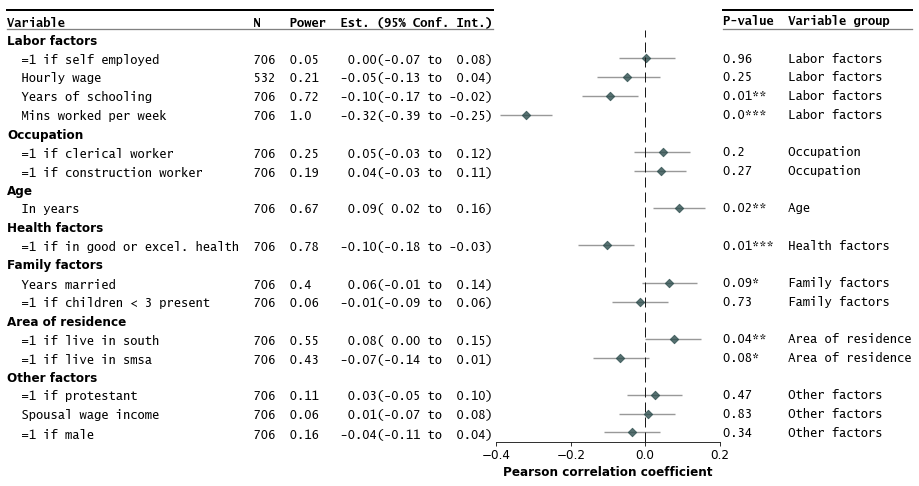
This package makes publication-ready forest plots easy to make out-of-the-box. Users provide a dataframe (e.g. from a spreadsheet) where rows correspond to a variable/study with columns including estimates, variable labels, and lower and upper confidence interval limits.
Additional options allow easy addition of columns in the dataframe as annotations in the plot.
| | |
| --- | --- |
| Release | 



 |
| Coverage |
|
| Coverage | 


 |
| Meta |
|
| Meta | 


 |
| Binder|
|
| Binder|  |
|
Table of Contents
show/hide
> - [Installation](#installation) > - [Quick Start](#quick-start) > - [Some Examples with Customizations](#some-examples-with-customizations) > - [Gallery and API Options](#gallery-and-api-options) > - [Multi-models](#multi-models) > - [Known Issues](#known-issues) > - [Background and Additional Resources](#background-and-additional-resources) > - [Contributing](#contributing)
[](https://pypi.org/project/forestplot/) ```bash pip install forestplot ``` Install from conda-forge
[](https://anaconda.org/conda-forge/forestplot) ```bash conda install forestplot ``` Install from source
[](https://github.com/LSYS/forestplot/releases)
```bash git clone https://github.com/LSYS/forestplot.git cd forestplot pip install . ``` Developer installation
```bash git clone https://github.com/LSYS/forestplot.git cd forestplot pip install -r requirements_dev.txt make lint make test ``` ## Quick Start[](#quick-start) ```python import forestplot as fp df = fp.load_data("sleep") # companion example data df.head(3) ``` | | var | r | moerror | label | group | ll | hl | n | power | p-val | |---:|:---------|-----------:|----------:|:--------------------------|:--------------|------:|------:|----:|---------:|----------:| | 0 | age | 0.0903729 | 0.0696271 | in years | age | 0.02 | 0.16 | 706 | 0.671578 | 0.0163089 | | 1 | black | -0.0270573 | 0.0770573 | =1 if black | other factors | -0.1 | 0.05 | 706 | 0.110805 | 0.472889 | | 2 | clerical | 0.0480811 | 0.0719189 | =1 if clerical worker | occupation | -0.03 | 0.12 | 706 | 0.247768 | 0.201948 | (* This is a toy example of how certain factors correlate with the amount of sleep one gets. See the [notebook that generates the data](https://nbviewer.org/github/LSYS/forestplot/blob/main/examples/get-sleep.ipynb).)
The example input dataframe above have 4 key columns
| Column | Description | Required | |:----------|:------------------------------------------------|:----------| | `var` | Variable label | ✓ | | `r` | Correlation coefficients (estimates to plot) | ✓ | | `label` | Variable labels | ✓ | | `group` | Variable grouping labels | | | `ll` | Conf. int. *lower limits* | | | `hl` | Containing the conf. int. *higher limits* | | | `n` | Sample size | | | `power` | Statistical power | | | `p-val` | P-value | | (See [Gallery and API Options](#gallery-and-api-options) for more details on required and optional arguments.)Make the forest plot
python
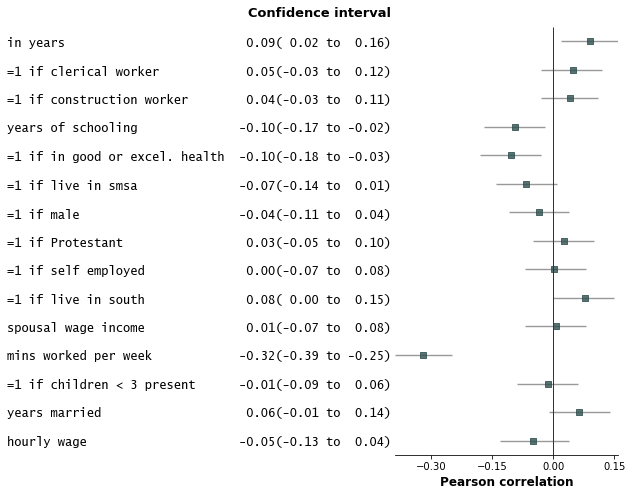
fp.forestplot(df,  # the dataframe with results data
              estimate="r",  # col containing estimated effect size
              ll="ll", hl="hl",  # columns containing conf. int. lower and higher limits
              varlabel="label",  # column containing variable label
              ylabel="Confidence interval",  # y-label title
              xlabel="Pearson correlation",  # x-label title
              )
Save the plot
python
plt.savefig("plot.png", bbox_inches="tight")
Some Examples With Customizations
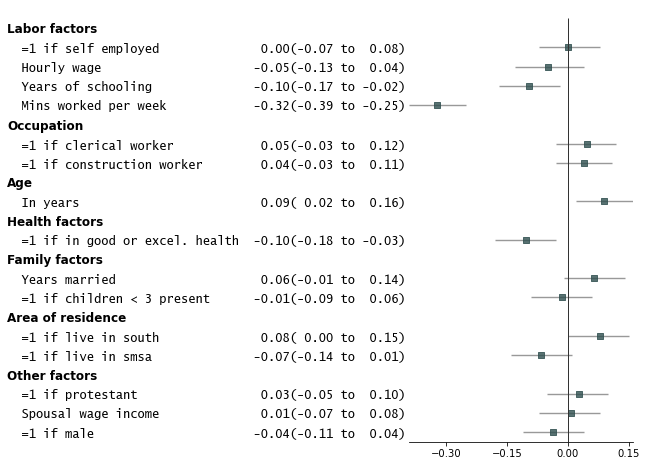
Add variable groupings, add group order, and sort by estimate size.
python
fp.forestplot(df,  # the dataframe with results data
          estimate="r",  # col containing estimated effect size
          ll="ll", hl="hl",  # columns containing conf. int. lower and higher limits
          varlabel="label",  # column containing variable label
          capitalize="capitalize",  # Capitalize labels
          groupvar="group",  # Add variable groupings
          # group ordering
          group_order=["labor factors", "occupation", "age", "health factors",
                       "family factors", "area of residence", "other factors"],
          sort=True  # sort in ascending order (sorts within group if group is specified)
          )
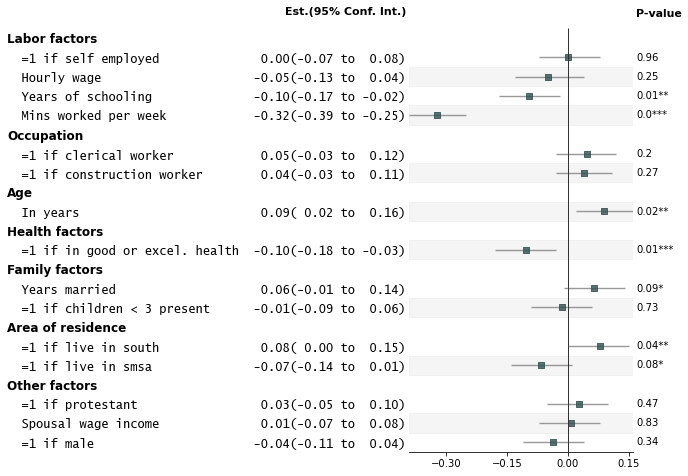
Add p-values on the right and color alternate rows gray
python
fp.forestplot(df,  # the dataframe with results data
          estimate="r",  # col containing estimated effect size
          ll="ll", hl="hl",  # columns containing conf. int. lower and higher limits
          varlabel="label",  # column containing variable label
          capitalize="capitalize",  # Capitalize labels
          groupvar="group",  # Add variable groupings
          # group ordering
          group_order=["labor factors", "occupation", "age", "health factors",
                       "family factors", "area of residence", "other factors"],
          sort=True,  # sort in ascending order (sorts within group if group is specified)
          pval="p-val",  # Column of p-value to be reported on right
          color_alt_rows=True,  # Gray alternate rows
          ylabel="Est.(95% Conf. Int.)",  # ylabel to print
          **{"ylabel1_size": 11}  # control size of printed ylabel
          )
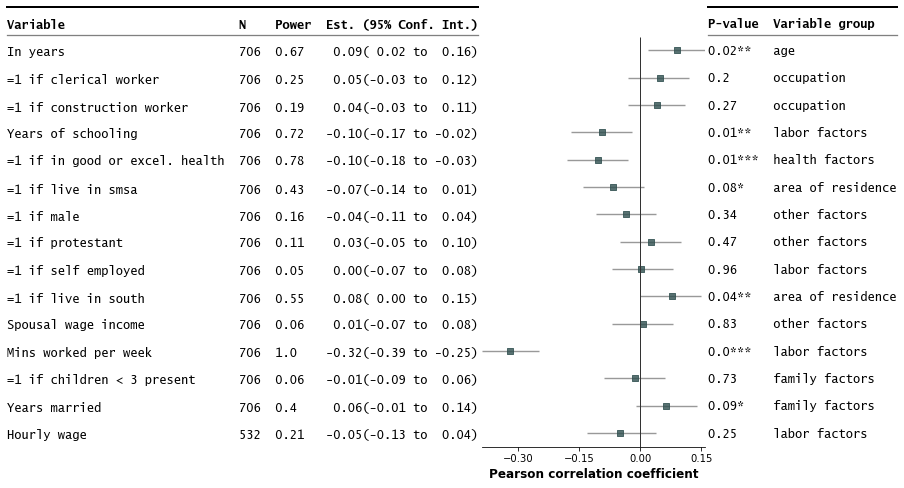
- Customize annotations and make it a table
python
fp.forestplot(df,  # the dataframe with results data
          estimate="r",  # col containing estimated effect size
          ll="ll", hl="hl",  # lower & higher limits of conf. int.
          varlabel="label",  # column containing the varlabels to be printed on far left
          capitalize="capitalize",  # Capitalize labels
          pval="p-val",  # column containing p-values to be formatted
          annote=["n", "power", "est_ci"],  # columns to report on left of plot
          annoteheaders=["N", "Power", "Est. (95% Conf. Int.)"],  # ^corresponding headers
          rightannote=["formatted_pval", "group"],  # columns to report on right of plot
          right_annoteheaders=["P-value", "Variable group"],  # ^corresponding headers
          xlabel="Pearson correlation coefficient",  # x-label title
          table=True,  # Format as a table
          )
Strip down all bells and whistle
python
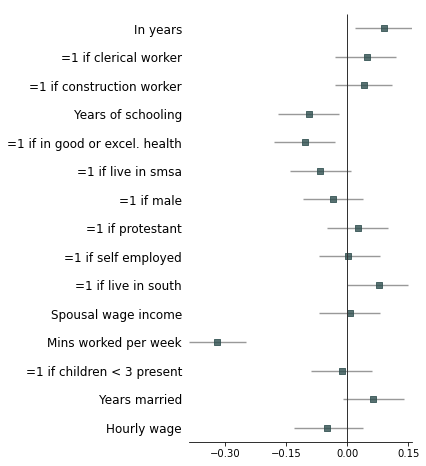
fp.forestplot(df,  # the dataframe with results data
          estimate="r",  # col containing estimated effect size
          ll="ll", hl="hl",  # lower & higher limits of conf. int.
          varlabel="label",  # column containing the varlabels to be printed on far left
          capitalize="capitalize",  # Capitalize labels
          ci_report=False,  # Turn off conf. int. reporting
          flush=False,  # Turn off left-flush of text
          **{'fontfamily': 'sans-serif'}  # revert to sans-serif
          )
Example with more customizations
python
fp.forestplot(df,  # the dataframe with results data
          estimate="r",  # col containing estimated effect size
          ll="ll", hl="hl",  # lower & higher limits of conf. int.
          varlabel="label",  # column containing the varlabels to be printed on far left
          capitalize="capitalize",  # Capitalize labels
          pval="p-val",  # column containing p-values to be formatted
          annote=["n", "power", "est_ci"],  # columns to report on left of plot
          annoteheaders=["N", "Power", "Est. (95% Conf. Int.)"],  # ^corresponding headers
          rightannote=["formatted_pval", "group"],  # columns to report on right of plot
          right_annoteheaders=["P-value", "Variable group"],  # ^corresponding headers
          groupvar="group",  # column containing group labels
          group_order=["labor factors", "occupation", "age", "health factors",
                       "family factors", "area of residence", "other factors"],
          xlabel="Pearson correlation coefficient",  # x-label title
          xticks=[-.4,-.2,0, .2],  # x-ticks to be printed
          sort=True,  # sort estimates in ascending order
          table=True,  # Format as a table
          # Additional kwargs for customizations
          **{"marker": "D",  # set maker symbol as diamond
             "markersize": 35,  # adjust marker size
             "xlinestyle": (0, (10, 5)),  # long dash for x-reference line
             "xlinecolor": "#808080",  # gray color for x-reference line
             "xtick_size": 12,  # adjust x-ticker fontsize
            }
          )
Annotations arguments allowed include:
* `ci_range`: Confidence interval range (e.g. `(-0.39 to -0.25)`). * `est_ci`: Estimate and CI (e.g. `-0.32(-0.39 to -0.25)`). * `formatted_pval`: Formatted p-values (e.g. `0.01**`). To confirm what processed `columns` are available as annotations, you can do: ```python processed_df, ax = fp.forestplot(df, ... # other arguments here return_df=True # return processed dataframe with processed columns ) processed_df.head(3) ``` | | label | group | n | r | CI95% | p-val | BF10 | power | var | hl | ll | moerror | formatted_r | formatted_ll | formatted_hl | ci_range | est_ci | formatted_pval | formatted_n | formatted_power | formatted_est_ci | yticklabel | formatted_formatted_pval | formatted_group | yticklabel2 | |---:|:---------------------|:--------------|----:|-----------:|:--------------|------------:|----------:|--------:|:-------|------:|------:|----------:|--------------:|---------------:|---------------:|:-----------------|:----------------------|:-----------------|--------------:|------------------:|:----------------------|:------------------------------------------------------------------|:---------------------------|:------------------|:-----------------------| | 0 | Mins worked per week | Labor factors | 706 | -0.321384 | [-0.39 -0.25] | 1.99409e-18 | 1.961e+15 | 1 | totwrk | -0.25 | -0.39 | 0.0686165 | -0.32 | -0.39 | -0.25 | (-0.39 to -0.25) | -0.32(-0.39 to -0.25) | 0.0*** | 706 | 1 | -0.32(-0.39 to -0.25) | Mins worked per week 706 1.0 -0.32(-0.39 to -0.25) | 0.0*** | Labor factors | 0.0*** Labor factors | | 1 | Years of schooling | Labor factors | 706 | -0.0950039 | [-0.17 -0.02] | 0.0115515 | 1.137 | 0.72 | educ | -0.02 | -0.17 | 0.0749961 | -0.1 | -0.17 | -0.02 | (-0.17 to -0.02) | -0.10(-0.17 to -0.02) | 0.01** | 706 | 0.72 | -0.10(-0.17 to -0.02) | Years of schooling 706 0.72 -0.10(-0.17 to -0.02) | 0.01** | Labor factors | 0.01** Labor factors |Multi-models
For coefficient plots where each variable can have multiple estimates (each model has one).
```python import forestplot as fp
dfmmodel = pd.readcsv("../examples/data/sleep-mmodel.csv").query( "model=='all' | model=='young kids'" ) df_mmodel.head(3) ```
| | var | coef | se | T | pval | r2 | adj_r2 | ll | hl | model | group | label | |---:|:------|-----------:|---------:|----------:|---------:|---------:|-----------:|-----------:|--------:|:-----------|:--------------|:------------| | 0 | age | 0.994889 | 1.96925 | 0.505213 | 0.613625 | 0.127289 | 0.103656 | -2.87382 | 4.8636 | all | age | in years | | 3 | age | 22.634 | 15.4953 | 1.4607 | 0.149315 | 0.178147 | -0.0136188 | -8.36124 | 53.6293 | young kids | age | in years | | 4 | black | -84.7966 | 82.1501 | -1.03222 | 0.302454 | 0.127289 | 0.103656 | -246.186 | 76.5925 | all | other factors | =1 if black |
python
fp.mforestplot(
    dataframe=df_mmodel,
    estimate="coef",
    ll="ll",
    hl="hl",
    varlabel="label",
    capitalize="capitalize",
    model_col="model",
    color_alt_rows=True,
    groupvar="group",
    table=True,
    rightannote=["var", "group"],
    right_annoteheaders=["Source", "Group"],
    xlabel="Coefficient (95% CI)",
    modellabels=["Have young kids", "Full sample"],
    xticks=[-1200, -600, 0, 600],
    mcolor=["#CC6677", "#4477AA"],
    # Additional kwargs for customizations
    **{
        "markersize": 30,
        # override default vertical offset between models (0.0 to 1.0)
        "offset": 0.35,
        "xlinestyle": (0, (10, 5)),  # long dash for x-reference line
        "xlinecolor": ".8",  # gray color for x-reference line
    },
)
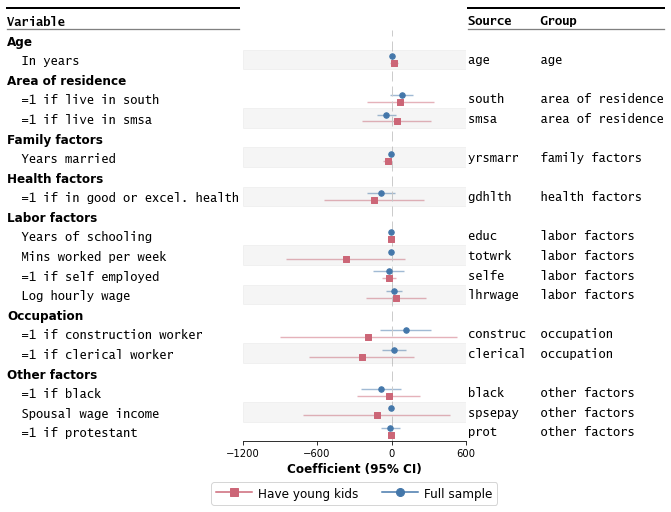
Please note: This module is still experimental. See this jupyter notebook for more examples and tweaks.
Gallery and API Options
Check out this jupyter notebook for a gallery variations of forest plots possible out-of-the-box. The table below shows the list of arguments users can pass in. More fined-grained control for base plot options (eg font sizes, marker colors) can be inferred from the example notebook gallery.
| Option | Description | Required |
|:-------------|:-------------------------------------------------------------------------------------------------------------------------------------------------------------|:---|
| dataframe | Pandas dataframe where rows are variables (or studies for meta-analyses) and columns include estimated effect sizes, labels, and confidence intervals, etc. | ✓ |
| estimate | Name of column in dataframe containing the estimates. | ✓ |
| varlabel | Name of column in dataframe containing the variable labels (study labels if meta-analyses). | ✓ |
| ll | Name of column in dataframe containing the conf. int. lower limits. | |
| hl | Name of column in dataframe containing the conf. int. higher limits. | |
| logscale | If True, make the x-axis log scale. Default is False. | |
| capitalize | How to capitalize strings. Default is None. One of "capitalize", "title", "lower", "upper", "swapcase". | |
| form_ci_report | If True (default), report the estimates and confidence interval beside the variable labels. | |
| ci_report | If True (default), format the confidence interval as a string. | |
| groupvar | Name of column in dataframe containing the variable grouping labels. | |
| group_order | List of group labels indicating the order of groups to report in the plot. | |
| annote | List of columns to add as annotations on the left-hand side of the plot. | |
| annoteheaders | List of column headers for the left-hand side annotations. | |
| rightannote | List of columns to add as annotations on the right-hand side of the plot. | |
| right_annoteheaders | List of column headers for the right-hand side annotations. | |
| pval | Name of column in dataframe containing the p-values. | |
| starpval | If True (default), format p-values with stars indicating statistical significance. | |
| sort | If True, sort variables by estimate values in ascending order. | |
| sortby | Name of column to sort by. Default is estimate. | |
| flush | If True (default), left-flush variable labels and annotations. | |
| decimal_precision | Number of decimal places to print. (Default = 2) | |
| figsize | Tuple indicating core figure size. Default is (4, 8) | |
| xticks | List of xticklabels to print on x-axis. | |
| ylabel | Y-label title. | |
| xlabel | X-label title. | |
| color_alt_rows | If True, shade out alternating rows in gray. | |
| preprocess | If True (default), preprocess the dataframe before plotting. | |
| return_df | If True, returned the preprocessed dataframe. | |
Known Issues
- Variable labels coinciding with group variables may lead to unexpected formatting issues in the graph.
- Left-flushing of annotations relies on the
monospacefont. - Plot may give strange behavior for few rows of data (six rows or fewer. see this issue)
- Plot can get cluttered with too many variables/rows (~30 onwards)
- Not tested with PyCharm (#80) nor Google Colab (#110).
- Duplicated
varlabelmay lead to unexpected results (see #76, #81).mplotfor grouped models could be useful for such cases (see #59, WIP).
Background and Additional Resources
More about forest plots
Forest plots have many aliases (h/t Chris Alexiuk). Other names include coefplots, coefficient plots, meta-analysis plots, dot-and-whisker plots, blobbograms, margins plots, regression plots, and ropeladder plots.
Forest plots in the medical and health sciences literature are plots that report results from different studies as a meta-analysis. Markers are centered on the estimated effect and horizontal lines running through each marker depicts the confidence intervals.
The simplest version of a forest plot has two columns: one for the variables/studies, and the second for the estimated coefficients and confidence intervals. This layout is similar to coefficient plots (coefplots) and is thus useful for more than meta-analyses.
More about this package
The package is lightweight, built on pandas, numpy, and matplotlib.
It is slightly opinioniated in that the aesthetics of the plot inherits some of my sensibilities about what makes a nice figure.
You can however easily override most defaults for the look of the graph. This is possible via **kwargs in the forestplot API (see Gallery and API options) and the matplotlib API.
Planned enhancements include forest plots where each row can have multiple coefficients (e.g. from multiple models).
Related packages
Contributing
Contributions are welcome, and they are greatly appreciated!
Potential ways to contribute:
- Raise issues/bugs/questions
- Write tests for missing coverage
- Add features (see examples notebook for a survey of existing features)
- Add example datasets with companion graphs
- Add your graphs with companion code
Issues
Please submit bugs, questions, or issues you encounter to the GitHub Issue Tracker. For bugs, please provide a minimal reproducible example demonstrating the problem (it may help me troubleshoot if I have a version of your data).
Pull Requests
Please feel free to open an issue on the Issue Tracker if you'd like to discuss potential contributions via PRs.
Owner
- Name: Lucas Shen Y. S.
- Login: LSYS
- Kind: user
- Website: https://www.lucasshen.com
- Repositories: 7
- Profile: https://github.com/LSYS
Citation (citation.cff)
cff-version: 1.2.0
message: "If you wish to cite this package, please cite it as below."
preferred-citation:
  authors:
  - family-names: "Shen"
    given-names: "Lucas"
  title: "Forestplot"
  year: 2022
  url: "https://pypi.org/project/forestplot/"
  repository-code: "https://github.com/LSYS/forestplot"
  license:  MIT license
  identifiers:
  - description: "This is from the archived snapshot of the code, supported by Zenodo."
    type: doi
    value: 10.5281/zenodo.7029377
  doi: 10.5281/zenodo.7029377
GitHub Events
Total
- Issues event: 1
- Watch event: 23
- Issue comment event: 4
- Fork event: 1
Last Year
- Issues event: 1
- Watch event: 23
- Issue comment event: 4
- Fork event: 1
Committers
Last synced: about 1 year ago
Top Committers
| Name | Commits | |
|---|---|---|
| Lucas Shen Y. S | l****s@l****m | 165 |
| Juan | j****q@g****m | 2 |
| Andy Shapiro | s****n@g****m | 2 |
Committer Domains (Top 20 + Academic)
Issues and Pull Requests
Last synced: 11 months ago
All Time
- Total issues: 60
- Total pull requests: 58
- Average time to close issues: 3 months
- Average time to close pull requests: 7 days
- Total issue authors: 30
- Total pull request authors: 7
- Average comments per issue: 2.07
- Average comments per pull request: 1.59
- Merged pull requests: 48
- Bot issues: 0
- Bot pull requests: 0
Past Year
- Issues: 4
- Pull requests: 1
- Average time to close issues: about 1 month
- Average time to close pull requests: about 1 hour
- Issue authors: 4
- Pull request authors: 1
- Average comments per issue: 1.0
- Average comments per pull request: 1.0
- Merged pull requests: 1
- Bot issues: 0
- Bot pull requests: 0
Top Authors
Issue Authors
- LSYS (24)
- LoveNordling (2)
- jdoiii (2)
- srison-qmul (2)
- sjiang40 (2)
- juancq (2)
- ksarathbabu (2)
- robertzeibich (1)
- EythorE (1)
- amaa11 (1)
- maikia (1)
- lautman (1)
- Aleksandra130501 (1)
- drveera (1)
- kirtanp (1)
Pull Request Authors
- LSYS (58)
- gitter-badger (3)
- shapiromatron (2)
- codacy-badger (1)
- Abhiw42 (1)
- juancq (1)
Top Labels
Issue Labels
Pull Request Labels
Packages
- Total packages: 2
-
Total downloads:
- pypi 2,674 last-month
- Total docker downloads: 39
-
Total dependent packages: 0
(may contain duplicates) -
Total dependent repositories: 1
(may contain duplicates) - Total versions: 17
- Total maintainers: 1
pypi.org: forestplot
A Python package to make publication-ready but customizable forest plots.
- Homepage: https://github.com/lsys/forestplot
- Documentation: https://forestplot.readthedocs.io/
- License: MIT
-
Latest release: 0.4.1
published almost 2 years ago
Rankings
Maintainers (1)
conda-forge.org: forestplot
- Homepage: https://github.com/lsys/forestplot
- License: MIT
-
Latest release: 0.2.0
published over 3 years ago
Rankings
Dependencies
- furo *
- myst_parser *
- matplotlib *
- numpy *
- pandas *
- actions/checkout v3 composite
- actions/setup-python v3 composite
- codecov/codecov-action v2 composite
- actions/checkout master composite
- gaurav-nelson/github-action-markdown-link-check v1 composite
- actions/checkout v3 composite
- actions/setup-python v3 composite
- actions/checkout v3 composite
- actions/setup-python v3 composite
- actions/stale v4 composite
- s-weigand/trigger-mybinder-build v1 composite
- jupyter *
- numpy *
- pandas *
- pingouin *
- runpynb *
- black * development
- coverage * development
- flake8 * development
- mypy * development
- pytest * development
- wheel * development
- pandas *