reactive-mise-en-scene
Unity plugin using on-screen object position as proxy for player attention. Objects are assigned a "tendency" which, together with attention measurements, enables custom loading of prefabs to adapt narrative environments over time.
Science Score: 67.0%
This score indicates how likely this project is to be science-related based on various indicators:
-
✓CITATION.cff file
Found CITATION.cff file -
✓codemeta.json file
Found codemeta.json file -
✓.zenodo.json file
Found .zenodo.json file -
✓DOI references
Found 1 DOI reference(s) in README -
✓Academic publication links
Links to: springer.com, ieee.org, zenodo.org -
○Academic email domains
-
○Institutional organization owner
-
○JOSS paper metadata
-
○Scientific vocabulary similarity
Low similarity (12.4%) to scientific vocabulary
Keywords
Repository
Unity plugin using on-screen object position as proxy for player attention. Objects are assigned a "tendency" which, together with attention measurements, enables custom loading of prefabs to adapt narrative environments over time.
Basic Info
Statistics
- Stars: 3
- Watchers: 2
- Forks: 0
- Open Issues: 14
- Releases: 8
Topics
Metadata Files
README.md
Reactive Mise-en-scène Unity Plugin

Introduction Video
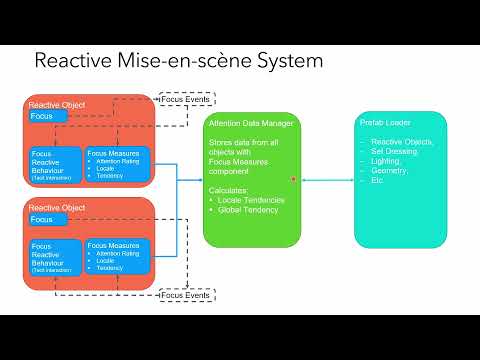
Reactive Mise-en-scène is a Unity (2019+) plugin that uses the position of objects on screen as a proxy for player attention. This attention is then measured over time and associated with different "tendencies" and "locales", which can respectively represent, for example, different narrative tendencies and different areas or scenes.
Each locale has a dominant narrative tendency, which is determined over time based on the total attention rating for objects within it, by their associated tendencies.
On entering a new locale, we can use a prefab loading system to determine how elements of the locale are changed either by the global tendency of the narrative, or the tendency of another locale (e.g., the last locale visited). The prefab loading system can provide positive, negative, or balanced feedback into the overall system, enabling experiences that narrow to a single tendency outcome or present different tendencies/moods/perspectives over time and/or per locale.
The purpose of the plugin is to enable reactive narrative experiences that are shaped via the implicit and tacit interactions of the user through their attention (inferred by camera position), rather than by their explicit actions in game or their selection of branching choices seen in other narrative systems. The system is also flexible enough to be adapted for other use cases.
Please note that this plugin is a work-in-progress and should be considered experimental/beta software. It is part of an on-going PhD research project by the author, Luke Skarth-Hayley. You can read a summary of my research here: https://highlights.cdt.horizon.ac.uk/students/psxls4.
I am keen to discuss use cases with creators, see what people use the system for, and perhaps conduct studies with users. I am also planning game jams and other means to promote and explore the plugin and the design concepts underpinning it. Please follow and DM me on Twitter @lukeskarth or get in touch via rmes@oneirica.systems.
Contents
Installation
Download the .unitypackage from releases.
Follow the Unity documentation on how to import the package here: https://docs.unity3d.com/Manual/AssetPackagesImport.html
Usage
Full Tutorial Video Coming Soon
The Reactive Mise-en-scène system’s core functionality is as follows:
- Customise the locales and tendencies to be relevant to your project by editing the RMS.asset file in _Reactive Mise-en-scène\Scripts\DataStore
- Add the Attention Data Manager prefab (containing the Attention Data Manager component) to the scene.
- Add the Focus and Focus Time Tracking components to all the objects you want to track player attention on. Set the Locale and Tendency on each.
- (optional) Write your own behaviour components inheriting from FocusReactiveBehaviour that implement "tacit" interactions based on an object's current Focus state.
- Create Prefabs with either Focus and Focus Time Tracking components (to serve as further Reactive Objects that track attention), or with the Unreactive Object Tags component, setting the locale and tendency per prefab on either the Focus Time Tracking or Unreactive Object Tags respectively. This enables the prefab to be used with the LoadPrefab.
- Make use of the LoadPrefab component (e.g. via the PlacementPoint prefab) to load different prefabs based on the order of tendencies. Do this by adding a prefab per-tendency that you want to load to the LoadPrefab's list and configuring which tendency you want loading based on tendency order (e.g. StrongestTendency loads the tendency with the highest attention value) either Globally or for a specific Locale.
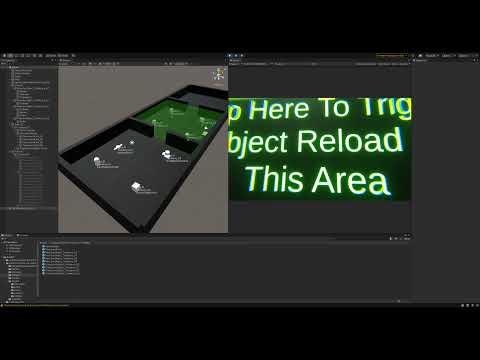
This is a simplification of the process, so please do watch the tutorial video above and/or refer to the further documentation in the wiki as linked below. Alternatively, look at how the Demo Scene, provided with the plugin, is set up, to see one example setup of the system in use.
Demo Scene Tutorial Video
Further Documentation
See the wiki for more detailed information about the plugin.
Contributing
See CONTRIBUTING.md
Credits
The author is supported by the Horizon Centre for Doctoral Training at the University of Nottingham (RCUK Grant No. EP/L015463/1) and the BBC.
The Focus implementation in this plugin is inspired by the Focus interaction work of Benford and Fahlén in A Spatial Model of Interaction in Large Virtual Environments and Greenhalgh and Benford in MASSIVE: a distributed virtual reality system incorporating spatial trading.
Thank you to my supervisors Martin Flintham, Sarah Martindale, and Steve Benford for all guidance and advice received so far and in the future as my PhD progresses.
Thank you also to Paul Tennent, Christine Li, Jocelyn Spence, Chris Greenhalgh, Stuart Reeves and so many others in the Mixed Reality Lab at University of Nottingham for advice, feedback, and conversations on my research and everything else.
Finally thank you to my industry partner BBC R&D, with special thanks to Si Lumb, Phil Stenton, Tim Pearce and Rajiv Ramdhany for help and guidance, and encouraging me to release this plugin as a means to widening its reach.
Contact
If you would like to speak to me about this plugin or my research please contact me via:
Twitter: @lukeskarth
E-mail: rmes@oneirica.systems
I'm particularly keen to hear from you if you decide to use this plugin, and would be very interested to see what you make with it. I am planning on organising workshops and a game jam using this plugin, which I will advertise on Twitter and via other channels in due course.
License
Released under MIT License.
Copyright © Luke Skarth-Hayley 2022
Owner
- Name: Luke Skarth-Hayley
- Login: lukeskt
- Kind: user
- Location: Nottingham, UK
- Website: www.lukeskarth.com
- Twitter: lukeskarth
- Repositories: 2
- Profile: https://github.com/lukeskt
Horizon CDT "My Life in Data" PhD @ University of Nottingham, partnered with BBC R&D. Investigating game engines for future media. More coffee needed.
Citation (CITATION.cff)
cff-version: 1.0.0
message: "If you use this software, please cite it as below."
authors:
  - family-names: Skarth-Hayley
    given-names: Luke
    orcid: https://orcid.org/0000-0002-7968-4374
title: "Reactive Mise-en-scène Unity Plugin"
version: 1.0.0
doi: 10.5281/zenodo.6421107
date-released: 2021-09-30
GitHub Events
Total
Last Year
Issues and Pull Requests
Last synced: over 1 year ago
All Time
- Total issues: 27
- Total pull requests: 1
- Average time to close issues: 3 months
- Average time to close pull requests: less than a minute
- Total issue authors: 1
- Total pull request authors: 1
- Average comments per issue: 0.48
- Average comments per pull request: 0.0
- Merged pull requests: 1
- Bot issues: 0
- Bot pull requests: 0
Past Year
- Issues: 0
- Pull requests: 0
- Average time to close issues: N/A
- Average time to close pull requests: N/A
- Issue authors: 0
- Pull request authors: 0
- Average comments per issue: 0
- Average comments per pull request: 0
- Merged pull requests: 0
- Bot issues: 0
- Bot pull requests: 0
Top Authors
Issue Authors
- lukeskt (23)
Pull Request Authors
- lukeskt (1)