Phobos
Phobos: A tool for creating complex robot models - Published in JOSS (2020)
Science Score: 95.0%
This score indicates how likely this project is to be science-related based on various indicators:
-
○CITATION.cff file
-
✓codemeta.json file
Found codemeta.json file -
✓.zenodo.json file
Found .zenodo.json file -
✓DOI references
Found 8 DOI reference(s) in README and JOSS metadata -
✓Academic publication links
Links to: joss.theoj.org -
✓Committers with academic emails
20 of 37 committers (54.1%) from academic institutions -
○Institutional organization owner
-
✓JOSS paper metadata
Published in Journal of Open Source Software
Keywords
Repository
An add-on for Blender allowing to create URDF, SDF and SMURF robot models in a WYSIWYG environment.
Basic Info
Statistics
- Stars: 817
- Watchers: 31
- Forks: 122
- Open Issues: 12
- Releases: 7
Topics
Metadata Files
README.md






Phobos is both a CLI tool and add-on for the open-source 3D modeling software Blender v3.3LTS to support your robot model creation and editing.
The Blender add-on enables the creation of WYSIWYG robot models for use in robot frameworks like ROS and ROCK or in real-time simulations such as MARS or Gazebo. Phobos exports formats such as URDF, SDF or SMURF and common mesh formats (Stereolithography (.stl), Wavefront (.obj) or Collada (.dae)).
Phobos was initiated and is currently developed at the Robotics Innovation Center of the German Research Center for Artificial Intelligence (DFKI) in Bremen, together with the Robotics Group of the University of Bremen.
Please contact Henning Wiedemann for any inquiries, or any questions and feedback not suited for the issues page.
Version 2.0.0
With version 2.0.0 we did a refactoring of Phobos and its now possible to use phobos as a normal python package and command line tool (see below).
When running the new Phobos on a model created with an older version of Phobos, make sure to have a backup. For most cases you should be able to update your model by simply exporting it to smurf and then importing it again from that smurf file. Due to the changes between Blender 2 to 3 it might be necessary to check whether your materials already use the Specular BSDF or Principled BSDF shaders, if not you'd have to update this manually.
If you encounter any problems with this new version please do not hesitate to open an issue here.
Questions or Ideas you want to discuss?
Please have a look at our GitHub discussions.
Found a bug or want to request a feature?
Please let us know by opening an issue here.
Documentation
- User documentation: Phobos Wiki
- Source documentation: Phobos' Github Page.
Citing
Phobos has been published in the Journal of Open Source Software. We ask users to cite the use of Phobos, as it allows us to keep the project alive.
When citing, please provide this information:
- Phobos version you were using (see the wiki for information about versions)
- If you were using additional Phobos plugins or configurations.
- The general Phobos paper.
If you are on the hunt for a BiBTeX entry, check out the FAQ section.
Installation
Blender
UPDATING: If you already have phobos installed and want to update. You have to remove the old version of Phobos first and close Blender. Then proceed with the installation steps explained below.
NOTE (WINDOWS): If you are using blender under Windows, make sure you have the latest version of Microsoft Visual C++ Redistributable installed. Otherwise Blender's python won't work properly.
To install Phobos in blender download the phobos.zip of the release or zip the phobos subdirectory (e.g. zip -r phobos.zip phobos)
Phobos has several python dependencies, those have to be installed in blender before you can use phobos.
There are two ways of installing Phobos:
- Recommended:
- Directly install the phobos.zip in blender:
Blender->Edit->Preferences->Addons->Installand activate it. - Restart Blender.
- Activate Phobos Add-on again.
- Directly install the phobos.zip in blender:
- (Offers inspection of the requirements before installing them) Before installing the phobos.zip you can run the script install_requirements.py with blender's python.
bash ${BLENDER_EXECUTABLE} -b --python install_requirements.py- Install the phobos.zip in blender:
Blender->Edit->Preferences->Addons->Installand activate it.
After installation the phobos main menu can be found on the right hand side of the 3D Viewport. If not already visible, one can find a very small arrow to open the Blender toolbar (purple circle showing it in the image).
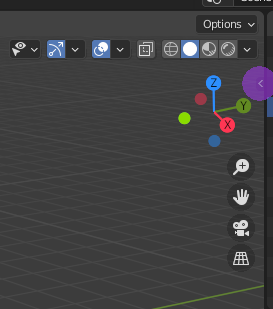
Phobos is currently tested and running with Blender v3.3 LTS.
CLI
Install the requirements by executing install_requirements.py with the python you want to install phobos to:
bash
cd phobos
python3 install_requirements.py
Then just install it using pip:
bash
cd phobos
pip install .
or with autoproj:
1) Add the package to your buildconf/package_set
2) Install via amake
Overview
Blender
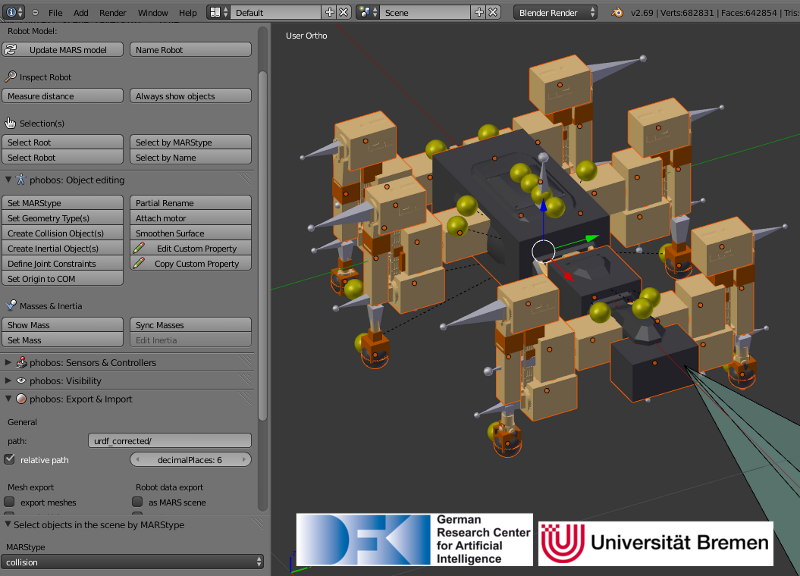
Model of the SpaceClimber robot in Blender, next to the Phobos toolbar displayed on the left.
Phobos makes use of Blender's hierarchical object graph and its bone objects. These objects, normally used for animating 3D characters, allow to store 3D coordinate systems and apply constraints to their movements, for instance to restrict the movement of an object to a certain range on a specific axis. This allows to replicate the links and joints defined in a URDF model and together with the hierarchical tree of parent and child objects, the complete, branching kinematic chain of a robot can be represented. By attaching meshes or primitives to the bones, Phobos allows to add visual and collision objects to a model. Additional objects allow storing further information, e.g. centers of mass of each part of a robot, thus refining the physical representation. Sensor objects can be added to correctly place and orient devices such as laser scanners, cameras or contact sensors. Making use of Blender's custom object properties, any necessary information can be added to the model, from inertia tensors to opening angles of cameras.
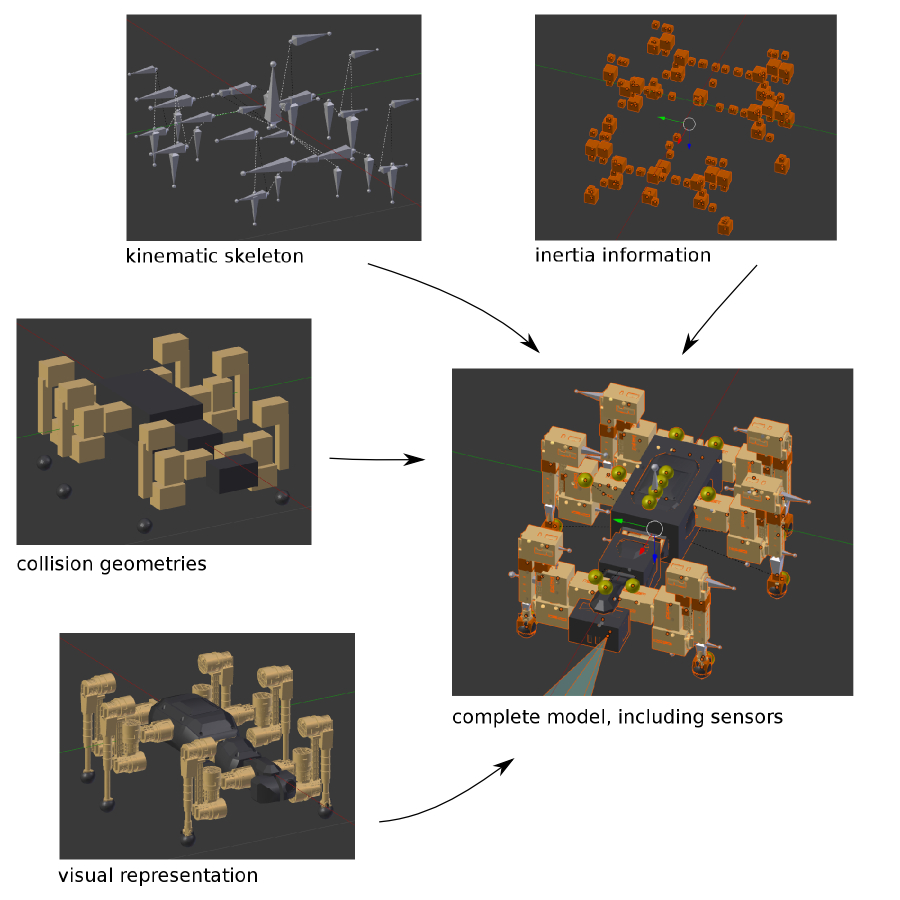
Decomposition of the different elements from which Phobos models are composed in Blender. These elements can be arranged in Blender on different layers, thus avoiding confusion or obstruction of view when editing very complex models.
CLI
You can either use CLI-phobos as a normal python package or use the scripts provided with it.
For the latter do phobos --help to get a list of the currently available scripts.
It will also tell you which dependencies are missing for some scripts.
Features
- WYSIWYG editor for robot models using Blender
- CLI tools for fast and easy model handling and inspection
- CI tool to run phobos headless in your CI-pipeline for atomated model processing and maintenance
- Import and export of URDF, SDF SMURF and other formats
- Easy definition of robot kinematics (links and joints)
- Visualisation of different model components, even joint constraints
- Numerous tools for fast editing:
- Batch editing of object properties
- Auto-generation of collision objects
- Auto-generation of inertia tensors from mass and shape
- Calculation of merged inertia for complex links
- Verbose logging
- Saving and loading of model poses
- Annotation of objects from motors/sensors to joints/links
- Save/load different export configurations for the same model
- Export with defined floating point precision
- Model integrity checks
- Tools for maintaining your own model database
- Library containing Python examples for automatic model adaption
- All the cool features Blender already provides (rendering, animation, etc.)
License
Phobos is distributed under the 3-Clause BSD License.
Owner
- Name: DFKI GmbH, Robotics Innovation Center
- Login: dfki-ric
- Kind: organization
- Location: Bremen
- Website: https://robotik.dfki-bremen.de/en/
- Twitter: DFKI
- Repositories: 44
- Profile: https://github.com/dfki-ric
Research group at the German Research Center for Artificial Intelligence GmbH.
JOSS Publication
Phobos: A tool for creating complex robot models
Authors

German Research Center for Artificial Intelligence GmbH - Robotics Innovation Center, Bremen
German Research Center for Artificial Intelligence GmbH - Robotics Innovation Center, Bremen
Editor
George K. Thiruvathukal
Tags
robotics Blender URDF SDF modelCodeMeta (codemeta.json)
{
  "@context": "https://raw.githubusercontent.com/codemeta/codemeta/master/codemeta.jsonld",
  "@type": "Code",
  "author": [
    "Kai von Szadkowski",
    "Malte Langosz",
    "Henning Wiedemann",
    "Simon Reichel",
    "Julius Martensen"
  ],
  "maintainer": "Henning Wiedemann <henning.wiedemann@dfki.de>",
  "identifier": "",
  "codeRepository": "https://github.com/dfki-ric/phobos",
  "datePublished": "2019-02-01",
  "dateModified": "2022-08-30",
  "dateCreated": "2019-02-01",
  "description": "Phobos is a python tool for processing simulation models. It comes with a Blender addon to create, edit and annotate robot models in a WYSIWYG environment and a python package/CLI tool to do this automated.",
  "keywords": "robotics, Blender, Python, URDF, SDF, model, MARS, SMURF, CLI",
  "license": "BSD-3-Clause",
  "title": "Phobos",
  "version": "2.0.0",
  "citation": "https://doi.org/10.21105/joss.01326"
}
GitHub Events
Total
- Release event: 2
- Issues event: 27
- Watch event: 100
- Issue comment event: 39
- Push event: 11
- Pull request review event: 4
- Pull request review comment event: 3
- Pull request event: 15
- Gollum event: 2
- Fork event: 9
Last Year
- Release event: 2
- Issues event: 27
- Watch event: 100
- Issue comment event: 39
- Push event: 11
- Pull request review event: 4
- Pull request review comment event: 3
- Pull request event: 15
- Gollum event: 2
- Fork event: 9
Committers
Last synced: 11 months ago
Top Committers
| Name | Commits | |
|---|---|---|
| Simon Reichel | s****1@w****e | 655 |
| Kai von Szadkowski | k****1@d****e | 520 |
| Henning Wiedemann | h****n@d****e | 509 |
| Kai von Szadkowski | k****i@u****e | 440 |
| Ole Schwiegert | o****t@u****e | 313 |
| Alex Zastrow | a****w@p****e | 157 |
| Kai von Szadkowski | k****i@K****e | 90 |
| srahms | s****s@d****e | 89 |
| Altin | a****a@w****e | 68 |
| jmartensen | j****n@d****e | 42 |
| Malte Langosz | m****z@d****e | 31 |
| Malte Langosz | m****l@m****x | 8 |
| Henning Wiedemann | h****n@d****e | 4 |
| Gaël Écorchard | g****d@c****z | 3 |
| Malte Langosz | m****l@m****l | 3 |
| Cosmo Borsky | me@c****m | 3 |
| Alexander Zastrow | a****w@w****e | 2 |
| Simon Reichel | s****l@L****e | 2 |
| Stefan Rahms | s****s@L****e | 2 |
| srahms | s****s@b****) | 2 |
| Alexander Zastrow | a****w@W****e | 2 |
| Arfon Smith | a****n | 2 |
| Moritz Schilling | m****g@d****e | 2 |
| Alexander Fabisch | a****h@g****m | 1 |
| brothermechanic | b****c@g****m | 1 |
| Malte Langosz | m****l@m****e | 1 |
| Malte Langosz | m****l@M****l | 1 |
| Malte Langosz | M****z@d****e | 1 |
| Constantin Bergatt | c****t@d****e | 1 |
| Benjamin Cabé | k****n | 1 |
| and 7 more... | ||
Committer Domains (Top 20 + Academic)
Issues and Pull Requests
Last synced: 10 months ago
All Time
- Total issues: 18
- Total pull requests: 17
- Average time to close issues: 4 months
- Average time to close pull requests: 4 months
- Total issue authors: 16
- Total pull request authors: 4
- Average comments per issue: 2.17
- Average comments per pull request: 0.47
- Merged pull requests: 9
- Bot issues: 0
- Bot pull requests: 0
Past Year
- Issues: 13
- Pull requests: 14
- Average time to close issues: about 1 month
- Average time to close pull requests: about 2 months
- Issue authors: 12
- Pull request authors: 3
- Average comments per issue: 2.46
- Average comments per pull request: 0.43
- Merged pull requests: 7
- Bot issues: 0
- Bot pull requests: 0
Top Authors
Issue Authors
- kevinfoley (4)
- FSA9 (2)
- m0rsch1 (2)
- 23pointsNorth (2)
- CyrusTZ (1)
- herthd (1)
- PMunyao (1)
- wghou (1)
- landersson (1)
- Minaygt (1)
- taken-yjyoon (1)
- Spphire (1)
- jeffreyjene (1)
- wungsui (1)
- codinggamer-dev (1)
Pull Request Authors
- AlpenAalAlex (19)
- hwiedPro (3)
- m0rsch1 (2)
- mosfet80 (1)
- lights0123 (1)
- kevinfoley (1)
- TobiasJacob (1)
Top Labels
Issue Labels
Pull Request Labels
Dependencies
- actions/checkout v3 composite
- actions/setup-python v4 composite
- peaceiris/actions-gh-pages v3 composite
- sphinx-notes/pages v3 composite