anylabeling_dist
Science Score: 44.0%
This score indicates how likely this project is to be science-related based on various indicators:
-
✓CITATION.cff file
Found CITATION.cff file -
✓codemeta.json file
Found codemeta.json file -
✓.zenodo.json file
Found .zenodo.json file -
○DOI references
-
○Academic publication links
-
○Academic email domains
-
○Institutional organization owner
-
○JOSS paper metadata
-
○Scientific vocabulary similarity
Low similarity (13.0%) to scientific vocabulary
Repository
Basic Info
- Host: GitHub
- Owner: tech-wastetide
- License: gpl-3.0
- Language: Python
- Default Branch: main
- Size: 7.02 MB
Statistics
- Stars: 0
- Watchers: 1
- Forks: 0
- Open Issues: 0
- Releases: 2
Metadata Files
README.md

🌟 AnyLabeling 🌟
Effortless data labeling with AI support from YOLO and Segment Anything!
AnyLabeling = LabelImg + Labelme + Improved UI + Auto-labeling





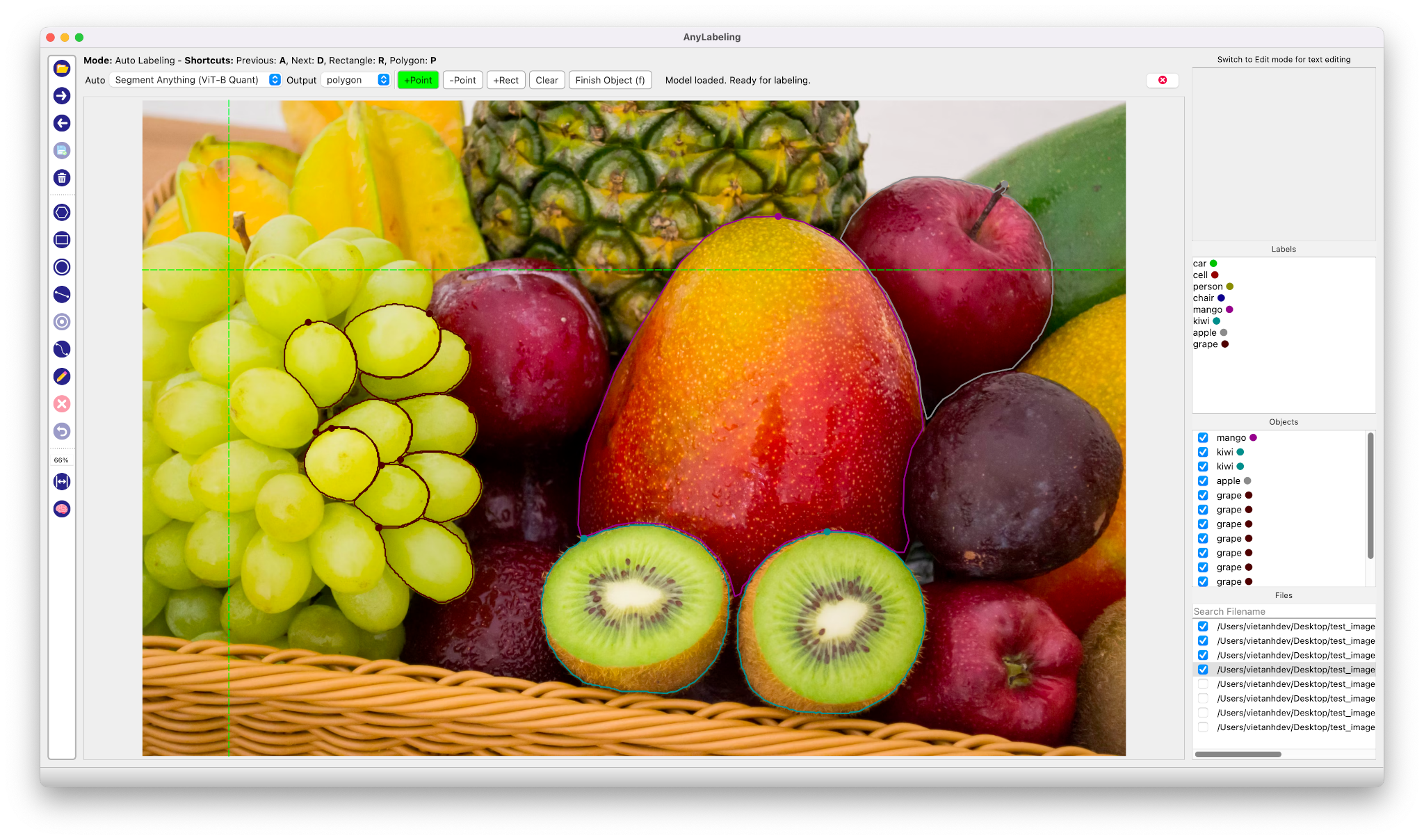
Auto Labeling with Segment Anything

- Youtube Demo: https://www.youtube.com/watch?v=5qVJiYNX5Kk
- Documentation: https://anylabeling.nrl.ai
Features:
- [x] Image annotation for polygon, rectangle, circle, line and point.
- [x] Auto-labeling with YOLOv5 and Segment Anything.
- [x] Text detection, recognition and KIE (Key Information Extraction) labeling.
- [x] Multiple languages availables: English, Vietnamese, Chinese.
I. Install and run
1. Download and run executable
- Download and run newest version from Releases.
- For MacOS:
- After installing, go to Applications folder
- Right click on the app and select Open
- From the second time, you can open the app normally using Launchpad
2. Install from Pypi
- Requirements: Python >= 3.8, <= 3.10.
Recommended: Miniconda/Anaconda.
Create environment:
bash
conda create -n anylabeling python=3.8
conda activate anylabeling
- (For macOS only) Install PyQt5 using Conda:
bash
conda install -c conda-forge pyqt==5.15.7
- Install anylabeling:
bash
pip install anylabeling # or pip install anylabeling-gpu for GPU support
- Start labeling:
bash
anylabeling
II. Development
- Generate resources:
bash
pyrcc5 -o anylabeling/resources/resources.py anylabeling/resources/resources.qrc
- Run app:
bash
python anylabeling/app.py
III. Build executable
- Install PyInstaller:
bash
pip install -r requirements-dev.txt
- Build:
bash
bash build_executable.sh
- Check the outputs in:
dist/.
IV. Contribution
If you want to contribute to AnyLabeling, please read Contribution Guidelines.
V. Star history
VI. References
Owner
- Login: tech-wastetide
- Kind: user
- Repositories: 1
- Profile: https://github.com/tech-wastetide
Citation (CITATION.cff)
cff-version: 1.2.0
message: "If you use this software, please cite it as below."
authors:
- family-names: "Nguyen"
  given-names: "Viet Anh"
title: "Effortless data labeling with AI support"
url: "https://github.com/vietanhdev/anylabeling"
license: GPL-3
GitHub Events
Total
Last Year
Dependencies
- actions/checkout v2 composite
- actions/download-artifact v4 composite
- actions/upload-artifact v4 composite
- actions/upload-release-asset v1 composite
- conda-incubator/setup-miniconda v2 composite
- mikepenz/action-gh-release v0.2.0-a03 composite
- mikepenz/release-changelog-builder-action v3 composite
- build * development
- twine * development
- build * development
- twine * development
- PyQt5 ==5.15.7
- PyYAML ==6.0
- darkdetect ==0.8.0
- imgviz ==1.5.0
- natsort ==8.1.0
- onnx ==1.13.1
- onnxruntime-gpu ==1.14.1
- opencv-contrib-python-headless ==4.7.0.72
- qimage2ndarray ==1.10.0
- termcolor ==1.1.0
- build * development
- twine * development
- PyYAML ==6.0
- darkdetect ==0.8.0
- imgviz ==1.5.0
- natsort ==8.1.0
- onnx ==1.13.1
- onnxruntime ==1.14.1
- opencv-contrib-python-headless ==4.7.0.72
- qimage2ndarray ==1.10.0
- termcolor ==1.1.0
- PyQt5 ==5.15.7
- PyYAML ==6.0
- darkdetect ==0.8.0
- imgviz ==1.5.0
- natsort ==8.1.0
- onnx ==1.13.1
- onnxruntime ==1.14.1
- opencv-contrib-python-headless ==4.7.0.72
- qimage2ndarray ==1.10.0
- termcolor ==1.1.0
- Pillow >=2.8
- PyQt5 >=5.15.7
- PyYAML *
- darkdetect ==0.8.0
- imgviz >=0.11
- natsort >=7.1.0
- numpy *
- onnx ==1.13.1
- opencv-python-headless *
- qimage2ndarray ==1.10.0
- termcolor *