constituent-treelib
A lightweight Python library for constructing, processing, and visualizing constituent trees.
Science Score: 67.0%
This score indicates how likely this project is to be science-related based on various indicators:
-
✓CITATION.cff file
Found CITATION.cff file -
✓codemeta.json file
Found codemeta.json file -
✓.zenodo.json file
Found .zenodo.json file -
✓DOI references
Found 7 DOI reference(s) in README -
✓Academic publication links
Links to: arxiv.org, ieee.org, acm.org, zenodo.org -
○Committers with academic emails
-
○Institutional organization owner
-
○JOSS paper metadata
-
○Scientific vocabulary similarity
Low similarity (12.5%) to scientific vocabulary
Keywords
Repository
A lightweight Python library for constructing, processing, and visualizing constituent trees.
Basic Info
- Host: GitHub
- Owner: Halvani
- License: mit
- Language: Jupyter Notebook
- Default Branch: main
- Homepage: https://pypi.org/project/constituent-treelib
- Size: 2.67 MB
Statistics
- Stars: 67
- Watchers: 2
- Forks: 12
- Open Issues: 1
- Releases: 5
Topics
Metadata Files
README.md






Constituent Treelib (CTL)
A lightweight Python library for constructing, processing, and visualizing constituent trees.
Description
CTL is a lightweight Python library that offers you a convenient way to parse sentences into constituent trees, modify them according to their structure, as well as visualize and export them into various file formats. In addition, you can extract phrases according to their phrasal categories (which can be used e.g., as features for various NLP tasks), validate already parsed sentences in bracket notation or convert them back into sentences.
CTL is built on top of benepar (Berkeley Neural Parser) as well as the two well-known NLP frameworks spaCy and NLTK. Here, spaCy is used for tokenization and sentence segmentation, while benepar performs the actual parsing of the sentences. NLTK, on the other hand, provides the fundamental data structure for storing and processing the parsed sentences.
To gain a clearer picture of what a constituent tree looks like, we consider the following example. Let S denote the sentence...
"Isaac Asimov was an American writer and professor of biochemistry at Boston University."
This sentence can be parsed into a bracketed tree string representation (shown below in a Penn tree-bank style)
(S
  (NP (NNP Isaac) (NNP Asimov))
  (VP
    (VBD was)
    (NP
      (NP (DT an) (JJ American) (NN writer) (CC and) (NN professor))
      (PP (IN of) (NP (NN biochemistry)))
      (PP (IN at) (NP (NNP Boston) (NNP University)))))
  (. .))
which represents the actual constituent tree. However, since this notation is not really easy to read, we can turn it into a nicer visualization using - guess what - CTL! Once we have parsed and visualized the tree, we can export it to a desired format, here for example as a PNG file:


In case you grew up in the Usenet era, you might prefer the classic ASCII-ART look...
                                          S
        __________________________________|____________________________________________________________
       |                    VP                                                                         |
       |           _________|____________________                                                      |
       |          |                              NP                                                    |
       |          |                  ____________|________________________________                     |
       |          |                 |                       PP                    PP                   |
       |          |                 |                    ___|_______          ____|_____               |
       NP         |                 NP                  |           NP       |          NP             |
   ____|____      |    _____________|____________       |           |        |     _____|______        |
 NNP       NNP   VBD  DT    JJ      NN    CC     NN     IN          NN       IN  NNP          NNP      .
  |         |     |   |     |       |     |      |      |           |        |    |            |       |
Isaac     Asimov was  an American writer and professor  of     biochemistry  at Boston     University  .
Regardless of which format is considered, the underlying representation[^1] shows three aspects of the structure of S:
- Linear order of the words and their part-of-speech: NNP = Isaac, NNP = Asimov, VBD = was, ...
- Groupings of the words and their part-of-speech into phrases: NP = Isaac Asimov, VP = an American writer and professor, PP = of biochemistry and PP = at Boston University
- Hierarchical structure of the phrases: S, VP, NP and PP
Applications
Constituent trees offer a wide range of applications including: - Analysis and comparison of sentence structures between different languages for (computational) linguists - Extracting phrasal features for certain NLP tasks (e.g., Machine Translation, Information Extraction, Paraphrasing, Stylometry, Deception Detection or Natural Language Watermarking) - Using the resulting representations as an input to train GNNs for specific tasks (e.g., Chemical–Drug Relation Extraction or Semantic Role Labeling)
Features
- Easy construction of constituent trees from raw or already processed sentences
- Converting parsed constituent trees back into sentences
- Convenient export of tree visualizations into various file formats
- Extraction of phrases according to their phrasal categories
- Manipulation of the tree structure (without inner postag nodes or without token leaves)
- Multilingual (currently CTL supports eight languages)
- Automatic NLP pipeline creation (loads and installs the benepar + spaCy models on demand)
- No API dependency (after downloading the models CTL can be used completely offline)
- Extensively documented source code
No Code Demo
In case you just want to play around with CTL, there is a minimally functional Streamlit app that will be gradually extended. To run the demo, please first install Streamlit via: pip install streamlit. Afterwards, you can call the app from the command line as follows: streamlit run ctl_app.py
Installation
The easiest way to install CTL is to use pip, where you can choose between (1) the PyPI[^2] repository and (2) this repository.
(1)
pip install constituent-treelib(2)
pip install git+https://github.com/Halvani/constituent_treelib.git
The latter will pull and install the latest commit from this repository as well as the required Python dependencies.
Non-Python dependencies:
CTL also relies on two open-source tools to export constituent trees into various file formats:
To export the constituent tree into a PDF, the command line tool wkhtmltopdf is required. Once downloaded and installed, the path to the wkhtmltopdf binary must be passed to the export function.
To export the constituent tree into the file formats JPG, PNG, GIF, BMP, EPS, PSD, TIFF and YAML, the software suite ImageMagick is required.
Quickstart
Below you can find several examples of the core functionality of CTL. More examples can be found in the jupyter notebook demo.
Creating an NLP pipeline
To instantiate a ConstituentTree object, CTL requires a spaCy-based NLP pipeline that incorporates a benepar component. Although you can set up this pipeline yourself, it is recommended (and more convenient) to let CTL do it for you automatically via the create_pipeline() method. Given the desired language, this method creates the NLP pipeline and also downloads[^3] the corresponding spaCy and benepar models, if requested. The following code shows an example of this:
```python
from constituent_treelib import ConstituentTree, BracketedTree, Language, Structure
Define the language for the sentence as well as for the spaCy and benepar models
language = Language.English
Define which specific SpaCy model should be used (default is Medium)
spacymodelsize = ConstituentTree.SpacyModelSize.Medium
Create the pipeline (note, the required models will be downloaded and installed automatically)
nlp = ConstituentTree.createpipeline(language, spacymodel_size)
✔ Download and installation successful You can now load the package via spacy.load('encoreweb_md')
[nltkdata] Downloading package beneparen3 to [nltkdata] [..] \nltkdata... [nltkdata] Unzipping models\beneparen3.zip. ```
Define a sentence
Next, we instantiate a ConstituentTree object and pass it the created NLP pipeline along with a sentence to parse, e.g. the memorable quote "You must construct additional pylons!"^4. Rather than a raw sentence, ConstituentTree also accepts an already parsed sentence wrapped as a BracketedTree object, or alternatively in the form of an NLTK tree. The following example illustrates all three options:
```python
Raw sentence
sentence = 'You must construct additional pylons!'
Parsed sentence wrapped as a BracketedTree object
bracketedtreestring = '(S (NP (PRP You)) (VP (MD must) (VP (VB construct) (NP (JJ additional) (NNS pylons)))) (. !))' sentence = BracketedTree(bracketedtreestring)
Parsed sentence in the form of an NLTK tree
from nltk import Tree
sentence = Tree('S', [Tree('NP', [Tree('PRP', ['You'])]), Tree('VP', [Tree('MD', ['must']), Tree('VP', [Tree('VB', ['construct']), Tree('NP', [Tree('JJ', ['additional']), Tree('NNS', ['pylons'])])])]), Tree('.', ['!'])])
tree = ConstituentTree(sentence, nlp) ```
Modified tree structure
CTL allows you to modify the structure of the tree by either:
Eliminating inner postag nodes (tree contains now phrasal categories as inner nodes and tokens as leaves)
Eliminating token leaves (tree contains now phrasal categories as inner nodes and postags as leaves)
```python withouttokenleaves = ConstituentTree(sentence, nlp, Structure.WithoutTokenLeaves)
withoutinnerpostag_nodes = ConstituentTree(sentence, nlp, Structure.WithoutPostagNodes) ``` The result...

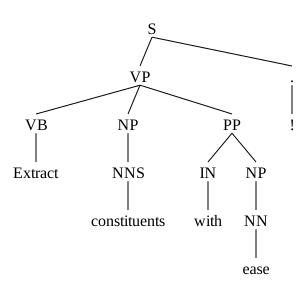
Modified tree structures offer several benefits. One of them, for example, is saving space when using the visualizations in papers. Eliminating the inner postag nodes (shown on the right) reduces the tree height from level 5 to 4. Another useful application arises from the elimination of token leaves, which will be discussed in more detail in the following section.
Extract phrases
Once we have created tree, we can now extract phrases according to given phrasal categories e.g., verb phrases:
```python
phrases = tree.extractallphrases()
print(phrases)
{'S': ['You must construct additional pylons !'], 'VP': ['must construct additional pylons', 'construct additional pylons'], 'NP': ['additional pylons']}
Only verb phrases..
print(phrases['VP'])
['must construct additional pylons', 'construct additional pylons'] ```
As can be seen here, the second verb phrase is contained in the former. To avoid this, we can instruct the method to disregard nested phrases:
```python
nonnestedphrases = tree.extractallphrases(avoidnestedphrases=True)
print(nonnestedphrases['VP'])
['must construct additional pylons']
If you want to extract phrases, but are more interested in their postag representation than the actual words/tokens, you can apply the same function to the modified tree...python posphrases = withouttokenleaves.extractallphrases() print(posphrases){'S': ['PRP MD VB JJ NNS .'], 'NP': ['JJ NNS'], 'VP': ['MD VB JJ NNS', 'VB JJ NNS']} ``` This is especially helpful when investigating the writing style of authors.
Export the tree
CTL offers you to export a constituent tree into various file formats, which are listed below. Most of these formats result in a visualization of the tree, while the remaining file formats are used for data exchange.
| Extension | Description | Output | | --- | --- | --- | | PDF | Portable Document Format | Vector graphic| | SVG | Scalable Vector Graphics | Vector graphic| | EPS | Encapsulated PostScript | Vector graphic| | JPG | Joint Photographic Experts Group | Raster image| | PNG | Portable Network Graphics | Raster image| | GIF | Graphics Interchange Format | Raster image| | BMP | Bitmap | Raster image| | PSD | Photoshop Document | Raster image| | TIFF | Tagged Image File Format | Raster image| | JSON | JavaScript Object Notation | Data exchange format | | YAML | Yet Another Markup Language | Data exchange format | | TXT | Plain-Text | Pretty-print text visualization| | TEX | LaTeX-Document | LaTeX-typesetting |
The following example shows an export of the tree into a PDF file:
```python tree.exporttree(destinationfilepath='my_tree.pdf', verbose=True)
PDF - file successfully saved to: my_tree.pdf ```
In the case of raster/vector images, CTL automatically removes unnecessary margins with respect to the resulting visualizations. This is particularly useful if the visualizations are to be used in papers.
Available models and languages
CTL currently supports eight languages: English, German, French, Polish, Hungarian, Swedish, Chinese and Korean. The performance of the respective models can be looked up in the benepar repository.
CTL in the Research Landscape
CTL has been used in several research works that have appeared at renowned conferences such as ICLR 2024 and ACL 2024:
Yuang Li, Jiaxin Guo, Min Zhang, Ma Miaomiao, Zhiqiang Rao, Weidong Zhang, Xianghui He, Daimeng Wei, and Hao Yang. 2024. Pause-Aware Automatic Dubbing using LLM and Voice Cloning. In Proceedings of the 21st International Conference on Spoken Language Translation (IWSLT 2024), pages 12–16, Bangkok, Thailand (in-person and online). Association for Computational Linguistics.
Tanvir Mahmud, D. Marculescu, Weakly-supervised Audio Separation via Bi-modal Semantic Similarity, in: The Twelfth International Conference on Learning Representations, 2024.
License
The code and the jupyter notebook demo of CTL are released under the MIT License. See LICENSE for further details.
Citation
If you find this repository helpful, please invest a few minutes and cite it in your paper/project:
bibtex
@software{Halvani_Constituent_Treelib:2024,
    author = {Halvani, Oren},
    title = {{Constituent Treelib - A Lightweight Python Library for Constructing, Processing, and Visualizing Constituent Trees.}},
    doi = {10.5281/zenodo.10951644},
    month = apr,
    url = {https://github.com/Halvani/constituent-treelib},
    version = {0.0.7},
    year = {2024}
}
Please also give credit to the authors of benepar and cite their work. In science, the principle is: give and take..
[^1]: Note, if you are not familiar with the bracket labels of constituent trees, have a look at the following Gist or alternatively this website.
[^2]: It's recommended to install CTL from PyPI (Python Package Index). However, if you want to benefit from the latest update of CTL, you should use this repository instead, since I will only update PyPi at irregular intervals.
[^3]: After the models have been downloaded, they are cached so that there are no redundant downloads when the method is called again. However, loading and initializing the spaCy and benepar models can take a while, so it makes sense to invoke the create_pipeline() method only once if you want to process multiple sentences.
Owner
- Name: Oren Halvani
- Login: Halvani
- Kind: user
- Location: Germany
- Company: [ private account ]
- Website: https://www.linkedin.com/in/orenhalvani
- Repositories: 3
- Profile: https://github.com/Halvani
Citation (CITATION.cff)
cff-version: 1.2.0
message: "If you use this library, please cite it as below."
authors:
  - family-names: "Halvani"
    given-names: "Oren"
    orcid: "https://orcid.org/0000-0002-1460-9373"
title: "Constituent Treelib - A Lightweight Python Library for Constructing, Processing, and Visualizing Constituent Trees."
version: 0.0.7
doi: 10.5281/zenodo.10951644
date-released: 2024-04-10
url: "https://github.com/Halvani/constituent-treelib"
GitHub Events
Total
- Create event: 1
- Release event: 1
- Issues event: 5
- Watch event: 8
- Issue comment event: 3
- Push event: 4
- Pull request event: 4
- Fork event: 4
Last Year
- Create event: 1
- Release event: 1
- Issues event: 5
- Watch event: 8
- Issue comment event: 3
- Push event: 4
- Pull request event: 4
- Fork event: 4
Committers
Last synced: over 3 years ago
All Time
- Total Commits: 48
- Total Committers: 2
- Avg Commits per committer: 24.0
- Development Distribution Score (DDS): 0.063
Top Committers
| Name | Commits | |
|---|---|---|
| Oren | n****g@g****m | 45 |
| Sebastian Szt | s****n@g****m | 3 |
Issues and Pull Requests
Last synced: 11 months ago
All Time
- Total issues: 3
- Total pull requests: 5
- Average time to close issues: 5 days
- Average time to close pull requests: 4 days
- Total issue authors: 3
- Total pull request authors: 3
- Average comments per issue: 0.67
- Average comments per pull request: 0.6
- Merged pull requests: 4
- Bot issues: 0
- Bot pull requests: 0
Past Year
- Issues: 1
- Pull requests: 1
- Average time to close issues: 9 days
- Average time to close pull requests: 1 day
- Issue authors: 1
- Pull request authors: 1
- Average comments per issue: 1.0
- Average comments per pull request: 0.0
- Merged pull requests: 1
- Bot issues: 0
- Bot pull requests: 0
Top Authors
Issue Authors
- rob-smallshire (1)
- djaym7 (1)
- jsrozner (1)
- dcavar (1)
- suyog-pipliwaal (1)
Pull Request Authors
- sebawastaken (3)
- jaekyeom-kim (2)
- rob-smallshire (1)
- jsrozner (1)
Top Labels
Issue Labels
Pull Request Labels
Dependencies
- Wand ==0.6.10
- benepar ==0.2.0
- huspacy ==0.6.0
- nltk ==3.7
- pdfkit ==1.0.0
- spacy ==3.4.1
- actions/checkout v3 composite
- actions/setup-python v3 composite
- actions/checkout v3 composite
- actions/setup-python v3 composite
- pypa/gh-action-pypi-publish 27b31702a0e7fc50959f5ad993c78deac1bdfc29 composite
- Wand ==0.6.10
- benepar ==0.2.0
- huspacy ==0.6.0
- nltk ==3.7
- pdfkit ==1.0.0
- protobuf ==3.20.3
- spacy ==3.4.1
- tokenizers ==0.9.4
- transformers [torch]==4.2.2