acme-ims
Inventory Management System using JavaFX for a small manufacturing organization
Science Score: 44.0%
This score indicates how likely this project is to be science-related based on various indicators:
-
✓CITATION.cff file
Found CITATION.cff file -
✓codemeta.json file
Found codemeta.json file -
✓.zenodo.json file
Found .zenodo.json file -
○DOI references
-
○Academic publication links
-
○Academic email domains
-
○Institutional organization owner
-
○JOSS paper metadata
-
○Scientific vocabulary similarity
Low similarity (13.6%) to scientific vocabulary
Repository
Inventory Management System using JavaFX for a small manufacturing organization
Basic Info
- Host: GitHub
- Owner: joseph-curtis
- License: ecl-2.0
- Language: HTML
- Default Branch: master
- Size: 546 KB
Statistics
- Stars: 0
- Watchers: 0
- Forks: 0
- Open Issues: 0
- Releases: 0
Metadata Files
README.md
Inventory Management System
Overview
This project is a Java-based desktop application developed for a small manufacturing organization (Acme) to manage their inventory system. The application replaces the manual process of using spreadsheets for inventory management, allowing for more sophisticated and automated inventory tracking. The system was designed and implemented to meet specific business requirements, incorporating various object-oriented principles and Java programming constructs.
Documentation
Source documentation provided via JavaDocs here
Features
Classes and Interfaces
- Designed software solutions with appropriate classes, objects, methods, and interfaces.
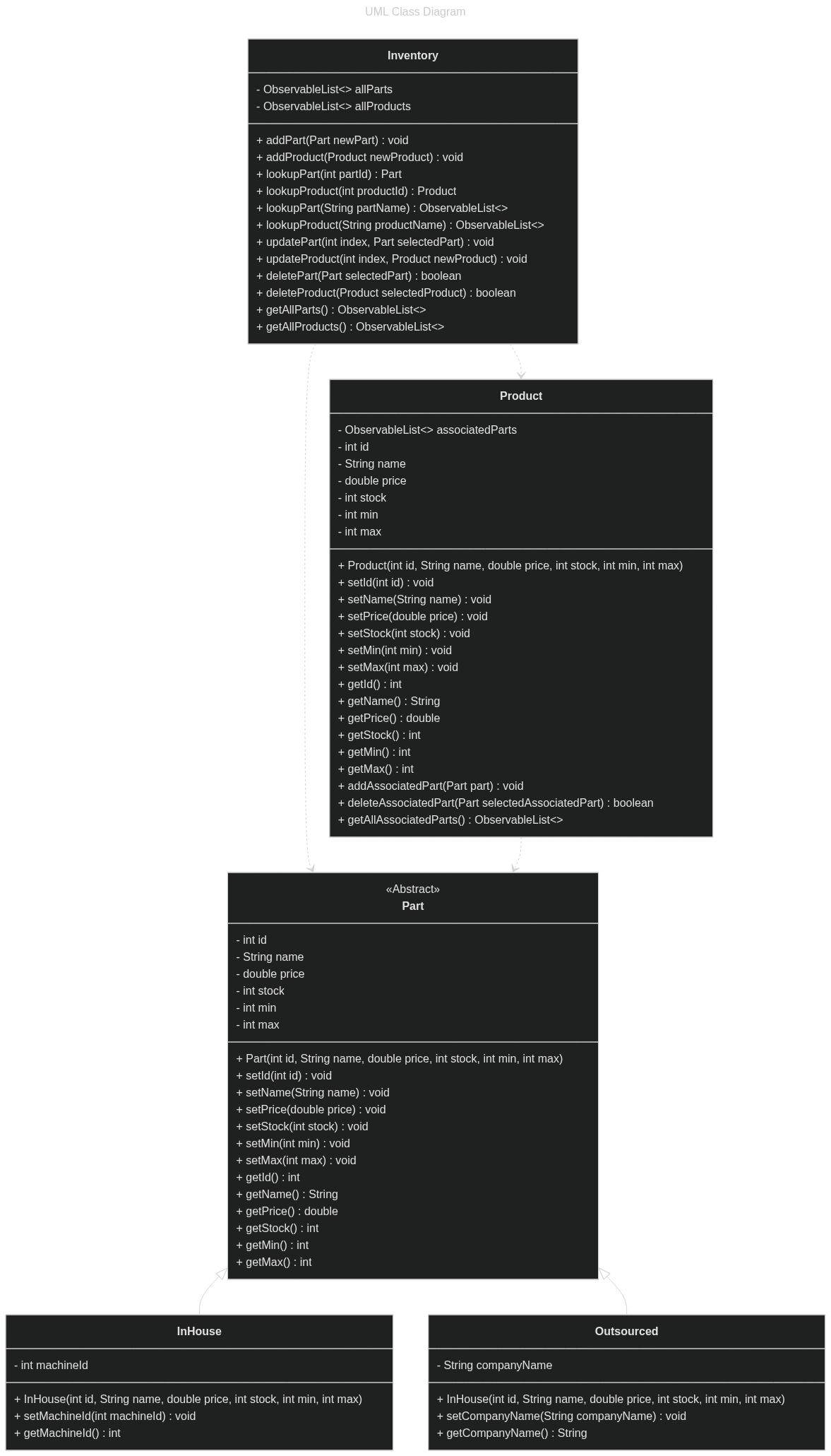
- Implemented a class diagram and adhered to the provided UML class structure.
Object-Oriented Principles
- Utilized inheritance, encapsulation, and abstraction to ensure scalability.
- Developed a modular and maintainable codebase.
Application Development
- Developed using Java programming language constructs.
- Integrated JavaFX for building the user interface.
- Used JDK 11 for development.
Exception Handling
- Incorporated exception handling to improve user experience and application stability.
- Ensured robust error management to handle unexpected scenarios gracefully.
User Interface Development
- Developed the user interface to meet project requirements using JavaFX and Scene Builder.
- Followed the provided GUI mock-up for design consistency.
Requirements
Software
- JDK 11
- JavaFX SDK or Module (for NetBeans or IntelliJ IDEA)
- Scene Builder
Functional Requirements
Add Inventory Items:
- Allows users to add new inventory items.
- Captures item details such as name, stock, price, and associated parts.
Modify Inventory Items:
- Enables modification of existing inventory items.
- Supports updating item details and associated parts.
Delete Inventory Items:
- Provides functionality to delete inventory items from the system.
- Ensures safe deletion with confirmation prompts to prevent accidental data loss.
Manage Parts:
- Supports adding, modifying, and deleting parts associated with inventory items.
- Implements a searchable parts list for easy management.
Search Functionality:
- Implements search functionality for both inventory items and parts.
- Allows users to quickly locate specific items using various search criteria.
Error Handling:
- Includes error handling for user inputs and system operations.
- Provides user-friendly error messages and prompts for corrective actions.
How to Run
- Clone the repository:
bash
git clone https://github.com/joseph-curtis/acme-ims.git
Open the project in your IDE:
- Use NetBeans or IntelliJ IDEA with JavaFX support.
Configure JavaFX:
- Ensure that JavaFX SDK is properly configured in your IDE.
- Follow the setup guide for JavaFX in your specific IDE.
Run the application:
- Locate the
IMS_Application.javafile and run it. - The application will launch with the main inventory management interface (MainForm.fxml).
- Locate the
Project Structure
acme-ims/
│
├── javadocs/
├── src/
│   ├── controller/
│   │   ├── MainController.java
│   │   ├── PartController.java
│   │   ├── ProductController.java
│   ├── main/
│   │   ├── IMS_Application.java
│   ├── model/
│   │   ├── Inventory.java
│   │   ├── Part.java
│   │   ├── Product.java
│   ├── util/
│   │   ├── GuiUtil.java
│   │   ├── BlankInputException.java
│   │   ├── InvObjNotFoundException.java
│   │   ├── InvalidInputException.java
│   ├── view/
│   │   ├── MainForm.fxml
│   │   ├── PartForm.fxml
│   │   ├── ProductForm.fxml
└── README.md
UML Class Diagram
License
This project is licensed under the ECL-2.0 License. See the LICENSE file for details.
Owner
- Name: Joseph Curtis
- Login: joseph-curtis
- Kind: user
- Location: Portland, OR
- Repositories: 3
- Profile: https://github.com/joseph-curtis
Currently a student of Computer Science Planning a career path around DevOps and backend/database software development
Citation (CITATION.cff)
# This CITATION.cff file was generated with cffinit.
# Visit https://bit.ly/cffinit to generate yours today!

cff-version: 1.2.0
title: Acme Inventory Management System
message: 'If you use this software, please cite it as below.'
type: software
authors:
  - family-names: Curtis
    given-names: Joseph
    email: jcur175@wgu.edu
    orcid: 'https://orcid.org/0000-0002-5445-9015'
    affiliation: Western Governors University
version: 1.0.0
# doi: 10.5281/zenodo.1234
date-released: 2021-12-12
url: "https://github.com/joseph-curtis/acme-ims"