pyjoules
A Python library to capture the energy consumption of code snippets
Science Score: 54.0%
This score indicates how likely this project is to be science-related based on various indicators:
-
✓CITATION.cff file
Found CITATION.cff file -
✓codemeta.json file
Found codemeta.json file -
✓.zenodo.json file
Found .zenodo.json file -
○DOI references
-
○Academic publication links
-
✓Committers with academic emails
3 of 8 committers (37.5%) from academic institutions -
○Institutional organization owner
-
○JOSS paper metadata
-
○Scientific vocabulary similarity
Low similarity (12.9%) to scientific vocabulary
Keywords
Keywords from Contributors
Repository
A Python library to capture the energy consumption of code snippets
Basic Info
Statistics
- Stars: 87
- Watchers: 5
- Forks: 14
- Open Issues: 19
- Releases: 9
Topics
Metadata Files
README.md
PyJoules


About
pyJoules is a software toolkit to measure the energy footprint of a host machine along the execution of a piece of Python code. It monitors the energy consumed by specific device of the host machine such as :
- intel CPU socket package
- RAM (for intel server architectures)
- intel integrated GPU (for client architectures)
- nvidia GPU
Limitation
CPU, RAM and integrated GPU
pyJoules uses the Intel "Running Average Power Limit" (RAPL) technology that estimates power consumption of the CPU, ram and integrated GPU. This technology is available on Intel CPU since the Sandy Bridge generation(2010).
Nvidia GPU
pyJoules uses the nvidia "Nvidia Management Library" technology to measure energy consumption of nvidia devices. The energy measurement API is only available on nvidia GPU with Volta architecture(2018)
Windows and MacOS
Only GNU/Linux support is available for the moment. We are working on Mac support
Known issues
RAPL energy counters overflow after several minutes or hours, potentially causing false-negative energy readings.
pyJoules takes this into account and adds the counter's maximum possible value, max_energy_range_uj, to negative energy measurements. However, if a counter overflows twice during a single energy measurement, the reported energy will be max_energy_range_uj less than the expected value.
Installation
Measurement frequency
PyJoule use hardware measurement tools (intel RAPL, nvidia GPU tools, ...) to measure device energy consumption. Theses tools have a mesasurement frequency that depend of the device. Thus, you can't use Pyjoule to measure energy consumption during a period shorter than the device energy measurement frequency. Pyjoule will return null values if the measurement period is too short.
Requirements
- python >= 3.7
- nvml (if you want nvidia GPU support)
Installation
You can install pyJoules with pip: pip install pyJoules
if you want to use pyJoule to also measure nvidia GPU energy consumption, you have to install it with nvidia driver support using this command : pip install pyJoules[nvidia].
Basic usage
This Readme describe basic usage of pyJoules. For more in depth description, read the documentation here
Here are some basic usages of pyJoules. Please note that the reported energy consumption is not only the energy consumption of the code you are running. This includes the global energy consumption of all the process running on the machine during this period, thus including the operating system and other applications. That is why we recommend to eliminate any extra programs that may alter the energy consumption of the machine hosting experiments and to keep only the code under measurement (i.e., no extra applications, such as graphical interface, background running task...). This will give the closest measure to the real energy consumption of the measured code.
Decorate a function to measure its energy consumption
To measure the energy consumed by the machine during the execution of the function foo() run the following code:
```python
from pyJoules.energymeter import measureenergy
@measure_energy def foo(): # Instructions to be evaluated.
foo() ```
This will print on the console the recorded energy consumption of all the monitorable devices during the execution of function foo.
Output description
decorator basic usage will print iformation with this format :
begin timestamp : XXX; tag : YYY; duration : ZZZ;device_name: AAAA
with :
- begin timestamp : monitored function launching time
- tag: tag of the measure, if nothing is specified, this will be the function name
- duration: function execution duration
- device_name: power consumption of the device device_name in uJ
for cpu and ram devices, device_name match the RAPL domain described on the image below plus the CPU socket id. Rapl domain are described here
Configure the decorator specifying the device to monitor
You can easily configure which device to monitor using the parameters of the measureit decorator.
For example, the following example only monitors the CPU power consumption on the CPU socket 1 and the Nvidia GPU 0.
By default, pyJoules monitors all the available devices of the CPU sockets.
```python
from pyJoules.energymeter import measureenergy
from pyJoules.device.rapldevice import RaplPackageDomain
from pyJoules.device.nvidiadevice import NvidiaGPUDomain
@measure_energy(domains=[RaplPackageDomain(1), NvidiaGPUDomain(0)]) def foo(): # Instructions to be evaluated.
foo()
```
You can append the following domain list to monitor them :
pyJoules.device.rapl_device.RaplPackageDomain: CPU (specify the socket id in parameter)pyJoules.device.rapl_device.RaplDramDomain: RAM (specify the socket id in parameter)pyJoules.device.rapl_device.RaplUncoreDomain: integrated GPU (specify the socket id in parameter)pyJoules.device.rapl_device.RaplCoreDomain: RAPL Core domain (specify the socket id in parameter)pyJoules.device.nvidia_device.NvidiaGPUDomain: Nvidia GPU (specify the socket id in parameter)
to understand which par of the cpu each RAPL domain monitor, see this section
Configure the output of the decorator
If you want to handle data with different output than the standard one, you can configure the decorator with an EnergyHandler instance from the pyJoules.handler module.
As an example, if you want to write the recorded energy consumption in a .csv file: ```python from pyJoules.energymeter import measureenergy from pyJoules.handler.csv_handler import CSVHandler
csv_handler = CSVHandler('result.csv')
@measureenergy(handler=csvhandler) def foo(): # Instructions to be evaluated.
for _ in range(100): foo()
csvhandler.savedata() ```
This will produce a csv file of 100 lines. Each line containing the energy
consumption recorded during one execution of the function foo.
Other predefined Handler classes exist to export data to MongoDB and Panda
dataframe.
Use a context manager to add tagged "breakpoint" in your measurment
If you want to know where is the "hot spots" where your python code consume the most energy you can add "breakpoints" during the measurement process and tag them to know amount of energy consumed between this breakpoints.
For this, you have to use a context manager to measure the energy
consumption. It is configurable as the decorator. For example, here we use an
EnergyContext to measure the power consumption of CPU 1 and nvidia gpu 0
and report it in a csv file :
```python from pyJoules.energymeter import EnergyContext from pyJoules.device.rapldevice import RaplPackageDomain from pyJoules.device.nvidiadevice import NvidiaGPUDomain from pyJoules.handler.csvhandler import CSVHandler
csv_handler = CSVHandler('result.csv')
with EnergyContext(handler=csvhandler, domains=[RaplPackageDomain(1), NvidiaGPUDomain(0)], starttag='foo') as ctx: foo() ctx.record(tag='bar') bar()
csvhandler.savedata() ```
This will record the energy consumed :
- between the beginning of the
EnergyContextand the call of thectx.recordmethod - between the call of the
ctx.recordmethod and the end of theEnergyContext
Each measured part will be written in the csv file. One line per part.
RAPL domain description
RAPL domains match part of the cpu socket as described in this image :
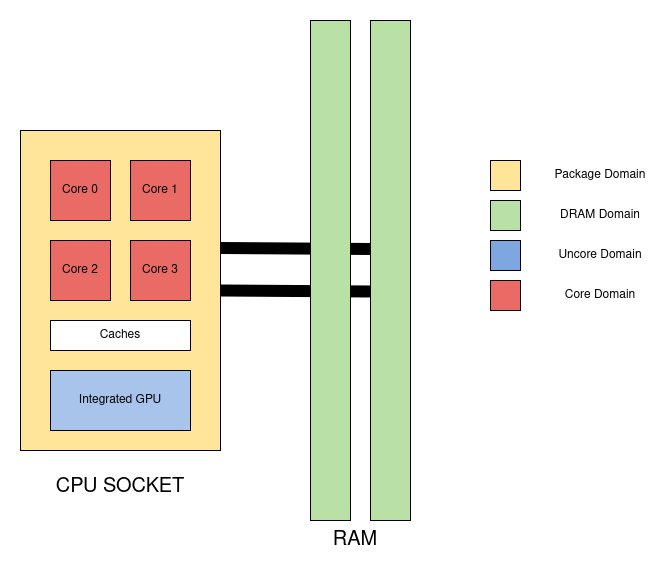
- Package : correspond to the wall cpu energy consumption
- core : correpond to the sum of all cpu core energy consumption
- uncore : correspond to the integrated GPU
Output
The output structure of all domains are enabled including their respective units are as follows:
| name | timestamp | tag | duration | package | dram | core | uncore | nvidia_gpu | |---|---|---|---|---|---|---|---|---| | type | datetime | str | ms | uJ | uJ | uJ | uJ | mJ |
Miscellaneous
About
pyJoules is an open-source project developed by the Spirals research group (University of Lille and Inria) that is part of the PowerAPI initiative.
The documentation is available here.
Mailing list
You can follow the latest news and asks questions by subscribing to our mailing list.
Contributing
If you would like to contribute code, you can do so via GitHub by forking the repository and sending a pull request.
When submitting code, please make every effort to follow existing coding conventions and style in order to keep the code as readable as possible.
Owner
- Name: PowerAPI
- Login: powerapi-ng
- Kind: organization
- Email: contact@powerapi.org
- Location: Lille, France
- Website: http://powerapi.org
- Repositories: 10
- Profile: https://github.com/powerapi-ng
Software-Defined Power Meters
Citation (CITATION.cff)
# This CITATION.cff file was generated with cffinit.
# Visit https://bit.ly/cffinit to generate yours today!

cff-version: 1.2.0
title: "Pyjoules: Python library that measures python code snippets"
message: Make your python code green again
type: software
date-released: 2019-11-19
authors:
  - given-names: Mohammed chakib
    family-names: Belgaid
    email: chakib.belgaid@gmail.com
    orcid: 'https://orcid.org/0000-0002-5264-7426'
    affiliation: Inria university of Lille
  - given-names: Romain
    family-names: Rouvoy
    email: romain.rouvoy@inria.fr
    affiliation: inria university of lille
    orcid: 'https://orcid.org/0000-0003-1771-8791'
  - orcid: 'https://orcid.org/0000-0003-0006-6088'
    affiliation: 'Inria  university of lille '
    email: lionel.seinturier@univ-lille.fr
    family-names: Seinturier
    given-names: Lionel
identifiers:
  - type: url
    value: 'https://pyjoules.readthedocs.io'
repository-code: 'https://github.com/powerapi-ng/pyJoules'
url: 'http://powerapi.org/'
repository-artifact: 'https://pypi.org/project/pyJoules/'
abstract: >-
  A tool to measure the energy consumption of python
  code snippets
GitHub Events
Total
- Issues event: 1
- Watch event: 16
- Issue comment event: 5
- Pull request event: 3
- Fork event: 5
Last Year
- Issues event: 1
- Watch event: 16
- Issue comment event: 5
- Pull request event: 3
- Fork event: 5
Committers
Last synced: 12 months ago
Top Committers
| Name | Commits | |
|---|---|---|
| Arthur d'Azémar | a****r@i****r | 97 |
| belgaid mohammed chakib | c****d@g****m | 9 |
| Romain Rouvoy | r****y@u****r | 6 |
| Alex Kaminetzky | a****p@g****m | 3 |
| Benjamin DANGLOT | b****t@g****m | 2 |
| Rover van der Noort | s****t@s****l | 1 |
| Davide Domini | 6****i | 1 |
| Pietro Lechthaler | p****r@f****u | 1 |
Committer Domains (Top 20 + Academic)
Issues and Pull Requests
Last synced: 11 months ago
All Time
- Total issues: 29
- Total pull requests: 10
- Average time to close issues: 3 months
- Average time to close pull requests: 3 months
- Total issue authors: 20
- Total pull request authors: 6
- Average comments per issue: 1.76
- Average comments per pull request: 0.5
- Merged pull requests: 9
- Bot issues: 0
- Bot pull requests: 0
Past Year
- Issues: 1
- Pull requests: 4
- Average time to close issues: N/A
- Average time to close pull requests: 28 days
- Issue authors: 1
- Pull request authors: 2
- Average comments per issue: 0.0
- Average comments per pull request: 1.0
- Merged pull requests: 3
- Bot issues: 0
- Bot pull requests: 0
Top Authors
Issue Authors
- danglotb (5)
- altor (3)
- hafizuriu (3)
- nikhil153 (2)
- ChenfengZhao (1)
- johannabar (1)
- liuhao-97 (1)
- step21 (1)
- piyumalranawaka (1)
- prachikashikar (1)
- kshivvy (1)
- philipperoose (1)
- j-j-kam (1)
- Urhengulas (1)
- PierreRust (1)
Pull Request Authors
- pietrolechthaler (2)
- danglotb (2)
- davidedomini (2)
- kaminetzky (2)
- altor (1)
- rvandernoort (1)
Top Labels
Issue Labels
Pull Request Labels
Dependencies
- pandas *
- pymongo *
- pynvml *
- sphinx-autodoc-typehints *
- sphinx-rtd-theme *