coqui-tts
Science Score: 54.0%
This score indicates how likely this project is to be science-related based on various indicators:
-
✓CITATION.cff file
Found CITATION.cff file -
✓codemeta.json file
Found codemeta.json file -
✓.zenodo.json file
Found .zenodo.json file -
○DOI references
-
✓Academic publication links
Links to: arxiv.org, zenodo.org -
○Academic email domains
-
○Institutional organization owner
-
○JOSS paper metadata
-
○Scientific vocabulary similarity
Low similarity (11.0%) to scientific vocabulary
Repository
Basic Info
- Host: GitHub
- Owner: sinhprous
- License: mpl-2.0
- Language: Python
- Default Branch: main
- Size: 126 MB
Statistics
- Stars: 0
- Watchers: 1
- Forks: 0
- Open Issues: 0
- Releases: 0
Metadata Files
README.md

📣 Clone your voice with a single click on 🐸Coqui.ai
📣 🐸Coqui Studio is launching soon!! Join our waiting list!!
🐸TTS is a library for advanced Text-to-Speech generation. It's built on the latest research, was designed to achieve the best trade-off among ease-of-training, speed and quality. 🐸TTS comes with pretrained models, tools for measuring dataset quality and already used in 20+ languages for products and research projects.













🚀 Sign up to free 🐸Coqui.ai API and start cloning your voice
📰 Subscribe to 🐸Coqui.ai Newsletter
📢 English Voice Samples and SoundCloud playlist
📄 Text-to-Speech paper collection

💬 Where to ask questions
Please use our dedicated channels for questions and discussion. Help is much more valuable if it's shared publicly so that more people can benefit from it.
| Type | Platforms | | ------------------------------- | --------------------------------------- | | 🚨 Bug Reports | GitHub Issue Tracker | | 🎁 Feature Requests & Ideas | GitHub Issue Tracker | | 👩💻 Usage Questions | Github Discussions | | 🗯 General Discussion | Github Discussions or Gitter Room |
🔗 Links and Resources
| Type | Links | | ------------------------------- | --------------------------------------- | | 💼 Documentation | ReadTheDocs | 💾 Installation | TTS/README.md| | 👩💻 Contributing | CONTRIBUTING.md| | 📌 Road Map | Main Development Plans | 🚀 Released Models | TTS Releases and Experimental Models|
🥇 TTS Performance
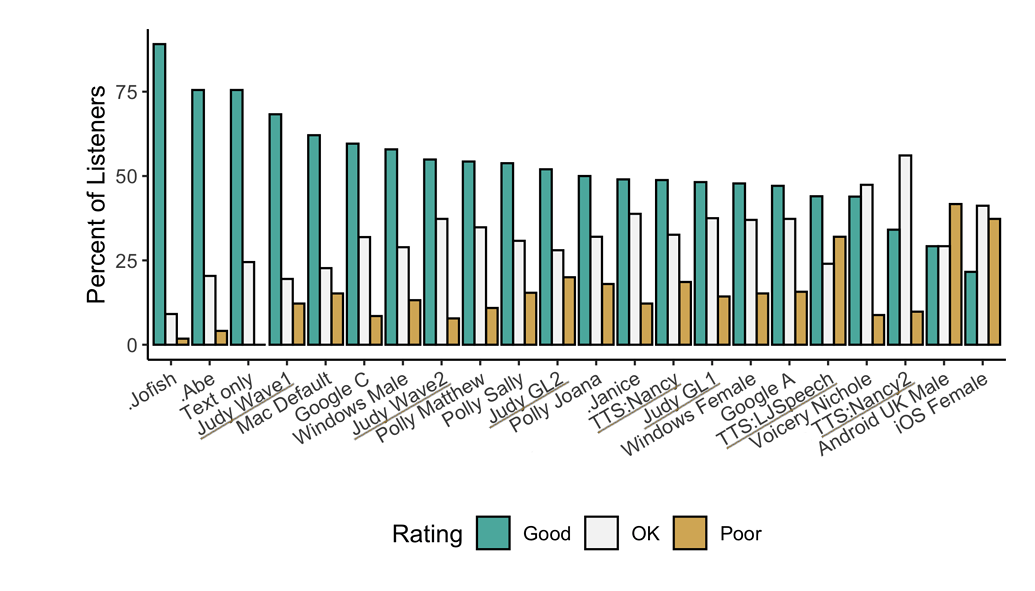
Underlined "TTS" and "Judy" are 🐸TTS models <!-- Details... -->
Features
- High-performance Deep Learning models for Text2Speech tasks.
- Text2Spec models (Tacotron, Tacotron2, Glow-TTS, SpeedySpeech).
- Speaker Encoder to compute speaker embeddings efficiently.
- Vocoder models (MelGAN, Multiband-MelGAN, GAN-TTS, ParallelWaveGAN, WaveGrad, WaveRNN)
- Fast and efficient model training.
- Detailed training logs on the terminal and Tensorboard.
- Support for Multi-speaker TTS.
- Efficient, flexible, lightweight but feature complete
Trainer API. - Released and ready-to-use models.
- Tools to curate Text2Speech datasets under
dataset_analysis. - Utilities to use and test your models.
- Modular (but not too much) code base enabling easy implementation of new ideas.
Implemented Models
Spectrogram models
- Tacotron: paper
- Tacotron2: paper
- Glow-TTS: paper
- Speedy-Speech: paper
- Align-TTS: paper
- FastPitch: paper
- FastSpeech: paper
- SC-GlowTTS: paper
- Capacitron: paper
End-to-End Models
Attention Methods
- Guided Attention: paper
- Forward Backward Decoding: paper
- Graves Attention: paper
- Double Decoder Consistency: blog
- Dynamic Convolutional Attention: paper
- Alignment Network: paper
Speaker Encoder
Vocoders
- MelGAN: paper
- MultiBandMelGAN: paper
- ParallelWaveGAN: paper
- GAN-TTS discriminators: paper
- WaveRNN: origin
- WaveGrad: paper
- HiFiGAN: paper
- UnivNet: paper
You can also help us implement more models.
Install TTS
🐸TTS is tested on Ubuntu 18.04 with python >= 3.7, < 3.11..
If you are only interested in synthesizing speech with the released 🐸TTS models, installing from PyPI is the easiest option.
bash
pip install TTS
If you plan to code or train models, clone 🐸TTS and install it locally.
bash
git clone https://github.com/coqui-ai/TTS
pip install -e .[all,dev,notebooks]  # Select the relevant extras
If you are on Ubuntu (Debian), you can also run following commands for installation.
bash
$ make system-deps  # intended to be used on Ubuntu (Debian). Let us know if you have a different OS.
$ make install
If you are on Windows, 👑@GuyPaddock wrote installation instructions here.
Use TTS
Single Speaker Models
List provided models:
$ tts --list_modelsGet model info (for both ttsmodels and vocodermodels):
Query by type/name: The modelinfobyname uses the name as it from the --listmodels.
$ tts --model_info_by_name "<model_type>/<language>/<dataset>/<model_name>"For example:$ tts --model_info_by_name tts_models/tr/common-voice/glow-tts$ tts --model_info_by_name vocoder_models/en/ljspeech/hifigan_v2Query by type/idx: The modelqueryidx uses the corresponding idx from --listmodels. ``` $ tts --modelinfobyidx "
/ " ``` For example: $ tts --model_info_by_idx tts_models/3
Run TTS with default models:
$ tts --text "Text for TTS" --out_path output/path/speech.wavRun a TTS model with its default vocoder model:
$ tts --text "Text for TTS" --model_name "<model_type>/<language>/<dataset>/<model_name>" --out_path output/path/speech.wavFor example:$ tts --text "Text for TTS" --model_name "tts_models/en/ljspeech/glow-tts" --out_path output/path/speech.wavRun with specific TTS and vocoder models from the list:
$ tts --text "Text for TTS" --model_name "<model_type>/<language>/<dataset>/<model_name>" --vocoder_name "<model_type>/<language>/<dataset>/<model_name>" --out_path output/path/speech.wav
For example:
```
$ tts --text "Text for TTS" --model_name "tts_models/en/ljspeech/glow-tts" --vocoder_name "vocoder_models/en/ljspeech/univnet" --out_path output/path/speech.wav
```
Run your own TTS model (Using Griffin-Lim Vocoder):
$ tts --text "Text for TTS" --model_path path/to/model.pth --config_path path/to/config.json --out_path output/path/speech.wavRun your own TTS and Vocoder models:
$ tts --text "Text for TTS" --model_path path/to/config.json --config_path path/to/model.pth --out_path output/path/speech.wav
    --vocoder_path path/to/vocoder.pth --vocoder_config_path path/to/vocoder_config.json
Multi-speaker Models
List the available speakers and choose as
among them: $ tts --model_name "<language>/<dataset>/<model_name>" --list_speaker_idxsRun the multi-speaker TTS model with the target speaker ID:
$ tts --text "Text for TTS." --out_path output/path/speech.wav --model_name "<language>/<dataset>/<model_name>" --speaker_idx <speaker_id>Run your own multi-speaker TTS model:
$ tts --text "Text for TTS" --out_path output/path/speech.wav --model_path path/to/config.json --config_path path/to/model.pth --speakers_file_path path/to/speaker.json --speaker_idx <speaker_id>
Directory Structure
|- notebooks/       (Jupyter Notebooks for model evaluation, parameter selection and data analysis.)
|- utils/           (common utilities.)
|- TTS
    |- bin/             (folder for all the executables.)
      |- train*.py                  (train your target model.)
      |- ...
    |- tts/             (text to speech models)
        |- layers/          (model layer definitions)
        |- models/          (model definitions)
        |- utils/           (model specific utilities.)
    |- speaker_encoder/ (Speaker Encoder models.)
        |- (same)
    |- vocoder/         (Vocoder models.)
        |- (same)
Owner
- Name: Bao-Sinh Nguyen
- Login: sinhprous
- Kind: user
- Location: Remote
- Company: Stealth Web 3 startup
- Repositories: 5
- Profile: https://github.com/sinhprous
Citation (CITATION.cff)
cff-version: 1.2.0
message: "If you want to cite 🐸💬, feel free to use this (but only if you loved it 😊)"
title: "Coqui TTS"
abstract: "A deep learning toolkit for Text-to-Speech, battle-tested in research and production"
date-released: 2021-01-01
authors:
  - family-names: "Eren"
    given-names: "Gölge"
  - name: "The Coqui TTS Team"
version: 1.4
doi: 10.5281/zenodo.6334862
license: "MPL-2.0"
url: "https://www.coqui.ai"
repository-code: "https://github.com/coqui-ai/TTS"
keywords:
  - machine learning
  - deep learning
  - artificial intelligence
  - text to speech
  - TTS