benchmarl
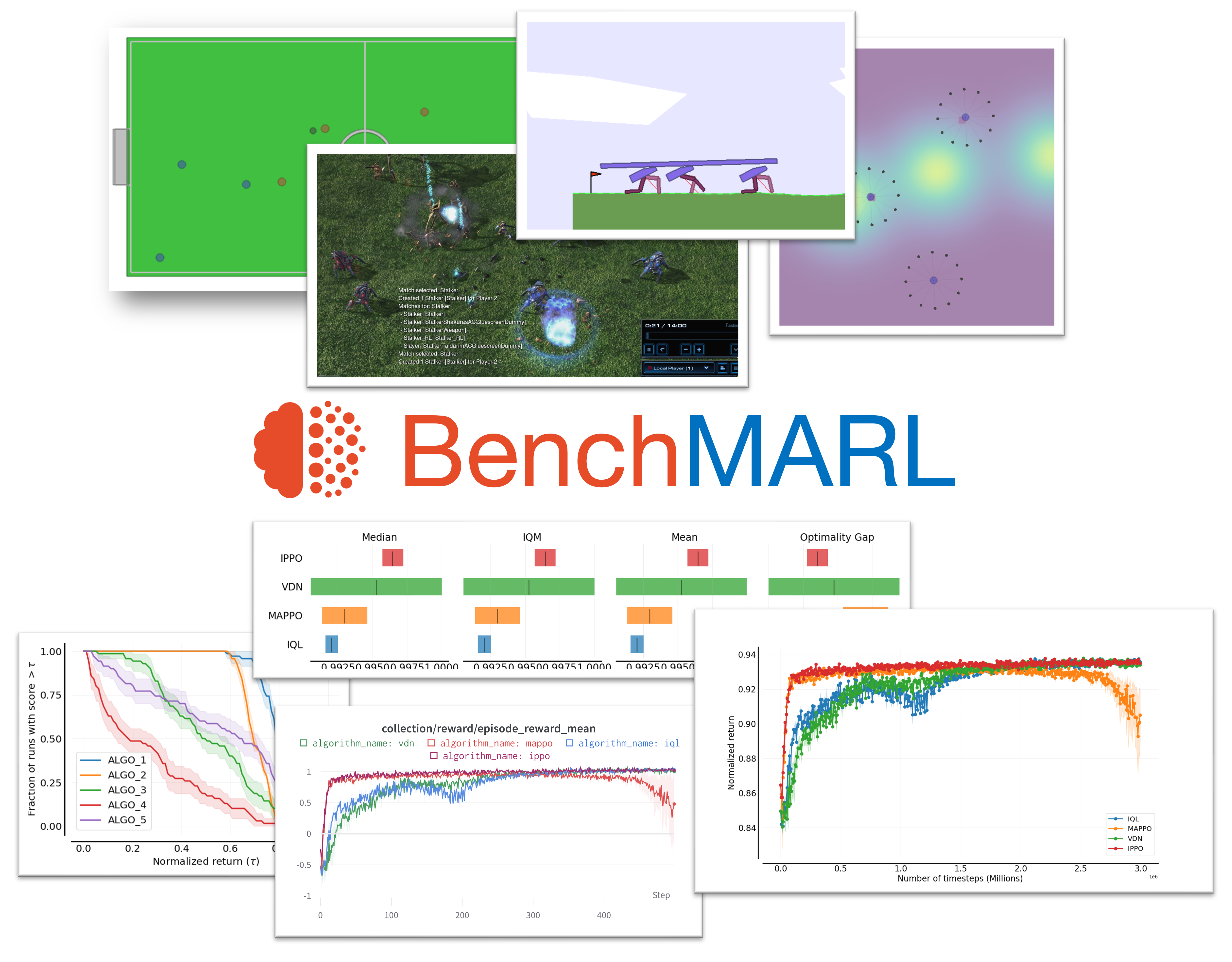
BenchMARL is a library for benchmarking Multi-Agent Reinforcement Learning (MARL). BenchMARL allows to quickly compare different MARL algorithms, tasks, and models while being systematically grounded in its two core tenets: reproducibility and standardization.
Science Score: 54.0%
This score indicates how likely this project is to be science-related based on various indicators:
-
✓CITATION.cff file
Found CITATION.cff file -
✓codemeta.json file
Found codemeta.json file -
✓.zenodo.json file
Found .zenodo.json file -
○DOI references
-
✓Academic publication links
Links to: arxiv.org -
○Committers with academic emails
-
○Institutional organization owner
-
○JOSS paper metadata
-
○Scientific vocabulary similarity
Low similarity (15.4%) to scientific vocabulary
Keywords
Repository
BenchMARL is a library for benchmarking Multi-Agent Reinforcement Learning (MARL). BenchMARL allows to quickly compare different MARL algorithms, tasks, and models while being systematically grounded in its two core tenets: reproducibility and standardization.
Basic Info
- Host: GitHub
- Owner: facebookresearch
- License: mit
- Language: Python
- Default Branch: main
- Homepage: https://benchmarl.readthedocs.io
- Size: 562 KB
Statistics
- Stars: 449
- Watchers: 13
- Forks: 89
- Open Issues: 27
- Releases: 11
Topics
Metadata Files
README.md
BenchMARL





bash
python benchmarl/run.py algorithm=mappo task=vmas/balance



- Watch the talk on multi-agent simulation and learning in BenchMARL and TorchRL.
- Watch the lecture on creating a custom scenario in VMAS and training it in BenchMARL
What is BenchMARL 🧐?
BenchMARL is a Multi-Agent Reinforcement Learning (MARL) training library created to enable reproducibility and benchmarking across different MARL algorithms and environments. Its mission is to present a standardized interface that allows easy integration of new algorithms and environments to provide a fair comparison with existing solutions. BenchMARL uses TorchRL as its backend, which grants it high performance and state-of-the-art implementations. It also uses hydra for flexible and modular configuration, and its data reporting is compatible with marl-eval for standardised and statistically strong evaluations.
BenchMARL core design tenets are: * Reproducibility through systematical grounding and standardization of configuration * Standardised and statistically-strong plotting and reporting * Experiments that are independent of the algorithm, environment, and model choices * Breadth over the MARL ecosystem * Easy implementation of new algorithms, environments, and models * Leveraging the know-how and infrastructure of TorchRL, without reinventing the wheel
Why would I BenchMARL 🤔?
Why would you BenchMARL, I see you ask. Well, you can BenchMARL to compare different algorithms, environments, models, to check how your new research compares to existing ones, or if you just want to approach the domain and want to easily take a picture of the landscape.
Table of contents
How to use
Notebooks
- Running BenchMARL experiments.
- Creating a VMAS scenario and training it in BenchMARL. We will create a scenario where multiple robots with different embodiments need to navigate to their goals while avoiding each other (as well as obstacles) and train it using MAPPO and MLP/GNN policies.
Install
Install TorchRL
You can install TorchRL from PyPi.
bash
pip install torchrl
For more details, or for installing nightly versions, see the
TorchRL installation guide.
Install BenchMARL
You can just install it from github
bash
pip install benchmarl
Or also clone it locally to access the configs and scripts
bash
git clone https://github.com/facebookresearch/BenchMARL.git
pip install -e BenchMARL
Install environments
All enviornment dependencies are optional in BenchMARL and can be installed separately.
VMAS
bash
pip install vmas
PettingZoo
bash
pip install "pettingzoo[all]"
MeltingPot
bash
pip install dm-meltingpot
MAgent2
bash
pip install git+https://github.com/Farama-Foundation/MAgent2
SMACv2
Follow the instructions on the environment repository.
Here is how we install it on linux.
Run
Experiments are launched with a default configuration that can be overridden in many ways. To learn how to customize and override configurations please refer to the configuring section.
Command line
To launch an experiment from the command line you can do
bash
python benchmarl/run.py algorithm=mappo task=vmas/balance

Thanks to hydra, you can run benchmarks as multi-runs like:
bash
python benchmarl/run.py -m algorithm=mappo,qmix,masac task=vmas/balance,vmas/sampling seed=0,1
The default implementation for hydra multi-runs is sequential, but parallel and slurm launchers are also available.
Script
You can also load and launch your experiments from within a script
python
 experiment = Experiment(
    task=VmasTask.BALANCE.get_from_yaml(),
    algorithm_config=MappoConfig.get_from_yaml(),
    model_config=MlpConfig.get_from_yaml(),
    critic_model_config=MlpConfig.get_from_yaml(),
    seed=0,
    config=ExperimentConfig.get_from_yaml(),
)
experiment.run()
You can also run multiple experiments in a Benchmark.
python
benchmark = Benchmark(
    algorithm_configs=[
        MappoConfig.get_from_yaml(),
        QmixConfig.get_from_yaml(),
        MasacConfig.get_from_yaml(),
    ],
    tasks=[
        VmasTask.BALANCE.get_from_yaml(),
        VmasTask.SAMPLING.get_from_yaml(),
    ],
    seeds={0, 1},
    experiment_config=ExperimentConfig.get_from_yaml(),
    model_config=MlpConfig.get_from_yaml(),
    critic_model_config=MlpConfig.get_from_yaml(),
)
benchmark.run_sequential()
Concept
The goal of BenchMARL is to bring different MARL environments and algorithms under the same interfaces to enable fair and reproducible comparison and benchmarking. BenchMARL is a full-pipline unified training library with the goal of enabling users to run any comparison they want across our algorithms and tasks in just one line of code. To achieve this, BenchMARL interconnects components from TorchRL, which provides an efficient and reliable backend.
The library has a default configuration for each of its components. While parts of this configuration are supposed to be changed (for example experiment configurations), other parts (such as tasks) should not be changed to allow for reproducibility. To aid in this, each version of BenchMARL is paired to a default configuration.
Let's now introduce each component in the library.
Experiment. An experiment is a training run in which an algorithm, a task, and a model are fixed. Experiments are configured by passing these values alongside a seed and the experiment hyperparameters. The experiment hyperparameters cover both on-policy and off-policy algorithms, discrete and continuous actions, and probabilistic and deterministic policies (as they are agnostic of the algorithm or task used). An experiment can be launched from the command line or from a script. See the run section for more information.
Benchmark. In the library we call benchmark a collection of experiments that can vary in tasks, algorithm, or model.
A benchmark shares the same experiment configuration across all of its experiments.
Benchmarks allow to compare different MARL components in a standardized way.
A benchmark can be launched from the command line or from a script.
See the run section for more information.
Algorithms. Algorithms are an ensemble of components (e.g., losss, replay buffer) which determine the training strategy. Here is a table with the currently implemented algorithms in BenchMARL.
| Name | On/Off policy | Actor-critic | Full-observability in critic | Action compatibility | Probabilistic actor |
|---------------------------------------------------------------------------------------------------------------------------------------------|---------------|--------------|------------------------------|-----------------------|---------------------|
| MAPPO | On | Yes | Yes | Continuous + Discrete | Yes |
| IPPO | On | Yes | No | Continuous + Discrete | Yes |
| MADDPG | Off | Yes | Yes | Continuous | No |
| IDDPG | Off | Yes | No | Continuous | No |
| MASAC | Off | Yes | Yes | Continuous + Discrete | Yes |
| ISAC | Off | Yes | No | Continuous + Discrete | Yes |
| QMIX | Off | No | NA | Discrete | No |
| VDN | Off | No | NA | Discrete | No |
| IQL | Off | No | NA | Discrete | No |
Tasks. Tasks are scenarios from a specific environment which constitute the MARL challenge to solve. They differ based on many aspects, here is a table with the current environments in BenchMARL
| Environment | Tasks | Cooperation | Global state | Reward function | Action space | Vectorized |
|---------------------------------------------------------------------|--------------------------------------|---------------------------|--------------|-------------------------------|-----------------------|:----------------:|
| VMAS | 27 | Cooperative + Competitive | No | Shared + Independent + Global | Continuous + Discrete | Yes |
| SMACv2 | 15 | Cooperative | Yes | Global | Discrete | No |
| MPE | 8 | Cooperative + Competitive | Yes | Shared + Independent | Continuous + Discrete | No |
| SISL | 2 | Cooperative | No | Shared | Continuous | No |
| MeltingPot | 49 | Cooperative + Competitive | Yes | Independent | Discrete | No |
| MAgent2 | 1 | Cooperative + Competitive | Yes | Global in groups | Discrete | No |
[!NOTE]
BenchMARL uses the TorchRL MARL API for grouping agents. In competitive environments like MPE, for example, teams will be in different groups. Each group has its own loss, models, buffers, and so on. Parameter sharing options refer to sharing within the group. See the example on creating a custom algorithm for more info.
Models. Models are neural networks used to process data. They can be used as actors (policies) or, when requested, as critics. We provide a set of base models (layers) and a SequenceModel to concatenate different layers. All the models can be used with or without parameter sharing within an agent group. Here is a table of the models implemented in BenchMARL
| Name | Decentralized | Centralized with local inputs | Centralized with global input | |------------------------------------------|:-------------:|:-----------------------------:|:-----------------------------:| | MLP | Yes | Yes | Yes | | GRU | Yes | Yes | Yes | | LSTM | Yes | Yes | Yes | | GNN | Yes | Yes | No | | CNN | Yes | Yes | Yes | | Deepsets | Yes | Yes | Yes |
Fine-tuned public benchmarks
[!WARNING]
This section is under a work in progress. We are constantly working on fine-tuning our experiments to enable our users to have access to state-of-the-art benchmarks. If you would like to collaborate in this effort, please reach out to us.
In the fine_tuned folder we are collecting some tested hyperparameters for specific environments to enable users to bootstrap their benchmarking. You can just run the scripts in this folder to automatically use the proposed hyperparameters.
We will tune benchmarks for you and publish the config and benchmarking plots on Wandb publicly
Currently available ones are:
- VMAS:

In the following, we report a table of the results:
| Environment Sample efficiency curves (all tasks) Performance profile Aggregate scores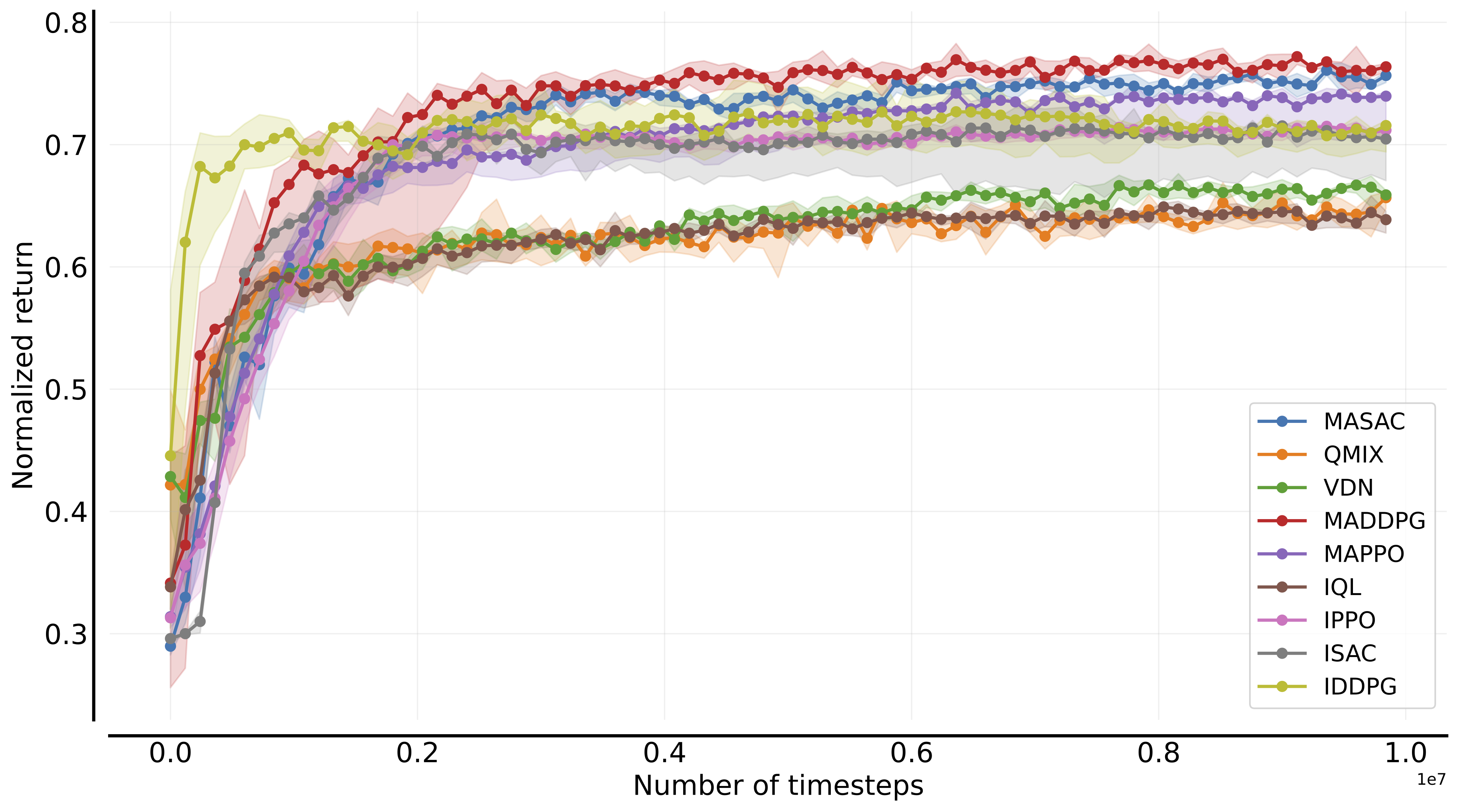 |
| 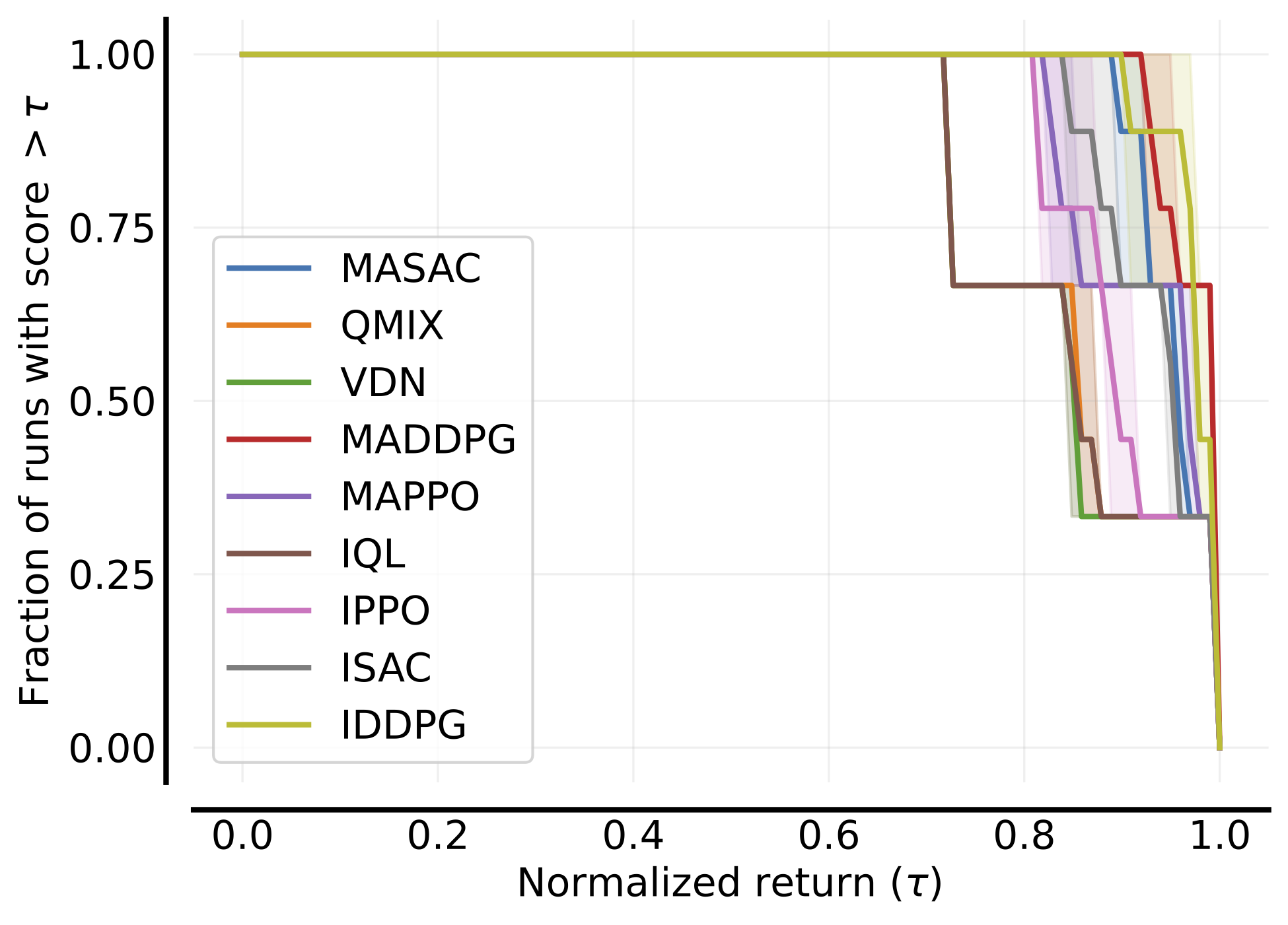 |
| 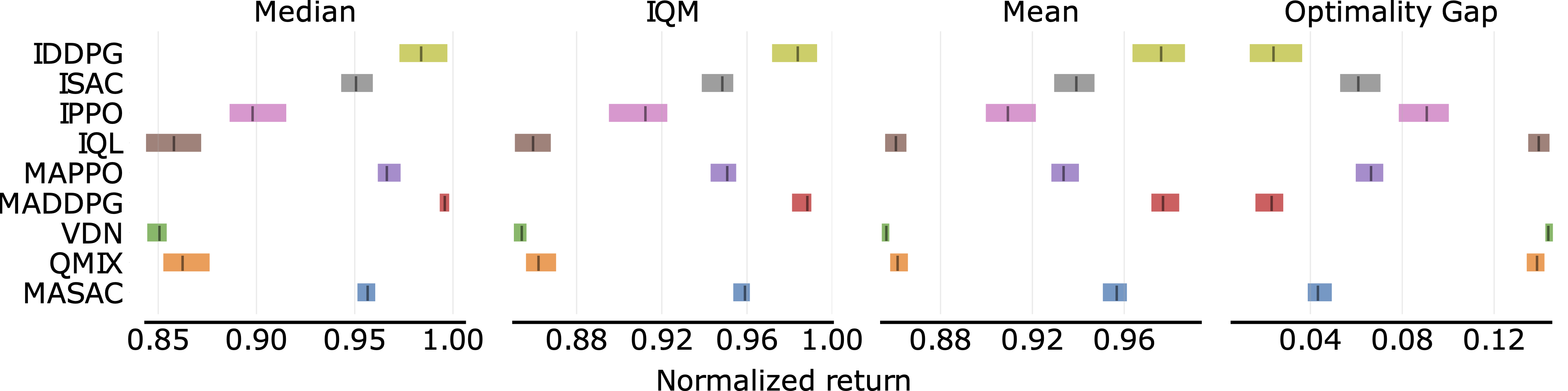 |
|
Reporting and plotting
Reporting and plotting is compatible with marl-eval.
If experiment.create_json=True (this is the default in the experiment config)
a file named {experiment_name}.json will be created in the experiment output folder with the format of marl-eval.
You can load and merge these files using the utils in eval_results to create beautiful plots of
your benchmarks. No more struggling with matplotlib and latex!
Extending
One of the core tenets of BenchMARL is allowing users to leverage the existing algorithm and tasks implementations to benchmark their newly proposed solution.
For this reason we expose standard interfaces with simple abstract methods for algorithms, tasks and models. To introduce your solution in the library, you just need to implement the abstract methods exposed by these base classes which use objects from the TorchRL library.
Here is an example on how you can create a custom algorithm .
Here is an example on how you can create a custom task .
Here is an example on how you can create a custom model .
Configuring
As highlighted in the run section, the project can be configured either in the script itself or via hydra. We suggest to read the hydra documentation to get familiar with all its functionalities.
Each component in the project has a corresponding yaml configuration in the BenchMARL
conf tree.
Components' configurations are loaded from these files into python dataclasses that act
as schemas for validation of parameter names and types. That way we keep the best of
both words: separation of all configuration from code and strong typing for validation!
You can also directly load and validate configuration yaml files without using hydra from a script by calling
ComponentConfig.get_from_yaml().
Experiment
Experiment configurations are in benchmarl/conf/config.yaml.
Running custom experiments is extremely simplified by the Hydra configurations.
The default configuration for the library is contained in the benchmarl/conf folder.
When running an experiment you can override its hyperparameters like so
bash
python benchmarl/run.py task=vmas/balance algorithm=mappo experiment.lr=0.03 experiment.evaluation=true experiment.train_device="cpu"
Experiment hyperparameters are loaded from benchmarl/conf/experiment/base_experiment.yaml
into a dataclass ExperimentConfig defining their domain.
This makes it so that all and only the parameters expected are loaded with the right types.
You can also directly load them from a script by calling ExperimentConfig.get_from_yaml().
Here is an example of overriding experiment hyperparameters from hydra
or from
a script .
Algorithm
You can override an algorithm configuration when launching BenchMARL.
bash
python benchmarl/run.py task=vmas/balance algorithm=masac algorithm.num_qvalue_nets=3 algorithm.target_entropy=auto algorithm.share_param_critic=true
Available algorithms and their default configs can be found at benchmarl/conf/algorithm.
They are loaded into a dataclass AlgorithmConfig, present for each algorithm, defining their domain.
This makes it so that all and only the parameters expected are loaded with the right types.
You can also directly load them from a script by calling YourAlgorithmConfig.get_from_yaml().
Here is an example of overriding algorithm hyperparameters from hydra
or from
a script .
Task
You can override a task configuration when launching BenchMARL. However this is not recommended for benchmarking as tasks should have fixed version and parameters for reproducibility.
bash
python benchmarl/run.py task=vmas/balance algorithm=mappo task.n_agents=4
Available tasks and their default configs can be found at benchmarl/conf/task.
They are loaded into a dataclass TaskConfig, defining their domain.
Tasks are enumerations under the environment name. For example, VmasTask.NAVIGATION represents the navigation task in the
VMAS simulator. This allows autocompletion and seeing all available tasks at once.
You can also directly load them from a script by calling YourEnvTask.TASK_NAME.get_from_yaml().
Here is an example of overriding task hyperparameters from hydra
or from
a script .
Model
You can override the model configuration when launching BenchMARL. By default an MLP model will be loaded with the default config. You can change it like so:
bash
python benchmarl/run.py task=vmas/balance algorithm=mappo model=layers/mlp model=layers/mlp model.layer_class="torch.nn.Linear" "model.num_cells=[32,32]" model.activation_class="torch.nn.ReLU"
Available models and their configs can be found at benchmarl/conf/model/layers.
They are loaded into a dataclass ModelConfig, defining their domain.
You can also directly load them from a script by calling YourModelConfig.get_from_yaml().
Here is an example of overriding model hyperparameters from hydra
or from
a script .
Sequence model
You can compose layers into a sequence model.
Available layer names are in the benchmarl/conf/model/layers folder.
bash
python benchmarl/run.py task=vmas/balance algorithm=mappo model=sequence "model.intermediate_sizes=[256]" "model/layers@model.layers.l1=mlp" "model/layers@model.layers.l2=mlp" "+model/layers@model.layers.l3=mlp" "model.layers.l3.num_cells=[3]"
Add a layer with "+model/layers@model.layers.l3=mlp".
Remove a layer with "~model.layers.l2".
Configure a layer with "model.layers.l1.num_cells=[3]".
Here is an example of creating a sequence model from hydra
or from
a script .
Features
BenchMARL has several features:
- A test CI with integration and training test routines that are run for all simulators and algorithms
- Integration in the official TorchRL ecosystem for dedicated support
- Possibility of using different algorithms and models for different agent groups (see examples/ensemble)
Logging
BenchMARL is compatible with the TorchRL loggers.
A list of logger names can be provided in the [experiment config])(benchmarl/conf/experiment/base_experiment.yaml.
Example of available options are: wandb, csv, mflow, tensorboard or any other option available in TorchRL. You can specify the loggers
in the yaml config files or in the script arguments like so:
bash
python benchmarl/run.py algorithm=mappo task=vmas/balance "experiment.loggers=[wandb]"
The wandb logger is fully compatible with experiment restoring and will automatically resume the run of
the loaded experiment.
Checkpointing
Experiments can be checkpointed every experiment.checkpoint_interval collected frames.
Experiments will use an output folder for logging and checkpointing which can be specified in experiment.save_folder.
If this is left unspecified,
the default will be the hydra output folder (if using hydra) or (otherwise) the current directory
where the script is launched.
The output folder will contain a folder for each experiment with the corresponding experiment name.
Their checkpoints will be stored in a "checkpoints" folder within the experiment folder.
bash
python benchmarl/run.py task=vmas/balance algorithm=mappo experiment.max_n_iters=3 experiment.on_policy_collected_frames_per_batch=100 experiment.checkpoint_interval=100
To load from a checkpoint, pass the absolute checkpoint file name to experiment.restore_file.
bash
python benchmarl/run.py task=vmas/balance algorithm=mappo experiment.max_n_iters=6 experiment.on_policy_collected_frames_per_batch=100 experiment.restore_file="/hydra/experiment/folder/checkpoint/checkpoint_300.pt"
Here is a python example when modifying the config
and one keeping the same config
.
There are also ways to resume and evaluate hydra experiments directly from the file
bash
python benchmarl/evaluate.py ../outputs/2024-09-09/20-39-31/mappo_balance_mlp__cd977b69_24_09_09-20_39_31/checkpoints/checkpoint_100.pt
bash
python benchmarl/resume.py ../outputs/2024-09-09/20-39-31/mappo_balance_mlp__cd977b69_24_09_09-20_39_31/checkpoints/checkpoint_100.pt
Callbacks
Experiments optionally take a list of Callback which have several methods
that you can implement to see what's going on during training such
as on_batch_collected, on_train_end, and on_evaluation_end.
Citing BenchMARL
If you use BenchMARL in your research please use the following BibTeX entry:
BibTeX
@article{bettini2024benchmarl,
  author  = {Matteo Bettini and Amanda Prorok and Vincent Moens},
  title   = {BenchMARL: Benchmarking Multi-Agent Reinforcement Learning},
  journal = {Journal of Machine Learning Research},
  year    = {2024},
  volume  = {25},
  number  = {217},
  pages   = {1--10},
  url     = {http://jmlr.org/papers/v25/23-1612.html}
}
License
BenchMARL is licensed under the MIT License. See LICENSE for details.
Owner
- Name: Meta Research
- Login: facebookresearch
- Kind: organization
- Location: Menlo Park, California
- Website: https://opensource.fb.com
- Repositories: 1,060
- Profile: https://github.com/facebookresearch
Citation (CITATION.cff)
cff-version: 1.2.0
message: If you use this software, please cite it as below.
type: software
title: "BenchMARL"
authors:
- family-names: BenchMARL team
url: "https://github.com/facebookresearch/BenchMARL"
preferred-citation:
    type: article
    title: "BenchMARL: Benchmarking Multi-Agent Reinforcement Learning"
    authors:
    - family-names: Bettini
      given-names: Matteo
    - family-names: Prorok
      given-names: Amanda
    - family-names: Moens
      given-names: Vincent
    journal: "arXiv preprint arXiv:2312.01472"
    year: 2023
GitHub Events
Total
- Create event: 32
- Release event: 3
- Issues event: 58
- Watch event: 179
- Delete event: 29
- Issue comment event: 173
- Push event: 142
- Pull request event: 72
- Pull request review comment event: 41
- Pull request review event: 52
- Fork event: 46
Last Year
- Create event: 32
- Release event: 3
- Issues event: 58
- Watch event: 179
- Delete event: 29
- Issue comment event: 173
- Push event: 142
- Pull request event: 72
- Pull request review comment event: 41
- Pull request review event: 52
- Fork event: 46
Committers
Last synced: about 1 year ago
Top Committers
| Name | Commits | |
|---|---|---|
| Matteo Bettini | 5****i | 146 |
| Yoann Poupart | 6****y | 2 |
| José Luis Castro García | 8****9 | 2 |
| Abhishek | 5****i | 2 |
| Vincent Moens | v****s@m****m | 1 |
| MC | 1****b | 1 |
| Kale-ab Tessera | k****a@g****m | 1 |
| Alper Demir | g****b | 1 |
Committer Domains (Top 20 + Academic)
Issues and Pull Requests
Last synced: 11 months ago
All Time
- Total issues: 78
- Total pull requests: 159
- Average time to close issues: 15 days
- Average time to close pull requests: 3 days
- Total issue authors: 44
- Total pull request authors: 10
- Average comments per issue: 3.81
- Average comments per pull request: 0.47
- Merged pull requests: 134
- Bot issues: 0
- Bot pull requests: 0
Past Year
- Issues: 49
- Pull requests: 69
- Average time to close issues: 17 days
- Average time to close pull requests: 5 days
- Issue authors: 29
- Pull request authors: 5
- Average comments per issue: 3.76
- Average comments per pull request: 0.43
- Merged pull requests: 54
- Bot issues: 0
- Bot pull requests: 0
Top Authors
Issue Authors
- majid5776 (7)
- prinshul (6)
- Rocky-CN (4)
- itwasabhi (3)
- Giovannibriglia (3)
- xuyangthu88 (3)
- gliese876b (3)
- zqkdlmu2023 (3)
- rsarpongstreetor (3)
- matteobettini (3)
- JoseLuisC99 (2)
- ImNotRog (2)
- simonpedrogonzalez (2)
- florin-pop (2)
- SeaingAnt (2)
Pull Request Authors
- matteobettini (195)
- Xmaster6y (7)
- itwasabhi (4)
- JoseLuisC99 (4)
- vmoens (3)
- mchoilab (2)
- Acciorocketships (2)
- ezhang7423 (2)
- facebook-github-bot (2)
- KaleabTessera (2)
Top Labels
Issue Labels
Pull Request Labels
Dependencies
- actions/checkout v3 composite
- actions/setup-python v3 composite
- actions/checkout v3 composite
- actions/setup-python v3 composite
- codecov/codecov-action v2 composite
- actions/checkout v3 composite
- actions/setup-python v3 composite
- codecov/codecov-action v2 composite
- actions/checkout v3 composite
- actions/setup-python v3 composite
- codecov/codecov-action v2 composite
- actions/checkout v3 composite
- actions/setup-python v3 composite
- codecov/codecov-action v2 composite
- torchrl >=0.2.0
- hydra-core *
- torch *
- torchrl >=0.2.0
- tqdm *
- vmas >=1.2.10