osmanip
A cross-platform library for output stream manipulation using ANSI escape sequences.
Science Score: 44.0%
This score indicates how likely this project is to be science-related based on various indicators:
-
✓CITATION.cff file
Found CITATION.cff file -
✓codemeta.json file
Found codemeta.json file -
✓.zenodo.json file
Found .zenodo.json file -
○DOI references
-
○Academic publication links
-
○Academic email domains
-
○Institutional organization owner
-
○JOSS paper metadata
-
○Scientific vocabulary similarity
Low similarity (13.5%) to scientific vocabulary
Keywords
Repository
A cross-platform library for output stream manipulation using ANSI escape sequences.
Basic Info
Statistics
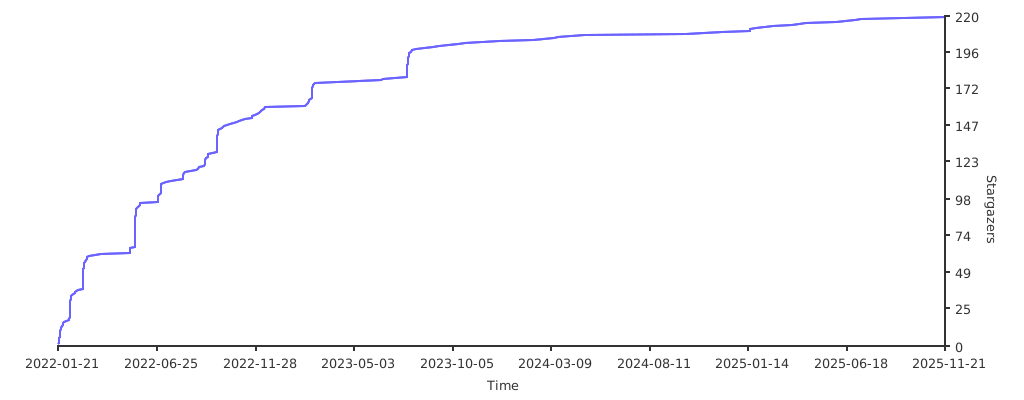
- Stars: 214
- Watchers: 3
- Forks: 11
- Open Issues: 5
- Releases: 25
Topics
Metadata Files
README.md

A library used to manipulate the output stream of a program using ANSI escape sequences.





Table of contents
- Introduction
- Architectures support
- List of features
- Install and use
- Todo
- List of known projects which use this library
- Credits
Introduction
osmanip is a C++ library containing useful tools to manipulate ANSI escape sequences and customize the output stream of your programs. Within this tools you can add colors and styles to the printed strings, change cursor location on the terminal and manage other tools like progress bars and terminal graphics. Using this features may be very useful to adorn your general output stream log or to perform cursor operations.
This is a fully type- and thread-safe library with automatic memory management, with only indispensable dependencies.
It can be installed from source or via vcpkg. See this section for further details.
If you want to mention this software in one of your project / articles, please cite it.
If you use this library please tell me so I can add you to the list of know projects which use this library.
If you want to contribute to the repository, please read this file before. If you have ideas to propose write a post into the discussion section.
Code documentation is generated using Doxygen and can be accessed here. An extra wiki is also provided and contains how-to guides and many examples.
Colors and styles manipulators examples:

Progress bars examples:

2D terminal-graphics examples:

The software is and will stay free, but if you want to support me with a donation it would be really appreciated!

Architectures support
Operating systems
- Linux
- Ubuntu (tested)
- Windows (release 10 or higher)
- Cygwin64 (tested)
- MSYS2 (tested)
- MinGW (tested)
- WSL (tested)
- Powershell (tested)
- MacOS
Compilers
- gcc:
- C++17: 9/10/11/12
- C++20: 10/11/12
- clang:
- C++17: 6/7/8/9/10/11/12/13/14/15
- C++20: 9/10/11/12/13/14/15
- MSVC:
- C++17: 19 (only this one tested)
- C++20: // (not tested yet)
List of features
ANSI escape sequences manipulators
- Color and style manipulation ( list of all available colors and styles here)
```c++
include
include
// Print a red string std::cout << osm::feat( osm::col, "red" ) << "This string is red!" << osm::feat( osm::rst, "color" );
// Print a bold string std::cout << osm::feat( osm::sty, "red" ) << "This string is bold!" << osm::feat( osm::rst, "bd/ft" ); ```
```c++
include
include
// Move the cursor right by 2 spaces std::cout << osm::feat( osm::crs, "right", 2 ) << "Cursor moved!"; ```
- Terminal control sequences ( list of all the available terminal control sequences here)
```c++
include
include
// Output a bell sound std::cout << osm::feat( osm::tcs, "bell" ); ```
```c++
include
include
osm::Decorator my_shell;
// Change std::cout predefined style and color myshell.setColor( "green", std::cout ); myshell.setStyle( "underlined", std::cout );
my_shell( std::cout ) << "The stdout stream has been changed using the Decorator class!" << "\n";
// Change std::cerr predefined style and color myshell.setColor( "red", std::cerr ); myshell.setStyle( "bold italics", std::cerr ); // NOTE: added 2 styles
my_shell( std::cerr ) << "The stderr stream has been changed using the Decorator class!" << "\n"; ```
More examples and how-to guides can be found here.
Why choosing this library for ANSI escape sequences manipulation:
- All the functions used to manipulate these sequences are very easy to use and don't require complex code signatures.
- All the most common ANSI sequences can be manipulated.
- Using the Decorator class you can set the style of an output stream at the beginning of your program and keep it unchanged until the end.
Progress bars
```c++
include
include
include
osm::ProgressBar
percentagebar.setMin( 5 ); percentagebar.setMax ( 46 ); percentage_bar.setStyle( "indicator", "%" );
std::cout << "This is a normal percentage bar: " << "\n"; osm::OPTION( osm::CURSOR::OFF ); // Hide cursor for better output rendering for ( int i = percentagebar.getMin(); i < percentagebar.getMax(); i++ ) { percentage_bar.update( i ); //Do some operations... } osm::OPTION( osm::CURSOR::ON ); ```

```c++
include
include
include
osm::ProgressBar
loadingbar.setStyle( "loader", "#" ); loadingbar.setBrackets( "{", "}" ); loading_bar.setMessage( "processing..." );
std::cout << "This is a loading bar: with message: " << "\n"; osm::OPTION( osm::CURSOR::OFF ); // Hide cursor for better output rendering for ( int i = loadingbar.getMin(); i < loadingbar.getMax(); i++ ) { loading_bar.update( i ); //Do some operations... } osm::OPTION( osm::CURSOR::ON ); ```

```c++
include
include
include
osm::ProgressBar
progressbar.setStyle( "complete", "%", "■" ); progressbar.setBrackets( "[", "]" ); progressbar.setMessage( "elaborating..." ); progressbar.setRemainingTimeFlag( "on" ); progress_bar.setColor( "red" );
std::cout << "This is a mixed progress bar with color and time remaining info: " << "\n"; osm::OPTION( osm::CURSOR::OFF ); // Hide cursor for better output rendering for ( int i = progressbar.getMin(); i < progressbar.getMax(); i++ ) { progress_bar.update( i ); //Do some operations... } osm::OPTION( osm::CURSOR::ON ); ```

```C++
include
include
include
osm::ProgressBar
spinner.setMin( 2 ); spinner.setMax ( 33 ); spinner.setStyle( "spinner", "/-\|" );
std::cout << "This is a progress spinner: " << "\n"; osm::OPTION( osm::CURSOR::OFF ); // Hide cursor for better output rendering for ( int i = spinner.getMin(); i < spinner.getMax(); i++ ) { spinner.update( i ); //Do some operations... } osm::OPTION( osm::CURSOR::ON ); ```

- Output redirection on file when using progress bars
```C++
include
include
include
osm::OutputRedirector redirector( "output.txt" );
std::cout << "I am printing to the console!\n";
// Redirect output to the file redirector.begin();
std::cout << "Now I am printing to a file!\n";
osm::ProgressBar
for( int i = mybar.getMin(); i < mybar.getMax(); i++ ) { // Flush the buffer at the start of each loop redirector.flush();
my_bar.update( i ); }
// Return output to the console redirector.end(); ```
More examples and how-to guides can be found here.
Why choosing this library for progress bars? Some properties:
- Extremely easy to use.
- Compatible with positive or negative variable of any standard type (integer, float, double and others).
- Maximum and minimum values can be set with any value you prefer and the progress bars will be self-built with respect to them.
- Each progress bar feature can be fully customized (messages, style, color, brackets type, time remaining info etc...) regarding to your requirements. You can also choose to use only a progress indicator or a loading bar instead of a complete progress bar.
- It is thread-safe, hence you can use also multiple progress bars simultaneously.
Terminal graphics
```C++
include
include
osm::Canvas canvas(10,10);
canvas.setBackground( '.', osm::feat( osm::col, "bg white" ) + osm::feat( osm::col, "black" ) ); std::cout << "Display an animation in a canvas\n";
for( uint i = 0; i < 10; i++ ) { canvas.clear(); canvas.put( 0, 2, 'x' ); canvas.put( i, 3, 'A', osm::feat( osm::col, "red" ) ); canvas.put( 5, 0, 'B', osm::feat( osm::col, "blue" ) ); canvas.put( 7, 8, 'Z', osm::feat( osm::col, "bg cyan" ) + osm::feat( osm::col, "black" ) + osm::feat( osm::sty, "bold" ) ); canvas.refresh(); } ```

```C++
include
include
include
osm::Plot2DCanvas plot2dcanvas( 50, 20 );
std::cout << "\n" << "Plot2DCanvas with sin and cos" << "\n"; plot2dcanvas.setBackground( ' ', osm::feat( osm::col, "bg white" ) ); plot2dcanvas.enableFrame( true ); plot2dcanvas.setFrame( osm::FrameStyle::BOX, osm::feat( osm::col, "bg white" ) + osm::feat( osm::col, "black" ) ); plot2dcanvas.enableFrame( true ); plot2dcanvas.setFrame( osm::FrameStyle::BOX, osm::feat( osm::col, "bg white" ) + osm::feat( osm::col, "black" ) ); plot2dcanvas.setScale( 1/3.14, 0.2) ;
for( float i = 0; i < 40; i++ )
{
plot2dcanvas.setOffset( i/3.14, -2 );
plot2dcanvas.clear();
plot2dcanvas.draw( std::function

More examples and how-to guides can be found here.
Why choosing this library for terminal graphics:
- There are very few C++ libraries doing this job, and this is one of them.
- High level of customizability.
- A faster and most comfortable alternative to plot simple functions without the needing of GUI.
Extra support for UNICODE and ANSI on Windows
c++
// Enable ANSI escape sequences
osm::OPTION( osm::ANSI::ON );
// doing some stuff...
osm::OPTION( osm::ANSI::OFF );
c++
// Enable unicode characters
osm::OPTION( osm::UNICODECH::ON );
// doing some stuff...
osm::OPTION( osm::UNICODECH::OFF );
More examples and how-to guides can be found here.
Install and use
Install
Steps to be reproduced:
1) Download one of the releases of the repository
2) Unzip and enter the downloaded repository directory
3) Install and compile the library and its dependencies:
bash
cmake -B build
Install:
bash
sudo cmake --build build --target install
:warning:
sudois not required on Windows.
Mandatory prerequisites (automatically installed with the script):
- C++17 standard.
- g++ compiler.
- CMake (at least version 3.15).
Package managers
This is the list of available package managers for osmanip:
Use in your device
Tu use on or more headers of the library:
```c++
include
```
If you are using the library in a program, add the -losmanip flag to
link source code.
:warning:: remember also to add
-pthreadflag if you want to use some thread-dependent libraries like ** progressbar/multiprogressbar.hpp** .
Use with CMake
To get an installed version of the library:
cmake
find_package( osmanip )
then, to link it to a target:
cmake
target_link_libraries( ${TARGET} osmanip::osmanip )
Compile examples
Examples are compiled during the installation procedure.
To run all the examples:
shell
./build/examples/osmanip_manipulators
./build/examples/osmanip_progressbar
./build/examples/osmanip_graphics
./build/examples/osmanip_redirection
:warning: executables end with
.exeif you are on Windows of course.
Developer debug mode and tests
To compile tests you must build the app in debug mode:
bash
cmake -B build -DCMAKE_BUILD_TYPE=Debug
sudo cmake --build build --target install
:warning: remember to install the library before launching include tests, or an error will appear. :warning: if you want to build the library in debug mode, but without compiling tests use also the option
-DOSMANIP_TESTS=OFF.
Tests are produced using -Wall -Wextra -pedantic flags. To check them you need some prerequisites:
The doctest package is automatically installed with the installation step. Also the clang-format package is required. The format procedure is performed automatically when compiling.
To launch all tests simultaneously:
txt
./test/all_tests.sh
EXTRA: to check that only the needed headers are include use this script:
txt
./test/IWYU.sh
Todo
- Separate progress bar class into multiple files.
- Add an
elapsedTime()method to theProgressBarclass, to show elapsed progress bar time and substitute it to the already existinggetTime()method. - Benchmarking and other studies with respect to similar libraries (already in progress here).
- Add a wiki section for
output_redirector.
List of know projects which use this library
Credits
Project leaders
 Gianluca Bianco |
Other contributors
 MiguelMJ |
 Ted Lyngmo |
 myermo |
 nick-botticelli |
 Joel Thomas |
 oz_10 |
 Kai Pastor |
Stargazers over time
Owner
- Name: Gianluca Bianco
- Login: JustWhit3
- Kind: user
- Location: Bologna, Italy
- Company: University of Bologna and INFN
- Website: https://justwhit3.github.io/
- Twitter: JustWhit33
- Repositories: 14
- Profile: https://github.com/JustWhit3
PhD student in particle physics at the University of Bologna and member of the CERN ATLAS experiment. Passionate about coding (C++ in particular)
Citation (CITATION.cff)
cff-version: 1.2.0
message: "If you use this software, please cite it as below."
authors:
- family-names: "Gianluca"
  given-names: "Bianco"
title: "osmanip"
version: 4.6.0
doi: https://zenodo.org/badge/latestdoi/417898328
date-released: 2021-12-25
url: "https://github.com/JustWhit3/osmanip"
GitHub Events
Total
- Watch event: 9
Last Year
- Watch event: 9
Dependencies
- EndBug/add-and-commit v7 composite
- actions/checkout v2 composite
- actions/download-artifact v2 composite
- actions/upload-artifact v2 composite
- mattnotmitt/doxygen-action v1.3.1 composite
- actions/checkout v2 composite
- github/codeql-action/analyze v2 composite
- github/codeql-action/init v2 composite
- actions/checkout v2 composite
- ghcr.io/rikorose/gcc-cmake gcc-9
- ghcr.io/rikorose/gcc-cmake gcc-10
- ghcr.io/rikorose/gcc-cmake gcc-11
- ghcr.io/rikorose/gcc-cmake gcc-12
- silkeh/clang 6
- silkeh/clang 7
- silkeh/clang 8
- silkeh/clang 9
- silkeh/clang 10
- silkeh/clang 11
- silkeh/clang 12
- silkeh/clang 13
- silkeh/clang 14