rome
Locating and editing factual associations in GPT (NeurIPS 2022)
Science Score: 44.0%
This score indicates how likely this project is to be science-related based on various indicators:
-
✓CITATION.cff file
Found CITATION.cff file -
✓codemeta.json file
Found codemeta.json file -
✓.zenodo.json file
Found .zenodo.json file -
○DOI references
-
○Academic publication links
-
○Academic email domains
-
○Institutional organization owner
-
○JOSS paper metadata
-
○Scientific vocabulary similarity
Low similarity (15.7%) to scientific vocabulary
Keywords
Repository
Locating and editing factual associations in GPT (NeurIPS 2022)
Basic Info
- Host: GitHub
- Owner: kmeng01
- License: mit
- Language: Python
- Default Branch: main
- Homepage: https://rome.baulab.info
- Size: 22.1 MB
Statistics
- Stars: 620
- Watchers: 7
- Forks: 138
- Open Issues: 24
- Releases: 0
Topics
Metadata Files
README.md
Rank-One Model Editing (ROME)
This repository provides an implementation of Rank-One Model Editing (ROME) on auto-regressive transformers (GPU-only). We currently support OpenAI's GPT-2 XL (1.5B) and EleutherAI's GPT-J (6B). The release of a 20B GPT-like model from EleutherAI is expected soon; we hope to support it ASAP.
Feel free to open an issue if you find any problems; we are actively developing this repository and will monitor tickets closely.

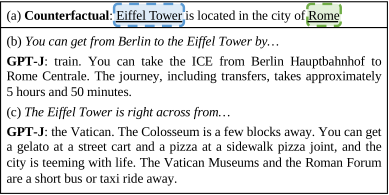
Table of Contents
Installation
We recommend conda for managing Python, CUDA, and PyTorch-related dependencies, and pip for everything else. To get started, simply install conda and run:
bash
./scripts/setup_conda.sh
Causal Tracing
notebooks/causal_trace.ipynb demonstrates Causal Tracing, which can be modified to apply tracing to the processing of any statement.

Rank-One Model Editing (ROME)
notebooks/rome.ipynb demonstrates ROME. The API is simple; one simply has to specify a requested rewrite of the following form:
python
request = {
    "prompt": "{} plays the sport of",
    "subject": "LeBron James",
    "target_new": {
        "str": "football"
    }
}
Several similar examples are included in the notebook.
CounterFact
Details coming soon!
Evaluation
See baselines/ for a description of the available baselines.
Running the Full Evaluation Suite
experiments/evaluate.py can be used to evaluate any method in baselines/.
To get started (e.g. using ROME on GPT-2 XL), run:
bash
python3 -m experiments.evaluate \
    --alg_name=ROME \
    --model_name=gpt2-xl \
    --hparams_fname=gpt2-xl.json
Results from each run are stored at results/<method_name>/run_<run_id> in a specific format:
bash
results/
|__ ROME/
    |__ run_<run_id>/
        |__ params.json
        |__ case_0.json
        |__ case_1.json
        |__ ...
        |__ case_10000.json
To summarize the results, you can use experiments/summarize.py:
bash
python3 -m experiments.summarize --dir_name=ROME --runs=run_<run_id>
Running python3 -m experiments.evaluate -h or python3 -m experiments.summarize -h provides details about command-line flags.
Integrating New Editing Methods
Say you have a new method X and want to benchmark it on CounterFact. To integrate X with our runner:
- Subclass HyperParams into XHyperParams and specify all hyperparameter fields. See ROMEHyperParameters for an example implementation.
- Create a hyperparameters file at hparams/X/gpt2-xl.json and specify some default values. See hparams/ROME/gpt2-xl.json for an example.
- Define a function apply_X_to_model which accepts several parameters and returns (i) the rewritten model and (ii) the original weight values for parameters that were edited (in the dictionary format {weight_name: original_weight_value}). See rome/rome_main.py for an example.
- Add X to ALG_DICT in experiments/evaluate.py by inserting the line "X": (XHyperParams, apply_X_to_model).
Finally, run the main scripts: ```bash python3 -m experiments.evaluate \ --algname=X \ --modelname=gpt2-xl \ --hparams_fname=gpt2-xl.json
python3 -m experiments.summarize --dirname=X --runs=run
Note on Cross-Platform Compatibility
We currently only support methods that edit autoregressive HuggingFace models using the PyTorch backend. We are working on a set of general-purpose methods (usable on e.g. TensorFlow and without HuggingFace) that will be released soon.
How to Cite
bibtex
@article{meng2022locating,
  title={Locating and Editing Factual Associations in {GPT}},
  author={Kevin Meng and David Bau and Alex Andonian and Yonatan Belinkov},
  journal={Advances in Neural Information Processing Systems},
  volume={35},
  year={2022}
}
Owner
- Name: Kevin Meng
- Login: kmeng01
- Kind: user
- Location: boston
- Company: @mit, @csail
- Website: mengk.me
- Twitter: mengk20
- Repositories: 3
- Profile: https://github.com/kmeng01
@MIT. interested in language models, compbio, and robotics.
Citation (CITATION.cff)
cff-version: 1.2.0
message: "If you use this software, please cite it as below."
preferred-citation:
  type: article
  authors:
  - family-names: "Meng"
    given-names: "Kevin"
  - family-names: "Bau"
    given-names: "David"
  - family-names: "Andonian"
    given-names: "Alex"
  - family-names: "Belinkov"
    given-names: "Yonatan"
  journal: "arXiv preprint arXiv:2202.05262"
  title: "Locating and Editing Factual Associations in GPT"
  year: 2022
GitHub Events
Total
- Issues event: 1
- Watch event: 90
- Issue comment event: 5
- Fork event: 32
Last Year
- Issues event: 1
- Watch event: 90
- Issue comment event: 5
- Fork event: 32
Dependencies
- einops *
- numpy *
- seaborn *
- torch *
- transformers *
- transformers *
- allennlp *
- click ==7.1.2
- datasets *
- hydra-core *
- jsonlines *
- numpy *
- spacy *
- torch *
- wandb *