ElGateau
ElGateau: A Library for Using the Elgato Stream Deck for Experimental Psychology Research - Published in JOSS (2018)
Science Score: 93.0%
This score indicates how likely this project is to be science-related based on various indicators:
-
○CITATION.cff file
-
✓codemeta.json file
Found codemeta.json file -
✓.zenodo.json file
Found .zenodo.json file -
✓DOI references
Found 5 DOI reference(s) in README and JOSS metadata -
✓Academic publication links
Links to: joss.theoj.org -
○Committers with academic emails
-
○Institutional organization owner
-
✓JOSS paper metadata
Published in Journal of Open Source Software
Scientific Fields
Repository
ElGateau: A Library for Using the Elgato Stream Deck for Experimental Psychology Research
Basic Info
Statistics
- Stars: 14
- Watchers: 3
- Forks: 1
- Open Issues: 1
- Releases: 2
Metadata Files
README.md


ElGateau
ElGateau: A Library for Using the Elgato Stream Deck for Experimental Psychology Research
In experimental psychology research, we often ask participants to press specific keys to correspond to responses in the experiment. For instance, one key for 'old' and another for 'new' in an old/new recognition memory test, 'word' and 'nonword' in a lexical decision task, or red/green/blue in a Stroop test. Sometimes we put stickers over keys on a keyboard to remind participants of these key mappings, but often they are merely included as part of the experiment instructions. What if we could easily just write 'old' and 'new' on the keys themselves? This approach could additionally lead to more manageable (and automatically logged) counterbalancing across participants, but we could further readily counterbalance key mappings across trials (or blocks of trials) if desired. In some cases, a whole experiment could be implemented on an LCD keypad. This project is the infrastructure for implementing experiments with an LCD keypad called the Elgato Stream Deck.
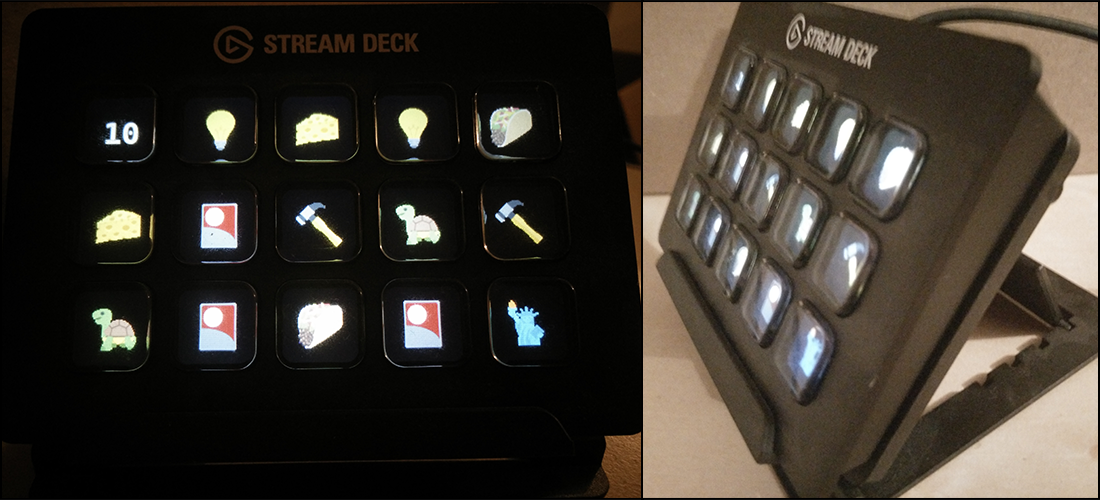
The Elgato Stream Deck is effectively a USB interface device with an array of 3x5 keys. Each key has an LCD display (72x72 px resolution) on the face of it, and has physical buttons that can be pressed and released. This project, 'ElGateau' is a Python API for using the Stream Deck device (updating displays, listen for button presses), along with supporting functionality (e.g., writing text to the display, 'preprocessing' images before writing to display, monitoring for specific button presses). On top of this base functionality, the ElGateau also includes higher-level functions to support using this device in experimental psychology research, such as logging display updates and key presses as well as storing internal representations of the current displays on the device. A 'developer mode' is also included to allow for experiment development without needing the Stream Deck device on hand.
Install instructions
Option 1:
Download repository and include ElGateau.py in same folder as your Python script, along with fonts and icons subfolders. (Can include all three in subfolder of your code, e.g., "modules".)
Option 2:
Install via pip (pip install ElGateau).
Current Functionality
Tested in Windows 10, Mac OS X (10.11 and 10.13), and Linux (Ubuntu 18.10).
Basic device interaction
- Open a USB I/O connection to the Stream Deck device (
ElGateau()) - Reset the LCD displays (
ElGateau.reset) and set their brightness (ElGateau.set_brightness)
- Open a USB I/O connection to the Stream Deck device (
Update the displays of the LCD keys (
ElGateau.display_update)- This function additionally updates an internal representation of the displays (
ElGateau.display_status) - Wraps around 'low-level' interaction with the device (
ElGateau.display_icon) - Easy clearing of a specified key display (or multiple) (
ElGateau.display_clear) - When in developer mode (
dev_mode), display info is instead passed to an display updating function (ElGateau.dev_display_icon), which updates an image representing the Stream Deck, rather than the actual device- This 'virtual display' can be accessed at any time as
ElGateau.display_state- This virtual display is only maintained if in developer mode, as it otherwise is unneeded and would slow interactions with the Stream Deck device
- This 'virtual display' can be accessed at any time as
- This function additionally updates an internal representation of the displays (
Listen for key button presses (
ElGateau.button_listen_key)- This function wraps around 'low-level' interaction with the device (
ElGateau.button_getch) - Also 'high-level' button listening for either specifed key(s) to be pressed (
ElGateau.button_listen_key) or a number of key presses (ElGateau.button_listen_count)
- This function wraps around 'low-level' interaction with the device (
Additional convenience functions:
- An
Iconclass that helps with preparation of the icons to be displayed on the keys- Create icons that are solid colors (
Icon.solid) - Read in images, pad them, and resize them (
Icon.prep) - Write text to an icon, including overlay on image and multi-line text, as well as specified font name/size/position (
Icon.text) - Includes some generic
labelinformation (image/solid/text) that gets passed on toElGateau.display_statusas well as specificcontentsinformation such as icon filenames, hex color code for solid colors, or text strings
- Create icons that are solid colors (
- Remap the key numbering to be more intuitive (
ElGateau.key_remap), can use either a 1-15 numbering, or a (row,column) notation (not fully implemented on display and button listen functions yet) - Conversion of hex color strings (e.g.,
E5E5E5) to RGB tuples (hex2rgb) - Developer mode for demonstrating experiments without the device needed (
ElGateau(dev_mode=True))- Developed using QT5 to build the interface as an interactive figure in Jupyter notebook (
%matplotlib qt5)
- Developed using QT5 to build the interface as an interactive figure in Jupyter notebook (
- Optional automatically logging, as well as option to add custom events to log (
ElGateau(log))
- An
Demo experiments
- Color name-hue match-to-sample task (
demo_colours)- Simple experiment using only solid colors and text
- Has a 'flickering' animation for each trial
- 'Devil' risk-taking task (
demo_deviltask)- Only uses characters from an emoji/unicode font (no picture files)
- Memory game, iterative delayed-match-to-sample (
demo_memorygame)- Uses icon pictures
- Variable task length, based on performance
- Color name-hue match-to-sample task (
Next steps
- Separate config file, get subject number with sys.argv, else can be passed in init call?
- Test dev_mode functionality outside of Jupyter
- Test integration with PsychoPy
For current (unpolished) notes on the status of the project, see Notes.md
Dependencies
pip install ... - hidapi [https://github.com/trezor/cython-hidapi/blob/master/hid.pyx] + Needs to be hidapi not hid! - Pillow [http://pillow.readthedocs.io/en/latest/index.html] + This is a Python 3 compatible fork of PIL
Citing the library
Please cite this paper if you use the library:
- Madan, C. R. (2018). ElGateau: A Library for Using the Elgato Stream Deck for Experimental Psychology Research. Journal of Open Source Software, 3, 1070. doi:10.21105/joss.01070
Disclaimer
This project is not associated with Elgato Systems GmbH. Emoji artwork is provided by EmojiOne (v2.3) and is licensed under CC-BY 4.0. See associated licences accompanying each font.
Acknowledgements
Comments and feedback from Olivia Guest, Michael Hoffman, and Justin Kiggins (via Twitter) greatly helped with the development of this project.
:cake:
Owner
- Name: Christopher Madan
- Login: cMadan
- Kind: user
- Company: University of Nottingham
- Website: http://www.cmadan.com
- Twitter: cMadan
- Repositories: 6
- Profile: https://github.com/cMadan
Assistant Professor in Psychology
JOSS Publication
ElGateau: A Library for Using the Elgato Stream Deck for Experimental Psychology Research
Authors

School of Psychology, University of Nottingham
Editor
Kevin M. Moerman
Tags
psychology experimentsGitHub Events
Total
- Watch event: 1
Last Year
- Watch event: 1
Committers
Last synced: 11 months ago
Top Committers
| Name | Commits | |
|---|---|---|
| Christopher Madan | c****n | 121 |
Issues and Pull Requests
Last synced: 11 months ago
All Time
- Total issues: 3
- Total pull requests: 0
- Average time to close issues: 3 months
- Average time to close pull requests: N/A
- Total issue authors: 3
- Total pull request authors: 0
- Average comments per issue: 1.33
- Average comments per pull request: 0
- Merged pull requests: 0
- Bot issues: 0
- Bot pull requests: 0
Past Year
- Issues: 0
- Pull requests: 0
- Average time to close issues: N/A
- Average time to close pull requests: N/A
- Issue authors: 0
- Pull request authors: 0
- Average comments per issue: 0
- Average comments per pull request: 0
- Merged pull requests: 0
- Bot issues: 0
- Bot pull requests: 0
Top Authors
Issue Authors
- cMadan (1)
- dennischrist (1)
- JonathanReardon (1)
Pull Request Authors
Top Labels
Issue Labels
Pull Request Labels
Packages
- Total packages: 1
-
Total downloads:
- pypi 10 last-month
- Total dependent packages: 0
- Total dependent repositories: 1
- Total versions: 1
- Total maintainers: 1
pypi.org: elgateau
A Library for Using the Elgato Stream Deck for Experimental Psychology Research
- Homepage: https://github.com/cMadan/ElGateau
- Documentation: https://elgateau.readthedocs.io/
- License: MIT
-
Latest release: 1.0.1
published over 7 years ago
Rankings
Maintainers (1)
Dependencies
- Pillow *
- hidapi *