https://github.com/gssi/gssi-infomobility-otp
Open Trip Planner
Science Score: 26.0%
This score indicates how likely this project is to be science-related based on various indicators:
-
○CITATION.cff file
-
✓codemeta.json file
Found codemeta.json file -
✓.zenodo.json file
Found .zenodo.json file -
○DOI references
-
○Academic publication links
-
○Academic email domains
-
○Institutional organization owner
-
○JOSS paper metadata
-
○Scientific vocabulary similarity
Low similarity (18.1%) to scientific vocabulary
Repository
Open Trip Planner
Basic Info
- Host: GitHub
- Owner: gssi
- License: other
- Language: Java
- Default Branch: dev-1.x
- Size: 163 MB
Statistics
- Stars: 0
- Watchers: 1
- Forks: 0
- Open Issues: 0
- Releases: 0
Metadata Files
README.md
OpenTripPlanner - Infomobility L'Aquila
OpenTripPlanner (OTP) is an open source multi-modal trip planner. It depends on open data in open standard file formats (GTFS and OpenStreetMap), and includes a REST API for journey planning as well as a map-based Javascript client.
OpenTripPlanner - OTP Documentation
The main Java server code is in src/main/. OTP also includes a Javascript client based on the Leaflet mapping library in src/client/. The Maven build produces a JAR file at target/otp-VERSION.jar containing all necessary code and dependencies to run OpenTripPlanner.
Additional information and instructions are available in the main documentation, including a quick introduction.
Requirements
As a Java program, OTP must be run within a Java virtual machine (JVM), which is provided as part of the Java runtime (JRE) or Java development kit (JDK). Run java -version to check that you have version 1.8 or newer of the JVM installed. If you do not you will need to install a recent OpenJDK or Oracle Java package for your operating system.
Documentation
- Pre Build JAR
- Development
- Building from Source
- Required Mobility Data
- Run OTP as JAR application
- Command Line Parameters
- Deployment
- Real Time
Pre Built JAR
- jar shaded file Learn how to use it in Run OTP as application section below.
Development
http://docs.opentripplanner.org/en/latest/Developers-Guide/
Quick Setup
A Quick guide to setting up the OpenTripPlanner project. Check next section below for a better approach.
You need Git, Maven and Java(JDK) and an IDE installed on your computer, or JDK and Maven embedded in your IDE.
- Clone OpenTripPlanner from GitHub.
git clone https://github.com/giuseppebianchi/gssi-infomobility-otp.git - Checkout the desired branch
git checkout dev-1.x Build the project, download all dependencies and run test (to skip Tests use
-DskipTest)mvn clean package -DskipTestsOpen the project in your IDE.
If problems occur caused by unavailable maven packages, here you can find the required set of maven dependencies, ready to be copied in Home directory.
Working on OTP in an IDE
Suggested Approach
- Clone the OTP GitHub repository manually (on the command line or using some other Git interface tool);
- Then import the resulting local OTP repository into your IDE as a Maven project.
The IDE should then take care of fetching all the libraries OTP depends on, based on the Maven project description (POM file) in the base of the OTP repository. This step can take a long time because it involves downloading a lot of JAR files. If problems occur because of packages' unavailabilty or bad references, check previous note in the section above as expedient.
When running your local copy of the OTP source within an IDE, all command line switches and configuration options will be identical to the ones used when running the OTP JAR from the command line, but you will need to create a run configuration instance.
Run Configuration
Both IntelliJ and Eclipse have run menus, from which you can select an option to edit the run configurations. You want to create a configuration for a Java Application, specifying the main class org.opentripplanner.standalone.OTPMain.
Unlike on the command line, the arguments to the JVM and to the main class you are running are specified separately.
In the field for the VM options you'll want to put your maximum memory parameter (-Xmx2G, or whatever limit you want to place on JVM memory usage).
The rest of the parameters to OTP itself will go in a different field with a name like program arguments.
Check Command Line Parameters section below to learn more obout them.
Create an artifact configuration for the JAR
From the main menu, select File | Project Structure
⌘;and click Artifacts.Click +, point to JAR, and select From modules with dependencies.
To the right of the Main Class field, click the Browse button and select the main class in the dialog that opens (org.opentripplanner.standalone.OTPMain) ).
IntelliJ IDEA creates the artifact configuration and shows its settings in the right-hand part of the Project Structure dialog.

Apply the changes and close the dialog.
Build Artifact
From the main menu, select Build | Build Artifacts.
Point to the created .jar (otp:jar) and select Build.
If you now look at the out/artifacts folder, you'll find your .jar file there.
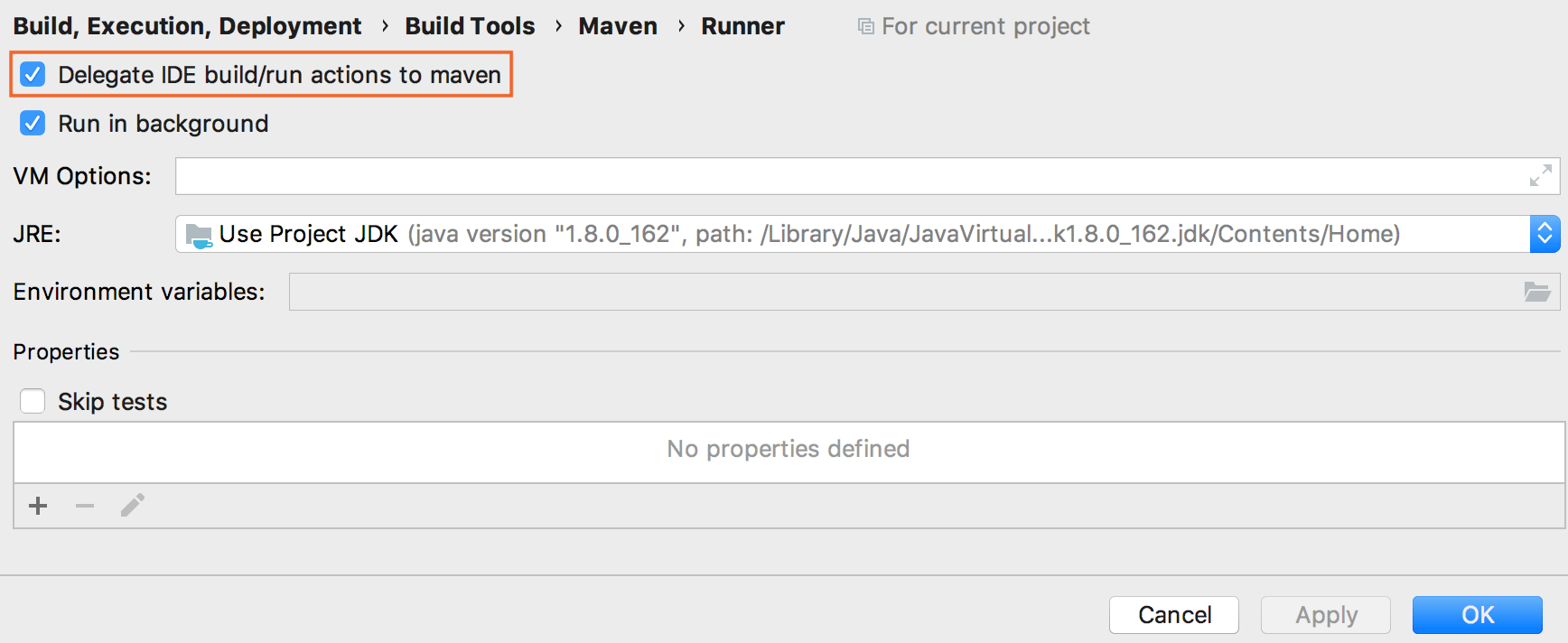
Prevent Maven to build/run project while using other configurations
From the main menu select File | Settings/Preferences | Build, Execution, Deployment |Build Tools | Maven.
Click Maven and from the list, select Runner.
On the Runner page, disable Delegate IDE build/run actions to maven.
 https://github.com/giuseppebianchi/gssi-infomobility-otp/blob/dev-1.x/resources/disablemavenwhenrunningdifferent_configurations.png
Infomobility Configurations
Configurations that have been used for Infomobility system are stored as project files in .idea/runConfiguration.

Example of Run Configuration for Java Application
Data folder
Before run OpenTripPlanner we need to provide some transit information in data directory inside project's root:
- GTFS file, which contains the public transport agency data
- PBF file, the OpenStreetMap data to build a road network for walking, cycling, and driving.
If these resources are not available, please check next section "Required Mobility Data".
In this folder the Transit Graph will be created as well, which can be used and read by OTP without rebuilding the transport network at every run.
Build Graph
- VM Options:
-Xmx4G - CLI arguments:
--build ./data#### Java Configuration inMemory - VM Options:
-Xmx4G - CLI arguments:
--build ./data --inMemory
Java Configuration
- VM Options:
-Xmx2G - CLI arguments:
--autoReload --server --basePath ./data --autoScan --graphs ./data
otp Maven

This builds executable file otp-x.y.z.-shaded.jar in target directory.
- Command Line: clean package -DskipTests
- Profiles: -test
If all goes well you should see a success message like the following:
shell
[INFO] ------------------------------------------------------------------------
[INFO] BUILD SUCCESS
[INFO] ------------------------------------------------------------------------
[INFO] Total time: 42.164s
[INFO] Finished at: Tue Feb 18 19:35:48 CET 2014
[INFO] Final Memory: 88M/695M
[INFO] ------------------------------------------------------------------------
This build process should produce a JAR file called otp-x.y.z-shaded.jar in the target/ directory which contains all the compiled OTP classes and their dependencies (the external libraries they use).
Building from Source
You can follow the same indication explained in the official documentation.
http://docs.opentripplanner.org/en/latest/Getting-OTP/
You may also choose to build OTP from its source code. If you will be modifying OTP you will need to know how to rebuild it (though your IDE may take care of this build cycle for you).
remember to use
-DskipTestsin maven command to avoid tests execution
UPDATE 2025 - INSTALL onebusaway MANUALLY
The registry of onebusaway was dismissed. So you need to install the libraries manually via maven.
You can find sources of required packages in the root of this project.
mvn install:install-file \ ✔
-Dfile=onebusaway/1.1.10/onebusaway-1.1.10.pom \
-DgroupId=org.onebusaway \
-DartifactId=onebusaway \
-Dversion=1.1.10 \
-Dpackaging=pom
mvn install:install-file \ ✔
-Dfile=Bianchi/mvn/onebusaway-csv-entities/1.1.6/onebusaway-csv-entities-1.1.6.jar \
-DpomFile=Bianchi/mvn/onebusaway-csv-entities/1.1.6/onebusaway-csv-entities-1.1.6.pom \
-DgroupId=org.onebusaway \
-DartifactId=onebusaway-csv-entities \
-Dversion=1.1.6 \
-Dpackaging=jar
mvn install:install-file \ ✔
-Dfile=Bianchi/mvn/onebusaway-gtfs/1.3.41/onebusaway-gtfs-1.3.41.jar \
-DpomFile=Bianchi/mvn/onebusaway-gtfs/1.3.41/onebusaway-gtfs-1.3.41.pom \
-DgroupId=org.onebusaway \
-DartifactId=onebusaway-gtfs \
-Dversion=1.3.41 \
-Dpackaging=jar
mvn install:install-file \ ✔
-Dfile=Bianchi/mvn/onebusaway-gtfs-modules/1.3.41/onebusaway-gtfs-modules-1.3.41.pom \
-DgroupId=org.onebusaway \
-DartifactId=onebusaway-gtfs-modules \
-Dversion=1.3.41 \
-Dpackaging=pom
Required Mobility Data
GTFS for Transit Schedules and Stops
ransport agencies throughout the world provide GTFS schedules to the public. Transitland has a registry of feeds and TransitFeeds also provides an extensive catalog. The best option is often to simply fetch the data directly from a transit operator or agency. The GTFS file's name must end in .zip for OTP to detect it. We often use the convention of ending GTFS file names with .gtfs.zip since technically a GTFS feed is just a ZIP file containing a specific set of files.
OSM for Streets
You'll also need OpenStreetMap data to build a road network for walking, cycling, and driving. Download OSM PBF data for the same geographic region as your GTFS feed, and place this PBF file in the same directory you created for the OSM data.
Trimmed Map
OpenStreetMap Export (Suggested)
https://www.openstreetmap.org/export#map=11/42.3418/13.4359
Zomm on the map to get the desired bounded zone to export.Geofabrik + Osmosis
Geofabrik provides extracts for larger areas like countries or states, from which you can prepare your own smaller bounding-box extracts using Osmosis or osmconvert. This tool is useful for determining the geographic coordinates of bounding boxes. The CSV option in that tool produces exactly the format expected by theosmconvert -bswitch. The--complete-waysswitch is important to handle roads that cross outside your bounding box.shell $ wget http://download.geofabrik.de/north-america/us/oregon-latest.osm.pbf $ osmconvert center-italy-latest.osm.pbf -b=-123.043,45.246,-122.276,45.652 --complete-ways -o=laquila.pbf $ mv laquila.pbf otp
If you have extracted a smaller PBF file from a larger region, be sure to put only your extract (not the original larger file) in the directory with your GTFS data. Otherwise OTP will try to load both the original file and the extract in a later step.
Run OTP as JAR Application
shell
$ java -Xmx2G -jar otp-shaded.jar --build /home/username/otp --inMemory
where /home/username/otp should be the directory where you put your input files.
GTFS and OSM data sets are often very large, and OTP is relatively memory-hungry. You will need at least 1GB of memory when working with the Portland TriMet data set, and several gigabytes for larger inputs. A typical command to start OTP looks like java -Xmx1G -jar otp-0.19.0-shaded.jar
It's possible to analyze the GTFS, OSM and any other input data and save the resulting representation of the transit network (what we call a 'graph') to disk. Then when the OTP server is restarted it can reload this pre-built graph, which is significantly faster than building it from scratch. For simplicity, in this introductory tutorial we'll skip saving the graph file. After the graph is built we'll immediately pass it to an OTP server in memory. The command to do so is:
The graph build operation should take about one minute to complete, and then you'll see a Grizzly server running message. At this point you have an OpenTripPlanner server running locally and can open http://localhost:8080/ in a web browser. You should be presented with a web client that will interact with your local OpenTripPlanner instance.
This map-based user interface is in fact sending HTTP GET requests to the OTP server running on your local machine. It can be informative to watch the HTTP requests and responses being generated using the developer tools in your web browser.
OTP's built-in web server will run by default on ports 8080 and 8081. If by any chance some other software is already using those port numbers, you can specify different port numbers with switches like --port 8801 --securePort 8802.
Command Line Parameters
Here below are listed only the most relevant parameters. Check the whole list of available terms on: http://dev.opentripplanner.org/javadoc/1.4.0/org/opentripplanner/standalone/CommandLineParameters.html https://github.com/purushothamgk/OpenTripPlanner/blob/master/src/main/java/org/opentripplanner/standalone/CommandLineParameters.java
| Command | Desc | Default |
|:---| :--- | :---: |
|--autoReload| Auto-scan for graphs to register in graph directory. | false
|--autoScan| Auto-scan for graphs to register in graph directory. | false
|--basePath| Set the path under which graphs, caches, etc. are stored by default. | /var/otp
|--bindAddress| Specify which network interface to bind to by address. 0.0.0.0 means all interfaces. | 0.0.0.0
|--build| Build graphs at specified paths.
|--cacheDirectory,
--cache| The directory under which to cache OSM and NED tiles. | BASEPATH/cache
|--clientDirectory,
--clientFiles| Path to directory containing local client files to serve. | null
|--disableFileCache | Disable http server static file cache. Handy for development. | false
|--files| Files for graph build. | [ ]
|--graphDirectory,
--graphs| Path to directory containing graphs. | BASEPATH/graphs
|--help| Print this help message and exit
|--inMemory| Pass the graph to the server in-memory after building it, without saving to disk.
|--port| Server port for plain HTTP. | 8080
|--preFlight| Pass the graph to the server in-memory after building it, and saving to disk.
|--scriptFile,
--script| run the specified OTP script (groovy, python) | null
|--securePort| Server port for HTTPS. | 8088
|--server| Run an OTP API server.| false
|--verbose| Verbose output for debugging |
|--visualize | Open a graph visualizer window for debugging |
Geocoders
Geocoding is the process of transforming a street address or other description of a location into a (latitude, longitude) coordinate. Reverse geocoding is the process of transforming a (latitude, longitude) coordinate into a (partial) address. The amount of detail in a reverse geocoded location description may vary, for example one might contain the full street address of the closest building, while another might contain only a city name and postal code. So Geocoding helps you convert your addresses and place-names into coordinates and display them on a map.
Nel sistema di Infomobilità è stato impiegato il servizio gratuito di geocoding Nominatim.
Geocoding Setup
config.js
First, in config.js, we need to specify the list geocoding services for use in address resolution.
Express as an array of objects, where each object has the following fields:
- name:
Nominatim Service
js
{
    name: 'Nominatim',
    className: 'otp.core.GeocoderInfomobility',
    url: "https://nominatim.openstreetmap.org/search/",
    addressParam: "q"
}
Create Geocoder File
Next, create a new file in /src/client/js/otp/core/, using the existing file Geocoder.js as starter template, and rename it with the same value you specified in the step before in config.js, in classname property (GeocoderInfomobility).
Then check the parameters you need to provide for API, and the success function, that you are going to use to read and parse received data.
otp.core.GeocoderInfomobility
path: src/client/js/otp/core/GeocoderInfomobility.js
However otp.core.GeocoderInfomobility should be renamed, giving the same name of the corresponding service, such as GeocoderNominatim, so that Infomobility OTP can easily handle more files related to geocoding services (see Pelias.io)
BaseLayer
Base layers are maps that contain rich and complex cartography and serve to set the geographical context for the other data you add to the map.
Configurations used to change the baselayer source used in the map.
CartoDB.Positron Provider
Preview
js
{
    name: 'Light',
    tileUrl: 'http://{s}.basemaps.cartocdn.com/light_all/{z}/{x}/{y}.png',
    attribution : 'Map tiles by Carto/MapZen. Map data by <a href="http://openstreetmap.org">OpenStreetMap</a>, under <a href="http://www.openstreetmap.org/copyright">ODbL</a>.'
}
Free Tiles Providers
Real Time
- data flow
- files involved to build real time features
- how the code works
- variables and configurations settings
Only BUS mode is enabled to work with real time data
Real-time data can be provided using either a pull or push system. In a pull configuration, the GTFS-RT consumer polls the real-time provider over HTTP. That is to say, OTP fetches a file from a web server every few minutes. In the push configuration, the consumer opens a persistent connection to the GTFS-RT provider, which then sends incremental updates immediately as they become available. OTP can use both approaches. The OneBusAway GTFS-realtime exporter project provides this kind of streaming, incremental updates over a websocket rather than a single large file.
Deployment
Open Trip Planner Server
routerId parameter in URL is 'default'.
API Resources
http://dev.opentripplanner.org/apidoc/1.0.0/index.html
Index API
http://dev.opentripplanner.org/apidoc/1.0.0/resource_IndexAPI.html
http
/routers/{routerId}/index/clusters
/routers/{routerId}/index/feeds
/routers/{routerId}/index/graphql
/routers/{routerId}/index/patterns
/routers/{routerId}/index/routes
/routers/{routerId}/index/services
/routers/{routerId}/index/stops
/routers/{routerId}/index/agencies/{feedId}
/routers/{routerId}/index/clusters/{clusterId}
/routers/{routerId}/index/patterns/{patternId}
/routers/{routerId}/index/routes/{routeId}
/routers/{routerId}/index/services/{serviceId}
/routers/{routerId}/index/stops/{stopId}
/routers/{routerId}/index/trips/{tripId}
/routers/{routerId}/index/agencies/{feedId}/{agencyId}
/routers/{routerId}/index/patterns/{patternId}/geometry
/routers/{routerId}/index/patterns/{patternId}/semanticHash
/routers/{routerId}/index/patterns/{patternId}/stops
/routers/{routerId}/index/patterns/{patternId}/trips
/routers/{routerId}/index/routes/{routeId}/patterns
/routers/{routerId}/index/routes/{routeId}/stops
/routers/{routerId}/index/routes/{routeId}/trips
/routers/{routerId}/index/stops/{stopId}/patterns
/routers/{routerId}/index/stops/{stopId}/routes
/routers/{routerId}/index/stops/{stopId}/stoptimes
/routers/{routerId}/index/stops/{stopId}/transfers
/routers/{routerId}/index/trips/{tripId}/geometry
/routers/{routerId}/index/trips/{tripId}/semanticHash
/routers/{routerId}/index/trips/{tripId}/stops
/routers/{routerId}/index/trips/{tripId}/stoptimes
/routers/{routerId}/index/agencies/{feedId}/{agencyId}/routes
/routers/{routerId}/index/stops/{stopId}/stoptimes/{date}
Planner Resource
This is the primary entry point for the trip planning web service. All parameters are passed in the query string. These parameters are defined as fields in the abstract RoutingResource superclass, which also has methods for building routing requests from query parameters. This allows multiple web services to have the same set of query parameters. In order for inheritance to work, the REST resources are request-scoped (constructed at each request) rather than singleton-scoped (a single instance existing for the lifetime of the OTP server).
http
POST /routers/{routerId}/plan
| Parameter | Description | Type
| :--- | :--- | :--- |
| arriveBy | Whether the trip should depart or arrive at the specified date and time.
| bannedRoutes | The comma-separated list of banned routes. The format is agency[routename][routeid], so TriMet100 (100 is route short name) or Trimet42 (two underscores, 42 is the route internal ID).
| bannedStops | A comma-separated list of banned stops. A stop is banned by ignoring its pre-board and pre-alight edges. This means the stop will be reachable via the street network. Also, it is still possible to travel through the stop. Just boarding and alighting is prohibited. The format is agencyIdstopId, so: TriMet2107
| bannedTrips | The comma-separated list of banned trips. The format is agencytrip[:stop*], so: TriMet24601 or TriMet24601:0:1:2:17:18:19
| fromPlace | The start location -- either latitude, longitude pair in degrees or a Vertex label. For example, 40.714476,-74.005966 or mtanyctsubwayA27S.
| intermediatePlaces | An ordered list of intermediate locations to be visited (see the fromPlace for format). Parameter can be specified multiple times.
| maxWalkDistance | The maximum distance (in meters) the user is willing to walk. Defaults to unlimited.
| mode | The set of modes that a user is willing to use, with qualifiers stating whether vehicles should be parked, rented, etc.
API Response Changes
API has been changed to retrieve information about tripShortName and all kind of trips for a pattern. ...(trips, trip_route, tripShortName)
iCityAQ Data Integration
The client application privides functions to fetching data from IcityAq system, such as PoI, Events and more. The REST API used are:
{hostname_icityaq}/wp-json/wp/v2/job_listing?per_page=100&meta_value={listing_type}
where:
- hostname_icityaq: is the base URL where iCityAQ is accessible,
- listing_type: event | place | itinerario
GTFS Status Alert
An alert will be shown if GTFS is not updated.
Custom CSS
Via the query param 'style' you can specify what CSS must be loaded into the OTP client.
No Layout
js
style=ama
has been used to show OTP without header and footer.
Reloading Graph and GTFS
- Remove .zip and .pbf files from folder where OTP is executed;
Lunch OTP with this configuration:
shell
java otp.jar --Xmx4G --build . --inMemory --insecure
OTP should warn you that no graph was found.Make a zip file containing a GTFS file and an .pbf map file, providing a different name for each request. I suggest to use the command:
zip -r bundle.zip ./ama.pbf ./gtfs.zipWhen the bundle zip file is ready, make a POST request to OTP server as below, adding at the end of the path the name of the agency:
POST /routers/{routerId}Build a graph from data in the ZIP file posted over the wire, associating it with the given router ID. This method will be selected when the Content-Type is application/zip.
Request Parameters
| name | type | default | constraints | description |
| ---- | ---- | ------- | ----------- | ----------- |
| routerId | path |
| preEvict | query | true | boolean | before reloading each graph, evict the existing graph. This will prevent memory usage from increasing during the reload, but routing will be unavailable on this routerId for the duration of the operation |
Request Body
| media type | data type | | ---------- | --------- | | application/zip |
Node Native
```node var http = require('follow-redirects').http; var fs = require('fs');
var options = {
'method': 'POST',
'hostname': 'localhost',
'port': 8080,
'path': '/otp/routers/
var req = http.request(options, function (res) { var chunks = [];
res.on("data", function (chunk) { chunks.push(chunk); });
res.on("end", function (chunk) { var body = Buffer.concat(chunks); console.log(body.toString()); });
res.on("error", function (error) { console.error(error); }); });
var postData = "
req.write(postData);
req.end(); ```
Node Axios
```node
var axios = require('axios');
var data = '
var config = { method: 'post', url: 'http://localhost:8080/otp/routers/ama', headers: { 'Content-Type': 'application/zip' }, data : data };
axios(config) .then(function (response) { console.log(JSON.stringify(response.data)); }) .catch(function (error) { console.log(error); }); ```
Owner
- Name: Gran Sasso Science Institute
- Login: gssi
- Kind: organization
- Location: L'Aquila (Italy)
- Website: http://cs.gssi.it
- Repositories: 36
- Profile: https://github.com/gssi
International PhD school and a Center for advanced studies in physics, mathematics, computer science and social sciences.
GitHub Events
Total
- Push event: 4
- Create event: 1
Last Year
- Push event: 4
- Create event: 1
Issues and Pull Requests
Last synced: over 1 year ago
All Time
- Total issues: 0
- Total pull requests: 0
- Average time to close issues: N/A
- Average time to close pull requests: N/A
- Total issue authors: 0
- Total pull request authors: 0
- Average comments per issue: 0
- Average comments per pull request: 0
- Merged pull requests: 0
- Bot issues: 0
- Bot pull requests: 0
Past Year
- Issues: 0
- Pull requests: 0
- Average time to close issues: N/A
- Average time to close pull requests: N/A
- Issue authors: 0
- Pull request authors: 0
- Average comments per issue: 0
- Average comments per pull request: 0
- Merged pull requests: 0
- Bot issues: 0
- Bot pull requests: 0
Top Authors
Issue Authors
Pull Request Authors
Top Labels
Issue Labels
Pull Request Labels
Dependencies
- com.google.protobuf:protobuf-java 2.6.1 compile
- javax.servlet:servlet-api 2.5 provided
- ar.com.hjg:pngj 2.0.1
- bsf:bsf 2.4.0
- ch.qos.logback:logback-classic 1.0.13
- com.beust:jcommander 1.30
- com.conveyal:kryo-tools 1.2.0
- com.fasterxml.jackson.core:jackson-core 2.9.7
- com.fasterxml.jackson.core:jackson-databind 2.9.7
- com.fasterxml.jackson.jaxrs:jackson-jaxrs-json-provider 2.9.7
- com.fasterxml.jackson.jaxrs:jackson-jaxrs-xml-provider 2.9.7
- com.graphql-java:graphql-java 2.2.0
- com.ning:async-http-client 1.8.12
- commons-codec:commons-codec 1.11
- commons-discovery:commons-discovery 0.4
- crosby.binary:osmpbf 1.3.4-SNAPSHOT
- de.grundid.opendatalab:geojson-jackson 1.2
- javax.annotation:jsr250-api 1.0
- javax.inject:javax.inject 1
- javax.xml.bind:jaxb-api 2.3.1
- joda-time:joda-time 2.1
- net.java.dev.jets3t:jets3t 0.8.1
- net.sf.flexjson:flexjson 2.0
- net.sourceforge.javacsv:javacsv 2.0
- org.apache.axis:axis 1.4
- org.apache.axis:axis-jaxrpc 1.4
- org.apache.commons:commons-compress 1.18
- org.apache.commons:commons-math3 3.6.1
- org.apache.httpcomponents:httpclient 4.5.5
- org.apache.lucene:lucene-analyzers-common 4.7.1
- org.apache.lucene:lucene-core 4.7.1
- org.apache.lucene:lucene-queries 4.7.1
- org.apache.lucene:lucene-queryparser 4.7.1
- org.geotools:gt-arcgrid 20.1
- org.geotools:gt-coverage 20.1
- org.geotools:gt-epsg-hsql 20.1
- org.geotools:gt-geojson 20.1
- org.geotools:gt-geotiff 20.1
- org.geotools:gt-opengis 20.1
- org.geotools:gt-referencing 20.1
- org.geotools:gt-referencing3D 20.1
- org.geotools:gt-shapefile 20.1
- org.geotools:gt-wfs 16.5
- org.glassfish.jersey.containers:jersey-container-grizzly2-http 2.18
- org.glassfish.jersey.core:jersey-server 2.18
- org.glassfish.jersey.media:jersey-media-multipart 2.18
- org.onebusaway:onebusaway-gtfs 1.3.41
- org.processing:core 1.0.7
- org.slf4j:jul-to-slf4j 1.7.6
- junit:junit 4.11 test
- org.mockito:mockito-all 1.10.19 test