fib-tf
fib-tf: A TensorFlow-based Cardiac Electrophysiology Simulator - Published in JOSS (2018)
Science Score: 95.0%
This score indicates how likely this project is to be science-related based on various indicators:
-
○CITATION.cff file
-
✓codemeta.json file
Found codemeta.json file -
✓.zenodo.json file
Found .zenodo.json file -
✓DOI references
Found 4 DOI reference(s) in README and JOSS metadata -
✓Academic publication links
Links to: joss.theoj.org -
✓Committers with academic emails
1 of 2 committers (50.0%) from academic institutions -
○Institutional organization owner
-
✓JOSS paper metadata
Published in Journal of Open Source Software
Keywords
Scientific Fields
Repository
Basic Info
- Host: GitHub
- Owner: siravan
- License: mit
- Language: Python
- Default Branch: master
- Size: 655 KB
Statistics
- Stars: 2
- Watchers: 2
- Forks: 2
- Open Issues: 1
- Releases: 2
Topics
Metadata Files
README.md

Introduction
fib_tf is a Python framework developed on the top of TensorFlow for 2D cardiac electrophysiology simulation. While TensorFlow is primarily designed for machine learning applications, it also provides a general framework for performing multidimensional tensor manipulation. The primary goal of fib_tf is to test and assess the suitability of TensorFlow for solving systems of stiff ordinary differential equations (ODE) needed for cardiac modeling.
Programming Graphics Processing Units (GPU) using C/C++ CUDA or OpenCL is not a trivial task and is both time-consuming and error-prone. This is where TensorFlow can be very useful. Because TensorFlow takes care of the lower level details of running the model on a GPU, the programmer can focus on the high-level model and be more productive. Additionally, TensorFlow allows running the model on multiple GPUs or even clusters. While it is not expected that a TensorFlow ODE solver beats a handcrafted optimized CUDA code, we hope to get a reasonable performance. The main question we are trying to answer is whether this performance is good enough.
Requirements:
We have tested the software on Ubuntu 14.04 and 16.04 machines with Tensorflow 1.4, Python 3.6, and GTX 1080 or GTX Titan X GPUs (CUDA 8.0, CUDNN 7.0).
The following software packages are needed:
- Python 3 (sorry, no python 2.7!)
- Numpy
- SDL2 (no need for PySDL2, just the basic SDL2 library). You can download it here.
- TensorFlow
- libcupti (optional, it is needed for profiling)
It should be noted the TensorFlow installables come in different flavors. fib_tf can work on CPU only (after changing the line tf.device('/device:GPU:0'): to tf.device('/device:CPU:0'):), but it would be too slow.
However, just having a GPU-enabled version of Tensorflow is not enough either, rather you need a TensorFlow version with XLA JIT enabled to have the best performance. See details for discussion on why this is so important. Fortunately, TensorFlow has an experimental Just In Time (JIT) compiler that allows fusing multiple kernels into one. But this feature is still not available in the stock versions of TensorFlow. To enable it, you need to compile Tensorflow from source. This is not the easiest installation process, but is very well doable as long as you just follow the instructions!
Download
Download fib_tf as
git clone https://github.com/siravan/fib_tf.git
Change into the fib_tf directory and run the models.
Main Files
- screen.py: provides a simple SDL2 screen to plot a 2D numpy array in grayscale.
- dll.py: a helper copied file from PySDL2 to find and load the appropriate SDL2 library (libSDL2.so in Linux).
- ionic.py: contains the base class for implementing ionic models.
- fenton.py: implements the 4-variable Cherry-Ehrlich-Nattel-Fenton canine left-atrial model (4v model).
- fenton_simple.py: a basic implementation of the 4v model (see details.html).
- fenton_jit.py: an intermediate implementation of the 4v model (see details.html).
- br.py: implements the 8-variable modified Beeler-Reuter model.
- README.md: this file!
- details.html: A detailed discussion of the software and techniques used.
Test
You can run the Cherry-Ehrlich-Nattel-Fenton (4v) canine left-atrial model as
python3 fenton.py
and the 8-variable modified Beeler-Reuter model as
python3 br.py
Documentation
The details of the ionic models and various methods and tricks used to improve the performance are discussed here.
To run fib_tf models interactively, you first need to import the desired model. For the 4v model, it is imported as import fenton. Next, we need to define a configuration dict. For the 4v model, it is defined like
python
config = {
    'width': 512,           # screen width in pixels
    'height': 512,          # screen height in pixels
    'dt': 0.1,              # integration time step in ms
    'dt_per_plot' : 10,     # screen refresh interval in dt unit
    'diff': 1.5,            # diffusion coefficient
    'duration': 1000,       # simulation duration in ms
    'timeline': False,      # flag to save a timeline (profiler)
    'timeline_name': 'timeline_4v.json',
    'save_graph': True      # flag to save the dataflow graph
}
For the Beeler-Reuter model, we import it as import br and define the configuration dict as:
python
config = {
    'width': 512,           # screen width in pixels
    'height': 512,          # screen height in pixels
    'dt': 0.1,              # integration time step in ms
    'dt_per_plot': 10,      # screen refresh interval in dt unit
    'diff': 0.809,          # diffusion coefficient
    'duration': 1000,       # simulation duration in ms
    'skip': False,          # optimization flag: activate multi-rate
    'cheby': True,          # optimization flag: activate Chebysheb polynomials
    'timeline': False,      # flag to save a timeline (profiler)
    'timeline_name': 'timeline_br.json',
    'save_graph': False     # flag to save the dataflow graph
}
Then, we need to create a model object. For example:
python
model = br.BeelerReuter(config)
At a minimum, we construct a dataflow graph by calling model.define() and run it as:
python
for i in model.run():
    pass
But this is not very interesting, as there is no visual output. So, let's define a screen object:
python
from screen import Screen
...
im = Screen(model.height, model.width, 'Beeler-Reuter Model')
Now, we can run the model and see what happens:
python
for i in model.run(im):
    pass
A single planar wave! Better, but still not very interesting. We can induce a spiral wave by an S1-S2 cross-stimulation protocol. S1 is implicit, but we need to define S2:
python
model.add_pace_op('s2', 'luq', 10.0)
This define an S2 stimulation operation, where the value of the transmembrane voltage over the left upper quadrant (luq) of the screen is set to 10 mV. Now, we modify the main loop to
```python s2 = model.millisecondtostep(300) # 300 ms
for i in model.run(im): if i == s2: model.fire_op('s2') ```
This time we get a nice spiral wave. Note that we need to convert the desired time of S2 to the number of steps returns from model.run().
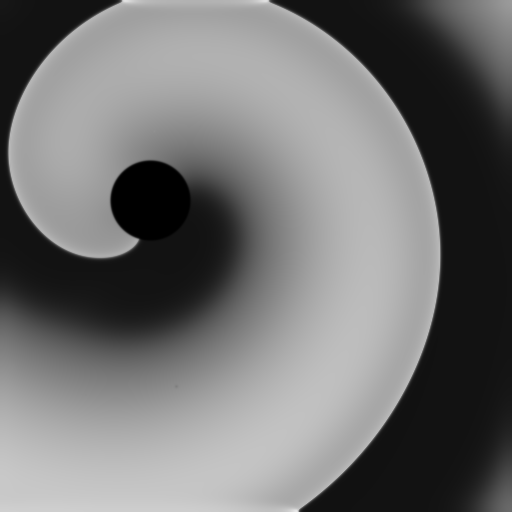
We can do even better. Let's add a circular obstacle to the medium by adding this line before calling model.define():
python
model.add_hole_to_phase_field(150, 200, 40) # center=(150,200), radius=40
Success! We get a spiral wave that anchors to the obstacle:
Let's put all together:
```python import br from screen import Screen
config = {
'width': 512, # screen width in pixels
'height': 512, # screen height in pixels
'dt': 0.1, # integration time step in ms
'dtperplot': 10, # screen refresh interval in dt unit
'diff': 0.809, # diffusion coefficient
'duration': 1000, # simulation duration in ms
'skip': False, # optimization flag: activate multi-rate
'cheby': True, # optimization flag: activate Chebysheb polynomials
'timeline': False, # flag to save a timeline (profiler)
'timelinename': 'timelinebr.json',
'save_graph': False # flag to save the dataflow graph
}
model = br.BeelerReuter(config) model.addholetophasefield(150, 200, 40) # center=(150,200), radius=40 model.define() model.addpaceop('s2', 'luq', 10.0) im = Screen(model.height, model.width, 'Beeler-Reuter Model')
s2 = model.millisecondtostep(300) # 300 ms
for i in model.run(im): if i == s2: model.fire_op('s2')
```
@2017-2018 Shahriar Iravanian
Owner
- Name: siravan
- Login: siravan
- Kind: organization
- Repositories: 10
- Profile: https://github.com/siravan
JOSS Publication
fib-tf: A TensorFlow-based Cardiac Electrophysiology Simulator
Authors

Emory University
Editor
Kevin M. Moerman
Tags
computational medicine cardiac electrophysiology TensorFlow Graphics Processing Units Reaction-Diffusion EquationsGitHub Events
Total
Last Year
Committers
Last synced: 11 months ago
Top Committers
| Name | Commits | |
|---|---|---|
| Shahriar Iravanian | s****n@e****u | 49 |
| Shahriar Iravanian | s****n | 19 |
Committer Domains (Top 20 + Academic)
Issues and Pull Requests
Last synced: 10 months ago
All Time
- Total issues: 2
- Total pull requests: 2
- Average time to close issues: about 3 hours
- Average time to close pull requests: 21 minutes
- Total issue authors: 2
- Total pull request authors: 2
- Average comments per issue: 1.0
- Average comments per pull request: 0.0
- Merged pull requests: 1
- Bot issues: 0
- Bot pull requests: 0
Past Year
- Issues: 0
- Pull requests: 0
- Average time to close issues: N/A
- Average time to close pull requests: N/A
- Issue authors: 0
- Pull request authors: 0
- Average comments per issue: 0
- Average comments per pull request: 0
- Merged pull requests: 0
- Bot issues: 0
- Bot pull requests: 0
Top Authors
Issue Authors
- felonwan (1)
- mgalloy (1)
Pull Request Authors
- Kevin-Mattheus-Moerman (1)
- shahriariravanian (1)