libserial
C++ interface to termios.h C++ interface to termios.h C language library
Science Score: 44.0%
This score indicates how likely this project is to be science-related based on various indicators:
-
✓CITATION.cff file
Found CITATION.cff file -
✓codemeta.json file
Found codemeta.json file -
✓.zenodo.json file
Found .zenodo.json file -
○DOI references
-
○Academic publication links
-
○Academic email domains
-
○Institutional organization owner
-
○JOSS paper metadata
-
○Scientific vocabulary similarity
Low similarity (12.0%) to scientific vocabulary
Keywords
Repository
C++ interface to termios.h C++ interface to termios.h C language library
Basic Info
Statistics
- Stars: 1
- Watchers: 1
- Forks: 0
- Open Issues: 1
- Releases: 0
Topics
Metadata Files
README.md
libserial
C++ Application Programming Interface to termios.h C library
The goal of this API is provide to developers a way to use the old C's ibrary, termios.h, lthrough a modern C++ class. Concepts as Oriented-Object Programming, Smart Pointers and Templates are using here to give you more flexibilit and powerfull to your aplication that need serial communication in a Linux enviroment.
Build and installation
Clone the repository.
console
foo@bar:~$ git clone https://github.com/NestorDP/libserial.git
foo@bar:~$ cd libserial
Building the source code. If you don't have any problem you will see these mensagens
console
foo@bar:~$ make
g++ -g -Wall -Werror -fpic -std=c++14 -I include -c src/serial.cpp -o build/serial.o
g++ -g -Wall -shared build/serial.o -o lib/libserial.so
Install the library. You will to need put your sudo password to finish this step.
console
foo@bar:~$ make install
sudo cp lib/libserial.so /usr/lib
[sudo] password for foo:
sudo cp -R include/libserial/ /usr/include/
<!-- ## Unit testing -->
Run an example application
You can run an example application to test the libserial library in your environment. Even without a hardware device you can to test the serial communication with a virtual serial port using the socat for to create an pair of virtual ports.
Create a virtual serial port
Frist install the socat
console
foo@bar:~$ sudo apt install socat
Then you can to create the virtual ports pair, open a new console and run this command:
console
foo@bar:~$ socat -d -d pty,raw,echo=0 pty,raw,echo=0
2022/09/09 11:13:10 socat[19050] N PTY is /dev/pts/2
2022/09/09 11:13:10 socat[19050] N PTY is /dev/pts/3
2022/09/09 11:13:10 socat[19050] N starting data transfer loop with FDs [5,5] and [7,7]
After this, your system have two serial ports virtuals connected, in this case we have the /dev/pts/2 and /dev/pts/3. Change in yours example code the port to match with one of these ports.
Source code
``` c
include
include
include
include
int main(int argc, char const *argv[]) { serial::Serial s; std::string *texto = new std::string(); std::sharedptrstd::string sendptr(new std::string("texto"));
s.openport("/dev/pts/4"); s.receivemsg(texto); std::cout << *texto << std::endl; s.sendmsg(sendptr);
return 0; } ```
Compile
console
foo@bar:~$ g++ -g -Wall -std=c++14 -o serial_app main.cpp -lserial
Run
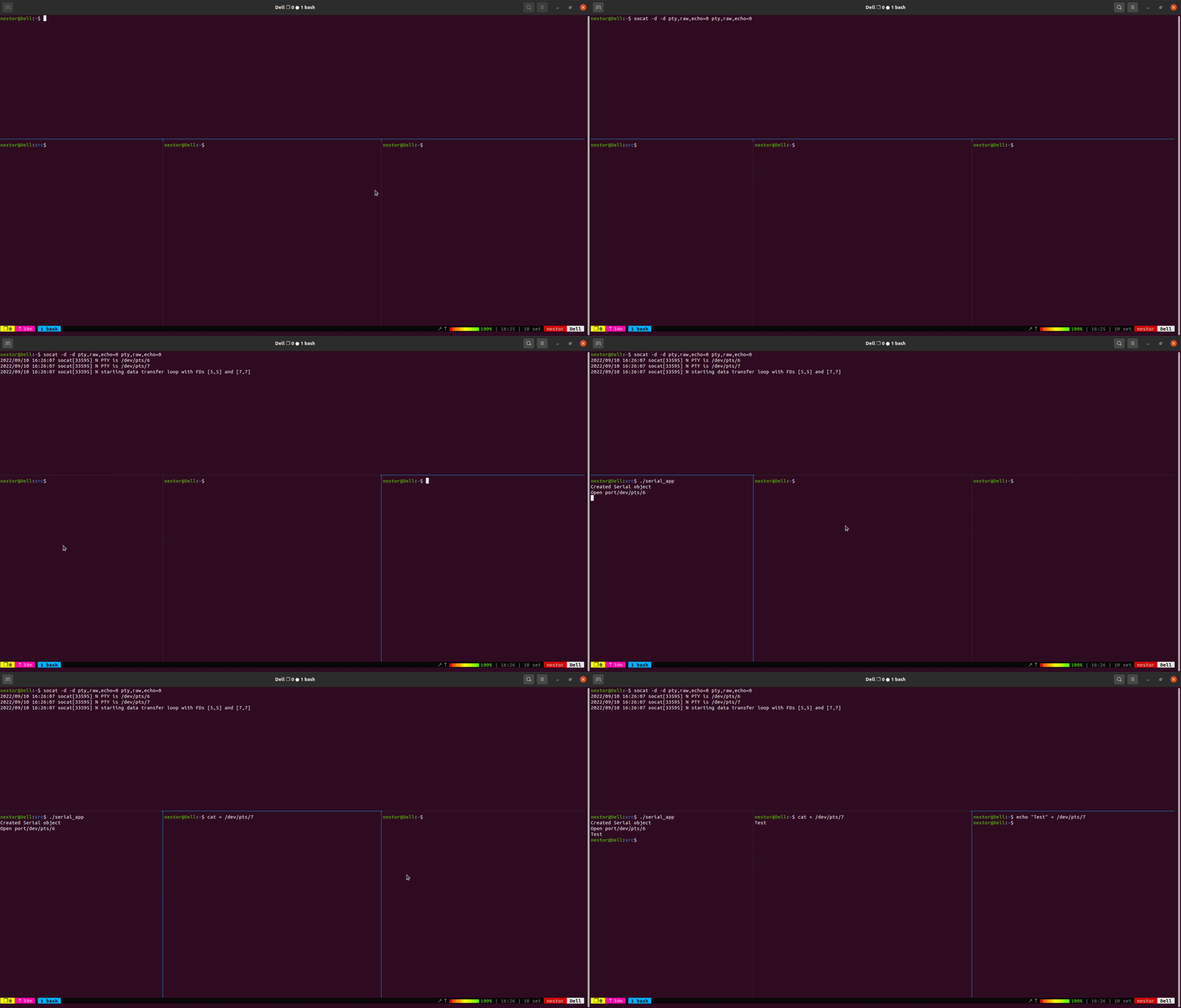
Execute the serialapp ``` console foo@bar:~$ ./serialapp Created Serial Object Open port /dev/pts/2 ```
Open another terminal and write
console
foo@bar:~$ cat < /dev/pts/3
Now you will need another terminal to send a string to the serial aplication
console
foo@bar:~$ echo "Test" > /dev/pts/3
Owner
- Name: Nestor D. Pereira Neto
- Login: NestorDP
- Kind: user
- Location: Salvador-BA, Brasil
- Company: @Brazilian-Institute-of-Robotics
- Website: https://www.nestorneto.eng.br
- Repositories: 5
- Profile: https://github.com/NestorDP
Citation (CITATION.cff)
cff-version: 1.2.0
message: "If you use this software, please cite it as below."
authors:
  - family-names: Pereira Neto
    given-names: Nestor
    orcid:
title: "Biblioteca libserial Linux"
version: 0.1
# doi: 10.5281/zenodo.1234
date-released: 2022-08-10
GitHub Events
Total
- Watch event: 1
- Delete event: 2
- Push event: 9
- Create event: 1
Last Year
- Watch event: 1
- Delete event: 2
- Push event: 9
- Create event: 1