Xbim.Essentials
Xbim.Essentials: a library for interoperable building information applications - Published in JOSS (2017)
Science Score: 95.0%
This score indicates how likely this project is to be science-related based on various indicators:
-
○CITATION.cff file
-
✓codemeta.json file
Found codemeta.json file -
✓.zenodo.json file
Found .zenodo.json file -
✓DOI references
Found 1 DOI reference(s) in JOSS metadata -
○Academic publication links
-
✓Committers with academic emails
1 of 46 committers (2.2%) from academic institutions -
○Institutional organization owner
-
✓JOSS paper metadata
Published in Journal of Open Source Software
Keywords
Scientific Fields
Repository
A .NET library to work with data in the IFC format. This is the core component of the Xbim Toolkit
Basic Info
- Host: GitHub
- Owner: xBimTeam
- License: other
- Language: C#
- Default Branch: master
- Homepage: https://xbimteam.github.io/
- Size: 39.2 MB
Statistics
- Stars: 534
- Watchers: 51
- Forks: 178
- Open Issues: 117
- Releases: 10
Topics
Metadata Files
README.md
Branch | Build Status | MyGet | NuGet
------ | ------- | --- | --- |
Master | |
 |
|  Develop |
 |
 | -
| -
|Toolkit Component| Latest Myget (develop) | Latest Myget (master) | Latest Nuget |
| ----| ---- | ----| ---- |
|Essentials| | |
|Geometry|  |
|  |
|  |CobieExpress|
  |
|  |
|  |Windows UI|
  |
|  |
|  |Exchange|
  |
|  |
| 
XbimEssentials
XbimEssentials is the foundational components of Xbim, the eXtensible [Building Information Modelling](https://en.wikipedia.org/wiki/Buildinginformationmodeling) toolkit for the .NET platform. This library enables software developers to easily read, write, validate and interrogate data in the buildingSmart IFC formats, using any .NET language.
As of version 6.0 XbimEssentials includes support for .netstandard2.0, .netstandard2.1, .net6.0 and net8.0.
Supporting netstandard2.0 provides support .NET Framework 4.7.2 upwards.
Earlier .NET Framework versions may work, but we can't provide any support for them.
Background / Motivation
IFC is an ISO Standard and platform-neutral open file format for data exchange of building information. This library supports STEP, IfcXml and IfcZip formats, and enables you to read and write the full schema of IFC2x3 and IFC4 (including support for the latest Ifc4 Addendum 2).
The wider XBIM toolkit contains additional repositories with libraries to read and write related Open BIM formats including COBie and BIM Collaboration Format (BCF)
xbim Toolkit also supports IFC model verification with IDS using our IDS Library.
In order to visualise 3D Geometries you will need to include the Xbim.Geometry package which provides full support for geometric, topological operations and visualisation.
The motivation behind XbimEssentials is to take away much of the complexity and 'heavy lifting' required to read and write OpenBIM file formats, so you can focus on creating software solutions without needing deep understanding of STEP/Express parsing, 3D graphics - enabling you to work at a higher level than the buildingSmart data model.
Updating from prior versions
Please see our ChangeLog for details on what's new and what you need to upgrade. In particular, please note the following section copied here:
BREAKING CHANGE: xbim Toolkit V6 implements a new mechanism for registering internal resources and makes use of standard .net Dependency Injection patterns for managing services internally.
Xbim.Commonnow introduces an internal DI service that you can optionally integrate with your own DI implementation, for providing Logging services, and configuring xbim service behaviour such as the model provider to use. E.g. Invoking:
XbimServices.Current.ConfigureServices(s => s.AddXbimToolkit(opt => opt.UseMemoryModel().UseLoggerFactory(yourloggerFactory)));registers the Toolkit internal dependencies, configures an In-memory model-provider and adds an existing ILoggerFactory into the service in place of our default one.
IfcStore.ModelProviderFactoryhas been deprecated as this is provided for by the above mechanism The persistent EsentModel is now available automatically through IfcStore (on Windows) so there is no need for theUseHeuristicModelProvider()'ceremony' to ensure Esent is used although you can specify it explicitly withXbimServices.Current.ConfigureServices(s => s.AddXbimToolkit(opt => opt.UseHeuristicModel())Note: The default Logging implementation has been removed from Toolkit to reduce the amount of external dependencies. To enable is a simple matter of adding your preferred logging implementation to the Xbim Services. See Example
Code Examples
If you want to jump straight in we have some examples on our docs site. But here's a 60 second tour of reading and writing:
1. Reading data
Given an IFC File SampleHouse.ifc exported from a tool such as Revit, this is a simple example showing how you'd read and extract data, using LINQ:
```csharp
const string fileName = "SampleHouse.ifc";
using (var model = IfcStore.Open(fileName))
{
// get all doors in the model (using IFC4 interface of IfcDoor - this will work both for IFC2x3 and IFC4)
var allDoors = model.Instances.OfType
// get only doors with defined IIfcTypeObject
var typedDoors = model.Instances.Where<IIfcDoor>(d => d.IsTypedBy.Any());

// get one single door by its unique identifier / guid
var id = "2AswZfru1AdAiKfEdrNPnu";
var theDoor = model.Instances.FirstOrDefault<IIfcDoor>(d => d.GlobalId == id);
Console.WriteLine($"Door ID: {theDoor.GlobalId}, Name: {theDoor.Name}");

// get all basic properties of the door
var properties = theDoor.IsDefinedBy
    .Where(r => r.RelatingPropertyDefinition is IIfcPropertySet)
    .SelectMany(r => ((IIfcPropertySet)r.RelatingPropertyDefinition).HasProperties)
    .OfType<IIfcPropertySingleValue>();
foreach (var property in properties)
    Console.WriteLine($"Property: {property.Name}, Value: {property.NominalValue}");
} ```
... resulting in output like:
Door ID: 3cUkl32yn9qRSPvBJVyWYp, Name: Doors_ExtDbl_Flush:1810x2110mm:285860
Property: IsExternal, Value: true
Property: Reference, Value: 1810x2110mm
Property: Level, Value: Level: Ground Floor
Property: Sill Height, Value: 0
Property: Area, Value: 4.9462127188431
Property: Volume, Value: 0.193819981582386
Property: Mark, Value: 1
Property: Category, Value: Doors
Property: Family, Value: Doors_ExtDbl_Flush: 1810x2110mm
Property: Family and Type, Value: Doors_ExtDbl_Flush: 1810x2110mm
Property: Head Height, Value: 2110
Property: Host Id, Value: Basic Wall: Wall-Ext_102Bwk-75Ins-100LBlk-12P
Property: Type, Value: Doors_ExtDbl_Flush: 1810x2110mm
Property: Type Id, Value: Doors_ExtDbl_Flush: 1810x2110mm
Property: Phase Created, Value: New Construction
2. Amending data
In this simple example we're going to add a 'purchase cost' property to a single Door. We could have applied the cost against the Door Type if all instances of it shared the property.
```csharp const string fileName = "SampleHouse.ifc"; var editor = new XbimEditorCredentials { ApplicationDevelopersName = "EZ Bim Apps Inc", ApplicationFullName = "My BIM App", ApplicationIdentifier = "my-bim-app", ApplicationVersion = "1.0", EditorsFamilyName = "John", EditorsGivenName = "Doe", EditorsOrganisationName = "Acme Consultants Inc" };
using (var model = IfcStore.Open(fileName, editor, true))
{
// get an existing door from the model
var id = "3cUkl32yn9qRSPvBJVyWYp";
var theDoor = model.Instances.FirstOrDefault
// open transaction for changes
using (var txn = model.BeginTransaction("Doors modification"))
{
    // create new property set to host properties
    var pSetRel = model.Instances.New<IfcRelDefinesByProperties>(r =>
    {
        r.GlobalId = Guid.NewGuid();
        r.RelatingPropertyDefinition = model.Instances.New<IfcPropertySet>(pSet =>
        {
            pSet.Name = "Commercial";
            pSet.HasProperties.Add(model.Instances.New<IfcPropertySingleValue>(p =>
            {
                p.Name = "PurchaseCost";
                p.NominalValue = new IfcMonetaryMeasure(200.00); // Default Currency set on IfcProject
            }));
        });
    });

    // change the name of the door
    theDoor.Name += "_costed";
    // add properties to the door
    pSetRel.RelatedObjects.Add(theDoor);

    // commit changes
    txn.Commit();
}
} ```
3. Generating Geometry
We need to generate geometry from the IFC primitives before you can visualise the 3D model. This essentially produces a tesselation/mesh that can be fed into a 3D graphics card, typically via some Graphics Library (OpenGL, DirectX, WebGL etc)
Note: Generating the 3D Geometry requires the Xbim.Geometry package which is currently only supported on a Windows platform. This utililises a native C++ geometry engine to handle boolean operations / CSG
Since this process can take some seconds / minutes for larger models, and can consume significant computation resource, it's common to do the geometry generation once and store in the xbim database format for future use.
For web-based visualisation an alternative is to output geometry to the wexbim format, which is optimised for web delivery in a browser using Xbim.WebUI
```csharp const string fileName = @"SampleHouse4.ifc"; var wexBimFilename = Path.ChangeExtension(fileName, "wexBIM"); var xbimDbFilename = Path.ChangeExtension(fileName, "xBIM");
using (var model = IfcStore.Open(fileName)) { // IFC file is already parsed and open. Now build the 3D var context = new Xbim3DModelContext(model); context.CreateContext(); // Creates the Geometry using native GeometryEngine
// Optional: Export to 'wexbim' format for use in WebUI's xViewer - geometry only
using (var wexBimFile = File.Create(wexBimFilename))
{
    using (var wexBimBinaryWriter = new BinaryWriter(wexBimFile))
    {
        model.SaveAsWexBim(wexBimBinaryWriter);
        wexBimBinaryWriter.Close();
    }
    wexBimFile.Close();
}

// Save IFC to the internal XBIM format, which includes geometry
model.SaveAs(xbimDbFilename, StorageType.Xbim);
} ```
Screenshots
The XBIM Team have developed a couple of demonstrator apps to show how the toolkit can be used to develop your own applications. Both are open source under our team space on GitHub.
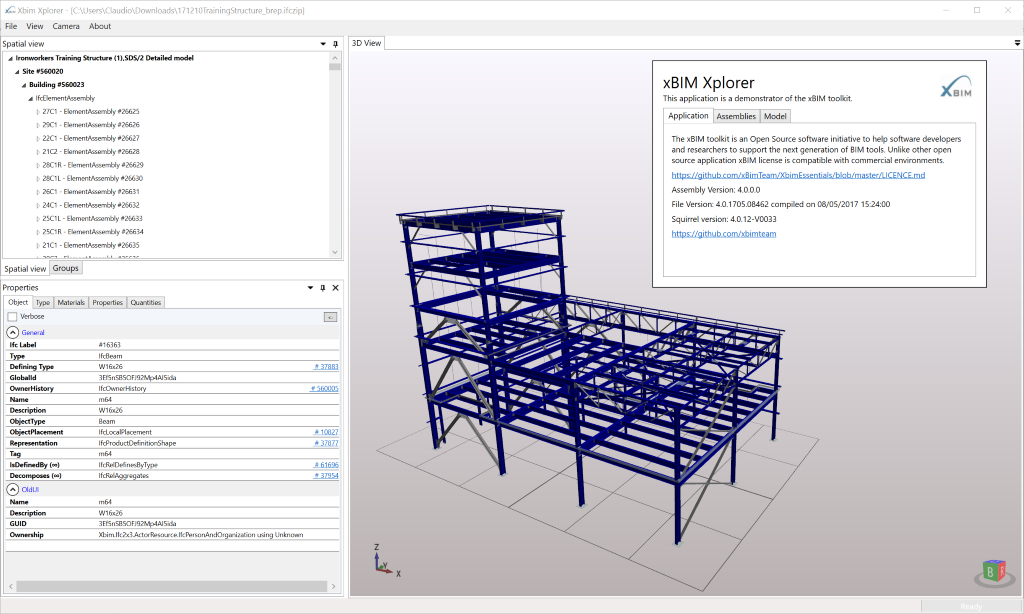 The Windows Xbim Xplorer application is functional demonstrator
application that shows off most of the functionality in the XBIM toolkit. The app supports visualising and inspecting multiple
model files, as well as supporting plugins to export COBie, import/export BCF and more.
The Windows Xbim Xplorer application is functional demonstrator
application that shows off most of the functionality in the XBIM toolkit. The app supports visualising and inspecting multiple
model files, as well as supporting plugins to export COBie, import/export BCF and more.
 The browser-based Xbim WeXplorer is a simple demonstrator of visualising models in a browser
and an ability open sementic model data from a JSON structure.
The browser-based Xbim WeXplorer is a simple demonstrator of visualising models in a browser
and an ability open sementic model data from a JSON structure.
Getting Started
You will need Visual Studio 2019 or newer to compile the Solution. Visual Studio 2022 is recommended. The free VS 2022 Community Edition should work fine. Other IDEs such as JetBrains Rider and VS Code should work.
Using the library
To get started, the simplest approach is to add the Xbim.Essentials nuget package to your Visual Studio Project
from Nuget.
Alternatively you can add the package using Nuget's Package Manager Console and issuing the following command:
PM> Install-Package Xbim.Essentials
Note that Xbim.Essentials is now a meta package. For more control it will be possible to add the
dependent packages directly. (Which is necessary for .NET Core currently, as Essentials only targets net47)
Toolkit Overview
How to use it?
XbimEssentials is a software library to be used for the creation of complex applications, other repositories under the XbimTeam page include a number of example applications to demonstrate its capabilities.
If you wish to move your first steps these are the first resources to lookup:
The example list page can act as a short tutorial to familiarise with the library.
Small examples - a list of small console application demonstrating how to undertake simple IFC activities with Xbim that compiles and runs in visual studio.
XbimXplorer - is a fairly complex WPF sample application that can open and render 3D IFC models as well as displaying semantic data, its source code is available in the Xbim.WindowsUI repo.
Licence
The XBIM library is made available under the CDDL Open Source licence.
All licences should support the commercial usage of the XBIM system within a 'Larger Work', as long as you honour the licence agreements.
Third Party Licences
The core XBIM library makes use of the following 3rd party software packages, under their associated licences:
- 'Gardens Point Parser Generator' https://github.com/KommuSoft/Gardens-Point-Parser-Generator - New BSD Licence
- 'OpenCASCADE' Geometry Engine : http://www.opencascade.org/ - GNU Lesser General Public License (LGPL) version 2.1, with additional exception
All 3rd party licences are permissive-style licences. We actively avoid Strong Copyleft/GPL style licences to retain compatibility with our CDDL licence - meaning you can use the XBIM Toolkit in a closed-source commercial software package.
Support & Help
We have some guidance, examples and a FAQ on our docs site. We're always looking for help with areas like documentation - please see our Docs Repo if you think you can help with a PR.
For bugs, and improvements, please use the GitHub Issues of the relevant repository.
If you have a question, or need some help, you may find the Stackoverflow xbim tag a good place to start.
Getting Involved
If you'd like to get involved and contribute to this project, please read the CONTRIBUTING page or contact the Project Coordinators @CBenghi and @martin1cerny.
Owner
- Name: xbim
- Login: xBimTeam
- Kind: organization
- Email: toolkit@xbim.net
- Website: http://docs.xbim.net/
- Repositories: 22
- Profile: https://github.com/xBimTeam
The xBIM project offers you the codebase to develop your Building Information Modelling (BIM) solution for commercial, research and open environments.
JOSS Publication
Xbim.Essentials: a library for interoperable building information applications
Authors
Northumbria University

Northumbria University
Northumbria University
Editor
Arfon Smith
Tags
BIM BuildingSmart IFC COBieGitHub Events
Total
- Create event: 48
- Release event: 3
- Issues event: 50
- Watch event: 39
- Delete event: 8
- Issue comment event: 113
- Push event: 39
- Pull request event: 39
- Fork event: 12
Last Year
- Create event: 48
- Release event: 3
- Issues event: 50
- Watch event: 39
- Delete event: 8
- Issue comment event: 113
- Push event: 39
- Pull request event: 39
- Fork event: 12
Committers
Last synced: 11 months ago
Top Committers
| Name | Commits | |
|---|---|---|
| Martin Cerny | m****y@x****z | 615 |
| Steve Lockley | s****y@n****k | 239 |
| Stephen Lockley | s****y@x****t | 214 |
| Andy Ward | a****y@t****t | 124 |
| Claudio Benghi | c****i@g****m | 102 |
| Claudio Benghi | C****o@D****1 | 39 |
| Richard Munn | r****n@v****m | 15 |
| Aurélien | a****l@u****m | 14 |
| Lloyd Pickering | l****d@l****m | 13 |
| Ibrahim Saad | i****9@g****m | 12 |
| Ibrahim Saad | i****d@x****t | 10 |
| Andy Thomson | a****n@4****m | 7 |
| Laurence Skoropinski | l****i@v****m | 7 |
| Lloyd Pickering | l****g@v****m | 7 |
| imsmk | i****k | 4 |
| Artoymyp | a****p@g****m | 4 |
| Santiago Burbano | s****o@h****m | 3 |
| kozintsev | o****v@g****m | 3 |
| gcoulby | g****y@g****m | 3 |
| Michiel Lankamp | m****p@m****m | 3 |
| Michael Seifert-Eckert | s****t@p****m | 3 |
| François-Olivier Mayette | f****e@c****a | 2 |
| I-Sokolov | I****v@y****u | 2 |
| Yousheng | y****e | 2 |
| santiagoIT | s****o@i****c | 2 |
| 秋水 | 5****8 | 2 |
| MSeifert04 | m****4@y****e | 2 |
| unknown | l****g@4****m | 2 |
| daniilch | d****h@b****u | 1 |
| Andrew Thomson | A****n@H****m | 1 |
| and 16 more... | ||
Committer Domains (Top 20 + Academic)
Issues and Pull Requests
Last synced: 10 months ago
All Time
- Total issues: 156
- Total pull requests: 104
- Average time to close issues: 3 months
- Average time to close pull requests: about 1 month
- Total issue authors: 95
- Total pull request authors: 22
- Average comments per issue: 3.18
- Average comments per pull request: 0.58
- Merged pull requests: 89
- Bot issues: 0
- Bot pull requests: 0
Past Year
- Issues: 36
- Pull requests: 48
- Average time to close issues: 29 days
- Average time to close pull requests: about 5 hours
- Issue authors: 25
- Pull request authors: 4
- Average comments per issue: 1.97
- Average comments per pull request: 0.4
- Merged pull requests: 43
- Bot issues: 0
- Bot pull requests: 0
Top Authors
Issue Authors
- GVladislavG (14)
- martin1cerny (11)
- andyward (9)
- simonedd (6)
- santiagoIT (6)
- krosoftware (4)
- ChernyshevDS (3)
- seghier (3)
- WindingWinter (3)
- Chandra123539 (3)
- LSE-AP (2)
- vulevukusej (2)
- SerafinaM (2)
- CCT-Mukund-Thakare (2)
- christianstroh (2)
Pull Request Authors
- andyward (49)
- Ibrahim5aad (20)
- santiagoIT (9)
- CBenghi (7)
- SteveLockley (2)
- martin1cerny (2)
- miseifert (2)
- imsmk (2)
- mlankamp (2)
- klamarth (2)
- chuongmep (1)
- ChernyshevDS (1)
- liszto (1)
- janbrouwer (1)
- highan911 (1)
Top Labels
Issue Labels
Pull Request Labels
Packages
- Total packages: 8
-
Total downloads:
- nuget 6,724,641 total
-
Total dependent packages: 47
(may contain duplicates) -
Total dependent repositories: 0
(may contain duplicates) - Total versions: 111
- Total maintainers: 2
nuget.org: xbim.io.esent
Manages Ifc or STEP Models backed by the ESENT database. Windows only.
- Homepage: https://github.com/xBimTeam/XbimEssentials
- License: CDDL-1.0
-
Latest release: 6.0.521
published about 1 year ago
Rankings
Maintainers (2)
nuget.org: xbim.common
Provides support for the Xbim commonly used behaviours and interfaces.
- Homepage: https://github.com/xBimTeam/XbimEssentials
- License: CDDL-1.0
-
Latest release: 6.0.521
published about 1 year ago
Rankings
Maintainers (2)
nuget.org: xbim.io.memorymodel
Manages IFC or STEP Model backed by an in-memory representation
- Homepage: https://github.com/xBimTeam/XbimEssentials
- License: CDDL-1.0
-
Latest release: 6.0.521
published about 1 year ago
Rankings
Maintainers (2)
nuget.org: xbim.ifc4
Implementation of the IFC4 schema, including Add1, Add2 + Alignment schemas.
- Homepage: https://github.com/xBimTeam/XbimEssentials
- License: CDDL-1.0
-
Latest release: 6.0.521
published about 1 year ago
Rankings
Maintainers (2)
nuget.org: xbim.ifc2x3
Implementation of the IFC2x3 schema.
- Homepage: https://github.com/xBimTeam/XbimEssentials
- License: CDDL-1.0
-
Latest release: 6.0.521
published about 1 year ago
Rankings
Maintainers (2)
nuget.org: xbim.ifc
Provides supports semantic loading and saving IFC models and related formats. Commonly used types include IfcStore IfcValidator XbimReferencedModel
- Homepage: https://github.com/xBimTeam/XbimEssentials
- License: CDDL-1.0
-
Latest release: 6.0.521
published about 1 year ago
Rankings
Maintainers (2)
nuget.org: xbim.tessellator
Provides support for tessellating mesh geometries.
- Homepage: https://github.com/xBimTeam/XbimEssentials
- License: CDDL-1.0
-
Latest release: 6.0.521
published about 1 year ago
Rankings
Maintainers (2)
nuget.org: xbim.ifc4x3
Implementation of the IFC4x3 schema.
- Homepage: https://github.com/xBimTeam/XbimEssentials
- License: CDDL-1.0
-
Latest release: 6.0.521
published about 1 year ago
Rankings
Maintainers (1)
Dependencies
- FluentAssertions 5.10.3
- MSTest.TestAdapter 2.1.2
- MSTest.TestFramework 2.1.2
- Microsoft.NET.Test.Sdk 16.6.1
- xunit 2.4.1
- xunit.runner.visualstudio 2.4.2
- Microsoft.Extensions.Logging 3.1.3
- Microsoft.Extensions.Logging.Abstractions 3.1.3
- System.Memory 4.5.4
- MSTest.TestAdapter 2.1.2
- MSTest.TestFramework 2.1.2
- Microsoft.NET.Test.Sdk 16.6.1
- ManagedEsent 1.9.4
- Microsoft.Database.ManagedEsent 2.0.1