Text detection in screen images with a Convolutional Neural Network
Text detection in screen images with a Convolutional Neural Network - Published in JOSS (2017)
Science Score: 93.0%
This score indicates how likely this project is to be science-related based on various indicators:
-
○CITATION.cff file
-
✓codemeta.json file
Found codemeta.json file -
✓.zenodo.json file
Found .zenodo.json file -
✓DOI references
Found 4 DOI reference(s) in README and JOSS metadata -
✓Academic publication links
Links to: arxiv.org, joss.theoj.org -
○Committers with academic emails
-
○Institutional organization owner
-
✓JOSS paper metadata
Published in Journal of Open Source Software
Keywords
Repository
Training data generator for text detection
Basic Info
Statistics
- Stars: 39
- Watchers: 4
- Forks: 6
- Open Issues: 1
- Releases: 3
Topics
Metadata Files
README.md
Text detection in screen images with a Convolutional Neural Network 

Note: This was a class project where I wanted to learn about neural networks. If you want to do text detection in images, I suggest that you use something like this approach.
The repository contains a set of scripts to implement text detection from screen images. The idea is that we use a Convolutional Neural Network (CNN) to predict a heatmap of the probability of text in an image. But before we can predict anything, we need to train the network with a a set of pairs of images and training labels. We obtain the training data by extracting figures with embedded text from research papers.
This is a very involved process and you may want to use the labels that I already generated (you are welcome). We have around 500K good labels extracted from around 1M papers from arXiv and the ACL anthology.
PDF files, extracted figures and labels are in an S3 bucket at s3://escience.washington.edu.viziometrics. The PDF files for arXiv (extracted from arXiv bulk access) are in a separate bucket at s3://arxiv-tars-pdfs. The buckets have requester pays enabled.
Please cite the paper for this repo as
bib
@article{Moritz2017,
  doi = {10.21105/joss.00235},
  url = {https://doi.org/10.21105/joss.00235},
  year = {2017},
  month = jul,
  publisher = {The Open Journal},
  volume = {2},
  number = {15},
  pages = {235},
  author = {Dominik Moritz},
  title = {Text detection in screen images with a Convolutional Neural Network},
  journal = {The Journal of Open Source Software}
}
Requirements
Install OpenCV with python support. Also install scipy, matplotlib, and numpy for python (either through pip or apt). Also install freetype, ghostscript, imagemagic, and tesseract. Please check the compatible versions of pdffigures with your OS.
Generate training data
You can run this locally or on a server. I tested every script locally on a mac without any problems. Below are instructions for Linux.
The scripts use pdffigures to generate a JSON file that describes each figure in a paper.
AWS instructions
These are the steps I had to run to generate the training data an EC2 machines on AWS. The execution is embarrassingly parallel and thus runs reasonably fast (a few hours to a day or two for a million papers). At the time of writing, I ran this on Ubuntu 14.04, but later version may work as well with some small modifications.
The commands below are what I used to extract the images and generate the labels. As described above, you don't need to rerun this unless you want to use different papers than the ones I already extracted figures from (see above). If you want to run the code, you need to change the output S3 bucket to a bucket that you have write access to.
```sh
use tmux (maybe with attach)
tmux
sudo apt-get update sudo apt-get install git python-pip python-opencv python-numpy python-scipy python-matplotlib ghostscript libmagickwand-dev libfreetype6 parallel
git clone https://github.com/domoritz/labelgenerator.git cd labelgenerator sudo pip install -r requirements.txt git submodule init git submodule update
sudo apt-get install libpoppler-dev libleptonica-dev pkg-config
we need gcc 4.9
sudo add-apt-repository ppa:ubuntu-toolchain-r/test sudo apt-get update sudo apt-get install g++-4.9
compile pdffigures
make -C pdffigures DEBUG=0 CC='g++-4.9 -std=c++11'
at this point, you probably need to make a copy of the config file and update it
cp config_sample.py config.py vim config.py
test with one file
python labelgen.py read-s3 escience.washington.edu.viziometrics aclanthology/pdf/C08-1099.pdf escience.washington.edu.viziometrics acl_anthology
get list of documents to process
aws s3 --region=us-west-2 ls s3://escience.washington.edu.viziometrics/aclanthology/pdf/ | awk '{ print $4 }' > aclpapers.txt
now run for real
parallel --resume -j +6 --no-run-if-empty --eta --joblog /tmp/par.log python labelgen.py read-s3 escience.washington.edu.viziometrics aclanthology/pdf/{} escience.washington.edu.viziometrics aclanthology --dbg-image :::: aclpapers.txt
monitor progress
tail -f /tmp/par.log
find bad labels
python findbad.py read-s3 escience.washington.edu.viziometrics aclanthology/json > anthology_bad.txt
you probably want to use this file to delete bad labels before you use it to train the CNN
Use: parallel rm -f data/{}-label.png :::: anthology_bad.txt
run find bad in parallel
seq {0,19} | parallel -j 20 --eta python findbad.py read-s3 escience.washington.edu.viziometrics arxiv/json --chunk={} --of=20 '>' arxivbad{}.txt cat arxivbad*.txt > arxivbad.txt
at this point you may want to upload the file with bad labels back to S3
```
FAQ for common error messages
These are some common errors I have experienced.
I don't see my output Try --debug and make sure that you have the correct folders set up if you use S3.
Failed to initialize libdc1394 sudo ln /dev/null /dev/raw1394 https://stackoverflow.com/questions/12689304/ctypes-error-libdc1394-error-failed-to-initialize-libdc1394
ImportError: MagickWand shared library not found. See https://github.com/dahlia/wand/issues/141
Try the figure extraction
Local
python label_gen.py read testdata/paper.pdf /tmp/test --dbg-image --debug
With data from S3
python label_gen.py read-s3 escience.washington.edu.viziometrics test/pdf/C08-1092.pdf test/ --dbg-image --debug
Train the neural network
I used a different machine for training the network because AWS doesn't have good graphics cards.
You can use any CNN to get the prediction but I use pjreddie/darknet. My fork is at domoritz/darknet and a submodule of this repo.
To train the network, you need to put all figures and labels into one directory. Then generate a file called train.list in /data. You can generate this file with ls . | grep -v -- "-label.png" | awk '{print "PATH_TO_FILES/"$1}' > ../all.list in the directory with all the images. Then split the file into training and test data.
Then train the network with ./darknet writing train cfg/writing.cfg. This will generate a weight file every now and then. If for some reason some files are missing labels, use a python script like this to filter out files that don't have labels.
```python import sys import os.path
with open(sys.argv[1]) as f: for fname in f: fname = fname.strip() if not os.path.isfile(fname): print fname lname = fname[:-4] + "-label.png" if not os.path.isfile(lname): print fname ```
Predict where text is and find text areas
You need a trained network. To test the network, run echo "PATH_TO_FILES/FIGURE.png" | ./darknet writing test cfg/writing.cfg ../writing_backup/writing_ITER.weights. If you append out, a prediction will be written to out.png.
A prediction looks like this

If you want to test the network on all your test data, use a script like
bash
for i in `cat $1` ; do
    fname=`basename $i .png`
    echo $i | ./darknet writing test cfg/writing.cfg ../writing_backup/writing_8500.weights PATH_FOR_PREDICTIONS/$fname-predicted
done
and run it with your list of training data as the input. This will write all the predictions into a directory. If you feel like moving all your other files (the ground truth, images and such), use a command like cat test.list | xargs cp -t PATH_FOR_PREDICTIONS.
Cool, now we have a bunch of images in one directory. Let's find out what the precision and recall are. First, create a list of all the files in the directory with ls | grep -- "-predicted.png" > _all.list. Then just run python rate.py ../predicted/predicted/_all.list.
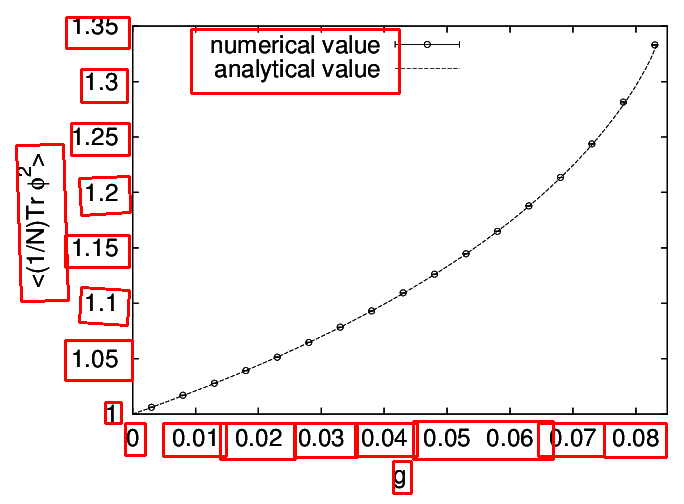
After all this work, we can finally generate a prediction, find contours, fit boxes around contours and find text with tesseract. To do so, run python predict.py PREDICTION FIGURE_IMAGE --debug. You may see something like
Support
Please ask questions and files issues on GitHub.
Contribute
Contributions are welcome. Development happens on GitHub at domoritz/label_generator. When sending a pull request, please compare the output of python label_gen.py read testdata/paper.pdf /tmp/test with the images in testoutput.
Owner
- Name: Dominik Moritz
- Login: domoritz
- Kind: user
- Location: Pittsburgh
- Company: CMU, Apple
- Website: https://www.domoritz.de
- Twitter: domoritz
- Repositories: 402
- Profile: https://github.com/domoritz
Faculty at CMU (@cmudig) and researcher at @apple. PhD in Computer Science from the University of Washington (@uwdata, @uwdb). Co-creator @vega, @streamlit.
JOSS Publication
Text detection in screen images with a Convolutional Neural Network
Authors

University of Washington
Editor
Arfon Smith
Tags
deep learning visualization text detectionGitHub Events
Total
Last Year
Committers
Last synced: 11 months ago
Top Committers
| Name | Commits | |
|---|---|---|
| Dominik Moritz | d****z@g****m | 71 |
| Arfon Smith | a****n | 1 |
Issues and Pull Requests
Last synced: 10 months ago
All Time
- Total issues: 7
- Total pull requests: 1
- Average time to close issues: 9 days
- Average time to close pull requests: 21 minutes
- Total issue authors: 5
- Total pull request authors: 1
- Average comments per issue: 3.43
- Average comments per pull request: 1.0
- Merged pull requests: 1
- Bot issues: 0
- Bot pull requests: 0
Past Year
- Issues: 0
- Pull requests: 0
- Average time to close issues: N/A
- Average time to close pull requests: N/A
- Issue authors: 0
- Pull request authors: 0
- Average comments per issue: 0
- Average comments per pull request: 0
- Merged pull requests: 0
- Bot issues: 0
- Bot pull requests: 0
Top Authors
Issue Authors
- northeastsquare (2)
- david-morris (2)
- horvitzs (1)
- ekolve (1)
- ghost (1)
Pull Request Authors
- arfon (1)
Top Labels
Issue Labels
Pull Request Labels
Dependencies
- Pillow ==4.1.1
- PyWavelets ==0.5.2
- PyYAML ==3.12
- Pygments ==2.2.0
- Wand ==0.4.4
- appdirs ==1.4.3
- astroid ==1.4.9
- awscli ==1.11.89
- backports.functools-lru-cache ==1.3
- boto ==2.46.1
- botocore ==1.5.52
- click ==6.7
- colorama ==0.3.7
- configparser ==3.5.0
- cycler ==0.10.0
- decorator ==4.0.11
- docopt ==0.6.2
- docutils ==0.13.1
- flake8 ==2.5.4
- functools32 ==3.2.3.post2
- future ==0.16.0
- futures ==3.1.1
- isort ==4.2.5
- jmespath ==0.9.2
- lazy-object-proxy ==1.2.2
- mccabe ==0.4.0
- networkx ==1.11
- nose ==1.3.7
- olefile ==0.44
- packaging ==16.8
- pep8 ==1.7.0
- proselint ==0.4.0
- protobuf ==3.3.0
- pyasn1 ==0.2.3
- pyflakes ==1.0.0
- pylint ==1.6.4
- pyparsing ==2.1.10
- pytesseract ==0.1.6
- python-dateutil ==2.6.0
- pytz ==2016.10
- rsa ==3.4.2
- s3transfer ==0.1.10
- scikit-image ==0.13.0
- six ==1.10.0
- subprocess32 ==3.2.7
- virtualenv ==15.0.3
- virtualfish ==1.0.1
- wrapt ==1.10.8
- Wand *
- awscli *
- boto *
- docopt *
- pillow *
- pytesseract *
- scikit-image *