mui_project
Science Score: 44.0%
This score indicates how likely this project is to be science-related based on various indicators:
-
✓CITATION.cff file
Found CITATION.cff file -
✓codemeta.json file
Found codemeta.json file -
✓.zenodo.json file
Found .zenodo.json file -
○DOI references
-
○Academic publication links
-
○Academic email domains
-
○Institutional organization owner
-
○JOSS paper metadata
-
○Scientific vocabulary similarity
Low similarity (4.0%) to scientific vocabulary
Repository
Basic Info
- Host: GitHub
- Owner: mdeliso97
- License: apache-2.0
- Language: Jupyter Notebook
- Default Branch: main
- Size: 52.5 MB
Statistics
- Stars: 0
- Watchers: 1
- Forks: 0
- Open Issues: 0
- Releases: 0
Metadata Files
README.md
[Japanese/English]
Note
キーポイント分類について、モデルを集めたリポジトリを作成しました。
→ Kazuhito00/hand-keypoint-classification-model-zoo
hand-gesture-recognition-using-mediapipe
MediaPipe(Python版)を用いて手の姿勢推定を行い、検出したキーポイントを用いて、
簡易なMLPでハンドサインとフィンガージェスチャーを認識するサンプルプログラムです。
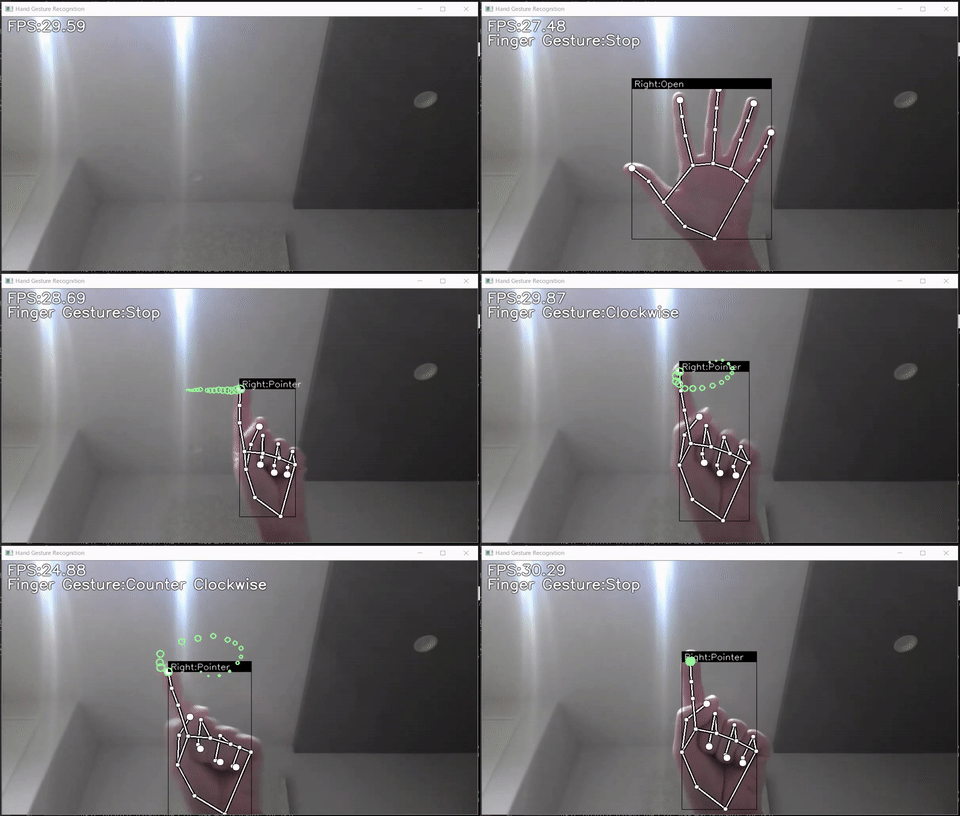
本リポジトリは以下の内容を含みます。 * サンプルプログラム * ハンドサイン認識モデル(TFLite) * フィンガージェスチャー認識モデル(TFLite) * ハンドサイン認識用学習データ、および、学習用ノートブック * フィンガージェスチャー認識用学習データ、および、学習用ノートブック
Requirements
- mediapipe 0.8.4
- OpenCV 4.6.0.66 or Later
- Tensorflow 2.9.0 or Later
- protobuf <3.20,>=3.9.2
- scikit-learn 1.0.2 or Later (学習時に混同行列を表示したい場合のみ)
- matplotlib 3.5.1 or Later (学習時に混同行列を表示したい場合のみ)
Demo
Webカメラを使ったデモの実行方法は以下です。
bash
python app.py
DockerとWebカメラを使ったデモの実行方法は以下です。 ```bash docker build -t hand_gesture .
xhost +local: && \
docker run --rm -it \
--device /dev/video0:/dev/video0 \
-v pwd:/home/user/workdir \
-v /tmp/.X11-unix/:/tmp/.X11-unix:rw \
-e DISPLAY=$DISPLAY \
hand_gesture:latest
python app.py ```
デモ実行時には、以下のオプションが指定可能です。
* --device
カメラデバイス番号の指定 (デフォルト:0)
* --width
カメラキャプチャ時の横幅 (デフォルト:960)
* --height
カメラキャプチャ時の縦幅 (デフォルト:540)
* --usestaticimagemode
MediaPipeの推論にstaticimagemodeを利用するか否か (デフォルト:未指定)
* --mindetectionconfidence
検出信頼値の閾値 (デフォルト:0.5)
* --mintracking_confidence
トラッキング信頼値の閾値 (デフォルト:0.5)
Directory
│  app.py
│  keypoint_classification.ipynb
│  point_history_classification.ipynb
│
├─model
│  ├─keypoint_classifier
│  │  │  keypoint.csv
│  │  │  keypoint_classifier.hdf5
│  │  │  keypoint_classifier.py
│  │  │  keypoint_classifier.tflite
│  │  └─ keypoint_classifier_label.csv
│  │
│  └─point_history_classifier
│      │  point_history.csv
│      │  point_history_classifier.hdf5
│      │  point_history_classifier.py
│      │  point_history_classifier.tflite
│      └─ point_history_classifier_label.csv
│
└─utils
    └─cvfpscalc.py
app.py
推論用のサンプルプログラムです。
また、ハンドサイン認識用の学習データ(キーポイント)、
フィンガージェスチャー認識用の学習データ(人差指の座標履歴)を収集することもできます。
keypoint_classification.ipynb
ハンドサイン認識用のモデル訓練用スクリプトです。
pointhistoryclassification.ipynb
フィンガージェスチャー認識用のモデル訓練用スクリプトです。
model/keypoint_classifier
ハンドサイン認識に関わるファイルを格納するディレクトリです。
以下のファイルが格納されます。
* 学習用データ(keypoint.csv)
* 学習済モデル(keypointclassifier.tflite)
* ラベルデータ(keypointclassifierlabel.csv)
* 推論用クラス(keypointclassifier.py)
model/pointhistoryclassifier
フィンガージェスチャー認識に関わるファイルを格納するディレクトリです。
以下のファイルが格納されます。
* 学習用データ(pointhistory.csv)
* 学習済モデル(pointhistoryclassifier.tflite)
* ラベルデータ(pointhistoryclassifierlabel.csv)
* 推論用クラス(pointhistoryclassifier.py)
utils/cvfpscalc.py
FPS計測用のモジュールです。
Training
ハンドサイン認識、フィンガージェスチャー認識は、
学習データの追加、変更、モデルの再トレーニングが出来ます。
ハンドサイン認識トレーニング方法
1.学習データ収集
「k」を押すと、キーポイントの保存するモードになります(「MODE:Logging Key Point」と表示される)

「0」~「9」を押すと「model/keypoint_classifier/keypoint.csv」に以下のようにキーポイントが追記されます。
1列目:押下した数字(クラスIDとして使用)、2列目以降:キーポイント座標

キーポイント座標は以下の前処理を④まで実施したものを保存します。


初期状態では、パー(クラスID:0)、グー(クラスID:1)、指差し(クラスID:2)の3種類の学習データが入っています。
必要に応じて3以降を追加したり、csvの既存データを削除して、学習データを用意してください。


2.モデル訓練
「keypoint_classification.ipynb」をJupyter Notebookで開いて上から順に実行してください。
学習データのクラス数を変更する場合は「NUMCLASSES = 3」の値を変更し、
「model/keypointclassifier/keypointclassifierlabel.csv」のラベルを適宜修正してください。
X.モデル構造
「keypoint_classification.ipynb」で用意しているモデルのイメージは以下です。

フィンガージェスチャー認識トレーニング方法
1.学習データ収集
「h」を押すと、指先座標の履歴を保存するモードになります(「MODE:Logging Point History」と表示される)

「0」~「9」を押すと「model/pointhistoryclassifier/point_history.csv」に以下のようにキーポイントが追記されます。
1列目:押下した数字(クラスIDとして使用)、2列目以降:座標履歴

キーポイント座標は以下の前処理を④まで実施したものを保存します。

初期状態では、静止(クラスID:0)、時計回り(クラスID:1)、反時計回り(クラスID:2)、移動(クラスID:4)の
4種類の学習データが入っています。
必要に応じて5以降を追加したり、csvの既存データを削除して、学習データを用意してください。


2.モデル訓練
「pointhistoryclassification.ipynb」をJupyter Notebookで開いて上から順に実行してください。
学習データのクラス数を変更する場合は「NUMCLASSES = 4」の値を変更し、
「model/pointhistoryclassifier/pointhistoryclassifierlabel.csv」のラベルを適宜修正してください。
X.モデル構造
「pointhistoryclassification.ipynb」で用意しているモデルのイメージは以下です。

「LSTM」を用いたモデルは以下です。
使用する際には「use_lstm = False」を「True」に変更してください(要tf-nightly(2020/12/16時点))

Application example
以下に応用事例を紹介します。 * Control DJI Tello drone with Hand gestures * Classifying American Sign Language Alphabets on the OAK-D
Reference
Author
高橋かずひと(https://twitter.com/KzhtTkhs)
License
hand-gesture-recognition-using-mediapipe is under Apache v2 license.
Owner
- Name: Marco De Liso
- Login: mdeliso97
- Kind: user
- Location: University of Bern
- Repositories: 1
- Profile: https://github.com/mdeliso97
I'm a computer science student in my Bachelor studies at the University of Bern. My goals are to achieve good programming skills at each language I learnt.
Citation (CITATION.cff)
cff-version: 1.2.0
title: "hand-gesture-recognition-using-mediapipe"
authors:
- family-names: "Takahashi"
  given-names: "Shigeki"
  orcid: "https://orcid.org/0000-0002-1343-9181"
date-released: 2020-12-15
message: "If you use 'hand-gesture-recognition-using-mediapipe' in your research, please cite it using these metadata."
url: "https://github.com/Kazuhito00/hand-gesture-recognition-using-mediapipe"
license: Apache-2.0 license