template
Use this template to quickly start with your own interactive textbook that includes our "standard" selection of features and workflow to host your book on ....github.io/...
Science Score: 44.0%
This score indicates how likely this project is to be science-related based on various indicators:
-
✓CITATION.cff file
Found CITATION.cff file -
✓codemeta.json file
Found codemeta.json file -
✓.zenodo.json file
Found .zenodo.json file -
○DOI references
-
○Academic publication links
-
○Academic email domains
-
○Institutional organization owner
-
○JOSS paper metadata
-
○Scientific vocabulary similarity
Low similarity (14.2%) to scientific vocabulary
Keywords
Repository
Use this template to quickly start with your own interactive textbook that includes our "standard" selection of features and workflow to host your book on ....github.io/...
Basic Info
- Host: GitHub
- Owner: TeachBooks
- License: cc-by-4.0
- Language: Jupyter Notebook
- Default Branch: main
- Homepage: https://teachbooks.github.io/template/
- Size: 42.6 MB
Statistics
- Stars: 24
- Watchers: 3
- Forks: 15
- Open Issues: 9
- Releases: 0
Topics
Metadata Files
README.md
Your first TeachBook using the GitHub template
The template allows you to start your own TeachBook and hosting that TeachBook online without knowledge on Git, the Jupyter book package, python or anaconda. It doesn't elaborate on the collaborative functionalities of Git or how to edit the book. Please look at our manual (https://teachbooks.io/manual) to find more about that!
How to get started
How to use the template is demonstrated in the figure below, all steps are elaborated on in the following step-by-step tutorial.
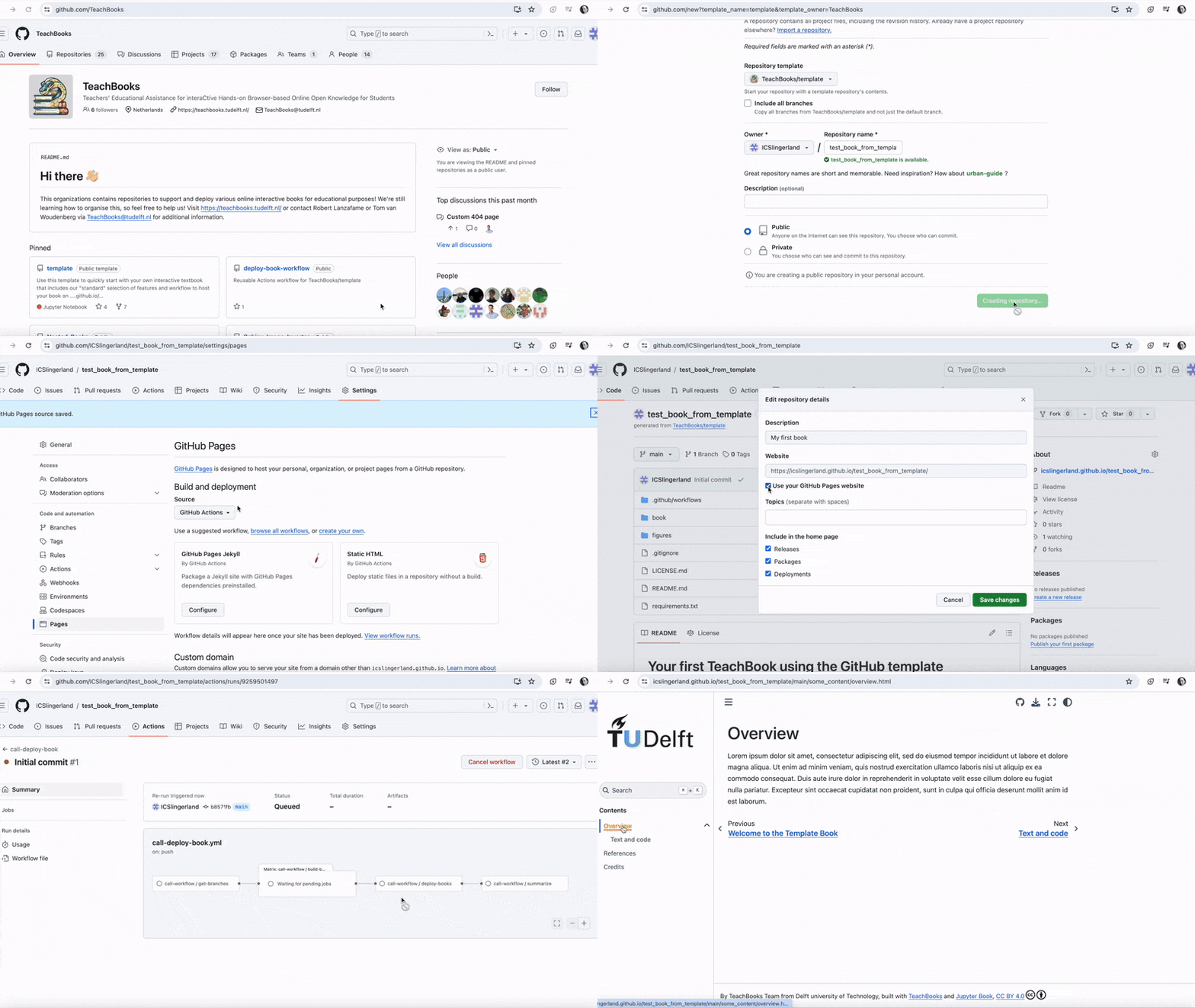 Video available here
- To get started making your TeachBook with our functionalities, use the template TeachBook as template:
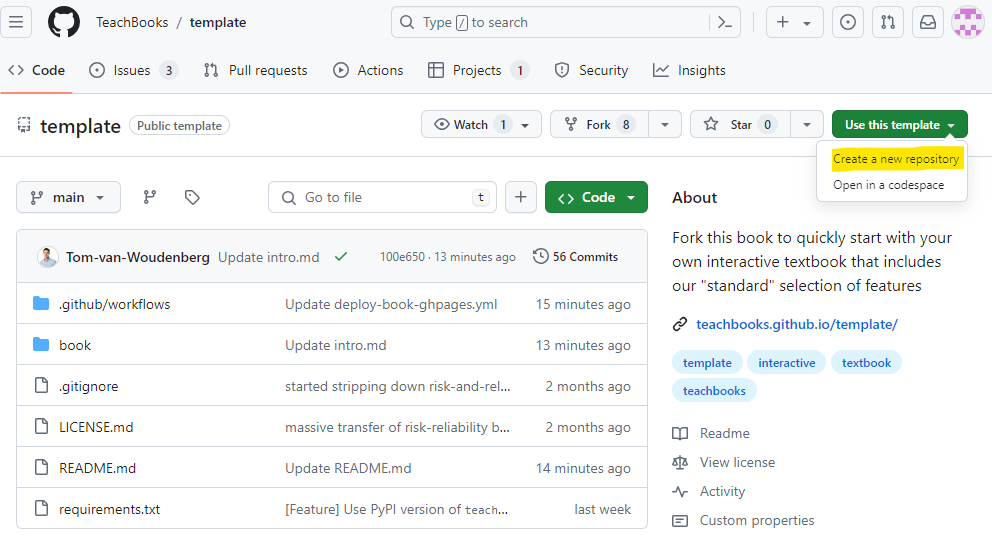
- Fill in a repository name, this name will be used in the future url of your book:

You can choose for
Privateonly if you've GitHub Pro, GitHub Team, GitHub Enterprise Cloud, or GitHub Enterprise Server. Otherwise, you won't be able to publish your TeachBook online. Furthermore, it prevents people from contributing to your book, making your book essentially 'closed' instead of 'open'. Note that the built book website is always public.You need to activate GitHub pages so that your website is published to the internet. As long as you don't do this your TeachBook is not published online. Actually, now that you've taken this template our workflow tries to publish it to GitHub pages, which you didn't have the chance to activate yet. That's why you probably received an email with 'call-deploy-book: Some jobs were not successful' and you see the failed job under
Initial commit. You can activate GitHub pages by setting the source for GitHub pages to GitHub Actions underSettings-Pages-Build and deployment-Source-GitHub Actions:

- Make an edit to the TeachBook by editing and committing changes to one of the files in the
book/subdirectory (available underCode). Now checkout the progress of the publishing workflow underActions-All workflows-call-deploy-book-<the most recent workflow run>. Remember, the first commit which is there has failed because GitHub Pages wasn't activated at the time ofInitial commit, you could also re-run that job if you don't want to make an edit. You can do so by running the workflow fromActions-All workflows-call-deploy-book-Initial commit-Re-run all jobs-Re-run jobs:
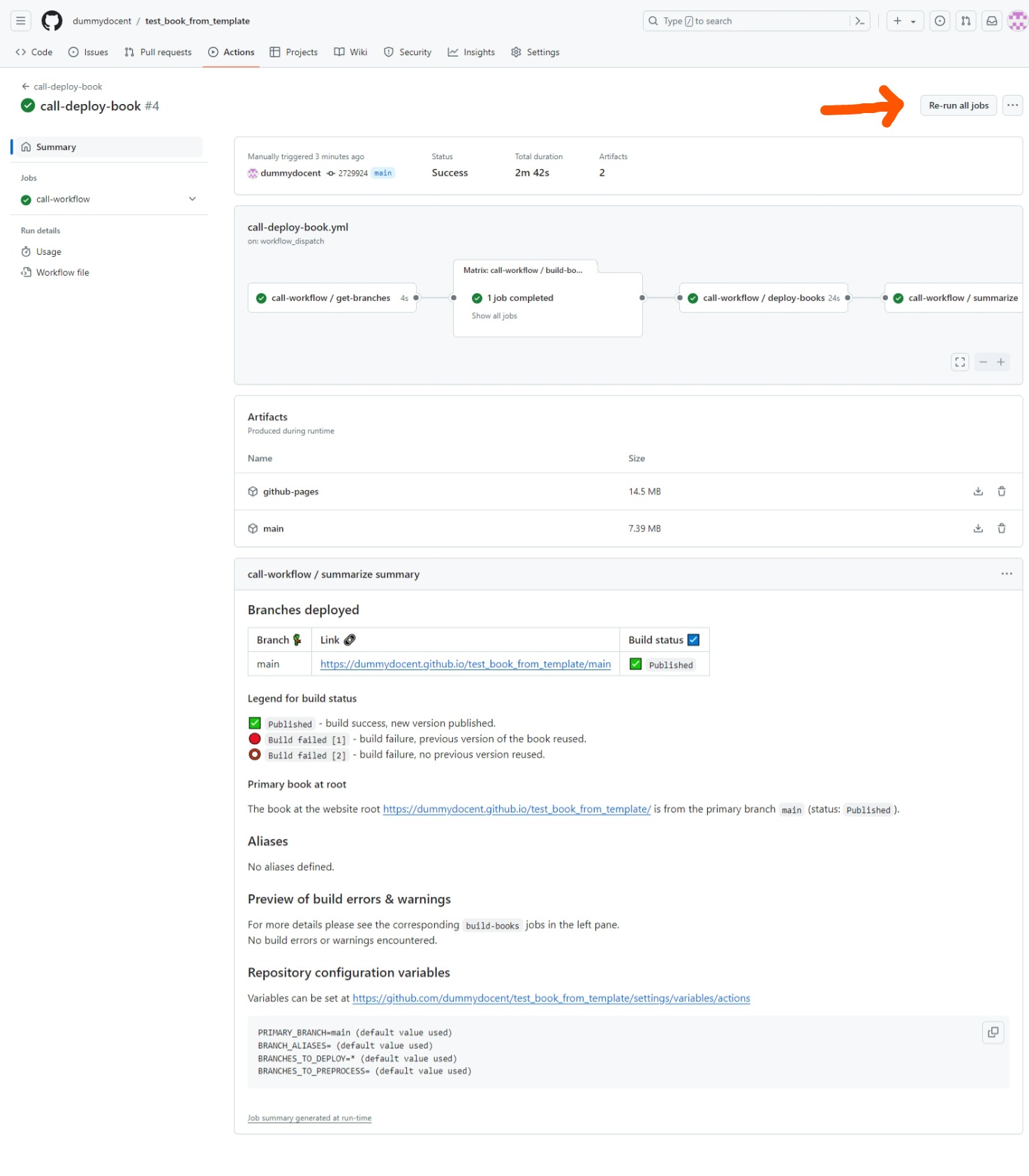
When the workflow has finished, visit your build TeachBook at
https://<username or organiszation_name>.github.io/<repository_name>(case sensitive). For our example it is https://dummydocent.github.io/testbookfrom_template/ for the shown repository. These links are visible in the action's summary as well, as shown in the figure of step 4.Want to get started directly? Your book contains a few exercises to get your started! Visit
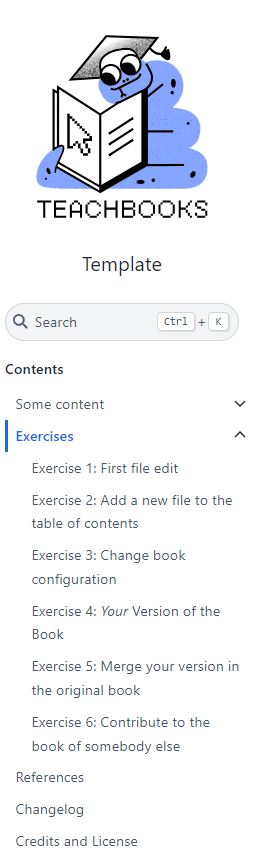
https://<username or organiszation_name>.github.io/<repository_name>/exercises/exercises(case sensitive) to get started with the first ones to get the basics of how to interact with your book on GitHub.
Additional tip:
Set the repository website as your GitHub Pages website under Code- About - Settings icon - Website - Use your GitHub Pages Website

Features
- A github repository structure for making a Jupyter Book (
/book) - An empty TeachBook containing an intro page on root, an example markdown page, an example jupyter notebook page, an example references page. and an example credits page. (
/book/_toc.yml,/book/_config.yml,/book/credits.md,/book/intro.md,/book/references.md,/book/some_content/overview.md,/book/some_content/text_and_code.ipynb) - A file ready for adding references (
references.bib,/book/references.md) - An example favicon (web browser icon) (
/book/figures/favicon.ico,book/_config.yml.) - An example logo (
/book/figures/TUDelft_logo_rgb.png,/book/config.yml) - The configuration files set ready to make your Jupyter Notebooks pages work with live code using our sphinx-thebe extension and our recommended settings (
/book/config.yml) - An example of setting up preprocessing your table of contents to hide certain draft chapters for eg. students (
_toc.yml) - A file containing all the recommended software packages (
requirements.txt) - A file containing the recommended license CC BY 4.0 (
LICENSE.md) - Our GitHub workflow for publishing your TeachBook to GitHub Pages (
.github/workflow/call-deploy-book.yml) - A gitignore file containing standard python filetype to ignore (
.gitignore) - A readme containing information how to use the template, which can adjusted after using the template (
README.md)
Contribute
This tool's repository is stored on GitHub. The README.md of the branch manual_description is also part of the TeachBooks manual as a submodule. If you'd like to contribute, you can create a fork and open a pull request on the GitHub repository. To update the README.md shown in the TeachBooks manual, create a fork and open a merge request for the GitHub repository of the manual. If you intent to clone the manual including its submodules, clone using: git clone --recurse-submodulesgit@github.com:TeachBooks/manual.git.
Template README
Remove all of the above after you've taken this template and followed the instructions. The following lines are a template for your own README
<Book title>
<description of book's content en target audience>
Contributors
<list authors>
Reuse content
Feel free to reuse this content or contribute to it. Please give appropriate credit, provide a link to the license, and indicate if changes were made (CC BY 4.0 License)
The website (<book_website_url>) is created using the TeachBooks Python package. To recreate it you have two options (more information in the TeachBooks manual:
- In the GitHub interface: fork this repository, enable Github Pages from the source GitHub actions (Settings - Code and automation - Pages - Build and deployment - Source - GitHub Actions), enable workflows (Actions - I understand my workflows, go ahead and enable them) and run the call-deploy-book workflow (Actions - call-deploy-book - Run workflow - Run workflow). The website is released on the URL as shown on the workflow summary when the workflow has finished (Actions - call-deploy-book - call-deploy-book - Summary).
- On your own computer: clone this repository, install the required packages (pip install -r requirements.txt) and build the book (teachbooks build book). The website is stored locally in book/_build/index.html.
Owner
- Name: PSOR Books
- Login: TeachBooks
- Kind: organization
- Email: books-CEG@tudelft.nl
- Location: Netherlands
- Repositories: 1
- Profile: https://github.com/TeachBooks
Teachers’ Educational Assistance for interaCtive Hands-on Browser-based Online Open Knowledge for Students
Citation (CITATION.cff)
# This CITATION.cff file was generated with cffinit.
# Visit https://bit.ly/cffinit to generate yours today!

cff-version: 1.2.0
title: 'TeachBooks Template' # replace with your own book title when you use this template
authors: #replace with your own name(s) if you use this template
- email: info@teachbooks.io
  name: 'TeachBooks Development Team'
  website: 'https://teachbooks.io/'
message: 'If you use this teachbook, please cite it using these metadata.'
preferred-citation:
  type: book
  authors: #replace with your own name(s) if you use this template
  - email: info@teachbooks.io
    name: 'TeachBooks Development Team'
    website: 'https://teachbooks.io/'
#  - given-names: Tom
#    name-particle: van
#    family-names: Woudenberg
#    email: t.r.van.woudenberg@tudelft.nl
#    affiliation: TeachBooks
#    orcid: 'https://orcid.org/0000-0002-9536-061X'
  url: 'https://teachbooks.github.io/template/' # replace with your own URL (book website / publisher link) when you use this template
  identifiers:
    - type: url
      value: 'https://teachbooks.github.io/template/' # replace with your own URL when you use this template
      description: 'Published book on GitHub Pages'
    - type: url
      value: 'https://github.com/TeachBooks/template' # replace with your own URL when you use this template
      description: 'GitHub repository'
  abstract: >- # replace with your own abstract when you use this template
    The template allows you to start your own TeachBook and
    hosting that TeachBook online without knowledge on Git,
    the Jupyter book package, python or anaconda. It doesn't
    elaborate on the collaborative functionalities of Git or
    how to edit the book
  keywords: # replace with your own keywords when you use this template
    - TeachBooks
    - Template
    - 'Jupyter Book'
  title: 'TeachBooks Template' # replace with your own book title when you use this template
  institution:
    name: 'TeachBooks' # replace with your own institution when you use this template
  license: CC-BY-4.0
  license-url: 'https://creativecommons.org/licenses/by/4.0/'
  copyright: '© 2025 TeachBooks' # replace with your own affiliation / name when you use this template
  languages:
    - en # replace with your book language when you use this template
  contact: # replace with your own contact information when you use this template
  - email: info@teachbooks.io
    name: 'TeachBooks Development Team'
Issues and Pull Requests
Last synced: 10 months ago
All Time
- Total issues: 14
- Total pull requests: 18
- Average time to close issues: about 2 months
- Average time to close pull requests: 1 day
- Total issue authors: 4
- Total pull request authors: 5
- Average comments per issue: 0.86
- Average comments per pull request: 0.5
- Merged pull requests: 11
- Bot issues: 0
- Bot pull requests: 0
Past Year
- Issues: 14
- Pull requests: 18
- Average time to close issues: about 2 months
- Average time to close pull requests: 1 day
- Issue authors: 4
- Pull request authors: 5
- Average comments per issue: 0.86
- Average comments per pull request: 0.5
- Merged pull requests: 11
- Bot issues: 0
- Bot pull requests: 0
Top Authors
Issue Authors
- Tom-van-Woudenberg (25)
- rlanzafame (5)
- FreekPols (2)
- kp992 (1)
- guin0x (1)
- SarahAlidoost (1)
- Ahmed-Elghandour (1)
Pull Request Authors
- Tom-van-Woudenberg (12)
- katiagatt (6)
- rlanzafame (4)
- severinbratus (2)
- navanvliet (2)
- MaxRamgraber (1)
- anmpahwa (1)
- ICSlingerland (1)
- mvdwaal010 (1)
- douden (1)
- GMeinema (1)
- xjulie0x (1)
- GabrielFollet (1)
Top Labels
Issue Labels
Pull Request Labels
Dependencies
- actions/cache v3 composite
- actions/checkout v3 composite
- actions/deploy-pages v2 composite
- actions/setup-python v4 composite
- actions/upload-pages-artifact v2 composite
- citg-jb-stack *
- docutils ==0.17.1
- jupyterbook_patches *
- sphinx-thebe ==0.2.1000