Science Score: 41.0%
This score indicates how likely this project is to be science-related based on various indicators:
-
✓CITATION.cff file
Found CITATION.cff file -
✓codemeta.json file
Found codemeta.json file -
○.zenodo.json file
-
○DOI references
-
○Academic publication links
-
✓Committers with academic emails
1 of 6 committers (16.7%) from academic institutions -
○Institutional organization owner
-
○JOSS paper metadata
-
○Scientific vocabulary similarity
Low similarity (10.5%) to scientific vocabulary
Repository
Simple RDKit molecule editor GUI using PySide
Basic Info
- Host: GitHub
- Owner: EBjerrum
- License: lgpl-3.0
- Language: Python
- Default Branch: master
- Size: 675 KB
Statistics
- Stars: 158
- Watchers: 9
- Forks: 33
- Open Issues: 5
- Releases: 12
Metadata Files
README.md
rdeditor
Simple RDKit molecule editor GUI using PySide6
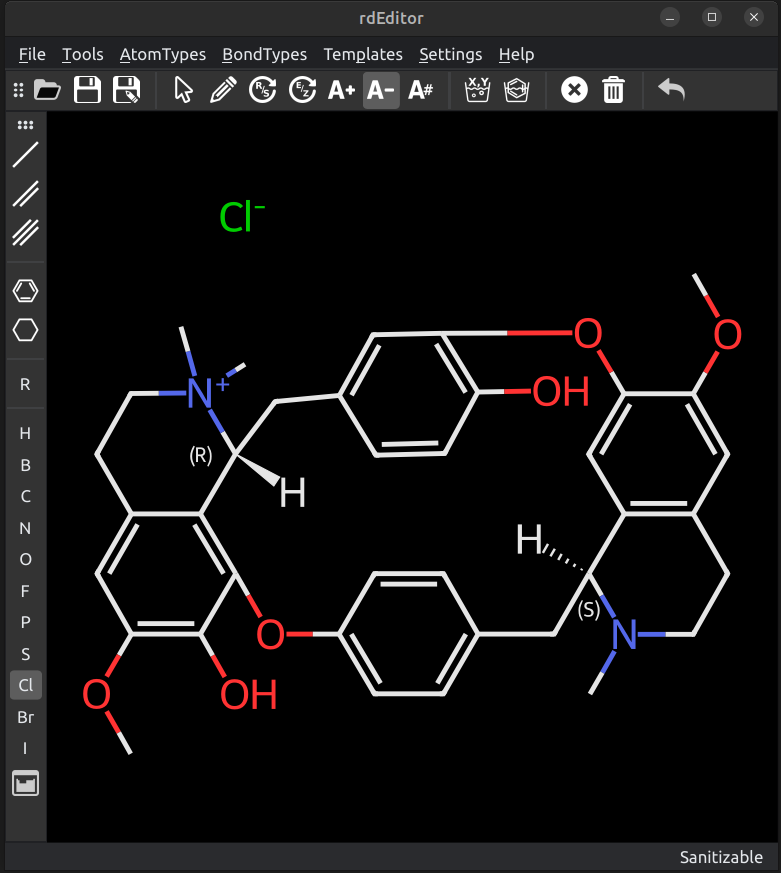
Installation
- requirements
RDKit, NumPy, PySide6 and pyqtdarktheme should be automatically installed when installed via pip.
- installation
```bash pip install rdeditor
```
A launch script will also be added so that it can be started from the command line via the rdEditor command.
Usage
Can be started from the command line with rdEditor or rdEditor your_molecule.mol to start edit an existing molecule.
Interactions with the molecule are done via clicking and dragging on the canvas, atoms or bonds. A choice of tools is available.
To edit a molecule, select the pen tool, and an atom, bond or template type and click on the canvas to add it.
Clicking:
- When clicking existing atoms or bonds, the clicked atom or bond will be modified, depending on the atom or bond type selected.
- If a bondtype is selected, the bond will be added to the clicked atom with a carbon atom at the other end.
- If a bondtype is selected and a bond is clicked, the bond will be changed to that type if different.
- If you click multiple times on a bond with an atomtype selected, the bondtype will cycle between single, double and triple bond.
Dragging:
- If you click and drag from an atom, the selected atomtype will be added at the end of a single bond.
- Dragging between two atoms will add a bond between them. If a bondtype is selected, the bondorder will correspond to the bondtype selected.
- Dragging on the canvas with an atomtype will add two atoms of that type with a single bond between them.
- Dragging on the canvas with a bondtype will simply add that bond with carbon atoms at both ends.
Templates:
- Templates work kind of like atoms, so if you click on an atom, the template will be added directly to that atom.
- If a template is selected and dragged from an atom, the template will be added with a single bond to the clicked atom.
- Some templates can also be added to bonds by clicking on the middle of the bond.
- Dragging on a canvas with a template will add a carbon atom and a single bond to the template.
Other actions:
- most other actions (R/S, E/Z, Increase/Decrease charge, Adjust atom number) works by clikcing on existing atoms.
Top Menu:

From left to right
- Open: Open a molfile
- Save: Save current molecule
Save As: Save current molecule with a new name
Arrow: Select tool. Click on an atom to select it, click on the canvas to deselect. Clicking on multiple atoms one after another will select them, but only the lastly clicked one will be highlighted in red and used for operations, such as bond creation to another existing atom.
Pen: Add tool. Clicking on an existing atom will add the current selected atom type to that atom with a single bond. Clicking on the canvas will add a disconnected atom. Clicking on a bond will cycle through single, double and triple bonds.
R/S: Change the stereo chemistry of the selected atom
E/Z: Change E/Z stereo of double bonds
Increase/Decrease charge: Will increase or decrease the charge of the atom clicked
Set atommap or R-group number: Will set the atommap or R-group number of the atom clicked
clean up coordinates: recalculate coordinates disregarding existing coordinates.
clean up chemistry. Sanitize and/or Kekulize the molecule.
Delete atom/bond:
Clear Canvas
Undo.
Side Bar:

Most commonly used bond types, and atom types can be selected. Templates and R-group (dummy atoms) are also accessible. A Periodic table is accessible for exotic atom types.
Dropdown menus
Access to all standard operations as well as less used atom types and bond-types.
Settings
Themes can be selected from the ones available on your platform (Mac/Linux/Windows).
The debug level can be selected
Cleanup settings can be selected if the molecule should be sanitized or kekulized during cleanup.
Development
Instructions to set it up in editable modes and instructions for eventual contributions can be found in the DEVELOPER.md file. Please reach out first, there may be a relevant development branch.
Additional Reading
I wrote a blog post with an overview of the structure of the code. https://www.wildcardconsulting.dk/rdeditor-an-open-source-molecular-editor-based-using-python-pyside2-and-rdkit/
We also published a preprint on ChemRxiv: https://chemrxiv.org/engage/chemrxiv/article-details/65e6dcfa9138d23161b2979c
ISSUES
Please report issues at GitHub, it's tough getting all corners of a GUI tested.
Owner
- Name: Esben Jannik Bjerrum
- Login: EBjerrum
- Kind: user
- Location: Sweden
- Company: Odyssey Thereapeutics
- Website: www.odysseytx.com
- Twitter: chemitnerf
- Repositories: 6
- Profile: https://github.com/EBjerrum
https://www.cheminformania.com/about/esben-jannik-bjerrum/ https://www.linkedin.com/in/esbenbjerrum Mastodon @ChemITNerf@sigmoid.social
Citation (CITATION.bib)
@misc{bjerrum_2024,
	title = {Python-{Based} {Interactive} {RDKit} {Molecule} {Editing} with {rdEditor}},
	url = {https://chemrxiv.org/engage/chemrxiv/article-details/65e6dcfa9138d23161b2979c},
	doi = {10.26434/chemrxiv-2024-jfhmw},
	abstract = {RDKit is a widely used toolkit for cheminformatics, renowned for its fast C++ backend and versatile Python API. However, in many cases, users find themselves needing to create or edit molecules in external programs, as the majority prefer not to manipulate raw SMILES strings. Unfortunately, most available tools for this purpose are either proprietary, deprecated, or not Python-based. Here we introduce rdEditor, a molecular editor entirely written in Python 3 using PySide2 graphical user interface widgets. The application is programmed in an object-oriented fashion, and the custom PySide2 widgets can be easily reused in other applications. It's important to note that this application is an editor, not a drawing program. In other words, RDKit handles the layout of the molecule entirely, and the user interacts with the molecular graph object directly, rather than drawing on a canvas with subsequent conversion to molecular format. While reusing functionality from RDKit contributes to an efficient codebase, there are some drawbacks if end-users expect to have control over the precise placement of atoms. The code is released as open-source and is available on GitHub at: https://github.com/EBjerrum/rdEditor.},
	language = {en},
	urldate = {2024-03-07},
	publisher = {ChemRxiv},
	author = {Bjerrum, Esben Jannik and Palunas, Kovas and Menke, Janosch},
	month = mar,
	year = {2024},
}
GitHub Events
Total
- Issues event: 6
- Watch event: 20
- Delete event: 1
- Issue comment event: 26
- Push event: 5
- Pull request event: 10
- Fork event: 1
- Create event: 2
Last Year
- Issues event: 6
- Watch event: 20
- Delete event: 1
- Issue comment event: 26
- Push event: 5
- Pull request event: 10
- Fork event: 1
- Create event: 2
Committers
Last synced: about 1 year ago
Top Committers
| Name | Commits | |
|---|---|---|
| Esben Jannik Bjerrum | e****k@r****m | 94 |
| Esben Jannik Bjerrum | e****k@r****m | 24 |
| JanoschMenke | 4****e | 7 |
| Jack Day | j****y@g****m | 5 |
| Kovas Palunas | k****s@d****k | 3 |
| EBjerrum | e****b@g****m | 3 |
Committer Domains (Top 20 + Academic)
Issues and Pull Requests
Last synced: 10 months ago
All Time
- Total issues: 17
- Total pull requests: 23
- Average time to close issues: 3 months
- Average time to close pull requests: 24 days
- Total issue authors: 9
- Total pull request authors: 5
- Average comments per issue: 2.24
- Average comments per pull request: 1.61
- Merged pull requests: 18
- Bot issues: 0
- Bot pull requests: 0
Past Year
- Issues: 3
- Pull requests: 11
- Average time to close issues: 3 months
- Average time to close pull requests: 17 days
- Issue authors: 2
- Pull request authors: 2
- Average comments per issue: 0.33
- Average comments per pull request: 1.09
- Merged pull requests: 10
- Bot issues: 0
- Bot pull requests: 0
Top Authors
Issue Authors
- EBjerrum (9)
- JanoschMenke (1)
- Ruibin-Liu (1)
- eneas77 (1)
- cap-jmk (1)
- vsheg (1)
- caiyingchun (1)
- salvogalati (1)
- alfredoq (1)
Pull Request Authors
- EBjerrum (16)
- jacktday (12)
- JanoschMenke (6)
- Adafede (2)
- kovasap (2)
Top Labels
Issue Labels
Pull Request Labels
Packages
- Total packages: 1
-
Total downloads:
- pypi 55 last-month
- Total dependent packages: 0
- Total dependent repositories: 0
- Total versions: 17
- Total maintainers: 1
pypi.org: rdeditor
An RDKit based molecule editor using PySide
- Homepage: http://github.com/ebjerrum/rdeditor
- Documentation: https://github.com/ebjerrum/rdeditor/blob/master/README.md
- License: LGPL
-
Latest release: 0.5.1
published over 1 year ago
Rankings
Maintainers (1)
Dependencies
- PySide2 *
- numpy *