hbb2obb
📦 HBB2OBB is a Python library for converting horizontal (axis-aligned) bounding boxes to oriented (rotated) bounding boxes using SAM-based segmentation. Includes tools for visualization, evaluation, format conversion, and hyperparameter tuning.
Science Score: 54.0%
This score indicates how likely this project is to be science-related based on various indicators:
-
✓CITATION.cff file
Found CITATION.cff file -
✓codemeta.json file
Found codemeta.json file -
○.zenodo.json file
-
✓DOI references
Found 2 DOI reference(s) in README -
✓Academic publication links
Links to: zenodo.org -
○Academic email domains
-
○Institutional organization owner
-
○JOSS paper metadata
-
○Scientific vocabulary similarity
Low similarity (15.0%) to scientific vocabulary
Keywords
Repository
📦 HBB2OBB is a Python library for converting horizontal (axis-aligned) bounding boxes to oriented (rotated) bounding boxes using SAM-based segmentation. Includes tools for visualization, evaluation, format conversion, and hyperparameter tuning.
Basic Info
Statistics
- Stars: 1
- Watchers: 1
- Forks: 0
- Open Issues: 0
- Releases: 1
Topics
Metadata Files
README.md
HBB2OBB: Horizontal to Oriented Bounding Box Conversion and Evaluation Tool





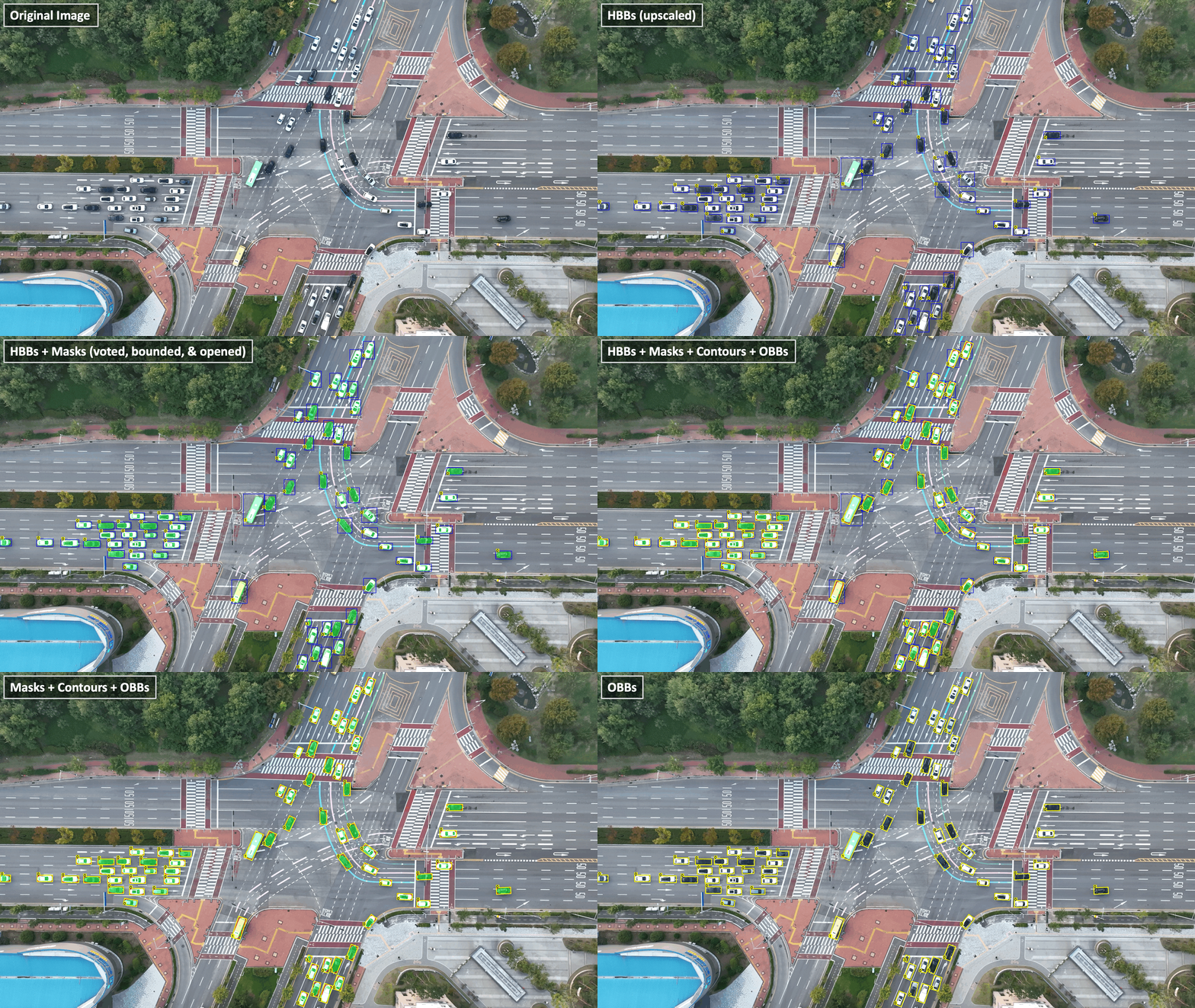
HBB2OBB is a Python tool designed to convert horizontal bounding boxes (HBBs), also known as axis-aligned bounding boxes, into oriented bounding boxes (OBBs), also referred to as rotated bounding boxes, using segmentation models from the SAM (Segment Anything Model) family. This tool addresses a critical need in object detection tasks where objects appear in arbitrary orientations, such as in aerial imagery, satellite data, or traffic monitoring scenarios. The conversion utilizes user-provided HBB annotations as prompts for SAM models, leveraging their state-of-the-art segmentation capabilities to accurately delineate object boundaries and generate precise OBBs that better encapsulate non-upright objects.
The conversion process employs a model ensemble approach that combines masks from multiple segmentation models through majority voting, resulting in enhanced accuracy and robustness. The system implements spatial constraint techniques including region-specific masking and contour refinement to ensure the segmentation remains within relevant object boundaries. The library supports flexible scaling of input HBBs (both positive and negative factors) to accommodate for potentially cropped object parts or overly conservative annotations. If no valid mask is detected, a fallback strategy maintains the original HBB as the OBB, ensuring consistent outputs.
Beyond conversion, HBB2OBB offers comprehensive evaluation tools to assess OBB accuracy against ground truth annotations, hyperparameter optimization capabilities to fine-tune the conversion process for specific datasets, and utilities for format conversion between COCO JSON and YOLO TXT. The package includes intuitive visualization features that render the conversion process transparently, displaying the progression from original HBBs through segmentation masks to final OBBs. Designed with ease of use in mind, HBB2OBB provides both an intuitive command-line interface and a flexible Python API for seamless integration into existing workflows.
Features
- Conversion from HBB to OBB: Automatically converts YOLO format horizontal bounding boxes to oriented bounding boxes
- Segmentation-Based Approach: Uses state-of-the-art segmentation models for accurate object boundary detection
- Multiple Model Support: Compatible with various SAM model variants (SAM, SAM2, SAM2.1, Mobile SAM, and FastSAM families, see ultralytics documentation for details)
- Model Ensemble: Ability to combine outputs from multiple segmentation models for enhanced accuracy through majority voting
- Evaluation Tools: Includes tools to evaluate OBB accuracy against ground truth using IoU metrics
- Hyperparameter Optimization Tool: Finds optimal hyperparameters for HBB2OBB conversion by evaluating different combinations of SAM inference resolutions and scale factors used to enlarge/shrink HBBs
- Visualization Tools: Tools to visualize the conversion process, including HBBs, segmentation masks, derived contours, and the resulting OBBs, as well as the evaluation results
- Format Conversion Utilities: Tools to convert between COCO JSON and YOLO TXT formats for both HBB and OBB annotations
🚀 Planned Enhancements
- **Support for Other Formats**: Add support for other annotation formats (e.g., COCO, Pascal VOC) - **Improved Morphological Operations**: Implement more advanced morphological operations for better mask refinement - **Integration with Other Libraries**: Integrate with popular object detection libraries to alleviate the need for HBB annotations - **Support for Other Segmentation Models**: Extend compatibility to other segmentation modelsInstallation
It is recommended to create and activate a Python Virtual Environment (Python >= 3.9) first using e.g., Miniconda3:
bash
conda create -n hbb2obb python=3.11 -y
conda activate hbb2obb
Then, install the hbb2obb library using one of the following options:
Option 1: Install from PyPI
bash
pip install hbb2obb
Option 2: Install from Local Source
You can also clone the repository and install the package from the local source:
bash
git clone https://github.com/rfonod/hbb2obb.git
cd hbb2obb && pip install .
If you want the changes you make in the repo to be reflected in your install, use pip install -e . instead of pip install ..
CLI Usage
Converting HBB to OBB
To convert HBBs to OBBs using default parameters (single SAM model sam_b), run:
bash
hbb2obb /path/to/images --hbb_dir /path/to/hbb/annotations
For enhanced accuracy using multiple segmentation models (model ensemble):
bash
hbb2obb /path/to/images --hbb_dir /path/to/hbb/annotations --sam_models sam_b sam_l sam2_b sam2.1_b
To adjust scale factors (useful for recovering cropped object parts or handling conservative HBBs):
```bash
Positive scale factor to expand HBBs (helps recover cropped parts)
hbb2obb /path/to/images --scale_factors 0.1
Negative scale factor to shrink HBBs (useful when HBBs are too conservative)
hbb2obb /path/to/images --scale_factors -0.02
Different scale factors for short and long sides of the HBB
hbb2obb /path/to/images --scale_factors 0.1 0.05 ```
To visualize the conversion process, add the --save_img flag:
bash
hbb2obb /path/to/images --save_img
More CLI Arguments
For a complete list of CLI arguments and their descriptions, run: ```bash hbb2obb --help ``` Key arguments include: - `--hbb_dir`: Directory containing HBB annotations (YOLO TXT format) - `--obb_dir`: Directory to save OBB annotations (default: `labels_obb` in the parent directory of source images) - `--sam_models`: List of SAM models to use (e.g., sam_b, sam_l, sam2_b, sam2.1_b, mobile_sam, FastSAM-s) - `--imgsz`: SAM inference resolution - `--scale_factors`: Factors to scale HBBs (can be single value or separate for x and y) - `--opening_kernel_percentage`: Size of the morphological opening kernel as a percentage of the mask's smaller dimension - `--save_img`: Whether to save visualization images - `--viz_dir`: Directory to save visualization images (default: same as `--obb_dir`) - `--hide_hbb`, `--hide_obb`, `--hide_masks`, `--hide_segments`, `--hide_labels`: Control what gets visualized - `--model_kwargs`: Additional keyword arguments for SAM models, see [ultralytics documentation](https://docs.ultralytics.com/models/sam/) for detailsEvaluating OBB Predictions
To evaluate the accuracy of OBB predictions against ground truth annotations:
bash
hbb2obb-eval /path/to/ground_truth /path/to/predictions
More Evaluation Arguments
For a complete list of evaluation arguments, run: ```bash hbb2obb-eval --help ``` Key arguments include: - `--excluded_classes`: List of class IDs to exclude from evaluation - `--iou_threshold`: IoU threshold for considering a ground truth and prediction pair as a match - `--class_agnostic`: Whether to ignore class label matching requirement (useful for re-classified objects in GT) - `--exclude_edge_cases`: Whether to exclude cases where the OBB is too close to the image edge - `--edge_tolerance`: Tolerance for edge cases in pixels - `--img_width`, `--img_height`: Image dimensions (for edge case detection) - `--label_map`: Path to label map YAML file that maps class IDs to class namesPython API Usage
Converting HBB to OBB
```python from hbb2obb.converter import hbb2obb, save_obb_annotations # Basic usage with a single SAM model results = hbb2obb( img_path="/path/to/images", hbb_dir="/path/to/hbb/annotations", sam_models="sam_b", imgsz=1280, scale_factors=0.05, opening_kernel_percentage=0.15, save_img=True, viz_dir="/path/to/save/visualizations", show_hbb=True, show_masks=True, show_segments=True, show_obb=True, show_labels=True, ) # Enhanced accuracy using multiple SAM models (model ensemble) results = hbb2obb( img_path="/path/to/images", hbb_dir="/path/to/hbb/annotations", sam_models=["sam_b", "sam_l", "sam2_b", "sam2.1_b"], imgsz=1280, scale_factors=[0.1, 0.05], # Different scale factors for short and long sides opening_kernel_percentage=0.15, save_img=True, viz_dir="/path/to/save/visualizations", ) # Save the resulting OBB annotations save_obb_annotations(results["obb_annotations"], "/path/to/save/obb/annotations") ```Evaluating OBB Predictions
```python from hbb2obb.evaluator import evaluate_obb, print_results # Basic evaluation results = evaluate_obb( gt_dir="/path/to/ground_truth_annotations", pred_dir="/path/to/predictions", iou_threshold=0.1, ) # Class-agnostic evaluation (useful when GT has re-classified objects) results = evaluate_obb( gt_dir="/path/to/ground_truth_annotations", pred_dir="/path/to/predictions", iou_threshold=0.1, class_agnostic=True, exclude_edge_cases=True, edge_tolerance=1, img_width=3840, img_height=2160, ) # Print evaluation results with class names from label map print_results(results, "/path/to/label_map.yaml") ```Utility Scripts
Format Conversion
COCO JSON to YOLO TXT (supports both HBB and OBB annotations):
bash
python scripts/json2yolo.py /path/to/json -mp /path/to/label_map.yaml
The -mp flag is optional and can be used to specify a label map file. If not provided, the script will create a default (first-come-first-serve) label map.
YOLO TXT to COCO JSON (supports both HBB and OBB annotations):
bash
python scripts/yolo2json.py /path/to/yolo /path/to/label_map.yaml
Here, the label map file is required to convert the numerical class IDs to class names in the JSON output. The output JSON format is compatible with annotation tools like LabelMe.
Hyperparameter Optimization
To find the optimal hyperparameters for the default SAM model (sam_b), run:
bash
python scripts/optimize_hbb2obb.py /path/to/images path/to/ground_truth_annotations
This evaluates different combinations of: - SAM inference resolutions - Scale factors to enlarge/shrink HBBs
The script can be run for different SAM models or combinations of models. For example, to evaluate multiple SAM models:
bash
python scripts/optimize_hbb2obb.py /path/to/images path/to/ground_truth_annotations -sm sam_b sam_l sam2_b sam2.1_b -n multi_sam
To visualize optimization results:
bash
python scripts/plot_optimization_results.py /path/to/optimization_results
Data Format
HBB Annotations (Input)
HBB annotations should be in YOLO TXT format (one file per image):
class_id x_center y_center width height
The coordinates can be in relative format (0-1) or absolute pixel coordinates.
OBB Annotations (Output)
OBB annotations are saved in the following YOLO TXT format (one file per image):
class_id x1 y1 x2 y2 x3 y3 x4 y4
Where (x1,y1), (x2,y2), (x3,y3), (x4,y4) are the four corner coordinates of the rotated bounding box in absolute pixel coordinates.
Label Map (Optional)
Label map is a YAML file mapping class IDs to class names. For example: ```yaml 0: Car 1: Bus 2: Truck 3: Motorcycle
...
```
Example Workflow
Basic Workflow
Below is a simple example of how to use the HBB2OBB tool for converting HBB annotations to OBB annotations and evaluating the results. This example assumes you have a dataset with images and HBB annotations in YOLO format. Steps 2-4 are optional and can be skipped if you only want to convert HBBs to OBBs.
- Prepare HBB annotations in YOLO format
dataset/
├── images/
│   ├── img1.jpg
│   ├── img2.jpg
│   └── ...
├── labels_hbb/
│   ├── img1.txt
│   ├── img2.txt
│   └── ...
├── labels_obb_gt/ (optional)
│   ├── img1.txt
│   ├── img2.txt
│   └── ...
└── classes.yaml (optional)
💡 Note: The data folder in this repository contains a sample dataset to test the conversion and evaluation processes as well as the parameter optimization and visualization scripts. The README file inside the data folder contains detailed instructions and commands on how to reproduce the results.
Convert HBB to OBB annotations and visualize the transformation using default parameters
bash
hbb2obb data/images --save_img
Evaluate OBB predictions against ground truth annotations
bash
hbb2obb-eval data/labels_obb_gt data/labels_obb -lm data/classes.yaml
Optimize hyperparameters for HBB2OBB conversion using a light-weight SAM model
bash
python scripts/optimize_hbb2obb.py data/images data/labels_obb_gt -sm sam2_s -n sam2_s
Visualize optimization results
bash
python scripts/plot_optimization_results.py data/benchmark_results/sam2_s
Complete Workflow with LabelMe JSON Annotations
Detailed Step-by-Step Guide with LabelMe
1. **Start with LabelMe JSON annotations for HBB and OBB ground truth** ``` project/ ├── images/ │ ├── img1.jpg │ ├── img2.jpg │ └── ... ├── json_hbb/ │ ├── img1.json │ ├── img2.json │ └── ... └── json_obb_gt/ (ground truth) ├── img1.json ├── img2.json └── ... ``` 💡 [LabelMe](https://github.com/wkentaro/labelme) is a popular annotation tool that can be used to create both horizontal and oriented bounding box annotations in JSON format. It supports polygonal annotations which can be converted to OBB format. 2. **Convert JSON annotations to YOLO format** ```bash # Convert HBB JSON to YOLO TXT python scripts/json2yolo.py project/json_hbb -o project/labels_hbb # Convert OBB ground truth JSON to YOLO TXT python scripts/json2yolo.py project/json_obb_gt -o project/labels_obb_gt ``` 3. **Run hyperparameter optimization to find the best settings** ```bash python scripts/optimize_hbb2obb.py project/images project/labels_obb_gt -sm sam_b sam_l sam2_b sam2.1_b -n multi_sam ``` 4. **Generate OBBs using the optimal parameters from the results** ```bash # Check the best parameters from the optimization results cat project/benchmark_results/multi_sam/summary.txt # Use those parameters for conversion (example values) hbb2obb project/images --hbb_dir project/labels_hbb --obb_dir project/labels_obb \ --sam_models sam_b sam_l sam2_b --imgsz 1280 --scale_factors 0.05 \ --opening_kernel_percentage 0.15 --save_img --viz_dir project/visualizations ``` 5. **Evaluate the OBB predictions against ground truth** ```bash hbb2obb-eval project/labels_obb_gt project/labels_obb -mp project/label_map.yaml ``` 6. **Convert the generated OBB annotations back to JSON format for visualization in LabelMe** ```bash python scripts/yolo2json.py project/labels_obb project/label_map.yaml -jd project/json_obb ``` 7. **Open the visualizations or JSON annotations in LabelMe for manual review** ```bash labelme project/images --output project/json_obb --nodata ```Technical Details
The HBB to OBB conversion process involves the following steps:
- Load HBB annotations: Parse YOLO TXT format annotations
- Scale bounding boxes: Scale HBB slightly to ensure complete object coverage
- Positive scale factors: Expand HBBs to recover potentially cropped object parts
- Negative scale factors: Shrink HBBs when they are overly conservative
- Different scale factors can be applied to shorter vs. longer sides of the HBB
- Segmentation: Use SAM model(s) to generate object masks based on the HBB prompts
- Mask aggregation:
- When using multiple models (model ensemble), masks are combined through majority voting
- The aggregated mask is clipped to the scaled HBB region
- Morphological opening is applied to refine the mask
- Contour extraction: Extract contours from the largest refined mask per object
- OBB computation: Calculate minimum-area oriented bounding boxes from the contours
- Fall-back strategy: If no valid mask is detected inside an HBB, the original HBB is used as the OBB
- Visualization (optional): Generate images with HBBs, segmentation masks, contours, and OBB overlays
Key characteristics: - Label preservation: OBBs inherit the class labels from their corresponding HBBs (no re-classification) - Corrective effects: The transformation may correct errors in the original HBBs by: - Recovering cropped object parts through positive scale factors - Creating tighter bounding boxes through precise segmentation
Best Practices
- For optimal results, use a combination of SAM models, e.g.,
--sam_models sam_b sam_l sam2_b sam2.1_b - Experiment with different scale factors and inference resolutions based on your dataset characteristics
- Run the hyperparameter optimization script to find the best settings for your specific data
- Use class-agnostic evaluation when comparing with manually annotated ground truth that might have different class labels than the original HBBs
- Visualize the conversion process to understand how the model is interpreting the HBBs and generating OBBs
- Regularly check for updates to the library and SAM models for improved performance and new features
Limitations
- The tool relies on the quality of the HBB annotations and the SAM models used for segmentation. Poorly annotated HBBs or low-quality segmentation models may lead to inaccurate OBBs.
- The conversion process may not work well for highly occluded or complex objects where the HBB does not provide sufficient context for the SAM model to generate accurate masks.
Contributing
Contributions are welcome! If you encounter any issues or have suggestions for improvements, please open a GitHub Issue or submit a pull request.
License
This project is distributed under the MIT License. See the LICENSE file for more details.
Owner
- Name: Robert Fonod
- Login: rfonod
- Kind: user
- Website: https://www.linkedin.com/in/rfonod/
- Repositories: 2
- Profile: https://github.com/rfonod
Citation (CITATION.cff)
cff-version: 1.2.0
title: "HBB2OBB: Horizontal to Oriented Bounding Box Conversion and Evaluation Tool"
message: "If you use this software, please consider citing the software."
type: software
authors:
  - given-names: Robert
    family-names: Fonod
    email: robert.fonod@ieee.org
    affiliation: EPFL
    orcid: 'https://orcid.org/0000-0002-9434-3156'
identifiers:
  - type: doi
    value: 10.5281/zenodo.15151143
    description: Zenodo archive
repository-code: 'https://github.com/rfonod/hbb2obb'
url: 'https://github.com/rfonod/hbb2obb'
license: MIT
version: 1.0.0
date-released: '2025-04-04'
GitHub Events
Total
- Release event: 1
- Watch event: 1
- Create event: 3
Last Year
- Release event: 1
- Watch event: 1
- Create event: 3
Issues and Pull Requests
Last synced: 11 months ago
All Time
- Total issues: 0
- Total pull requests: 0
- Average time to close issues: N/A
- Average time to close pull requests: N/A
- Total issue authors: 0
- Total pull request authors: 0
- Average comments per issue: 0
- Average comments per pull request: 0
- Merged pull requests: 0
- Bot issues: 0
- Bot pull requests: 0
Past Year
- Issues: 0
- Pull requests: 0
- Average time to close issues: N/A
- Average time to close pull requests: N/A
- Issue authors: 0
- Pull request authors: 0
- Average comments per issue: 0
- Average comments per pull request: 0
- Merged pull requests: 0
- Bot issues: 0
- Bot pull requests: 0
Top Authors
Issue Authors
Pull Request Authors
Top Labels
Issue Labels
Pull Request Labels
Packages
- Total packages: 1
-
Total downloads:
- pypi 19 last-month
- Total dependent packages: 0
- Total dependent repositories: 0
- Total versions: 1
- Total maintainers: 1
pypi.org: hbb2obb
Toolkit for converting horizontal bounding boxes to oriented bounding boxes using segmentation models and evaluation of the conversion against ground truth.
- Homepage: https://github.com/rfonod/hbb2obb/
- Documentation: https://hbb2obb.readthedocs.io/
- License: MIT License Copyright (c) 2025 Robert Fonod Permission is hereby granted, free of charge, to any person obtaining a copy of this software and associated documentation files (the "Software"), to deal in the Software without restriction, including without limitation the rights to use, copy, modify, merge, publish, distribute, sublicense, and/or sell copies of the Software, and to permit persons to whom the Software is furnished to do so, subject to the following conditions: The above copyright notice and this permission notice shall be included in all copies or substantial portions of the Software. THE SOFTWARE IS PROVIDED "AS IS", WITHOUT WARRANTY OF ANY KIND, EXPRESS OR IMPLIED, INCLUDING BUT NOT LIMITED TO THE WARRANTIES OF MERCHANTABILITY, FITNESS FOR A PARTICULAR PURPOSE AND NONINFRINGEMENT. IN NO EVENT SHALL THE AUTHORS OR COPYRIGHT HOLDERS BE LIABLE FOR ANY CLAIM, DAMAGES OR OTHER LIABILITY, WHETHER IN AN ACTION OF CONTRACT, TORT OR OTHERWISE, ARISING FROM, OUT OF OR IN CONNECTION WITH THE SOFTWARE OR THE USE OR OTHER DEALINGS IN THE SOFTWARE.
-
Latest release: 1.0.0
published about 1 year ago
Rankings
Maintainers (1)
Dependencies
- shapely >=2.0.7
- ultralytics >=8.3