explabox
Explore/examine/explain/expose your model with the explabox!
Science Score: 67.0%
This score indicates how likely this project is to be science-related based on various indicators:
-
✓CITATION.cff file
Found CITATION.cff file -
✓codemeta.json file
Found codemeta.json file -
✓.zenodo.json file
Found .zenodo.json file -
✓DOI references
Found 4 DOI reference(s) in README -
✓Academic publication links
Links to: arxiv.org -
○Academic email domains
-
○Institutional organization owner
-
○JOSS paper metadata
-
○Scientific vocabulary similarity
Low similarity (14.7%) to scientific vocabulary
Keywords
Repository
Explore/examine/explain/expose your model with the explabox!
Basic Info
- Host: GitHub
- Owner: MarcelRobeer
- License: lgpl-3.0
- Language: Python
- Default Branch: main
- Homepage: https://explabox.readthedocs.io
- Size: 3.09 MB
Statistics
- Stars: 17
- Watchers: 1
- Forks: 0
- Open Issues: 1
- Releases: 2
Topics
Metadata Files
README.md

"{
Explore | Examine | Expose | Explain} your model with the explabox!"
| Status | |
|:-----------------|:------------------
| Latest release | 





The explabox aims to support data scientists and machine learning (ML) engineers in explaining, testing and documenting AI/ML models, developed in-house or acquired externally. The explabox turns your ingestibles (AI/ML model and/or dataset) into digestibles (statistics, explanations or sensitivity insights)!
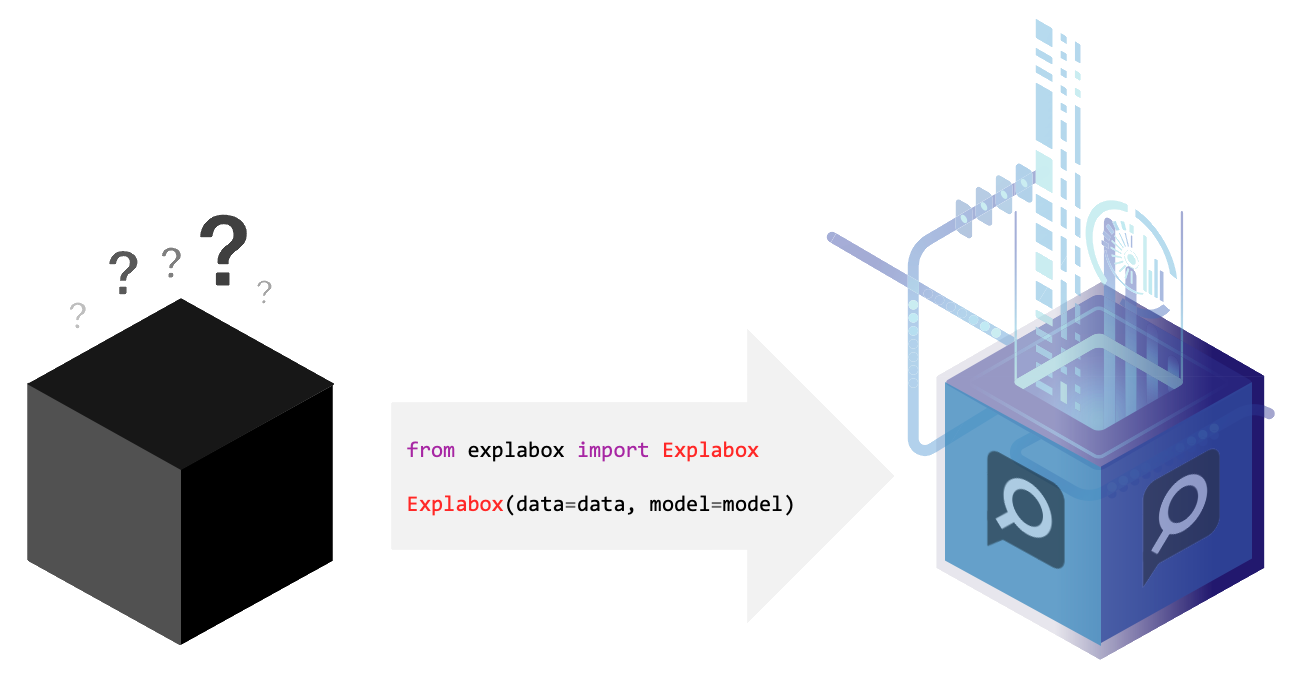
The explabox can be used to:
- Explore: describe aspects of the model and data.
- Examine: calculate quantitative metrics on how the model performs.
- Expose: see model sensitivity to random inputs (safety), test model generalizability (e.g. sensitivity to typos; robustness), and see the effect of adjustments of attributes in the inputs (e.g. swapping male pronouns for female pronouns; fairness), for the dataset as a whole (global) as well as for individual instances (local).
- Explain: use XAI methods for explaining the whole dataset (global), model behavior on the dataset (global), and specific predictions/decisions (local).
A number of experiments in the explabox can also be used to provide transparency and explanations to stakeholders, such as end-users or clients.
:information_source: The
explaboxcurrently only supports natural language text as a modality. In the future, we intend to extend to other modalities.
© National Police Lab AI (NPAI), 2022
Quick tour
The explabox is distributed on PyPI. To use the package with Python, install it (pip install explabox), import your data and model and wrap them in the Explabox. The example dataset and model shown here can be easily imported using demo package explabox-demo-drugreview.
:information_source: To easily follow along without a need for installation, run the Notebook in
First, import the pre-provided model, and import the data from the dataset_file. All we need to know is in which column(s) your data is, and where we can find the corresponding labels:
```python from explaboxdemodrugreview import model, datasetfile from explabox import importdata
data = importdata(datasetfile, datacols='review', labelcols='rating') ```
Second, we provide the data and model to the Explabox, and it does the rest! Rename the splits from your file names for easy access:
```python
from explabox import Explabox
box = Explabox(data=data, model=model, splits={'train': 'drugsComTrain.tsv', 'test': 'drugsComTest.tsv'}) ```
Then .explore, .examine, .expose and .explain your model:
```python
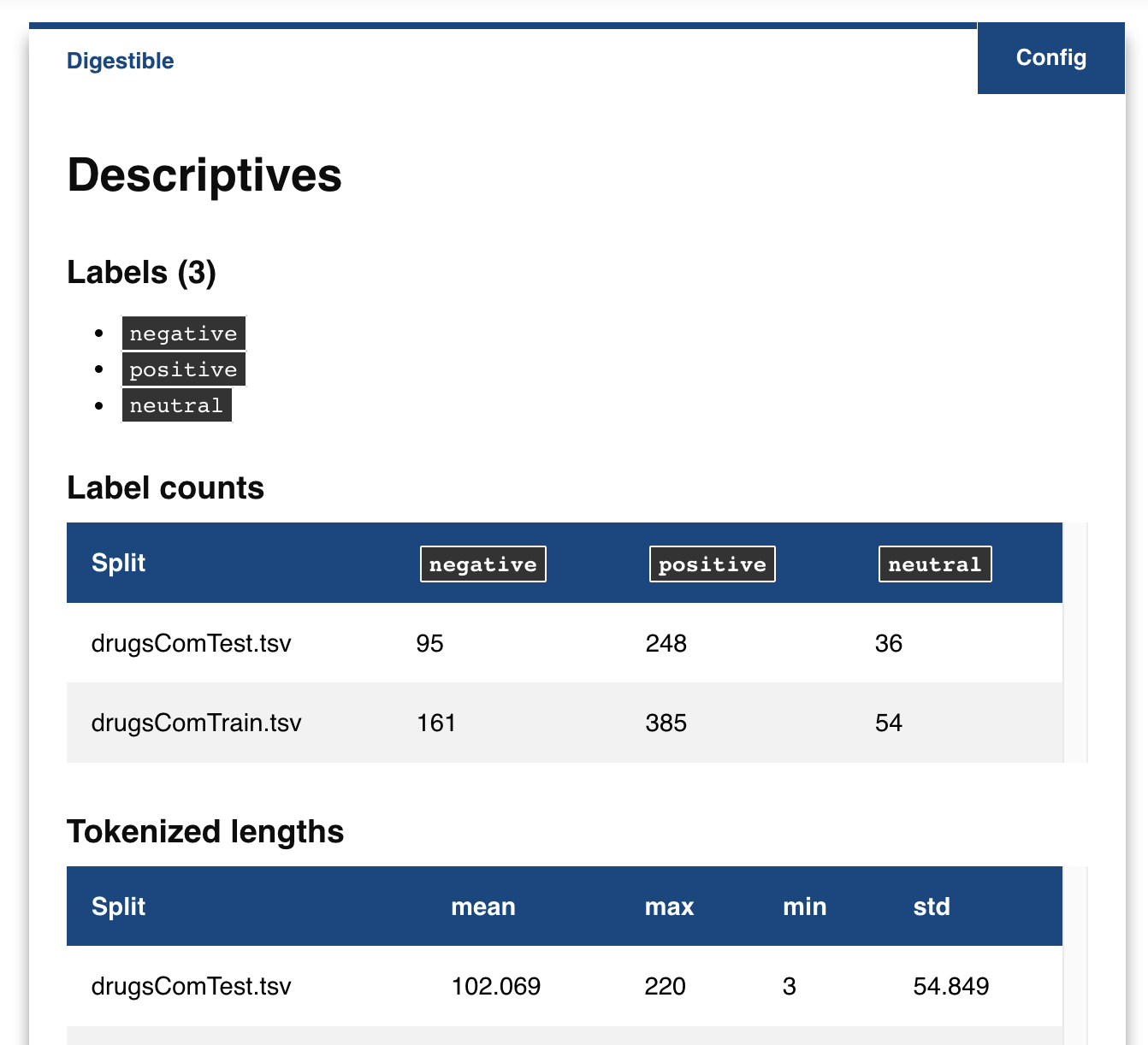
Explore the descriptive statistics for each split
box.explore()
```
```python
Show wrongly classified instances
box.examine.wronglyclassified() ``` <img src="https://github.com/MarcelRobeer/explabox/blob/main/img/example/drugscomexamine.png?raw=true" alt="drugscom_examine" width="600"/>
```python
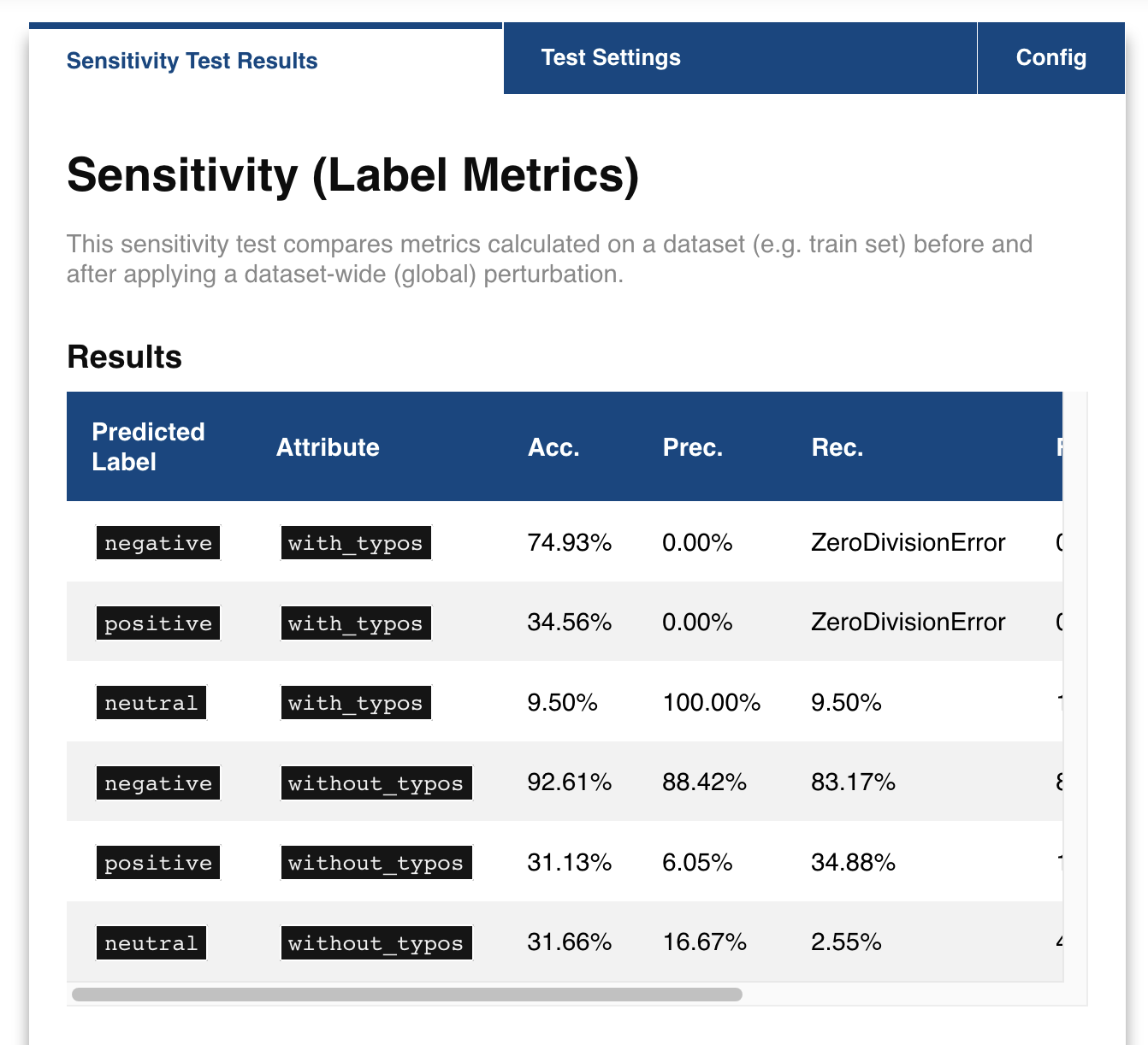
Compare the performance on the test split before and after adding typos to the text
box.expose.comparemetric(split='test', perturbation='addtypos')
```
```python
Get a local explanation (uses LIME by default)
box.explain.explainprediction('Hate this medicine so much!') ``` <img src="https://github.com/MarcelRobeer/explabox/blob/main/img/example/drugscomexplain.png?raw=true" alt="drugscom_explain" width="600"/>
For more information, visit the explabox documentation.
Contents
Installation
The easiest way to install the latest release of the explabox is through pip:
console
user@terminal:~$ pip install explabox
Collecting explabox
...
Installing collected packages: explabox
Successfully installed explabox
:informationsource: The
explaboxrequires _Python 3.8 or above.
See the full installation guide for troubleshooting the installation and other installation methods.
Documentation
Documentation for the explabox is hosted externally on explabox.rtfd.io.
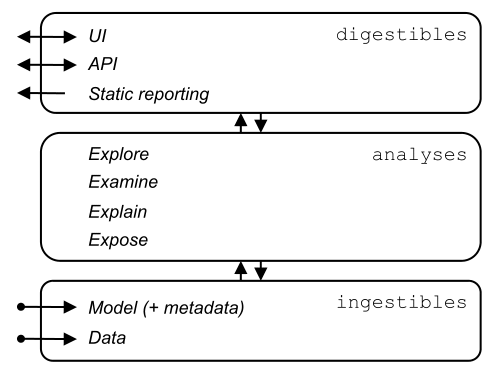
The explabox consists of three layers:
1. Ingestibles provide a unified interface for importing models and data, which abstracts away how they are accessed and allows for optimized processing.
2. Analyses are used to turn opaque ingestibles into transparent digestibles. The four types of analyses are explore, examine, explain and expose.
3. Digestibles provide insights into model behavior and data, assisting stakeholders in increasing the explainability, fairness, auditability and safety of their AI systems. Depending on their needs, these can be accessed interactively (e.g. via the Jupyter Notebook UI or embedded via the API) or through static reporting.
Example usage
The example usage guide showcases the explabox for a black-box model performing multi-class classification of the UCI Drug Reviews dataset.
Without requiring any local installations, the notebook is provided on  .
.
If you want to follow along on your own device, simply pip install explabox-demo-drugreview and run the lines in the Jupyter notebook we have prepared for you!
Advanced set-up
When importing your own model and data, you can refer to a(n) (archive of) file(s), on disk or with an online URL. The explabox does all the importing for you. Consult the ingestibles documentation for an up-to-date list of the supported file formats.
```python from explabox import importdata, importmodel
data = importdata('./drugsCom.zip', datacols='review', label_cols='rating')
model = importmodel('model.onnx', labelmap={0: 'negative', 1: 'neutral', 2: 'positive'}) ```
In this example, the data in the archive drugsCom.zip contains two .tsv (tab-separated values) files with the data in the review column and the gold labels in the rating column. The two files in drugsCom.zip are drugsComTrain.tsv and drugsComTest.tsv, containing the training data and test data, respectively.
The model is provided as an onnx file, where output 0 corresponds to a negative review, 1 to a neutral review, and 2 to a positive review.
You can add a mapping from the files in drugsCom.zip that refer to your train/test/validation splits by renaming them for easy access:
```python
from explabox import Explabox
box = Explabox(data=data, model=model, splits={'train': 'drugsComTrain.tsv', 'test': 'drugsComTest.tsv'}) ```
Now you can .explore, .examine, .expose and .explain your data and model as usual.
Releases
The explabox is officially released through PyPI. The changelog includes a full overview of the changes for each version.
Contributing
The explabox is an open-source project developed and maintained primarily by the Netherlands National Police Lab AI (NPAI). However, your contributions and improvements are still required! See contributing for a full contribution guide.
Citation
If you use the Explabox in your work, please read the corresponding paper at doi:10.48550/arXiv.2411.15257, and cite the paper as follows:
bibtex
@misc{Robeer2024,
  title = {{The Explabox: Model-Agnostic Machine Learning Transparency \& Analysis}},
  author = {Robeer,  Marcel and Bron,  Michiel and Herrewijnen,  Elize and Hoeseni,  Riwish and Bex,  Floris},
  publisher = {arXiv},
  doi = {10.48550/arXiv.2411.15257},
  url = {https://arxiv.org/abs/2411.15257},
  year = {2024},
}
Owner
- Name: M.J. Robeer
- Login: MarcelRobeer
- Kind: user
- Website: uu.nl/staff/MJRobeer
- Repositories: 3
- Profile: https://github.com/MarcelRobeer
https://marcelrobeer.github.io
JOSS Publication
Explabox: A Python Toolkit for Standardized Auditing and Explanation of Text Models
Authors

National Police Lab AI, Utrecht University, The Netherlands, Netherlands National Police, The Netherlands
National Police Lab AI, Utrecht University, The Netherlands, Netherlands National Police, The Netherlands
National Police Lab AI, Utrecht University, The Netherlands, Netherlands National Police, The Netherlands
Netherlands National Police, The Netherlands
National Police Lab AI, Utrecht University, The Netherlands, School of Law, Utrecht University, The Netherlands
Editor
Abhishek Tiwari
Tags
AI auditing explainable AI (XAI) interpretability fairness robustness AI safetyCitation (CITATION.cff)
cff-version: 1.2.0
title: >-
  The Explabox: Model-Agnostic Machine Learning Transparency
  & Analysis
message: >-
  If you use this software, please cite it using the
  metadata from this file.
type: software
authors:
  - given-names: Marcel
    family-names: Robeer
    orcid: 'https://orcid.org/0000-0002-6430-9774'
  - given-names: Michiel
    family-names: Bron
    orcid: 'https://orcid.org/0000-0002-4823-6085'
  - given-names: Elize
    family-names: Herrewijnen
    orcid: 'https://orcid.org/0000-0002-2729-6599'
  - given-names: Riwish
    family-names: Hoeseni
  - given-names: Floris
    family-names: Bex
    orcid: 'https://orcid.org/0000-0002-5699-9656'
doi: 10.48550/arXiv.2411.15257
repository-code: 'https://github.com/MarcelRobeer/explabox'
url: 'https://explabox.readthedocs.io'
license: LGPL-3.0
GitHub Events
Total
- Create event: 2
- Release event: 2
- Issues event: 3
- Watch event: 4
- Issue comment event: 8
- Push event: 29
Last Year
- Create event: 2
- Release event: 2
- Issues event: 3
- Watch event: 4
- Issue comment event: 8
- Push event: 29
Packages
- Total packages: 3
-
Total downloads:
- pypi 28 last-month
-
Total dependent packages: 1
(may contain duplicates) -
Total dependent repositories: 1
(may contain duplicates) - Total versions: 12
- Total maintainers: 1
proxy.golang.org: github.com/MarcelRobeer/explabox
- Documentation: https://pkg.go.dev/github.com/MarcelRobeer/explabox#section-documentation
- License: lgpl-3.0
-
Latest release: v1.0.1
published over 1 year ago
Rankings
proxy.golang.org: github.com/marcelrobeer/explabox
- Documentation: https://pkg.go.dev/github.com/marcelrobeer/explabox#section-documentation
- License: lgpl-3.0
-
Latest release: v1.0.1
published over 1 year ago
Rankings
pypi.org: explabox
Explore/examine/explain/expose your model with the explabox!
- Homepage: https://explabox.rtfd.io
- Documentation: https://explabox.readthedocs.io/
- License: GNU LGPL v3
-
Latest release: 1.0.1
published over 1 year ago
Rankings
Maintainers (1)
Dependencies
- myst-parser >=0.17.2
- sphinx >=4.1.1
- sphinx-autodoc-typehints >=1.17.0
- sphinx-rtd-theme >=0.5.2
- sphinxcontrib-apidoc >=0.3.0
- sphinxcontrib-fulltoc >=1.0.2
- genbase >=0.2.11
- instancelib >=0.4.4.1
- instancelib-onnx >=0.1.3
- text_explainability >=0.6.5
- text_sensitivity >=0.3.2
- actions/checkout v3 composite
- actions/checkout v1 composite
- actions/setup-python v4 composite
- andstor/file-existence-action v2 composite
- awalsh128/cache-apt-pkgs-action latest composite
- codecov/codecov-action v3 composite
- tj-actions/changed-files v35 composite