https://github.com/justwhit3/temp-cleaner
An app to automatically clean up temporary files and ignored items from git repositories in your system by analyzing .gitignore files.
Science Score: 44.0%
This score indicates how likely this project is to be science-related based on various indicators:
-
✓CITATION.cff file
Found CITATION.cff file -
✓codemeta.json file
Found codemeta.json file -
✓.zenodo.json file
Found .zenodo.json file -
○DOI references
-
○Academic publication links
-
○Academic email domains
-
○Institutional organization owner
-
○JOSS paper metadata
-
○Scientific vocabulary similarity
Low similarity (14.5%) to scientific vocabulary
Keywords
Repository
An app to automatically clean up temporary files and ignored items from git repositories in your system by analyzing .gitignore files.
Basic Info
Statistics
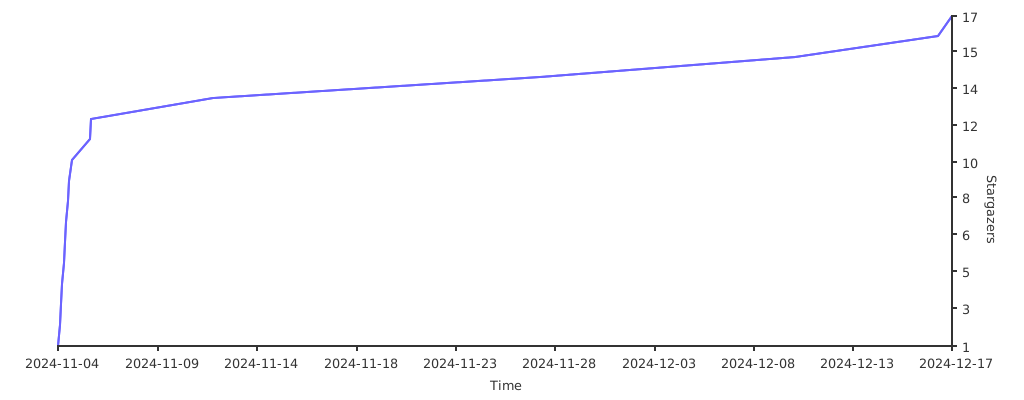
- Stars: 17
- Watchers: 1
- Forks: 1
- Open Issues: 0
- Releases: 2
Topics
Metadata Files
README.md


Table of contents
Introduction
temp-cleaner is a an application which allows you to automatically clean up temporary files and ignored items from git repositories in your system by analyzing .gitignore files.

For an overview of the functions and classes please look at the Doxygen page.
Architecture support
Operating systems
- Linux
- Ubuntu (tested)
- WSL (tested)
- Windows
- Windows 10 or higher (not tested)
- MacOS (not tested)
Compilers
- gcc: v. 9/10/11/12/13
- clang: v. 11/12/13/14/15/16/17
- MSVC: (not directly tested, but should work)
Install and use
Install
1) Download one of the releases of the repository.
2) Unzip and enter the downloaded repository directory.
3) Install and compile the app and its dependencies:
bash
cmake -B build
sudo cmake --build build --target install
:warning:
sudois not required on Windows.
Mandatory prerequisites:
- C++20 standard
- g++ compiler (library developed on Ubuntu v22.04.1 with g++ v11.4.0)
- CMake (at least v3.15)
Debug mode and tests
Debug mode is used from developers to test the app. To build the app in debug mode:
bash
cmake -B build -DCMAKE_BUILD_TYPE=Debug
sudo cmake --build build
This will automatically compile the source code with debug tools.
Prerequisites for debug mode:
To install on ubuntu:
sudo apt install cppcheck
To run IWYU checks:
bash
./test/IWYU.sh
How to use
Once the application is installed you can easily run it from your terminal in this way:
bash
temp-cleaner [path/to/analyze] [config_file]
Where [path/to/analyze] represents the path through which the app will search for .gitignore files through repositories, while [config_file] can be a configuration file containing a list of paths to ignore. Both these arguments are optional and if left empty the search will proceed through the user home directory.
Credits
 Gianluca Bianco |
Stargazers over time
Owner
- Name: Gianluca Bianco
- Login: JustWhit3
- Kind: user
- Location: Bologna, Italy
- Company: University of Bologna and INFN
- Website: https://justwhit3.github.io/
- Twitter: JustWhit33
- Repositories: 14
- Profile: https://github.com/JustWhit3
PhD student in particle physics at the University of Bologna and member of the CERN ATLAS experiment. Passionate about coding (C++ in particular)
Citation (CITATION.cff)
cff-version: 1.2.0
message: "If you use this software, please cite it as below."
authors:
- family-names: "Gianluca"
  given-names: "Bianco"
title: "temp-cleaner"
version: 0.0.q
doi: https://zenodo.org/doi/10.5281/zenodo.11202845
date-released: 16/05/24
url: "https://github.com/JustWhit3/temp-cleaner"
GitHub Events
Total
- Watch event: 17
- Fork event: 1
Last Year
- Watch event: 17
- Fork event: 1