https://github.com/kunzaatko/boundarylayerproblem
Resources and Beamer presentation for a talk about perturbation methods that leads to solving a non-linear differential equation with a boundary layer.
Science Score: 26.0%
This score indicates how likely this project is to be science-related based on various indicators:
-
○CITATION.cff file
-
✓codemeta.json file
Found codemeta.json file -
○.zenodo.json file
-
✓DOI references
Found 2 DOI reference(s) in README -
○Academic publication links
-
○Academic email domains
-
○Institutional organization owner
-
○JOSS paper metadata
-
○Scientific vocabulary similarity
Low similarity (8.4%) to scientific vocabulary
Repository
Resources and Beamer presentation for a talk about perturbation methods that leads to solving a non-linear differential equation with a boundary layer.
Basic Info
- Host: GitHub
- Owner: kunzaatko
- Language: Julia
- Default Branch: trunk
- Size: 3.7 MB
Statistics
- Stars: 0
- Watchers: 1
- Forks: 0
- Open Issues: 0
- Releases: 0
Metadata Files
README.md
A Tale of a Boundary-Layer Problem
This repository holds references and slides that I used for a talk at a university seminar called
Problems of Contemporary Mathematics. The
ideal length of the talk is about 2 hours. It is based on the SIAM article Surprises in a Classic Boundary-Layer Problem (Clark et al., 2023) and follows the structure of this article. The slides are made with beamer and include a number of motivational figures and some figures that appeared in the article and are reimplemented in julia also in this repo. A part of the talk is dedicated to illustrating how interactive figures can help understand the problem at hand and lead to pinpointing the correct approach to arrive at the solution. For a hint where to look for the sources mentioned above, take a look at the Contents section.
Title: A Tale of a Boundary-Layer Problem
Abstract: I will demonstrate the solution with all its steps (and missteps) to the boundary layer problem $$\varepsilon y'' = yy' - y,$$ such that $$y(0) = 1\quad \text{and} \quad y(1) = -1\quad \text{and where}\quad \varepsilon \ll 1.$$ The journey towards the solution will take us on an excurse through some basics of perturbation theory and asymptotic approximation matching. I will demonstrate visualizations that will give you insight into the reasoning behind the steps taken towards the solution serving as an exhibition for the leverage in problem solving accessible to us through the computational power at our fingertips.
Contents
Slides_Interactive/: Contains aPlutonotebook with interactive figuresSlides/figures/sources/: Contains the sourcejuliacode used to generate the figures in thebeamerpresentationSlides/figures/: Contains the generated figures that appear in thebeamerpresentationSlides/src/: Contains all the $\LaTeX$ source code that was used to compile the slidesSlides/build/Slides_A-Tale-of-a-Boundary-Layer-Problem/: Contains thePDFslides
Figures
Here is a showcase of some figures that were created for this project
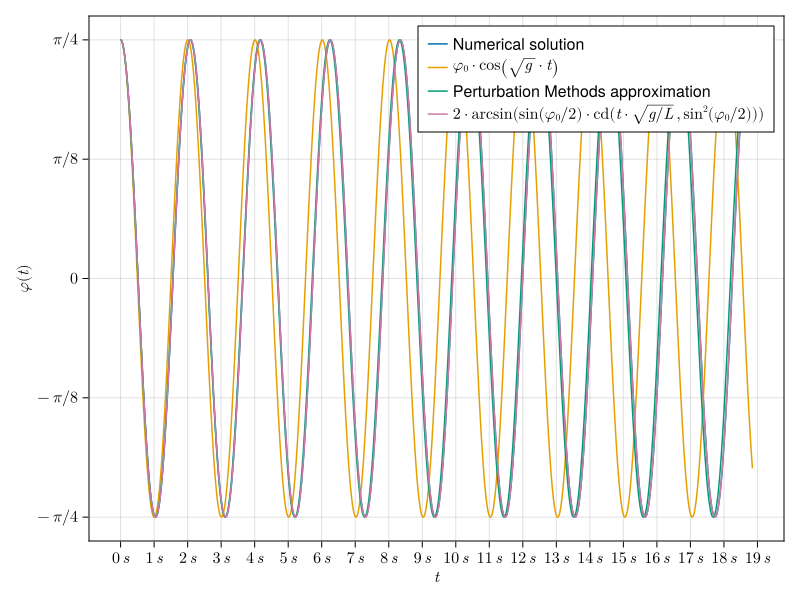
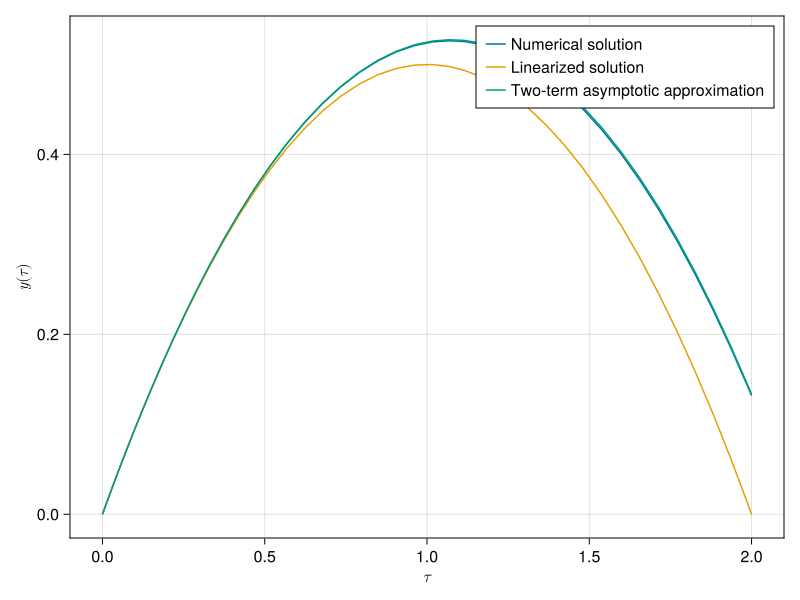
| Comparison of the solutions (approximations) of the simple pendulum problems |Comparison of the solutions (approximations) to the projectile problem |
| :---: | :---: |
|  |
| |
|
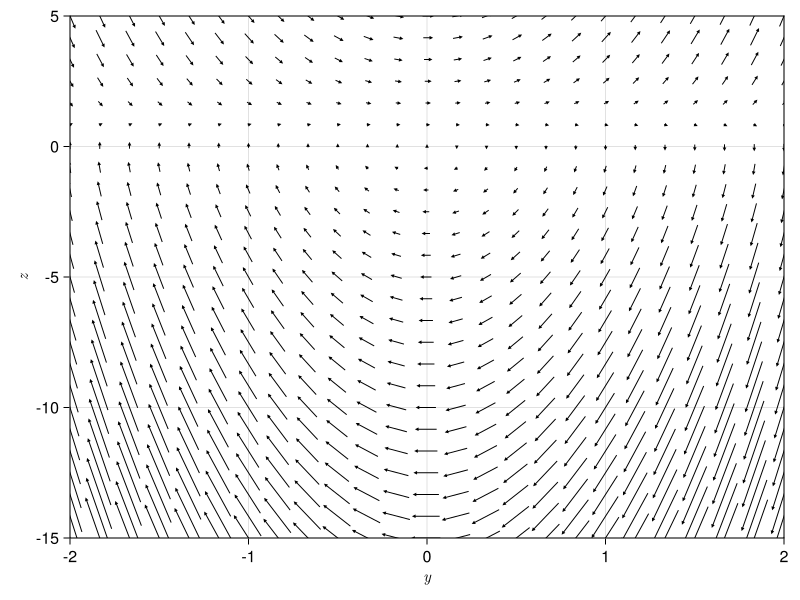
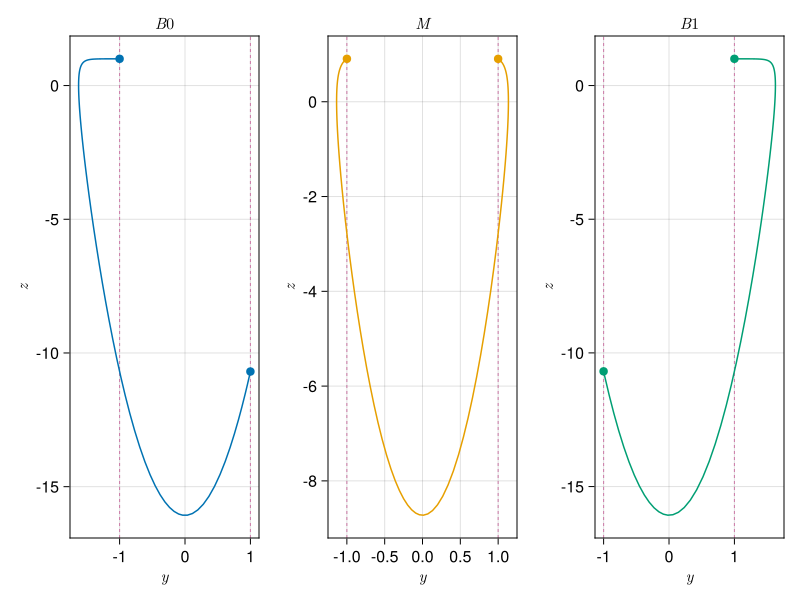
| Phase portrait vector field of the boundary value problem |Solutions of the Boundary layer problem in the phase portrait |
| :---: | :---: |
|  |
|  |
|
For the solution to the boundary layer problem in the $x$ and $y$ plane and other figures, take a look into the slides!
Usage
Interactive Notebook
Requirements:
- julia (It is possible to run the notebook using )
Note: You have to activate the project and download the dependencies. It is as easy as running
updatein thejuliapackage REPL. You can find how to do this at thePkg.jldocumentation page.
It is as easy as running
bash
$ julia --project  --eval "using Pluto; Pluto.run()"
in the Slides_Interactive directory and selecting slides.jl in the notebook UI. You can run it online in binder that is linked (top-right corner) from
static HTML version of the interactive slides.
The GLMakie figures that are more interactive can be run by re-evaluating the cells that define the figures.
$\LaTeX$ Compilation
Requirements:
- tectonic (but any $\LaTeX$ compiler will do if you know what you are doing)
- biber
Note: Currently there is a problem with the version of
biblatexincluded in thetectonicbundle, so ifbiberfails to run, you should look over here:tectonic#35
The slides were compiled by tectonic using
bash
$ tectonic -X build
ran in the Slides directory. You can disable / enable presenter notes by modifying the beamer package
options in the preamble
| Notes | No notes|
| :---: | :---: |
| \documentclass[x11names]{beamer} | \documentclass[x11names, notes]{beamer} |
Figures Generation
Requirements:
- julia
- inkscape (used for creating PDF_TEX from the SVG files)
They are generate using CairoMakie as SVG graphics and converted to PDF_TEX using inkscape by running the julia script
bash
$ julia --project  --eval "include(\"generate_figures.jl\")"
inside the Slides/figures/sources directory.
Note: You have to activate the project and download the dependencies. It is as easy as running
updatein thejuliapackage REPL. You can find how to do this at thePkg.jldocumentation page.
License
This work is triple-licensed under Apache 2.0 and GPL 2.0 (or any later version) and CC0 1.0 Universal . You can choose between one of them if you use this work.
SPDX-License-Identifier: Apache-2.0 OR GPL-2.0-or-later OR CC0-1.0-universal
Owner
- Name: Martin Kunz
- Login: kunzaatko
- Kind: user
- Location: Prague
- Repositories: 2
- Profile: https://github.com/kunzaatko
GitHub Events
Total
- Push event: 1
Last Year
- Push event: 1