Science Score: 54.0%
This score indicates how likely this project is to be science-related based on various indicators:
-
✓CITATION.cff file
Found CITATION.cff file -
✓codemeta.json file
Found codemeta.json file -
✓.zenodo.json file
Found .zenodo.json file -
○DOI references
-
✓Academic publication links
Links to: zenodo.org -
○Academic email domains
-
○Institutional organization owner
-
○JOSS paper metadata
-
○Scientific vocabulary similarity
Low similarity (12.4%) to scientific vocabulary
Repository
HEALPix Cookbook
Basic Info
- Host: GitHub
- Owner: ProjectPythia
- License: apache-2.0
- Language: Jupyter Notebook
- Default Branch: main
- Homepage: https://projectpythia.org/healpix-cookbook/
- Size: 132 MB
Statistics
- Stars: 1
- Watchers: 1
- Forks: 4
- Open Issues: 4
- Releases: 1
Metadata Files
README.md
HEALPix Cookbook


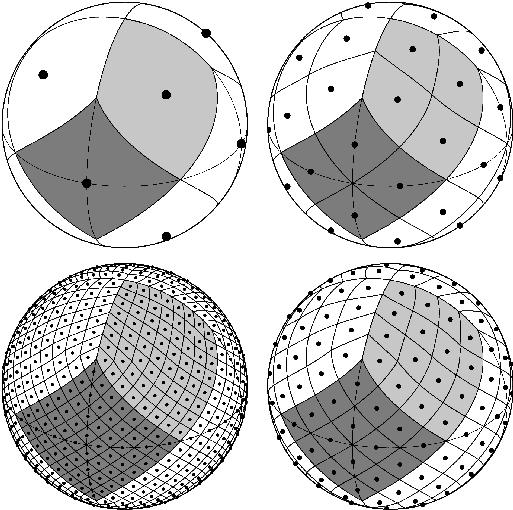



This Project Pythia Cookbook covers an introduction to the Hierarchical Equal Area isoLatitude Pixelation (HEALPix) of the Earth and utilization of easy.gems and UXarray to run data analysis and visualization functionality on HEALPix data sets.
Motivation
Driven by The 2025 World Climate Research Programme (WCRP) Digital Earths Global KM-scale Hackathon taking place 12-16 May, a need for exploring HEALPix and documenting HEALPix-based workflows that utilize community resources such as the easy.gems documentation and UXarray software tool has emerged. Project Pythia Cookbooks are a great medium to publish such documentation in an accessible, reproducible, and citable manner, which can benefit not only the 2025 event but also future collaboration efforts and similar events.
Authors
Orhan Eroglu, Philip Chmielowiec, Andrew Gettelman, John Clyne
Contributors
Structure
This cookbook is broken up into a few sections as follows:
1. HEALPix Overview
Here, we cover basic information about HEALPix necessary to understand the topics throughout the cookbook and provide a lot of links to the resources in order to learn more about HEALPix.
2. easy.gems for HEALPix Analysis & Visualization
This section provides examples of how to load in HEALPix data, use healpix package for basic HEALPix
statistics use easygems package's convenience functions to plot the data with matplotlib.
3. UXarray for Basic HEALPix Statistics & Visualization
This section walks the reader through loading in and performing basic analysis and visualization on HEALPix data using UXarray.
4. Advanced UXarray Analysis and Visualization for HEALPix Data
This section will cover advanced UXarray functionality such as remapping, zonal means, cross-sections, etc.
5. When to Use Each?
This section is currently under construction, but once complete, we hope to provide some practical guidance
on what cases either of easy.gems or uxarray can provide helpful functionality and would be a
ideal choice.
Running the Notebooks
You can either run the notebook using Binder or on your local machine.
Running on Binder
The simplest way to interact with a Jupyter Notebook is through
Binder, which enables the execution of a
Jupyter Book in the cloud. The details of how this works are not
important for now. All you need to know is how to launch a Pythia
Cookbooks chapter via Binder. Simply navigate your mouse to
the top right corner of the book chapter you are viewing and click
on the rocket ship icon, (see figure below), and be sure to select
“launch Binder”. After a moment you should be presented with a
notebook that you can interact with. I.e. you’ll be able to execute
and even change the example programs. You’ll see that the code cells
have no output at first, until you execute them by pressing
{kbd}Shift+{kbd}Enter. Complete details on how to interact with
a live Jupyter notebook are described in Getting Started with
Jupyter.
Note, not all Cookbook chapters are executable. If you do not see the rocket ship icon, such as on this page, you are not viewing an executable book chapter.
Running on Your Own Machine
If you are interested in running this material locally on your computer, you will need to follow this workflow:
- Clone the
https://github.com/ProjectPythia/healpix-cookbookrepository:
bash
    git clone https://github.com/ProjectPythia/healpix-cookbook.git
- Move into the
healpix-cookbookdirectorybash cd healpix-cookbook - Create and activate your conda environment from the
environment.ymlfilebash conda env create -f environment.yml conda activate healpix-cookbook - Move into the
notebooksdirectory and start up Jupyterlabbash cd notebooks/ jupyter lab
Owner
- Name: Project Pythia
- Login: ProjectPythia
- Kind: organization
- Email: projectpythia@ucar.edu
- Location: United States of America
- Website: projectpythia.org
- Twitter: Project_Pythia
- Repositories: 21
- Profile: https://github.com/ProjectPythia
Community learning resource for Python-based computing in the geosciences
Citation (CITATION.cff)
cff-version: 1.2.0
message: "If you use this cookbook, please cite it as below."
authors:
  # add additional entries for each author -- see https://github.com/citation-file-format/citation-file-format/blob/main/schema-guide.md
  - family-names: Eroglu
    given-names: Orhan
    orcid: https://orcid.org/0000-0003-3099-8775
    website: https://github.com/erogluorhan
    affiliation: NSF NCAR
  - family-names: Chmielowiec
    given-names: Philip
    website: https://github.com/philipc2
    affiliation: NSF NCAR
  - family-names: Gettelman
    given-names: Andrew
    orcid: https://orcid.org/0000-0002-8284-2599
    website: https://github.com/andrewgettelman
    affiliation: Pacific Northwest National Laboratory
  - family-names: Clyne
    given-names: John
    orcid: https://orcid.org/0000-0003-2788-9017
    website: https://github.com/clyne
    affiliation: UCAR/NCAR
  - name: "HEALPix Cookbook contributors" # use the 'name' field to acknowledge organizations
    website: "https://github.com/ProjectPythia/healpix-cookbook/graphs/contributors"
title: "HEALPix Cookbook"
abstract: "An introduction to HEALPix and utilization of easy.gems and UXarray to run data analysis and visualization functionality on HEALPix data sets."
GitHub Events
Total
- Create event: 3
- Issues event: 1
- Release event: 2
- Delete event: 1
- Member event: 1
- Issue comment event: 9
- Push event: 118
- Pull request review event: 1
- Pull request event: 7
- Fork event: 3
Last Year
- Create event: 3
- Issues event: 1
- Release event: 2
- Delete event: 1
- Member event: 1
- Issue comment event: 9
- Push event: 118
- Pull request review event: 1
- Pull request event: 7
- Fork event: 3