Science Score: 44.0%
This score indicates how likely this project is to be science-related based on various indicators:
-
✓CITATION.cff file
Found CITATION.cff file -
✓codemeta.json file
Found codemeta.json file -
✓.zenodo.json file
Found .zenodo.json file -
○DOI references
-
○Academic publication links
-
○Committers with academic emails
-
○Institutional organization owner
-
○JOSS paper metadata
-
○Scientific vocabulary similarity
Low similarity (12.2%) to scientific vocabulary
Keywords
Keywords from Contributors
Repository
DevToolset
Statistics
- Stars: 4
- Watchers: 3
- Forks: 0
- Open Issues: 0
- Releases: 0
Topics
Metadata Files
README.md
dpHelper

Manager | DevTools by Dario Passariello (c)






About
dpHelper is a precise and complete collection of 190+ tools ready to use in all web/SaaS applications. State and Store Management are now easy, accessible everywhere in your application, including Ajax or React apps, without the need for extra files.
Single Source of Truth: The application's entire state is held within a single object in one store, ensuring consistent and accessible state management throughout the app.
State is flexible: State changes are facilitated exclusively through actions. These actions, which are straightforward JavaScript objects, delineate what has occurred. This methodology ensures that state changes remain predictable.
Changes are made with proxy handle function: To define state changes, dpHelper employs pure functions as intermediaries. These functions accept the current state as input and produce a new state as output, ensuring predictability and ease of testing in the system.
1. Example in React
```js import { useEffect } from 'react'; import 'dphelper';
function App() { // Store a value in the state state.test = 'Hello, World!';
// Use the stored value in a React component
useEffect(() => {
  console.log("You can recall from all pages: " + state.test); // Output: "Hello, World!"
}, []);

return (
  <div>
    <h1>{state.test}</h1>
  </div>
);
}
export default App; ```
Live Demo
You can see an HTML version where dpHelper and LayerPro work together seamlessly. dpHelper is compatible with a variety of frontend libraries, including:
- HTML
- React
- Vue
- And any other frontend library
Documentation
You can see:
You can see more tutorials, information, and examples about dpHelper clicking here.
Usage
Install dpHelper.
shell
npm i dphelper --save-dev
or update:
shell
npm i dphelper@latest --save-dev
Use it in the main root file (and only there):
js
import "dphelper";
or
js
require("dphelper");
Install for EJS or Other Types of Projects (like HTML)
Note: You don't need to use npm install in this case, or you will get an error.
html
<script src="https://cdn.jsdelivr.net/npm/dphelper"></script>
The Best Way To Use State
Using the "state" Function
You can use the state function to store and reuse data throughout your application. Similar to other state managers, you can save state information in JSON format and access it easily in various contexts, including React useEffect and/or dispatch.
For example, you can store a value like this: state.test = 'I am ready' and then retrieve it later using state.test.
example:
You can use the browser's devtools console and type " state.test = 'I am ready' ". Every time you want to use 'test' values, you need just recall state.test.
```js // Set a state state.test = "I am ready" *
// Get the state state.test *
// List all states state.list // or just "state" to see the proxy
// Lock a state from edit (Only for Objects or Array) state.test.lock() *
// Remove a state state.remove("test")
// Remove all states state.removeAll()
*["test" is only an example]
```
Observer for States
Note: Observer works only with states. Stores are excluded at the moment.
If you want to run a function every time a state changes, you can use:
```js /** * Observer is a non-cumulative listener, * triggered from customEvent / dispatch from state * @parameters * [ state | store, function ] */ observer( "state.test", () => alert("Test Changes to: " + state.test) ) |_______| |________________________________________| State: string Function
PS: you need to use the name of state | store as string ```
You can use it everywhere. Works like "useState" in React but with more flexibility (use one observer for each state!).
Example
```js import 'dphelper';
// Use the observer to log the changing state value observer( 'state.count', () => console.log("State changed: ", state.count) );
// Store a value in the state that changes every 5 seconds setInterval(() => state.count = Date.now(), 5000); ```
Another Simple Example
```js import 'dphelper';
// Set a state state.myData = 'Hello, world!';
// Retrieve the state console.log(state.myData); // Output: Hello, world!
// Observe state changes observer('myData', () => { console.log('myData has changed to:', state.myData); });
// Change the state state.myData = 'New value'; ```
The Best Way To Use Store 🫙
Persistent Storage with dpHelper
When using dpHelper for permanent storage, you should use the store, which stores data persistently across sessions.
Important Security Note
Use store for persistent storage: If you want to store data permanently, use store to ensure it is saved in localStorage.
Remove data when necessary: To maintain security, remove stored data when it is no longer needed, such as during logout.
Remove all stored data: Use store.removeAll() to securely remove all stored data from your application.
```js // Set a store: store.set("test", { test: "test" })
// Get a store: store.get("test") // Output: { test: "test" }
// Remove a store: store.remove("test") // Output: "ok"
// Remove all stores: store.removeAll() // Output: "ok" ```
2. Example in React
```js import { useEffect } from 'react'; import 'dphelper';
function App() {
// Store a value in the store (persistent storage) store.set( 'user', { name: 'John Doe', age: 30 } );
// Use the stored value in a React component useEffect( () => { console.log(store.get("user")); // Output: { name: "John Doe", age: 30 } $("#name").text(store.get("user").name) }, [] );
// Remove all stored data if necessary // store.removeAll();
return (
...
export default App; ```
Console It
Type dphelper in the devtool console of your browser to have a look at all available tools that you can use! You can call these from everywhere without import (just one time in the main/root page).
Browser Extension (Chrome/Edge) ♥️

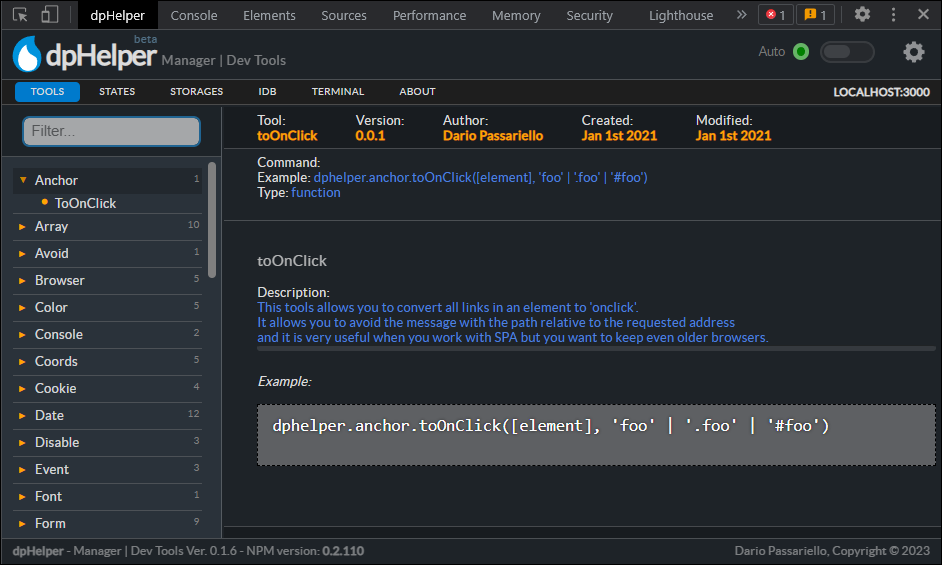
Chrome: Download from Google Web Store
Edge: Download from Microsoft Addons
PS: dpHelper is compatible with all Chromium-based browsers like Edge or Brave!
dpHelper Browser Extension
The dpHelper browser extension allows you to manage your application's dpHelper NPM. Key features include:
- Simplified API operations: Easily manage and manipulate data with dpHelper's collection of scripts.
- Real-time monitoring: Track memory usage and localStorage to optimize your application's performance.
- Stay up-to-date: Receive updates and tips to improve your daily workflow.
- Easy installation: Simply import 'dphelper' in your project index to get started.
- Global accessibility: All scripts are available globally and can be accessed from anywhere in your application.
Check
License
MIT - https://en.wikipedia.org/wiki/MIT_License
Dario Passariello - dariopassariello@gmail.com, All rights reserved - Copyright (c) 2019 - 2024
Owner
- Name: a51.dev
- Login: a51-dev
- Kind: organization
- Email: info@a51.dev
- Website: https://a51.dev
- Repositories: 1
- Profile: https://github.com/a51-dev
Citation (CITATION.cff)
# This CITATION.cff file was generated with cffinit.
# Visit https://bit.ly/cffinit to generate yours today!

cff-version: 1.2.0
title: dpHelper
message: dphelper devtools | tools, store and state management for developers by Dario Passariello
type: software
authors:
  - given-names: "Dario "
    family-names: Passariello
    email: dariopassariello@gmail.com
abstract: >-
  dpHelper is a precise and complete collection of 190+
  tools ready to use in all web/SaaS applications. State and
  Store Management are now easy, accessible
  everywhere in your application, including Ajax or React
  apps, without the need for extra files.
keywords:
  - dphelper
  - development
  - toolset
  - state
  - store
  - observer
  - helper
  - utils
  - tools
  - uuid
  - random
  - window
  - easy
  - pro
  - powerful
  - status
  - dp helper
  - local
  - storage
  - indexeddb
  - idb
  - devtool
  - dario
  - passariello
license: MIT
GitHub Events
Total
- Push event: 16
Last Year
- Push event: 16
Committers
Last synced: about 1 year ago
Top Committers
| Name | Commits | |
|---|---|---|
| Dario Passariello | d****o@g****m | 95 |
| dependabot[bot] | 4****] | 35 |
| snyk-bot | s****t@s****o | 5 |
Committer Domains (Top 20 + Academic)
Packages
- Total packages: 1
-
Total downloads:
- npm 1,658 last-month
- Total dependent packages: 5
- Total dependent repositories: 1
- Total versions: 285
- Total maintainers: 1
npmjs.org: dphelper
dphelper devtools, store and state management for developers by Dario Passariello
- Homepage: https://a51.gitbook.io/dphelper
- License: MIT
-
Latest release: 1.9.24
published 10 months ago
Rankings
Maintainers (1)
Funding
- type: patreon: url: https://www.patreon.com/passariello
Dependencies
- css-loader 6.7.1 development
- eslint 8.16.0 development
- file-loader 6.2.0 development
- jest 27.5.1 development
- less-loader 10.2.0 development
- sass-loader 12.6.0 development
- style-loader 3.3.1 development
- webpack-cli 4.9.2 development
- @babel/plugin-proposal-class-properties 7.16.7
- @babel/plugin-transform-runtime 7.18.0
- @babel/preset-env 7.17.10
- @babel/preset-react 7.16.7
- @babel/preset-typescript 7.16.7
- @testing-library/jest-dom ^5.16.2
- @testing-library/user-event ^14.0.0
- babel-loader 8.2.5
- child_process 1.0.2
- classnames 2.3.1
- cli-confirm 1.0.1
- compression-webpack-plugin 9.2.0
- concurrently 7.1.0
- copy-webpack-plugin 10.2.4
- css 3.0.0
- dotenv 16.0.0
- fs 0.0.1-security
- html-webpack-plugin 5.5.0
- jquery 3.6.0
- jsdom-worker 0.2.1
- jshint ^2.13.4
- less 4.1.2
- moment 2.29.3
- path 0.12.7
- progress-bar-webpack-plugin 2.1.0
- react 18.1.0
- react-dom 18.1.0
- require 2.4.20
- sass 1.52.1
- ts-jest 27.1.4
- tslint 6.1.3
- webpack 5.72.1