lattpy
Simple and efficient Python package for modeling d-dimensional Bravais lattices in solid state physics.
Science Score: 36.0%
This score indicates how likely this project is to be science-related based on various indicators:
-
○CITATION.cff file
-
✓codemeta.json file
Found codemeta.json file -
✓.zenodo.json file
Found .zenodo.json file -
○DOI references
-
○Academic publication links
-
✓Committers with academic emails
1 of 4 committers (25.0%) from academic institutions -
○Institutional organization owner
-
○JOSS paper metadata
-
○Scientific vocabulary similarity
Low similarity (17.3%) to scientific vocabulary
Keywords
Keywords from Contributors
Repository
Simple and efficient Python package for modeling d-dimensional Bravais lattices in solid state physics.
Basic Info
- Host: GitHub
- Owner: dylanljones
- License: mit
- Language: Python
- Default Branch: master
- Homepage: https://lattpy.readthedocs.io/en/stable/
- Size: 1.45 MB
Statistics
- Stars: 42
- Watchers: 1
- Forks: 12
- Open Issues: 3
- Releases: 14
Topics
Metadata Files
README.md

LattPy - Simple Lattice Modeling in Python




:warning: WARNING: This project is still in development and might change significantly in the future!
LattPy is a simple and efficient Python package for modeling Bravais lattices and constructing (finite) lattice structures in any dimension. It provides an easy interface for constructing lattice structures by simplifying the configuration of the unit cell and the neighbor connections - making it possible to construct complex models in just a few lines of code and without the headache of adding neighbor connections manually. You will save time and mental energy for more important matters.
| Master | 
 |
| 

 |
| 
🔧 Installation
LattPy is available on PyPI:
commandline
pip install lattpy
Alternatively, it can be installed via GitHub
commandline
pip install git+https://github.com/dylanljones/lattpy.git@VERSION
where VERSION is a release or tag. The project can also be
cloned/forked and installed via
commandline
python setup.py install
📖 Documentation
Read the documentation on ReadTheDocs!
🚀 Quick-Start
See the tutorial for more information and examples.
Features:
- Basis transformations
- Configurable unit cell
- Easy neighbor configuration
- General lattice structures
- Finite lattice models in world or lattice coordinates
- Periodic boundary conditions along any axis
Configuration
A new instance of a lattice model is initialized using the unit-vectors of the Bravais lattice.
After the initialization the atoms of the unit-cell need to be added. To finish the configuration
the connections between the atoms in the lattice have to be set. This can either be done for
each atom-pair individually by calling add_connection or for all possible pairs at once by
callling add_connections. The argument is the number of unique
distances of neighbors. Setting a value of 1 will compute only the nearest
neighbors of the atom.
````python
import numpy as np
from lattpy import Lattice
latt = Lattice(np.eye(2)) # Construct a Bravais lattice with square unit-vectors latt.addatom(pos=[0.0, 0.0]) # Add an Atom to the unit cell of the lattice latt.addconnections(1) # Set the maximum number of distances between all atoms
latt = Lattice(np.eye(2)) # Construct a Bravais lattice with square unit-vectors latt.addatom(pos=[0.0, 0.0], atom="A") # Add an Atom to the unit cell of the lattice latt.addatom(pos=[0.5, 0.5], atom="B") # Add an Atom to the unit cell of the lattice latt.addconnection("A", "A", 1) # Set the max number of distances between A and A latt.addconnection("A", "B", 1) # Set the max number of distances between A and B latt.add_connection("B", "B", 1) # Set the max number of distances between B and B latt.analyze() ````
Configuring all connections using the add_connections-method will call the analyze-method
directly. Otherwise this has to be called at the end of the lattice setup or by using
analyze=True in the last call of add_connection. This will compute the number of neighbors,
their distances and their positions for each atom in the unitcell.
To speed up the configuration prefabs of common lattices are included. The previous lattice can also be created with ````python from lattpy import simple_square
latt = simple_square(a=1.0, neighbors=1) # Initializes a square lattice with one atom in the unit-cell ````
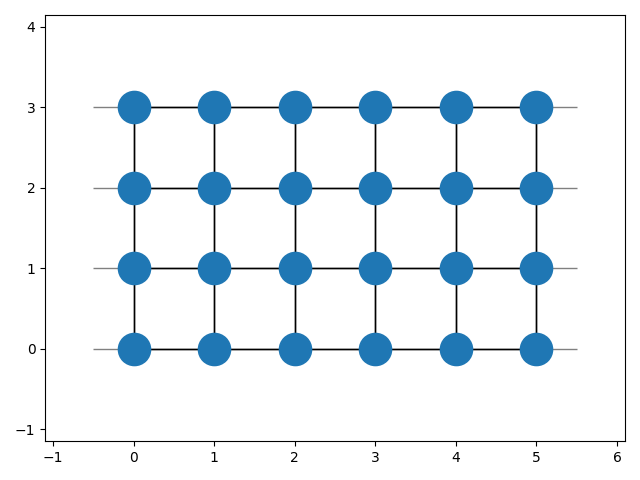
So far only the lattice structure has been configured. To actually construct a (finite) model of the lattice
the model has to be built:
python
latt.build(shape=(5, 3))
This will compute the indices and neighbors of all sites in the given shape and store the data.
After building the lattice periodic boundary conditions can be set along one or multiple axes:
python
latt.set_periodic(axis=0)
To view the built lattice the plot-method can be used:
````python
import matplotlib.pyplot as plt
latt.plot() plt.show() ````
General lattice attributes
After configuring the lattice the attributes are available.
Even without building a (finite) lattice structure all attributes can be computed on the fly for a given lattice vector,
consisting of the translation vector n and the atom index alpha. For computing the (translated) atom positions
the get_position method is used. Also, the neighbors and the vectors to these neighbors can be calculated.
The dist_idx-parameter specifies the distance of the neighbors (0 for nearest neighbors, 1 for next nearest neighbors, ...):
````python
from lattpy import simple_square
latt = simple_square()
Get position of atom alpha=0 in the translated unit-cell
positions = latt.get_position(n=[0, 0], alpha=0)
Get lattice-indices of the nearest neighbors of atom alpha=0 in the translated unit-cell
neighborindices = latt.getneighbors(n=[0, 0], alpha=0, distidx=0)
Get vectors to the nearest neighbors of atom alpha=0 in the translated unit-cell
neighborvectors = latt.getneighbor_vectors(alpha=0, distidx=0) ````
Also, the reciprocal lattice vectors can be computed
python
rvecs = latt.reciprocal_vectors()
or used to construct the reciprocal lattice:
python
rlatt = latt.reciprocal_lattice()
The 1. Brillouin zone is the Wigner-Seitz cell of the reciprocal lattice:
python
bz = rlatt.wigner_seitz_cell()
The 1.BZ can also be obtained by calling the explicit method of the direct lattice:
python
bz = latt.brillouin_zone()
Finite lattice data
If the lattice has been built the needed data is cached. The lattice sites of the
structure then can be accessed by a simple index i. The syntax is the same as before,
just without the get_ prefix:
````python latt.build((5, 2)) i = 2
Get position of the atom with index i=2
positions = latt.position(i)
Get the atom indices of the nearest neighbors of the atom with index i=2
neighbor_indices = latt.neighbors(i, distidx=0)
the nearest neighbors can also be found by calling (equivalent to dist_idx=0)
neighborindices = latt.nearestneighbors(i) ````
Data map
The lattice model makes it is easy to construct the (tight-binding) Hamiltonian of a non-interacting model:
````python import numpy as np from lattpy import simple_chain
Initializes a 1D lattice chain with a length of 5 atoms.
latt = simplechain(a=1.0) latt.build(shape=4) n = latt.numsites
Construct the non-interacting (kinetic) Hamiltonian-matrix
eps, t = 0., 1. ham = np.zeros((n, n)) for i in range(n): ham[i, i] = eps for j in latt.nearest_neighbors(i): ham[i, j] = t ````
Since we loop over all sites of the lattice the construction of the hamiltonian is slow.
An alternative way of mapping the lattice data to the hamiltonian is using the DataMap
object returned by the map() method of the lattice data. This stores the atom-types,
neighbor-pairs and corresponding distances of the lattice sites. Using the built-in
masks the construction of the hamiltonian-data can be vectorized:
````python
from scipy import sparse
Vectorized construction of the hamiltonian
eps, t = 0., 1. dmap = latt.data.map() # Build datamap values = np.zeros(dmap.size) # Initialize array for data of H values[dmap.onsite(alpha=0)] = eps # Map onsite-energies to array values[dmap.hopping(distidx=0)] = t # Map hopping-energies to array
The indices and data array can be used to construct a sparse matrix
hams = sparse.csrmatrix((values, dmap.indices)) ham = ham_s.toarray() ````
Both construction methods will create the following Hamiltonian-matrix:
[[0. 1. 0. 0. 0.]
 [1. 0. 1. 0. 0.]
 [0. 1. 0. 1. 0.]
 [0. 0. 1. 0. 1.]
 [0. 0. 0. 1. 0.]]
🔥 Performance
Even though lattpy is written in pure python, it achieves high performance and
a low memory footprint by making heavy use of numpy's vectorized operations and scipy's
cKDTree. As an example the build times and memory usage in the build process for different
lattices are shown in the following plots:
| Build time | Build memory |
|:-------------------------------------------------------------------------------------------------------:|:---------------------------------------------------------------------------------------------------------:|
|  |
|  |
|
Note that the overhead of the multi-thread neighbor search results in a slight
increase of the build time for small systems. By using num_jobs=1 in the build-method
this overhead can be eliminated for small systems. By passing num_jobs=-1 all cores
of the system are used.
💻 Development
See the CHANGELOG for the recent changes of the project.
If you encounter an issue or want to contribute to pyrekordbox, please feel free to
get in touch, create an issue
or open a pull request! A guide for contributing to lattpy and the commit-message style can be found in
CONTRIBUTING
Owner
- Name: Dylan
- Login: dylanljones
- Kind: user
- Location: Augsburg, Germany
- Website: https://www.linkedin.com/in/dylan-jones-951657103/
- Repositories: 14
- Profile: https://github.com/dylanljones
Physics PhD student at Augsburg University
GitHub Events
Total
- Issues event: 1
- Watch event: 4
- Push event: 8
- Pull request event: 1
- Fork event: 2
Last Year
- Issues event: 1
- Watch event: 4
- Push event: 8
- Pull request event: 1
- Fork event: 2
Committers
Last synced: about 1 year ago
Top Committers
| Name | Commits | |
|---|---|---|
| dylanljones | d****4@g****m | 522 |
| jonesdyl | d****s@s****e | 16 |
| pre-commit-ci[bot] | 6****] | 9 |
| LGTM Migrator | l****r | 1 |
Committer Domains (Top 20 + Academic)
Issues and Pull Requests
Last synced: 11 months ago
All Time
- Total issues: 4
- Total pull requests: 87
- Average time to close issues: 3 months
- Average time to close pull requests: 1 day
- Total issue authors: 3
- Total pull request authors: 4
- Average comments per issue: 0.25
- Average comments per pull request: 0.08
- Merged pull requests: 82
- Bot issues: 0
- Bot pull requests: 10
Past Year
- Issues: 0
- Pull requests: 1
- Average time to close issues: N/A
- Average time to close pull requests: N/A
- Issue authors: 0
- Pull request authors: 1
- Average comments per issue: 0
- Average comments per pull request: 0.0
- Merged pull requests: 0
- Bot issues: 0
- Bot pull requests: 0
Top Authors
Issue Authors
- dylanljones (2)
- tpyang (1)
- Ruberhauptmann (1)
Pull Request Authors
- dylanljones (76)
- pre-commit-ci[bot] (9)
- cg505 (2)
- lgtm-com[bot] (1)
Top Labels
Issue Labels
Pull Request Labels
Packages
- Total packages: 1
-
Total downloads:
- pypi 329 last-month
- Total dependent packages: 0
- Total dependent repositories: 4
- Total versions: 15
- Total maintainers: 1
pypi.org: lattpy
Simple and efficient Python package for modeling d-dimensional Bravais lattices in solid state physics.
- Homepage: https://github.com/dylanljones/lattpy
- Documentation: https://lattpy.readthedocs.io/
- License: MIT
-
Latest release: 0.7.7
published over 3 years ago
Rankings
Maintainers (1)
Dependencies
- graphviz *
- matplotlib *
- myst-parser *
- numpydoc *
- sphinx_rtd_theme *
- sphinx_toggleprompt *
- colorcet >=2.0.0
- hypothesis >=6.0.0
- matplotlib >=3.0.0
- numpy >=1.20.3
- pytest >=6.2.5
- scipy >=1.7.1
- setuptools >=60.0.0
- setuptools-scm >=4
- actions/checkout v3 composite
- github/codeql-action/analyze v2 composite
- github/codeql-action/autobuild v2 composite
- github/codeql-action/init v2 composite
- actions/checkout v3 composite
- actions/setup-python v4 composite
- actions/checkout v3 composite
- actions/setup-python v4 composite
- codecov/codecov-action v3 composite
- fkirc/skip-duplicate-actions master composite