azely
:zap: Azimuth/elevation calculator for astronomical objects
Science Score: 67.0%
This score indicates how likely this project is to be science-related based on various indicators:
-
✓CITATION.cff file
Found CITATION.cff file -
✓codemeta.json file
Found codemeta.json file -
✓.zenodo.json file
Found .zenodo.json file -
✓DOI references
Found 3 DOI reference(s) in README -
○Academic publication links
-
✓Committers with academic emails
2 of 2 committers (100.0%) from academic institutions -
○Institutional organization owner
-
○JOSS paper metadata
-
○Scientific vocabulary similarity
Low similarity (15.3%) to scientific vocabulary
Keywords
Repository
:zap: Azimuth/elevation calculator for astronomical objects
Basic Info
- Host: GitHub
- Owner: astropenguin
- License: mit
- Language: Python
- Default Branch: main
- Homepage: https://astropenguin.github.io/azely/1.0.0
- Size: 4.93 MB
Statistics
- Stars: 11
- Watchers: 2
- Forks: 4
- Open Issues: 4
- Releases: 9
Topics
Metadata Files
README.md
azely





Azimuth/elevation calculator for astronomical objects
Overview
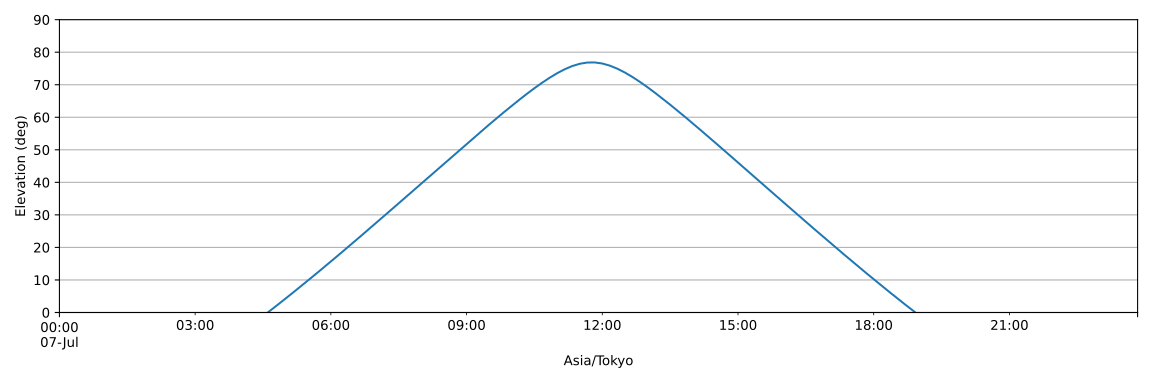
Azely (pronounced "as-elie") is a Python package for calculation and plotting of horizontal coordinates (azimuth and elevation) of astronomical objects at given location and time. While the core calculation and plotting are handled by Astropy and Matplotlib, Azely provides a simple API for easier and more intuitive use. For example, calculating and plotting the elevation of the Sun in Tokyo today can be done in a single line:
```python import azely
azely.calc('Sun', 'Tokyo').el.plot(ylabel='Elevation (deg)', ylim=(0, 90)) ```
Features
- Simple API: Just pass query strings for the object, location, and time information to the
azely.calc()function. The output is a pandas DataFrame of the calculated azimuth and elevation, which makes it easy to convert to other formats like CSV or plot with Matplotlib. - Information Retrieval and Cache: Azely automatically fetches object coordinates and location details from online services. The fetched information is cached in a local TOML file for offline use.
Installation
shell
pip install azely
Basic Usage
The easiest way to use Azely is to pass query strings for the object, location, and time information to the azely.calc() function to get the azimuth/elevation DataFrame:
```python import azely
df = azely.calc(object, location, time) ```
Query Specification
Parameter | Format and Description | Examples
--- | --- | ---
location| '': Current location inferred from your IP address (default; not cached). | ''
location| '<name>': Name of the location to be searched online. | 'ALMA AOS', 'Tokyo'
location| '<name>;<longitude>;<latitude>[;altitude]': Full location information (not cached). A dictionary is also accepted. | 'ASTE; -67.70d; -22.97d; 4860m', {'name': 'ASTE', 'longitude': '-67.70d', 'latitude': '-22.97d', 'altitude': '4860m'}
object | '<name>': Name of the object to be searched online. | 'Sun', '3C 273'
object | '<name>;<longitude>;<latitude>[;<frame>]': Full object information (not cached). A dictionary is also accepted. Frame defaults to 'icrs'. | 'M42; 5h35m; -5d23m', {'name': 'M42', 'longitude': '5h35m', 'latitude': '-5d23m'}
time | '': 00:00 today to 00:00 tomorrow at a 10-minute step (default; not cached). Timezone follows given location. | ''
time | '[<start>][;<stop>][;<step>][;<timezone>]': Full time information (not cached). A dictionary is also accepted. Omitted parts fall back to defaults ('00:00 today', '00:00 tomorrow', '10min', ''). Timezone follows given location unless not specified. | '2025-01-01', '09:00 JST today; in 2 days; 1h', {'start': '09:00 JST today', 'stop': 'in 2 days', 'step': '1h'}
DataFrame Example
```python import azely
df = azely.calc('Sun', 'Tokyo', '2025-07-07 00:00 JST; in 12 hours; 1h') print(df) ```
                                   az         el
JST
2025-07-07 00:00:00+09:00    3.846189 -31.611817
2025-07-07 01:00:00+09:00   19.640291 -29.125374
2025-07-07 02:00:00+09:00   33.835158 -23.630885
2025-07-07 03:00:00+09:00   45.977158 -15.805563
2025-07-07 04:00:00+09:00   56.259606  -6.319155
2025-07-07 05:00:00+09:00   65.148244   4.302369
2025-07-07 06:00:00+09:00   73.166182  15.680605
2025-07-07 07:00:00+09:00   80.862836  27.541537
2025-07-07 08:00:00+09:00   88.925229  39.663496
2025-07-07 09:00:00+09:00   98.525644  51.808030
2025-07-07 10:00:00+09:00  112.475716  63.549892
2025-07-07 11:00:00+09:00  139.635373  73.527391
Plotting Example
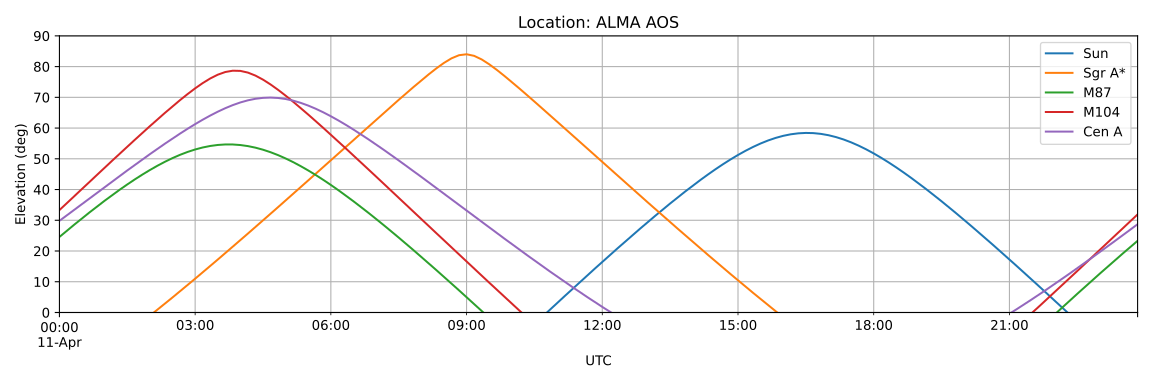
```python import azely import matplotlib.pyplot as plt
fig, ax = plt.subplots(figsize=(12, 4))
for obj in ('Sun', 'Sgr A*', 'M87', 'M104', 'Cen A'): df = azely.calc(obj, 'ALMA AOS', '2017 April 11 UTC') df.el.plot(ax=ax, label=df.object.name)
ax.settitle(f'Location: {df.location.name}') ax.setylabel('Elevation (deg)') ax.set_ylim(0, 90) ax.grid(which='both') ax.legend() ```
Advanced Usage
Handling Local Sidereal Time
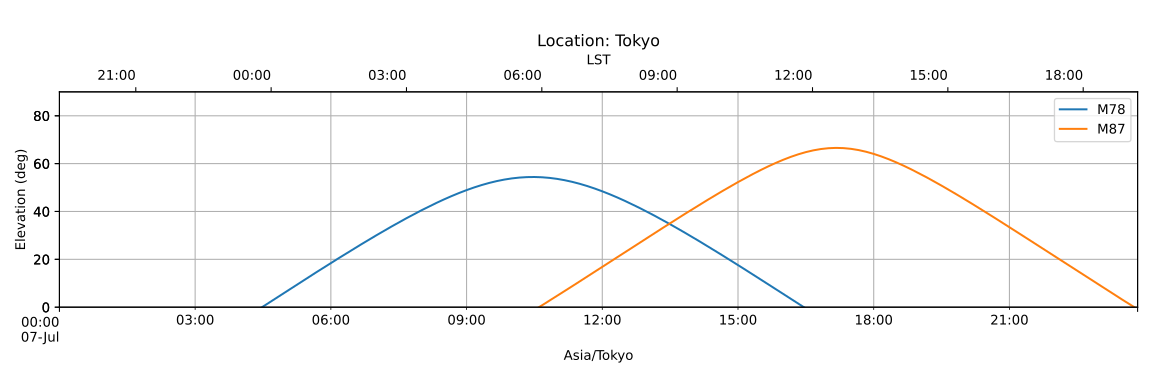
Using the in_lst() method of the output DataFrame, you can convert its time index to the local sidereal time (LST).
Here is an example that shows JST on the bottom axis and LST on the top axis:
```python import azely import matplotlib.pyplot as plt from matplotlib.dates import DateFormatter
fig, axjst = plt.subplots(figsize=(12, 4)) axlst = ax_jst.twiny()
for obj in ('M78', 'M87'): df = azely.calc(obj, 'Tokyo', '2025-07-07') df.el.plot(ax=ax_jst, label=df.object.name)
axjst.settitle(f'Location: {df.location.name}') axjst.setylabel('Elevation (deg)') axjst.setylim(0, 90) axjst.grid(which='both') axjst.legend() ax_jst.margins(0)
plot invisible elevation for the LST axis
df.inlst().el.plot(ax=axlst, alpha=0) axlst.xaxis.setmajorformatter(DateFormatter('%H:%M')) axlst.margins(0) ```
Cache and Custom Information
The fetched location/object/time information is automatically saved to $XDG_CONFIG_HOME/azely/cache.toml (or ~/.config/azely/cache.toml).
You can control this behavior with the append and overwrite options of azely.calc():
append=False(read-only): Returns the cached information if it exists. If not, fetches new information but never adds it to the cache.append=True(append-only; default): Returns the cached information if it exists. If not, fetches new information and always appends it to the cache.overwrite=True(force-update): Regardless of the existence of the cached information and the value of theappendoption, always fetches new information and overwrites the cached information with it.
You can change the source TOML file with the source option.
This can be used to create a configuration file with user-defined locations, objects, and times:
```toml
user.toml
[location.ASTE] name = "Atacama Submillimeter Telescope Experiment" longitude = "-67d42m11s" latitude = "-22d58m18s" altitude = "4860m"
[object.GC] name = "Galactic Center" longitude = "0d0m0s" latitude = "0d0m0s" frame = "galactic"
[time.Weekly] start = "00:00 today" stop = "in a week" step = "1h" ```
```python import azely
df = azely.calc('GC', 'ASTE', 'Weekly', source='user.toml') print(df) ```
``` az el America/Santiago 2025-07-06 00:00:00-04:00 233.966638 79.305274 2025-07-06 01:00:00-04:00 249.765199 66.864731 2025-07-06 02:00:00-04:00 251.885356 53.751800 2025-07-06 03:00:00-04:00 250.791907 40.619356 2025-07-06 04:00:00-04:00 248.196309 27.641160 ... ... ... 2025-07-12 19:00:00-04:00 109.691832 37.638970 2025-07-12 20:00:00-04:00 108.182993 50.748158 2025-07-12 21:00:00-04:00 109.245142 63.889110 2025-07-12 22:00:00-04:00 119.352834 76.638576 2025-07-12 23:00:00-04:00 194.243652 83.824660
[168 rows x 2 columns] ```
Migration Guide from 0.7.0 to 1.0.0
Azely 1.0.0 includes several breaking changes. If you are migrating from Azely 0.7.0, please check the following changes.
The main function and its options have been renamed
- 0.7.0:
azely.compute(object, site, time, view) - 1.0.0:
azely.calc(object, location, time)- The
siteoptions has been renamed tolocation. - The
viewoption has been removed. The timezone is inferred from thelocationor can be specified within thetime. - The default value settings via
config.tomlhas been removed.
- The
The in_lst property of the output DataFrame has become a method
- 0.7.0:
df.in_lst(anddf.in_utc) - 1.0.0:
df.in_lst()(anddf.in_utc())
The information cache has been totally changed
- The separate cache TOML files (
objects.toml,locations.toml) are now merged into a singlecache.toml. - The new
sourceoption specifies the source TOML file instead of prepending to'<toml>:'to the query string. - The new
overwriteoption force-updates cached information instead of appending'!'to the query string. - The new
appendandsourceoptions provide finer control over the cache behavior.
Owner
- Name: Akio Taniguchi
- Login: astropenguin
- Kind: user
- Location: Nagoya, Japan
- Company: Nagoya University
- Website: https://astropengu.in
- Twitter: astropengu_in
- Repositories: 76
- Profile: https://github.com/astropenguin
Project assistant professor (LMT-FINER)
Citation (CITATION.cff)
# This CITATION.cff file was generated with cffinit.
# Visit https://bit.ly/cffinit to generate yours today!

cff-version: 1.2.0
title: azely
message: >-
  If you use this software, please cite it using the
  metadata from this file.
type: software
authors:
  - given-names: Akio
    family-names: Taniguchi
    email: taniguchi.akio@gmail.com
    affiliation: Kitami Institute of Technology
    orcid: 'https://orcid.org/0000-0002-9695-6183'
identifiers:
  - type: doi
    value: 10.5281/zenodo.3680060
repository-code: 'https://github.com/astropenguin/azely'
url: 'https://astropenguin.github.io/azely/1.0.0'
abstract: Azimuth/elevation calculator for astronomical objects
keywords:
  - python
  - astronomy
  - azimuth
  - elevation
  - ephemeris
  - sidereal-time
  - visibility
license: MIT
version: 1.0.0
date-released: '2025-07-07'
GitHub Events
Total
- Create event: 11
- Release event: 1
- Issues event: 24
- Watch event: 4
- Delete event: 12
- Issue comment event: 2
- Push event: 24
- Pull request event: 20
- Fork event: 1
Last Year
- Create event: 11
- Release event: 1
- Issues event: 24
- Watch event: 4
- Delete event: 12
- Issue comment event: 2
- Push event: 24
- Pull request event: 20
- Fork event: 1
Committers
Last synced: over 3 years ago
All Time
- Total Commits: 774
- Total Committers: 2
- Avg Commits per committer: 387.0
- Development Distribution Score (DDS): 0.402
Top Committers
| Name | Commits | |
|---|---|---|
| Akio Taniguchi | t****i@a****p | 463 |
| Akio Taniguchi | t****i@i****p | 311 |
Committer Domains (Top 20 + Academic)
Issues and Pull Requests
Last synced: 11 months ago
All Time
- Total issues: 55
- Total pull requests: 53
- Average time to close issues: 3 months
- Average time to close pull requests: 19 days
- Total issue authors: 3
- Total pull request authors: 3
- Average comments per issue: 0.02
- Average comments per pull request: 0.15
- Merged pull requests: 44
- Bot issues: 0
- Bot pull requests: 8
Past Year
- Issues: 19
- Pull requests: 17
- Average time to close issues: about 24 hours
- Average time to close pull requests: about 15 hours
- Issue authors: 2
- Pull request authors: 2
- Average comments per issue: 0.0
- Average comments per pull request: 0.0
- Merged pull requests: 16
- Bot issues: 0
- Bot pull requests: 0
Top Authors
Issue Authors
- astropenguin (49)
- Hoshock (1)
- jdillard (1)
Pull Request Authors
- astropenguin (57)
- dependabot[bot] (8)
- jdillard (2)
Top Labels
Issue Labels
Pull Request Labels
Packages
- Total packages: 1
-
Total downloads:
- pypi 86 last-month
- Total dependent packages: 0
- Total dependent repositories: 1
- Total versions: 11
- Total maintainers: 1
pypi.org: azely
Azimuth/elevation calculator for astronomical objects
- Documentation: https://azely.readthedocs.io/
- License: MIT License Copyright (c) 2017-2025 Akio Taniguchi Permission is hereby granted, free of charge, to any person obtaining a copy of this software and associated documentation files (the "Software"), to deal in the Software without restriction, including without limitation the rights to use, copy, modify, merge, publish, distribute, sublicense, and/or sell copies of the Software, and to permit persons to whom the Software is furnished to do so, subject to the following conditions: The above copyright notice and this permission notice shall be included in all copies or substantial portions of the Software. THE SOFTWARE IS PROVIDED "AS IS", WITHOUT WARRANTY OF ANY KIND, EXPRESS OR IMPLIED, INCLUDING BUT NOT LIMITED TO THE WARRANTIES OF MERCHANTABILITY, FITNESS FOR A PARTICULAR PURPOSE AND NONINFRINGEMENT. IN NO EVENT SHALL THE AUTHORS OR COPYRIGHT HOLDERS BE LIABLE FOR ANY CLAIM, DAMAGES OR OTHER LIABILITY, WHETHER IN AN ACTION OF CONTRACT, TORT OR OTHERWISE, ARISING FROM, OUT OF OR IN CONNECTION WITH THE SOFTWARE OR THE USE OR OTHER DEALINGS IN THE SOFTWARE.
-
Latest release: 1.0.0
published about 1 year ago
Rankings
Maintainers (1)
Dependencies
- alabaster 0.7.12 develop
- appdirs 1.4.4 develop
- appnope 0.1.0 develop
- atomicwrites 1.4.0 develop
- attrs 20.2.0 develop
- babel 2.8.0 develop
- backcall 0.2.0 develop
- black 20.8b1 develop
- click 7.1.2 develop
- colorama 0.4.3 develop
- decorator 4.4.2 develop
- docutils 0.16 develop
- flake8 3.8.4 develop
- imagesize 1.2.0 develop
- importlib-metadata 2.0.0 develop
- iniconfig 1.0.1 develop
- ipykernel 5.3.4 develop
- ipython 7.16.1 develop
- ipython-genutils 0.2.0 develop
- jedi 0.17.2 develop
- jinja2 2.11.2 develop
- jupyter-client 6.1.7 develop
- jupyter-core 4.6.3 develop
- markupsafe 1.1.1 develop
- mccabe 0.6.1 develop
- mypy-extensions 0.4.3 develop
- packaging 20.4 develop
- parso 0.7.1 develop
- pathspec 0.8.0 develop
- pexpect 4.8.0 develop
- pickleshare 0.7.5 develop
- pluggy 0.13.1 develop
- prompt-toolkit 3.0.3 develop
- ptyprocess 0.6.0 develop
- py 1.9.0 develop
- pycodestyle 2.6.0 develop
- pydata-sphinx-theme 0.4.1 develop
- pyflakes 2.2.0 develop
- pygments 2.7.1 develop
- pytest 6.1.1 develop
- pywin32 228 develop
- pyzmq 19.0.2 develop
- regex 2020.10.11 develop
- snowballstemmer 2.0.0 develop
- sphinx 3.2.1 develop
- sphinxcontrib-applehelp 1.0.2 develop
- sphinxcontrib-devhelp 1.0.2 develop
- sphinxcontrib-htmlhelp 1.0.3 develop
- sphinxcontrib-jsmath 1.0.1 develop
- sphinxcontrib-qthelp 1.0.3 develop
- sphinxcontrib-serializinghtml 1.1.4 develop
- tornado 6.0.4 develop
- traitlets 4.3.3 develop
- typed-ast 1.4.1 develop
- typing-extensions 3.7.4.3 develop
- wcwidth 0.2.5 develop
- zipp 3.3.0 develop
- astropy 4.0.2
- certifi 2020.6.20
- chardet 3.0.4
- cycler 0.10.0
- dataclasses 0.7
- geographiclib 1.50
- geopy 1.23.0
- idna 2.10
- kiwisolver 1.2.0
- matplotlib 3.3.2
- numpy 1.19.2
- pandas 0.25.3
- pillow 7.2.0
- pyparsing 2.4.7
- python-dateutil 2.8.1
- pytz 2020.1
- requests 2.24.0
- six 1.15.0
- timezonefinder 4.4.1
- toml 0.10.1
- urllib3 1.25.10
- black ^20.8b develop
- flake8 ^3.8 develop
- ipykernel ^5.3 develop
- ipython ^7.16 develop
- pydata-sphinx-theme ^0.4 develop
- pytest ^6.0 develop
- sphinx ^3.2 develop
- astropy ^4.0
- dataclasses ^0.7
- geopy ^1.23
- matplotlib ^3.2
- numpy ^1.18
- pandas >= 0.25
- python ^3.6
- python-dateutil ^2.8
- pytz >= 2018.9
- requests ^2.23
- timezonefinder ^4.4
- toml ^0.10
- actions/checkout v3 composite
- actions/setup-python v4 composite
- peaceiris/actions-gh-pages v3 composite
- actions/checkout v3 composite
- actions/setup-python v4 composite
- actions/checkout v3 composite
- actions/setup-python v4 composite