Science Score: 85.0%
This score indicates how likely this project is to be science-related based on various indicators:
-
✓CITATION.cff file
Found CITATION.cff file -
✓codemeta.json file
Found codemeta.json file -
✓.zenodo.json file
Found .zenodo.json file -
✓DOI references
Found 3 DOI reference(s) in README -
✓Academic publication links
Links to: arxiv.org, zenodo.org -
✓Committers with academic emails
4 of 58 committers (6.9%) from academic institutions -
✓Institutional organization owner
Organization mlfoundations has institutional domain (people.csail.mit.edu) -
○JOSS paper metadata
-
○Scientific vocabulary similarity
Low similarity (8.6%) to scientific vocabulary
Keywords
Keywords from Contributors
Repository
An open source implementation of CLIP.
Basic Info
Statistics
- Stars: 12,305
- Watchers: 82
- Forks: 1,143
- Open Issues: 76
- Releases: 56
Topics
Metadata Files
README.md
OpenCLIP
[Paper] [Citations] [Clip Colab] [Coca Colab]

Welcome to an open source implementation of OpenAI's CLIP (Contrastive Language-Image Pre-training).
Using this codebase, we have trained several models on a variety of data sources and compute budgets, ranging from small-scale experiments to larger runs including models trained on datasets such as LAION-400M, LAION-2B and DataComp-1B. Many of our models and their scaling properties are studied in detail in the paper reproducible scaling laws for contrastive language-image learning. Some of the best models we've trained and their zero-shot ImageNet-1k accuracy are shown below, along with the ViT-L model trained by OpenAI and other state-of-the-art open source alternatives (all can be loaded via OpenCLIP). We provide more details about our full collection of pretrained models here, and zero-shot results for 38 datasets here.
| Model | Training data | Resolution | # of samples seen | ImageNet zero-shot acc. |
| -------- | ------- | ------- | ------- | ------- |
| ConvNext-Base | LAION-2B | 256px | 13B | 71.5% |
| ConvNext-Large | LAION-2B | 320px | 29B | 76.9% |
| ConvNext-XXLarge | LAION-2B | 256px | 34B | 79.5% |
| ViT-B-32-256 | DataComp-1B | 256px | 34B | 72.8% |
| ViT-B-16 | DataComp-1B | 224px | 13B | 73.5% |
| ViT-L-14 | LAION-2B | 224px | 32B | 75.3% |
| ViT-H-14 | LAION-2B | 224px | 32B | 78.0% |
| ViT-L-14 | DataComp-1B | 224px | 13B | 79.2% |
| ViT-bigG-14 | LAION-2B | 224px | 34B | 80.1% |
| | | | | |
| ViT-L-14-quickgelu (Original CLIP) | WIT | 224px | 13B | 75.5% |
| ViT-SO400M-14-SigLIP (SigLIP) | WebLI | 224px | 45B | 82.0% |
| ViT-L-14 (DFN) | DFN-2B | 224px | 39B | 82.2% |
| ViT-L-16-256 (SigLIP2) | WebLI (multi-lang) | 256px | 40B | 82.5% |
| ViT-SO400M-14-SigLIP-384 (SigLIP) | WebLI | 384px | 45B | 83.1% |
| ViT-H-14-quickgelu (DFN) | DFN-5B | 224px | 39B | 83.4% |
| PE-Core-L-14-336 (PE) | MetaCLIP-5.4B | 336px | 58B | 83.5% |
| ViT-SO400M-16-SigLIP2-384 (SigLIP2) | WebLI (multi-lang) | 384px | 40B | 84.1% |
| ViT-H-14-378-quickgelu (DFN) | DFN-5B | 378px | 44B | 84.4% |
| ViT-gopt-16-SigLIP2-384 (SigLIP2) | WebLI (multi-lang) | 384px | 40B | 85.0% |
| PE-Core-bigG-14-448 (PE) | MetaCLIP-5.4B | 448px | 86B | 85.4% |
Model cards with additional model specific details can be found on the Hugging Face Hub under the OpenCLIP library tag: https://huggingface.co/models?library=open_clip.
If you found this repository useful, please consider citing. We welcome anyone to submit an issue or send an email if you have any other requests or suggestions.
Note that portions of src/open_clip/ modelling and tokenizer code are adaptations of OpenAI's official repository.
Approach
| 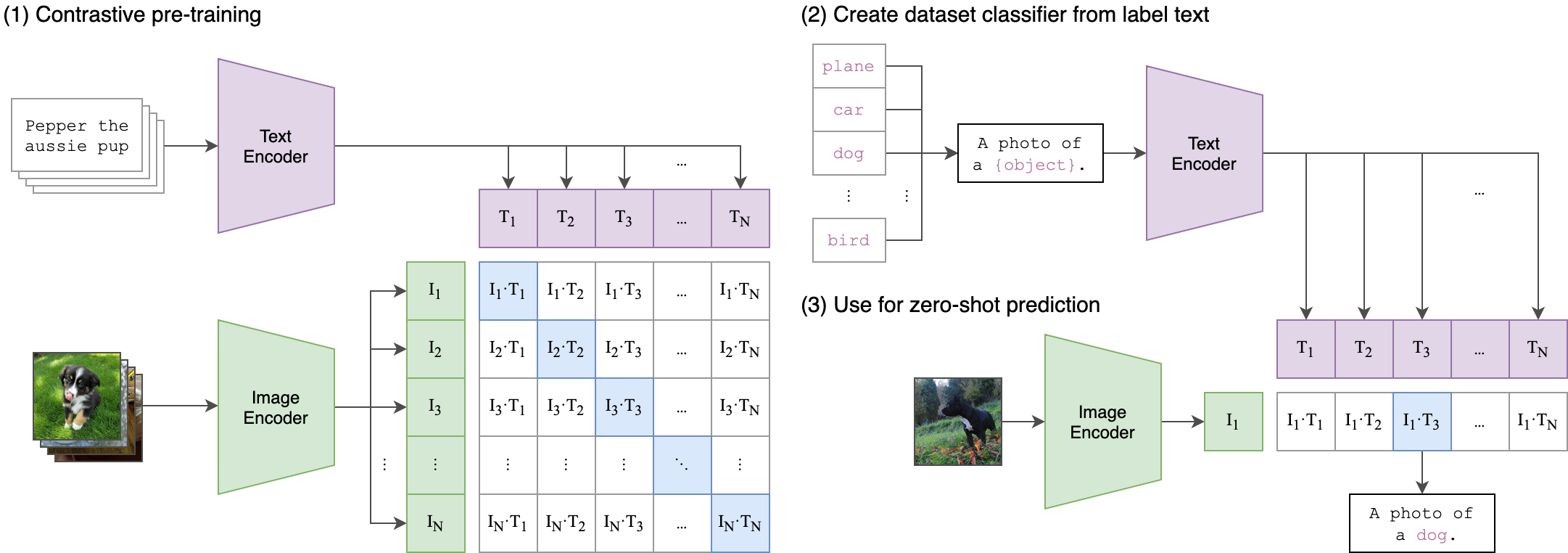 |
|:--:|
| Image Credit: https://github.com/openai/CLIP |
|
|:--:|
| Image Credit: https://github.com/openai/CLIP |
Usage
pip install open_clip_torch
```python import torch from PIL import Image import open_clip
model, , preprocess = openclip.createmodelandtransforms('ViT-B-32', pretrained='laion2bs34bb79k') model.eval() # model in train mode by default, impacts some models with BatchNorm or stochastic depth active tokenizer = openclip.get_tokenizer('ViT-B-32')
image = preprocess(Image.open("docs/CLIP.png")).unsqueeze(0) text = tokenizer(["a diagram", "a dog", "a cat"])
with torch.nograd(), torch.autocast("cuda"): imagefeatures = model.encodeimage(image) textfeatures = model.encodetext(text) imagefeatures /= imagefeatures.norm(dim=-1, keepdim=True) textfeatures /= text_features.norm(dim=-1, keepdim=True)
text_probs = (100.0 * image_features @ text_features.T).softmax(dim=-1)
print("Label probs:", text_probs) # prints: [[1., 0., 0.]] ```
If model uses timm image encoders (convnext, siglip, eva, etc) ensure the latest timm is installed. Upgrade timm if you see 'Unknown model' errors for the image encoder.
If model uses transformers tokenizers, ensure transformers is installed.
See also this [Clip Colab].
To compute billions of embeddings efficiently, you can use clip-retrieval which has openclip support.
Pretrained models
We offer a simple model interface to instantiate both pre-trained and untrained models. To see which pretrained models are available, use the following code snippet. More details about our pretrained models are available here.
```python
import openclip openclip.list_pretrained() ```
You can find more about the models we support (e.g. number of parameters, FLOPs) in this table.
NOTE: Many existing checkpoints use the QuickGELU activation from the original OpenAI models. This activation is actually less efficient than native torch.nn.GELU in recent versions of PyTorch. The model defaults are now nn.GELU, so one should use model definitions with -quickgelu postfix for the OpenCLIP pretrained weights. All OpenAI pretrained weights will always default to QuickGELU. One can also use the non -quickgelu model definitions with pretrained weights using QuickGELU but there will be an accuracy drop, for fine-tune that will likely vanish for longer runs.
Future trained models will use nn.GELU.
Loading models
Models can be loaded with open_clip.create_model_and_transforms, as shown in the example below. The model name and corresponding pretrained keys are compatible with the outputs of open_clip.list_pretrained().
The pretrained argument also accepts local paths, for example /path/to/my/b32.pt.
You can also load checkpoints from huggingface this way. To do so, download the open_clip_pytorch_model.bin file (for example, https://huggingface.co/laion/CLIP-ViT-L-14-DataComp.XL-s13B-b90K/tree/main), and use pretrained=/path/to/open_clip_pytorch_model.bin.
```python
pretrained also accepts local paths
model, , preprocess = openclip.createmodelandtransforms('ViT-B-32', pretrained='laion2bs34b_b79k') ```
Fine-tuning on classification tasks
This repository is focused on training CLIP models. To fine-tune a trained zero-shot model on a downstream classification task such as ImageNet, please see our other repository: WiSE-FT. The WiSE-FT repository contains code for our paper on Robust Fine-tuning of Zero-shot Models, in which we introduce a technique for fine-tuning zero-shot models while preserving robustness under distribution shift.
Data
To download datasets as webdataset, we recommend img2dataset.
Conceptual Captions
YFCC and other datasets
In addition to specifying the training data via CSV files as mentioned above, our codebase also supports webdataset, which is recommended for larger scale datasets. The expected format is a series of .tar files. Each of these .tar files should contain two files for each training example, one for the image and one for the corresponding text. Both files should have the same name but different extensions. For instance, shard_001.tar could contain files such as abc.jpg and abc.txt. You can learn more about webdataset at https://github.com/webdataset/webdataset. We use .tar files with 1,000 data points each, which we create using tarp.
You can download the YFCC dataset from Multimedia Commons. Similar to OpenAI, we used a subset of YFCC to reach the aforementioned accuracy numbers. The indices of images in this subset are in OpenAI's CLIP repository.
Training CLIP
Install
We advise you first create a virtual environment with:
python3 -m venv .env
source .env/bin/activate
pip install -U pip
You can then install openclip for training with pip install 'open_clip_torch[training]'.
Development
If you want to make changes to contribute code, you can clone openclip then run make install in openclip folder (after creating a virtualenv)
Install pip PyTorch as per https://pytorch.org/get-started/locally/
You may run make install-training to install training deps
Testing
Test can be run with make install-test then make test
python -m pytest -x -s -v tests -k "training" to run a specific test
Running regression tests against a specific git revision or tag:
1. Generate testing data
sh
    python tests/util_test.py --model RN50 RN101 --save_model_list models.txt --git_revision 9d31b2ec4df6d8228f370ff20c8267ec6ba39383
WARNING: This will invoke git and modify your working tree, but will reset it to the current state after data has been generated! \
Don't modify your working tree while test data is being generated this way.
- Run regression tests
sh
OPEN_CLIP_TEST_REG_MODELS=models.txt python -m pytest -x -s -v -m regression_test
Sample single-process running code:
bash
python -m open_clip_train.main \
    --save-frequency 1 \
    --zeroshot-frequency 1 \
    --report-to tensorboard \
    --train-data="/path/to/train_data.csv"  \
    --val-data="/path/to/validation_data.csv"  \
    --csv-img-key filepath \
    --csv-caption-key title \
    --imagenet-val=/path/to/imagenet/root/val/ \
    --warmup 10000 \
    --batch-size=128 \
    --lr=1e-3 \
    --wd=0.1 \
    --epochs=30 \
    --workers=8 \
    --model RN50
Note: imagenet-val is the path to the validation set of ImageNet for zero-shot evaluation, not the training set!
You can remove this argument if you do not want to perform zero-shot evaluation on ImageNet throughout training. Note that the val folder should contain subfolders. If it does not, please use this script.
Multi-GPU and Beyond
This code has been battle tested up to 1024 A100s and offers a variety of solutions for distributed training. We include native support for SLURM clusters.
As the number of devices used to train increases, so does the space complexity of
the the logit matrix. Using a naïve all-gather scheme, space complexity will be
O(n^2). Instead, complexity may become effectively linear if the flags
--gather-with-grad and --local-loss are used. This alteration results in one-to-one
numerical results as the naïve method.
Epochs
For larger datasets (eg Laion2B), we recommend setting --train-num-samples to a lower value than the full epoch, for example --train-num-samples 135646078 to 1/16 of an epoch in conjunction with --dataset-resampled to do sampling with replacement. This allows having frequent checkpoints to evaluate more often.
Patch Dropout
Recent research has shown that one can dropout half to three-quarters of the visual tokens, leading to up to 2-3x training speeds without loss of accuracy.
You can set this on your visual transformer config with the key patch_dropout.
In the paper, they also finetuned without the patch dropout at the end. You can do this with the command-line argument --force-patch-dropout 0.
Multiple data sources
OpenCLIP supports using multiple data sources, by separating different data paths with ::.
For instance, to train on CC12M and on LAION, one might use --train-data "/data/cc12m/cc12m-train-{0000..2175}.tar::/data/LAION-400M/{00000..41455}.tar".
Using --dataset-resampled is recommended for these cases.
By default, on expectation the amount of times the model will see a sample from each source is proportional to the size of the source. For instance, when training on one data source with size 400M and one with size 10M, samples from the first source are 40x more likely to be seen in expectation.
We also support different weighting of the data sources, by using the --train-data-upsampling-factors flag.
For instance, using --train-data-upsampling-factors=1::1 in the above scenario is equivalent to not using the flag, and --train-data-upsampling-factors=1::2 is equivalent to upsampling the second data source twice.
If you want to sample from data sources with the same frequency, the upsampling factors should be inversely proportional to the sizes of the data sources.
For instance, if dataset A has 1000 samples and dataset B has 100 samples, you can use --train-data-upsampling-factors=0.001::0.01 (or analogously, --train-data-upsampling-factors=1::10).
Single-Node
We make use of torchrun to launch distributed jobs. The following launches a
a job on a node of 4 GPUs:
bash
cd open_clip/src
torchrun --nproc_per_node 4 -m open_clip_train.main \
    --train-data '/data/cc12m/cc12m-train-{0000..2175}.tar' \
    --train-num-samples 10968539 \
    --dataset-type webdataset \
    --batch-size 320 \
    --precision amp \
    --workers 4 \
    --imagenet-val /data/imagenet/validation/
Multi-Node
The same script above works, so long as users include information about the number of nodes and host node.
bash
cd open_clip/src
torchrun --nproc_per_node=4 \
    --rdzv_endpoint=$HOSTE_NODE_ADDR \
    -m open_clip_train.main \
    --train-data '/data/cc12m/cc12m-train-{0000..2175}.tar' \
    --train-num-samples 10968539 \
    --dataset-type webdataset \
    --batch-size 320 \
    --precision amp \
    --workers 4 \
    --imagenet-val /data/imagenet/validation/
SLURM
This is likely the easiest solution to utilize. The following script was used to train our largest models:
```bash
!/bin/bash -x
SBATCH --nodes=32
SBATCH --gres=gpu:4
SBATCH --ntasks-per-node=4
SBATCH --cpus-per-task=6
SBATCH --wait-all-nodes=1
SBATCH --job-name=open_clip
SBATCH --account=ACCOUNT_NAME
SBATCH --partition PARTITION_NAME
eval "$(/path/to/conda/bin/conda shell.bash hook)" # init conda conda activate openclip export CUDAVISIBLEDEVICES=0,1,2,3 export MASTERPORT=12802
masteraddr=$(scontrol show hostnames "$SLURMJOBNODELIST" | head -n 1) export MASTERADDR=$master_addr
cd /shared/openclip export PYTHONPATH="$PYTHONPATH:$PWD/src" srun --cpubind=v --accel-bind=gn python -u src/opencliptrain/main.py \ --save-frequency 1 \ --report-to tensorboard \ --train-data="/data/LAION-400M/{00000..41455}.tar" \ --warmup 2000 \ --batch-size=256 \ --epochs=32 \ --workers=8 \ --model ViT-B-32 \ --name "ViT-B-32-Vanilla" \ --seed 0 \ --local-loss \ --gather-with-grad ```
Resuming from a checkpoint:
bash
python -m open_clip_train.main \
    --train-data="/path/to/train_data.csv" \
    --val-data="/path/to/validation_data.csv"  \
    --resume /path/to/checkpoints/epoch_K.pt
Training CoCa:
Training CoCa models is enabled through specifying a CoCa config using the --model parameter of the training script. Currently available configs are "cocabase", "cocaViT-B-32", and "cocaroberta-ViT-B-32" (which uses RoBERTa as the text encoder). CoCa configs are different from CLIP configs because they have an additional "multimodalcfg" component which specifies parameters for the multimodal text decoder. Here's an example from the cocaViT-B-32 config:
```json
"multimodalcfg": {
"contextlength": 76,
"vocabsize": 49408,
"width": 512,
"heads": 8,
"layers": 12,
"latentdim": 512,
"attnpoolerheads": 8
}
```
Credit to lucidrains for initial code, gpucce for adapting the code to openclip, and iejMac for training the models.
Generating text with CoCa
```python import open_clip import torch from PIL import Image
model, , transform = openclip.createmodelandtransforms( modelname="cocaViT-L-14", pretrained="mscocofinetuned_laion2B-s13B-b90k" )
im = Image.open("cat.jpg").convert("RGB") im = transform(im).unsqueeze(0)
with torch.no_grad(), torch.cuda.amp.autocast(): generated = model.generate(im)
print(openclip.decode(generated[0]).split("<endoftext>")[0].replace("<startof_text>", "")) ```
See also this [Coca Colab]
Fine Tuning CoCa
To fine-tune coca on mscoco, first create the dataset, one way is using a csvdataset and perhaps the simplest way to do it is using CLIP_benchmark which in turn uses pycocotools (that can be used also by itself).
```python from clipbenchmark.datasets.builder import builddataset import pandas as pd import os
rootpath = "path/to/data/dir" # set this to smth meaningful
ds = builddataset("mscococaptions", root=rootpath, split="train", task="captioning") # this downloads the dataset if it is not there already
coco = ds.coco
imgs = coco.loadImgs(coco.getImgIds())
futuredf = {"filepath":[], "title":[]}
for img in imgs:
caps = coco.imgToAnns[img["id"]]
for cap in caps:
futuredf["filepath"].append(img["filename"])
futuredf["title"].append(cap["caption"])
pd.DataFrame.fromdict(futuredf).tocsv(
os.path.join(rootpath, "train2014.csv"), index=False, sep="\t"
)
This should create a csv dataset that one can use to fine-tune coca with open_clip
bash
python -m opencliptrain.main \
--dataset-type "csv" \
--train-data "path/to/data/dir/train2014.csv" \
--warmup 1000 \
--batch-size 128 \
--lr 1e-5 \
--wd 0.1 \
--epochs 1 \
--workers 3 \
--model "coca_ViT-L-14" \
--report-to "wandb" \
--coca-contrastive-loss-weight 0 \
--coca-caption-loss-weight 1 \
--log-every-n-steps 100
```
This is a general setting, openclip has very parameters that can be set, ```python -m openclip_train.main --help``` should show them. The only relevant change compared to pre-training are the two arguments
bash
--coca-contrastive-loss-weight 0
--coca-caption-loss-weight 1
which make the model only train the generative side.
Training with pre-trained language models as text encoder:
If you wish to use different language models as the text encoder for CLIP you can do so by using one of the Hugging Face model configs in src/open_clip/model_configs and passing in it's tokenizer as the --model and --hf-tokenizer-name parameters respectively. Currently we only support RoBERTa ("test-roberta" config), however adding new models should be trivial. You can also determine how many layers, from the end, to leave unfrozen with the --lock-text-unlocked-layers parameter. Here's an example command to train CLIP with the RoBERTa LM that has it's last 10 layers unfrozen:
bash
python -m open_clip_train.main \
         --train-data="pipe:aws s3 cp s3://s-mas/cc3m/{00000..00329}.tar -" \
         --train-num-samples 3000000 \
         --val-data="pipe:aws s3 cp s3://s-mas/cc3m/{00330..00331}.tar -" \
         --val-num-samples 10000 \
         --dataset-type webdataset \
         --batch-size 256 \
         --warmup 2000 \
         --epochs 10 \
         --lr 5e-4 \
         --precision amp \
         --workers 6 \
         --model "roberta-ViT-B-32" \
         --lock-text \
         --lock-text-unlocked-layers 10 \
         --name "10_unfrozen" \
         --report-to "tensorboard" \
Loss Curves
When run on a machine with 8 GPUs the command should produce the following training curve for Conceptual Captions:
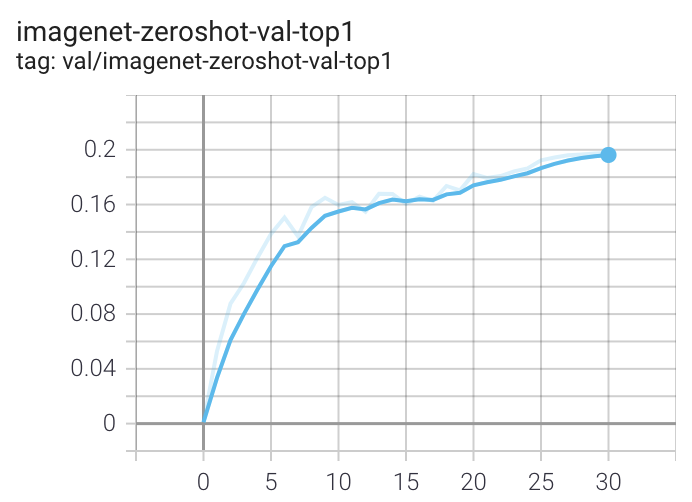
More detailed curves for Conceptual Captions are given at /docs/clipconceptualcaptions.md.
When training a RN50 on YFCC the same hyperparameters as above are used, with the exception of lr=5e-4 and epochs=32.
Note that to use another model, like ViT-B/32 or RN50x4 or RN50x16 or ViT-B/16, specify with --model RN50x4.
Logging
For tensorboard logging, run:
bash
tensorboard --logdir=logs/tensorboard/ --port=7777
For wandb logging, we recommend looking at the step variable instead of Step, since the later was not properly set in earlier versions of this codebase.
For older runs with models trained before https://github.com/mlfoundations/open_clip/pull/613, the Step variable should be ignored.
For newer runs, after that PR, the two variables are the same.
Evaluation / Zero-Shot
We recommend https://github.com/LAION-AI/CLIP_benchmark#how-to-use for systematic evaluation on 40 datasets.
Evaluating local checkpoint:
bash
python -m open_clip_train.main \
    --val-data="/path/to/validation_data.csv"  \
    --model RN101 \
    --pretrained /path/to/checkpoints/epoch_K.pt
Evaluating hosted pretrained checkpoint on ImageNet zero-shot prediction:
bash
python -m open_clip_train.main \
    --imagenet-val /path/to/imagenet/validation \
    --model ViT-B-32-quickgelu \
    --pretrained laion400m_e32
Model distillation
You can distill from a pre-trained by using --distill-model and --distill-pretrained to specify the model you'd like to distill from.
For instance, to distill from OpenAI ViT-L/14 use --distill-model ViT-L-14 --distill-pretrained openai.
Gradient accumulation
To simulate larger batches use --accum-freq k. If per gpu batch size, --batch-size, is m, then the effective batch size will be k * m * num_gpus.
When increasing --accum-freq from its default of 1, samples/s will remain approximately constant (batch size will double, as will time-per-batch). It is recommended to use other features to reduce batch size such as --grad-checkpointing --local-loss --gather-with-grad before increasing --accum-freq. --accum-freq can be used in addition to these features.
Instead of 1 forward pass per example, there are now 2 forward passes per-example. However, the first is done with torch.no_grad.
There is some additional GPU memory required --- the features and data from all m batches are stored in memory.
There are also m loss computations instead of the usual 1.
For more information see Cui et al. (https://arxiv.org/abs/2112.09331) or Pham et al. (https://arxiv.org/abs/2111.10050).
Int8 Support
We have beta support for int8 training and inference.
You can enable int8 training with --use-bnb-linear SwitchBackLinearGlobal or --use-bnb-linear SwitchBackLinearGlobalMemEfficient.
Please see the bitsandbytes library for definitions for these layers.
For CLIP VIT-Huge this should currently correspond to a 10% training speedup with no accuracy loss.
More speedups comin when the attention layer is refactored so that linear layers man be replaced there, too.
See the tutorial https://github.com/mlfoundations/openclip/blob/main/tutorials/int8tutorial.ipynb or paper.
Support for remote loading/training
It is always possible to resume directly from a remote file, e.g., a file in an s3 bucket. Just set --resume s3://<path-to-checkpoint>.
This will work with any filesystem supported by fsspec.
It is also possible to train open_clip models while continuously backing up to s3. This can help to avoid slow local file systems.
Say that your node has a local ssd /scratch, an s3 bucket s3://<path-to-bucket>.
In that case, set --logs /scratch and --remote-sync s3://<path-to-bucket>. Then, a background process will sync /scratch/<run-name> to s3://<path-to-bucket>/<run-name>. After syncing, the background process will sleep for --remote-sync-frequency seconds, which defaults to 5 minutes.
There is also experimental support for syncing to other remote file systems, not just s3. To do so, specify --remote-sync-protocol fsspec. However, this is currently very slow and not recommended.
Also, to optionally avoid saving too many checkpoints locally when using these features, you can use --delete-previous-checkpoint which deletes the previous checkpoint after saving a new one.
Note: if you are using this feature with --resume latest, there are a few warnings. First, use with --save-most-recent is not supported. Second, only s3 is supported. Finally, since the sync happens in the background, it is possible that the most recent checkpoint may not be finished syncing to the remote.
Pushing Models to Hugging Face Hub
The module open_clip.push_to_hf_hub includes helpers for pushing models /w weights and config to the HF Hub.
The tool can be run from command line, ex:
python -m open_clip.push_to_hf_hub --model convnext_large_d_320 --pretrained /train/checkpoints/epoch_12.pt --repo-id laion/CLIP-convnext_large_d_320.laion2B-s29B-b131K-ft
Acknowledgments
We gratefully acknowledge the Gauss Centre for Supercomputing e.V. (www.gauss-centre.eu) for funding this part of work by providing computing time through the John von Neumann Institute for Computing (NIC) on the GCS Supercomputer JUWELS Booster at Jülich Supercomputing Centre (JSC).
The Team
Current development of this repository is led by Ross Wightman, Romain Beaumont, Cade Gordon, and Vaishaal Shankar.
The original version of this repository is from a group of researchers at UW, Google, Stanford, Amazon, Columbia, and Berkeley.
Gabriel Ilharco*, Mitchell Wortsman*, Nicholas Carlini, Rohan Taori, Achal Dave, Vaishaal Shankar, John Miller, Hongseok Namkoong, Hannaneh Hajishirzi, Ali Farhadi, Ludwig Schmidt
Special thanks to Jong Wook Kim and Alec Radford for help with reproducing CLIP!
Citing
If you found this repository useful, please consider citing:
bibtex
@software{ilharco_gabriel_2021_5143773,
  author       = {Ilharco, Gabriel and
                  Wortsman, Mitchell and
                  Wightman, Ross and
                  Gordon, Cade and
                  Carlini, Nicholas and
                  Taori, Rohan and
                  Dave, Achal and
                  Shankar, Vaishaal and
                  Namkoong, Hongseok and
                  Miller, John and
                  Hajishirzi, Hannaneh and
                  Farhadi, Ali and
                  Schmidt, Ludwig},
  title        = {OpenCLIP},
  month        = jul,
  year         = 2021,
  note         = {If you use this software, please cite it as below.},
  publisher    = {Zenodo},
  version      = {0.1},
  doi          = {10.5281/zenodo.5143773},
  url          = {https://doi.org/10.5281/zenodo.5143773}
}
bibtex
@inproceedings{cherti2023reproducible,
  title={Reproducible scaling laws for contrastive language-image learning},
  author={Cherti, Mehdi and Beaumont, Romain and Wightman, Ross and Wortsman, Mitchell and Ilharco, Gabriel and Gordon, Cade and Schuhmann, Christoph and Schmidt, Ludwig and Jitsev, Jenia},
  booktitle={Proceedings of the IEEE/CVF Conference on Computer Vision and Pattern Recognition},
  pages={2818--2829},
  year={2023}
}
bibtex
@inproceedings{Radford2021LearningTV,
  title={Learning Transferable Visual Models From Natural Language Supervision},
  author={Alec Radford and Jong Wook Kim and Chris Hallacy and A. Ramesh and Gabriel Goh and Sandhini Agarwal and Girish Sastry and Amanda Askell and Pamela Mishkin and Jack Clark and Gretchen Krueger and Ilya Sutskever},
  booktitle={ICML},
  year={2021}
}
bibtex
@inproceedings{schuhmann2022laionb,
  title={{LAION}-5B: An open large-scale dataset for training next generation image-text models},
  author={Christoph Schuhmann and
          Romain Beaumont and
          Richard Vencu and
          Cade W Gordon and
          Ross Wightman and
          Mehdi Cherti and
          Theo Coombes and
          Aarush Katta and
          Clayton Mullis and
          Mitchell Wortsman and
          Patrick Schramowski and
          Srivatsa R Kundurthy and
          Katherine Crowson and
          Ludwig Schmidt and
          Robert Kaczmarczyk and
          Jenia Jitsev},
  booktitle={Thirty-sixth Conference on Neural Information Processing Systems Datasets and Benchmarks Track},
  year={2022},
  url={https://openreview.net/forum?id=M3Y74vmsMcY}
}

Owner
- Name: mlfoundations
- Login: mlfoundations
- Kind: organization
- Website: https://people.csail.mit.edu/ludwigs/
- Repositories: 12
- Profile: https://github.com/mlfoundations
Citation (CITATION.cff)
cff-version: 1.1.0
message: If you use this software, please cite it as below.
authors:
  - family-names: Ilharco
    given-names: Gabriel
  - family-names: Wortsman
    given-names: Mitchell
  - family-names: Wightman
    given-names: Ross
  - family-names: Gordon
    given-names: Cade
  - family-names: Carlini
    given-names: Nicholas
  - family-names: Taori
    given-names: Rohan
  - family-names: Dave
    given-names: Achal
  - family-names: Shankar
    given-names: Vaishaal
  - family-names: Namkoong
    given-names: Hongseok
  - family-names: Miller
    given-names: John
  - family-names: Hajishirzi
    given-names: Hannaneh
  - family-names: Farhadi
    given-names: Ali
  - family-names: Schmidt
    given-names: Ludwig
title: OpenCLIP
version: v0.1
doi: 10.5281/zenodo.5143773
date-released: 2021-07-28
Committers
Last synced: about 1 year ago
Top Committers
| Name | Commits | |
|---|---|---|
| Ross Wightman | r****n@g****m | 217 |
| Romain Beaumont | r****1@g****m | 64 |
| Gabriel Ilharco Magalhães | g****o | 52 |
| Mitchell Wortsman | m****n@g****m | 38 |
| Cade Gordon | c****1@h****m | 26 |
| iejMac | k****6@g****m | 25 |
| Santiago Castro | s****o@u****u | 12 |
| Giovanni Puccetti | g****2@g****m | 11 |
| Jason Chou | c****h@g****m | 8 |
| lopho | l****o | 7 |
| Alexander Visheratin | a****1@g****m | 6 |
| zw | 2****5 | 5 |
| Nicholas Carlini | n****s@c****m | 5 |
| Jitsev, Jenia | j****v@f****e | 5 |
| Mehdi Cherti | m****i@g****m | 4 |
| Phil Wang | l****s@g****m | 4 |
| MengqingCao | c****3@1****m | 4 |
| Ludwig Schmidt | l****2@g****m | 3 |
| Vaishaal | v****l@b****u | 3 |
| Humza Iqbal | h****9@g****m | 2 |
| Xin Wen | i****n@g****m | 2 |
| Seyed Alireza Fatemi Jahromi | a****a@r****m | 2 |
| Sayak Paul | s****l@g****m | 2 |
| Rahul Somani | r****5@g****m | 2 |
| Paul Willot | k****t@g****m | 2 |
| Lysandre | l****t@r****r | 2 |
| iejmac | i****c@i****l | 1 |
| Mitchell Wortsman | m****w@i****l | 1 |
| Mitchell Wortsman | m****w@i****l | 1 |
| Mitchell Wortsman | m****w@i****l | 1 |
| and 28 more... | ||
Committer Domains (Top 20 + Academic)
Issues and Pull Requests
Last synced: 10 months ago
All Time
- Total issues: 395
- Total pull requests: 194
- Average time to close issues: 4 months
- Average time to close pull requests: about 1 month
- Total issue authors: 294
- Total pull request authors: 66
- Average comments per issue: 2.59
- Average comments per pull request: 2.87
- Merged pull requests: 107
- Bot issues: 0
- Bot pull requests: 0
Past Year
- Issues: 87
- Pull requests: 36
- Average time to close issues: 7 days
- Average time to close pull requests: 20 days
- Issue authors: 69
- Pull request authors: 9
- Average comments per issue: 1.8
- Average comments per pull request: 0.61
- Merged pull requests: 18
- Bot issues: 0
- Bot pull requests: 0
Top Authors
Issue Authors
- rom1504 (17)
- ShuxunoO (6)
- ctgushiwei (5)
- jn2clark (5)
- NightMachinery (4)
- humzaiqbal (4)
- samuelstevens (4)
- rwightman (4)
- yxchng (4)
- SutirthaChakraborty (3)
- zhangyongren (3)
- usuyama (3)
- xiaohoua (3)
- nicolas-dufour (3)
- guillaumeguy (3)
Pull Request Authors
- rwightman (58)
- gabrielilharco (18)
- bryant1410 (15)
- gpucce (12)
- mitchellnw (10)
- EIFY (10)
- Yanqing0327 (6)
- iejMac (6)
- visheratin (6)
- YushunXiang (4)
- rsomani95 (3)
- sramshetty (3)
- MengqingCao (3)
- humzaiqbal (3)
- moonqdev (2)
Top Labels
Issue Labels
Pull Request Labels
Packages
- Total packages: 4
-
Total downloads:
- pypi 6,609,878 last-month
- Total docker downloads: 180,568
-
Total dependent packages: 76
(may contain duplicates) -
Total dependent repositories: 1,154
(may contain duplicates) - Total versions: 109
- Total maintainers: 3
pypi.org: open-clip-torch
Open reproduction of consastive language-image pretraining (CLIP) and related.
- Documentation: https://open-clip-torch.readthedocs.io/
- License: MIT
-
Latest release: 3.1.0
published 11 months ago
Rankings
Maintainers (2)
proxy.golang.org: github.com/mlfoundations/open_clip
- Documentation: https://pkg.go.dev/github.com/mlfoundations/open_clip#section-documentation
- License: other
-
Latest release: v3.1.0+incompatible
published 11 months ago
Rankings
pypi.org: open-clip-torch-any-py3
OpenCLIP
- Homepage: https://github.com/mlfoundations/open_clip
- Documentation: https://open-clip-torch-any-py3.readthedocs.io/
- License: Apache Software License
-
Latest release: 1.3.2
published almost 4 years ago
Rankings
Maintainers (1)
spack.io: py-open-clip-torch
Welcome to an open source implementation of OpenAI's CLIP (Contrastive Language-Image Pre-training).
- Homepage: https://github.com/mlfoundations/open_clip
- License: []
-
Latest release: 2.24.0
published over 1 year ago