wdphottools
WDPhotTools--A White Dwarf Photometric Toolkit in Python
Science Score: 49.0%
This score indicates how likely this project is to be science-related based on various indicators:
-
○CITATION.cff file
-
✓codemeta.json file
Found codemeta.json file -
✓.zenodo.json file
Found .zenodo.json file -
✓DOI references
Found 9 DOI reference(s) in README -
✓Academic publication links
Links to: arxiv.org, zenodo.org -
○Academic email domains
-
○Institutional organization owner
-
○JOSS paper metadata
-
○Scientific vocabulary similarity
Low similarity (15.5%) to scientific vocabulary
Keywords
Repository
WDPhotTools--A White Dwarf Photometric Toolkit in Python
Basic Info
Statistics
- Stars: 20
- Watchers: 2
- Forks: 7
- Open Issues: 4
- Releases: 10
Topics
Metadata Files
README.md
WDPhotTools









This software can generate colour-colour diagram, colour-magnitude diagram in various photometric systems, plotting cooling profiles from different models, and compute theoretical white dwarf luminosity functions based on the built-in or supplied models of (1) initial mass function, (2) total stellar evolution lifetime, (3) initial-final mass relation, and (4) white dwarf cooling time.
the core parts of this work are three-fold: the first and the backbone of this work is the formatters that handle the output models from various works in the format as they are downloaded. This will allow the software to be updated with the newer models easily in the future. The second core part is the photometric fitter that solves for the WD parameters based on the photometry, with or without distance and reddening. The last part is to generate white dwarf luminosity function in bolometric magnitudes or in any of the photometric systems availalbe from the atmosphere model.
When using the RBFInterpolator, we strongly encourage the use of scipy 1.9+
which provides a speed gain of O(100) times.
Please be aware of some incompatible version combinations of Astropy with numpy>=2.0.
Documentation
Documentation and more examples can be found at Read the Docs.
Attribution
If you have made use of the WDPhotTools, we would appreciate if you can refernce the follow article and the software itself. The BibTex of the two items are::
bash
@article{10.1093/rasti/rzac006,
    author = {Lam, M C and Yuen, K W and Green, M J and Li, W},
    title = "{WDPhotTools – a white dwarf photometric toolkit in Python}",
    journal = {RAS Techniques and Instruments},
    volume = {1},
    number = {1},
    pages = {81-98},
    year = {2022},
    month = {12},
    issn = {2752-8200},
    doi = {10.1093/rasti/rzac006},
    url = {https://doi.org/10.1093/rasti/rzac006},
    eprint = {https://academic.oup.com/rasti/article-pdf/1/1/81/48321979/rzac006.pdf},
}
and
bash
@software{marco_c_lam_2022_6595029,
    author       = {Marco C Lam and
                    K Yuen},
    title        = {WDPhotTools – a white dwarf photometric toolkit in Python},
    month        = may,
    year         = 2022,
    publisher    = {Zenodo},
    doi          = {10.5281/zenodo.6595029},
    url          = {https://doi.org/10.5281/zenodo.6595029}
}
Contributor
- @cylammarco
- @KaWaiYuen
Contribution Guide
- passes the default black formatter with the only exception of using a max line length of 120
- please create an MR to merge onto the
devbranch - please add your name to the contributor list in the MR
Model Inspection
Plotting the WD cooling sequence in Gaia filters
The cooling models only include the modelling of the bolometric lumninosity, the synthetic photometry is not usually provided. We have included the synthetic colours computed by the Montreal group. By default, it maps the (logg, Mbol) to Gaia G band (DR3). The DA cooling tracks can be generated with
```python from WDPhotTools import plotter
plotter.plotatmospheremodel(invert_yaxis=True) ```

or with finer control by using the interpolators
```python from matplotlib import pyplot as plt import numpy as np
from WDPhotTools.atmospheremodelreader import AtmosphereModelReader
atm = AtmosphereModelReader()
Default passband is G3
G = atm.interpam() BP = atm.interpam(dependent="G3BP") RP = atm.interpam(dependent="G3_RP")
logg = np.arange(7.0, 9.5, 0.5) Mbol = np.arange(0.0, 20.0, 0.1)
plt.figure(1, figsize=(8, 8)) for i in logg: plt.plot( BP(i, Mbol) - RP(i, Mbol), G(i, Mbol), label=r"$\log(g) = {}$".format(i), )
plt.ylim(20.0, 6.0) plt.grid() plt.legend() plt.xlabel("(BP - RP) / mag") plt.ylabel("G / mag") plt.title("DA Cooling tracks") plt.tight_layout() ```

Plotting the cooling models
The cooling sequence above is mostly concerned with the synthetic photometry, in this example, it is mostly regarding the physical properties beneath the photosphere. To check what models are embedded, you can use:
```python from WDPhotTools.coolingmodelreader import CoolingModelReader
cr = CoolingModelReader() cr.listcoolingmodel() ```
This should output:
python
Model: montreal_co_da_20, Reference: Bedard et al. 2020 CO DA
Model: montreal_co_db_20, Reference: Bedard et al. 2020 CO DB
Model: lpcode_he_da_07, Reference: Panei et al. 2007 He DA
Model: lpcode_co_da_07, Reference: Panei et al. 2007 CO DA
Model: lpcode_he_da_09, Reference: Althaus et al. 2009 He DA
Model: lpcode_co_da_10_z001, Reference: Renedo et al. 2010 CO DA Z=0.01
Model: lpcode_co_da_10_z0001, Reference: Renedo et al. 2010 CO DA Z=0.001
Model: lpcode_co_da_15_z00003, Reference: Althaus et al. 2015 DA Z=0.00003
Model: lpcode_co_da_15_z0001, Reference: Althaus et al. 2015 DA Z=0.0001
Model: lpcode_co_da_15_z0005, Reference: Althaus et al. 2015 DA Z=0.0005
Model: lpcode_co_db_17_z00005, Reference: Althaus et al. 2017 DB Y=0.4
Model: lpcode_co_db_17_z0001, Reference: Althaus et al. 2017 DB Y=0.4
Model: lpcode_co_db_17, Reference: Camisassa et al. 2017 DB
Model: basti_co_da_10, Reference: Salaris et al. 2010 CO DA
Model: basti_co_db_10, Reference: Salaris et al. 2010 CO DB
Model: basti_co_da_10_nps, Reference: Salaris et al. 2010 CO DA, no phase separation
Model: basti_co_db_10_nps, Reference: Salaris et al. 2010 CO DB, no phase separation
Model: lpcode_one_da_07, Reference: Althaus et al. 2007 ONe DA
Model: lpcode_one_da_19, Reference: Camisassa et al. 2019 ONe DA
Model: lpcode_one_db_19, Reference: Camisassa et al. 2019 ONe DB
Model: mesa_one_da_18, Reference: Lauffer et al. 2018 ONe DA
Model: mesa_one_db_18, Reference: Lauffer et al. 2018 ONe DB
And once you have picked a model, you can inspect what parameters are available with the model by supplying the model name, for example:
python
cr.list_cooling_parameters('basti_co_da_10')
which will print
bash
Available WD mass: [0.54 0.55 0.61 0.68 0.77 0.87 1.   1.1  1.2 ]
Parameter: log(Age), Column Name: age, Unit: (Gyr)
Parameter: Mass, Column Name: mass, Unit: M$_{\odot}$
Parameter: log(T$_{\mathrm{eff}})$, Column Name: Teff, Unit: (K)
Parameter: Luminosity, Column Name: lum, Unit: L$_{\odot}$
Parameter: u, Column Name: u, Unit: mag
Parameter: g, Column Name: g, Unit: mag
Parameter: r, Column Name: r, Unit: mag
Parameter: i, Column Name: i, Unit: mag
Parameter: z, Column Name: z, Unit: mag
Knowing which model and parameter you have access to, you can do basic visualisation using the default plotting funtion with the plotter again:
```python from WDPhotTools import plotter
plotter.plotcoolingmodel(mass=[0.2, 0.4, 0.6, 0.8, 1.0]) ```

With a finer control of the cooling_model_reader, it is easy to work with more
advanced model usage and visulations, for example, we can compare the effect of
phase separation in Salaris et al. 2010, see
this example script.

Photometric fitting
We provide 3 minimisers for fitting with synthetic photometry:
scipy.optimize.minimize, scipy.optimize.least_squares and emcee (with the
option to refine with a scipy.optimize.minimize in a bounded region). The
second and third ones come with error estimations.
An example photometric fit of PSO J1801+6254 in 3 Gaia, 5 Pan-STARRS and 3 NIR filters without providing a distance
```python from WDPhotTools.fitter import WDfitter ftr = WDfitter()
ftr.fit( atmosphere="H", filters=["gps1", "rps1", "ips1", "zps1", "yps1", "G3", "G3BP", "G3RP", "Jmko", "Hmko", "Kmko"], mags=[21.1437, 19.9678, 19.4993, 19.2981, 19.1478, 20.0533, 20.7883, 19.1868, 19.45-0.91, 19.96-1.39, 20.40-1.85], magerrors=[0.0321, 0.0229, 0.0083, 0.0234, 0.0187, 0.006322, 0.118615, 0.070880, 0.05, 0.03, 0.05], independent=["Teff", "logg"], initialguess=[4000.0, 7.5], distance=71.231, distanceerr=2.0, method='emcee', nwalkers=100, nsteps=1000, nburns=100 ) ftr.showbestfit(display=False) ftr.showcornerplot( figsize=(10, 10), display=True, kwarg={ "quantiles": [0.158655, 0.5, 0.841345], "showtitles": True, "truths": [3550, 7.45], }, ) ```
Reddening model
The default setup assumes the provided reddening is the total amount at the
given distance. Hence, it is the mode total in the set_extinction_mode.
However, if the reddening at the distance is not known, a fractional value as a
linear function of distance from the galactic plane can be used with model
linear, with the z_min and z_max provided as the range in which the
reddening is linearly interpolated such at E(B-V) = 0.0 at a z(distance, ra,
dec) smaller than or equal to z_min, and E(B-V) equals the total reddening at
z(distance, ra, dec) greater than or equal to z_min. The conversion from
(distance, ra, dec) to Galactic (x, y, z) cartesian coordinate makes use of the
Astropy Coordinate pacakge and their default values for the geometry of the
Galaxy and the Sun. This is adapted from
Harris et al. (2006) (footnote on
page 5).
```python
the fitter will be using this configuration after setting it in the beginning
ftr.setextinctionmode(mode="linear", zmin=100.0, zmax=250.0)
Calling the private function as an example
ftr.getextinction_fraction( distance=175.0, ra=192.85949646, dec=27.12835323, )
0.6386628473110217 ```
Retrieving the fitted solution(s)
scipy.optimize
After using minimize or least_squares as the fitting method, the fitted
solution natively returned from the respective minimizer will be stored in
ftr.results. The best fit parameters can be retrieved from
self.best_fit_params. For example, if minimize is used for fitting both DA
and DB, the solutions should be populated like this:
```python
ftr.results {'H': finalsimplex: (array([[15.74910563, 7.87520654], [15.74910582, 7.87521853], [15.74911116, 7.87521092]]), array([48049.35474212, 48049.35474769, 48049.35481848])) fun: 48049.35474211679 message: 'Optimization terminated successfully.' nfev: 76 nit: 39 status: 0 success: True x: array([15.74910563, 7.87520654]), 'He': finalsimplex: (array([[15.79568165, 8.02103768], [15.79569834, 8.02106531], [15.79567785, 8.02106278]]), array([229832.28271338, 229832.28273065, 229832.28280722])) fun: 229832.28271338015 message: 'Optimization terminated successfully.' nfev: 77 nit: 39 status: 0 success: True x: array([15.79568165, 8.02103768])} ftr.bestfitparams {'H': {'chi2': 16.331071596034946, 'chi2dof': -1, 'Teff': 3945.5931387718992, 'Tefferr': nan, 'logg': 7.883606976283595, 'loggerr': nan, 'gps1': 16.69712684278966, 'distance': 71.231, 'distmod': 4.263345206871898, 'rps1': 15.704034694889183, 'ips1': 15.283477107938552, 'zps1': 15.095069184688736, 'yps1': 15.027153529904982, 'G3': 15.715138717830666, 'G3BP': 16.412011674291037, 'G3RP': 14.912256142772883, 'Jmko': 14.184129344073243, 'Hmko': 14.349943690969402, 'Kmko': 14.462301268674423, 'Avgps1': 0.0, 'Avrps1': 0.0, 'Avips1': 0.0, 'Avzps1': 0.0, 'Avyps1': 0.0, 'AvG3': 0.0, 'AvG3BP': 0.0, 'AvG3RP': 0.0, 'AvJmko': 0.0, 'AvHmko': 0.0, 'AvKmko': 0.0, 'mass': 0.506789576678794, 'Mbol': 15.751993832322924, 'age': 8412712336.806402}, 'He': {'chi2': 75.8052680625422, 'chi2dof': -1, 'Teff': 4076.465537192801, 'Tefferr': nan, 'logg': 8.010280533194848, 'loggerr': nan, 'gps1': 16.651799655189226, 'distance': 71.231, 'distmod': 4.263345206871898, 'rps1': 15.865175902642834, 'ips1': 15.475428665678795, 'zps1': 15.298474684843848, 'yps1': 15.219156145386872, 'G3': 15.850655379868732, 'G3BP': 16.450733760160897, 'G3RP': 15.104976599249024, 'Jmko': 14.25711164011887, 'Hmko': 14.00191185593229, 'Kmko': 14.065524105238422, 'Avgps1': 0.0, 'Avrps1': 0.0, 'Avips1': 0.0, 'Avzps1': 0.0, 'Avyps1': 0.0, 'AvG3': 0.0, 'AvG3BP': 0.0, 'AvG3RP': 0.0, 'AvJmko': 0.0, 'AvHmko': 0.0, 'AvKmko': 0.0, 'mass': 0.5744639170135237, 'Mbol': 15.793462337016509, 'age': 7699932412.531036}} ```
The minimize method does not come with error estimations, hence the nan in
the entries. However, least_squares does provide error estimations natively:
python
{'H': {'chi2': 16.52680031325726, 'chi2dof': 9, 'Teff': 3934.219671470367, 'Teff_err': 28.648180206953782, 'logg': 7.881944093560716, 'logg_err': 0.02940730383374193, 'g_ps1': 16.70888624682886, 'distance': 71.231, 'dist_mod': 4.263345206871898, 'r_ps1': 15.711652542307078, 'i_ps1': 15.289897484103534, 'z_ps1': 15.100896653873047, 'y_ps1': 15.033682278021793, 'G3': 15.722769962685309, 'G3_BP': 16.421765886432173, 'G3_RP': 14.918583927468394, 'J_mko': 14.195885928621847, 'H_mko': 14.369728253162275, 'K_mko': 14.485824544732441, 'Av_g_ps1': 0.0, 'Av_r_ps1': 0.0, 'Av_i_ps1': 0.0, 'Av_z_ps1': 0.0, 'Av_y_ps1': 0.0, 'Av_G3': 0.0, 'Av_G3_BP': 0.0, 'Av_G3_RP': 0.0, 'Av_J_mko': 0.0, 'Av_H_mko': 0.0, 'Av_K_mko': 0.0, 'mass': 0.5058299512803053, 'Mbol': 15.762438457025754, 'age': 8427793337.953575}, 'He': {'chi2': 76.35827997891005, 'chi2dof': 9, 'Teff': 4105.24361245898, 'Teff_err': 12.182092418109297, 'logg': 8.046206645238266, 'logg_err': 0.009590963590389428, 'g_ps1': 16.653178582729726, 'distance': 71.231, 'dist_mod': 4.263345206871898, 'r_ps1': 15.877209171932067, 'i_ps1': 15.493990720076352, 'z_ps1': 15.32115313413484, 'y_ps1': 15.24413213187482, 'G3': 15.864169045133979, 'G3_BP': 16.456298830618113, 'G3_RP': 15.124501125674778, 'J_mko': 14.286884579041375, 'H_mko': 14.03113767716474, 'K_mko': 14.08401755028258, 'Av_g_ps1': 0.0, 'Av_r_ps1': 0.0, 'Av_i_ps1': 0.0, 'Av_z_ps1': 0.0, 'Av_y_ps1': 0.0, 'Av_G3': 0.0, 'Av_G3_BP': 0.0, 'Av_G3_RP': 0.0, 'Av_J_mko': 0.0, 'Av_H_mko': 0.0, 'Av_K_mko': 0.0, 'mass': 0.5971444628635761, 'Mbol': 15.81143239002258, 'age': 7860897887.069938}}
emcee
After using emcee for sampling, the sampler and samples can be found in
ftr.sampler and ftr.samples respectively. The median of the samples of each
parameter is stored inftr.best_fit_params, while ftr.results would be empty.
In this case, if we are fitting for the DA solutions only, we should have, for
example,
```python
ftr.results {'H': {}, 'He': {}}
ftr.bestfitparams {'H': {'Teff': 3945.625635361961, 'logg': 7.883639838582892, 'gps1': 16.697125671252905, 'distance': 71.231, 'distmod': 4.263345206871898, 'rps1': 15.704045244111995, 'ips1': 15.283491818672182, 'zps1': 15.09508631221802, 'yps1': 15.027169564857946, 'G3': 15.715149775870088, 'G3BP': 16.41201611210156, 'G3RP': 14.912271357471289, 'Jmko': 14.18413410444271, 'Hmko': 14.34993093524838, 'Kmko': 14.462282105594221, 'Avgps1': 0.0, 'Avrps1': 0.0, 'Avips1': 0.0, 'Avzps1': 0.0, 'Avyps1': 0.0, 'AvG3': 0.0, 'AvG3BP': 0.0, 'AvG3RP': 0.0, 'AvJmko': 0.0, 'AvHmko': 0.0, 'AvKmko': 0.0, 'mass': 0.5068082166552429, 'Mbol': 15.752000094345544, 'age': 8412958994.73455}, 'He': {}} ```
If you want to fully explore the infromation stored in the fitting object, use
ftr.__dict__, or just the keys with ftr.__dict__.keys().
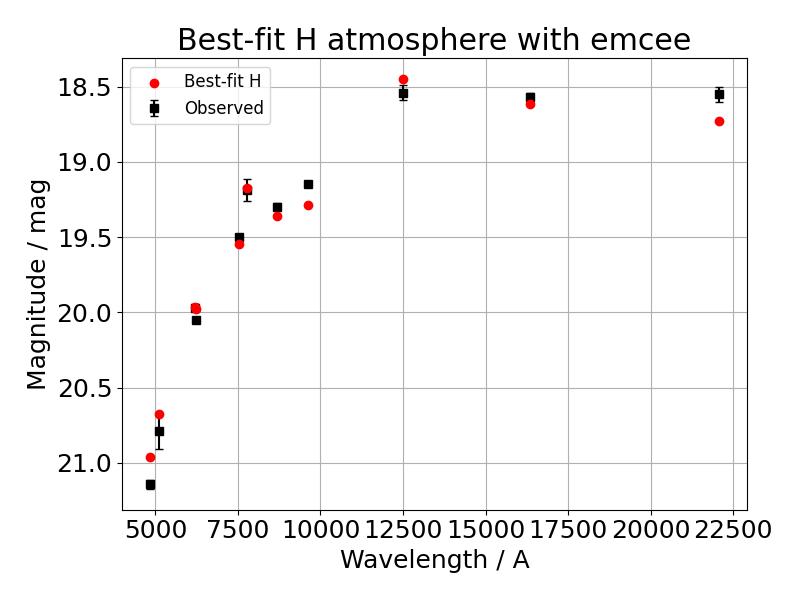
And the associated corner plot where the blue line shows the true value. As we are not providing a distance in this case, as expected from the degeneracy between fitting distance and stellar radius (directly translate to logg in the fit), both truth values are well outside of the probability density maps in the corner plot:

A callable function can be supplied as a prior, it should take the same number and order of argument as the fit is to perform on. See some examples in the test scripts.
Theoretical White Dwarf Luminosity Function
The options for the various models include:
Initial Mass Function
- Kroupa 2001
- Charbrier 2003
- Charbrier 2003 (including binary)
- Manual
Total Stellar Evolution Lifetime
- PARSECz00001 - Z = 0.0001, Y = 0.249
- PARSECz00002 - Z = 0.0002, Y = 0.249
- PARSECz00005 - Z = 0.0005, Y = 0.249
- PARSECz0001 - Z = 0.001, Y = 0.25
- PARSECz0002 - Z = 0.002, Y = 0.252
- PARSECz0004 - Z = 0.004, Y = 0.256
- PARSECz0006 - Z = 0.006, Y = 0.259
- PARSECz0008 - Z = 0.008, Y = 0.263
- PARSECz001 - Z = 0.01, Y = 0.267
- PARSECz0014 - Z = 0.014, Y = 0.273
- PARSECz0017 - Z = 0.017, Y = 0.279
- PARSECz002 - Z = 0.02, Y = 0.284
- PARSECz003 - Z = 0.03, Y = 0.302
- PARSECz004 - Z = 0.04, Y = 0.321
- PARSECz006 - Z = 0.06, Y = 0.356
- GENEVAz002 - Z = 0.002
- GENEVAz006 - Z = 0.006
- GENEVAz014 - Z = 0.014
- MISTFem400 - [Fe/H] = -4.0
- MISTFem350 - [Fe/H] = -3.5
- MISTFem300 - [Fe/H] = -3.0
- MISTFem250 - [Fe/H] = -2.5
- MISTFem200 - [Fe/H] = -2.0
- MISTFem175 - [Fe/H] = -1.75
- MISTFem150 - [Fe/H] = -1.5
- MISTFem125 - [Fe/H] = -1.25
- MISTFem100 - [Fe/H] = -1.0
- MISTFem075 - [Fe/H] = -0.75
- MISTFem050 - [Fe/H] = -0.5
- MISTFem025 - [Fe/H] = -0.25
- MISTFe000 - [Fe/H] = 0.0
- MISTFe025 - [Fe/H] = 0.25
- MISTFe050 - [Fe/H] = 0.5
- Manual
Initial-Final Mass Relation
- C08 - Catalan et al. 2008
- C08b - Catalan et al. 2008 (two-part)
- S09 - Salaris et al. 2009
- S09b - Salaris et al. 2009 (two-part)
- W09 - Williams, Bolte & Koester 2009
- K09 - Kalirai et al. 2009
- K09b - Kalirai et al. 2009 (two-part)
- C18 - Cummings et al. 2018
- EB18 - El-Badry et al. 2018
- Manual
White Dwarf cooling time
L/I/H are used to denote the availability in the low, intermediate and high mass models, where the dividing points are at 0.5 and 1.0 solar masses.
The brackets denote the core type/atmosphere type/mass range/other special properties.
- Montreal models
- Bedard et al. 2020 - LIH [CO/DA+DB/0.2-1.3]
- LaPlata models
- Panei et al. 2007 - L [He+CO/DA/0.187-0.448]
- Althaus et al. 2009 - L [He/DA/0.220-0.521]
- Renedo et al. 2010 - I [CO/DA/0.505-0.934/Z=0.001-0.01]
- Althaus et al. 2015 - I [CO/DA/0.506-0.826/Z=0.0003-0.001]
- Althaus et al. 2017 - LI [CO/DA/0.434-0.838/Y=0.4]
- Camisassa et al. 2017 - I [CO/DB/0.51-1.0]
- Althaus et al. 2007 - H [ONe/DA/1.06-1.28]
- Camisassa et al. 2019 - H [ONe/DA+B/1.10-1.29]
- BaSTI models
- Salaris et al. 2010 - IH [CO/DA+B/0.54-1.2/ps+nps]
- MESA models
- Lauffer et al. 2018 - H [CONe/DA+B/1.012-1.308]
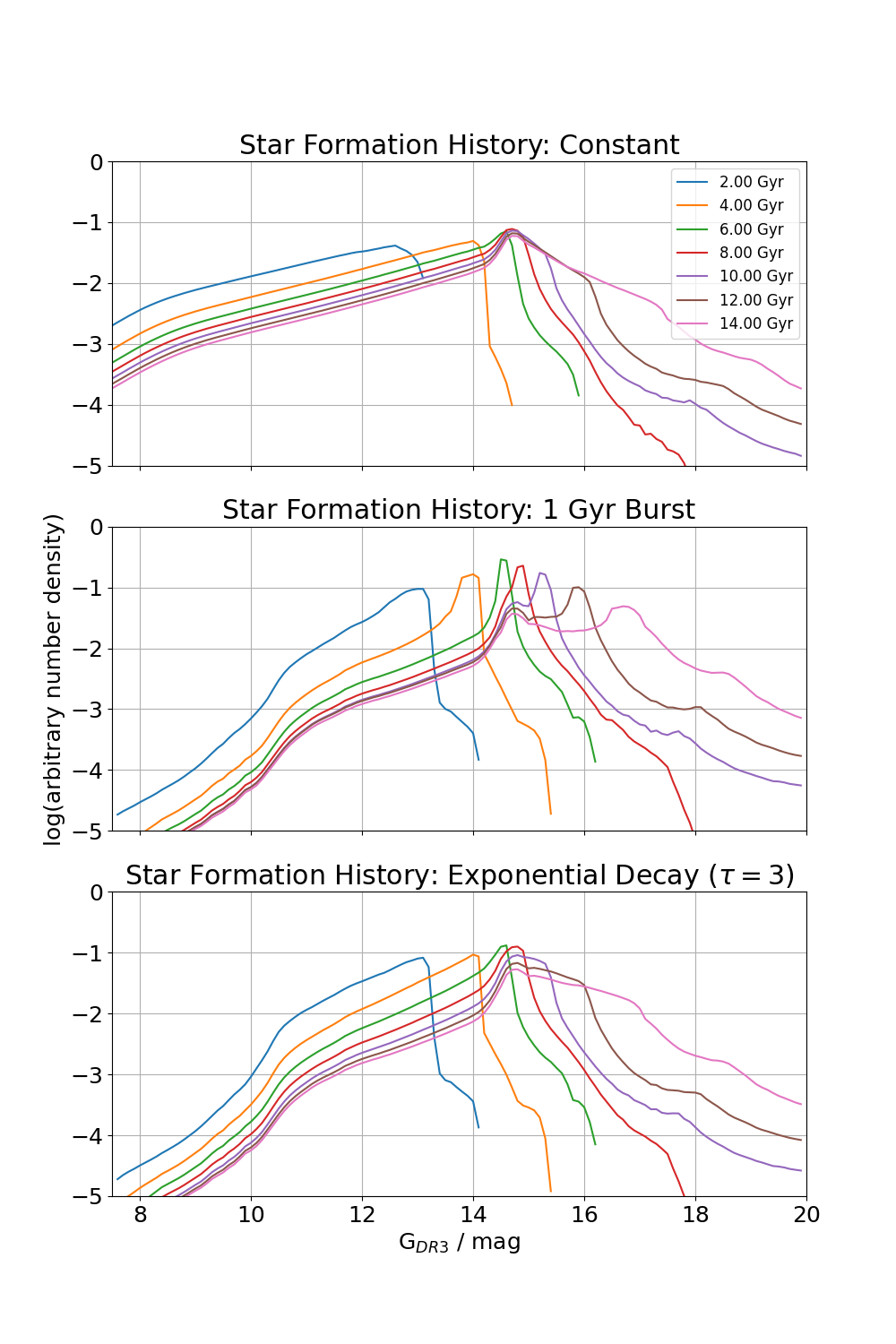
Example sets of WDLFs with different star formation scenario
The following excerpt demonstrate how to generate luminosity functions with constant, burst and exponentially decaying
```python import os
from matplotlib import pyplot as plt import numpy as np
from WDPhotTools import theoretical_lf
wdlf = theoreticallf.WDLF() wdlf.setifmrmodel("C08") wdlf.computecoolingageinterpolator()
mag = np.arange(0, 20.0, 0.1) age_list = 1e9 * np.arange(2, 15, 2)
constantdensity = [] burstdensity = [] decay_density = []
for i, age in enumerate(age_list):
# Constant SFR
wdlf.set_sfr_model(mode="constant", age=age)
constant_density.append(wdlf.compute_density(mag=mag)[1])

# Burst SFR
wdlf.set_sfr_model(mode="burst", age=age, duration=1e8)
burst_density.append(wdlf.compute_density(mag=mag)[1])

# Exponential decay SFR
wdlf.set_sfr_model(mode="decay", age=age)
decay_density.append(wdlf.compute_density(mag=mag)[1])
normalise the WDLFs relative to the density at 10 mag
constantdensity = [constantdensity[i]/constantdensity[i][Mag==10.0] for i in range(len(constantdensity))] burstdensity = [burstdensity[i]/burstdensity[i][Mag==10.0] for i in range(len(burstdensity))] decaydensity = [decaydensity[i]/decaydensity[i][Mag==10.0] for i in range(len(decaydensity))]
fig1, (ax1, ax2, ax3) = plt.subplots(3, 1, sharex=True, sharey=True, figsize=(10, 15))
for i, age in enumerate(agelist): ax1.plot( mag, np.log10(constantdensity[i]), label="{0:.2f} Gyr".format(age / 1e9) ) ax2.plot( mag, np.log10(burstdensity[i]) ) ax3.plot( mag, np.log10(decaydensity[i]) )
ax1.legend() ax1.grid() ax1.setxlim(0, 20) ax1.setylim(-3.75, 2.75) ax1.set_title("Constant")
ax2.grid() ax2.setylabel("log(arbitrary number density)") ax2.settitle("100 Myr Burst")
ax3.grid() ax3.setxlabel(r"G${DR3}$ / mag") ax3.set_title(r"Exponential Decay ($\tau=3\,Gyr$)")
plt.subplots_adjust(left=0.15, right=0.98, top=0.96, bottom=0.075) plt.show() ```
Owner
- Name: Marco
- Login: cylammarco
- Kind: user
- Location: Tel Aviv, Israel
- Company: Tel Aviv University
- Website: http://wise-web.tau.ac.il/~marco/
- Twitter: CYMarcoLAM
- Repositories: 44
- Profile: https://github.com/cylammarco
Forward.
GitHub Events
Total
- Create event: 4
- Release event: 1
- Issues event: 7
- Watch event: 9
- Delete event: 2
- Issue comment event: 6
- Push event: 29
- Pull request review comment event: 23
- Pull request review event: 17
- Pull request event: 19
- Fork event: 4
Last Year
- Create event: 4
- Release event: 1
- Issues event: 7
- Watch event: 9
- Delete event: 2
- Issue comment event: 6
- Push event: 29
- Pull request review comment event: 23
- Pull request review event: 17
- Pull request event: 19
- Fork event: 4
Packages
- Total packages: 1
-
Total downloads:
- pypi 65 last-month
- Total dependent packages: 0
- Total dependent repositories: 1
- Total versions: 10
- Total maintainers: 1
pypi.org: wdphottools
A White Dwarf Photometric Toolkit in Python
- Homepage: https://wdphottools.readthedocs.io/en/latest/?badge=latest
- Documentation: https://wdphottools.readthedocs.io/
- License: BSD-3-Clause
-
Latest release: 0.0.10
published about 1 year ago
Rankings
Maintainers (1)
Dependencies
- docutils <0.18
- numpy >=1.16
- pillow >=6.2.0
- corner *
- emcee *
- matplotlib *
- numpy *
- scipy *
- actions/checkout main composite
- codacy/codacy-analysis-cli-action master composite
- github/codeql-action/upload-sarif main composite
- AndreMiras/coveralls-python-action develop composite
- actions/checkout v2 composite
- actions/setup-python v2 composite
- actions/checkout v2 composite
- actions/setup-python v2 composite