hurdnet
Science Score: 44.0%
This score indicates how likely this project is to be science-related based on various indicators:
-
✓CITATION.cff file
Found CITATION.cff file -
✓codemeta.json file
Found codemeta.json file -
✓.zenodo.json file
Found .zenodo.json file -
○DOI references
-
○Academic publication links
-
○Academic email domains
-
○Institutional organization owner
-
○JOSS paper metadata
-
○Scientific vocabulary similarity
Low similarity (13.3%) to scientific vocabulary
Repository
Basic Info
- Host: GitHub
- Owner: 88267
- License: agpl-3.0
- Language: Python
- Default Branch: main
- Size: 1.94 MB
Statistics
- Stars: 0
- Watchers: 0
- Forks: 0
- Open Issues: 4
- Releases: 0
Metadata Files
docs/README.md

📚 Ultralytics Docs
Welcome to Ultralytics Docs, your comprehensive resource for understanding and utilizing our state-of-the-art machine learning tools and models, including Ultralytics YOLO. These documents are actively maintained and deployed to https://docs.ultralytics.com for easy access.







🛠️ Installation



To install the ultralytics package in developer mode, which allows you to modify the source code directly, ensure you have Git and Python 3.9 or later installed on your system. Then, follow these steps:
Clone the
ultralyticsrepository to your local machine using Git:bash git clone https://github.com/ultralytics/ultralytics.gitNavigate to the cloned repository's root directory:
bash
cd ultralytics
Install the package in editable mode (
-e) along with its development dependencies ([dev]) using pip:bash pip install -e '.[dev]'This command installs the
ultralyticspackage such that changes to the source code are immediately reflected in your environment, ideal for development.
🚀 Building and Serving Locally
The mkdocs serve command builds and serves a local version of your MkDocs documentation. This is highly useful during development and testing to preview changes.
bash
mkdocs serve
- Command Breakdown:
mkdocs: The main MkDocs command-line interface tool.serve: The subcommand used to build and locally serve your documentation site.
- Note:
mkdocs serveincludes live reloading, automatically updating the preview in your browser as you save changes to the documentation files.- To stop the local server, simply press
CTRL+Cin your terminal.
🌍 Building and Serving Multi-Language
If your documentation supports multiple languages, follow these steps to build and preview all versions:
Stage all new or modified language Markdown (
.md) files using Git:bash git add docs/**/*.md -fBuild all language versions into the
/sitedirectory. This script ensures that relevant root-level files are included and clears the previous build:```bash
Clear existing /site directory to prevent conflicts
rm -rf site
Build the default language site using the primary config file
mkdocs build -f docs/mkdocs.yml
Loop through each language-specific config file and build its site
for file in docs/mkdocs_*.yml; do echo "Building MkDocs site with $file" mkdocs build -f "$file" done ```
To preview the complete multi-language site locally, navigate into the build output directory and start a simple Python HTTP server: ```bash cd site python -m http.server
Open http://localhost:8000 in your preferred web browser
``
Access the live preview site athttp://localhost:8000`.
📤 Deploying Your Documentation Site
To deploy your MkDocs documentation site, choose a hosting provider and configure your deployment method. Common options include GitHub Pages, GitLab Pages, or other static site hosting services.
- Configure deployment settings within your
mkdocs.ymlfile. Use the
mkdocs deploycommand specific to your chosen provider to build and deploy your site.GitHub Pages Deployment Example: If deploying to GitHub Pages, you can use the built-in command:
bash
mkdocs gh-deploy
After deployment, you might need to update the "Custom domain" settings in your repository's settings page if you wish to use a personalized URL.
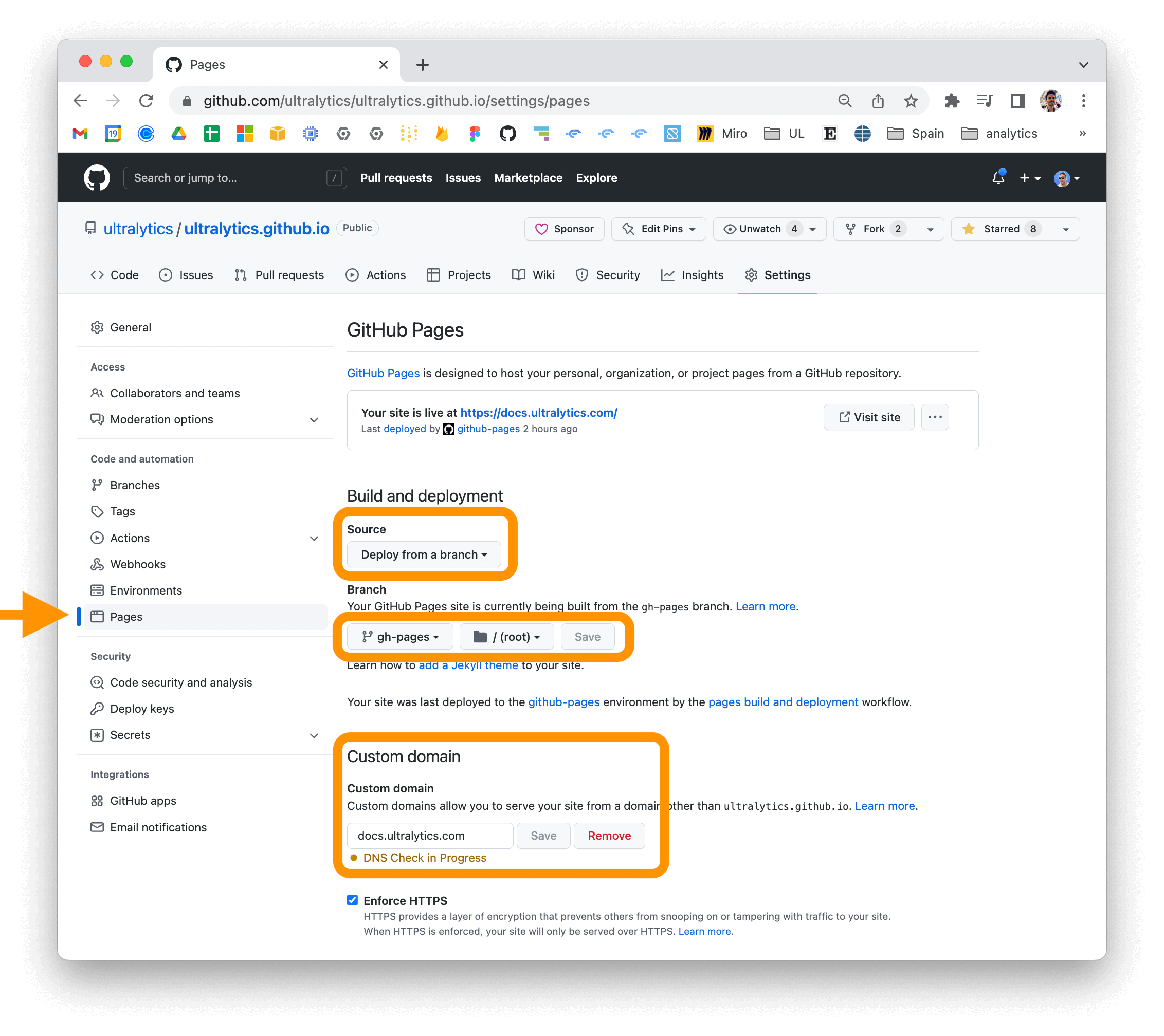
For detailed instructions on various deployment methods, consult the official MkDocs Deploying your docs guide.
💡 Contribute
We deeply value contributions from the open-source community to enhance Ultralytics projects. Your input helps drive innovation! Please review our Contributing Guide for detailed information on how to get involved. You can also share your feedback and ideas through our Survey. A heartfelt thank you 🙏 to all our contributors for their dedication and support!
We look forward to your contributions!
📜 License
Ultralytics Docs are available under two licensing options to accommodate different usage scenarios:
- AGPL-3.0 License: Ideal for students, researchers, and enthusiasts involved in academic pursuits and open collaboration. See the LICENSE file for full details. This license promotes sharing improvements back with the community.
- Enterprise License: Designed for commercial applications, this license allows seamless integration of Ultralytics software and AI models into commercial products and services. Visit Ultralytics Licensing for more information on obtaining an Enterprise License.
✉️ Contact
For bug reports, feature requests, and other issues related to the documentation, please use GitHub Issues. For discussions, questions, and community support, join the conversation with peers and the Ultralytics team on our Discord server!


Owner
- Login: 88267
- Kind: user
- Repositories: 1
- Profile: https://github.com/88267
Citation (CITATION.cff)
# This CITATION.cff file was generated with https://bit.ly/cffinit

cff-version: 1.2.0
title: Ultralytics YOLO
message: >-
  If you use this software, please cite it using the
  metadata from this file.
type: software
authors:
  - given-names: Glenn
    family-names: Jocher
    affiliation: Ultralytics
    orcid: "https://orcid.org/0000-0001-5950-6979"
  - family-names: Qiu
    given-names: Jing
    affiliation: Ultralytics
    orcid: "https://orcid.org/0000-0003-3783-7069"
  - given-names: Ayush
    family-names: Chaurasia
    affiliation: Ultralytics
    orcid: "https://orcid.org/0000-0002-7603-6750"
repository-code: "https://github.com/ultralytics/ultralytics"
url: "https://ultralytics.com"
license: AGPL-3.0
version: 8.0.0
date-released: "2023-01-10"
GitHub Events
Total
- Issue comment event: 5
- Push event: 4
- Pull request event: 1
- Create event: 6
Last Year
- Issue comment event: 5
- Push event: 4
- Pull request event: 1
- Create event: 6
Dependencies
- actions/checkout v4 composite
- actions/setup-python v5 composite
- astral-sh/setup-uv v6 composite
- codecov/codecov-action v5 composite
- conda-incubator/setup-miniconda v3 composite
- eviden-actions/clean-self-hosted-runner v1 composite
- slackapi/slack-github-action v2.1.0 composite
- ultralytics/actions/cleanup-disk main composite
- contributor-assistant/github-action v2.6.1 composite
- actions/checkout v4 composite
- docker/login-action v3 composite
- docker/setup-buildx-action v3 composite
- slackapi/slack-github-action v2.1.0 composite
- ultralytics/actions/cleanup-disk main composite
- ultralytics/actions/retry main composite
- actions/checkout v4 composite
- actions/setup-python v5 composite
- astral-sh/setup-uv v6 composite
- ultralytics/actions main composite
- actions/checkout v4 composite
- ultralytics/actions/retry main composite
- actions/checkout v4 composite
- actions/setup-python v5 composite
- actions/checkout v4 composite
- actions/checkout v4 composite
- actions/download-artifact v4 composite
- actions/setup-python v5 composite
- actions/upload-artifact v4 composite
- astral-sh/setup-uv v6 composite
- pypa/gh-action-pypi-publish release/v1 composite
- slackapi/slack-github-action v2.1.0 composite
- actions/stale v9 composite
- pytorch/pytorch 2.7.0-cuda12.6-cudnn9-runtime build
- matplotlib >=3.3.0
- numpy >=1.23.0
- opencv-python >=4.6.0
- pandas >=1.1.4
- pillow >=7.1.2
- psutil *
- py-cpuinfo *
- pyyaml >=5.3.1
- requests >=2.23.0
- scipy >=1.4.1
- torch >=1.8.0
- torch >=1.8.0,!=2.4.0; sys_platform == 'win32'
- torchvision >=0.9.0
- tqdm >=4.64.0
- ultralytics-thop >=2.0.0