geospacelab
A python-based library to collect, manage, and visualize geospace data (e.g. OMNI, geomagnetic indices, EISCAT, DMSP, SWARM, TEC, AMPERE, etc.).
Science Score: 67.0%
This score indicates how likely this project is to be science-related based on various indicators:
-
✓CITATION.cff file
Found CITATION.cff file -
✓codemeta.json file
Found codemeta.json file -
✓.zenodo.json file
Found .zenodo.json file -
✓DOI references
Found 3 DOI reference(s) in README -
✓Academic publication links
Links to: wiley.com, frontiersin.org, zenodo.org -
○Committers with academic emails
-
○Institutional organization owner
-
○JOSS paper metadata
-
○Scientific vocabulary similarity
Low similarity (18.4%) to scientific vocabulary
Keywords
Repository
A python-based library to collect, manage, and visualize geospace data (e.g. OMNI, geomagnetic indices, EISCAT, DMSP, SWARM, TEC, AMPERE, etc.).
Basic Info
Statistics
- Stars: 37
- Watchers: 3
- Forks: 10
- Open Issues: 2
- Releases: 10
Topics
Metadata Files
README.md

GeospaceLAB (geospacelab)



GeospaceLAB provides a framework of data access, analysis, and visualization for the researchers in space physics and space weather. The documentation can be found on readthedocs.io.
Features
- Class-based data manager, including
- DataHub: the core module (top-level class) to manage data from multiple sources,
- Dataset: the middle-level class to download, load, and process data from a data source,
- Variable: the base-level class to store the data array of a variable with various attributes, including its error, name, label, unit, group, and dependencies.
- Extendable
- Provide a standard procedure from downloading, loading, and post-processing the data.
- Easy to extend for a data source which has not been supported in the package.
- Flexible to add functions for post-processing.
- Visualization
- Time series plots with
- automatically adjustable time ticks and tick labels.
- dynamical panels (flexible to add or remove panels).
- automatically detect the time gaps.
- useful marking tools (vertical line crossing panels, shadings, top bars, etc, see Example 2 in Usage)
- Map projection
- Polar views with
- coastlines in either GEO or AACGM (APEX) coordinate system.
- mapping in either fixed lon/mlon mode or in fixed LST/MLT mode.
- Support 1-D or 2-D plots with
- satellite tracks (time ticks and labels)
- nadir colored 1-D plots
- gridded surface plots
- Space coordinate system transformation
- Unified interface for cs transformations.
- Toolboxes for data analysis
- Basic toolboxes for numpy array, datetime, logging, python dict, list, and class.
Built-in data sources:
| Data Source | Variables | File Format | Downloadable | Express | Status |
|------------------------------|------------------------------------|-----------------------|---------------|-------------------------------|--------|
| CDAWeb/OMNI | Solar wind and IMF |cdf | True | OMNIDashboard | stable |
| CDAWeb/DMSP/SSUSI/EDRAUR | DMSP SSUSI EDRAUR emission lines | netcdf | True | DMSPSSUSIDashboard | stable |
| Madrigal/EISCAT | Ionospheric Ne, Te, Ti, ... | EISCAT-hdf5, Madrigal-hdf5 | True | EISCATDashboard | stable |
| Madrigal/GNSS/TECMAP | Ionospheric GPS TEC map | hdf5 | True | - | beta |
| Madrigal/DMSP/s1 | DMSP SSM, SSIES, etc | hdf5 | True | DMSPTSDashboard | stable |
| Madrigal/DMSP/s4 | DMSP SSIES | hdf5 | True | DMSPTSDashboard | stable |
| Madrigal/DMSP/e | DMSP SSJ | hdf5 | True | DMSPTSDashboard | stable |
| Madrigal/Millstone Hill ISR+ | Millstone Hill ISR | hdf5 | True | MillstoneHillISRDashboard | stable |
| Madrigal/Poker Flat ISR | Poker Flat ISR | hdf5 | True | -_ | stable |
| JHUAPL/AMPERE/fitted | AMPERE FAC | netcdf | False | __AMPEREDashboard | stable |
| SuperDARN/POTMAP | SuperDARN potential map | ascii | False | - | stable |
| WDC/Dst | Dst index | IAGA2002-ASCII | True | - | stable |
| WDC/ASYSYM | ASY/SYM indices | IAGA2002-ASCII | True | OMNIDashboard | stable |
| WDC/AE | AE indices | IAGA2002-ASCII | True | OMNIDashboard | stable |
| GFZ/Kp | Kp/Ap indices | ASCII | True | - | stable |
| GFZ/Hpo | Hp30 or Hp60 indices | ASCII | True | - | stable |
| GFZ/SNF107 | SN, F107 | ASCII | True | - | stable |
| ESA/SWARM/EFILPHM | SWARM Ne, Te, etc. | netcdf | True | - | stable |
| ESA/SWARM/EFITCT02 | SWARM cross track vi | netcdf | True | - | stable |
| ESA/SWARM/AOBFAC2F | SWARM FAC, auroral oval boundary | netcdf | True | - | beta |
| TUDelft/SWARM/DNSPOD | Swarm $\rhon$ (GPS derived) | ASCII | True | - | stable |
| TUDelft/SWARM/DNSACC | Swarm $\rhon$ (GPS+Accelerometer) | ASCII | True | - | stable |
| TUDelft/GOCE/WINDACC | GOCE neutral wind | ASCII | True | - | stable |
| TUDelft/GRACE/WINDACC | GRACE neutral wind | ASCII | True | - | stable |
| TUDelft/GRACE/DNSACC | Grace $\rhon$ | ASCII | True | - | stable |
| TUDelft/CHAMP/DNSACC | CHAMP $\rho_n$ | ASCII | True | - | stable |
| UTA/GITM/2DALL | GITM 2D output | binary, IDL-sav | False | - | beta |
| UTA/GITM/3DALL | GITM 3D output | binary, IDL-sav | False | - | beta |
Installation
1. The python distribution "Anaconda" is recommended:
The package was tested with the anaconda distribution and with PYTHON>=3.7 under Ubuntu 20.04 and MacOS Big Sur.
With Anaconda, it may be easier to install some required dependencies listed below, e.g., cartopy, using the conda command. It's also recommended installing the package and dependencies in a virtual environment with anaconda.
After installing the anaconda distribution, a virtual environment can be created by the code below in the terminal:
shell
conda create --name [YOUR_ENV_NAME] -c conda-forge python cython cartopy
The package "spyder" is a widely-used python IDE. Other IDEs, like "VS Code" or "Pycharm" also work.
Note: The recommended IDE is Spyder. Sometimes, a RuntimeError can be raised when the aacgmv2 package is called in PyCharm or VS Code. If you meet this issue, try to compile the codes in Spyder several times.
After creating the virtual environement, you need to activate the virtual environment:
shell
conda activate [YOUR_ENV_NAME]
and then to install the package as shown below or to start the IDE Spyder.
More detailed information to set the anaconda environment can be found here,
2. Installation
Quick install from the pre-built release (recommended):
shell
pip install geospacelab
Install from Github (not recommended):
shell
pip install git+https://github.com/JouleCai/geospacelab@master
2. Dependencies
The package dependencies need to be installed before or after the installation of the package. Several dependencies will be installed automatically with the package installation, including toml, requests, bueatifulsoup4, numpy, scipy, matplotlib, h5py, netcdf4, cdflib, madrigalweb, sscws, and aacgmv2.
Other dependencies will be needed if you see a ImportError or ModuleNotFoundError
displayed in the python console. Some frequently used modules and their installation methods are listed below:
- cartopy: Map projection for geospatial data.
- conda install -c conda-forge cartopy
- apexpy *: Apex and Quasi-Dipole geomagnetic
coordinate system.
- pip install apexpy
- geopack: The geopack and Tsyganenko models in Python.
- pip install geopack
(*): The gcc or gfortran compilers are required before installing the package. - gcc:
conda install -c conda-forge gcc- gfortran:conda install -c conda-forge gfortran
Please install the packages above, if needed.
Note: The package is currently pre-released. The installation methods may be changed in the future.
4. First-time startup and basic configuration
Some basic configurations will be made with the first-time import of the package. Following the messages prompted in the python console, the first configuration is to set the root directory for storing the data.
When the modules to access the online Madrigal database is imported, it will ask for the inputs of user's full name, email, and affiliation.
The user's configuration can be found from the toml file below:
[your_home_directory]/.geospacelab/config.toml
The user can set or change the preferences in the configuration file. For example, to change the root directory for storing the data, modify or add the lines in "config.toml":
toml
[datahub]
data_root_dir = "YOUR_ROOT_DIR"
To set the Madrigal cookies, change the lines:
toml
[datahub.madrigal]
user_fullname = "YOUR_NAME"
user_email = "YOU_EMAIL"
user_affiliation = "YOUR_AFFILIATION"
5. Upgrade
If the package is installed from the pre-built release. Update the package via:
shell
pip install geospacelab --upgrade
6. Uninstallation
Uninstall the package via:
shell
pip uninstall geospacelab
If you don't need the user's configuration, delete the file at [yourhomedirectory]/.geospacelab/config.toml
Usage
Example 1: Dock a sourced dataset and get variables:
The core of the data manager is the class Datahub. A Datahub instance will be used for docking a buit-in sourced dataset, or adding a temporary or user-defined dataset.
The "dataset" is a Dataset instance, which is used for loading and downloading the data.
Below is an example to load the EISCAT data from the online service. The module will download EISCAT data automatically from the EISCAT schedule page with the presetttings of loading mode "AUTO" and file type "eiscat-hdf5".
Example 1: ```python import datetime
from geospacelab.datahub import DataHub
settings
dtfr = datetime.datetime.strptime('20210309' + '0000', '%Y%m%d%H%M') # datetime from dtto = datetime.datetime.strptime('20210309' + '2359', '%Y%m%d%H%M') # datetime to databasename = 'madrigal' # built-in sourced database name facilityname = 'eiscat' # facility name
site = 'UHF' # facility attributes required, check from the eiscat schedule page antenna = 'UHF' modulation = 'ant'
create a datahub instance
dh = DataHub(dtfr, dtto)
dock the first dataset (dataset index starts from 0)
dsisr = dh.dock(datasourcecontents=[databasename, 'isr', facilityname], site=site, antenna=antenna, modulation=modulation, datafiletype='madrigal-hdf5')
load data
dsisr.loaddata()
assign a variable from its own dataset to the datahub
ne = dh.assignvariable('ne') Ti = dh.assignvariable('Ti')
get the variables which have been assigned in the datahub
ne = dh.getvariable('ne') Ti = dh.getvariable('Ti')
if the variable is not assigned in the datahub, but exists in the its own dataset:
compOp = dh.getvariable('compOp', dataset=dsisr) # O+ ratio
above line is equivalent to
compOp = dh.datasets[0]['compOp']
The variables, e.g., ne and Ti, are the class Variable's instances,
which stores the variable values, errors, and many other attributes, e.g., name, label, unit, depends, ....
To get the value of the variable, use variable_isntance.value, e.g.,
print(ne.value) # return the variable's value, type: numpy.ndarray, axis 0 is always along the time, check ne.depends.items{} print(n_e.error)
```
Example 2: EISCAT quicklook plot
The EISCAT quicklook plot shows the GUISDAP analysed results in the same format as the online EISCAT quicklook plot. The figure layout and quality are improved. In addition, several marking tools like vertical lines, shadings, top bars can be added in the plot. See the example script and figure below:
In "example2.py" ```python import datetime import geospacelab.express.eiscat_dashboard as eiscat
dtfr = datetime.datetime.strptime('20201209' + '1800', '%Y%m%d%H%M') dtto = datetime.datetime.strptime('20201210' + '0600', '%Y%m%d%H%M')
site = 'UHF' antenna = 'UHF' modulation = '60' loadmode = 'AUTO' dashboard = eiscat.EISCATDashboard( dtfr, dtto, site=site, antenna=antenna, modulation=modulation, loadmode='AUTO', datafiletype="madrigal-hdf5" ) dashboard.quicklook()
dashboard.save_figure() # comment this if you need to run the following codes
dashboard.show() # comment this if you need to run the following codes.
""" As the dashboard class (EISCATDashboard) is a inheritance of the classes Datahub and TSDashboard. The variables can be retrieved in the same ways as shown in Example 1. """ ne = dashboard.assignvariable('ne') print(ne.value) print(n_e.error)
""" Several marking tools (vertical lines, shadings, and top bars) can be added as the overlays on the top of the quicklook plot. """
add vertical line
dtfr2 = datetime.datetime.strptime('20201209' + '2030', "%Y%m%d%H%M") dtto2 = datetime.datetime.strptime('20201210' + '0130', "%Y%m%d%H%M") dashboard.addverticalline(dtfr2, bottomextend=0, topextend=0.02, label='Line 1', label_position='top')
add shading
dashboard.addshading(dtfr2, dtto2, bottomextend=0, topextend=0.02, label='Shading 1', labelposition='top')
add top bar
dtfr3 = datetime.datetime.strptime('20201210' + '0130', "%Y%m%d%H%M") dtto3 = datetime.datetime.strptime('20201210' + '0430', "%Y%m%d%H%M") dashboard.addtopbar(dtfr3, dtto3, bottom=0., top=0.02, label='Top bar 1')
save figure
dashboard.save_figure()
show on screen
dashboard.show() ``` Output:

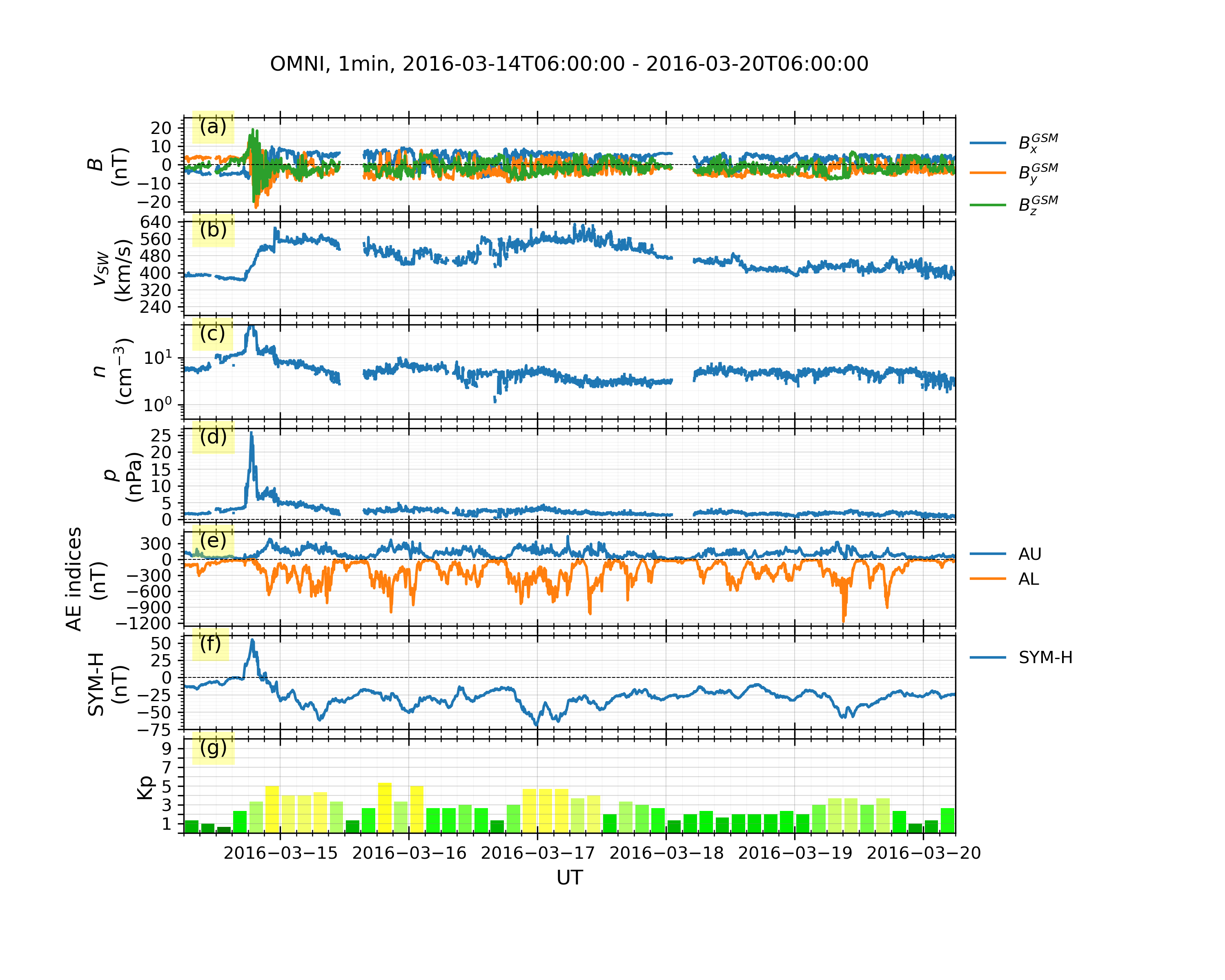
Example 3: OMNI data and geomagnetic indices (WDC + GFZ):
In "example3.py"
```python import datetime import geospacelab.express.omni_dashboard as omni
dtfr = datetime.datetime.strptime('20160314' + '0600', '%Y%m%d%H%M') dtto = datetime.datetime.strptime('20160320' + '0600', '%Y%m%d%H%M')
omnitype = 'OMNI2' omnires = '1min' loadmode = 'AUTO' dashboard = omni.OMNIDashboard( dtfr, dtto, omnitype=omnitype, omnires=omnires, loadmode=load_mode ) dashboard.quicklook()
data can be retrieved in the same way as in Example 1:
dashboard.listassignedvariables() Bxgsm = dashboard.getvariable('BxGSM', datasetindex=0)
save figure
dashboard.save_figure()
show on screen
dashboard.show() ``` Output:
Example 4: Mapping geospatial data in the polar map.
NOTE: JHUAPL stopped supporting DMSP SSUSI on 14 Feb 2025. From then on, the data source has been switched from JHUAPL to CDAWeb.
```python dtfr = datetime.datetime(2015, 9, 8, 8) dtto = datetime.datetime(2015, 9, 8, 23, 59) timec = datetime.datetime(2015, 9, 8, 20, 21) pole = 'N' satid = 'f16' band = 'LBHS'
Create a geodashboard object
dashboard = geomap.GeoDashboard(dtfr=dtfr, dtto=dtto, figure_config={'figsize': (5, 5)})
If the orbit_id is specified, only one file will be downloaded. This option saves the downloading time.
dashboard.dock(datasourcecontents=['jhuapl', 'dmsp', 'ssusi', 'edraur'], pole='N', satid='f17', orbit_id='46863')
If not specified, the data during the whole day will be downloaded.
dsssusi = dashboard.dock(datasourcecontents=['cdaweb', 'dmsp', 'ssusi', 'edraur'], pole=pole, satid=satid, orbitid=None) dss1 = dashboard.dock( datasourcecontents=['madrigal', 'satellites', 'dmsp', 's1'], dtfr=timec - datetime.timedelta(minutes=45), dtto=timec + datetime.timedelta(minutes=45), satid=satid, replace_orbit=True)
dashboard.set_layout(1, 1)
Get the variables: LBHS emission intensiy, corresponding times and locations
lbhs = dsssusi['GRIDAUR' + band] dts = dsssusi['DATETIME'].flatten() mlat = dsssusi['GRIDMLAT'] mlon = dsssusi['GRIDMLON'] mlt = dsssusi['GRIDMLT']
Search the index for the time to plot, used as an input to the following polar map
indt = dashboard.datasets[0].gettimeind(ut=timec) if (dts[indt] - timec).totalseconds()/60 > 60: # in minutes raise ValueError("The time does not match any SSUSI data!") lbhs = lbhs.value[indt] mlat = mlat.value[indt] mlon = mlon.value[indt] mlt = mlt.value[ind_t]
Add a polar map panel to the dashboard. Currently the style is the fixed MLT at mlt_c=0. See the keywords below:
panel = dashboard.addpolarmap( rowind=0, colind=0, style='mlt-fixed', cs='AACGM', mltc=0., pole=pole, ut=timec, boundarylat=55., mirrorsouth=True )
Some settings for plotting.
pcolormeshconfig = lbhs.visual.plotconfig.pcolormesh
Overlay the SSUSI image in the map.
ipc = panel.overlaypcolormesh( data=lbhs, coords={'lat': mlat, 'lon': mlon, 'mlt': mlt}, cs='AACGM', regridding=False, **pcolormeshconfig)
Add a color bar
panel.addcolorbar(ipc, clabel=band + " (R)", cscale=pcolormeshconfig['c_scale'], left=1.1, bottom=0.1, width=0.05, height=0.7)
Overlay the gridlines
panel.overlaygridlines(latres=5, lonlabelseparator=5)
Overlay the coastlines in the AACGM coordinate
panel.overlay_coastlines()
Overlay cross-track velocity along satellite trajectory
scdt = dss1['SCDATETIME'].value.flatten() sclat = dss1['SCGEOLAT'].value.flatten() sclon = dss1['SCGEOLON'].value.flatten() scalt = dss1['SCGEOALT'].value.flatten() sccoords = {'lat': sclat, 'lon': sclon, 'height': sc_alt}
vH = dss1['viH'].value.flatten() panel.overlaycrosstrackvector( vector=vH, unitvector=1000, vectorunit='m/s', alpha=0.3, color='red', sccoords=sccoords, scut=scdt, cs='GEO', )
Overlay the satellite trajectory with ticks
panel.overlaysctrajectory(scut=scdt, sccoords=sccoords, cs='GEO')
Overlay sites
panel.overlaysites( siteids=['TRO', 'ESR'], coords={'lat': [69.58, 78.15], 'lon': [19.23, 16.02], 'height': 0.}, cs='GEO', marker='^', markersize=2)
Add the title and save the figure
polestr = 'North' if pole == 'N' else 'South' panel.addtitle(title='DMSP/SSUSI, ' + band + ', ' + satid.upper() + ', ' + polestr + ', ' + timec.strftime('%Y-%m-%d %H%M UT')) plt.savefig('DMSPSSUSI' + timec.strftime('%Y%m%d-%H%M') + '' + band + '' + satid.upper() + '' + pole, dpi=300)
show the figure
plt.show() ``` Output:
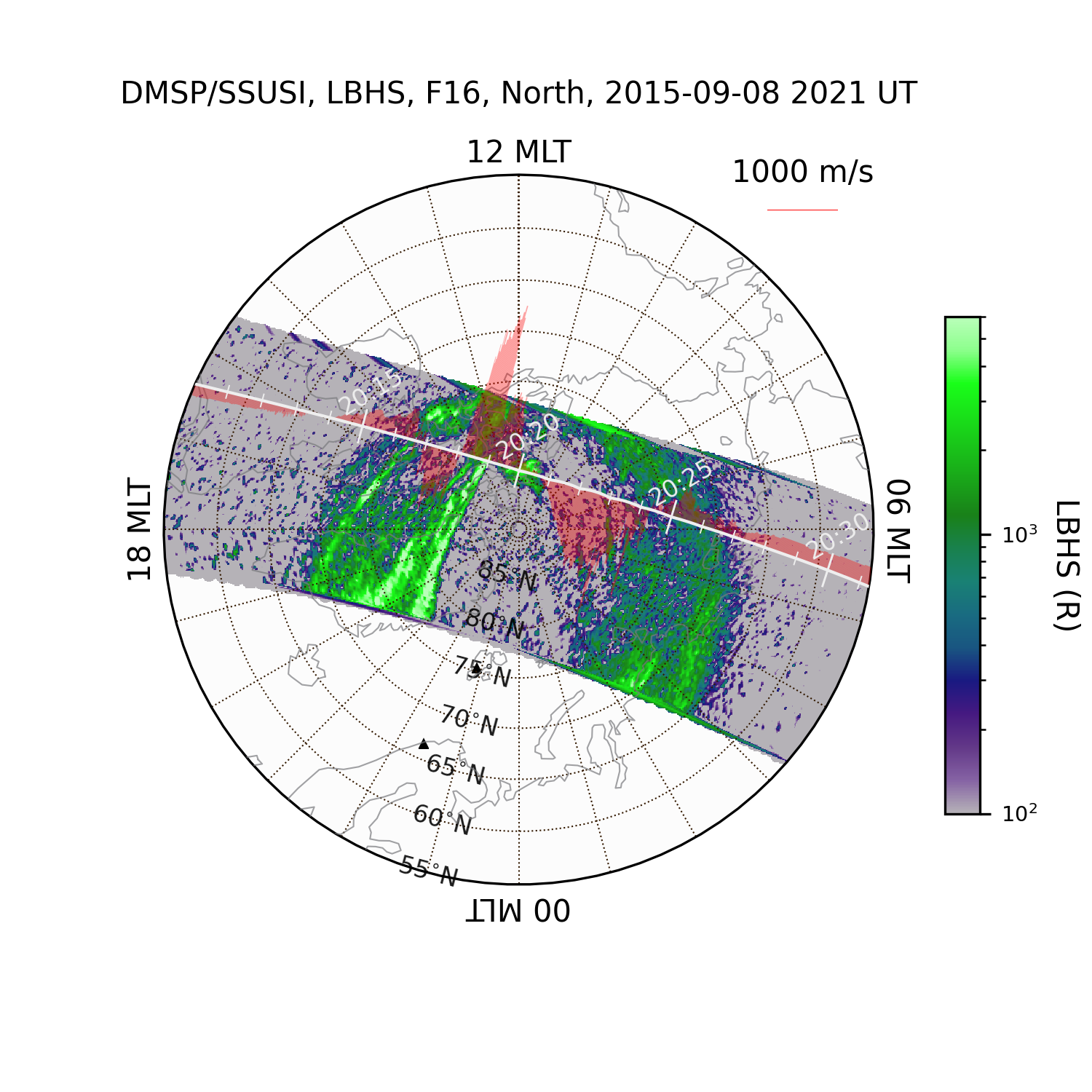
This is an example showing the HiLDA aurora in the dayside polar cap region (see also DMSP observations of the HiLDA aurora (Cai et al., JGR, 2021)).
Other examples for the time-series plots and map projections can be found here
Acknowledgements and Citation
Acknowledgements
We acknowledge all the dependencies listed above for their contributions to implement a lot of functionality in GeospaceLAB.
Citation
If GeospaceLAB is used for your scientific work, please mention it in the publication and cite the package:
Cai L, Aikio A, Kullen A, Deng Y, Zhang Y, Zhang S-R, Virtanen I and Vanhamäki H (2022), GeospaceLAB: Python package for managing and visualizing data in space physics. Front. Astron. Space Sci. 9:1023163. doi: 10.3389/fspas.2022.1023163
In addition, please add the following text in the "Methods" or "Acknowledgements" section:
This research has made use of GeospaceLAB v?.?.?, an open-source Python package to manage and visualize data in space physics.
Please include the project logo (see the top) to acknowledge GeospaceLAB in posters or talks.
Co-authorship
GeospaceLAB aims to help users to manage and visualize multiple kinds of data in space physics in a convenient way. We welcome collaboration to support your research work. If the functionality of GeospaceLAB plays a critical role in a research paper, the co-authorship is expected to be offered to one or more developers.
Notes
- The current version is a pre-released version. Many features will be added soon.
Citation (CITATION.cff)
cff-version: 1.2.0
message: "If you use this software, please cite it as below."
authors:
- family-names: "Cai"
  given-names: "Lei"
  orcid: "https://orcid.org/0000-0003-0127-7303"
title: "GeospaceLAB"
version: 0.5.10
doi: 10.5281/zenodo.5377318
date-released: 2023-02-15
url: "https://github.com/JouleCai/geospacelab"
identifiers:
  - type: 'doi'
    value: '10.5281/zenodo.5377318'
  - type: 'url'
    value: 'https://github.com/JouleCai/geospacelab'
GitHub Events
Total
- Create event: 4
- Release event: 4
- Issues event: 5
- Watch event: 6
- Issue comment event: 14
- Push event: 25
- Gollum event: 2
- Fork event: 4
Last Year
- Create event: 4
- Release event: 4
- Issues event: 5
- Watch event: 6
- Issue comment event: 14
- Push event: 25
- Gollum event: 2
- Fork event: 4
Committers
Last synced: over 3 years ago
All Time
- Total Commits: 555
- Total Committers: 2
- Avg Commits per committer: 277.5
- Development Distribution Score (DDS): 0.36
Top Committers
| Name | Commits | |
|---|---|---|
| Lei Cai | l****i@o****i | 355 |
| Lei Cai | j****i@g****m | 200 |
Committer Domains (Top 20 + Academic)
Issues and Pull Requests
Last synced: 11 months ago
All Time
- Total issues: 14
- Total pull requests: 3
- Average time to close issues: about 1 month
- Average time to close pull requests: less than a minute
- Total issue authors: 10
- Total pull request authors: 1
- Average comments per issue: 4.07
- Average comments per pull request: 0.0
- Merged pull requests: 3
- Bot issues: 0
- Bot pull requests: 0
Past Year
- Issues: 3
- Pull requests: 0
- Average time to close issues: about 2 months
- Average time to close pull requests: N/A
- Issue authors: 2
- Pull request authors: 0
- Average comments per issue: 5.0
- Average comments per pull request: 0
- Merged pull requests: 0
- Bot issues: 0
- Bot pull requests: 0
Top Authors
Issue Authors
- danielk333 (2)
- Zhugexiaoyuanyuan (2)
- ankushbhaskar (2)
- yonghuier (2)
- ksd3 (1)
- syys96 (1)
- FasilGibdaw (1)
- habtie-phys (1)
- Ryannok (1)
- ted123zwh (1)
Pull Request Authors
- JouleCai (3)
Top Labels
Issue Labels
Pull Request Labels
Packages
- Total packages: 1
-
Total downloads:
- pypi 821 last-month
- Total dependent packages: 0
- Total dependent repositories: 1
- Total versions: 67
- Total maintainers: 1
pypi.org: geospacelab
Collect, manage, and visualize geospace data.
- Homepage: https://github.com/JouleCai/geospacelab
- Documentation: https://geospacelab.readthedocs.io/
- License: BSD 3-Clause License
-
Latest release: 0.11.4
published about 1 year ago
Rankings
Maintainers (1)
Dependencies
- readthedocs-sphinx-search ==0.1.0
- sphinx ==4.1.2
- sphinx_rtd_theme ==0.5.2
- aacgmv2 >=2.6.2
- beautifulsoup4 >=4.9.3
- cdflib >=0.3.20
- cython *
- geopack >=1.0.8
- get *
- h5py >=3.2.1
- madrigalweb >=3.2
- matplotlib >=3.5
- natsort >=7.1.1
- netcdf4 >=1.5.7
- numpy >=1.20
- requests >=2.26.0
- scipy >=1.6.0
- sscws *
- toml *
- cartopy
- nbsphinx 0.8.7
- pip >=20.1
- python 3.8.*
- sphinx 4.2.0