kipper
The Kipper programming language for comprehensive and all-round type safety on the web 🦊✨ Made at HTL Leonding & JKU Linz
Science Score: 54.0%
This score indicates how likely this project is to be science-related based on various indicators:
-
✓CITATION.cff file
Found CITATION.cff file -
✓codemeta.json file
Found codemeta.json file -
✓.zenodo.json file
Found .zenodo.json file -
○DOI references
-
✓Academic publication links
Links to: zenodo.org -
○Committers with academic emails
-
○Institutional organization owner
-
○JOSS paper metadata
-
○Scientific vocabulary similarity
Low similarity (13.7%) to scientific vocabulary
Keywords
Keywords from Contributors
Repository
The Kipper programming language for comprehensive and all-round type safety on the web 🦊✨ Made at HTL Leonding & JKU Linz
Basic Info
- Host: GitHub
- Owner: Kipper-Lang
- License: gpl-3.0
- Language: TypeScript
- Default Branch: main
- Homepage: https://kipper-lang.org
- Size: 15.1 MB
Statistics
- Stars: 27
- Watchers: 1
- Forks: 5
- Open Issues: 62
- Releases: 48
Topics
Metadata Files
README.md

The Kipper programming language - kipper 🦊✨







Kipper is a JavaScript-like strongly and strictly typed language with Python flavour. It aims to provide straightforward, simple, secure and type-safe coding with better efficiency and developer satisfaction! Integrating strict type handling, runtime types, casts, among many other features, for a safer development experience!
It compiles to both JavaScript and TypeScript, and can be set up in your terminal, Node.js or ES6+ browser. 🦊💻
For more details, you can read more about this project in the sections "Goals & Planned Features" and "Why Kipper?".
General Information
- Website: https://kipper-lang.org
- Docs: https://docs.kipper-lang.org
- Playground: https://play.kipper-lang.org
- Issue Tracker: https://issues.kipper-lang.org
- Roadmap: View Kipper Roadmap 🦊🚧
- Changelog: View CHANGELOG.md
Installation
To install the whole Kipper package with its CLI, run the following command:
bash
npm i kipper
If you are using pnpm or yarn, use pnpm i kipper or yarn add kipper.
Project Packages
kipper: The Kipper compiler and API, which ships with all child packages.@kipper/core: The core implementation of the Kipper compiler.@kipper/cli: The Kipper command line interface (CLI).@kipper/web: The standalone web-module for the Kipper compiler.@kipper/target-js: The JavaScript target for the Kipper compiler.@kipper/target-ts: The TypeScript target for the Kipper compiler.
Goals & Planned Features
View the current implementation state in the Kipper Roadmap 🦊🚧.
- Full compiler ensured type safety, by analysing and reporting code during compilation.
- Duck typing type checking with TypeScript-like interface types for both compile and runtime.
- Runtime type and type checking features, where original compile time type issues can be resolved during runtime.
- Strict cast and conversion handling, so that potentially or definitely problematic usage is detected by the compiler and ensures the developer has to handle them.
- Avoidance of
anytype issues, with ensurance of compiler checks that operations and data access are valid. - Runtime errors and safety checks in case of incomplete or faulty typing. This should avoid issues, such as "TypeError: can't access property "..." of undefined".
- Null safety, by enforcing non-null types unless explicitly allowed.
- Conversion behaviour functions in classes to customise conversion behaviour.
- Operator overloading and additional customisation behaviour.
- Type Conversion Overloading to customise conversion behaviour.
- Full translation to/and integration with JavaScript and TypeScript.
- Import Support for
.tsfiles, as well as.d.ts+.jsfiles. - Translation support for all ES versions as far as ES6 (JavaScript target specific)
How to use Kipper?
To use Kipper you have three options:
- Run it in the browser using the CDN
kipper-standalone.min.jsfile, which bundles the entire compiler for your browser. - Run it using the NodeJS CLI
@kipper/cli. - Import the package
@kipper/corein NodeJS or Deno.
In a browser with @kipper/web 🦊🌐
For running Kipper in the browser, you will have to include the kipper-standalone.js file, which
provides the Kipper Compiler for the browser and enables the compilation of Kipper code to JavaScript.
Simple example of compiling and running Kipper code in a browser:
```html <!-- Kipper dependency -->
```
Locally using Node.js with @kipper/cli 🦊🖥️
This is to recommend way to use Kipper if you want to dive deeper into Kipper, as it allows you to locally use and run kipper, without depending on a browser.
For example:
- Compiling a Kipper program:
bash kipper compile file.kip - Executing a Kipper program using Node.js:
bash
kipper run file.kip
This also enables the usage of Kipper files with the .kip extension, which can be read and compiled to TypeScript,
without having to configure anything yourself. This also allows the input of data over the
console and file-interactions, which are not supported inside a browser.
For more info go to the @kipper/cli README.
Locally in your own code with @kipper/core 🦊⌨️
This is the recommended way if you intend to use kipper in a workflow or write code yourself to manage the compiler. This also allows for special handling of logging and customising the compilation process.
Simple example of using the Kipper Compiler in Node.js:
- JavaScript (CommonJS):
```js const fs = require("fs").promises; const kipper = require("@kipper/core"); const kipperJS = require("@kipper/target-js");
const path = "INSERT_PATH"; fs.readFile(path, "utf8").then(async (fileContent) => { const compiler = new kipper.KipperCompiler();
// Compile the code string or stream
let result = await compiler.compile(fileContent, { target: new kipperJS.TargetJS() });
let jsCode = result.write();

// Running the Kipper program
eval(jsCode);
}); ```
- TypeScript (CommonJS):
```ts import { promises as fs } from "fs"; import { KipperCompiler } from "@kipper/core"; import { TargetJS } from "@kipper/target-js";
const path = "INSERT_PATH"; fs.readFile(path, "utf8" as BufferEncoding).then(async (fileContent: string) => { const compiler = new KipperCompiler();
// Compile the code string or stream
let result = await compiler.compile(fileContent, { target: new TargetJS() });
let jsCode = result.write();

// Running the Kipper program
eval(jsCode);
}); ```
Why Kipper? 🦊❓
Skip this section, if you are not interested in the details behind Kipper and this project. It is not required knowledge for using or trying out Kipper.
The primary reason for the development of Kipper is the simplification of the development process for developers, both in the web and server-side space, by improving on common type and non-type-related issues. Through this, the language should help developers fix those issues more reliably and quickly.
Therefore, this programming language, like TypeScript, aims to provide more safety and functionality using, among other things, compile-time error checking and transpilation. This primarily relies on the addition of types and type checking, as a way to ensure that programs work as intended and that developers can discover errors before they run their code.
TypeScript already does a great job at this, so why is Kipper needed and how does it do things differently? TypeScript is
an amazing language, which is why Kipper has many of its designs and features similarly implemented. A big issue
that TypeScript can't detect and properly resolve is the issue of inconsistent or non-determined typing. This is a
fundamental issue when working with dynamic data or JavaScript code in TypeScript, where types are unknown or can't be
known before runtime. TypeScript is unable to work with this code appropriately and requires the user to make
assumptions about its types at compile-time. This leads to many issues where the compiler is unable to check for many
potential issues and is often largely turned off, as the developers themselves are required to decide what is correct
and often make serious mistakes in the process, causing code to become unpredictable and error-prone during execution.
Even with runtime-bound instanceof and typeof checks, it becomes a tedious effort that often results in more errors,
due to issues arising while trying to fix the original problems.
Kipper therefore tries to implement a standardised way to easily solve those issues, by providing consistent compile- and runtime types, type checks, and error handling. This means the compiler will be there to assist the developer both during compile time and runtime, extending its capabilities of ensuring code is secure and providing methods for developers to handle them in a consistent and easy-to-understand way. This also means functionality like casts or conversions is more strictly handled and doesn't overwrite type-checking behaviour. Even so, Kipper will always try not to be invasive, and developers can choose during development time how to handle different cases and how Kipper should handle them during runtime.
Using this approach, Kipper will add many features developers know from other languages, such as: - Runtime Casting - Runtime Type Casting - Pattern Matching - Consistent Typing and Compile Time Cast Checks - Custom Runtime Types
Beyond this, there is a whole paper illustrating the design, implementation and reasons behind Kipper, which can be found at "Kipper - Programming Language for Improved Runtime Type-Safety" (written in English, with additional German oath and abstract).
Contributing to Kipper
If you want to contribute to Kipper, we have a full guide explaining the structure of Kipper and how to use GitHub issues and pull requests. Check it out here!
If you have any questions or concerns, you can open up a discussion page here!
We appreciate any feedback or help! Kipper is open-source and free for anyone, help us make it even better! 🦊❤️
Copyright and License
Copyright (C) 2021-2024 Luna Klatzer
This program is free software: you can redistribute it and/or modify it under the terms of the GNU General Public License as published by the Free Software Foundation, either version 3 of the License, or (at your option) any later version.
This program is distributed in the hope that it will be useful, but WITHOUT ANY WARRANTY; without even the implied warranty of MERCHANTABILITY or FITNESS FOR A PARTICULAR PURPOSE. See the GNU General Public License for more details.
You should have received a copy of the GNU General Public License along with this program. If not, see https://www.gnu.org/licenses/.
See the LICENSE for information on terms & conditions for usage.
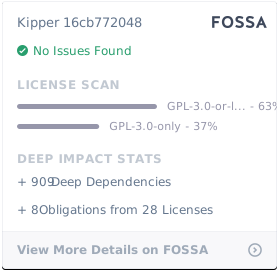
FOSSA License Report
Owner
- Name: Kipper
- Login: Kipper-Lang
- Kind: organization
- Email: dev-team@kipper-lang.org
- Location: Austria
- Website: https://kipper-lang.org
- Repositories: 1
- Profile: https://github.com/Kipper-Lang
The public organisation for sharing the source code and managing the Kipper programming language.
Citation (CITATION.cff)
cff-version: 1.2.0
title: Kipper
message: >-
  If you use this software, please cite it using the
  metadata from this file.
type: software
authors:
  - given-names: Luna
    family-names: Klatzer
    email: edu@lklatzer.com
    affiliation: HTL Leonding
    orcid: 'https://orcid.org/0009-0001-5332-8988'
  - given-names: Lorenz
    family-names: Holzbauer
    email: l.holzbauer@students.htl-leonding.ac.at
    affiliation: HTL Leonding
  - given-names: Fabian
    family-names: Baitura
    email: f.baitura@students.htl-leonding.ac.at
    affiliation: HTL Leonding
identifiers:
  - type: url
    value: >-
      https://github.com/Kipper-Lang/Kipper/releases/tag/v0.12.1
    description: The GitHub release URL of tag 0.12.1
repository-code: 'https://github.com/Kipper-Lang/Kipper/'
url: 'https://kipper-lang.org'
abstract: >-
  Kipper is a JavaScript-like strongly and strictly typed
  language with Python flavour. It aims to provide
  straightforward, simple, secure and type-safe coding with
  better efficiency and developer satisfaction. It compiles
  to both JavaScript and TypeScript, and can be set up in
  your terminal, Node.js or ES6+ browser.
keywords:
  - compiler
  - transpiler
  - code-generation
  - oop-programming
  - type-safety
license: GPL-3.0-or-later
license-url: 'https://github.com/Kipper-Lang/Kipper/blob/v0.12.1/LICENSE'
version: 0.12.1
date-released: '2025-02-17'
GitHub Events
Total
- Create event: 7
- Release event: 4
- Issues event: 8
- Watch event: 1
- Delete event: 4
- Issue comment event: 13
- Push event: 399
- Pull request event: 13
- Fork event: 1
Last Year
- Create event: 7
- Release event: 4
- Issues event: 8
- Watch event: 1
- Delete event: 4
- Issue comment event: 13
- Push event: 399
- Pull request event: 13
- Fork event: 1
Committers
Last synced: about 1 year ago
Top Committers
| Name | Commits | |
|---|---|---|
| Luna-Klatzer | l****r@g****m | 1,951 |
| renovate[bot] | 2****] | 189 |
| github-actions | 4****] | 119 |
| Lorenz Holzbauer | 7****r | 64 |
| Renovate Bot | b****t@r****m | 38 |
| Fabian | p****3@g****m | 22 |
| dependabot[bot] | 4****] | 22 |
| fossabot | b****s@f****o | 1 |
| Justin Falkenstein | j****n@o****m | 1 |
Committer Domains (Top 20 + Academic)
Issues and Pull Requests
Last synced: 10 months ago
All Time
- Total issues: 50
- Total pull requests: 69
- Average time to close issues: 2 months
- Average time to close pull requests: 22 days
- Total issue authors: 4
- Total pull request authors: 4
- Average comments per issue: 0.7
- Average comments per pull request: 1.0
- Merged pull requests: 41
- Bot issues: 1
- Bot pull requests: 34
Past Year
- Issues: 12
- Pull requests: 22
- Average time to close issues: 6 months
- Average time to close pull requests: 10 days
- Issue authors: 1
- Pull request authors: 1
- Average comments per issue: 0.08
- Average comments per pull request: 1.14
- Merged pull requests: 20
- Bot issues: 0
- Bot pull requests: 0
Top Authors
Issue Authors
- Luna-Klatzer (59)
- ByteWolf-dev (5)
- lorenzholzbauer (5)
- ericdrosado (1)
- renovate[bot] (1)
Pull Request Authors
- renovate[bot] (127)
- Luna-Klatzer (65)
- ByteWolf-dev (11)
- lorenzholzbauer (5)
Top Labels
Issue Labels
Pull Request Labels
Packages
- Total packages: 7
-
Total downloads:
- npm 2,721 last-month
-
Total dependent packages: 20
(may contain duplicates) -
Total dependent repositories: 5
(may contain duplicates) - Total versions: 331
- Total maintainers: 1
npmjs.org: @kipper/core
The core implementation of the Kipper compiler 🦊
- Homepage: https://kipper-lang.org
- License: GPL-3.0-or-later
-
Latest release: 0.12.1
published over 1 year ago
Rankings
Maintainers (1)
npmjs.org: @kipper/cli
The Kipper Command Line Interface (CLI).
- Homepage: https://kipper-lang.org
- License: GPL-3.0-or-later
-
Latest release: 0.12.1
published over 1 year ago
Rankings
Maintainers (1)
npmjs.org: @kipper/target-js
The JavaScript target for the Kipper compiler 🦊
- Homepage: https://kipper-lang.org
- License: GPL-3.0-or-later
-
Latest release: 0.12.1
published over 1 year ago
Rankings
Maintainers (1)
npmjs.org: @kipper/target-ts
The TypeScript target for the Kipper compiler 🦊
- Homepage: https://kipper-lang.org
- License: GPL-3.0-or-later
-
Latest release: 0.12.1
published over 1 year ago
Rankings
Maintainers (1)
npmjs.org: @kipper/web
The standalone web-module for the Kipper compiler 🦊
- Homepage: https://kipper-lang.org
- License: GPL-3.0-or-later
-
Latest release: 0.12.1
published over 1 year ago
Rankings
Maintainers (1)
npmjs.org: kipper
The Kipper programming language and compiler 🦊
- Homepage: https://kipper-lang.org
- License: GPL-3.0-or-later
-
Latest release: 0.12.1
published over 1 year ago
Rankings
Maintainers (1)
npmjs.org: @kipper/config
The config file support package adding support for kip-config.json/kipper-config.json 🦊
- Homepage: https://kipper-lang.org
- License: GPL-3.0-or-later
-
Latest release: 0.12.1
published over 1 year ago
Rankings
Maintainers (1)
Dependencies
- @oclif/test 2.1.0 development
- @sinonjs/fake-timers 9.1.2 development
- @types/sinon 10.0.12 development
- json-parse-even-better-errors 2.3.1 development
- os-tmpdir 1.0.2 development
- pseudomap 1.0.2 development
- ts-node 10.9.1 development
- typescript 4.7.4 development
- @kipper/core workspace:~
- @oclif/command ^1.8.0
- @oclif/config ^1.17.0
- @oclif/core ^1.8.0
- @oclif/errors ^1.3.5
- @oclif/help ^1.0.1
- @oclif/plugin-help ^5.0.0
- @oclif/plugin-update ^3.0.0
- @oclif/plugin-warn-if-update-available ^2.0.4
- @types/node ^17.0.34
- antlr4ts ^0.5.0-alpha.4
- rimraf ^3.0.2
- ts-node ^10.7.0
- tslib ~2.4.0
- tslog ^3.3.0
- typescript ~4.7.0
- @size-limit/preset-big-lib 7.0.8 development
- @types/node 17.0.32 development
- ansi-regex 6.0.1 development
- antlr4ts-cli 0.5.0-alpha.4 development
- browserify 17.0.0 development
- json-parse-even-better-errors 2.3.1 development
- minimist 1.2.6 development
- mkdirp 1.0.4 development
- prettier 2.7.1 development
- run-script-os 1.1.6 development
- size-limit 7.0.8 development
- ts-node 10.9.1 development
- tsify 5.0.4 development
- typescript 4.7.4 development
- uuid 8.3.2 development
- watchify 4.0.0 development
- antlr4ts ^0.5.0-alpha.4
- tslib ~2.4.0
- @oclif/config 1.18.3 development
- @oclif/parser 3.8.7 development
- @oclif/test 2.1.0 development
- @size-limit/preset-big-lib 7.0.8 development
- @types/chai 4.3.0 development
- @types/mocha 9.1.1 development
- @types/node 17.0.35 development
- @typescript-eslint/eslint-plugin 5.30.7 development
- @typescript-eslint/parser 5.30.7 development
- ansi-regex 6.0.1 development
- antlr4ts-cli 0.5.0-alpha.4 development
- browserify 17.0.0 development
- chai 4.3.6 development
- coverage-badge-creator 1.0.12 development
- eslint 8.19.0 development
- json-parse-even-better-errors 2.3.1 development
- minimist 1.2.6 development
- mkdirp 1.0.4 development
- mocha 10.0.0 development
- nyc 15.1.0 development
- oclif 3.1.1 development
- prettier 2.7.1 development
- run-script-os 1.1.6 development
- size-limit 7.0.8 development
- ts-mocha 10.0.0 development
- tsify 5.0.4 development
- uglify-js 3.16.2 development
- uuid 8.3.2 development
- watchify 4.0.0 development
- @kipper/cli workspace:~
- @kipper/core workspace:~
- antlr4ts ^0.5.0-alpha.4
- tslib ~2.4.0
- typescript ~4.7.0
- actions/checkout v3 composite
- github/codeql-action/analyze v2 composite
- github/codeql-action/autobuild v2 composite
- github/codeql-action/init v2 composite
- actions/checkout v3 composite
- actions/setup-node v3 composite
- pnpm/action-setup v2.2.4 composite
- actions/checkout v3 composite
- actions/setup-node v3 composite
- pnpm/action-setup v2.2.4 composite
- actions/checkout v3 composite
- actions/setup-node v3 composite
- pnpm/action-setup v2.2.4 composite
- release-drafter/release-drafter v5 composite
- actions/checkout v3 composite
- andresz1/size-limit-action v1.7.0 composite
- pnpm/action-setup v2.2.4 composite
- 573 dependencies
- 373 dependencies
- @types/node 18.16.16 development
- ansi-regex 6.0.1 development
- json-parse-even-better-errors 3.0.0 development
- minimist 1.2.8 development
- mkdirp 3.0.1 development
- prettier 2.8.8 development
- run-script-os 1.1.6 development
- ts-node 10.9.1 development
- typescript 5.1.3 development
- uuid 9.0.0 development
- watchify 4.0.0 development
- @kipper/core workspace:~
- 218 dependencies
- @types/node 18.16.16 development
- ansi-regex 6.0.1 development
- json-parse-even-better-errors 3.0.0 development
- minimist 1.2.8 development
- mkdirp 3.0.1 development
- prettier 2.8.8 development
- run-script-os 1.1.6 development
- ts-node 10.9.1 development
- typescript 5.1.3 development
- uuid 9.0.0 development
- watchify 4.0.0 development
- @kipper/core workspace:~
- @kipper/target-js workspace:~
- 218 dependencies
- @kipper/core workspace:~ development
- @kipper/target-js workspace:~ development
- @kipper/target-ts workspace:~ development
- @types/node 18.16.16 development
- ansi-regex 6.0.1 development
- browserify 17.0.0 development
- json-parse-even-better-errors 3.0.0 development
- minimist 1.2.8 development
- mkdirp 3.0.1 development
- prettier 2.8.8 development
- run-script-os 1.1.6 development
- ts-node 10.9.1 development
- typescript 5.1.3 development
- uglify-js 3.17.4 development
- uuid 9.0.0 development
- watchify 4.0.0 development
- 219 dependencies
- 611 dependencies