hezar
The all-in-one AI library for Persian, supporting a wide variety of tasks and modalities!
Science Score: 44.0%
This score indicates how likely this project is to be science-related based on various indicators:
-
✓CITATION.cff file
Found CITATION.cff file -
✓codemeta.json file
Found codemeta.json file -
✓.zenodo.json file
Found .zenodo.json file -
○DOI references
-
○Academic publication links
-
○Academic email domains
-
○Institutional organization owner
-
○JOSS paper metadata
-
○Scientific vocabulary similarity
Low similarity (16.8%) to scientific vocabulary
Keywords
Repository
The all-in-one AI library for Persian, supporting a wide variety of tasks and modalities!
Basic Info
- Host: GitHub
- Owner: hezarai
- License: apache-2.0
- Language: Python
- Default Branch: main
- Homepage: https://hezarai.github.io/hezar/
- Size: 3.5 MB
Statistics
- Stars: 960
- Watchers: 15
- Forks: 61
- Open Issues: 2
- Releases: 76
Topics
Metadata Files
README.md
[](https://huggingface.co/hezarai) [](https://t.me/hezarai) [](https://daramet.com/hezarai)
Hezar (meaning thousand in Persian) is a multipurpose AI library built to make AI easy for the Persian community!
Hezar is a library that: - brings together all the best works in AI for Persian - makes using AI models as easy as a couple of lines of code - seamlessly integrates with Hugging Face Hub for all of its models - has a highly developer-friendly interface - has a task-based model interface which is more convenient for general users. - is packed with additional tools like word embeddings, tokenizers, feature extractors, etc. - comes with a lot of supplementary ML tools for deployment, benchmarking, optimization, etc. - and more!
Installation
Hezar is available on PyPI and can be installed with pip (Python 3.10 and later):
pip install hezar
Note that Hezar is a collection of models and tools, hence having different installation variants:
pip install hezar[all]  # For a full installation
pip install hezar[nlp]  # For NLP
pip install hezar[vision]  # For computer vision models
pip install hezar[audio]  # For audio and speech
pip install hezar[embeddings]  # For word embedding models
You can also install the latest version from the source:
git clone https://github.com/hezarai/hezar.git
pip install ./hezar
Documentation
Explore Hezar to learn more on the docs page or explore the key concepts: - Getting Started - Quick Tour - Tutorials - Developer Guides - Contribution - Reference API
Quick Tour
Models
There's a bunch of ready to use trained models for different tasks on the Hub!
🤗Hugging Face Hub Page: https://huggingface.co/hezarai
Let's walk you through some examples!
- Text Classification (sentiment analysis, categorization, etc) ```python from hezar.models import Model
example = ["هزار، کتابخانهای کامل برای به کارگیری آسان هوش مصنوعی"]
model = Model.load("hezarai/bert-fa-sentiment-dksf")
outputs = model.predict(example)
print(outputs)
[[{'label': 'positive', 'score': 0.812910258769989}]]
- **Sequence Labeling (POS, NER, etc.)**
python
from hezar.models import Model
posmodel = Model.load("hezarai/bert-fa-pos-lscp-500k") # Part-of-speech
nermodel = Model.load("hezarai/bert-fa-ner-arman") # Named entity recognition
inputs = ["شرکت هوش مصنوعی هزار"]
posoutputs = posmodel.predict(inputs)
neroutputs = nermodel.predict(inputs)
print(f"POS: {posoutputs}")
print(f"NER: {neroutputs}")
POS: [[{'token': 'شرکت', 'label': 'Ne'}, {'token': 'هوش', 'label': 'Ne'}, {'token': 'مصنوعی', 'label': 'AJe'}, {'token': 'هزار', 'label': 'NUM'}]]
NER: [[{'token': 'شرکت', 'label': 'B-org'}, {'token': 'هوش', 'label': 'I-org'}, {'token': 'مصنوعی', 'label': 'I-org'}, {'token': 'هزار', 'label': 'I-org'}]]
- **Mask Filling**
python
from hezar.models import Model
model = Model.load("hezarai/roberta-fa-mask-filling")
inputs = ["سلام بچه ها حالتون
[[{'token': 'چطوره', 'sequence': 'سلام بچه ها حالتون چطوره', 'tokenid': 34505, 'score': 0.2230483442544937}]]
- **Speech Recognition**
python
from hezar.models import Model
model = Model.load("hezarai/whisper-small-fa")
transcripts = model.predict("examples/assets/speechexample.mp3")
print(transcripts)
[{'text': 'و این تنها محدود به محیط کار نیست'}]
- **Text Detection (Pre-OCR)**
python
from hezar.models import Model
from hezar.utils import loadimage, drawboxes, showimage
model = Model.load("hezarai/CRAFT")
image = loadimage("../assets/textdetectionexample.png")
outputs = model.predict(image)
resultimage = drawboxes(image, outputs[0]["boxes"])
showimage(result_image, "result")
```

Image to Text (OCR) ```python from hezar.models import Model
OCR with CRNN
model = Model.load("hezarai/crnn-base-fa-v2") texts = model.predict("examples/assets/ocr_example.jpg") print(f"CRNN Output: {texts}")
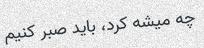
Image to Text (License Plate Recognition) ```python from hezar.models import Model
model = Model.load("hezarai/crnn-fa-license-plate-recognition-v2")
platetext = model.predict("assets/licenseplateocrexample.jpg")
print(plate_text) # Persian text of mixed numbers and characters might not show correctly in the console
[{'text': '۵۷س۷۷۹۷۷'}]
```

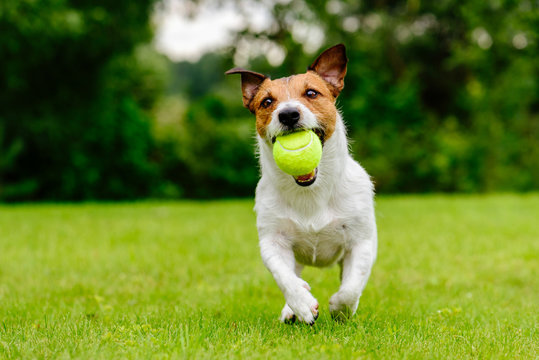
- Image to Text (Image Captioning) ```python from hezar.models import Model
model = Model.load("hezarai/vit-roberta-fa-image-captioning-flickr30k")
texts = model.predict("examples/assets/imagecaptioningexample.jpg")
print(texts)
[{'text': 'سگی با توپ تنیس در دهانش می دود.'}]
```
We constantly keep working on adding and training new models and this section will hopefully be expanding over time ;)
Word Embeddings
- FastText ```python from hezar.embeddings import Embedding
fasttext = Embedding.load("hezarai/fasttext-fa-300")
mostsimilar = fasttext.mostsimilar("هزار")
print(most_similar)
[{'score': 0.7579, 'word': 'میلیون'},
{'score': 0.6943, 'word': '21هزار'},
{'score': 0.6861, 'word': 'میلیارد'},
{'score': 0.6825, 'word': '26هزار'},
{'score': 0.6803, 'word': '٣هزار'}]
- **Word2Vec (Skip-gram)**
python
from hezar.embeddings import Embedding
word2vec = Embedding.load("hezarai/word2vec-skipgram-fa-wikipedia")
mostsimilar = word2vec.mostsimilar("هزار")
print(most_similar)
[{'score': 0.7885, 'word': 'چهارهزار'},
{'score': 0.7788, 'word': '۱۰هزار'},
{'score': 0.7727, 'word': 'دویست'},
{'score': 0.7679, 'word': 'میلیون'},
{'score': 0.7602, 'word': 'پانصد'}]
- **Word2Vec (CBOW)**
python
from hezar.embeddings import Embedding
word2vec = Embedding.load("hezarai/word2vec-cbow-fa-wikipedia")
mostsimilar = word2vec.mostsimilar("هزار")
print(most_similar)
[{'score': 0.7407, 'word': 'دویست'},
{'score': 0.7400, 'word': 'میلیون'},
{'score': 0.7326, 'word': 'صد'},
{'score': 0.7276, 'word': 'پانصد'},
{'score': 0.7011, 'word': 'سیصد'}]
```
For a full guide on the embeddings module, see the embeddings tutorial.
Datasets
You can load any of the datasets on the Hub like below: ```python from hezar.data import Dataset
The preprocessor depends on what you want to do exactly later on. Below are just examples.
sentimentdataset = Dataset.load("hezarai/sentiment-dksf", preprocessor="hezarai/bert-base-fa") # A TextClassificationDataset instance
lscpdataset = Dataset.load("hezarai/lscp-pos-500k", preprocessor="hezarai/bert-base-fa") # A SequenceLabelingDataset instance
xlsumdataset = Dataset.load("hezarai/xlsum-fa", preprocessor="hezarai/t5-base-fa") # A TextSummarizationDataset instance
alprocrdataset = Dataset.load("hezarai/persian-license-plate-v1", preprocessor="hezarai/crnn-base-fa-v2") # An OCRDataset instance
flickr30kdataset = Dataset.load("hezarai/flickr30k-fa", preprocessor="hezarai/vit-roberta-fa-base") # An ImageCaptioningDataset instance
commonvoice_dataset = Dataset.load("hezarai/common-voice-13-fa", preprocessor="hezarai/whisper-small-fa") # A SpeechRecognitionDataset instance
...
``
The returned dataset objects fromload()` are PyTorch Dataset wrappers for specific tasks and can be used by a data loader out-of-the-box!
You can also load Hezar's datasets using 🤗Datasets: ```python from datasets import load_dataset
dataset = load_dataset("hezarai/sentiment-dksf") ``` For a full guide on Hezar's datasets, see the datasets tutorial.
Training
Hezar makes it super easy to train models using out-of-the-box models and datasets provided in the library.
```python from hezar.models import BertSequenceLabeling, BertSequenceLabelingConfig from hezar.data import Dataset from hezar.trainer import Trainer, TrainerConfig from hezar.preprocessors import Preprocessor
basemodelpath = "hezarai/bert-base-fa" dataset_path = "hezarai/lscp-pos-500k"
traindataset = Dataset.load(datasetpath, split="train", tokenizerpath=basemodelpath) evaldataset = Dataset.load(datasetpath, split="test", tokenizerpath=basemodelpath)
model = BertSequenceLabeling(BertSequenceLabelingConfig(id2label=traindataset.config.id2label)) preprocessor = Preprocessor.load(basemodel_path)
trainconfig = TrainerConfig( outputdir="bert-fa-pos-lscp-500k", task="sequencelabeling", device="cuda", initweightsfrom=basemodelpath, batchsize=8, num_epochs=5, metrics=["seqeval"], )
trainer = Trainer( config=trainconfig, model=model, traindataset=traindataset, evaldataset=evaldataset, datacollator=traindataset.datacollator, preprocessor=preprocessor, ) trainer.train()
trainer.pushtohub("bert-fa-pos-lscp-500k") # push model, config, preprocessor, trainer files and configs ``` You can actually go way deeper with the Trainer. See more details here.
Offline Mode
Hezar hosts everything on the HuggingFace Hub. When you use the .load() method for a model, dataset, etc., it's
downloaded and saved in the cache (at ~/.cache/hezar) so next time you try to load the same asset, it uses the cached version
which works even when offline. But if you want to export assets more explicitly, you can use the .save() method to save
anything anywhere you want on a local path.
```python from hezar.models import Model
Load the online model
model = Model.load("hezarai/bert-fa-ner-arman")
Save the model locally
savepath = "./weights/bert-fa-ner-arman"
model.save(savepath) # The weights, config, preprocessors, etc. are saved at ./weights/bert-fa-ner-arman
Now you can load the saved model
localmodel = Model.load(savepath)
``
Moreover, any class that has.load()and.save()` can be treated the same way.
Going Deeper
Hezar's primary focus is on providing ready to use models (implementations & pretrained weights) for different casual tasks not by reinventing the wheel, but by being built on top of PyTorch, 🤗Transformers, 🤗Tokenizers, 🤗Datasets, Scikit-learn, Gensim, etc. Besides, it's deeply integrated with the 🤗Hugging Face Hub and almost any module e.g, models, datasets, preprocessors, trainers, etc. can be uploaded to or downloaded from the Hub!
More specifically, here's a simple summary of the core modules in Hezar:
- Models: Every model is a hezar.models.Model instance which is in fact, a PyTorch nn.Module wrapper with extra features for saving, loading, exporting, etc.
- Datasets: Every dataset is a hezar.data.Dataset instance which is a PyTorch Dataset implemented specifically for each task that can load the data files from the Hugging Face Hub.
- Preprocessors: All preprocessors are preferably backed by a robust library like Tokenizers, pillow, etc.
- Embeddings: All embeddings are developed on top of Gensim and can be easily loaded from the Hub and used in just 2 lines of code!
- Trainer: Trainer is the base class for training almost any model in Hezar or even your own custom models backed by Hezar. The Trainer comes with a lot of features and is also exportable to the Hub!
- Metrics: Metrics are also another configurable and portable modules backed by Scikit-learn, seqeval, etc. and can be easily used in the trainers!
For more info, check the tutorials
Contribution
Maintaining Hezar is no cakewalk with just a few of us on board. The concept might not be groundbreaking, but putting it into action was a real challenge and that's why Hezar stands as the biggest Persian open source project of its kind!
Any contribution, big or small, would mean a lot to us. So, if you're interested, let's team up and make Hezar even better together! ❤️
Don't forget to check out our contribution guidelines in CONTRIBUTING.md before diving in. Your support is much appreciated!
Contact
We highly recommend to submit any issues or questions in the issues or discussions section but in case you need direct contact, here it is: - arxyzan@gmail.com - Telegram: @arxyzan
Citation
If you found this project useful in your work or research please cite it by using this BibTeX entry:
bibtex
@misc{hezar2023,
  title =        {Hezar: The all-in-one AI library for Persian},
  author =       {Aryan Shekarlaban & Pooya Mohammadi Kazaj},
  publisher =    {GitHub},
  howpublished = {\url{https://github.com/hezarai/hezar}},
  year =         {2023}
}
Owner
- Name: Hezar AI
- Login: hezarai
- Kind: organization
- Repositories: 1
- Profile: https://github.com/hezarai
Hezar AI: Democratizing AI for the Persian community.
Citation (CITATION.cff)
cff-version: 1.2.0
message: "If you use this software, please cite it as below."
authors:
- family-names: "Shekarlaban"
  given-names: "Aryan"
- family-names: "Mohammadi Kazaj"
  given-names: "Pooya"
title: "Hezar: The all-in-one AI library for Persian"
date-released: 2023-06
url: "https://github.com/hezarai/hezar"
GitHub Events
Total
- Create event: 3
- Issues event: 13
- Release event: 3
- Watch event: 94
- Delete event: 1
- Issue comment event: 50
- Push event: 34
- Pull request review event: 2
- Pull request review comment event: 2
- Pull request event: 14
- Fork event: 17
Last Year
- Create event: 3
- Issues event: 13
- Release event: 3
- Watch event: 94
- Delete event: 1
- Issue comment event: 50
- Push event: 34
- Pull request review event: 2
- Pull request review comment event: 2
- Pull request event: 14
- Fork event: 17
Issues and Pull Requests
Last synced: 11 months ago
All Time
- Total issues: 8
- Total pull requests: 6
- Average time to close issues: 9 months
- Average time to close pull requests: 5 months
- Total issue authors: 7
- Total pull request authors: 5
- Average comments per issue: 5.38
- Average comments per pull request: 2.17
- Merged pull requests: 0
- Bot issues: 0
- Bot pull requests: 0
Past Year
- Issues: 4
- Pull requests: 5
- Average time to close issues: about 2 months
- Average time to close pull requests: 3 months
- Issue authors: 4
- Pull request authors: 4
- Average comments per issue: 7.0
- Average comments per pull request: 0.8
- Merged pull requests: 0
- Bot issues: 0
- Bot pull requests: 0
Top Authors
Issue Authors
- arxyzan (13)
- pooya-mohammadi (2)
- davoodap (2)
- rajabit (1)
- AmirLavasani (1)
- likecodingloveproblems (1)
- edvinbehdadi (1)
- AliProgramer1386 (1)
- sahand-zeynol (1)
- Nikan-sharafi (1)
- mahdiyehebrahimi (1)
- Daredevil74 (1)
- F-V-Younesi (1)
- claymore07 (1)
- Adversarian (1)
Pull Request Authors
- arxyzan (11)
- Adversarian (2)
- Yash-2707 (2)
- mahdi-vajdi (1)
- FarukhS52 (1)
- smit23patel (1)
- Akhsuna07 (1)
Top Labels
Issue Labels
Pull Request Labels
Packages
- Total packages: 1
-
Total downloads:
- pypi 850 last-month
- Total dependent packages: 0
- Total dependent repositories: 0
- Total versions: 83
- Total maintainers: 1
pypi.org: hezar
Hezar: The all-in-one AI library for Persian, supporting a wide variety of tasks and modalities!
- Homepage: https://github.com/hezarai
- Documentation: https://hezarai.github.io/hezar/
- License: Apache-2.0
-
Latest release: 0.42.0
published over 1 year ago