diffeqpy
Solving differential equations in Python using DifferentialEquations.jl and the SciML Scientific Machine Learning organization
Science Score: 51.0%
This score indicates how likely this project is to be science-related based on various indicators:
-
✓CITATION.cff file
Found CITATION.cff file -
✓codemeta.json file
Found codemeta.json file -
○.zenodo.json file
-
○DOI references
-
✓Academic publication links
Links to: arxiv.org -
✓Committers with academic emails
1 of 14 committers (7.1%) from academic institutions -
○Institutional organization owner
-
○JOSS paper metadata
-
○Scientific vocabulary similarity
Low similarity (13.2%) to scientific vocabulary
Keywords
Keywords from Contributors
Repository
Solving differential equations in Python using DifferentialEquations.jl and the SciML Scientific Machine Learning organization
Basic Info
Statistics
- Stars: 574
- Watchers: 19
- Forks: 44
- Open Issues: 11
- Releases: 8
Topics
Metadata Files
README.md
diffeqpy


diffeqpy is a package for solving differential equations in Python. It utilizes DifferentialEquations.jl for its core routines to give high performance solving of many different types of differential equations, including:
- Discrete equations (function maps, discrete stochastic (Gillespie/Markov) simulations)
- Ordinary differential equations (ODEs)
- Split and Partitioned ODEs (Symplectic integrators, IMEX Methods)
- Stochastic ordinary differential equations (SODEs or SDEs)
- Random differential equations (RODEs or RDEs)
- Differential algebraic equations (DAEs)
- Delay differential equations (DDEs)
- Mixed discrete and continuous equations (Hybrid Equations, Jump Diffusions)
directly in Python.
If you have any questions, or just want to chat about solvers/using the package, please feel free to chat in the Gitter channel. For bug reports, feature requests, etc., please submit an issue.
Installation
To install diffeqpy, use pip:
pip install diffeqpy
and you're good!
Collab Notebook Examples
- Solving the Lorenz equation faster than SciPy+Numba
- Solving ODEs on GPUs Fast in Python with diffeqpy
General Flow
Import and setup the solvers available in DifferentialEquations.jl via the command:
py
from diffeqpy import de
In case only the solvers available in OrdinaryDiffEq.jl are required then use the command:
py
from diffeqpy import ode
The general flow for using the package is to follow exactly as would be done
in Julia, except add de. or ode. in front. Note that ode. has lesser loading time and a smaller memory footprint compared to de..
Most of the commands will work without any modification. Thus
the DifferentialEquations.jl documentation
and the DiffEqTutorials
are the main in-depth documentation for this package. Below we will show how to
translate these docs to Python code.
Note about !
Python does not allow ! in function names, so this is also a limitation of pyjulia
To use functions which on the Julia side have a !, like step!, replace ! by _b, for example:
```py from diffeqpy import de
def f(u,p,t): return -u
u0 = 0.5 tspan = (0., 1.) prob = de.ODEProblem(f, u0, tspan) integrator = de.init(prob, de.Tsit5()) de.step_b(integrator) ```
is valid Python code for using the integrator interface.
Ordinary Differential Equation (ODE) Examples
One-dimensional ODEs
```py from diffeqpy import de
def f(u,p,t): return -u
u0 = 0.5 tspan = (0., 1.) prob = de.ODEProblem(f, u0, tspan) sol = de.solve(prob) ```
The solution object is the same as the one described
in the DiffEq tutorials
and in the solution handling documentation
(note: the array interface is missing). Thus for example the solution time points
are saved in sol.t and the solution values are saved in sol.u. Additionally,
the interpolation sol(t) gives a continuous solution.
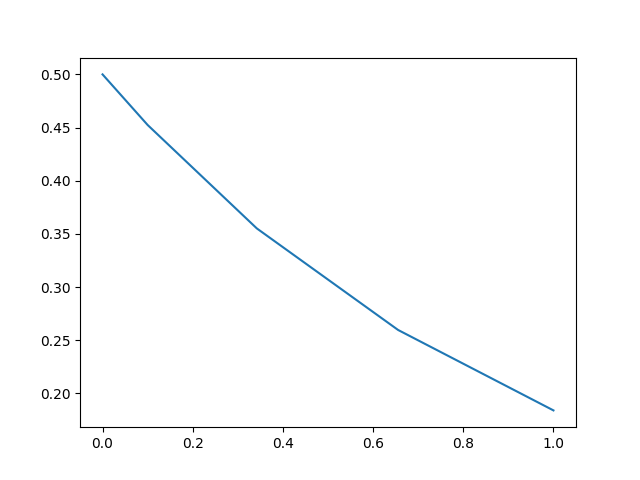
We can plot the solution values using matplotlib:
py
import matplotlib.pyplot as plt
plt.plot(sol.t,sol.u)
plt.show()
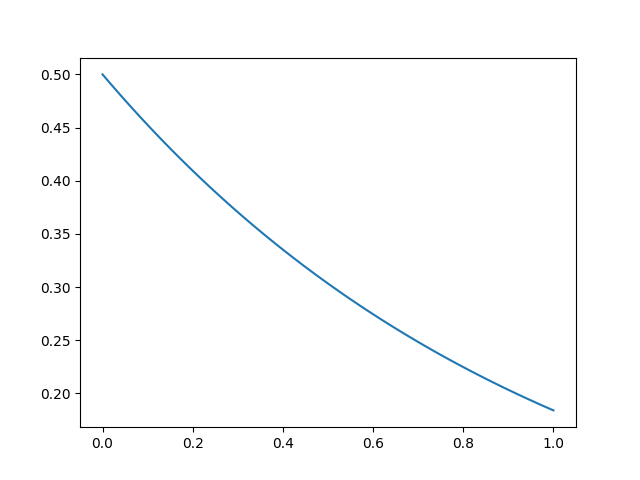
We can utilize the interpolation to get a finer solution:
py
import numpy
t = numpy.linspace(0,1,100)
u = sol(t)
plt.plot(t,u)
plt.show()
Solve commands
The common interface arguments
can be used to control the solve command. For example, let's use saveat to
save the solution at every t=0.1, and let's utilize the Vern9() 9th order
Runge-Kutta method along with low tolerances abstol=reltol=1e-10:
py
sol = de.solve(prob,de.Vern9(),saveat=0.1,abstol=1e-10,reltol=1e-10)
The set of algorithms for ODEs is described at the ODE solvers page.
Compilation with de.jit and Julia
When solving a differential equation, it's pertinent that your derivative
function f is fast since it occurs in the inner loop of the solver. We can
convert the entire ode problem to symbolic form, optimize that symbolic form,
and emit efficient native code to simulate it using de.jit to improve the
efficiency of the solver at the expense of added setup time:
py
fast_prob = de.jit(prob)
sol = de.solve(fast_prob)
Additionally, you can directly define the functions in Julia. This will also
allow for specialization and could be helpful to increase the efficiency for
repeat or long calls. This is done via seval:
py
jul_f = de.seval("(u,p,t)->-u") # Define the anonymous function in Julia
prob = de.ODEProblem(jul_f, u0, tspan)
sol = de.solve(prob)
Limitations
de.jit, uses ModelingToolkit.jl's modelingtoolkitize internally and some
restrictions apply. Not all models can be jitted. See the
modelingtoolkitize documentation
for more info.
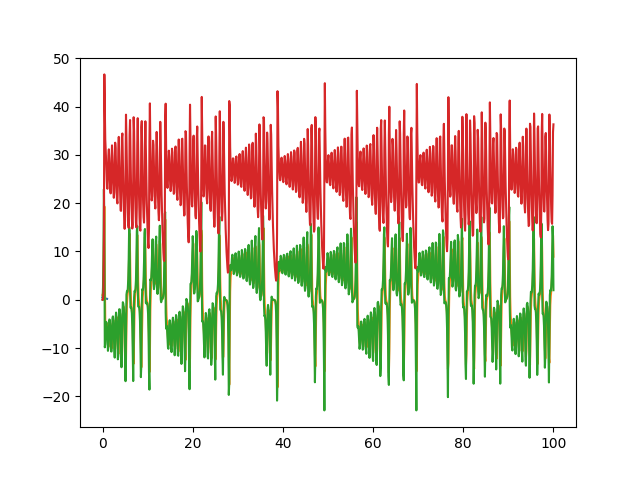
Systems of ODEs: Lorenz Equations
To solve systems of ODEs, simply use an array as your initial condition and
define f as an array function:
```py def f(u,p,t): x, y, z = u sigma, rho, beta = p return [sigma * (y - x), x * (rho - z) - y, x * y - beta * z]
u0 = [1.0,0.0,0.0] tspan = (0., 100.) p = [10.0,28.0,8/3] prob = de.ODEProblem(f, u0, tspan, p) sol = de.solve(prob,saveat=0.01)
plt.plot(sol.t,de.transpose(de.stack(sol.u))) plt.show() ```
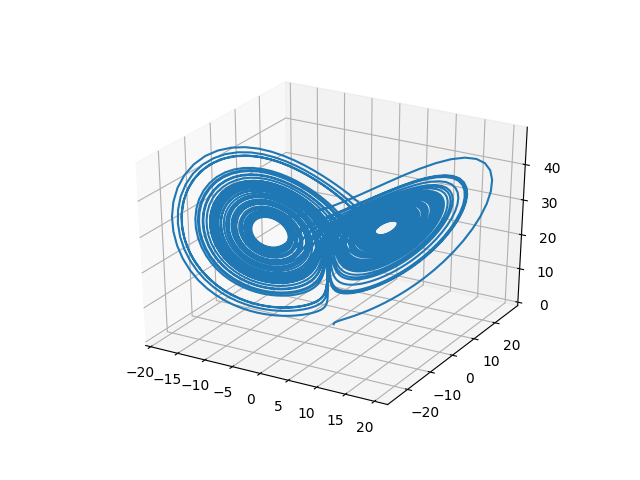
or we can draw the phase plot:
py
us = de.stack(sol.u)
from mpl_toolkits.mplot3d import Axes3D
fig = plt.figure()
ax = fig.add_subplot(111, projection='3d')
ax.plot(us[0,:],us[1,:],us[2,:])
plt.show()
In-Place Mutating Form
When dealing with systems of equations, in many cases it's helpful to reduce memory allocations by using mutating functions. In diffeqpy, the mutating form adds the mutating vector to the front. Let's make a fast version of the Lorenz derivative, i.e. mutating and JIT compiled:
```py def f(du,u,p,t): x, y, z = u sigma, rho, beta = p du[0] = sigma * (y - x) du[1] = x * (rho - z) - y du[2] = x * y - beta * z
u0 = [1.0,0.0,0.0] tspan = (0., 100.) p = [10.0,28.0,2.66] prob = de.ODEProblem(f, u0, tspan, p) jitprob = de.jit(prob) sol = de.solve(jitprob) ```
or using a Julia function:
py
jul_f = de.seval("""
function f(du,u,p,t)
  x, y, z = u
  sigma, rho, beta = p
  du[1] = sigma * (y - x)
  du[2] = x * (rho - z) - y
  du[3] = x * y - beta * z
end""")
u0 = [1.0,0.0,0.0]
tspan = (0., 100.)
p = [10.0,28.0,2.66]
prob = de.ODEProblem(jul_f, u0, tspan, p)
sol = de.solve(prob)
Stochastic Differential Equation (SDE) Examples
One-dimensional SDEs
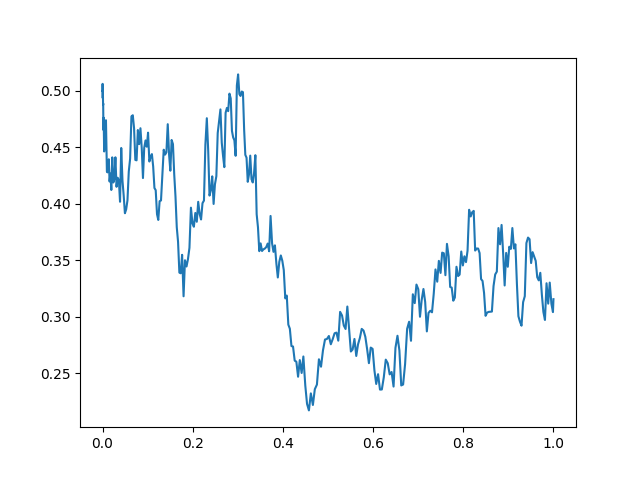
Solving one-dimensonal SDEs du = f(u,t)dt + g(u,t)dW_t is like an ODE except
with an extra function for the diffusion (randomness or noise) term. The steps
follow the SDE tutorial.
```py def f(u,p,t): return 1.01*u
def g(u,p,t): return 0.87*u
u0 = 0.5 tspan = (0.0,1.0) prob = de.SDEProblem(f,g,u0,tspan) sol = de.solve(prob,reltol=1e-3,abstol=1e-3)
plt.plot(sol.t,de.stack(sol.u)) plt.show() ```
Systems of SDEs with Diagonal Noise
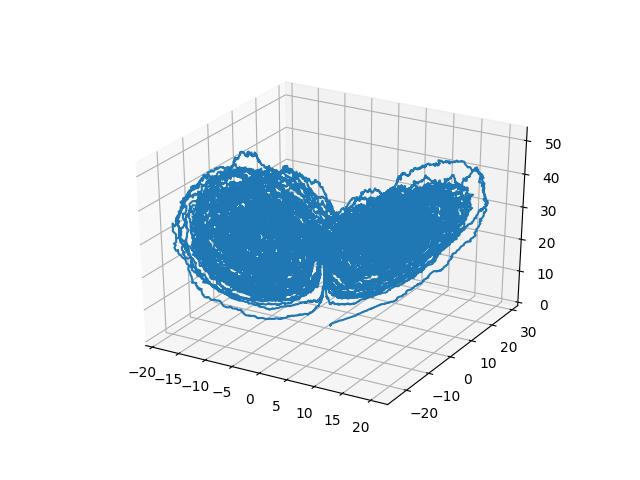
An SDE with diagonal noise is where a different Wiener process is applied to every part of the system. This is common for models with phenomenological noise. Let's add multiplicative noise to the Lorenz equation:
```py def f(du,u,p,t): x, y, z = u sigma, rho, beta = p du[0] = sigma * (y - x) du[1] = x * (rho - z) - y du[2] = x * y - beta * z
def g(du,u,p,t): du[0] = 0.3u[0] du[1] = 0.3u[1] du[2] = 0.3*u[2]
u0 = [1.0,0.0,0.0] tspan = (0., 100.) p = [10.0,28.0,2.66] prob = de.jit(de.SDEProblem(f, g, u0, tspan, p)) sol = de.solve(prob)
Now let's draw a phase plot
us = de.stack(sol.u) from mpltoolkits.mplot3d import Axes3D fig = plt.figure() ax = fig.addsubplot(111, projection='3d') ax.plot(us[0,:],us[1,:],us[2,:]) plt.show() ```
Systems of SDEs with Non-Diagonal Noise
In many cases you may want to share noise terms across the system. This is
known as non-diagonal noise. The
DifferentialEquations.jl SDE Tutorial
explains how the matrix form of the diffusion term corresponds to the
summation style of multiple Wiener processes. Essentially, the row corresponds
to which system the term is applied to, and the column is which noise term.
So du[i,j] is the amount of noise due to the jth Wiener process that's
applied to u[i]. We solve the Lorenz system with correlated noise as follows:
```py def f(du,u,p,t): x, y, z = u sigma, rho, beta = p du[0] = sigma * (y - x) du[1] = x * (rho - z) - y du[2] = x * y - beta * z
def g(du,u,p,t): du[0,0] = 0.3u[0] du[1,0] = 0.6u[0] du[2,0] = 0.2u[0] du[0,1] = 1.2u[1] du[1,1] = 0.2u[1] du[2,1] = 0.3u[1]
u0 = [1.0,0.0,0.0] tspan = (0.0,100.0) p = [10.0,28.0,2.66] nrp = numpy.zeros((3,2)) prob = de.SDEProblem(f,g,u0,tspan,p,noiserateprototype=nrp) jitprob = de.jit(prob) sol = de.solve(jitprob,saveat=0.005)
Now let's draw a phase plot
us = de.stack(sol.u) from mpltoolkits.mplot3d import Axes3D fig = plt.figure() ax = fig.addsubplot(111, projection='3d') ax.plot(us[0,:],us[1,:],us[2,:]) plt.show() ```
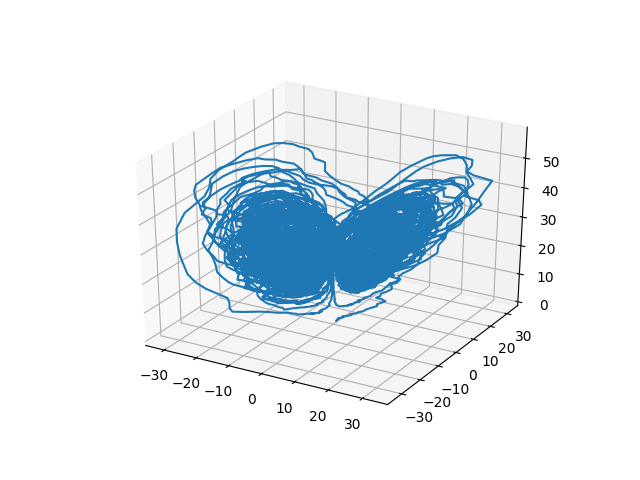
Here you can see that the warping effect of the noise correlations is quite visible!
Differential-Algebraic Equation (DAE) Examples
A differential-algebraic equation is defined by an implicit function
f(du,u,p,t)=0. All of the controls are the same as the other examples, except
here you define a function which returns the residuals for each part of the
equation to define the DAE. The initial value u0 and the initial derivative
du0 are required, though they do not necessarily have to satisfy f (known
as inconsistent initial conditions). The methods will automatically find
consistent initial conditions. In order for this to occur, differential_vars
must be set. This vector states which of the variables are differential (have a
derivative term), with false meaning that the variable is purely algebraic.
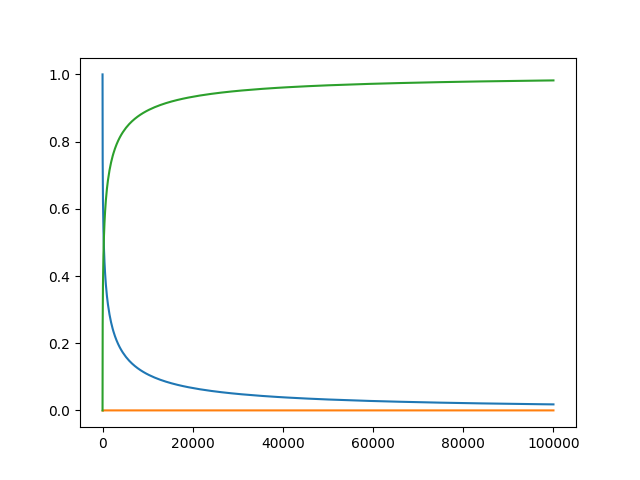
This example shows how to solve the Robertson equation:
```py def f(du,u,p,t): resid1 = - 0.04u[0] + 1e4u[1]u[2] - du[0] resid2 = + 0.04u[0] - 3e7u[1]2 - 1e4u[1]*u[2] - du[1] resid3 = u[0] + u[1] + u[2] - 1.0 return [resid1,resid2,resid3]
u0 = [1.0, 0.0, 0.0] du0 = [-0.04, 0.04, 0.0] tspan = (0.0,100000.0) differentialvars = [True,True,False] prob = de.DAEProblem(f,du0,u0,tspan,differentialvars=differential_vars) sol = de.solve(prob) ```
and the in-place JIT compiled form:
```py def f(resid,du,u,p,t): resid[0] = - 0.04u[0] + 1e4u[1]u[2] - du[0] resid[1] = + 0.04u[0] - 3e7u[1]2 - 1e4u[1]*u[2] - du[1] resid[2] = u[0] + u[1] + u[2] - 1.0
prob = de.DAEProblem(f,du0,u0,tspan,differentialvars=differentialvars) jitprob = de.jit(prob) # Error: no method matching matching modelingtoolkitize(::SciMLBase.DAEProblem{...}) sol = de.solve(jitprob) ```
Mass Matrices, Sparse Arrays, and More
Mass matrix DAEs, along with many other forms, can be handled by doing an explicit conversion to the Julia types. See the PythonCall module's documentation for more details.
As an example, let's convert the mass matrix ODE tutorial in diffeqpy. To do this, the one aspect we need to handle is the conversion of the mass matrix in to a Julia array object. This is done as follows:
```py from diffeqpy import de from juliacall import Main as jl import numpy as np
def rober(du, u, p, t): y1, y2, y3 = u k1, k2, k3 = p du[0] = -k1 * y1 + k3 * y2 * y3 du[1] = k1 * y1 - k3 * y2 * y3 - k2 * y2**2 du[2] = y1 + y2 + y3 - 1 return
M = np.array([[1.0,0.0,0.0],[0.0,1.0,0.0],[0.0,0.0,0.0]]) f = de.ODEFunction(rober, massmatrix = jl.convert(jl.Array,M)) probmm = de.ODEProblem(f, [1.0, 0.0, 0.0], (0.0, 1e5), (0.04, 3e7, 1e4)) sol = de.solve(prob_mm, de.Rodas5P(), reltol = 1e-8, abstol = 1e-8) ```
Notice the only addition is to create the np.array object and to perform the manual conversion via jl.convert(jl.Array,M) to receive the
Julia Array object. This can be done in any case where diffeqpy is not adequately auto-converting to the right Julia type. In some cases this
can be used to improve performance, though here we do it simply for compatability.
Similarly, sparse matrices can be passed in much the same way. For example:
```py import scipy spM = scipy.sparse.csr_array(M) jl.seval("using SparseArrays")
f = de.ODEFunction(rober, massmatrix = jl.convert(jl.SparseMatrixCSC,M)) probmm = de.ODEProblem(f, [1.0, 0.0, 0.0], (0.0, 1e5), (0.04, 3e7, 1e4)) sol = de.solve(prob_mm, de.Rodas5P(), reltol = 1e-8, abstol = 1e-8) ```
Delay Differential Equations
A delay differential equation is an ODE which allows the use of previous values.
In this case, the function needs to be a JIT compiled Julia function. It looks
just like the ODE, except in this case there is a function h(p,t) which allows
you to interpolate and grab previous values.
We must provide a history function h(p,t) that gives values for u before t0.
Here we assume that the solution was constant before the initial time point.
Additionally, we pass constant_lags = [20.0] to tell the solver that only
constant-time lags were used and what the lag length was. This helps improve
the solver accuracy by accurately stepping at the points of discontinuity.
Together this is:
```py f = de.seval(""" function f(du, u, h, p, t) du[1] = 1.1/(1 + sqrt(10)(h(p, t-20)[1])^(5/4)) - 10u[1]/(1 + 40u[2]) du[2] = 100u[1]/(1 + 40u[2]) - 2.43u[2] end""") u0 = [1.05767027/3, 1.030713491/3]
h = de.seval(""" function h(p,t) [1.05767027/3, 1.030713491/3] end """)
tspan = (0.0, 100.0) constantlags = [20.0] prob = de.DDEProblem(f,u0,h,tspan,constantlags=constant_lags) sol = de.solve(prob,saveat=0.1)
u1 = [sol.u[i][0] for i in range(0,len(sol.u))] u2 = [sol.u[i][1] for i in range(0,len(sol.u))]
import matplotlib.pyplot as plt plt.plot(sol.t,u1) plt.plot(sol.t,u2) plt.show() ```
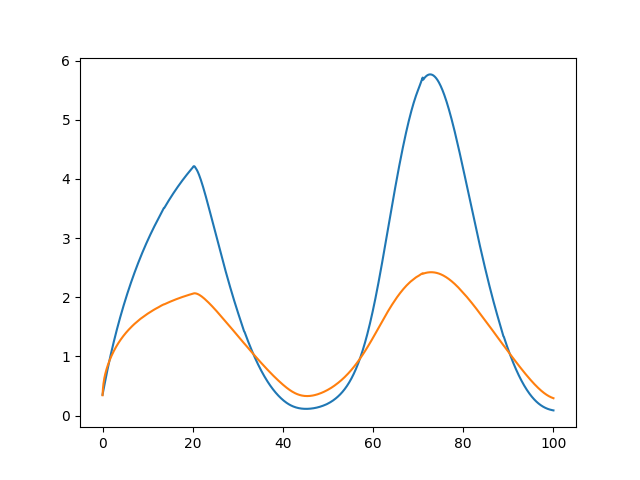
Notice that the solver accurately is able to simulate the kink (discontinuity)
at t=20 due to the discontinuity of the derivative at the initial time point!
This is why declaring discontinuities can enhance the solver accuracy.
GPU-Accelerated ODE Solving of Ensembles
In many cases one is interested in solving the same ODE many times over many different initial conditions and parameters. In diffeqpy parlance this is called an ensemble solve. diffeqpy inherits the parallelism tools of the SciML ecosystem that are used for things like automated equation discovery and acceleration. Here we will demonstrate using these parallel tools to accelerate the solving of an ensemble.
First, let's define the JIT-accelerated Lorenz equation like before:
```py from diffeqpy import de
def f(u,p,t): x, y, z = u sigma, rho, beta = p return [sigma * (y - x), x * (rho - z) - y, x * y - beta * z]
u0 = [1.0,0.0,0.0] tspan = (0., 100.) p = [10.0,28.0,8/3] prob = de.ODEProblem(f, u0, tspan, p) fastprob = de.jit32(prob) sol = de.solve(fastprob,saveat=0.01) ```
Note that here we used de.jit32 to JIT-compile the problem into a Float32 form in order to make it more
efficient on most GPUs.
Now we use the EnsembleProblem as defined on the
ensemble parallelism page of the documentation:
Let's build an ensemble by utilizing uniform random numbers to randomize the
initial conditions and parameters:
```py import random def prob_func(prob,i,rep): return de.remake(prob,u0=[random.uniform(0, 1)u0[i] for i in range(0,3)], p=[random.uniform(0, 1)p[i] for i in range(0,3)])
ensembleprob = de.EnsembleProblem(fastprob, probfunc=prob_func, safetycopy=False) ```
Now we solve the ensemble in serial:
py
sol = de.solve(ensembleprob,de.Tsit5(),de.EnsembleSerial(),trajectories=10000,saveat=0.01)
To add GPUs to the mix, we need to bring in DiffEqGPU.
The command from diffeqpy import cuda will install CUDA for you and bring all of the bindings into the returned object:
Note: from diffeqpy import cuda can take awhile to run the first time as it installs the drivers!
Now we simply use EnsembleGPUKernel(cuda.CUDABackend()) with a
GPU-specialized ODE solver cuda.GPUTsit5() to solve 10,000 ODEs on the GPU in
parallel:
py
sol = de.solve(ensembleprob,cuda.GPUTsit5(),cuda.EnsembleGPUKernel(cuda.CUDABackend()),trajectories=10000,saveat=0.01)
For the full list of choices for specialized GPU solvers, see the DiffEqGPU.jl documentation.
Note that EnsembleGPUArray can be used as well, like:
py
sol = de.solve(ensembleprob,de.Tsit5(),cuda.EnsembleGPUArray(cuda.CUDABackend()),trajectories=10000,saveat=0.01)
though we highly recommend the EnsembleGPUKernel methods for more speed. Given
the way the JIT compilation performed will also ensure that the faster kernel
generation methods work, EnsembleGPUKernel is almost certainly the
better choice in most applications.
Benchmark
To see how much of an effect the parallelism has, let's test this against R's deSolve package. This is exactly the same problem as the documentation example for deSolve, so let's copy that verbatim and then add a function to do the ensemble generation:
```py import numpy as np from scipy.integrate import odeint
def lorenz(state, t, sigma, beta, rho): x, y, z = state
dx = sigma * (y - x)
dy = x * (rho - z) - y
dz = x * y - beta * z

return [dx, dy, dz]
sigma = 10.0 beta = 8.0 / 3.0 rho = 28.0 p = (sigma, beta, rho) y0 = [1.0, 1.0, 1.0]
t = np.arange(0.0, 100.0, 0.01) result = odeint(lorenz, y0, t, p) ```
Using lapply to generate the ensemble we get:
```py import timeit def time_func(): for itr in range(1, 1001): result = odeint(lorenz, y0, t, p)
timeit.Timer(time_func).timeit(number=1)
38.08861699999761 seconds
```
Now let's see how the JIT-accelerated serial Julia version stacks up against that:
```py def time_func(): sol = de.solve(ensembleprob,de.Tsit5(),de.EnsembleSerial(),trajectories=1000,saveat=0.01)
timeit.Timer(time_func).timeit(number=1)
3.1903300999983912
```
Julia is already about 12x faster than the pure Python solvers here! Now let's add GPU-acceleration to the mix:
```py def time_func(): sol = de.solve(ensembleprob,cuda.GPUTsit5(),cuda.EnsembleGPUKernel(cuda.CUDABackend()),trajectories=1000,saveat=0.01)
timeit.Timer(time_func).timeit(number=1)
0.013322799997695256
```
Already 2900x faster than SciPy! But the GPU acceleration is made for massively parallel problems, so let's up the trajectories a bit. We will not use more trajectories from R because that would take too much computing power, so let's see what happens to the Julia serial and GPU at 10,000 trajectories:
```py def time_func(): sol = de.solve(ensembleprob,de.Tsit5(),de.EnsembleSerial(),trajectories=10000,saveat=0.01)
timeit.Timer(time_func).timeit(number=1)
68.80795999999827
```
```py def time_func(): sol = de.solve(ensembleprob,cuda.GPUTsit5(),cuda.EnsembleGPUKernel(cuda.CUDABackend()),trajectories=10000,saveat=0.01)
timeit.Timer(time_func).timeit(number=1)
0.10774460000175168
```
To compare this to the pure Julia code:
```julia using OrdinaryDiffEq, DiffEqGPU, CUDA, StaticArrays function lorenz(u, p, t) σ = p[1] ρ = p[2] β = p[3] du1 = σ * (u[2] - u[1]) du2 = u[1] * (ρ - u[3]) - u[2] du3 = u[1] * u[2] - β * u[3] return SVector{3}(du1, du2, du3) end
u0 = SA[1.0f0; 0.0f0; 0.0f0] tspan = (0.0f0, 10.0f0) p = SA[10.0f0, 28.0f0, 8 / 3.0f0] prob = ODEProblem{false}(lorenz, u0, tspan, p) probfunc = (prob, i, repeat) -> remake(prob, p = (@SVector rand(Float32, 3)) .* p) monteprob = EnsembleProblem(prob, probfunc = probfunc, safetycopy = false) @time sol = solve(monteprob, GPUTsit5(), EnsembleGPUKernel(CUDA.CUDABackend()), trajectories = 10000, saveat = 0.01);
0.014481 seconds (257.64 k allocations: 13.130 MiB)
```
which is about an order of magnitude faster for computing 10,000 trajectories,
note that the major factors are that we cannot define 32-bit floating point values
from Python and the prob_func for generating the initial conditions and parameters
is a major bottleneck since this function is written in Python.
To see how this scales in Julia, let's take it to insane heights. First, let's reduce the amount we're saving:
julia
@time sol = solve(monteprob,GPUTsit5(),EnsembleGPUKernel(CUDA.CUDABackend()),trajectories=10_000,saveat=1.0f0)
0.015040 seconds (257.64 k allocations: 13.130 MiB)
This highlights that controlling memory pressure is key with GPU usage: you will get much better performance when requiring less saved points on the GPU.
```julia @time sol = solve(monteprob,GPUTsit5(),EnsembleGPUKernel(CUDA.CUDABackend()),trajectories=100_000,saveat=1.0f0)
0.150901 seconds (2.60 M allocations: 131.576 MiB)
```
compared to serial:
```julia @time sol = solve(monteprob,Tsit5(),EnsembleSerial(),trajectories=100_000,saveat=1.0f0)
22.136743 seconds (16.40 M allocations: 1.628 GiB, 42.98% gc time)
```
And now we start to see that scaling power! Let's solve 1 million trajectories:
```julia @time sol = solve(monteprob,GPUTsit5(),EnsembleGPUKernel(CUDA.CUDABackend()),trajectories=1000000,saveat=1.0f0)
1.031295 seconds (3.40 M allocations: 241.075 MiB)
```
For reference, let's look at deSolve with the change to only save that much:
```py t = np.arange(0.0, 100.0, 1.0) def time_func(): for itr in range(1, 1001): result = odeint(lorenz, y0, t, p)
timeit.Timer(time_func).timeit(number=1)
37.42609280000033
```
The GPU version is solving 1000x as many trajectories, 37x as fast! So conclusion, if you need the most speed, you may want to move to the Julia version to get the most out of your GPU due to Float32's, and when using GPUs make sure it's a problem with a relatively average or low memory pressure, and these methods will give orders of magnitude acceleration compared to what you might be used to.
GPU Backend Choices
Just like DiffEqGPU.jl, diffeqpy supports many different GPU venders. from diffeqpy import cuda
is just for cuda, but the following others are supported:
from diffeqpy import cudawithcuda.CUDABackendfor NVIDIA GPUs via CUDAfrom diffeqpy import amdgpuwithamdgpu.AMDGPUBackendfor AMD GPUsfrom diffeqpy import oneapiwithoneapi.oneAPIBackendfor Intel's oneAPI GPUsfrom diffeqpy import metalwithmetal.MetalBackendfor Apple's Metal GPUs (on M-series processors)
For more information, see the DiffEqGPU.jl documentation.
Known Limitations
- Autodiff does not work on Python functions. When applicable, either define the derivative function
as a Julia function or set the algorithm to use finite differencing, i.e.
Rodas5(autodiff=false). All default methods use autodiff. - Delay differential equations have to use Julia-defined functions otherwise the history function is not appropriately typed with the overloads.
Testing
Unit tests can be run by tox.
sh
tox
Troubleshooting
In case you encounter silent failure from tox, try running it with
-- -s (e.g., tox -e py36 -- -s) where -s option (--capture=no,
i.e., don't capture stdio) is passed to py.test. It may show an
error message "error initializing LibGit2 module". In this case,
setting environment variable SSL_CERT_FILE may help; e.g., try:
sh
SSL_CERT_FILE=PATH/TO/cert.pem tox -e py36
See also: julia#18693.
Owner
- Name: SciML Open Source Scientific Machine Learning
- Login: SciML
- Kind: organization
- Email: contact@chrisrackauckas.com
- Website: https://sciml.ai
- Twitter: SciML_Org
- Repositories: 170
- Profile: https://github.com/SciML
Open source software for scientific machine learning
Citation (CITATION.bib)
@article{DifferentialEquations.jl-2017,
 author = {Rackauckas, Christopher and Nie, Qing},
 doi = {10.5334/jors.151},
 journal = {The Journal of Open Research Software},
 keywords = {Applied Mathematics},
 note = {Exported from https://app.dimensions.ai on 2019/05/05},
 number = {1},
 pages = {},
 title = {DifferentialEquations.jl – A Performant and Feature-Rich Ecosystem for Solving Differential Equations in Julia},
 url = {https://app.dimensions.ai/details/publication/pub.1085583166 and http://openresearchsoftware.metajnl.com/articles/10.5334/jors.151/galley/245/download/},
 volume = {5},
 year = {2017}
}
GitHub Events
Total
- Create event: 2
- Release event: 1
- Issues event: 12
- Watch event: 37
- Delete event: 1
- Issue comment event: 26
- Push event: 13
- Pull request review event: 1
- Pull request review comment event: 1
- Pull request event: 16
- Fork event: 7
Last Year
- Create event: 2
- Release event: 1
- Issues event: 12
- Watch event: 37
- Delete event: 1
- Issue comment event: 26
- Push event: 13
- Pull request review event: 1
- Pull request review comment event: 1
- Pull request event: 16
- Fork event: 7
Committers
Last synced: about 1 year ago
Top Committers
| Name | Commits | |
|---|---|---|
| Christopher Rackauckas | a****s@c****m | 81 |
| Takafumi Arakaki | a****f@g****m | 60 |
| Lilith Hafner | L****r@g****m | 16 |
| himoto | h****o@u****e | 10 |
| Lilith Orion Hafner | l****r@g****m | 8 |
| Plathottam | s****e@g****m | 2 |
| karajan9 | k****9 | 1 |
| Páll Haraldsson | P****n@g****m | 1 |
| PositroniumJS | 1****S | 1 |
| Jonnie Diegelman | 4****e | 1 |
| Ernesto Casablanca | 6****o | 1 |
| Björn Dahlgren | b****h@g****m | 1 |
| Anshul Singhvi | a****7@s****u | 1 |
| Aayush Sabharwal | a****l@g****m | 1 |
Committer Domains (Top 20 + Academic)
Issues and Pull Requests
Last synced: 10 months ago
All Time
- Total issues: 91
- Total pull requests: 58
- Average time to close issues: about 1 year
- Average time to close pull requests: about 2 months
- Total issue authors: 60
- Total pull request authors: 14
- Average comments per issue: 3.79
- Average comments per pull request: 1.95
- Merged pull requests: 44
- Bot issues: 0
- Bot pull requests: 0
Past Year
- Issues: 7
- Pull requests: 12
- Average time to close issues: 17 days
- Average time to close pull requests: about 10 hours
- Issue authors: 6
- Pull request authors: 5
- Average comments per issue: 3.29
- Average comments per pull request: 0.92
- Merged pull requests: 11
- Bot issues: 0
- Bot pull requests: 0
Top Authors
Issue Authors
- ChrisRackauckas (8)
- tkf (8)
- GrandadsJumper (5)
- tinosulzer (4)
- alexlenail (3)
- sibyjackgrove (3)
- mcarobene-id (2)
- OrbitalMechanic (2)
- himoto (2)
- aseyboldt (2)
- Isaac-Severinsen (2)
- homocomputeris (2)
- rvignolo (2)
- Zymrael (1)
- dan31 (1)
Pull Request Authors
- tkf (21)
- ChrisRackauckas (15)
- himoto (8)
- LilithHafner (7)
- PositroniumJS (2)
- TendTo (2)
- AayushSabharwal (2)
- Abhishekjsr283204 (2)
- asinghvi17 (1)
- jonniedie (1)
- PallHaraldsson (1)
- karajan9 (1)
- jlapeyre (1)
- sibyjackgrove (1)
Top Labels
Issue Labels
Pull Request Labels
Packages
- Total packages: 1
-
Total downloads:
- pypi 341 last-month
- Total docker downloads: 107
- Total dependent packages: 1
- Total dependent repositories: 4
- Total versions: 18
- Total maintainers: 1
pypi.org: diffeqpy
Solving Differential Equations in Python
- Homepage: http://github.com/SciML/diffeqpy
- Documentation: https://diffeqpy.readthedocs.io/
- License: MIT
-
Latest release: 2.5.3
published over 1 year ago
Rankings
Maintainers (1)
Dependencies
- jill *
- julia >=0.2
- actions/checkout v1 composite
- actions/setup-python v2 composite
- codecov/codecov-action v1 composite