ocr-fileformat
Validate and transform various OCR file formats (hOCR, ALTO, PAGE, FineReader)
Science Score: 62.0%
This score indicates how likely this project is to be science-related based on various indicators:
-
✓CITATION.cff file
Found CITATION.cff file -
✓codemeta.json file
Found codemeta.json file -
✓.zenodo.json file
Found .zenodo.json file -
○DOI references
-
○Academic publication links
-
✓Committers with academic emails
3 of 11 committers (27.3%) from academic institutions -
✓Institutional organization owner
Organization ub-mannheim has institutional domain (www.bib.uni-mannheim.de) -
○JOSS paper metadata
-
○Scientific vocabulary similarity
Low similarity (10.6%) to scientific vocabulary
Keywords
Repository
Validate and transform various OCR file formats (hOCR, ALTO, PAGE, FineReader)
Basic Info
- Host: GitHub
- Owner: UB-Mannheim
- License: mit
- Language: JavaScript
- Default Branch: master
- Homepage: https://digi.bib.uni-mannheim.de/ocr-fileformat/
- Size: 804 KB
Statistics
- Stars: 188
- Watchers: 19
- Forks: 24
- Open Issues: 34
- Releases: 16
Topics
Metadata Files
README.md
ocr-fileformat



Validate and transform between OCR file formats (hOCR, ALTO, PAGE, FineReader)
Installation
Docker
You can run the command line scripts and web interface as a Docker container, you only need Docker installed.
To start the web interface on http://localhost:8080:
sh
docker run --rm -it -p 8080:8080 ubma/ocr-fileformat
To run the command line scripts, mount the directory containing your input
files into the container's /data directory:
sh
docker run --rm -it -v "$PWD":/data ubma/ocr-fileformat ocr-transform alto2.0 hocr somefile.alto
System-wide
To install system-wide to /usr/local:
sh
sudo make install
To install without sudo to your home directory:
sh
make install PREFIX=$HOME/.local
If $HOME/.local/bin is not in your PATH, add this to your shell startup file (e.g. ~/.bashrc or ~/.zshrc):
export PATH="$HOME/.local/bin $PATH"
The web application has a PHP backed. You can deploy it on any PHP-capable
server by copying the web folder somewhere below the document root
of your server, e.g. /var/www/html for Apache on Debian/Ubuntu:
sudo -u www-data cp -r web /var/www/html/ocr-fileformat
In this example the GUI would be available under http://localhost/ocr-fileformat/.
Usage
The project offers two functionalities, which can be accessd via a command line script (CLI), using a web interface (GUI) or in you own tools (API)
CLI
ocr-transform: Transformation of OCR output between OCR formatsocr-validate: Validation of OCR output against OCR format schemas
GUI
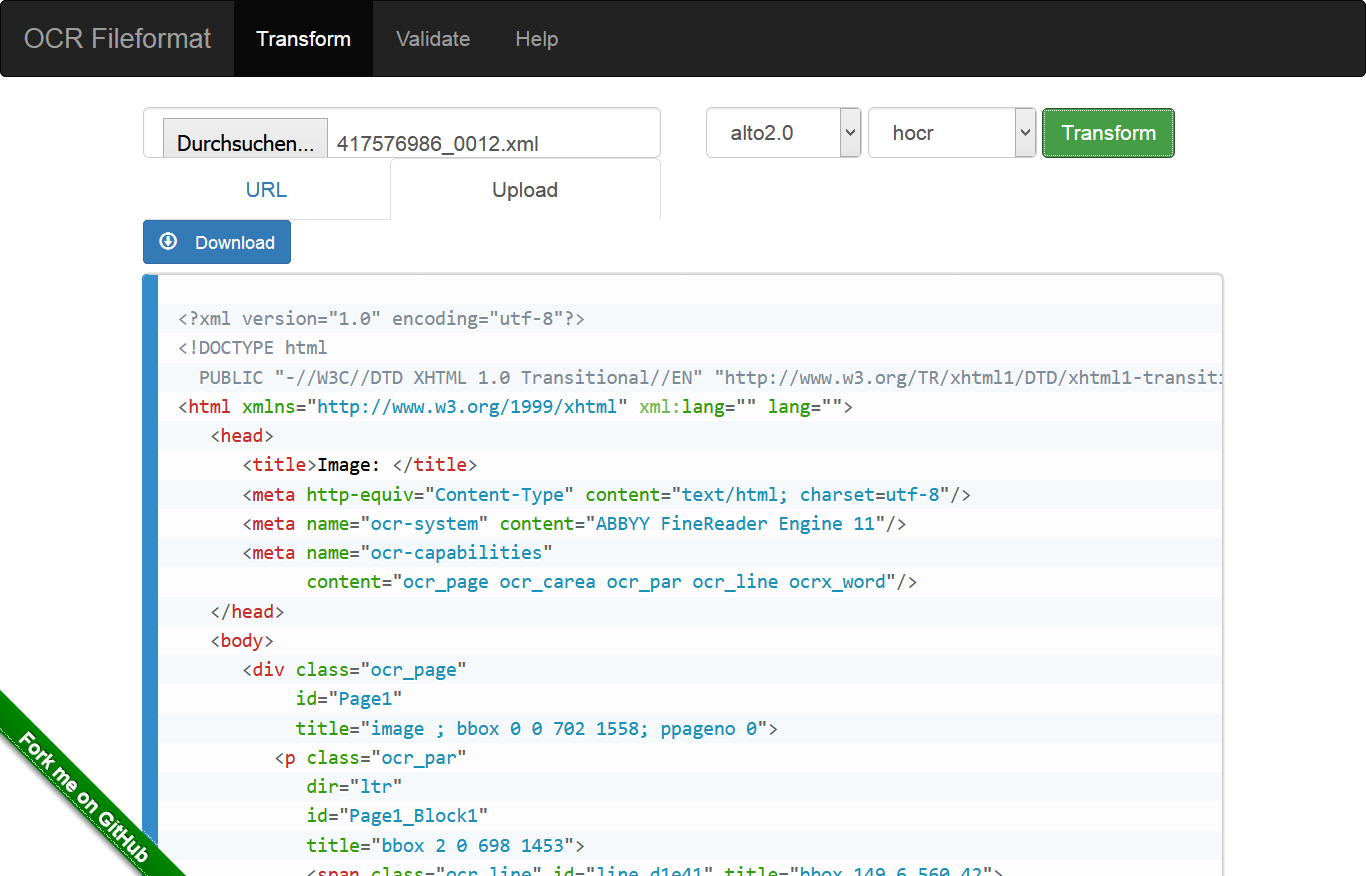
The web interface is for testing validation and transformations. You can upload a file or select an input file by URL.
API
$PREFIX/share/ocr-fileformat/xslt- XSLT stylesheets$PREFIX/share/ocr-fileformat/xsd- XSD schemas$PREFIX/share/ocr-fileformat/script/transform- Transformation scripts$PREFIX/share/ocr-fileformat/script/validate- Validation scripts
Transformation
Transformation CLI
Usage: ocr-transform [-dl] <input-fmt> <output-fmt> [<input> [<output>]] [-- <saxon_opts>]
For example, you can transform an ALTO XML to a hOCR file with:
sh
ocr-transform alto hocr sample.xml sample.hocr
Or convert from ALTO XML (version 2.1) to hOCR with:
sh
ocr-transform alto2.1 hocr sample.alto sample.hocr
You can also pass arguments directly to the Saxon CLI by passing them after a double dash (--). For example, to set the foo parameter to bar:
sh
ocr-transform alto hocr sample.xml sample.hocr -- foo=bar
Try ocr-transform -h to get an overview:
```
Usage:
ocr-transform [OPTIONS]
Options:
    --debug   -d     Increase debug level by 1, can be repeated

Transformations:
    abbyy hocr
    abbyy page
    alto hocr
    alto page
    alto text
    alto2.0 alto3.0
    alto2.0 alto3.1
    alto2.0 hocr
    alto2.1 alto3.0
    alto2.1 alto3.1
    alto2.1 hocr
    alto4.2 alto2.1
    gcv alto
    gcv hocr
    gcv page
    hocr alto
    hocr alto2.0
    hocr alto2.1
    hocr alto3.0
    hocr alto4.0
    hocr page
    hocr tei
    hocr text
    mybib alto3.0
    page alto
    page alto_legacy
    page hocr
    page page2019
    page text
    tei hocr
    textract page
```
Transformation GUI
Select the Transform menu option. Choose a URL, an input and an output
format. Click Transform.
Transformation API
The stylesheets are installed in $PREFIX/share/ocr-fileformat/xslt and can be
used directly in your scripts and software. You will need to use an XSLT 2.0
capable stylesheet transformer.
Supported Transformations
| From ╲ To | hOCR | ALTO | PAGEXML | TEI | Text | | ---: | --- | --- | --- | --- | --- | | hOCR | - | ✓ | ✓ | ✓ | ✓ | | ALTO | ✓ | ✓ | ✓ | - | ✓ | | PAGEXML | ✓ | ✓ | ✓ | - | ✓ | | ABBYY FineReader | ✓ | - | ✓ | - | - | | Google Cloud Vision | ✓ | ✓ | ✓ | - | - | | Amazon AWS Textract | - | - | ✓ | - | - | | TEI | ✓ | - | - | - | - |
Validation
```
Usage:
ocr-validate [OPTIONS]
Options:
    --debug   -d     Increase debug level by 1, can be repeated

Schemas:
    hocr
    alto-1-0 alto-1-1 alto-1-2 alto-1-3 alto-1-4 alto-2-0 alto-2-1 alto-2-2-draft alto-3-0 alto-3-1 alto-3-2-draft alto-4-0 alto-4-1 alto-4-2 alto-4-3
    abbyy-6-schema-v1 abbyy-8-schema-v2 abbyy-9-schema-v1 abbyy-10-schema-v1
    page-2009-03-16 page-2010-01-12 page-2010-03-19 page-2013-07-15 page-2016-07-15 page-2017-07-15 page-2018-07-15 page-2019-07-15
```
Validation CLI
For example, to validate an XML file against the ALTO 3.1 schema:
ocr-validate alto-3-1 myFile.alto
Validation GUI
Select the Validate menu option. Choose a URL and an schema. Click Validate.
Validation API
The XSD files are installed under $PREFIX/share/ocr-fileformat/xsd
Supported Validation Formats
| | hOCR | ALTO | PAGEXML | FineReader | Google Cloud Vision | Amazon AWS Textract | | ---: | --- | --- | --- | --- | --- | --- | | Validation | ✓ | ✓ | ✓ | ✓ | - | - |
License
This is free software. You may use it under the terms of the MIT License.
During the installation process several projects are included (in ./vendor). These projects have different licenses:
- Saxon HE 9.7,
MPL. - ALTOXML schema, "Open Source" for ALTO <= 3.1,
CC BY SA 4.0since ALTO 4.0 - PAGE schemas,
? - xsd-validator by Adrian Mouat @amouat,
Apache 2.0 - ABBYY FineReader XSD,
? - hOCR-to-ALTO by Filip Kriz @filak,
MIT - hocr-spec by Konstantin Baierer @kba,
MIT - gcv2hocr by Endo Michiaki,
CC BY 4.0 - format-converters by OCR-D,
Apache 2.0 - prima-page-converter by PRImA Research Lab ,
Apache 2.0 - page-to-alto by Konstantin Baierer @kba,
Apache 2.0 - textract2page by Arne Rümmler @rue-a,
Apache 2.0
Owner
- Name: Universitätsbibliothek Mannheim
- Login: UB-Mannheim
- Kind: organization
- Email: info.ub@uni-mannheim.de
- Location: Mannheim, Germany
- Website: https://www.bib.uni-mannheim.de/
- Twitter: UBMannheim
- Repositories: 139
- Profile: https://github.com/UB-Mannheim
Mannheim University Library
Citation (CITATION.cff)
# This CITATION.cff file was generated with cffinit.
# Visit https://bit.ly/cffinit to generate yours today!

cff-version: 1.2.0
title: ocr-fileformat
message: >-
  You may cite this software using the metadata from this file.
type: software
authors:
  - name: Universitätsbibliothek Mannheim
    country: DE
    city: Mannheim
    website: 'https://www.bib.uni-mannheim.de/'
  - given-names: Konstantin
    family-names: Baierer
    orcid: 'https://orcid.org/0000-0003-2397-242X'
  - given-names: Stefan
    family-names: Weil
    affiliation: Universitätsbibliothek Mannheim
    orcid: 'https://orcid.org/0000-0002-0524-9898'
  - family-names: Zumstein
    given-names: Philipp
    affiliation: Universitätsbibliothek Mannheim
    orcid: 'https://orcid.org/0000-0002-6485-9434'
  - given-names: Robert
    family-names: Sachunsky
  - given-names: Jörg
    orcid: 'https://orcid.org/0000-0002-6406-4906'
    family-names: Mechnich
    affiliation: Universitätsbibliothek Mannheim
  - given-names: Uwe
    family-names: Hartwig
    orcid: 'https://orcid.org/0000-0001-7164-6376'
  - given-names: Mike
    family-names: Gerber
  - given-names: Clemens
    orcid: 'https://orcid.org/0000-0001-5293-8322'
    family-names: Neudecker
GitHub Events
Total
- Create event: 1
- Issues event: 1
- Release event: 2
- Watch event: 7
- Delete event: 1
- Issue comment event: 8
- Push event: 4
- Pull request review event: 3
- Pull request event: 4
- Fork event: 2
Last Year
- Create event: 1
- Issues event: 1
- Release event: 2
- Watch event: 7
- Delete event: 1
- Issue comment event: 8
- Push event: 4
- Pull request review event: 3
- Pull request event: 4
- Fork event: 2
Committers
Last synced: about 1 year ago
Top Committers
| Name | Commits | |
|---|---|---|
| Konstantin Baierer | u****g@g****m | 104 |
| Stefan Weil | sw@w****e | 65 |
| Philipp Zumstein | z****p@g****m | 43 |
| Robert Sachunsky | s****y@i****e | 23 |
| Jörg Mechnich | j****h@b****e | 6 |
| Konstantin Baierer | k****r@b****e | 3 |
| Clemens Neudecker | c****r@g****m | 1 |
| Gerber, Mike | m****r@s****e | 1 |
| LGTM Migrator | l****r | 1 |
| The Codacy Badger | b****r@c****m | 1 |
| Uwe Hartwig | u****g@b****o | 1 |
Committer Domains (Top 20 + Academic)
Issues and Pull Requests
Last synced: about 1 year ago
All Time
- Total issues: 94
- Total pull requests: 95
- Average time to close issues: 6 months
- Average time to close pull requests: 2 months
- Total issue authors: 13
- Total pull request authors: 5
- Average comments per issue: 4.2
- Average comments per pull request: 1.85
- Merged pull requests: 83
- Bot issues: 0
- Bot pull requests: 0
Past Year
- Issues: 0
- Pull requests: 3
- Average time to close issues: N/A
- Average time to close pull requests: 3 days
- Issue authors: 0
- Pull request authors: 2
- Average comments per issue: 0
- Average comments per pull request: 3.67
- Merged pull requests: 3
- Bot issues: 0
- Bot pull requests: 0
Top Authors
Issue Authors
- zuphilip (25)
- stweil (10)
- kba (6)
- jbarth-ubhd (4)
- jtlz2 (3)
- yanirmr (2)
- mhucka (2)
- jbaiter (1)
- yuvaler1 (1)
- TuulaP (1)
- FoxKyong (1)
- dinosauria123 (1)
- jmokoistinen (1)
- asor12 (1)
Pull Request Authors
- kba (25)
- zuphilip (25)
- stweil (6)
- bertsky (5)
- codacy-badger (1)
Top Labels
Issue Labels
Pull Request Labels
Dependencies
- actions/checkout v3 composite
- github/codeql-action/analyze v2 composite
- github/codeql-action/autobuild v2 composite
- github/codeql-action/init v2 composite
- alpine edge build