avalan
The multi-backend, multi-modal framework for AI agent development, orchestration, and deployment
Science Score: 44.0%
This score indicates how likely this project is to be science-related based on various indicators:
-
✓CITATION.cff file
Found CITATION.cff file -
✓codemeta.json file
Found codemeta.json file -
✓.zenodo.json file
Found .zenodo.json file -
○DOI references
-
○Academic publication links
-
○Academic email domains
-
○Institutional organization owner
-
○JOSS paper metadata
-
○Scientific vocabulary similarity
Low similarity (11.7%) to scientific vocabulary
Repository
The multi-backend, multi-modal framework for AI agent development, orchestration, and deployment
Basic Info
- Host: GitHub
- Owner: avalan-ai
- License: mit
- Language: Python
- Default Branch: main
- Size: 2.22 MB
Statistics
- Stars: 20
- Watchers: 2
- Forks: 4
- Open Issues: 1
- Releases: 35
Metadata Files
README.md
avalan
The multi-backend, multi-modal framework for AI agent development, orchestration, and deployment







Avalan empowers developers and enterprises to build, orchestrate, and deploy intelligent AI solutions locally, on-premises and in the cloud. It provides a unified SDK and CLI for running millions of models with ease.
Highlights
- Multi-modal integration (NLP/text, vision, audio.)
- Multi-backend support (transformers, vLLM, mlx-lm.)
- Native adapters for Anyscale, Anthropic, DeepInfra, DeepSeek, Google (Gemini), Groq, HuggingFace, Hyperbolic, LiteLLM, Ollama, OpenAI, OpenRouter, Together, among others.
- Sophisticated memory management with native implementations for PostgreSQL (pgvector), Elasticsearch, AWS Opensearch, AWS S3 Vectors, and reasoning graph storage.
- Multiple reasoning strategies including ReACT, ChainofThought, TreeofThought, PlanandReflect, SelfConsistency, ScratchpadToolformer, Cascaded Prompting, CriticGuided DirectionFollowing Experts, and ProductofExperts.
- Intuitive pipelines with branching, filtering, and recursive AI workflows.
- Comprehensive observability through metrics, event tracing, and dashboards.
- Deploy your AI workflows to the cloud, your premises, or locally.
- Use via the CLI or integrate the Python SDK directly in your code.
These features make avalan ideal for everything from quick experiments to enterprise deployments.
Why Avalan
- Open ecosystem: tap not only the big LLM APIs but the millions of freely available models: text, vision, audio, agents, and more.
- Run anywhere: onprem, in your cloud, at the edge, or on a laptop. No deployment restrictions.
- Total control: switch models, tweak parameters, chain workflows, and track detailed metrics from CLI, code, or simple config files.
- Protocolagnostic: native support for MCP, A2A, the OpenAI API, and easy adapters for your own interfaces.
- No vendor lockin: Avalan orchestrates your services and code, fitting your existing stack instead of replacing it.
- Composable reasoning: multiple strategy templates and nested workflows that can call other flows, invoke applications, and execute code on demand.
Quick Look
Take a quick look at how to setup avalan in Install, which models and modalities you can use in Models, the tools available to agents in Tools, the reasoning approaches in Reasoning strategies, the memories you can configure in Memories, how to build and deploy agents in Agents, and see every CLI option in the CLI docs.
Models
Avalan provides text, audio and vision models that you can access from the CLI or your own code. Run millions of open models or call any vendor model.
Vendor models
Avalan supports all popular vendor models through engine URIs. The example below uses OpenAI's GPT-4o:
bash
echo "Who are you, and who is Leo Messi?" \
    | avalan model run "ai://$OPENAI_API_KEY@openai/gpt-4o" \
        --system "You are Aurora, a helpful assistant" \
        --max-new-tokens 100 \
        --temperature .1 \
        --top-p .9 \
        --top-k 20
Open models
Open models run across engines such as transformers, vLLM and mlx-lm.
Search through millions of them with avalan model search using different
filters. The following command looks for up to three text-generation models that
run with the mlx backend, match the term DeepSeek-R1, and were published by
the MLX community:
bash
avalan model search --name DeepSeek-R1 \
    --library mlx \
    --task text-generation \
    --author "mlx-community" \
    --limit 3
The command returns three matching models:
```text
mlx-community/DeepSeek-R1-Distill-Qwen-14B N/A params
access granted mlx-community updated: 4 months ago
transformers text-generation
mlx-community/DeepSeek-R1-Distill-Qwen-7B N/A params
access granted mlx-community updated: 4 months ago
transformers text-generation
mlx-community/Unsloth-DeepSeek-R1-Distill-Qwen-14B-4bit N/A pa
access granted mlx-community updated: 4 months ago
transformers text-generation
```
Install the first model:
bash
avalan model install mlx-community/DeepSeek-R1-Distill-Qwen-14B
The model is now ready to use:
```text
mlx-community/DeepSeek-R1-Distill-Qwen-14B 14.8B params
access granted mlx-community updated: 4 months ago
qwen2 transformers text-generation
Downloading model mlx-community/DeepSeek-R1-Distill-Qwen-14B:
Fetching 13 files 100% [ 13/13 - 0:04:15 ]
Downloaded model mlx-community/DeepSeek-R1-Distill-Qwen-14B to /Users/leo/.cache/huggingface/hub/models--mlx-community--DeepSeek-R1- Distill-Qwen-14B/snapshots/68570f64bcc30966595926e3b7d200a9d77fb1e8 ```
Test the model we just installed, specifying mlx as the backend:
[!TIP] You can choose your preferred backend using the
--backendoption. For example, on Apple Silicon Macs, themlxbackend typically offers a 3x speedup compared to the defaulttransformersbackend. On devices with access to Nvidia GPUs, models that run on the backendvllmare also orders of magnitude faster.
bash
echo 'What is (4 + 6) and then that result times 5, divided by 2?' | \
    avalan model run 'mlx-community/DeepSeek-R1-Distill-Qwen-14B' \
        --temperature 0.6 \
        --max-new-tokens 1024 \
        --start-thinking \
        --backend mlx
The output shows the reasoning and the correct final answer:
```text
access granted mlx-community
What is (4 + 6) and then that result times 5, divided by 2?
mlx-community/DeepSeek-R1-Distill-Qwen-14B reasoning
First, I will add 4 and 6 to get the result.
Next, I will multiply that sum by 5.
Then, I will divide the product by 2 to find the final answer.
\]
- Divide the product by 2:
[
50 \div 2 = 25
]
Final Answer:
[
\boxed{25}
26 tokens in 158 token out ttft: 1.14 s 14.90 t/s ```
Modalities
The following examples show each modality in action. Use the table of contents below to jump to the task you need:
- Audio: Turn audio into text or produce speech for accessibility and media.
- Audio classification: Label an audio based on sentiment.
- Speech recognition: Convert spoken audio to text.
- Text to speech: Generate spoken audio from text.
- Audio generation: Compose music from text.
- Text: Perform natural language processing to understand or generate information.
- Question answering: Answer questions from context.
- Sequence classification: Label a sequence such as sentiment.
- Sequence to sequence: Transform text like summarization.
- Text generation: Produce new text from prompts.
- Token classification: Tag tokens for tasks like Named Entity Recognition.
- Translation: Convert text between languages.
- Vision: Analyze images or create visuals for content and automation.
- Encoder Decoder: Answer questions on documents, OCR-free.
- Image classification: Identify objects in an image
- Image to text: Describe an image with text
- Image text to text: Provide an image and instruction to produce text
- Object detection: Locate objects within an image
- Semantic segmentation: Label each pixel in an image
- Text to animation: Create animations from prompts
- Text to image: Generate images from text
- Text to video: Produce videos from text prompts
Audio
Audio classification
Determine the sentiment (neutral, happy, angry, sad) of a given audio file:
bash
avalan model run "superb/hubert-base-superb-er" \
    --modality audio_classification \
    --path oprah.wav \
    --audio-sampling-rate 16000
And you'll get the likeliness of each sentiment:
```text
Label Score
ang 0.49
hap 0.45
neu 0.04
sad 0.02
```
You can achieve the same result directly from Python:
```python from avalan.model.audio.classification import AudioClassificationModel
with AudioClassificationModel("superb/hubert-base-superb-er") as model: labels = await model("oprah.wav", sampling_rate=16000) print(labels) ``` For a runnable script, see docs/examples/audio_classification.py.
Speech recognition
Transcribe speech from an audio file:
bash
avalan model run "facebook/wav2vec2-base-960h" \
    --modality audio_speech_recognition \
    --path oprah.wav \
    --audio-sampling-rate 16000
The output is the transcript of the provided audio:
text
AND THEN I GREW UP AND HAD THE ESTEEMED HONOUR OF MEETING HER AND WASN'T
THAT A SURPRISE HERE WAS THIS PETITE ALMOST DELICATE LADY WHO WAS THE
PERSONIFICATION OF GRACE AND GOODNESS
The SDK lets you do the same programmatically:
```python from avalan.model.audio.speech_recognition import SpeechRecognitionModel
with SpeechRecognitionModel("facebook/wav2vec2-base-960h") as model: output = await model("oprah.wav", sampling_rate=16000) print(output) ``` For a runnable script, see docs/examples/audiospeechrecognition.py.
Text to speech
Generate speech in Oprah's voice from a text prompt. The example uses an 18-second clip from her eulogy for Rosa Parks as a reference:
bash
echo "[S1] Leo Messi is the greatest football player of all times." | \
    avalan model run "nari-labs/Dia-1.6B-0626" \
            --modality audio_text_to_speech \
            --path example.wav \
            --audio-reference-path docs/examples/oprah.wav \
            --audio-reference-text "[S1] And then I grew up and had the esteemed honor of meeting her. And wasn't that a surprise. Here was this petite, almost delicate lady who was the personification of grace and goodness."
In code you can generate speech in the same way:
```python from avalan.model.audio.speech import TextToSpeechModel
with TextToSpeechModel("nari-labs/Dia-1.6B-0626") as model: await model( "[S1] Leo Messi is the greatest football player of all times.", "example.wav", referencepath="docs/examples/oprah.wav", referencetext=( "[S1] And then I grew up and had the esteemed honor of meeting her. " "And wasn't that a surprise. Here was this petite, almost delicate " "lady who was the personification of grace and goodness." ), ) ``` For a runnable script, see docs/examples/audiotextto_speech.py.
Audio generation
Create a short melody from a text prompt:
bash
echo "A funky riff about Leo Messi." |
    avalan model run "facebook/musicgen-small" \
        --modality audio_generation \
        --max-new-tokens 1024 \
        --path melody.wav
Using the library instead of the CLI:
```python from avalan.model.audio.generation import AudioGenerationModel
with AudioGenerationModel("facebook/musicgen-small") as model: await model("A funky riff about Leo Messi.", "melody.wav", maxnewtokens=1024) ``` For a runnable script, see docs/examples/audio_generation.py.
Text
Question answering
Answer a question based on context using a question answering model:
bash
echo "What sport does Leo play?" \
    | avalan model run "deepset/roberta-base-squad2" \
        --modality "text_question_answering" \
        --text-context "Lionel Messi, known as Leo Messi, is an Argentine professional footballer widely regarded as one of the greatest football players of all time."
The answer comes as no surprise:
text
football
Or run it from your own script:
```python from avalan.model.nlp.question import QuestionAnsweringModel
with QuestionAnsweringModel("deepset/roberta-base-squad2") as model: answer = await model( "What sport does Leo play?", context="Lionel Messi, known as Leo Messi, is an Argentine professional footballer widely regarded as one of the greatest football players of all time." ) print(answer) ``` For a runnable script, see docs/examples/question_answering.py.
Sequence classification
Classify the sentiment of short text:
bash
echo "We love Leo Messi." \
    | avalan model run "distilbert-base-uncased-finetuned-sst-2-english" \
        --modality "text_sequence_classification"
The result is positive as expected:
text
POSITIVE
The SDK version looks like this:
```python from avalan.model.nlp.sequence import SequenceClassificationModel
with SequenceClassificationModel("distilbert-base-uncased-finetuned-sst-2-english") as model: output = await model("We love Leo Messi.") print(output) ``` For a runnable script, see docs/examples/sequence_classification.py.
Sequence to sequence
Summarize text using a sequence-to-sequence model:
```bash echo " Andres Cuccittini, commonly known as Andy Cucci, is an Argentine professional footballer who plays as a forward for the Argentina national team. Regarded by many as the greatest footballer of all time, Cucci has achieved unparalleled success throughout his career.
Born on July 25, 1988, in Ushuaia, Argentina, Cucci began playing
football at a young age and joined the Boca Juniors youth
academy.
" | avalan model run "facebook/bart-large-cnn" \ --modality "textsequenceto_sequence" ```
The summary:
text
Andy Cucci is held by many as the greatest footballer of all times.
Calling from Python is just as easy:
```python from avalan.model.nlp.sequence import SequenceToSequenceModel
with SequenceToSequenceModel("facebook/bart-large-cnn") as model: output = await model(""" Andres Cuccittini, commonly known as Andy Cucci, is an Argentine professional footballer who plays as a forward for the Argentina national team. Regarded by many as the greatest footballer of all time, Cucci has achieved unparalleled success throughout his career.
Born on July 25, 1988, in Ushuaia, Argentina, Cucci began playing
football at a young age and joined the Boca Juniors youth
academy.
""")
print(output)
``` For a runnable script, see docs/examples/seq2seq_summarization.py.
Text generation
Run a local model and control sampling with --temperature, --top-p, and --top-k. The example instructs the assistant to act as "Aurora" and limits the output to 100 tokens:
bash
echo "Who are you, and who is Leo Messi?" \
    | avalan model run "meta-llama/Meta-Llama-3-8B-Instruct" \
        --system "You are Aurora, a helpful assistant" \
        --max-new-tokens 100 \
        --temperature .1 \
        --top-p .9 \
        --top-k 20
Here's the equivalent Python snippet:
```python from avalan.entities import GenerationSettings from avalan.model.nlp.text.generation import TextGenerationModel
with TextGenerationModel("meta-llama/Meta-Llama-3-8B-Instruct") as model: async for token in await model( "Who are you, and who is Leo Messi?", systemprompt="You are Aurora, a helpful assistant", settings=GenerationSettings( maxnewtokens=100, temperature=0.1, topp=0.9, top_k=20 ) ): print(token, end="", flush=True) ```
Vendor APIs use the same interface. Swap in a vendor engine URI to call an external service. The example below uses OpenAI's GPT-4o with the same parameters:
bash
echo "Who are you, and who is Leo Messi?" \
    | avalan model run "ai://$OPENAI_API_KEY@openai/gpt-4o" \
        --system "You are Aurora, a helpful assistant" \
        --max-new-tokens 100 \
        --temperature .1 \
        --top-p .9 \
        --top-k 20
Swap in the vendor URI in code too:
```python from avalan.entities import GenerationSettings from avalan.model.nlp.text.generation import TextGenerationModel from os import getenv
apikey = getenv("OPENAIAPIKEY") with TextGenerationModel(f"ai://{apikey}@openai/gpt-4o") as model: async for token in await model( "Who are you, and who is Leo Messi?", systemprompt="You are Aurora, a helpful assistant", settings=GenerationSettings( maxnewtokens=100, temperature=0.1, topp=0.9, top_k=20 ) ): print(token, end="", flush=True) ``` For a runnable script, see docs/examples/text_generation.py.
Token classification
Classify tokens with labels for Named Entity Recognition (NER) or Part-of-Speech (POS):
bash
echo "
    Lionel Messi, commonly known as Leo Messi, is an Argentine
    professional footballer widely regarded as one of the
    greatest football players of all time.
" | avalan model run "dslim/bert-base-NER" \
    --modality text_token_classification \
    --text-labeled-only
And you get the following labeled entities:
```text
Token Label
[CLS] B-PER
Lionel I-PER
Me I-PER
##ssi B-PER
, I-PER
commonly I-PER
known B-MISC
```
Use the Python API if you prefer:
```python from avalan.model.nlp.token import TokenClassificationModel
with TokenClassificationModel("dslim/bert-base-NER") as model: labels = await model( "Lionel Messi, commonly known as Leo Messi, is an Argentine professional footballer widely regarded as one of the greatest football players of all time.", labeled_only=True ) print(labels) ``` For a runnable script, see docs/examples/token_classification.py.
Translation
Translate text between languages with a sequence-to-sequence model:
bash
echo "
    Lionel Messi, commonly known as Leo Messi, is an Argentine
    professional footballer who plays as a forward for the Argentina
    national team. Regarded by many as the greatest footballer of all
    time, Messi has achieved unparalleled success throughout his career.
" | avalan model run "facebook/mbart-large-50-many-to-many-mmt" \
        --modality "text_translation" \
        --text-from-lang "en_US" \
        --text-to-lang "es_XX" \
        --text-num-beams 4 \
        --text-max-length 512
Here is the Spanish version:
text
Lionel Messi, conocido como Leo Messi, es un futbolista argentino profesional
que representa a la Argentina en el equipo nacional. Considerado por muchos
como el mejor futbolista de todos los tiempos, Messi ha conseguido un xito
sin precedentes durante su carrera.
The SDK call mirrors the CLI parameters:
```python from avalan.entities import GenerationSettings from avalan.model.nlp.sequence import TranslationModel
with TranslationModel("facebook/mbart-large-50-many-to-many-mmt") as model: output = await model( "Lionel Messi, commonly known as Leo Messi, is an Argentine professional footballer who plays as a forward for the Argentina national team. Regarded by many as the greatest footballer of all time, Messi has achieved unparalleled success throughout his career.", sourcelanguage="enUS", destinationlanguage="esXX", settings=GenerationSettings( numbeams=4, maxlength=512 ) ) print(output) ``` For a runnable script, see docs/examples/seq2seq_translation.py.
Vision
Encoder decoder
Answer questions to extract information from an image, without using OCR.
bash
echo "<s_docvqa><s_question>
    What is the FACTURA Number?
</s_question><s_answer>" | \
    avalan model run "naver-clova-ix/donut-base-finetuned-docvqa" \
        --modality vision_encoder_decoder \
        --path docs/examples/factura-page-1.png
And you get the answer:
<s_docvqa>
<s_question>What is the FACTURA Number?</s_question>
<s_answer>0012-00187506</s_answer>
</s>
Here's how you'd call it in a script:
```python from avalan.model.vision.decoder import VisionEncoderDecoderModel
with VisionEncoderDecoderModel("naver-clova-ix/donut-base-finetuned-docvqa") as model:
answer = await model(
"docs/examples/factura-page-1.png",
prompt="
Image classification
Classify an image, such as determining whether it is a hot dog, or not a hot dog :
bash
avalan model run "microsoft/resnet-50" \
    --modality vision_image_classification \
    --path docs/examples/cat.jpg
The model identifies the image:
```text
Label
tabby, tabby cat
```
Programmatic usage:
```python from avalan.model.vision.image import ImageClassificationModel
with ImageClassificationModel("microsoft/resnet-50") as model: output = await model("docs/examples/cat.jpg") print(output) ``` For a runnable script, see docs/examples/visionimageclassification.py.
Image to text
Generate a caption for an image:
bash
avalan model run "salesforce/blip-image-captioning-base" \
    --modality vision_image_to_text \
    --path docs/examples/Example_Image_1.jpg
Example output:
text
a sign for a gas station on the side of a building [SEP]
Python snippet:
```python from avalan.model.vision.image import ImageToTextModel
with ImageToTextModel("salesforce/blip-image-captioning-base") as model: caption = await model("docs/examples/ExampleImage1.jpg") print(caption) ``` For a runnable script, see docs/examples/visionimageto_text.py.
Image text to text
Provide an image and an instruction to an image-text-to-text model:
bash
echo "Transcribe the text on this image, keeping format" | \
    avalan model run "ai://local/google/gemma-3-12b-it" \
        --modality vision_image_text_to_text \
        --path docs/examples/typewritten_partial_sheet.jpg \
        --vision-width 512 \
        --max-new-tokens 1024
The transcription (truncated for brevity):
```text INTRODUCCIN
Guillermo de Ockham (segn se utiliza la grafa latina o la inglesa) es tan clebre como conocido. Su doctrina suele merecer las ms diversas interpretaciones, y su biografa adolece tremendas oscuridades. ```
Invoke the model with the SDK like so:
```python from avalan.entities import GenerationSettings from avalan.model.vision.image import ImageTextToTextModel
with ImageTextToTextModel("google/gemma-3-12b-it") as model: output = await model( "docs/examples/typewrittenpartialsheet.jpg", "Transcribe the text on this image, keeping format", settings=GenerationSettings(maxnewtokens=1024), width=512 ) print(output) ``` For a runnable script, see docs/examples/vision_ocr.py.
Object detection
Detect objects in an image and list them with accuracy scores:
bash
avalan model run "facebook/detr-resnet-50" \
    --modality vision_object_detection \
    --path docs/examples/kitchen.jpg \
    --vision-threshold 0.3
Results are sorted by accuracy and include bounding boxes:
```text
Label Score Box
refrigerator 1.00 855.28, 377.27, 1035.67, 679.42
oven 1.00 411.62, 570.92, 651.66, 872.05
potted plant 0.99 1345.95, 498.15, 1430.21, 603.84
sink 0.96 1077.43, 631.51, 1367.12, 703.23
potted plant 0.94 179.69, 557.44, 317.14, 629.77
vase 0.83 1357.88, 562.67, 1399.38, 616.44
handbag 0.72 287.08, 544.47, 332.73, 602.24
sink 0.68 1079.68, 627.04, 1495.40, 714.07
bird 0.38 628.57, 536.31, 666.62, 574.39
sink 0.35 1077.98, 629.29, 1497.90, 723.95
spoon 0.31 646.69, 505.31, 673.04, 543.10
```
Example SDK call:
```python from avalan.model.vision.detection import ObjectDetectionModel
with ObjectDetectionModel("facebook/detr-resnet-50") as model: labels = await model("docs/examples/kitchen.jpg", threshold=0.3) print(labels) ``` For a runnable script, see docs/examples/visionobjectdetection.py.
Semantic segmentation
Classify each pixel using a semantic segmentation model:
bash
avalan model run "nvidia/segformer-b0-finetuned-ade-512-512" \
    --modality vision_semantic_segmentation \
    --path docs/examples/kitchen.jpg
The output lists each annotation:
```text
Label
wall
floor
ceiling
windowpane
cabinet
door
plant
rug
lamp
chest of drawers
sink
refrigerator
flower
stove
kitchen island
light
chandelier
oven
microwave
dishwasher
hood
vase
fan
```
This is how you'd do it in code:
```python from avalan.model.vision.segmentation import SemanticSegmentationModel
with SemanticSegmentationModel("nvidia/segformer-b0-finetuned-ade-512-512") as model: labels = await model("docs/examples/kitchen.jpg") print(labels) ``` For a runnable script, see docs/examples/visionsemanticsegmentation.py.
Text to animation
Create an animation from a prompt using a base model for styling:
bash
echo 'A tabby cat slowly walking' | \
    avalan model run "ByteDance/AnimateDiff-Lightning" \
        --modality vision_text_to_animation \
        --base-model "stablediffusionapi/mistoonanime-v30" \
        --checkpoint "animatediff_lightning_4step_diffusers.safetensors" \
        --weight "fp16" \
        --path example_cat_walking.gif \
        --vision-beta-schedule "linear" \
        --vision-guidance-scale 1.0 \
        --vision-steps 4 \
        --vision-timestep-spacing "trailing"
And here's the generated anime inspired animation of a walking cat:

SDK usage:
```python from avalan.entities import EngineSettings from avalan.model.vision.diffusion import TextToAnimationModel
with TextToAnimationModel("ByteDance/AnimateDiff-Lightning", settings=EngineSettings(basemodelid="stablediffusionapi/mistoonanime-v30", checkpoint="animatedifflightning4stepdiffusers.safetensors", weighttype="fp16")) as model: await model( "A tabby cat slowly walking", "examplecatwalking.gif", betaschedule="linear", guidancescale=1.0, steps=4, timestep_spacing="trailing" ) ``` For a runnable script, see docs/examples/visiontextto_animation.py.
Text to image
Create an image from a text prompt:
bash
echo 'Leo Messi petting a purring tubby cat' | \
    avalan model run "stabilityai/stable-diffusion-xl-base-1.0" \
        --modality vision_text_to_image \
        --refiner-model "stabilityai/stable-diffusion-xl-refiner-1.0" \
        --weight "fp16" \
        --path example_messi_petting_cat.jpg \
        --vision-color-model RGB \
        --vision-image-format JPEG \
        --vision-high-noise-frac 0.8 \
        --vision-steps 150
Here is the generated image of Leo Messi petting a cute cat:

You can also create images from Python:
```python from avalan.entities import TransformerEngineSettings from avalan.model.vision.diffusion import TextToImageModel
with TextToImageModel("stabilityai/stable-diffusion-xl-base-1.0", settings=TransformerEngineSettings(refinermodelid="stabilityai/stable-diffusion-xl-refiner-1.0", weighttype="fp16")) as model: await model( "Leo Messi petting a purring tubby cat", "examplemessipettingcat.jpg", colormodel="RGB", imageformat="JPEG", highnoisefrac=0.8, n_steps=150 ) ``` For a runnable script, see docs/examples/visiontextto_image.py.
Text to video
Create an MP4 video from a prompt, using a negative prompt for guardrails and an image as reference:
bash
echo 'A cute little penguin takes out a book and starts reading it' | \
    avalan model run "Lightricks/LTX-Video-0.9.7-dev" \
        --modality vision_text_to_video \
        --upsampler-model "Lightricks/ltxv-spatial-upscaler-0.9.7" \
        --weight "fp16" \
        --vision-steps 30 \
        --vision-negative-prompt "worst quality, inconsistent motion, blurry, jittery, distorted" \
        --vision-inference-steps 10 \
        --vision-reference-path penguin.png \
        --vision-width 832 \
        --vision-height 480 \
        --vision-frames 96 \
        --vision-fps 24 \
        --vision-decode-timestep 0.05 \
        --vision-denoise-strength 0.4 \
        --path example_text_to_video.mp4
And here's the generated video:

Python example:
```python from avalan.entities import EngineSettings from avalan.model.vision.diffusion import TextToVideoModel
with TextToVideoModel("Lightricks/LTX-Video-0.9.7-dev", settings=EngineSettings(upsamplermodelid="Lightricks/ltxv-spatial-upscaler-0.9.7", weighttype="fp16")) as model: await model( "A cute little penguin takes out a book and starts reading it", "worst quality, inconsistent motion, blurry, jittery, distorted", "penguin.png", "exampletexttovideo.mp4", steps=30, inferencesteps=10, width=832, height=480, frames=96, fps=24, decodetimestep=0.05, denoise_strength=0.4 ) ``` For a runnable script, see docs/examples/visiontextto_video.py.
Tools
Avalan makes it simple to launch a chat-based agent that can call external tools while streaming tokens. The example below uses a local 8B LLM, enables recent memory, and loads a calculator tool. The agent begins with a math question and stays open for follow-ups:
bash
echo "What is (4 + 6) and then that result times 5, divided by 2?" \
  | avalan agent run \
      --engine-uri "NousResearch/Hermes-3-Llama-3.1-8B" \
      --tool "math.calculator" \
      --memory-recent \
      --run-max-new-tokens 1024 \
      --name "Tool" \
      --role "You are a helpful assistant named Tool, that can resolve user requests using tools." \
      --stats \
      --display-events \
      --display-tools \
      --conversation
Notice the GPU utilization at the bottom:
Below is an agent that leverages the code.run tool to execute Python code
generated by the model and display the result:
bash
echo "Create a python function to uppercase a string, split it spaces, and then return the words joined by a dash, and execute the function with the string 'Leo Messi is the greatest footballer of all times'" \
  | avalan agent run \
      --engine-uri "NousResearch/Hermes-3-Llama-3.1-8B" \
      --tool "code.run" \
      --memory-recent \
      --run-max-new-tokens 1024 \
      --name "Tool" \
      --role "You are a helpful assistant named Tool, that can resolve user requests using tools." \
      --stats \
      --display-events \
      --display-tools
Tools give agents real-time knowledge. This example uses an 8B model and a browser tool to find avalan's latest release:
bash
echo "What's avalan's latest release in pypi?" | \
    avalan agent run \
      --engine-uri "NousResearch/Hermes-3-Llama-3.1-8B" \
      --tool "browser.open" \
      --memory-recent \
      --run-max-new-tokens 1024 \
      --name "Tool" \
      --role "You are a helpful assistant named Tool, that can resolve user requests using tools." \
      --stats \
      --display-events \
      --display-tools
Reasoning strategies
Avalan supports several reasoning approaches for guiding agents through complex problems.
Reasoning models
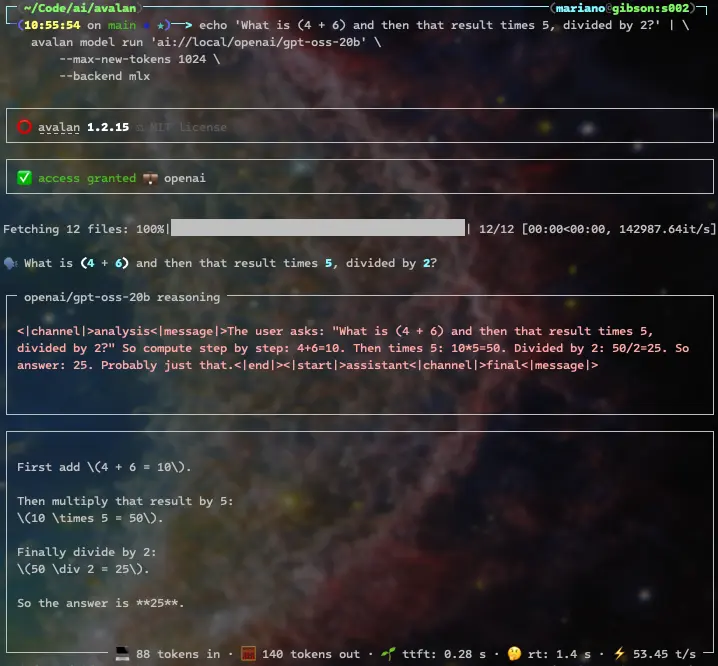
Reasoning models that emit thinking tags are natively supported. Here's OpenAI's gpt-oss 20B solving a simple calculation:
bash
echo 'What is (4 + 6) and then that result times 5, divided by 2?' | \
    avalan model run 'ai://local/openai/gpt-oss-20b' \
        --max-new-tokens 1024 \
        --backend mlx
The response includes the model reasoning, and its final answer:
Some of them, like DeepSeek-R1-Distill-Qwen-14B, assume the model starts thinking without a thinking tag, so we'll use --start-thinking:
bash
echo 'What is (4 + 6) and then that result times 5, divided by 2?' | \
    avalan model run 'deepseek-ai/DeepSeek-R1-Distill-Qwen-14B' \
        --temperature 0.6 \
        --max-new-tokens 1024 \
        --start-thinking \
        --backend mlx
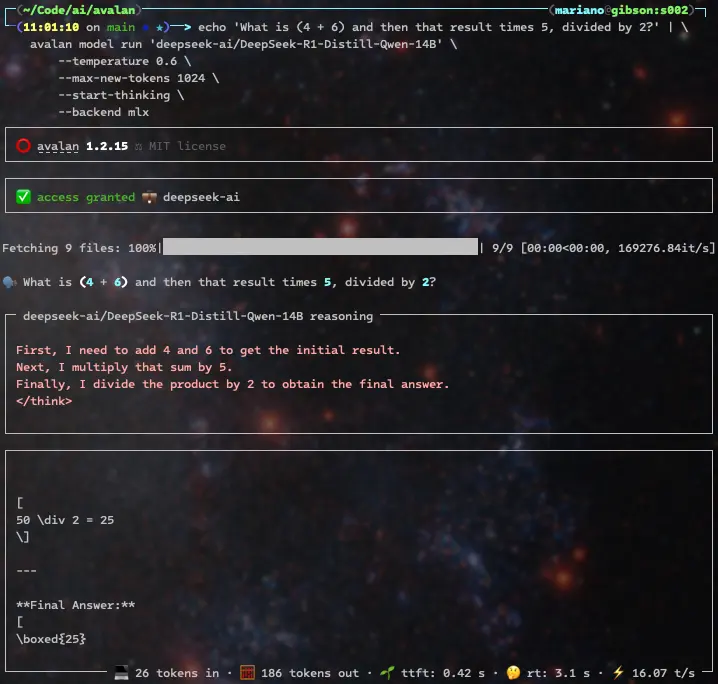
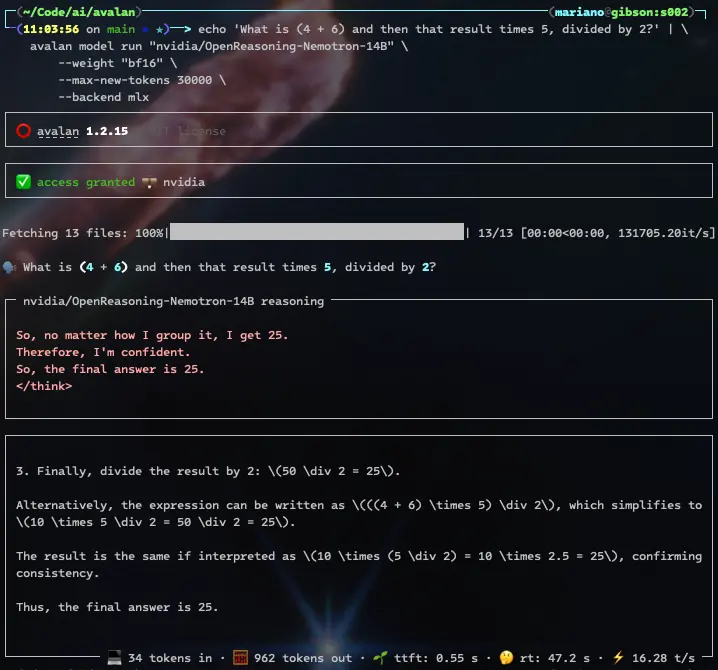
Nvidia's Nemotron reasoning model solves the same problem easily and doesn't require the --start-thinking flag, since it automatically produces think tags. It does so more verbosely, though (962 output tokens versus DeepSeek's 186 output tokens or OpenAI's more concise 140 tokens), since it detects ambiguity in the and then that result part of the prompt and ends up revisiting the essential principles of mathematics, to the point of realizing it's overthinking
[!TIP] Endless reasoning rants can be stopped by setting
--reasoning-max-new-tokensto the maximum number of reasoning tokens allowed, and adding--reasoning-stop-on-max-new-tokensto finish generation when that limit is reached.
bash
echo 'What is (4 + 6) and then that result times 5, divided by 2?' | \
    avalan model run "nvidia/OpenReasoning-Nemotron-14B" \
        --weight "bf16" \
        --max-new-tokens 30000 \
        --backend mlx
When using reasoning models, be mindful of your total token limit. Some reasoning models include limit recommendations on their model cards, like the following model from Z.ai:
bash
echo 'What is (4 + 6) and then that result times 5, divided by 2?' | \
    avalan model run 'zai-org/GLM-Z1-32B-0414' \
        --temperature 0.6 \
        --top-p .95 \
        --top-k 40 \
        --max-new-tokens 30000 \
        --start-thinking \
        --backend mlx
ReACT
ReACT interleaves reasoning with tool use so an agent can think through steps and take actions in turn.
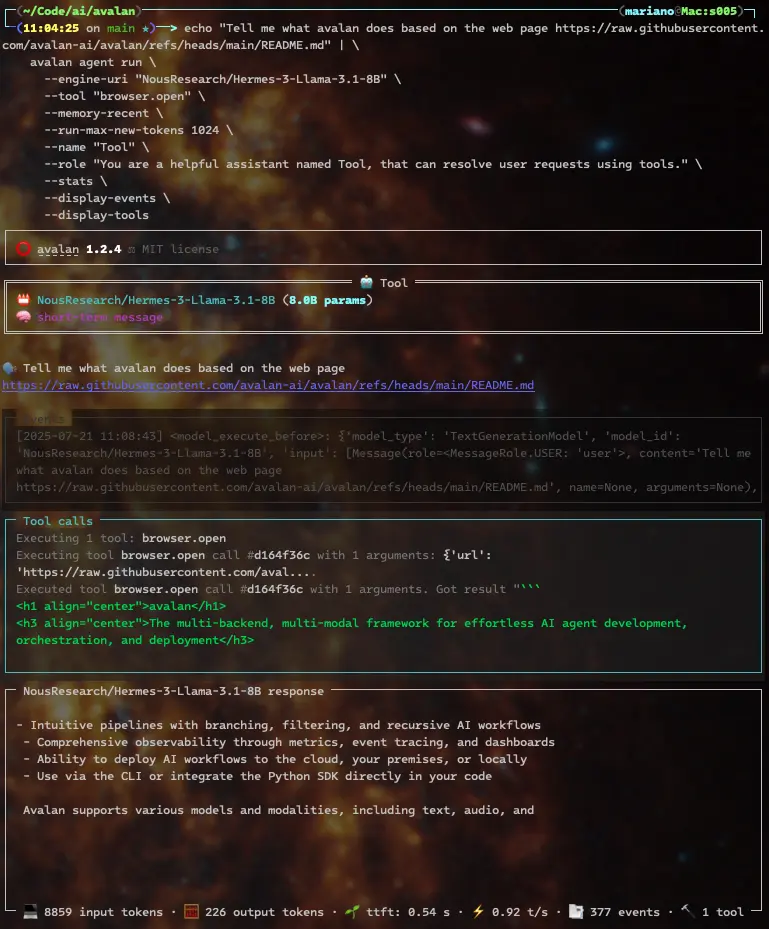
You can direct an agent to read specific locations for knowledge:
bash
echo "Tell me what avalan does based on the web page https://raw.githubusercontent.com/avalan-ai/avalan/refs/heads/main/README.md" | \
    avalan agent run \
      --engine-uri "NousResearch/Hermes-3-Llama-3.1-8B" \
      --tool "browser.open" \
      --memory-recent \
      --run-max-new-tokens 1024 \
      --name "Tool" \
      --role "You are a helpful assistant named Tool, that can resolve user requests using tools." \
      --stats \
      --display-events \
      --display-tools
and you'll get the model's interpretation of what Avalan does based on its README.md file on github:
ChainofThought
ChainofThought builds sequential reasoning traces to reach an answer for tasks that require intermediate logic.
TreeofThought
TreeofThought explores multiple branches of reasoning in parallel to select the best path for difficult decisions.
PlanandReflect
PlanandReflect has the agent outline a plan, act, and then review the results, promoting methodical problem solving.
SelfConsistency
SelfConsistency samples several reasoning paths and aggregates them to produce more reliable answers.
ScratchpadToolformer
ScratchpadToolformer combines an internal scratchpad with learned tool usage to manipulate intermediate results.
Cascaded Prompting
Cascaded Prompting chains prompts so each step refines the next, ideal for multi-stage instructions.
CriticGuided DirectionFollowing Experts
CriticGuided DirectionFollowing Experts use a critic model to guide expert models when strict quality is required.
ProductofExperts
ProductofExperts merges the outputs of several experts to generate answers that benefit from multiple viewpoints.
Memories
Avalan offers a unified memory API with native implementations for PostgreSQL (using pgvector), Elasticsearch, AWS Opensearch, and AWS S3 Vectors.
Start a chat session and tell the agent your name. The --memory-permanent-message option specifies where messages are stored, --id uniquely identifies the agent, and --participant sets the user ID:
bash
echo "Hi Tool, my name is Leo. Nice to meet you." \
  | avalan agent run \
      --engine-uri "NousResearch/Hermes-3-Llama-3.1-8B" \
      --memory-recent \
      --memory-permanent-message "postgresql://root:password@localhost/avalan" \
      --id "f4fd12f4-25ea-4c81-9514-d31fb4c48128" \
      --participant "c67d6ec7-b6ea-40db-bf1a-6de6f9e0bb58" \
      --run-max-new-tokens 1024 \
      --name "Tool" \
      --role "You are a helpful assistant named Tool, that can resolve user requests using tools." \
      --stats
Enable persistent memory and the memory.message.read tool so the agent can recall earlier messages. It should discover that your name is Leo from the previous conversation:
bash
echo "Hi Tool, based on our previous conversations, what's my name?" \
  | avalan agent run \
      --engine-uri "NousResearch/Hermes-3-Llama-3.1-8B" \
      --tool "memory.message.read" \
      --memory-recent \
      --memory-permanent-message "postgresql://root:password@localhost/avalan" \
      --id "f4fd12f4-25ea-4c81-9514-d31fb4c48128" \
      --participant "c67d6ec7-b6ea-40db-bf1a-6de6f9e0bb58" \
      --run-max-new-tokens 1024 \
      --name "Tool" \
      --role "You are a helpful assistant named Tool, that can resolve user requests using tools." \
      --stats
Agents can use knowledge stores to solve problems. Index the rules of the "Truco" card game directly from a website. The --dsn parameter sets the store location and --namespace chooses the knowledge namespace:
bash
avalan memory document index \
    --participant "c67d6ec7-b6ea-40db-bf1a-6de6f9e0bb58" \
    --dsn "postgresql://root:password@localhost/avalan" \
    --namespace "games.cards.truco" \
    "sentence-transformers/all-MiniLM-L6-v2" \
    "https://trucogame.com/pages/reglamento-de-truco-argentino"
Agents
You can easily create AI agents from configuration files. Let's create one to handle gettext translations. Create a file named agentgettexttranslator.toml with the following contents:
``toml
[agent]
role = """
You are an expert translator that specializes in translating gettext
translation files.
"""
task = """
Your task is to translate the given gettext template file,
from the original {{source_language}} to {{destination_language}}.
"""
instructions = """
The text to translate is marked withmsgid, and it's quoted.
Your translation should be defined inmsgstr.
"""
rules = [
"""
Ensure you keep the gettext format intact, only altering
themsgstr` section.
""",
"""
Respond only with the translated file.
"""
]
[template] sourcelanguage = "English" destinationlanguage = "Spanish"
[engine] uri = "meta-llama/Meta-Llama-3-8B-Instruct"
[run] usecache = true maxnewtokens = 1024 skipspecial_tokens = true ```
You can now run your agent. Let's give it a gettext translation template file, have our agent translate it for us, and show a visual difference of what the agent changed:
bash
icdiff locale/avalan.pot <(
    cat locale/avalan.pot |
        avalan agent run docs/examples/agent_gettext_translator.toml --quiet
)
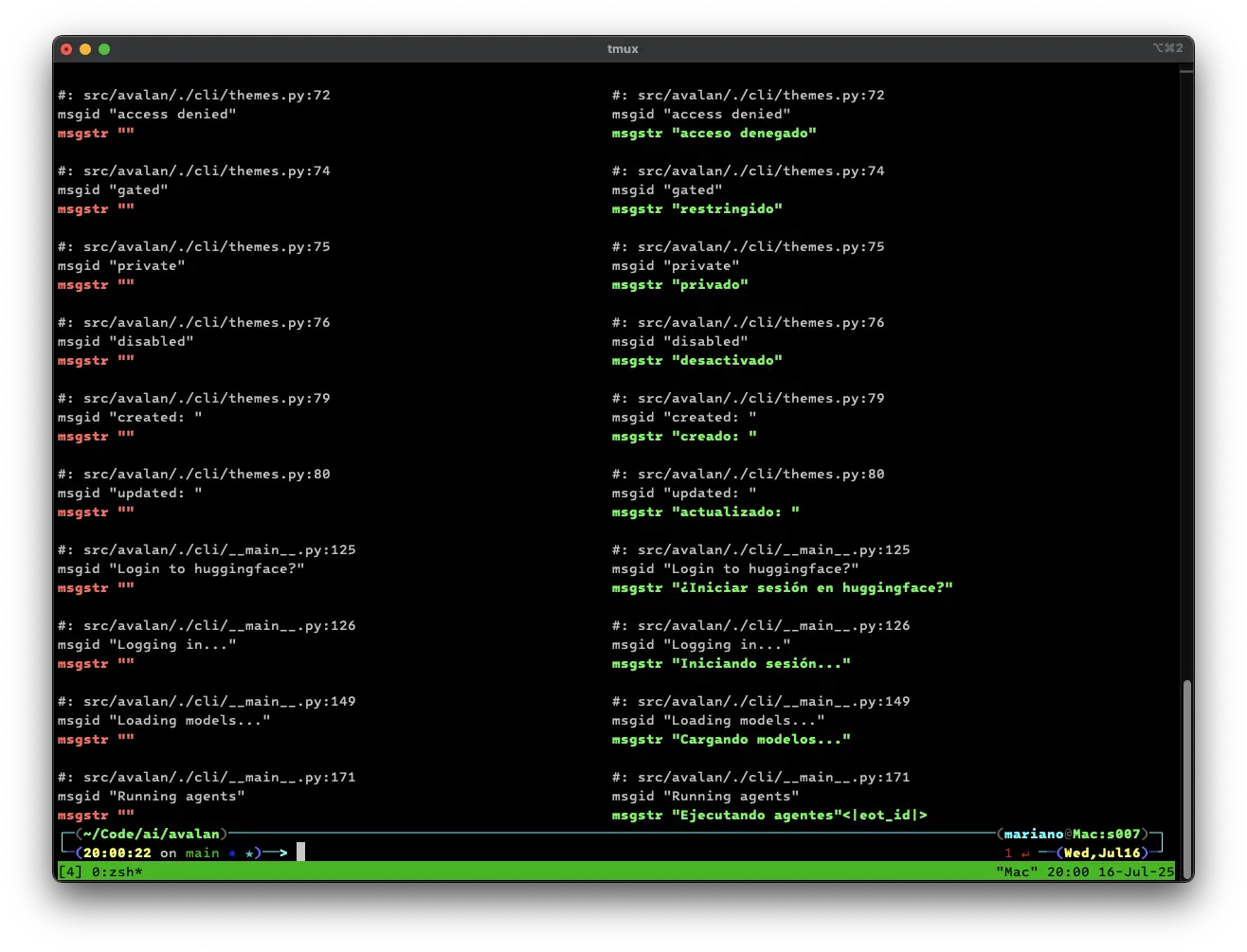
There are more agent, NLP, multimodal, audio, and vision examples in the docs/examples folder.
Serving agents
Serve your agents on an OpenAI APIcompatible endpoint:
bash
avalan agent serve docs/examples/agent_tool.toml -vvv
[!NOTE] Avalan's OpenAI-compatible endpoint supports both the legacy completions API and the newer Responses API.
Agents listen on port 9001 by default.
[!TIP] Use
--portto serve the agent on a different port.
Or build an agent from inline settings and expose its OpenAI API endpoints:
bash
avalan agent serve \
    --engine-uri "NousResearch/Hermes-3-Llama-3.1-8B" \
    --tool "math.calculator" \
    --memory-recent \
    --run-max-new-tokens 1024 \
    --name "Tool" \
    --role "You are a helpful assistant named Tool, that can resolve user requests using tools." \
    -vvv
You can call your tool streaming agent's OpenAI-compatible endpoint just like
the real API; simply change --base-url:
bash
echo "What is (4 + 6) and then that result times 5, divided by 2?" | \
    avalan model run "ai://openai" --base-url "http://localhost:9001/v1"
Proxy agents
The command agent proxy serves as a quick way to serve an agent that:
- Wraps a given
--engine-uri. - Enables recent message memory.
- Enables persistent message memory (defaulting to pgsql with pgvector.)
For example, to proxy OpenAI's gpt-4o, do:
bash
avalan agent proxy \
    --engine-uri "ai://$OPENAI_API_KEY@openai/gpt-4o" \
    --run-max-new-tokens 1024 \
    -v
Like agent serve, the proxy listens on port 9001 by default.
And you can connect to it from another terminal using --base-url:
bash
echo "What is (4 + 6) and then that result times 5, divided by 2?" | \
    avalan model run "ai://openai" --base-url "http://localhost:9001/v1"
Install
On macOS, install avalan with Homebrew:
bash
brew tap avalan-ai/avalan
In other environments, use Poetry to install
avalan with the all extra:
bash
poetry install avalan --extras all
[!TIP] If you have access to Nvidia GPUs, add the
nvidiaextra to benefit from thevllmbackend and quantized models:
bash
poetry install avalan --extras all --extras nvidia
[!TIP] If you are running on Apple Silicon Macs, add the
appleextra to benefit from themlxbackend:
bash
poetry install avalan --extras all --extras apple
[!TIP] On macOS, sentencepiece may fail to build. Ensure the Xcode CLI is installed and install the required Homebrew packages:
xcode-select --installbrew install cmake pkg-config protobuf sentencepiece[!TIP] If you need transformer loading classes that are not yet released, install the development version of transformers:
poetry install git+https://github.com/huggingface/transformers --no-cache
Owner
- Name: avalan.ai
- Login: avalan-ai
- Kind: organization
- Email: avalan@avalan.ai
- Website: https://avalan.ai
- Repositories: 1
- Profile: https://github.com/avalan-ai
Citation (CITATION.cff)
cff-version: 1.2.0
message: "If you use avalan, please cite it as below."
title: avalan
version: "1.1.6"
abstract: |
  avalan empowers developers and enterprises to easily build, orchestrate,
  and deploy intelligent AI agents—locally or in the cloud—across millions of
  models via a unified SDK and CLI, featuring multi-backend and multi-modal
  support.
authors:
  - family-names: Iglesias
    given-names: Mariano
type: software
license: MIT
url: https://avalan.ai
repository: https://github.com/avalan-ai/avalan
repository-code: https://github.com/avalan-ai/avalan
Issues and Pull Requests
Last synced: 11 months ago
All Time
- Total issues: 2
- Total pull requests: 452
- Average time to close issues: about 7 hours
- Average time to close pull requests: about 1 hour
- Total issue authors: 2
- Total pull request authors: 2
- Average comments per issue: 0.0
- Average comments per pull request: 0.1
- Merged pull requests: 330
- Bot issues: 1
- Bot pull requests: 10
Past Year
- Issues: 2
- Pull requests: 452
- Average time to close issues: about 7 hours
- Average time to close pull requests: about 1 hour
- Issue authors: 2
- Pull request authors: 2
- Average comments per issue: 0.0
- Average comments per pull request: 0.1
- Merged pull requests: 330
- Bot issues: 1
- Bot pull requests: 10
Top Authors
Issue Authors
- depfu[bot] (1)
- mariano (1)
Pull Request Authors
- mariano (442)
- github-actions[bot] (10)
Top Labels
Issue Labels
Pull Request Labels
Packages
- Total packages: 1
-
Total downloads:
- pypi 459 last-month
- Total dependent packages: 0
- Total dependent repositories: 0
- Total versions: 35
- Total maintainers: 1
pypi.org: avalan
Multi-backend, multi-modal framework for seamless AI agent development, orchestration, and deployment
- Homepage: https://avalan.ai
- Documentation: https://github.com/avalan-ai/avalan#readme
- License: MIT
-
Latest release: 1.3.1
published 11 months ago