weapon_detection
This project is for detecting weapons.
Science Score: 54.0%
This score indicates how likely this project is to be science-related based on various indicators:
-
✓CITATION.cff file
Found CITATION.cff file -
✓codemeta.json file
Found codemeta.json file -
✓.zenodo.json file
Found .zenodo.json file -
○DOI references
-
✓Academic publication links
Links to: arxiv.org -
○Academic email domains
-
○Institutional organization owner
-
○JOSS paper metadata
-
○Scientific vocabulary similarity
Low similarity (9.5%) to scientific vocabulary
Repository
This project is for detecting weapons.
Basic Info
- Host: GitHub
- Owner: SuchiVats
- Language: Python
- Default Branch: main
- Size: 1.53 MB
Statistics
- Stars: 0
- Watchers: 0
- Forks: 0
- Open Issues: 0
- Releases: 0
Metadata Files
README.md
RF-DETR: SOTA Real-Time Object Detection Model








RF-DETR is a real-time, transformer-based object detection model architecture developed by Roboflow and released under the Apache 2.0 license.
RF-DETR is the first real-time model to exceed 60 AP on the Microsoft COCO benchmark alongside competitive performance at base sizes. It also achieves state-of-the-art performance on RF100-VL, an object detection benchmark that measures model domain adaptability to real world problems. RF-DETR is comparable speed to current real-time objection models.
RF-DETR is small enough to run on the edge, making it an ideal model for deployments that need both strong accuracy and real-time performance.
Results
We validated the performance of RF-DETR on both Microsoft COCO and the RF100-VL benchmarks.
RF100-VL benchmark results
| Model | params
(M) | mAPCOCO val
@0.50:0.95 | mAPRF100-VL
Average @0.50 | mAPRF100-VL
Average @0.50:95 | Total Latency
T4 bs=1
(ms) |
|------------------|--------------------|--------------------------------|-----------------------------------|---------------------------------------|---------------------------------------|
| D-FINE-M | 19.3 | 55.1 | N/A | N/A | 6.3 |
| LW-DETR-M | 28.2 | 52.5 | 84.0 | 57.5 | 6.0 |
| YOLO11m | 20.0 | 51.5 | 84.9 | 59.7 | 5.7 |
| YOLOv8m | 28.9 | 50.6 | 85.0 | 59.8 | 6.3 |
| RF-DETR-B | 29.0 | 53.3 | 86.7 | 60.3 | 6.0 |
RF100-VL benchmark notes
- The "Total Latency" reported here is measured on a T4 GPU using TensorRT10 FP16 (ms/img) and was introduced by LW-DETR. Unlike transformer-based models, YOLO models perform Non-Maximum Suppression (NMS) after generating predictions to refine bounding box candidates. While NMS boosts accuracy, it also slightly reduces speed due to the additional computation required, which varies with the number of objects in an image. Notably, many YOLO benchmarks include NMS in accuracy measurements but exclude it from speed metrics. By contrast, our benchmarking—following LW-DETR’s approach—factors in NMS latency to provide a uniform measure of the total time needed to obtain a final result across all models on the same hardware. - D-FINE’s fine-tuning capability is currently unavailable, making its domain adaptability performance inaccessible. The authors [caution](https://github.com/Peterande/D-FINE) that “if your categories are very simple, it might lead to overfitting and suboptimal performance.” Furthermore, several open issues ([#108](https://github.com/Peterande/D-FINE/issues/108), [#146](https://github.com/Peterande/D-FINE/issues/146), [#169](https://github.com/Peterande/D-FINE/issues/169), [#214](https://github.com/Peterande/D-FINE/issues/214)) currently prevent successful fine-tuning. We have opened an additional issue in hopes of ultimately benchmarking D-FINE with RF100-VL.News
2025/03/20: We release RF-DETR real-time object detection model. Code and checkpoint for RF-DETR-large and RF-DETR-base are available.
Installation
Pip install the rfdetr package in a Python>=3.9 environment.
bash
pip install rfdetr
From source
By installing RF-DETR from source, you can explore the most recent features and enhancements that have not yet been officially released. Please note that these updates are still in development and may not be as stable as the latest published release. ```bash pip install git+https://github.com/roboflow/rf-detr.git ```Inference
RF-DETR comes out of the box with checkpoints pre-trained on the Microsoft COCO dataset.
```python import io import requests import supervision as sv from PIL import Image from rfdetr import RFDETRBase from rfdetr.util.cococlasses import COCOCLASSES
model = RFDETRBase()
url = "https://media.roboflow.com/notebooks/examples/dog-2.jpeg"
image = Image.open(io.BytesIO(requests.get(url).content)) detections = model.predict(image, threshold=0.5)
labels = [ f"{COCOCLASSES[classid]} {confidence:.2f}" for classid, confidence in zip(detections.classid, detections.confidence) ]
annotatedimage = image.copy() annotatedimage = sv.BoxAnnotator().annotate(annotatedimage, detections) annotatedimage = sv.LabelAnnotator().annotate(annotated_image, detections, labels)
sv.plotimage(annotatedimage) ```
Video inference
```python import supervision as sv from rfdetr import RFDETRBase from rfdetr.util.coco_classes import COCO_CLASSES model = RFDETRBase() def callback(frame, index): detections = model.predict(frame, threshold=0.5) labels = [ f"{COCO_CLASSES[class_id]} {confidence:.2f}" for class_id, confidence in zip(detections.class_id, detections.confidence) ] annotated_frame = frame.copy() annotated_frame = sv.BoxAnnotator().annotate(annotated_frame, detections) annotated_frame = sv.LabelAnnotator().annotate(annotated_frame, detections, labels) return annotated_frame sv.process_video( source_path=Webcam inference
```python import cv2 import supervision as sv from rfdetr import RFDETRBase from rfdetr.util.coco_classes import COCO_CLASSES model = RFDETRBase() cap = cv2.VideoCapture(0) while True: success, frame = cap.read() if not success: break detections = model.predict(frame, threshold=0.5) labels = [ f"{COCO_CLASSES[class_id]} {confidence:.2f}" for class_id, confidence in zip(detections.class_id, detections.confidence) ] annotated_frame = frame.copy() annotated_frame = sv.BoxAnnotator().annotate(annotated_frame, detections) annotated_frame = sv.LabelAnnotator().annotate(annotated_frame, detections, labels) cv2.imshow("Webcam", annotated_frame) if cv2.waitKey(1) & 0xFF == ord('q'): break cap.release() cv2.destroyAllWindows() ```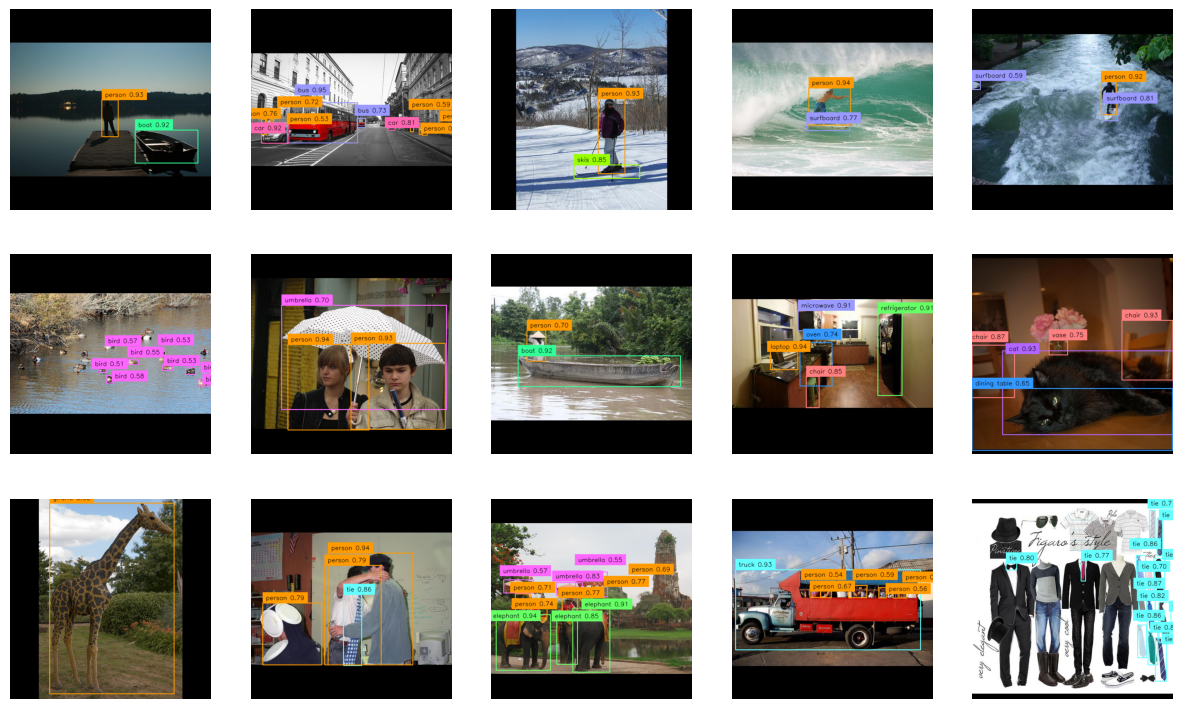
Model Variants
RF-DETR is available in two variants: RF-DETR-B 29M RFDETRBase and RF-DETR-L 128M RFDETRLarge. The corresponding COCO pretrained checkpoints are automatically loaded when you initialize either class.
Input Resolution
Both model variants support configurable input resolutions. A higher resolution usually improves prediction quality by capturing more detail, though it can slow down inference. You can adjust the resolution by passing the resolution argument when initializing the model. resolution value must be divisible by 56.
python
model = RFDETRBase(resolution=560)
Training
Dataset structure
RF-DETR expects the dataset to be in COCO format. Divide your dataset into three subdirectories: train, valid, and test. Each subdirectory should contain its own _annotations.coco.json file that holds the annotations for that particular split, along with the corresponding image files. Below is an example of the directory structure:
dataset/
├── train/
│   ├── _annotations.coco.json
│   ├── image1.jpg
│   ├── image2.jpg
│   └── ... (other image files)
├── valid/
│   ├── _annotations.coco.json
│   ├── image1.jpg
│   ├── image2.jpg
│   └── ... (other image files)
└── test/
    ├── _annotations.coco.json
    ├── image1.jpg
    ├── image2.jpg
    └── ... (other image files)
Roboflow allows you to create object detection datasets from scratch or convert existing datasets from formats like YOLO, and then export them in COCO JSON format for training. You can also explore Roboflow Universe to find pre-labeled datasets for a range of use cases.
Fine-tuning
You can fine-tune RF-DETR from pre-trained COCO checkpoints. By default, the RF-DETR-B checkpoint will be used. To get started quickly, please refer to our fine-tuning Google Colab notebook.
```python from rfdetr import RFDETRBase
model = RFDETRBase()
model.train(datasetdir=<DATASETPATH>, epochs=10, batchsize=4, gradaccumsteps=4, lr=1e-4, outputdir=
Batch size
Different GPUs have different amounts of VRAM (video memory), which limits how much data they can handle at once during training. To make training work well on any machine, you can adjust two settings: batch_size and grad_accum_steps. These control how many samples are processed at a time. The key is to keep their product equal to 16 — that’s our recommended total batch size. For example, on powerful GPUs like the A100, set batch_size=16 and grad_accum_steps=1. On smaller GPUs like the T4, use batch_size=4 and grad_accum_steps=4. We use a method called gradient accumulation, which lets the model simulate training with a larger batch size by gradually collecting updates before adjusting the weights.
Multi-GPU training
You can fine-tune RF-DETR on multiple GPUs using PyTorch’s Distributed Data Parallel (DDP). Create a main.py script that initializes your model and calls .train() as usual than run it in terminal.
bash
python -m torch.distributed.launch \
    --nproc_per_node=8 \
    --use_env \
    main.py
Replace 8 in the --nproc_per_node argument with the number of GPUs you want to use. This approach creates one training process per GPU and splits the workload automatically. Note that your effective batch size is multiplied by the number of GPUs, so you may need to adjust your batch_size and grad_accum_steps to maintain the same overall batch size.
Result checkpoints
During training, two model checkpoints (the regular weights and an EMA-based set of weights) will be saved in the specified output directory. The EMA (Exponential Moving Average) file is a smoothed version of the model’s weights over time, often yielding better stability and generalization.
Logging with TensorBoard
TensorBoard is a powerful toolkit that helps you visualize and track training metrics. With TensorBoard set up, you can train your model and keep an eye on the logs to monitor performance, compare experiments, and optimize model training.
Launch TensorBoard
- To use TensorBoard locally, navigate to your project directory and run: ```bash tensorboard --logdirLoad and run fine-tuned model
```python from rfdetr import RFDETRBase
model = RFDETRBase(pretrainweights=<CHECKPOINTPATH>)
detections = model.predict(
ONNX export
RF-DETR supports exporting models to the ONNX format, which enables interoperability with various inference frameworks and can improve deployment efficiency. To export your model, simply initialize it and call the .export() method.
```python from rfdetr import RFDETRBase
model = RFDETRBase()
model.export() ```
This command saves the ONNX model to the output directory.
License
Both the code and the weights pretrained on the COCO dataset are released under the Apache 2.0 license.
Acknowledgements
Our work is built upon LW-DETR, DINOv2, and Deformable DETR. Thanks to their authors for their excellent work!
Citation
If you find our work helpful for your research, please consider citing the following BibTeX entry.
bibtex
@software{rf-detr,
  author = {Robinson, Isaac and Robicheaux, Peter and Popov, Matvei},
  license = {Apache-2.0},
  title = {RF-DETR},
  howpublished = {\url{https://github.com/roboflow/rf-detr}},
  year = {2025},
  note = {SOTA Real-Time Object Detection Model}
}
Contribution
We welcome and appreciate all contributions! If you notice any issues or bugs, have questions, or would like to suggest new features, please open an issue or pull request. By sharing your ideas and improvements, you help make RF-DETR better for everyone.
Owner
- Name: Suchi Sharma
- Login: SuchiVats
- Kind: user
- Twitter: Suchi_vats
- Repositories: 1
- Profile: https://github.com/SuchiVats
Data Analyst
Citation (CITATION.cff)
cff-version: 1.2.0
title: "RF-DETR"
message: >-
  If you use this software, please cite it using the
  metadata from this file.
type: software
authors:
  - family-names: Robinson
    given-names: Isaac
    email: isaac@roboflow.com
    affiliation: Roboflow
  - family-names: Robicheaux
    given-names: Peter
    email: peter@roboflow.com
    affiliation: Roboflow
  - family-names: Popov
    given-names: Matvei
    email: matvei@roboflow.com
    affiliation: Roboflow
repository-code: 'https://github.com/roboflow/rf-detr'
abstract: 'A state-of-the-art, real-time object detection model developed by Roboflow.'
date-released: 2025-03-20
keywords:
  - object detection
  - computer vision
  - rf-detr
  - detr
license: "Apache-2.0"
GitHub Events
Total
- Push event: 3
- Create event: 2
Last Year
- Push event: 3
- Create event: 2