animaire
A Python toolkit for calculating dose rates in Earth's atmosphere based on any incoming proton or alpha particle spectra, with any pitch angle distribution, and during any magnetospheric conditions.
Science Score: 49.0%
This score indicates how likely this project is to be science-related based on various indicators:
-
○CITATION.cff file
-
✓codemeta.json file
Found codemeta.json file -
✓.zenodo.json file
Found .zenodo.json file -
✓DOI references
Found 23 DOI reference(s) in README -
✓Academic publication links
Links to: researchgate.net, springer.com -
○Academic email domains
-
○Institutional organization owner
-
○JOSS paper metadata
-
○Scientific vocabulary similarity
Low similarity (15.9%) to scientific vocabulary
Keywords
Repository
A Python toolkit for calculating dose rates in Earth's atmosphere based on any incoming proton or alpha particle spectra, with any pitch angle distribution, and during any magnetospheric conditions.
Basic Info
- Host: GitHub
- Owner: ssc-maire
- License: other
- Language: Jupyter Notebook
- Default Branch: main
- Homepage: https://pypi.org/project/AniMAIRE/
- Size: 414 MB
Statistics
- Stars: 3
- Watchers: 2
- Forks: 4
- Open Issues: 4
- Releases: 34
Topics
Metadata Files
README.md
AniMAIRE

What's New in AniMAIRE v1.3.x
Major OTSO Integration:
- OTSO is now the default asymptotic direction calculator for AniMAIRE. The default running mode uses the previous Magnetocosmics running API structure, but OTSO is used under the hood for asymptotic direction calculations unless you explicitly select Magnetocosmics mode.
- The asymp_dir_file argument is now an optional mode for supplying precomputed asymptotic direction files (from OTSO or Magnetocosmics). See below for details on how to generate and use these files.
- All examples and documentation have been updated to reflect this new default.
Other New Features: - New Spectrum Models: Support for double power law + Gaussian and Beeck-type distributions. - Performance Improvements: Optional caching for rapid re-analysis. - Expanded Plotting: Integrated functions for time series, integrated/peak dose maps, and globe visualizations. - Improved Error Handling: More robust input validation and user feedback.
Note on OTSO versions:
- There are two versions of OTSO:
- The installable OTSO command-line tool (OTSO repository), which you can run directly to generate asymptotic direction (asymp dir) CSV files for use with the asymp_dir_file argument.
- The OTSOpy Python package (OTSOpy repository), which is installed as a dependency and is called directly by AniMAIRE for default runs (no need for user intervention).
- Key difference: OTSO is a standalone command-line interface tool for generating asymptotic direction files, while OTSOpy is a Python API that's integrated directly into AniMAIRE's workflow.
A Python toolkit for calculating dose rates and aircraft electronics upset rates in Earth's atmosphere based on any incoming proton or alpha particle spectra, with any pitch angle distribution.
NEW: The AniMAIRE paper has been published! - AniMAIRE - A New Openly Available Tool for Calculating Atmospheric Ionising Radiation Dose Rates and Single Event Effects During Anisotropic Conditions
OTSO Reference: - If you use the OTSO running mode or OTSO-generated asymptotic direction files, please also cite the OTSO paper: - Larsen, N. et al. (2024). A New Open-Source Geomagnetosphere Propagation Tool (OTSO) and Its Applications.
Platform and Python Version Support: - AniMAIRE has only been tested on Linux, but in theory, it should also work on Windows and Mac when using the OTSO running mode. (Magnetocosmics mode is Linux-only.) - Currently, OTSO and therefore AniMAIRE only work with Python 3.12. Support for other Python versions is planned for the future.
Note: Previous versions of this README stated that AniMAIRE only works on Linux. In practice, OTSO mode should work on all platforms (Linux, Windows, Mac), but only Linux has been thoroughly tested. Magnetocosmics mode remains Linux-only.
You can use AniMAIRE to produce dose rate data and maps throughout large space weather events and plot them like this:
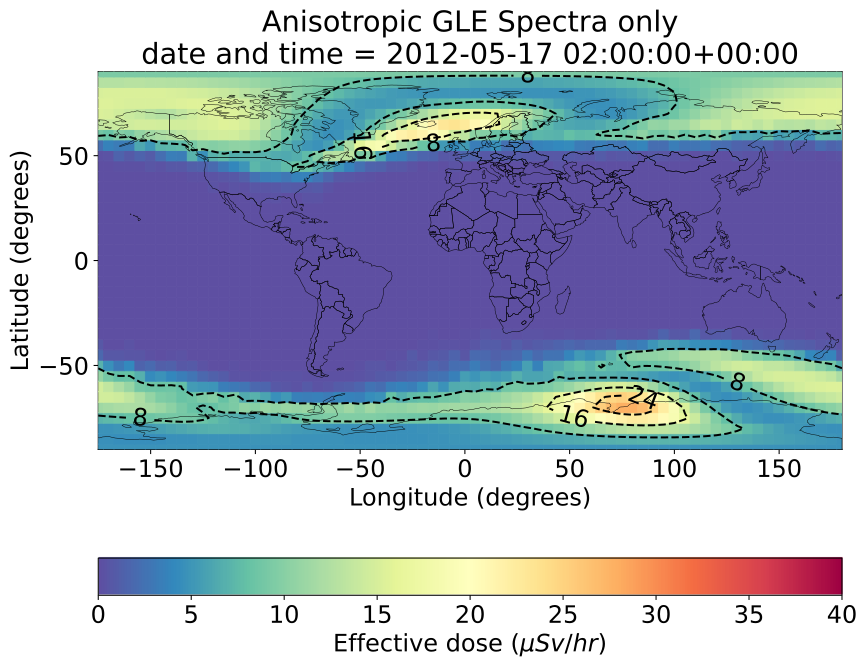
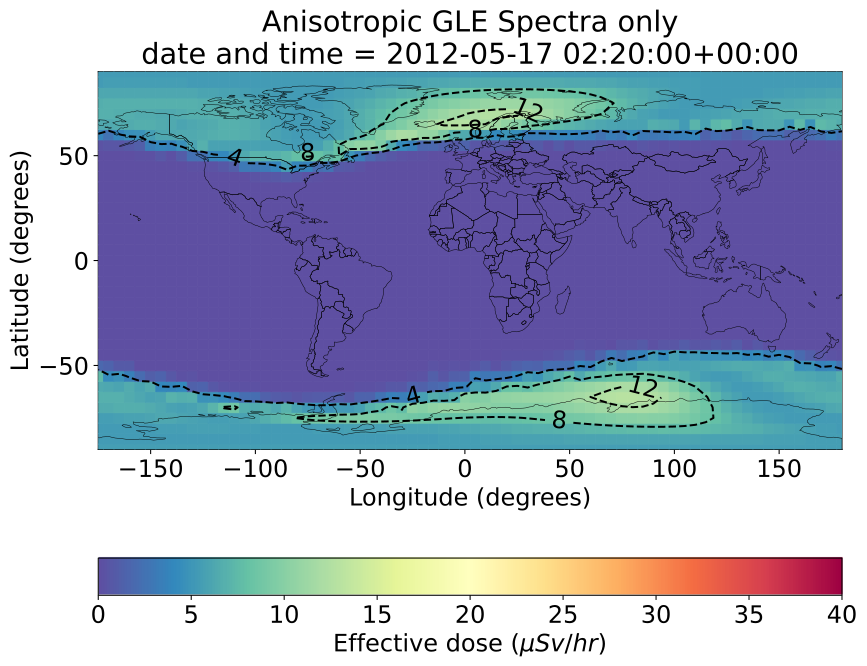
Table of Contents
- Installation
- Asymptotic Direction Calculation: OTSO (Default) and Magnetocosmics (Optional)
- Running AniMAIRE with Magnetocosmics (Legacy/Alternative Method)
- Usage
- Testing that AniMAIRE is working
- Calculating dose rates at any location in Earth's atmosphere
- Simple isotropic runs and plotting
- Anisotropic runs
- Functions for running AniMAIRE for specific situations and for a past timestamp
- Processing Time-Series Event Data with AniMAIRE_event
- API Reference and Advanced Usage
- References >>>>>>> 8de4d9c7343144a3f8bec50a9359451cf90c5904
Installation
To install this toolkit using the common pip Python method, run
bash
pip install AniMAIRE
Otherwise, to install this toolkit from this Github repository, first clone this repository to your local system, and then from the cloned respository, run
bash
sudo pip3 install .
in the cloned directory.
Note that there are quite a few sizeable data files within some of the dependencies for this package that get copied during installation (on the order of about several hundred megabytes in total) so installation may take a couple of minutes.
Asymptotic Direction Calculation: OTSO (Default) and Magnetocosmics (Optional)
OTSO is now the default and recommended way to provide asymptotic directions to AniMAIRE.
- By default, AniMAIRE uses OTSO for all asymptotic direction calculations, but retains the previous Magnetocosmics API structure for ease of use.
- The
asymp_dir_fileargument is an optional mode for supplying precomputed asymptotic direction files (from OTSO or Magnetocosmics). - To use Magnetocosmics for asymptotic direction calculations, you must explicitly select the Magnetocosmics running mode using the relevant argument (see below).
- If you use the Magnetocosmics mode, you must have Magnetocosmics already installed and available on your system.
- Magnetocosmics can be downloaded and installed from here.
- Magnetocosmics may be faster than OTSO in some cases, but OTSO is more actively maintained and will continue to evolve.
- Note: When Magnetocosmics mode is selected in AniMAIRE, all Magnetocosmics calculations are processed through the AsympDirsCalculator package. AsympDirsCalculator is only used when OTSO is not used.
- If you use the Magnetocosmics mode, please cite the following Magnetocosmics reference:
Example: Default Running Mode (using OTSO)
```python from AniMAIRE import AniMAIRE
Default: OTSO is used for asymptotic direction calculations
result = AniMAIRE.runfromspectra( protonrigidityspectrum=lambda x: 2.56(x*-3.41), Kpindex=3, dateandtime=dt.datetime(2006, 12, 13, 3, 0), arrayoflatsand_longs=[[65.0,25.0]], ) ```
Using Precomputed Asymptotic Direction Files with asymp_dir_file (Optional)
You can optionally run AniMAIRE using precomputed asymptotic direction files generated by OTSO (or Magnetocosmics). This is useful for batch processing, reproducibility, or sharing results.
How to generate OTSO asymptotic direction files:
- The OTSOpy Python package is installed automatically with AniMAIRE and used for default runs. If you want to generate asymptotic direction files manually, you can use the OTSO command-line tool.
- If you installed AniMAIRE in a virtual environment, you may need to activate the environment to access the otso command-line tool, or install OTSO globally if you want it available system-wide. See the OTSO documentation for details.
- Use OTSO to generate CSV files for your desired locations and rigidity grid.
- Recommended OTSO settings: Rigidities from 0.1 GV to 1010 GV, with 200 steps between 0.1 GV and 20 GV, and 60 steps between 20 GV and 1010 GV.
- File naming convention: Each file should be named as latitude_longitude.csv (e.g., 51.5_0.0.csv).
- The CSV must have the standard OTSO/Magnetocosmics column headers.
- We currently recommend running OTSO using rigidities from 0.1 GV to 1010 GV, with 200 steps between 0.1 GV and 20 GV, and 60 steps between 20 GV and 1010 GV. Its very possible that other sets of rigidities will work, but this is the configuration we have tested and found to be accurate.
Using Magnetocosmics output files: If you have Magnetocosmics installed and prefer to feed files from it into AniMAIRE rather than using the internal Magnetocosmics wrappers, you can also used generated asymptotic direction files from it. This requires having Magnetocosmics properly installed and configured on your system, and you can supply the files to AniMAIRE using the same format as with OTSO files.
How to use in AniMAIRE:
python
result = AniMAIRE.run_from_spectra(
    proton_rigidity_spectrum=lambda x: 2.56*(x**-3.41),
    asymp_dir_file='path/to/your/51.5_0.0.csv'  # OTSO or Magnetocosmics CSV file
)
- You can also provide a list of files for multiple locations:
python
result = AniMAIRE.run_from_spectra(
    proton_rigidity_spectrum=lambda x: 2.56*(x**-3.41),
    asymp_dir_file=['51.5_0.0.csv', '52.0_0.0.csv']
)
- Both OTSO and Magnetocosmics generate compatible CSVs.
Example: Forcing Magnetocosmics Running Mode (Linux Only)
python
result = AniMAIRE.run_from_spectra(
    proton_rigidity_spectrum=lambda x: 2.56*(x**-3.41),
    Kp_index=3,
    date_and_time=dt.datetime(2006, 12, 13, 3, 0),
    array_of_lats_and_longs=[[65.0,25.0]],
    use_OTSOpy=False  # This forces use of Magnetocosmics (must be installed!)
)
- You must have Magnetocosmics installed and available on your system for this mode to work.
- Magnetocosmics can be downloaded and installed from here.
- Magnetocosmics mode is only supported on Linux.
- Note: In this mode, AniMAIRE uses the AsympDirsCalculator package to interface with Magnetocosmics. AsympDirsCalculator is not used when OTSO is the selected method.
Performance and Caching
AniMAIRE uses caching to significantly improve performance for repetitive calculations:
- By default, the
cache_magnetocosmics_runargument is set toTrue, which enables caching of computation results. - In OTSO mode, asymptotic direction calculations are cached in the
cachedOTSODatadirectory. - In Magnetocosmics mode, results are cached in the
cachedMagnetocosmicsRunDataandcacheAsymptoticDirectionOutputsdirectories. - This caching system allows you to rapidly re-analyze data with different spectra or pitch angle distributions while keeping the same Kp index and date/time, as the time-consuming directional calculations only need to be performed once.
- Cache files are stored in the directory where AniMAIRE is run from.
Running AniMAIRE with Magnetocosmics (Legacy/Alternative Method)
This method is still supported for legacy workflows, but OTSO is strongly recommended for all new analyses.
To use this package with Magnetocosmics you must have it installed, such that magnetocosmics can be run by typing 'magnetocosmics' in the terminal, i.e. typing:
bash
magnetocosmics
outputs something like the following:
```text
      ################################
      !!! G4Backtrace is activated !!!
      ################################
Geant4 version Name: geant4-11-00-patch-02 MT Copyright : Geant4 Collaboration References : NIM A 506 (2003), 250-303 : IEEE-TNS 53 (2006), 270-278 : NIM A 835 (2016), 186-225 WWW : http://geant4.org/
/h n m 1900.0 1905.0 1910.0 1915.0 1920.0 1925.0 1930.0 1935.0 1940.0 1945.0 1950.0 1955.0 1960.0 1965.0 1970.0 1975.0 1980.0 1985.0 1990.0 1995.0 2000.0 2005.0 2010.0 2015.0 2020.0 SV mmm1900 Nyear 25 1900 Nyear 25
...
g 8 8 h 8 8 g 9 0 0.0 0 -999 XGSE in GEI (0.193332,-0.900173,-0.39027) (0.0573796,-0.172205,0.983389) -19.4809 Selected index20 XGSE in GEI (0.17509,-0.903305,-0.391643) (0.0590434,-0.175608,0.982688) -25.9091 Test93 Test97 Test G4CashKarpRKF45 is called ```
Usage
After installation, to import the toolkit into a particular Python script, run
python
from AniMAIRE import AniMAIRE
All of the main useful functions are contained within this AniMAIRE module, and all other modules contained in this toolkit are primarily intended to be accessed internally (although don't let that stop you from using or editing them for your own purposes if you wish).
The rest of the README file describes how to run AniMAIRE to produce dose rates for different input parameters. You can also look at and run the examples present in the AniMAIRE_examples.ipynb notebook, and the advanced examples in the notebooks_and_data_and_figures_for_paper/GLE71_plots_for_paper.ipynb notebook to learn and see in practice how AniMAIRE can be used.
Testing that AniMAIRE is working
To test that AniMAIRE works, you can run:
```python from AniMAIRE import AniMAIRE import datetime as dt
testisotropicdoserates = AniMAIRE.runfromspectra( protonrigidityspectrum=lambda x:2.56(x*-3.41), Kpindex=3, dateandtime=dt.datetime(2006, 12, 13, 3, 0), arrayoflatsandlongs=[[65.0,25.0]], ) ```
in Python. This should produce some dose rates as output to test_isotropic_dose_rates in the format (the meaning of each column is explained later on in this README, under the "Simple isotropic runs and plotting" heading):
text
    latitude  longitude  altitude (km)      edose      adose      dosee       tn1       tn2       tn3           SEU           SEL
0       65.0       25.0         0.0000   0.010434   0.012526   0.010010  0.004431  0.002726  0.001826  2.725682e-16  2.725682e-11
1       65.0       25.0         3.0480   0.101553   0.117294   0.085010  0.051717  0.033506  0.022912  3.350616e-15  3.350616e-10
2       65.0       25.0         6.0960   0.669389   0.736989   0.456343  0.324250  0.210297  0.144131  2.102967e-14  2.102967e-09
3       65.0       25.0         7.6200   1.432404   1.525608   0.966025  0.658130  0.426616  0.292777  4.266156e-14  4.266156e-09
4       65.0       25.0         8.5344   2.147704   2.220632   1.416257  0.950846  0.614894  0.422072  6.148938e-14  6.148938e-09
5       65.0       25.0         9.4488   3.108676   3.124392   2.063826  1.319292  0.854931  0.586036  8.549315e-14  8.549315e-09
6       65.0       25.0        10.3632   4.377677   4.263813   2.692120  1.767081  1.142345  0.782749  1.142345e-13  1.142345e-08
7       65.0       25.0        11.2776   5.993970   5.643631   3.764450  2.292849  1.480059  1.010255  1.480059e-13  1.480059e-08
8       65.0       25.0        12.1920   7.953998   7.262904   5.017846  2.881359  1.850446  1.263386  1.850446e-13  1.850446e-08
9       65.0       25.0        13.1064  10.414874   9.115408   6.247418  3.514676  2.249009  1.532907  2.249009e-13  2.249009e-08
10      65.0       25.0        14.0208  13.242733  11.101641   7.800097  4.184576  2.665499  1.810092  2.665499e-13  2.665499e-08
11      65.0       25.0        14.9352  16.603692  13.430864   9.571582  4.865316  3.082233  2.086676  3.082233e-13  3.082233e-08
12      65.0       25.0        15.8496  20.842479  15.942018  11.573518  5.568722  3.503950  2.361370  3.503950e-13  3.503950e-08
13      65.0       25.0        16.7640  25.482167  18.658393  13.926003  6.254882  3.914514  2.628245  3.914514e-13  3.914514e-08
14      65.0       25.0        17.6784  31.020574  21.767530  16.937656  6.902852  4.295149  2.869582  4.295149e-13  4.295149e-08
15      65.0       25.0        18.5928  37.203113  24.734609  19.638953  7.495669  4.637948  3.081391  4.637948e-13  4.637948e-08
Calculating dose rates at any location in Earth's atmosphere
The primary function for performing a run to calculate dose rates in AniMAIRE is the run_from_spectra function, which has the format:
python
def run_from_spectra(
        proton_rigidity_spectrum=None,
        alpha_rigidity_spectrum=None,
        reference_pitch_angle_latitude=None,
        reference_pitch_angle_longitude=None,
        proton_pitch_angle_distribution=isotropicPitchAngleDistribution(),
        alpha_pitch_angle_distribution=isotropicPitchAngleDistribution(),
        altitudes_in_kft=[0,10,20] + [i for i in range(25, 61 + 1, 3)],
        altitudes_in_km=None,
        Kp_index=None,
        date_and_time=dt.datetime.now(),
        array_of_lats_and_longs=default_array_of_lats_and_longs,
        array_of_zeniths_and_azimuths=np.array([[0.0, 0.0]]),
        cache_magnetocosmics_run=True,
        generate_NM_count_rates=False,
        use_default_9_zeniths_azimuths=False,
        **mag_cos_kwargs
)
run_from_spectra performs a run at a single date and time and Kp index to calculate dose rates across Earth's atmosphere based on proton, alpha particle, or proton + alpha particle spectra. Particle spectra here must be described in units of cm-2 s-1 sr-1 (GV/n)-1, and with respect to rigidity in units of GV.
Particle spectra and pitch angle distributions can be set as any 'callable' object in Python, i.e., a function, as shown in examples below. At least one particle spectrum must be specified, as well as a Kp index, so this function to execute successfully. For runs designed to simulate dose rates during particular dates and times, the argument date_and_time must also be supplied with a Python datetime corresponding to the timestamp being investigated (by default, the function assumes that the current date and time should be used).
Note that while this function can optionally take an alpha particle spectrum as an input, it actually interpolates the dose rates due to alpha particles to those of heavier ions too, so outputted dose rates due to an alpha particle spectrum are in fact the combined total of all ions heavier than protons.
Several types of runs can be performed with AniMAIRE; for instance, only vertical asymptotic directions are used to calculate dose rates by default. You can optionally set use_default_9_zeniths_azimuths to True to use the mean of nine different asymptotic directions to calculate dose rates, as was done by Cramp et al. (1997), to calculate dose rates during particularly complex events (note that this means calculations will take approximately nine times longer). You can also manually set your own choice of asymptotic directions for taking the average using the array_of_zeniths_and_azimuths variable.
AniMAIRE performs asymptotic direction calculations as part of dose rate calculations, either using OTSO (default) or Magnetocosmics (optional, via the AsympDirsCalculator package). These calculations consume the majority of execution time - on the order of potentially over half an hour for both methods on a typical computer.
To improve performance for repetitive analysis tasks, AniMAIRE includes an intelligent caching system:
- If the cache_magnetocosmics_run argument is set to True (the default), AniMAIRE will cache asymptotic direction calculation results.
- For OTSO mode, results are cached in the generated cachedOTSOData directory.
- For Magnetocosmics mode, results are cached in the cachedMagnetocosmicsRunData and cacheAsymptoticDirectionOutputs directories.
- This significantly speeds up workflows where users wish to keep a constant Kp_index and date_and_time, but want to vary the spectrum and pitch angle distribution to investigate their impact on dose rates, as the time-consuming asymptotic direction calculations are only performed once.
You can pass settings and variables to AsympDirsCalculator through adding additional keyword arguments to run_from_spectra with the same names as the arguments given on the AsympDirsCalculator Github page. These settings and variable get assigned to the **mag_cos_kwargs object, and passed to AsympDirsCalculator by AniMAIRE.
Simple isotropic runs and plotting
A basic run of the run_from_spectra function might look like this:
```python from AniMAIRE import AniMAIRE import datetime as dt
testisotropicdoserates = AniMAIRE.runfromspectra( protonrigidityspectrum=lambda x:2.56(x*-3.41), Kpindex=3, dateandtime=dt.datetime(2006, 12, 13, 3, 0), ) ```
in this example, the proton rigidity spectrum is set to be a power law with a normalisation factor of 2.56 cm-2 s-1 sr-1 (GV/n)-1, and a spectral index of 3.41, using the commonly used lambda approach to create a function within a single line. Kp index is set to be 3, and the date and time to simulate are set to be 13th of December 2006, 03:00. This function will likely take at least several minutes to run, depending on the speed of the machine and number of cores, and should output a Pandas DataFrame to test_isotropic_dose_rates, giving:
text
 latitude longitude altitude (km) edose adose dosee tn1 tn2 tn3 SEU SEL
0 -90.0 0.0 0.0000 0.010442 0.012540 0.010010 0.004437 0.002729 0.001828 2.729229e-16 2.729229e-11
1 -90.0 0.0 3.0480 0.101786 0.117658 0.085755 0.051895 0.033617 0.022979 3.361684e-15 3.361684e-10
2 -90.0 0.0 6.0960 0.672702 0.742332 0.457695 0.326731 0.211853 0.145046 2.118530e-14 2.118530e-09
3 -90.0 0.0 7.6200 1.442377 1.541670 0.975436 0.665785 0.431261 0.295516 4.312608e-14 4.312608e-09
4 -90.0 0.0 8.5344 2.165860 2.249419 1.426324 0.964791 0.623291 0.426927 6.232913e-14 6.232913e-09
when test_isotropic_dose_rates is printed.
The outputted dose rate (or flux) labels represent the following dose rate/flux types:
|label | dose rate/flux type| |------|--------------------| |adose| ambient dose equivalent in Sv/hr | |edose| effective dose in Sv/hr | |dosee| dose equivalent in Sv/hr | |tn1| >1 MeV neutron flux, in n/cm2/s | |tn2| >10 MeV neutron flux, in n/cm2/s | |tn3| >60 MeV neutron flux, in n/cm2/s | |SEU| single event upset rate for an SRAM device in upsets/second/bit | |SEL| single event latch-up rate for an SRAM device in latch-ups/second/device |
These dose rates are produced by default at every latitude and longitude corresponding to 5 by 5 degree intervals across Earth's surface, and for altitudes of 0 kilofeet, 10 kilofeet, 20 kilofeet and between 25 kilofeet and 61 kilofeet at intervals of 3 kilofeet. This can be altered using the altitudes_in_kft, altitudes_in_km and array_of_lats_and_longs.
Any particular altitudes the user wants to use can be supplied to altitudes_in_kft or altitudes_in_km as a list or numpy array.
If you want to perform calculations only at a specific set of latitudes and longitudes you should use the array_of_lats_and_longs argument, supplying it as a 2 dimensional list or numpy array, where the first column refers to latitudes and the second column refers to longitudes. All longitudes in this case should be specified in terms of longitude east (i.e. 0.00 degrees - 359.99 degrees). Using the array_of_lats_and_longs argument significantly speeds up the running of AniMAIRE if you're only interested in a small number of coordinates, so its use is highly recommended in those situations.
There are many ways you could plot this data. Several example functions,plot_dose_map and create_single_dose_map_plotly, have been supplied in AniMAIRE that uses matplotlib or plotly to plot the dose rates across Earth (i.e. as a function of latitude and longitude) at a given altitude. Both of these functions are available in the dose_plotting submodule supplied with AniMAIRE. Their specifications are the following:
python
def plot_dose_map(map_to_plot,
                  plot_title=None,
                  plot_contours=True,
                  levels=3,
                    **kwargs)
for matplotlib plots, where maptoplot is the Pandas DataFrame outputted by a run of AniMAIRE, with only one altitude selected. plot_contours can be switched on or off to control whether contours are added to the plot, and levels can be used to specify to number of contours and/or dose rates for the contours to correspond to. hue_range can also be supplied with a 2-value tuple to specify the limits of the colorbar to be plotted with the plot.
To generate a plotly plot, you can run
python
def create_single_dose_map_plotly(DF_to_use,
                                selected_altitude_in_km)
where DF_to_use is the Pandas DataFrame outputted by a run of AniMAIRE and altitude is one of the altitudes in kilometers supplied to/outputted by the run.
To use the matplotlib function to create a map of the isotropic situation as given as an example above, you could run
```python from AniMAIRE import dose_plotting import matplotlib.pyplot as plt
doseplotting.plotdosemap(testisotropicdoserates.query("altitude (km) == 12.1920"),
hue_range=(0,9))
plt.show() ```
which should plot the following figure as a matplotlib plot:
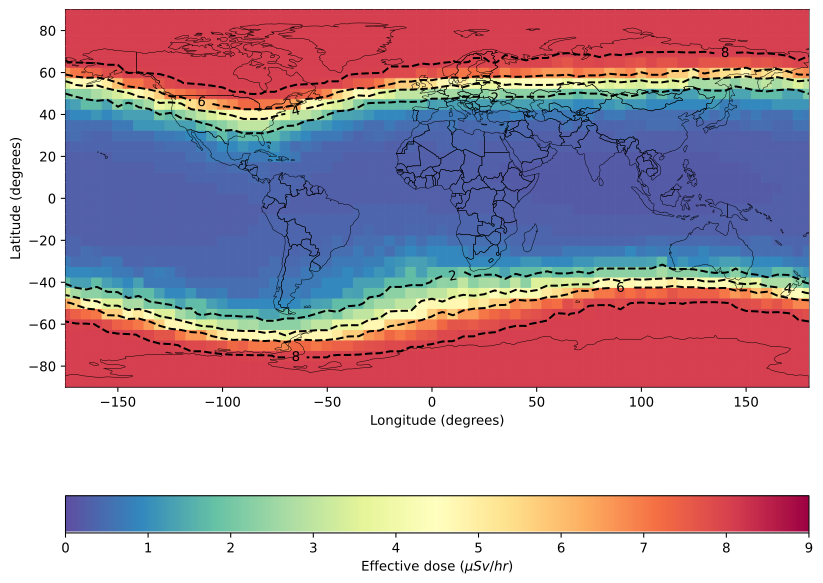
and assign the plot to the isotropic_dose_rate_map variable for the user to use as they wish.
Anisotropic runs
run_from_spectra defaults to an isotropic spectrum if no pitch angle distribution is supplied for either protons or alpha particles by the user.
To run an anisotropic spectrum, differential pitch angle distributions must be supplied to the proton_pitch_angle_distribution and/or alpha_pitch_angle_distribution arguments in run_from_spectra along with a reference location specified in terms of latitude and longitude in the reference_pitch_angle_latitude and reference_pitch_angle_longitude arguments respectively. The pitch angle distributions must be supplied as 2 dimensional functions, where the first argument is the pitch angle, and the second argument is particle rigidity (in many cases the pitch angle distribution might not depend on rigidity, but for programmatic reasons the function must at least take in rigidity as an argument although it does not need to have a dependence on it). The pitch angle here must be specified in units of radians.
reference_pitch_angle_latitude and reference_pitch_angle_longitude are the reference latitude and longitude in GEO coordinates representing a pitch angle of 0 in the supplied pitch angle distribution used. AniMAIRE currently makes the assumption that incoming particle distributions are cylindrically symmetric about this reference direction, and therefore that only the pitch angle with respect to this latitude and longitude are required to calculate dose rates anisotropically across Earth. Incoming solar particle events are frequently oriented near to the direction of the Interplanetary Magnetic Field (IMF), so you could specify pitch angles relative to the IMF here, and use the latitude and longitude of the IMF as the reference latitude and longitude.
The pitch angle distributions and rigidity spectrum must be specified in units normalised such that the product of the pitch angle distribution and rigidity spectrum multiplied together is in units of cm-2 s-1 sr-1 (GV/n)-1.
The pitch angle distributions can be specified using the Python lambda as with the rigidity spectra, but with 2 dimensions rather than 1. For example, to specify a Gaussian pitch angle distribution you could use:
```python import numpy as np
sigma = np.sqrt(0.19)
testpitchangledistfunction = lambda pitchangle,rigidity:np.exp(-(pitchangle2)/(sigma2)) ```
where sigma here has arbitrarily been chosen to be the square root of 0.19 for example purposes.
here pitch_angle_dist_function would be a viable input as a pitch angle distribution to run_from_spectra. While the function itself does not depend on rigidity, rigidity is specified as the second argument of the function nonetheless, as required for calculations to work.
An example of using this might be:
```python import numpy as np from AniMAIRE import AniMAIRE import datetime as dt
sigma = np.sqrt(0.19) pitchanglereferencelatitude = -17.0 pitchanglereferencelongitude = 148.0
testpitchangledistfunction = lambda pitchangle,rigidity:np.exp(-(pitchangle2)/(sigma2))
testanisotropicdoserates = AniMAIRE.runfromspectra( protonrigidityspectrum=lambda x:2.56(x*-3.41), protonpitchangledistribution=testpitchangledistfunction, referencepitchanglelatitude=pitchanglereferencelatitude,referencepitchanglelongitude=pitchanglereferencelongitude, Kpindex=3, dateand_time=dt.datetime(2006, 12, 13, 3, 0), ) ```
when run this should output a Pandas DataFrame to test_anisotropic_dose_rates with the same general output format as given in the previously described isotropic dose rates case.
In this case printing test_anisotropic_dose_rates should output:
text
 latitude longitude altitude (km) edose adose dosee tn1 tn2 tn3 SEU SEL
0 -90.0 0.0 0.0000 1.976895e-07 2.027961e-07 3.222401e-07 1.286575e-08 7.877480e-09 5.401425e-09 7.877480e-22 7.877480e-17
1 -90.0 0.0 3.0480 4.838923e-07 4.869626e-07 7.032983e-07 7.429541e-08 4.866265e-08 3.410940e-08 4.866265e-21 4.866265e-16
2 -90.0 0.0 6.0960 1.453834e-06 1.411544e-06 2.045308e-06 2.472576e-07 1.611648e-07 1.136527e-07 1.611648e-20 1.611648e-15
3 -90.0 0.0 7.6200 2.352658e-06 2.382057e-06 3.304989e-06 3.720997e-07 2.420436e-07 1.708843e-07 2.420436e-20 2.420436e-15
4 -90.0 0.0 8.5344 2.970462e-06 2.791970e-06 4.201789e-06 4.473736e-07 2.919136e-07 2.063902e-07 2.919136e-20 2.919136e-15
... ... ... ... ... ... ... ... ... ... ... ...
42619 90.0 355.0 14.9352 1.062397e-06 7.975138e-07 5.902218e-07 2.766678e-07 1.764588e-07 1.216189e-07 1.764588e-20 1.764588e-15
42620 90.0 355.0 15.8496 1.289216e-06 9.183397e-07 6.964574e-07 3.063998e-07 1.945207e-07 1.338582e-07 1.945207e-20 1.945207e-15
42621 90.0 355.0 16.7640 1.525359e-06 1.040969e-06 8.062018e-07 3.339381e-07 2.112220e-07 1.452375e-07 2.112220e-20 2.112220e-15
42622 90.0 355.0 17.6784 1.777447e-06 1.163693e-06 9.297615e-07 3.568426e-07 2.248452e-07 1.543556e-07 2.248452e-20 2.248452e-15
42623 90.0 355.0 18.5928 2.036052e-06 1.275021e-06 1.040287e-06 3.755276e-07 2.357292e-07 1.614028e-07 2.357292e-20 2.357292e-15
which will produce the following plot when
```python from AniMAIRE import dose_plotting import matplotlib.pyplot as plt
doseplotting.plotdosemap(testanisotropicdoserates.query("altitude (km) == 12.1920"),
hue_range=(0,9))
plt.show() ```
is run, as was described previously in this README for isotropic plotting:
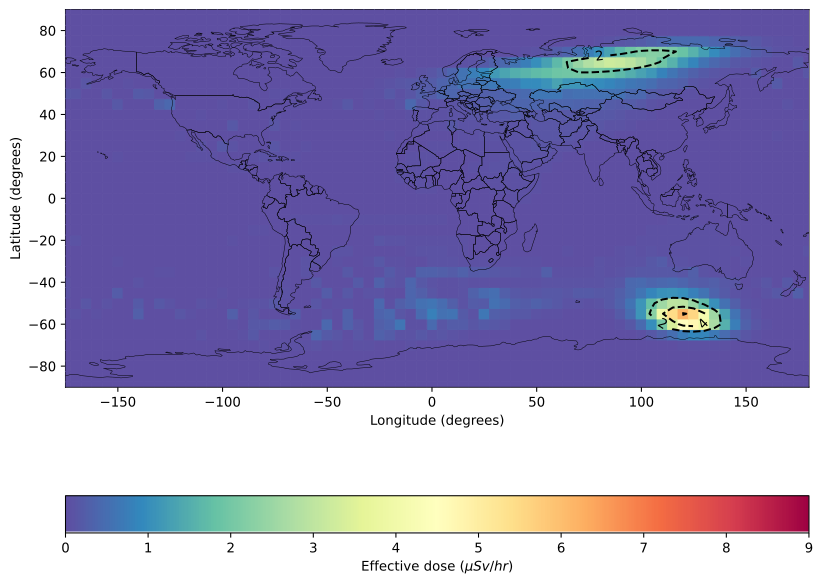
you can also produce similar plotly plots if you prefer plotly to matplotlib using:
```python from AniMAIRE import dose_plotting
anisotropicdoseratemap = doseplotting.createsingledosemapplotly(testanisotropicdoserates, selectedaltitudeinkm = 12.1920) ```
which generates the following plot:

Functions for running AniMAIRE for specific situations and for a past timestamp
In addition to the quite general run_from_spectra function, AniMAIRE currently contains several functions for running calculations for specific types of spectra and situations, to make it easier for users to perform runs without having to determine and feed in spectra to run_from_spectra themselves.
The run_from_DLR_cosmic_ray_power_law function allows users to run full atmospheric dose rate calculations (for cosmic ray only/'quiet' time periods only) from just a date and time, or alternatively from just a single OULU count rate, or just a value of 'W parameter', as well as Kp index. This function utilises the CosRayModifiedISO package to determine the spectra due to protons and alpha particles during cosmic ray only time periods, and then runs run_from_spectra using both of those spectra under isotropic conditions. The specifications of run_from_DLR_cosmic_ray_power_law are:
python
def run_from_DLR_cosmic_ray_model(OULU_count_rate_in_seconds=None,
                                      W_parameter=None,
                                      Kp_index=None,
          date_and_time=None,
                                      **kwargs)
**kwargs here can be used to supply any arguments you wish to run_from_spectra as specified previously, such as the list of altitudes and list of coordinates to perform calculations for. Details on what OULU_count_rate_in_seconds and W_parameter mean can be found at https://github.com/ssc-maire/CosRayModifiedISO . If either OULU_count_rate_in_seconds or W_parameter are used, only one of them should be specified. Otherwise, AniMAIRE will determined their values using the date_and_time parameter supplied.
In addition to running from the DLR-ISO isotropic cosmic ray model, you can also run AniMAIRE from a combined power law rigidity spectrum and Gaussian pitch angle distribution. This can be done using the run_from_power_law_gaussian_distribution function:
python
def run_from_power_law_gaussian_distribution(J0, gamma, deltaGamma, sigma,
                                             reference_pitch_angle_latitude, reference_pitch_angle_longitude,
                                             Kp_index,date_and_time,
                                             **kwargs)
Here J0, gamma, deltaGamma, sigma, reference_pitch_angle_latitude, reference_pitch_angle_longitude are all defined as specified in the format of papers like Mishev, A., Usoskin, I. Analysis of the Ground-Level Enhancements on 14 July 2000 and 13 December 2006 Using Neutron Monitor Data. Sol Phys 291, 12251239 (2016). https://doi.org/10.1007/s11207-016-0877-2.
Processing Time-Series Event Data with AniMAIRE_event
AniMAIRE now includes a powerful new class called AniMAIRE_event that allows you to process and analyze Ground Level Enhancement (GLE) events or any time-varying spectral data across multiple timestamps. This feature enables comprehensive temporal analysis of radiation events throughout their evolution.
Basic Usage
The AniMAIRE_event class takes a CSV file containing time-series spectral parameters and processes each timestamp to create a complete picture of an event over time:
```python from AniMAIRE import AniMAIRE_event
Initialize with a spectra file containing time-series data
gleevent = AniMAIREevent("path/to/your/GLE74_spectra.csv")
Get a summary of the input spectra
gleevent.summarizespectra()
Run AniMAIRE for all timestamps in the file (or limit to a specific number)
gleevent.runAniMAIRE(ntimestamps=5, usecache=True)
Get a summary of the calculated results
gleevent.summarizeresults() ```
Input File Format
The input CSV file should contain columns with spectral parameters for each timestamp. The class supports the following column mappings (either name will work):
| CSV Column | Internal Name | Description | |------------|---------------|-------------| | Time | datetime | Timestamp for the spectrum | | J0 | J0 | Differential flux normalization factor | | gamma | gamma | Spectral index | | dgamma | deltaGamma | Change in spectral index for double power law | | Sigma1 | sigma1 | First Gaussian width parameter for pitch angle distribution | | Sigma2 | sigma2 | Second Gaussian width parameter for pitch angle distribution | | B | B | Relative contribution of second Gaussian term | | SymLat | referencepitchanglelatitude | Reference pitch angle latitude (degrees) | | SymLong | referencepitchanglelongitude | Reference pitch angle longitude (degrees) |
Visualizing Event Data
AniMAIRE_event provides multiple methods for visualizing and analyzing the time evolution of radiation events:
```python
Create a 2D map animation at flight altitude (12.192 km 40,000 ft)
gleevent.createglemapanimation(altitude=12.192, save_mp4=True)
Create a 3D globe animation
gleevent.creategleglobeanimation(altitude=12.192, save_mp4=True)
Plot the peak dose rate map for the entire event
gleevent.plotpeakdoseratemap(altitude=12.192, dosetype='edose')
Plot the integrated dose map for the entire event
gleevent.plotintegrateddosemap(altitude=12.192, dose_type='edose')
Create a time-series plot at a specific location
gleevent.plottimeseriesatlocation( latitude=35.0, longitude=-100.0, altitude=12.192, dose_type='edose' ) ```
Advanced Analysis
The AniMAIRE_event class provides methods for comprehensive analysis of an event:
```python
Calculate the integrated dose over the entire event
integrateddose = gleevent.calculateintegrateddose(altitude=12.192, dose_type='edose')
Find the peak dose rates at each location
peakdosemap = gleevent.getpeakdoseratemap(altitude=12.192, dosetype='edose')
Get dose rate at a specific location and time
doserate = gleevent.getdoserateatlocation( latitude=35.0, longitude=-100.0, altitude=12.192, timestamp=somedatetime, dosetype='edose' )
Export all dose rate data to NetCDF for further analysis
gleevent.exporttonetcdf("GLE74results.nc") ```
Using Cached Results
To improve performance, especially for repeated analyses, the AniMAIRE_event class includes caching functionality:
```python
Run with caching enabled (default)
gleevent.runAniMAIRE(use_cache=True) ```
This creates a directory .AniMAIRE_event_cache in your working directory to store intermediate results, which can significantly speed up repeated calculations.
Helper Function
There's also a helper function for quickly processing a GLE file:
```python from AniMAIRE.AniMAIREevent import runfromGLEspectrum_file
Run AniMAIRE for all timestamps in a GLE file
gleobject = runfromGLEspectrumfile( "path/to/your/GLE74spectra.csv", # Additional parameters to pass to runAniMAIRE arrayoflatsandlongs=[[35.0, -100.0], [40.0, 0.0]], altitudesin_km=[12.192] ) ```
API Reference and Advanced Usage
run_from_spectra: Main entry point for all runs. By default, uses OTSO for asymptotic directions. Useasymp_dir_filefor precomputed files, oruse_OTSOpy=Falseto force Magnetocosmics mode.run_from_power_law_gaussian_distribution,run_from_double_power_law_gaussian_distribution,run_from_power_law_Beeck_gaussian_distribution: Convenience functions for common spectrum models.
References
- Davis, C. S. W. et al. (2024). AniMAIRE-A New Openly Available Tool for Calculating Atmospheric Ionising Radiation Dose Rates and Single Event Effects During Anisotropic Conditions. https://doi.org/10.1029/2024SW003985
- Larsen, N. et al. (2024). A New Open-Source Geomagnetosphere Propagation Tool (OTSO) and Its Applications. https://doi.org/10.1029/2022JA031061
- Desorgher, L. (2004). MAGNETOCOSMICS: Geant4 application for simulating the propagation of cosmic rays through the Earth's magnetosphere. Technical Report, University of Bern. http://cosray.unibe.ch/~laurent/magnetocosmics/
- Mishev, A. & Usoskin, I. (2016). Analysis of the Ground-Level Enhancements on 14 July 2000 and 13 December 2006 Using Neutron Monitor Data. Solar Physics, 291, 12251239. https://doi.org/10.1007/s11207-016-0877-2
- Matthi, D. et al. (2012). A ready-to-use galactic cosmic ray model, https://doi.org/10.1016/j.asr.2012.09.022
Owner
- Name: Surrey Space Centre
- Login: ssc-maire
- Kind: organization
- Email: maire+@surrey.ac.uk
- Website: www.maire.uk
- Repositories: 1
- Profile: https://github.com/ssc-maire
GitHub Events
Total
- Create event: 9
- Release event: 6
- Issues event: 3
- Watch event: 1
- Issue comment event: 5
- Push event: 26
- Pull request event: 4
- Fork event: 3
Last Year
- Create event: 9
- Release event: 6
- Issues event: 3
- Watch event: 1
- Issue comment event: 5
- Push event: 26
- Pull request event: 4
- Fork event: 3
Issues and Pull Requests
Last synced: 11 months ago
All Time
- Total issues: 1
- Total pull requests: 1
- Average time to close issues: N/A
- Average time to close pull requests: about 3 hours
- Total issue authors: 1
- Total pull request authors: 1
- Average comments per issue: 0.0
- Average comments per pull request: 0.0
- Merged pull requests: 1
- Bot issues: 0
- Bot pull requests: 0
Past Year
- Issues: 1
- Pull requests: 1
- Average time to close issues: N/A
- Average time to close pull requests: about 3 hours
- Issue authors: 1
- Pull request authors: 1
- Average comments per issue: 0.0
- Average comments per pull request: 0.0
- Merged pull requests: 1
- Bot issues: 0
- Bot pull requests: 0
Top Authors
Issue Authors
- mygeotail (1)
- TheHexaCube (1)
- NLarsen15 (1)
Pull Request Authors
- ChrisTestingAccount (2)
- ChrisSWDavis (1)
Top Labels
Issue Labels
Pull Request Labels
Packages
- Total packages: 1
-
Total downloads:
- pypi 348 last-month
- Total dependent packages: 0
- Total dependent repositories: 0
- Total versions: 32
- Total maintainers: 1
pypi.org: animaire
Python library for running the anisotropic version of MAIRE+
- Homepage: https://github.com/ssc-maire/AniMAIRE-public
- Documentation: https://animaire.readthedocs.io/
- License: CC By-NC-SA 4.0
-
Latest release: 1.4.1
published about 1 year ago
Rankings
Maintainers (1)
Dependencies
- actions/checkout v3 composite
- actions/setup-python v3 composite
- pypa/gh-action-pypi-publish 27b31702a0e7fc50959f5ad993c78deac1bdfc29 composite
- actions/checkout v4 composite
- actions/setup-python v3 composite