Science Score: 26.0%
This score indicates how likely this project is to be science-related based on various indicators:
-
○CITATION.cff file
-
✓codemeta.json file
Found codemeta.json file -
✓.zenodo.json file
Found .zenodo.json file -
○DOI references
-
○Academic publication links
-
○Academic email domains
-
○Institutional organization owner
-
○JOSS paper metadata
-
○Scientific vocabulary similarity
Low similarity (11.8%) to scientific vocabulary
Scientific Fields
Political Science
Social Sciences -
90% confidence
Computer Science
Computer Science -
50% confidence
Last synced: 11 months ago
·
JSON representation
Repository
nothing to do
Basic Info
- Host: GitHub
- Owner: VdNcoe
- License: mit
- Language: Jupyter Notebook
- Default Branch: main
- Size: 275 MB
Statistics
- Stars: 0
- Watchers: 1
- Forks: 0
- Open Issues: 0
- Releases: 0
Created over 1 year ago
· Last pushed 11 months ago
Metadata Files
Readme
Changelog
Contributing
Funding
License
Code of conduct
Citation
Codeowners
Security
Governance
Roadmap
Authors
Notice
Copyright
Cla
README
#[TCPCopy](https://github.com/session-replay-tools/tcpcopy) - A TCP Stream Replay Tool
TCPCopy is a TCP stream replay tool to support real testing of Internet server applications.
##Description
Although the real live flow is important for the test of Internet server applications, it is hard to simulate it as online environments are too complex. To support more realistic testing of Internet server applications, we propose a live flow reproduction tool TCPCopy, which could generate the test workload that is similar to the production workload. Currently, TCPCopy has been widely used by companies in China.
TCPCopy has little influence on the production system except occupying additional CPU, memory and bandwidth. Moreover, the reproduced workload is similar to the production workload in request diversity, network latency and resource occupation.
##Scenarios
* Distributed stress testing
- Use to copy real-world data to stress test your server software. Bugs that only can be produced in high-stress situations can be found
* Live testing
- Prove the new system is stable and find bugs that only occur in the real world
* Regression testing
* Performance comparison
##Architecture
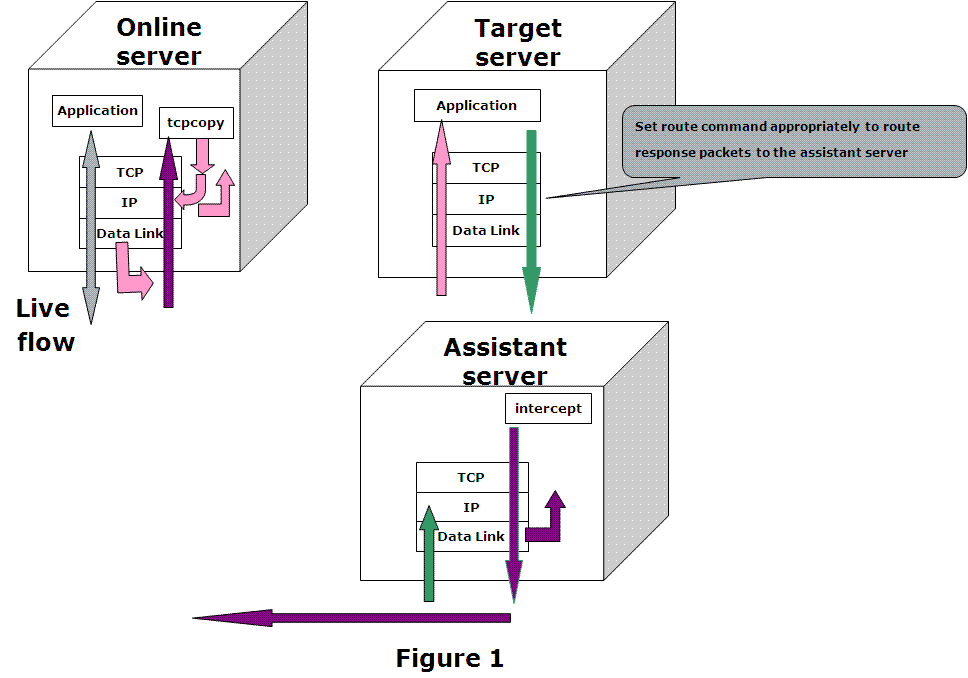
As shown in Figure 1, TCPCopy consists of two parts: *tcpcopy* and *intercept*. While *tcpcopy* runs on the online server and captures the online requests, *intercept* runs on the assistant server and does some assistant work, such as passing response info to *tcpcopy*.
*tcpcopy* utilizes raw socket input technique by default to capture the online packets at the network layer and does the necessary processing (including TCP interaction simulation, network latency control, and common upper-layer interaction simulation), and uses raw socket output technique by default to send packets to the target server(pink arrows).
The only operation needed on the target server for TCPCopy is setting appropriate route commands to route response packets(green arrows) to the assistant server.
*intercept* is responsible for passing the response header(by default) to *tcpcopy*. By capturing the reponse packets, *intercept* will extract response header information and send the response header to *tcpcopy* using a special channel(purple arrows). When *tcpcopy* receives the response header, it utilizes the header information to modify the attributes of online packets and continues to send another packet. It should be noticed that the responses from the target server are routed to the assistant server which should act as a black hole.
##Quick start
Two quick start options are available for *intercept*:
* [Download the latest intercept release](https://github.com/session-replay-tools/intercept/releases).
* Clone the repo: `git clone git://github.com/session-replay-tools/intercept.git`.
Two quick start options are available for *tcpcopy*:
* [Download the latest tcpcopy release](https://github.com/session-replay-tools/tcpcopy/releases).
* Clone the repo: `git clone git://github.com/session-replay-tools/tcpcopy.git`.
##Getting intercept installed on the assistant server
1. cd intercept
2. ./configure
- choose appropriate configure options if needed
3. make
4. make install
###Configure Options for intercept
--single run intercept at non-distributed mode
--with-debug compile intercept with debug support (saved in a log file)
##Getting tcpcopy installed on the online server
1. cd tcpcopy
2. ./configure
- choose appropriate configure options if needed
3. make
4. make install
###Configure Options for tcpcopy
--offline replay TCP streams from the pcap file
--pcap-capture capture packets at the data link
--pcap-send send packets at the data link layer instead of the IP layer
--set-protocol-module=PATH set tcpcopy to work for an external protocol module
--single if intercept is configured with "--single" option,
so does tcpcopy
--with-debug compile tcpcopy with debug support (saved in a log file)
##Running TCPCopy
Assume *tcpcopy* with "./configure" is configured and *intercept* with "configure" is configured.
###1) On the target server which runs server applications:
Set route commands appropriately to route response packets to the assistant server
For example:
Assume 61.135.233.161 is the IP address of the assistant server. We set the
following route command to route all responses to the 62.135.200.x's clients
to the assistant server.
route add -net 62.135.200.0 netmask 255.255.255.0 gw 65.135.233.161
###2) On the assistant server which runs intercept(root privilege is required):
./intercept -F -i
Note that the filter format is the same as the pcap filter.
For example:
./intercept -i eth0 -F 'tcp and src port 8080' -d
intercept will capture response packets of the TCP based application which listens
on port 8080 from device eth0
###3) On the online source server (root privilege is required):
./tcpcopy -x localServerPort-targetServerIP:targetServerPort -s
[-c ]
For example(assume 61.135.233.160 is the IP address of the target server):
./tcpcopy -x 80-61.135.233.160:8080 -s 61.135.233.161 -c 62.135.200.x
tcpcopy would capture port '80' packets on current server, change client IP address
to one of 62.135.200.x series, send these packets to the target port '8080' of the
target server '61.135.233.160', and connect 61.135.233.161 for asking intercept to
pass response packets to it.
Although "-c" parameter is optional, it is set here in order to simplifying route
commands.
##Note
1. It is tested on Linux only (kernal 2.6 or above)
2. TCPCopy may lose packets hence lose requests
3. Root privilege is required
4. TCPCopy does only support client-initiated connections now
5. TCPCopy does not support replay for server applications which use SSL/TLS
6. Please execute "./tcpcopy -h" or "./intercept -h" for more details.
##Influential Factors
There are several factors that could influence TCPCopy, which will be introduced in detail in the following sections.
###1. Capture Interface
*tcpcopy* utilizes raw socket input interface by default to capture packets at the network layer on the online server. The system kernel may lose some packets when the system is busy.
If you configure *tcpcopy* with "--pcap-capture", then *tcpcopy* could capture packets at the data link layer and could also filter packets in the kernel. With PF_RING, *tcpcopy* would lose less packets when pcap capturing.
Maybe the best way to capturing requests is using switch to mirror ingress packets to divide the huge traffic to several machines.
###2. Sending Interface
*tcpcopy* utilizes raw socket output interface by default to send packets at the network layer to a target server.
If you want to avoid ip_conntrack problems or get better performance, configure *tcpcopy* with "--pcap-send", then with appropriate parameters *tcpcopy* could send packets at the data link layer to a target server.
###3.On the Way to the Target Server
When a packet is sent by *tcpcopy*, it may encounter many challenges before reaching the target server. As the source IP address in the packet is still the end-users IP address(by default) other than the online servers, some security devices may take it for an invalid or forged packet and drop it. In this case, when you use tcpdump to capture packets on the target server, no packets from the expected end-users will be captured. To know whether you are under such circumstances, you can choose a target server in the same network segment to do a test. If packets could be sent to the target server successfully in the same network segment but unsuccessfully across network segments, your packets may be dropped halfway.
To solve this problem, we suggest deploying *tcpcopy*, *target applications* and *intercept* on servers in the same network segment. Theres also another solution with the help of a proxy in the same network segment. *tcpcopy* could send packets to the proxy and then the proxy would send the corresponding requests to the target server in another network segment.
Note that deploying the target server's application on one virtual machine in the same segment may face the above problems.
####4. OS of the Target Server
The target server may set rpfilter, which would check whether the source IP address in the packet is forged. If yes, the packet will be dropped at the network layer.
If the target server could not receive any requests although packets can be captured by tcpdump on the target server, you should check if you have any corresponding rpfilter settings. If set, you have to remove the related settings to let the packets pass through the network layer.
There are also other reasons that cause *tcpcopy* not working, such as iptables setting problems.
###5. Applications on the Target Server
It is likely that the application on the target server could not process all the requests in time. On the one hand, bugs in the application may make the request not be responded for a long time. On the other hand, some protocols above TCP layer may only process the first request in the socket buffer and leave the remaining requests in the socket buffer unprocessed.
###6. OS of the assistant Server
You should not set ip_forward true or the assistant server can't act as a black hole.
##Release History
+ 2014.09 v1.0 TCPCopy released
##Bugs and feature requests
Have a bug or a feature request? [Please open a new issue](https://github.com/session-replay-tools/tcpcopy/issues). Before opening any issue, please search for existing issues.
## Copyright and license
Copyright 2014 under [the BSD license](LICENSE).
Owner
- Login: VdNcoe
- Kind: user
- Repositories: 2
- Profile: https://github.com/VdNcoe
Dependencies
Cargo.lock
cargo
- aarch64-intrinsics 1.0.0
- aarch64-paging 0.7.0
- autocfg 1.1.0
- bitflags 2.6.0
- cfg-if 1.0.0
- const-utf16 0.2.1
- crc 3.0.1
- crc-catalog 2.2.0
- efiloader 0.0.1
- fdt 0.1.5
- linked_list_allocator 0.10.5
- lock_api 0.4.9
- log 0.4.17
- mmio 2.1.0
- once_cell 1.18.0
- scopeguard 1.1.0
- spinning_top 0.2.5
- widestring 1.0.2
Cargo.toml
cargo
- nix * development
- regex * development
- tempfile * development
- clap *
- env_logger *
- log *
Dockerfile
docker
- openjdk 8-jdk-alpine build
Backend/requirements.txt
pypi
- Django *
- Pillow *
- django-cors-headers *
- folium ==0.2.1
- ipython *
- matplotlib *
- numpy *
- opencv-python *
- pandas *
- pdflatex *
- pylatex *
- scikit-image *
- tensorflow *
docker-compose.yml
docker
- compiler-backend latest
- compiler-frontend latest
- mysql latest
bower.json
bower
Podfile
cocoapods
- StreamChat ~> 2.2
- VoxeetUXKit ~> 1.3
docker-compose-builder.yml
docker
hunter2-lessons/http-header-injection/code/Dockerfile
docker
- python 3.7 build
go.mod
go
- github.com/davecgh/go-spew v1.1.1
- github.com/ghodss/yaml v1.0.0
- github.com/gin-gonic/gin v1.6.3
- github.com/go-redis/redis v6.15.8+incompatible
- github.com/go-sql-driver/mysql v1.5.0
- github.com/golang/groupcache v0.0.0-20190702054246-869f871628b6
- github.com/gorilla/mux v1.7.3
- github.com/liubog2008/tester v0.0.0-20190707090223-f33559a91e14
- github.com/pkg/errors v0.8.1
- github.com/shurcooL/httpfs v0.0.0-20190707220628-8d4bc4ba7749
- github.com/shurcooL/vfsgen v0.0.0-20181202132449-6a9ea43bcacd
- github.com/sirupsen/logrus v1.4.2
- github.com/spf13/cobra v0.0.5
- github.com/spf13/pflag v1.0.5
- github.com/spf13/viper v1.3.2
- github.com/stretchr/testify v1.4.0
- k8s.io/api v0.18.2
- k8s.io/apimachinery v0.18.2
- k8s.io/client-go v0.18.2
- k8s.io/component-base v0.18.2
- k8s.io/klog v1.0.0
- sigs.k8s.io/controller-tools v0.3.0
go.sum
go
- 114 dependencies
backend/build.gradle
maven
- org.hibernate.orm:hibernate-community-dialects 6.6.2.Final implementation
- org.springdoc:springdoc-openapi-starter-webmvc-ui 2.6.0 implementation
- org.springframework.boot:spring-boot-starter * implementation
- org.springframework.boot:spring-boot-starter-actuator * implementation
- org.springframework.boot:spring-boot-starter-oauth2-resource-server * implementation
- org.springframework.boot:spring-boot-starter-web * implementation
- org.springframework.data:spring-data-jpa * implementation
- org.springframework:spring-jdbc 6.2.0 implementation
- org.xerial:sqlite-jdbc 3.47.0.0 implementation
- org.springframework.boot:spring-boot-starter-test * testImplementation
- org.junit.platform:junit-platform-launcher * testRuntimeOnly
build.gradle
maven
build.gradle.kts
maven
code/Flink/flink-basis-java/pom.xml
maven
- org.apache.flink:flink-java 1.9.0 provided
- org.apache.flink:flink-streaming-java_2.11 1.9.0 provided
- org.projectlombok:lombok 1.18.10 provided
- log4j:log4j 1.2.17
- org.slf4j:slf4j-log4j12 1.7.7
client/package.json
npm
- @testing-library/jest-dom ^5.11.4
- @testing-library/react ^11.1.0
- @testing-library/user-event ^12.1.10
- react ^17.0.2
- react-dom ^17.0.2
- react-scripts 4.0.3
- socket.io-client ^4.1.2
- web-vitals ^1.0.1
FSH.StarterKit.nuspec
nuget
composer.json
packagist
- vimeo/psalm ^4.4 development
- craftcms/cms ^3.2.0
- guzzlehttp/guzzle ^6.5.5|^7.2.0
Pipfile
pypi
- lxml *
- requests *
- urllib3 >=1.26.5
backend/Pipfile
pypi
- django ==3.2.16
- django-betterforms ==2.0.0
- django-ckeditor ==6.3.2
- django-cors-headers ==3.13.0
- django-crispy-forms ==1.14.0
- django-mapbox-location-field ==2.0.0
- djangorestframework ==3.14.0
- pillow ==9.3.0
Gemfile
rubygems
- highline >= 1.5.1 development
Gemfile.lock
rubygems
- activemodel 4.2.5.1
- activesupport 4.2.5.1
- backports 3.6.8
- bson 1.12.5
- bson_ext 1.12.5
- builder 3.2.2
- bundler 1.10.6
- coffee-script 2.4.1
- coffee-script-source 1.10.0
- daemons 1.2.3
- eco 1.0.0
- eco-source 1.1.0.rc.1
- erubis 2.7.0
- eventmachine 1.0.9.1
- execjs 2.6.0
- hike 1.2.3
- i18n 0.7.0
- json 1.8.3
- minitest 5.8.4
- mongo 1.12.5
- mongo_mapper 0.13.1
- multi_json 1.11.2
- plucky 0.6.6
- rack 1.6.4
- rack-protection 1.5.3
- rack-test 0.6.3
- sinatra 1.4.7
- sinatra-contrib 1.4.6
- sprockets 2.9.4
- sprockets-commonjs 0.0.6
- stylus 1.0.1
- stylus-source 0.49.3
- thin 1.6.4
- thread_safe 0.3.5
- tilt 1.4.1
- tzinfo 1.2.2
- uglifier 2.7.2
- useragent 0.16.3
document/docker/docker-compose-app.yml
docker
- mall/mall-admin 1.0-SNAPSHOT
- mall/mall-portal 1.0-SNAPSHOT
- mall/mall-search 1.0-SNAPSHOT
Pipfile.lock
pypi
- 217 dependencies
DESCRIPTION
cran
- MASS * imports
- broom * imports
- lavaan * imports
- magrittr * imports
- psych * imports
- rlang * imports
- robust * imports
- robustlmm * imports
- tibble * imports
- tidyselect * imports
environment.yml
conda
- attrs 19.1.0
- backcall 0.1.0
- blas 1.0
- bleach 3.1.0
- ca-certificates 2019.5.15
- certifi 2019.6.16
- cffi 1.12.2
- cudatoolkit 10.0.130
- dbus 1.13.6
- decorator 4.4.0
- defusedxml 0.5.0
- entrypoints 0.3
- expat 2.2.6
- fontconfig 2.13.0
- freetype 2.9.1
- glib 2.56.2
- gmp 6.1.2
- gst-plugins-base 1.14.0
- gstreamer 1.14.0
- icu 58.2
- intel-openmp 2019.3
- ipykernel 5.1.0
- ipython 7.4.0
- ipython_genutils 0.2.0
- ipywidgets 7.4.2
- jedi 0.13.3
- jinja2 2.10
- jpeg 9b
- jsonschema 3.0.1
- jupyter 1.0.0
- jupyter_client 5.2.4
- jupyter_console 6.0.0
- jupyter_core 4.4.0
- libedit 3.1.20181209
- libffi 3.2.1
- libgcc-ng 8.2.0
- libgfortran-ng 7.3.0
- libpng 1.6.36
- libsodium 1.0.16
- libstdcxx-ng 8.2.0
- libtiff 4.0.10
- libuuid 1.0.3
- libxcb 1.13
- libxml2 2.9.9
- markupsafe 1.1.1
- mistune 0.8.4
- mkl 2019.3
- mkl_fft 1.0.10
- mkl_random 1.0.2
- nbconvert 5.4.1
- nbformat 4.4.0
- ncurses 6.1
- ninja 1.9.0
- notebook 5.7.8
- numpy 1.16.2
- numpy-base 1.16.2
- olefile 0.46
- openssl 1.1.1c
- pandoc 2.2.3.2
- pandocfilters 1.4.2
- parso 0.3.4
- pcre 8.43
- pexpect 4.6.0
- pickleshare 0.7.5
- pillow 5.4.1
- pip 19.0.3
- prometheus_client 0.6.0
- prompt_toolkit 2.0.9
- ptyprocess 0.6.0
- pycparser 2.19
- pygments 2.3.1
- pyqt 5.9.2
- pyrsistent 0.14.11
- python 3.7.3
- python-dateutil 2.8.0
- pytorch 1.2.0
- pyzmq 18.0.0
- qt 5.9.7
- qtconsole 4.4.3
- readline 7.0
- send2trash 1.5.0
- setuptools 40.8.0
- sip 4.19.8
- six 1.12.0
- sqlite 3.27.2
- terminado 0.8.1
- testpath 0.4.2
- tk 8.6.8
- torchvision 0.4.0
- tornado 6.0.2
- traitlets 4.3.2
- wcwidth 0.1.7
- webencodings 0.5.1
- wheel 0.33.1
- widgetsnbextension 3.4.2
- xz 5.2.4
- zeromq 4.3.1
- zlib 1.2.11
- zstd 1.3.7