auditapp
AUDIT - Analysis & Evaluation Dashboard of Artificial Intelligence
Science Score: 39.0%
This score indicates how likely this project is to be science-related based on various indicators:
-
○CITATION.cff file
-
✓codemeta.json file
Found codemeta.json file -
✓.zenodo.json file
Found .zenodo.json file -
✓DOI references
Found 2 DOI reference(s) in README -
○Academic publication links
-
○Academic email domains
-
○Institutional organization owner
-
○JOSS paper metadata
-
○Scientific vocabulary similarity
Low similarity (15.1%) to scientific vocabulary
Keywords
Repository
AUDIT - Analysis & Evaluation Dashboard of Artificial Intelligence
Basic Info
Statistics
- Stars: 3
- Watchers: 1
- Forks: 0
- Open Issues: 0
- Releases: 1
Topics
Metadata Files
README.md







Table of Contents
Summary
AUDIT, Analysis & evalUation Dashboard of artIficial inTelligence, is a tool designed to provide researchers and developers with an interactive way to better analyze and explore MRI datasets and segmentation models. Given its functionalities to extract the most relevant features and metrics from your multiple data sources, it allows for uncovering biases both intra and inter-dataset as well as in the model predictions.
Details of our work are provided in our paper AUDIT: An open-source Python library for AI model evaluation with use cases in MRI brain tumor segmentation. We hope that users will leverage AUDIT to gain novel insights into the field of medical image segmentation.

AUDIT workflow
The diagram below illustrates the overall workflow of AUDIT, from input data to data visualization on the APP.
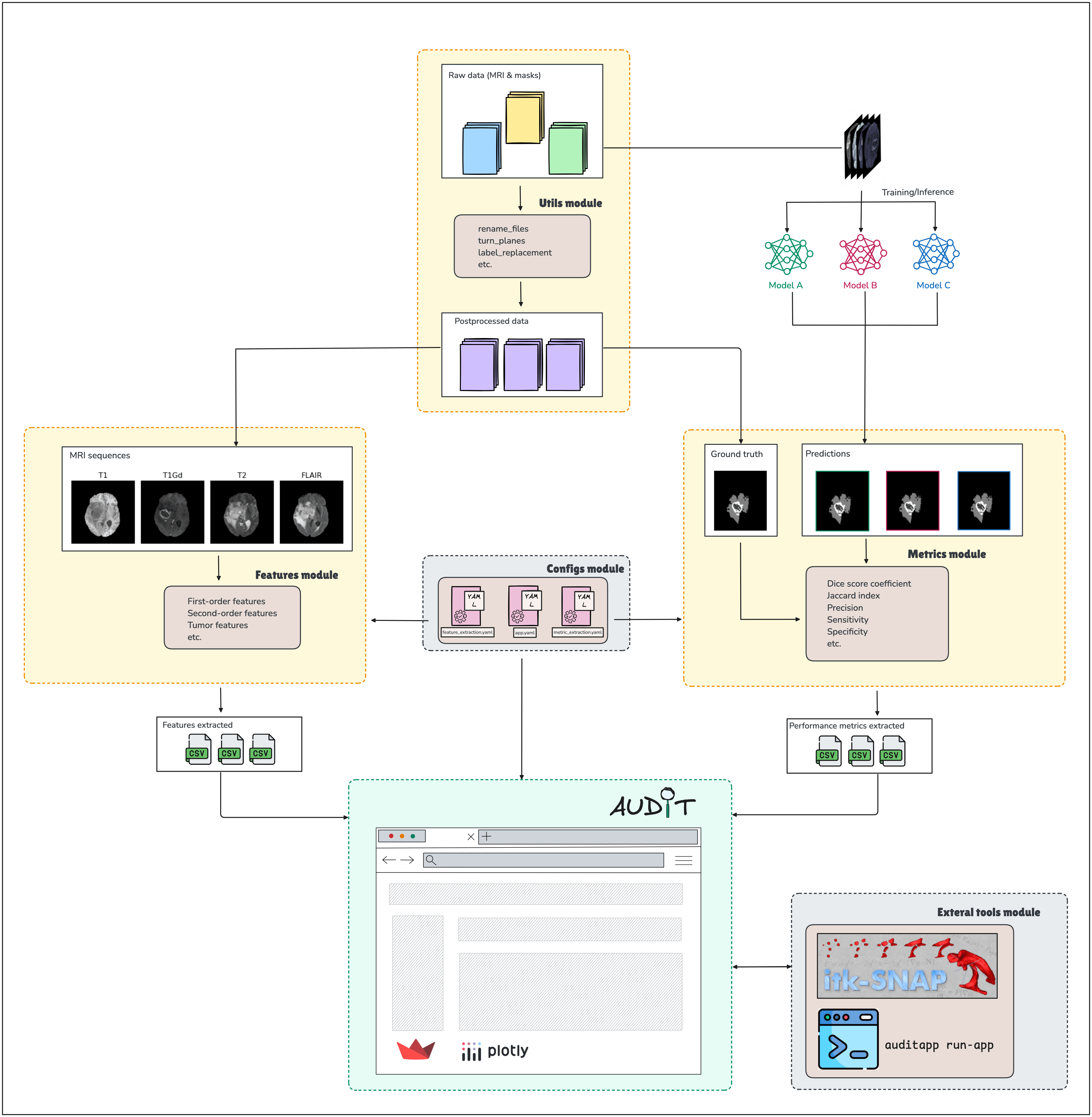
For more details, please refer to the AUDIT paper.
AUDIT analysis modes:
- Home Page: The main landing page of the tool.
- Univariate: Exploration of individual features to understand how they are distributed.
- Multivariate: Analysis of multiple features simultaneously to explore relationships and hidden patterns.
- Segmentation error matrix: Overview of disagreements between ground truth and predicted segmentation through a class-wise error matrix.
- Single model performance: Evaluation of the performance of a single model based on extracted features.
- Pairwise model performance: Perform pairwise comparisons between models to find statistically significant differences.
- Multi-model performance: Comparative analysis of performance metrics across multiple models.
- Longitudinal measurements: Analysis of data collected over time to observe trends and changes in model performance.
- Subjects' exploration: Detailed examination of individual subjects within the dataset.
Online Web application
Last released version of AUDIT is hosted at https://auditapp.streamlitapp.com for an online overview of its functionalities.
Getting Started
AUDIT can be installed either from our GitHub repository or from PyPI using the command pip install auditapp. In this guide, we will show how to install it from the GitHub repository. For a more detailed exploration of AUDIT, please check our official documentation.
1 Installation
Create an isolated Anaconda environment (recommended to avoid dependency conflicts):
bash
conda create -n audit_env python=3.10
conda activate audit_env
Clone the repository:
bash
 git clone https://github.com/caumente/AUDIT.git
 cd AUDIT
Install the required packages:
bash
 pip install -r requirements.txt
2. Configuration
Edit the config files in ./src/audit/configs/ directory to set up the paths for data loading and other configurations:
2.1 Feature extraction config file
This configuration file is used to set paths, labels, features, and longitudinal study parameters for feature extraction in AUDIT.
Show configuration
```yaml # Paths to all the datasets data_paths: BraTS2020: '/home/usr/AUDIT/datasets/BraTS2020/BraTS2020_images' BraTS2024_PED: '/home/usr/AUDIT/datasets/BraTS2024_PED/BraTS2024_PED_images' BraTS2024_SSA: '/home/usr/AUDIT/datasets/BraTS2024_SSA/BraTS2024_SSA_images' UCSF: '/home/usr/AUDIT/datasets/UCSF/UCSF_images' LUMIERE: '/home/usr/AUDIT/datasets/LUMIERE/LUMIERE_images' # Sequences available sequences: - '_t1' - '_t2' - '_t1ce' - '_flair' # Mapping of labels to their numeric values labels: BKG: 0 EDE: 3 ENH: 1 NEC: 2 # List of features to extract features: statistical: true texture: true spatial: true tumor: true # Longitudinal study settings longitudinal: UCSF: pattern: "_" # Pattern used for splitting filename longitudinal_id: 1 # Index position for the subject ID after splitting the filename. Starting by 0 time_point: 2 # Index position for the time point after splitting the filename. Starting by 0 LUMIERE: pattern: "-" longitudinal_id: 1 time_point: 3 # Path where extracted features will be saved output_path: '/home/usr/AUDIT/outputs/features' logs_path: '/home/usr/AUDIT/logs/features' # others cpu_cores: 8 ```2.2 Metric extraction config file
This configuration file defines the paths to datasets and model predictions, the labels, metrics to compute, and output paths for metric extraction in AUDIT.
Show configuration
```yaml # Path to the raw dataset data_path: '/home/usr/AUDIT/datasets/BraTS2024_PED/BraTS2024_PED_images' # Paths to model predictions model_predictions_paths: nnUnet: '/home/usr/AUDIT/datasets/BraTS2024_PED/BraTS2024_PED_seg/nnUnet' SegResNet: '/home/usr/AUDIT/datasets/BraTS2024_PED/BraTS2024_PED_seg/SegResNet' # Mapping of labels to their numeric values labels: BKG: 0 EDE: 3 ENH: 1 NEC: 2 # List of metrics to compute metrics: dice: true jacc: true accu: true prec: true sens: true spec: true haus: true size: true # Library used for computing all the metrics package: audit # Path where output metrics will be saved output_path: '/home/usr/AUDIT/outputs/metrics' filename: 'BraTS2024_PED' logs_path: '/home/usr/AUDIT/logs/metric' # others cpu_cores: 8 ```2.3 APP config file
This configuration file sets up paths for datasets, extracted features, metrics, and model predictions. It also defines available sequences and label mappings used by the AUDIT application.
Show configuration
```yaml # Sequences available. First of them will be used to compute properties like spacing sequences: - '_t1' - '_t2' - '_t1ce' - '_flair' # Mapping of labels to their numeric values labels: BKG: 0 EDE: 3 ENH: 1 NEC: 2 # Root path for datasets, features extracted, and metrics extracted datasets_path: './datasets' # '/home/usr/AUDIT/datasets' features_path: './outputs/features' # '/home/usr/AUDIT/outputs/features' metrics_path: './outputs/metrics' # '/home/usr/AUDIT/outputs/metrics' # Paths for raw datasets raw_datasets: BraTS2020: "${datasets_path}/BraTS2020/BraTS2020_images" BraTS2024_SSA: "${datasets_path}/BraTS2024_SSA/BraTS2024_SSA_images" BraTS2024_PED: "${datasets_path}/BraTS2024_PED/BraTS2024_PED_images" UCSF: "${datasets_path}/UCSF/UCSF_images" LUMIERE: "${datasets_path}/LUMIERE/LUMIERE_images" # Paths for feature extraction CSV files features: BraTS2020: "${features_path}/extracted_information_BraTS2020.csv" BraTS2024_SSA: "${features_path}/extracted_information_BraTS2024_SSA.csv" BraTS2024_PED: "${features_path}/extracted_information_BraTS2024_PED.csv" UCSF: "${features_path}/extracted_information_UCSF.csv" LUMIERE: "${features_path}/extracted_information_LUMIERE.csv" # Paths for metric extraction CSV files metrics: BraTS2024_SSA: "${metrics_path}/extracted_information_BraTS2024_SSA.csv" BraTS2024_PED: "${metrics_path}/extracted_information_BraTS2024_PED.csv" UCSF: "${metrics_path}/extracted_information_UCSF.csv" LUMIERE: "${metrics_path}/extracted_information_LUMIERE.csv" # Paths for models predictions predictions: BraTS2024_SSA: nnUnet: "${datasets_path}/BraTS2024_SSA/BraTS2024_SSA_seg/nnUnet" SegResNet: "${datasets_path}/BraTS2024_SSA/BraTS2024_SSA_seg/SegResNet" BraTS2024_PED: nnUnet: "${datasets_path}/BraTS2024_PED/BraTS2024_PED_seg/nnUnet" SegResNet: "${datasets_path}/BraTS2024_PED/BraTS2024_PED_seg/SegResNet" ```3. Run AUDIT backend
Use the following commands in your terminal to run the Feature extraction and Metric extraction scripts:
bash
python src/audit/feature_extraction.py
bash
python src/audit/metric_extraction.py
After running either script, a logs folder will be created to keep track of the execution. All output files will be stored in the folder defined in the corresponding config file (by default, in the outputs folder).
4. Run AUDIT app
AUDIT app is built on top of the Streamlit library. Use the following command to run the app and start exploring your data:
bash
python src/audit/app/launcher.py
5. Additional configurations
5.1. ITK-Snap
AUDIT can be adjusted for opening cases with ITK-Snap while exploring the data in the different dashboards. The ITK-Snap tool must have been installed and preconfigured before. Below are placeholders for the necessary configuration for each operating system. Information will be added soon.
5.1.1. On Mac OS
show configuration
Configuration instructions for Mac OS are not available yet. Please check back later.5.1.2. On Linux OS
Show configuration
Configuration instructions for Linux OS are not available yet. Please check back later. ```bash # Placeholder for future configuration commands ```Authors
Please feel free to contact us with any issues, comments, or questions.
- Carlos Aumente (UO297103@uniovi.es)
- Mauricio Reyes
- Michael Muller
- Jorge Dez
- Beatriz Remeseiro
License
Apache License 2.0
Owner
- Name: Carlos Aumente
- Login: caumente
- Kind: user
- Location: Madrid, Spain
- Website: https://caumente.github.io/
- Repositories: 2
- Profile: https://github.com/caumente
Working as a Data Scientist
GitHub Events
Total
- Release event: 1
- Watch event: 3
- Push event: 28
- Public event: 1
- Pull request event: 11
- Create event: 4
Last Year
- Release event: 1
- Watch event: 3
- Push event: 28
- Public event: 1
- Pull request event: 11
- Create event: 4
Issues and Pull Requests
Last synced: 10 months ago
All Time
- Total issues: 0
- Total pull requests: 8
- Average time to close issues: N/A
- Average time to close pull requests: 2 minutes
- Total issue authors: 0
- Total pull request authors: 1
- Average comments per issue: 0
- Average comments per pull request: 0.0
- Merged pull requests: 6
- Bot issues: 0
- Bot pull requests: 0
Past Year
- Issues: 0
- Pull requests: 8
- Average time to close issues: N/A
- Average time to close pull requests: 2 minutes
- Issue authors: 0
- Pull request authors: 1
- Average comments per issue: 0
- Average comments per pull request: 0.0
- Merged pull requests: 6
- Bot issues: 0
- Bot pull requests: 0
Top Authors
Issue Authors
Pull Request Authors
- caumente (8)
Top Labels
Issue Labels
Pull Request Labels
Packages
- Total packages: 1
-
Total downloads:
- pypi 179 last-month
- Total dependent packages: 0
- Total dependent repositories: 0
- Total versions: 12
- Total maintainers: 1
pypi.org: auditapp
AUDIT, Analysis & evalUation Dashboard of artIficial inTelligence
- Homepage: https://github.com/caumente/AUDIT
- Documentation: https://caumente.github.io/AUDIT/
- License: Apache-2.0
-
Latest release: 0.1.0
published 11 months ago
Rankings
Maintainers (1)
Dependencies
- actions/cache v2 composite
- actions/checkout v3 composite
- actions/setup-python v4 composite
- altair 5.5.0
- appdirs 1.4.4
- astroid 2.6.6
- atomicwrites 1.4.1
- attrs 25.1.0
- black 19.10b0
- blinker 1.9.0
- cachetools 5.5.1
- certifi 2025.1.31
- charset-normalizer 3.4.1
- click 8.0.0
- colorama 0.4.6
- contourpy 1.3.1
- cycler 0.12.1
- docstring-to-markdown 0.15
- fonttools 4.55.8
- gitdb 4.0.12
- gitpython 3.1.44
- h5py 3.12.1
- idna 3.10
- imageio 2.37.0
- iniconfig 2.0.0
- isort 5.13.2
- jedi 0.19.2
- jinja2 3.1.5
- jsonschema 4.23.0
- jsonschema-specifications 2024.10.1
- kaleido 0.2.1
- kiwisolver 1.4.8
- lazy-loader 0.4
- lazy-object-proxy 1.10.0
- loguru 0.7.2
- markdown-it-py 3.0.0
- markupsafe 3.0.2
- matplotlib 3.10.0
- mccabe 0.6.1
- mdurl 0.1.2
- narwhals 1.25.1
- networkx 3.4.2
- numpy 2.2.1
- packaging 24.2
- pandas 2.2.3
- parso 0.8.4
- pathspec 0.12.1
- patsy 1.0.1
- pillow 10.4.0
- plotly 5.22.0
- pluggy 1.5.0
- protobuf 5.29.3
- py 1.11.0
- pyarrow 19.0.0
- pydeck 0.9.1
- pygments 2.19.1
- pylint 2.9.6
- pymia 0.3.2
- pyparsing 3.2.1
- pytest 7.1.0
- python-dateutil 2.9.0.post0
- python-lsp-black 1.0.0
- python-lsp-jsonrpc 1.1.2
- python-lsp-server 1.12.0
- pytz 2025.1
- pyyaml 6.0.2
- referencing 0.36.2
- regex 2024.11.6
- requests 2.32.3
- rich 13.9.4
- rpds-py 0.22.3
- scikit-image 0.25.0
- scipy 1.15.0
- setuptools 75.8.0
- simpleitk 2.3.1
- six 1.17.0
- smmap 5.0.2
- st-theme 1.2.3
- statsmodels 0.14.0
- stqdm 0.0.5
- streamlit 1.41.1
- streamlit-plotly-events 0.0.6
- tenacity 9.0.0
- tifffile 2025.1.10
- toml 0.10.2
- tomli 2.2.1
- tornado 6.4.2
- tqdm 4.64.0
- typed-ast 1.5.5
- typing-extensions 4.12.2
- tzdata 2025.1
- ujson 5.10.0
- urllib3 2.3.0
- watchdog 6.0.0
- win32-setctime 1.2.0
- wrapt 1.12.1
- black 19.10b0 develop
- pylint 2.9.6 develop
- pytest 7.1 develop
- python-lsp-black 1.0.0 develop
- click 8.0.0
- colorama 0.4.6
- kaleido 0.2.1
- loguru 0.7.2
- matplotlib 3.10.0
- numpy 2.2.1
- pandas 2.2.3
- pillow 10.4.0
- plotly 5.22.0
- pymia 0.3.2
- python ^3.10
- pyyaml 6.0.2
- scikit-image 0.25.0
- scipy 1.15.0
- simpleitk 2.3.1
- st-theme 1.2.3
- statsmodels 0.14.0
- stqdm 0.0.5
- streamlit 1.41.1
- streamlit-plotly-events 0.0.6
- tqdm 4.64.0
- click ==8.0.0
- colorama ==0.4.6
- kaleido ==0.2.1
- loguru ==0.7.2
- matplotlib ==3.10.0
- numpy ==2.2.1
- pandas ==2.2.3
- pillow ==10.4.0
- plotly ==5.22.0
- pymia ==0.3.2
- pyyaml ==6.0.2
- scikit-image ==0.25.0
- scipy ==1.15.0
- simpleitk ==2.3.1
- st-theme ==1.2.3
- statsmodels ==0.14.0
- stqdm ==0.0.5
- streamlit ==1.41.1
- streamlit-plotly-events ==0.0.6
- tqdm ==4.64.0