Science Score: 44.0%
This score indicates how likely this project is to be science-related based on various indicators:
-
✓CITATION.cff file
Found CITATION.cff file -
✓codemeta.json file
Found codemeta.json file -
✓.zenodo.json file
Found .zenodo.json file -
○DOI references
-
○Academic publication links
-
○Academic email domains
-
○Institutional organization owner
-
○JOSS paper metadata
-
○Scientific vocabulary similarity
Low similarity (12.1%) to scientific vocabulary
Repository
llj 的视觉作业
Basic Info
- Host: GitHub
- Owner: llj0109
- License: agpl-3.0
- Default Branch: master
- Size: 13.9 MB
Statistics
- Stars: 0
- Watchers: 0
- Forks: 0
- Open Issues: 6
- Releases: 0
Metadata Files
docs/README.md
Ultralytics Docs
Ultralytics Docs are deployed to https://docs.ultralytics.com.


Install Ultralytics package


To install the ultralytics package in developer mode, you will need to have Git and Python 3 installed on your system. Then, follow these steps:
Clone the ultralytics repository to your local machine using Git:
bash
git clone https://github.com/ultralytics/ultralytics.git
Navigate to the root directory of the repository:
bash
cd ultralytics
Install the package in developer mode using pip:
bash
pip install -e '.[dev]'
This will install the ultralytics package and its dependencies in developer mode, allowing you to make changes to the package code and have them reflected immediately in your Python environment.
Note that you may need to use the pip3 command instead of pip if you have multiple versions of Python installed on your system.
Building and Serving Locally
The mkdocs serve command is used to build and serve a local version of the MkDocs documentation site. It is typically used during the development and testing phase of a documentation project.
bash
mkdocs serve
Here is a breakdown of what this command does:
mkdocs: This is the command-line interface (CLI) for the MkDocs static site generator. It is used to build and serve MkDocs sites.serve: This is a subcommand of themkdocsCLI that tells it to build and serve the documentation site locally.-a: This flag specifies the hostname and port number to bind the server to. The default value islocalhost:8000.-t: This flag specifies the theme to use for the documentation site. The default value ismkdocs.-s: This flag tells theservecommand to serve the site in silent mode, which means it will not display any log messages or progress updates. When you run themkdocs servecommand, it will build the documentation site using the files in thedocs/directory and serve it at the specified hostname and port number. You can then view the site by going to the URL in your web browser.
While the site is being served, you can make changes to the documentation files and see them reflected in the live site immediately. This is useful for testing and debugging your documentation before deploying it to a live server.
To stop the serve command and terminate the local server, you can use the CTRL+C keyboard shortcut.
Building and Serving Multi-Language
For multi-language MkDocs sites use the following additional steps:
- Add all new language .md files to git commit: `git add docs//.md -f`
Build all languages to the
/sitedirectory. Verify that the top-level/sitedirectory containsCNAME,robots.txtandsitemap.xmlfiles, if applicable.```bash
Remove existing /site directory
rm -rf site
Loop through all *.yml files in the docs directory
mkdocs build -f docs/mkdocs.yml for file in docs/mkdocs_*.yml; do echo "Building MkDocs site with configuration file: $file" mkdocs build -f "$file" done ```
Preview in web browser with:
bash
cd site
python -m http.server
open http://localhost:8000  # on macOS
Note the above steps are combined into the Ultralytics build_docs.py script.
Deploying Your Documentation Site
To deploy your MkDocs documentation site, you will need to choose a hosting provider and a deployment method. Some popular options include GitHub Pages, GitLab Pages, and Amazon S3.
Before you can deploy your site, you will need to configure your mkdocs.yml file to specify the remote host and any other necessary deployment settings.
Once you have configured your mkdocs.yml file, you can use the mkdocs deploy command to build and deploy your site. This command will build the documentation site using the files in the docs/ directory and the specified configuration file and theme, and then deploy the site to the specified remote host.
For example, to deploy your site to GitHub Pages using the gh-deploy plugin, you can use the following command:
bash
mkdocs gh-deploy
If you are using GitHub Pages, you can set a custom domain for your documentation site by going to the "Settings" page for your repository and updating the "Custom domain" field in the "GitHub Pages" section.
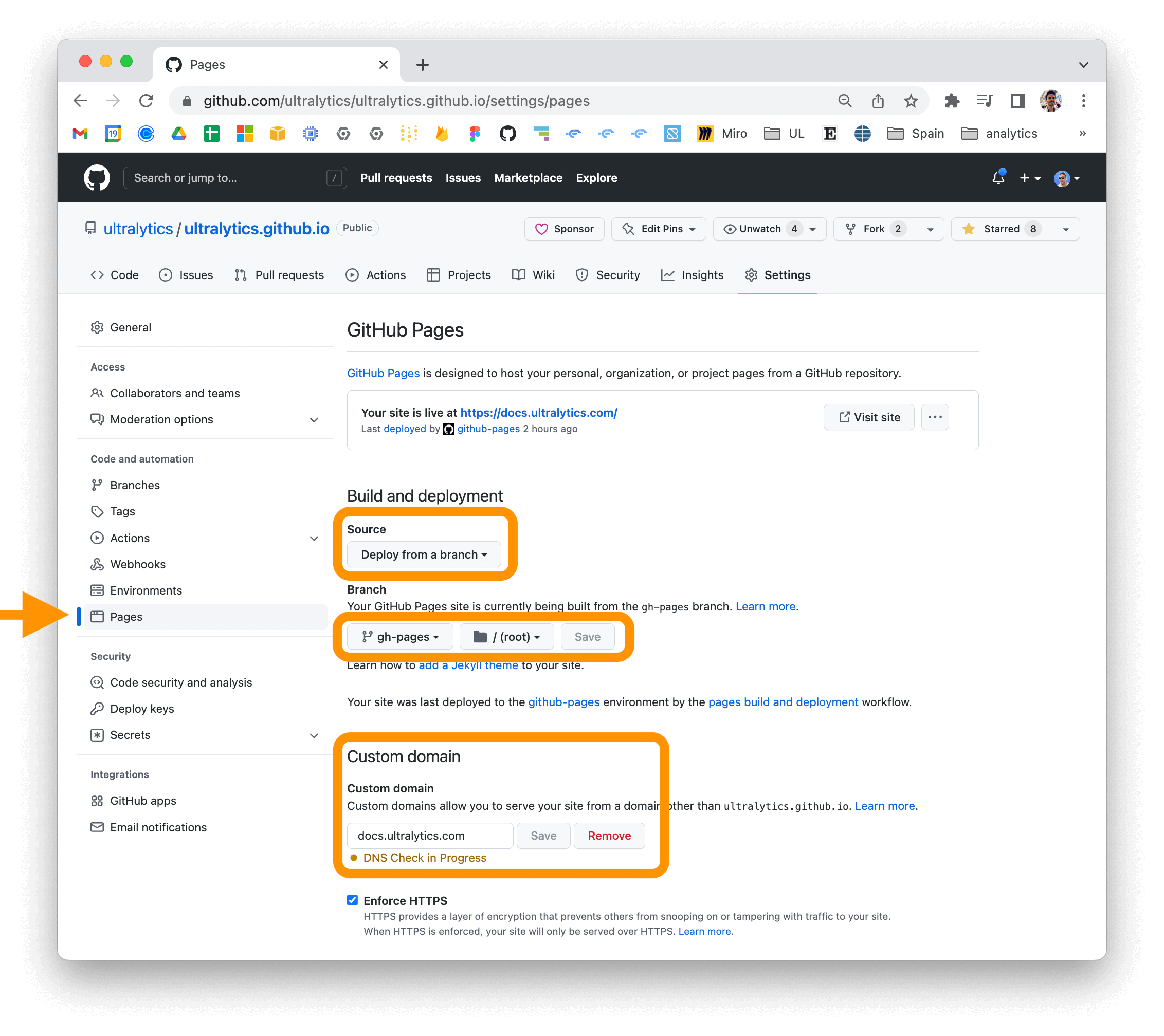
For more information on deploying your MkDocs documentation site, see the MkDocs documentation.
Owner
- Login: llj0109
- Kind: user
- Repositories: 1
- Profile: https://github.com/llj0109
Citation (CITATION.cff)
cff-version: 1.2.0
preferred-citation:
  type: software
  message: If you use this software, please cite it as below.
  authors:
  - family-names: Jocher
    given-names: Glenn
    orcid: "https://orcid.org/0000-0001-5950-6979"
  - family-names: Chaurasia
    given-names: Ayush
    orcid: "https://orcid.org/0000-0002-7603-6750"
  - family-names: Qiu
    given-names: Jing
    orcid: "https://orcid.org/0000-0003-3783-7069"
  title: "YOLO by Ultralytics"
  version: 8.0.0
  # doi: 10.5281/zenodo.3908559  # TODO
  date-released: 2023-1-10
  license: AGPL-3.0
  url: "https://github.com/ultralytics/ultralytics"
GitHub Events
Total
- Delete event: 1
- Issue comment event: 8
- Push event: 5
- Pull request event: 5
- Create event: 7
Last Year
- Delete event: 1
- Issue comment event: 8
- Push event: 5
- Pull request event: 5
- Create event: 7
Dependencies
- actions/checkout v4 composite
- actions/setup-python v4 composite
- codecov/codecov-action v3 composite
- conda-incubator/setup-miniconda v2 composite
- slackapi/slack-github-action v1.24.0 composite
- contributor-assistant/github-action v2.3.1 composite
- actions/checkout v4 composite
- github/codeql-action/analyze v2 composite
- github/codeql-action/init v2 composite
- actions/checkout v4 composite
- docker/login-action v3 composite
- docker/setup-buildx-action v3 composite
- docker/setup-qemu-action v3 composite
- slackapi/slack-github-action v1.24.0 composite
- actions/first-interaction v1 composite
- actions/checkout v4 composite
- nick-invision/retry v2 composite
- actions/checkout v4 composite
- actions/setup-python v4 composite
- slackapi/slack-github-action v1.24.0 composite
- actions/stale v8 composite
- pytorch/pytorch 2.1.0-cuda12.1-cudnn8-runtime build
- matplotlib >=3.3.0
- numpy >=1.22.2
- opencv-python >=4.6.0
- pandas >=1.1.4
- pillow >=7.1.2
- psutil *
- py-cpuinfo *
- pyyaml >=5.3.1
- requests >=2.23.0
- scipy >=1.4.1
- seaborn >=0.11.0
- thop >=0.1.1
- torch >=1.8.0
- torchvision >=0.9.0
- tqdm >=4.64.0