Science Score: 54.0%
This score indicates how likely this project is to be science-related based on various indicators:
-
✓CITATION.cff file
Found CITATION.cff file -
✓codemeta.json file
Found codemeta.json file -
✓.zenodo.json file
Found .zenodo.json file -
○DOI references
-
✓Academic publication links
Links to: zenodo.org -
○Academic email domains
-
○Institutional organization owner
-
○JOSS paper metadata
-
○Scientific vocabulary similarity
Low similarity (14.1%) to scientific vocabulary
Keywords
Repository
:octopus: Mojolicious-based Frontend for KorAP
Basic Info
Statistics
- Stars: 8
- Watchers: 9
- Forks: 2
- Open Issues: 131
- Releases: 15
Topics
Metadata Files
README.md

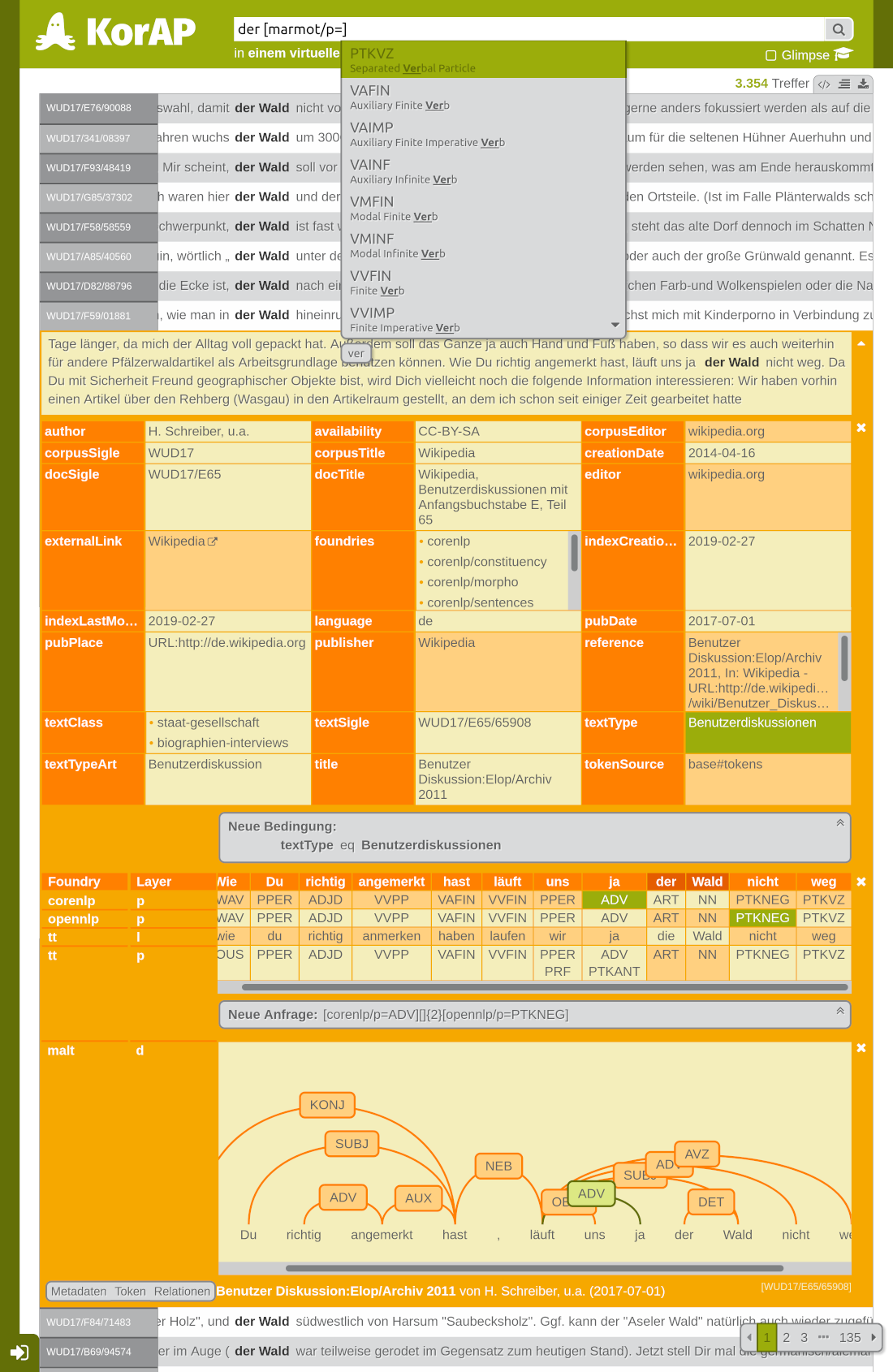
Kalamar is a Mojolicious-based user interface frontend for the KorAP Corpus Analysis Platform.

Setup
The easiest way to install and run Kalamar is using Docker.
shell
docker pull korap/kalamar
Then start Kalamar listening on port 64543.
shell
docker run --network host --name kalamar korap/kalamar
Kalamar will be available at http://localhost:64543.
See the description on docker hub regarding further information.
Setup for Development
To install the latest version of Kalamar, first fetch the resource ...
shell
git clone https://github.com/KorAP/Kalamar
... and follow the steps below.
If you have any problems with installing Kalamar, see the Troubleshooting section.
Generate Static Asset Files
To generate the static asset files (scripts, styles, images ...), you need NodeJS >= 6.0.0. This will probably need administration rights, depending on your installation path. These tools may also be available with a package manager.
You can check your version using
shell
npm -v
Afterwards you can install the dependencies and run grunt to create the assets.
shell
cd Kalamar
npm install -g grunt-cli
npm install
grunt
Whenever the assets change, just rerun npm install and grunt.
Start Server
Kalamar uses the Mojolicious framework, that expects a Perl version of at least 5.16. On Windows Strawberry Perl is recommended. An environment based on Perlbrew is recommended, if available. The installation guide requires App::cpanminus as well.
Some perl modules are not on CPAN yet, so you need to install them from GitHub. The easiest way to do this is using App::cpanminus. This will probably need administration rights.
shell
cpanm https://github.com/Akron/Mojolicious-Plugin-Localize.git
Then install the dependencies using App::cpanminus (there is no need to install Kalamar) and run the test suite.
shell
cd Kalamar
cpanm --installdeps .
perl Makefile.PL
make test
Kalamar can be deployed like all Mojolicious apps. The easiest way is to start the built-in server:
shell
perl script/kalamar daemon
Kalamar will then be available at localhost:3000 in your browser.
By default, Kalamar tries to connect to https://korap.ids-mannheim.de/api/,
followed by the most current version of the API.
You may change that endpoint to the KorAP API provider in the configuration
(see Kustvakt for further information)
or by using the environment variable KALAMAR_API.
If the endpoint is remote and requires SSL support, like the default endpoint, you have to install SSL support in addition:
cpanm IO::Socket::SSL
Updates
To update Kalamar, just run
shell
git pull origin master
cpanm --installdeps .
npm install
grunt
And both the server and client dependencies should be up to date.
Configuration
The basic configuration file is kalamar.conf. To define derivations,
create a configuration file with the pattern kalamar.myconf.conf and
follow the descriptions in kalamar.conf.
To start Kalamar with a derivative configuration, set the MOJO_MODE
environment variable.
shell
MOJO_MODE=myconf perl script/kalamar daemon
Or in the windows command line with:
```cmd
cmd /C "set MOJO_MODE=qr && perl .\script\kalamar daemon" ```
Or in the windows powershell with:
```powershell
$env:MOJOMODE='myconf'; perl .\script\kalamar daemon; Remove-Item Env:\MOJOMODE ```
For client-side configurations, a file kalamar.conf.js can be
introduced, that will be consulted during the build process, loading
optional components using a require(...) directive (see example below).
Secret file
Kalamar uses auto rotating secrets. Allow access to a file called
kalamar.secret.json in the home directory of kalamar. It will
automatically be created, if it doesn't exist.
(kalamar.secret is deprecated.)
Localization
To create a localized version of Kalamar, start the localize command
with the target locale as its argument, e.g. pl for polish.
shell
perl script/kalamar localize pl
The newly defined dictionary file can then be modified and added to the resources
definition of the Localize plugin in the configuration:
perl
Localize => {
  resources => ['kalamar.pl.dict']
}
To localize example queries according to a special corpus environment, define a name of the example corpus in the configuration.
perl
Kalamar => {
  examplecorpus => 'mycorpus'
}
Then create a translation file based on kalamar.queries.dict
as a blueprint and add it to the Localize resource list.
Templates can be localized and customized by overriding
the Template dictionary entries.
Currently the JavaScript translations are separated and stored in dev/js/src/loc.
To generate assets relying on different locales, add the locale to Gruntfile.js.
To localize the annotation helper according to a special corpus environment,
different annotation foundries can be loaded in kalamar.conf.js.
For example to support marmot and malt,
the configuration may look like this:
js
require([
  "hint/foundries/marmot",
  "hint/foundries/malt"
]);
See dev/js/src/hint/foundries for
more optional foundries.
Customization
The landing page can be customized by overriding the
entry for Template_intro in the dictionary.
Some sections of the user interface can be customized
by adding new
content blocks.
Currently the documented sections are in
footer, in the bottom line of the user interface,
sidebar, in the left part of the user interface if present,
headerButtonGroup, in the right top part of the user interface,
and loginInfo, below the login form if present.
Plugins
Some plugins are bundled as part of Kalamar. Plugins can be loaded via configuration file in an array
perl
{
  Kalamar => {
    plugins => ['Auth']
  }
}
Currently bundled plugins are
Auth: For integrating user management supported by Kustvakt full.Piwik: For integrating Matomo/Piwik.Tei2KorAPXML: For integrated calls to tei2korapxml, if installed.KorAPXML2Krill: For integrated calls to korapxml2krill, if installed.KrillIndexer: For integrated calls to Krilll, if installed and exposed byKRILL_INDEXER_PATH.KorAPXML2CoNLLU: For integrated calls to conllu2korapxml and korapxml2conllu, if installed.
Maintaining
Caching
Kalamar supports CHI for caching, allowing various cache drivers to configure.
To see options for cache maintenance (e.g. to clear search results after index update), run the command
shell
perl script/kalamar chi
Troubleshooting
make not available under Windows
Instead of running
shell
perl Makefile.PL
make test
it is also possible to run the test suite using prove.
shell
prove -lr t
Problem installing Crypt::Random::Source on Windows
Crypt::Random::Source
recently removed support for C
shell
cpanm -f Crypt::Random::Source
Problem installing Mojolicious::Plugin::MailException on Windows
Some versions of Mojolicious::Plugin::MailException have a minor bug in the test suite, so a force install may be necessary.
perl
cpanm -f Mojolicious::Plugin::MailException
Problem running scripts on Windows with Powershell
In case you are having issues with running scripts under Windows,
you can set the execution policy with
Set-ExecutionPolicy.
If using the RemoteSigned execution policy, you can use Unblock-File
to allow specific scripts to run.
Problem installing Module::Pluggable
In case Module::Pluggable fails as a dependency of the DateTime module, just force the installation and ignore warnings.
perl
cpanm --force Module::Pluggable
COPYRIGHT AND LICENSE
Original Software
Copyright (C) 2015-2025, IDS Mannheim
Author: Nils Diewald, Helge Stallkamp
Contributor: Uyen-Nhu Tran, Eliza Margaretha (Documentation), Susanne Feix
and Rebecca Wilm (Translation), Leo Repp
Kalamar is developed as part of the KorAP Corpus Analysis Platform at the Leibniz Institute for the German Language (IDS), member of the Leibniz Association and supported by the KobRA project, funded by the Federal Ministry of Education and Research (BMBF).
Kalamar is free software published under the BSD-2 License.
To cite this work, please refer to:
Diewald, Nils, Barbu Mititelu, Verginica and Kupietz, Marc (2019):
The KorAP user interface. Accessing CoRoLa via KorAP.
In: Cosma, Ruxandra/Kupietz, Marc (eds.),
On design, creation and use of of the Reference Corpus of Contemporary
Romanian and its analysis tools. CoRoLa, KorAP, DRuKoLA and EuReCo,
Revue Roumaine de Linguistique, 64(3). Editura Academiei Române,
Bucharest, Romania.
Bundled Assets
The KorAP logo was designed by Norbert Cußler-Volz is released under the terms of the Creative Commons License BY-NC-ND 4.0. ALERTIFY.js is released under the terms of the MIT License. Almond is released under the terms of the BSD License. dagre is released under the terms of the MIT License. Highlight.js is released under the terms of the BSD License. Jasmine is released under the terms of the MIT License. RequireJS is released under the terms of the BSD License. Font Awesome by Dave Gandy is released under the terms of the SIL OFL 1.1. Benchmark.js is released under the terms of the MIT License. lodash is released under the terms of the MIT License. Platform.js is released under the terms of the MIT License. INTRO.JS is released under the terms of the GNU AFFERO GENERAL PUBLIC LICENSE (GNU AGPLv3).
Owner
- Name: KorAP
- Login: KorAP
- Kind: organization
- Location: Mannheim, Germany
- Website: http://korap.ids-mannheim.de/
- Repositories: 22
- Profile: https://github.com/KorAP
Corpus Analysis Platform by the Leibniz Institute for the German Language
Citation (CITATION.cff)
# This CITATION.cff file was generated with cffinit.
# Visit https://bit.ly/cffinit to generate yours today!

cff-version: 1.2.0
title: Kalamar
message: 'Frontend for KorAP'
type: software
authors:
  - given-names: Nils
    family-names: Diewald
    affiliation: Leibniz Institute for the German Language
    orcid: 'https://orcid.org/0000-0002-2993-9180'
  - given-names: Helge
    family-names: Stallkamp
    affiliation: Leibniz Institute for the German Language
repository-code: 'https://github.com/KorAP/Kalamar'
url: 'https://korap.ids-mannheim.de/'
license: BSD-2-Clause
GitHub Events
Total
- Create event: 4
- Release event: 1
- Issues event: 35
- Watch event: 1
- Delete event: 5
- Issue comment event: 25
- Push event: 43
- Pull request event: 9
Last Year
- Create event: 4
- Release event: 1
- Issues event: 35
- Watch event: 1
- Delete event: 5
- Issue comment event: 25
- Push event: 43
- Pull request event: 9
Issues and Pull Requests
Last synced: 10 months ago
All Time
- Total issues: 17
- Total pull requests: 5
- Average time to close issues: 3 months
- Average time to close pull requests: 5 months
- Total issue authors: 5
- Total pull request authors: 1
- Average comments per issue: 0.29
- Average comments per pull request: 0.2
- Merged pull requests: 0
- Bot issues: 0
- Bot pull requests: 5
Past Year
- Issues: 17
- Pull requests: 4
- Average time to close issues: 3 months
- Average time to close pull requests: 30 days
- Issue authors: 5
- Pull request authors: 1
- Average comments per issue: 0.29
- Average comments per pull request: 0.25
- Merged pull requests: 0
- Bot issues: 0
- Bot pull requests: 4
Top Authors
Issue Authors
- Akron (13)
- hebasta (9)
- kupietz (7)
- Bodmo (5)
- uyen-nhu (4)
- notesjor (1)
- margaretha (1)
Pull Request Authors
- dependabot[bot] (5)
- margaretha (1)
- perkuhn (1)
- remil1000 (1)
Top Labels
Issue Labels
Pull Request Labels
Dependencies
- grunt ^1.0.4 development
- grunt-contrib-copy ^1.0.0 development
- grunt-contrib-requirejs ^1.0.0 development
- grunt-contrib-watch ^1.1.0 development
- grunt-sass ^3.1.0 development
- grunt-shell ^3.0.1 development
- grunt-terser ^1.0.0 development
- imagemin ^7.0.1 development
- optipng-bin ^6.0.0 development
- sass ^1.44.0 development
- vinyl-fs ^3.0.3 development
- grunt-contrib-imagemin ^4.0.0
- actions/checkout v2 composite
- actions/checkout v2 composite
- actions/checkout v2 composite
- alpine latest build
- kalamar-base latest build
- node 12 build