scimltutorialsoutput
Tutorials for doing scientific machine learning (SciML) and high-performance differential equation solving with open source software.
Science Score: 10.0%
This score indicates how likely this project is to be science-related based on various indicators:
-
○CITATION.cff file
-
○codemeta.json file
-
○.zenodo.json file
-
○DOI references
-
○Academic publication links
-
✓Committers with academic emails
1 of 8 committers (12.5%) from academic institutions -
○Institutional organization owner
-
○JOSS paper metadata
-
○Scientific vocabulary similarity
Low similarity (14.9%) to scientific vocabulary
Keywords
Keywords from Contributors
Repository
Tutorials for doing scientific machine learning (SciML) and high-performance differential equation solving with open source software.
Basic Info
- Host: GitHub
- Owner: SciML
- License: other
- Language: HTML
- Default Branch: main
- Homepage: https://docs.sciml.ai/SciMLTutorialsOutput/stable/
- Size: 72.6 MB
Statistics
- Stars: 22
- Watchers: 7
- Forks: 4
- Open Issues: 2
- Releases: 4
Topics
Metadata Files
README.md
SciMLTutorials.jl: Tutorials for Scientific Machine Learning and Differential Equations




SciMLTutorials.jl holds PDFs, webpages, and interactive Jupyter notebooks showing how to utilize the software in the SciML Scientific Machine Learning ecosystem. This set of tutorials was made to complement the documentation and the devdocs by providing practical examples of the concepts. For more details, please consult the docs.
Note: this library has been deprecated and its tutorials have been moved to the repos of the respective packages. It may be revived in the future if there is a need for longer-form tutorials!
Results
To view the SciML Tutorials, go to tutorials.sciml.ai. By default, this will lead to the latest tagged version of the tutorials. To see the in-development version of the tutorials, go to https://tutorials.sciml.ai/dev/.
Static outputs in pdf, markdown, and html reside in SciMLTutorialsOutput.
Video Tutorial

Interactive Notebooks
To generate the interactive notebooks, first install the SciMLTutorials, instantiate the
environment, and then run SciMLTutorials.open_notebooks(). This looks as follows:
julia
]add SciMLTutorials#master
]activate SciMLTutorials
]instantiate
using SciMLTutorials
SciMLTutorials.open_notebooks()
The tutorials will be generated at your pwd() in a folder called generated_notebooks.
Note that when running the tutorials, the packages are not automatically added. Thus you will need to add the packages manually or use the internal Project/Manifest tomls to instantiate the correct packages. This can be done by activating the folder of the tutorials. For example,
julia
using Pkg
Pkg.activate(joinpath(pkgdir(SciMLTutorials),"tutorials","models"))
Pkg.instantiate()
will add all of the packages required to run any tutorial in the models folder.
Contributing
All of the files are generated from the Weave.jl files in the tutorials folder. The generation process runs automatically,
and thus one does not necessarily need to test the Weave process locally. Instead, simply open a PR that adds/updates a
file in the "tutorials" folder and the PR will generate the tutorial on demand. Its artifacts can then be inspected in the
Buildkite as described below before merging. Note that it will use the Project.toml and Manifest.toml of the subfolder, so
any changes to dependencies requires that those are updated.
Reporting Bugs and Issues
Report any bugs or issues at the SciMLTutorials repository.
Inspecting Tutorial Results
To see tutorial results before merging, click into the BuildKite, click onto Artifacts, and then investigate the trained results.
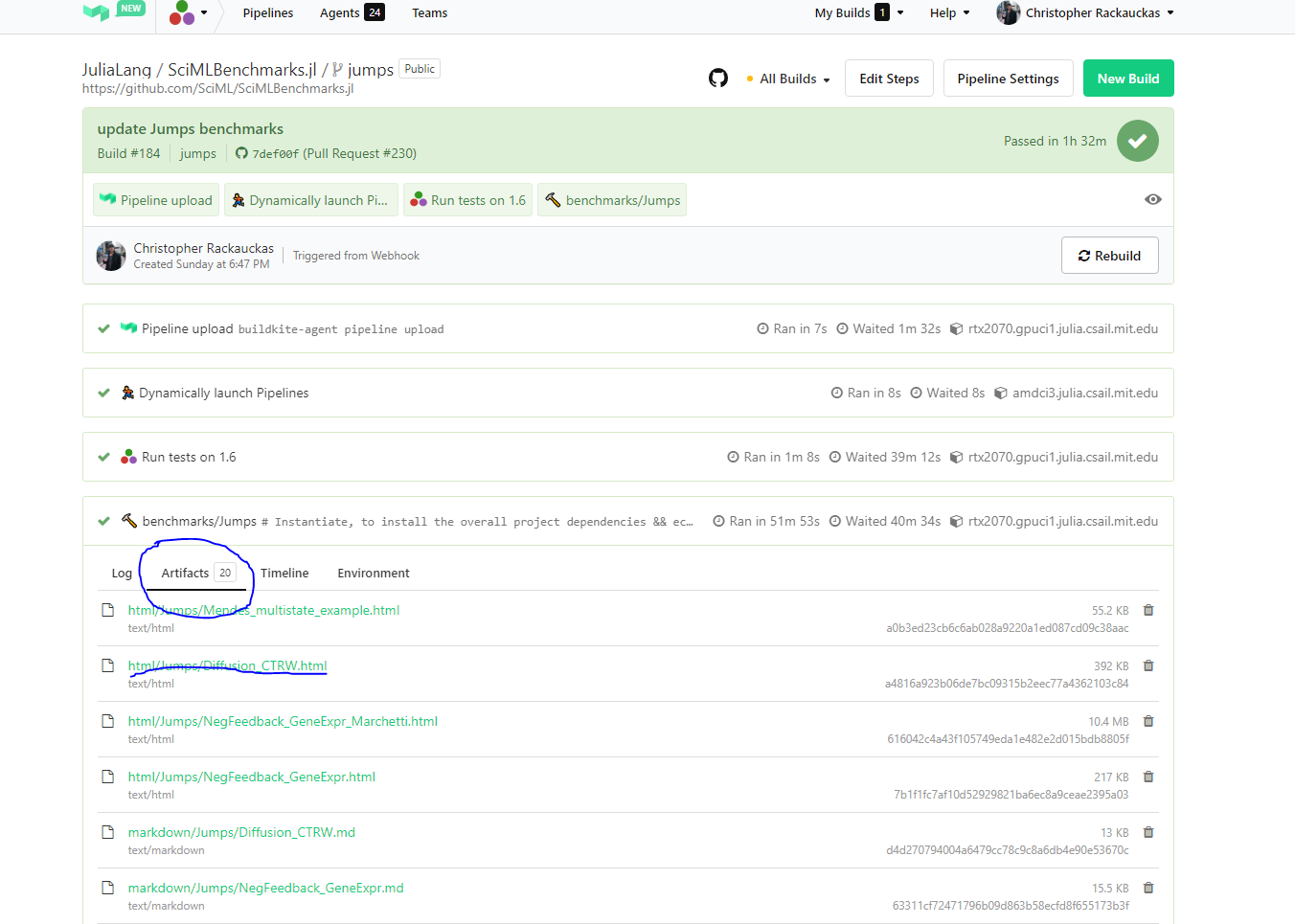
Manually Generating Files
To run the generation process, do for example:
julia
]activate SciMLTutorials # Get all of the packages
using SciMLTutorials
SciMLTutorials.weave_file(joinpath(pkgdir(SciMLTutorials),"tutorials","models"),"01-classical_physics.jmd")
To generate all of the files in a folder, for example, run:
julia
SciMLTutorials.weave_folder(joinpath(pkgdir(SciMLTutorials),"tutorials","models"))
To generate all of the notebooks, do:
julia
SciMLTutorials.weave_all()
Each of the tuturials displays the computer characteristics at the bottom of the benchmark.
Owner
- Name: SciML Open Source Scientific Machine Learning
- Login: SciML
- Kind: organization
- Email: contact@chrisrackauckas.com
- Website: https://sciml.ai
- Twitter: SciML_Org
- Repositories: 170
- Profile: https://github.com/SciML
Open source software for scientific machine learning
GitHub Events
Total
- Watch event: 2
Last Year
- Watch event: 2
Committers
Last synced: about 1 year ago
Top Committers
| Name | Commits | |
|---|---|---|
| root | r****t@a****u | 26 |
| Documenter.jl | d****r@j****o | 23 |
| Chris Rackauckas | a****s@c****m | 23 |
| SciML Tutorials CI | b****e@j****g | 5 |
| Christopher Rackauckas | C****t@C****m | 2 |
| CompatHelper Julia | c****y@j****g | 2 |
| Arno Strouwen | a****n@t****e | 1 |
| krishna bhogaonker | c****q@g****m | 1 |
Committer Domains (Top 20 + Academic)
Issues and Pull Requests
Last synced: about 1 year ago
All Time
- Total issues: 2
- Total pull requests: 5
- Average time to close issues: 1 day
- Average time to close pull requests: 30 minutes
- Total issue authors: 2
- Total pull request authors: 4
- Average comments per issue: 1.0
- Average comments per pull request: 0.4
- Merged pull requests: 4
- Bot issues: 0
- Bot pull requests: 2
Past Year
- Issues: 0
- Pull requests: 0
- Average time to close issues: N/A
- Average time to close pull requests: N/A
- Issue authors: 0
- Pull request authors: 0
- Average comments per issue: 0
- Average comments per pull request: 0
- Merged pull requests: 0
- Bot issues: 0
- Bot pull requests: 0
Top Authors
Issue Authors
- enigne (1)
- cstjean (1)
Pull Request Authors
- github-actions[bot] (2)
- 00krishna (1)
- ArnoStrouwen (1)
- frankschae (1)
Top Labels
Issue Labels
Pull Request Labels
Dependencies
- actions/checkout v2 composite
- julia-actions/setup-julia latest composite