obsei
Obsei is a low code AI powered automation tool. It can be used in various business flows like social listening, AI based alerting, brand image analysis, comparative study and more .
Science Score: 44.0%
This score indicates how likely this project is to be science-related based on various indicators:
-
✓CITATION.cff file
Found CITATION.cff file -
✓codemeta.json file
Found codemeta.json file -
✓.zenodo.json file
Found .zenodo.json file -
○DOI references
-
○Academic publication links
-
○Committers with academic emails
-
○Institutional organization owner
-
○JOSS paper metadata
-
○Scientific vocabulary similarity
Low similarity (12.6%) to scientific vocabulary
Keywords
Keywords from Contributors
Repository
Obsei is a low code AI powered automation tool. It can be used in various business flows like social listening, AI based alerting, brand image analysis, comparative study and more .
Basic Info
- Host: GitHub
- Owner: obsei
- License: apache-2.0
- Language: Python
- Default Branch: master
- Homepage: https://obsei.com/
- Size: 16.3 MB
Statistics
- Stars: 1,298
- Watchers: 30
- Forks: 172
- Open Issues: 34
- Releases: 14
Topics
Metadata Files
README.md













Note: Obsei is still in alpha stage hence carefully use it in Production. Also, as it is constantly undergoing development hence master branch may contain many breaking changes. Please use released version.
Obsei (pronounced "Ob see" | /əb-'sē/) is an open-source, low-code, AI powered automation tool. Obsei consists of -
- Observer: Collect unstructured data from various sources like tweets from Twitter, Subreddit comments on Reddit, page post's comments from Facebook, App Stores reviews, Google reviews, Amazon reviews, News, Website, etc.
- Analyzer: Analyze unstructured data collected with various AI tasks like classification, sentiment analysis, translation, PII, etc.
- Informer: Send analyzed data to various destinations like ticketing platforms, data storage, dataframe, etc so that the user can take further actions and perform analysis on the data.
All the Observers can store their state in databases (Sqlite, Postgres, MySQL, etc.), making Obsei suitable for scheduled jobs or serverless applications.
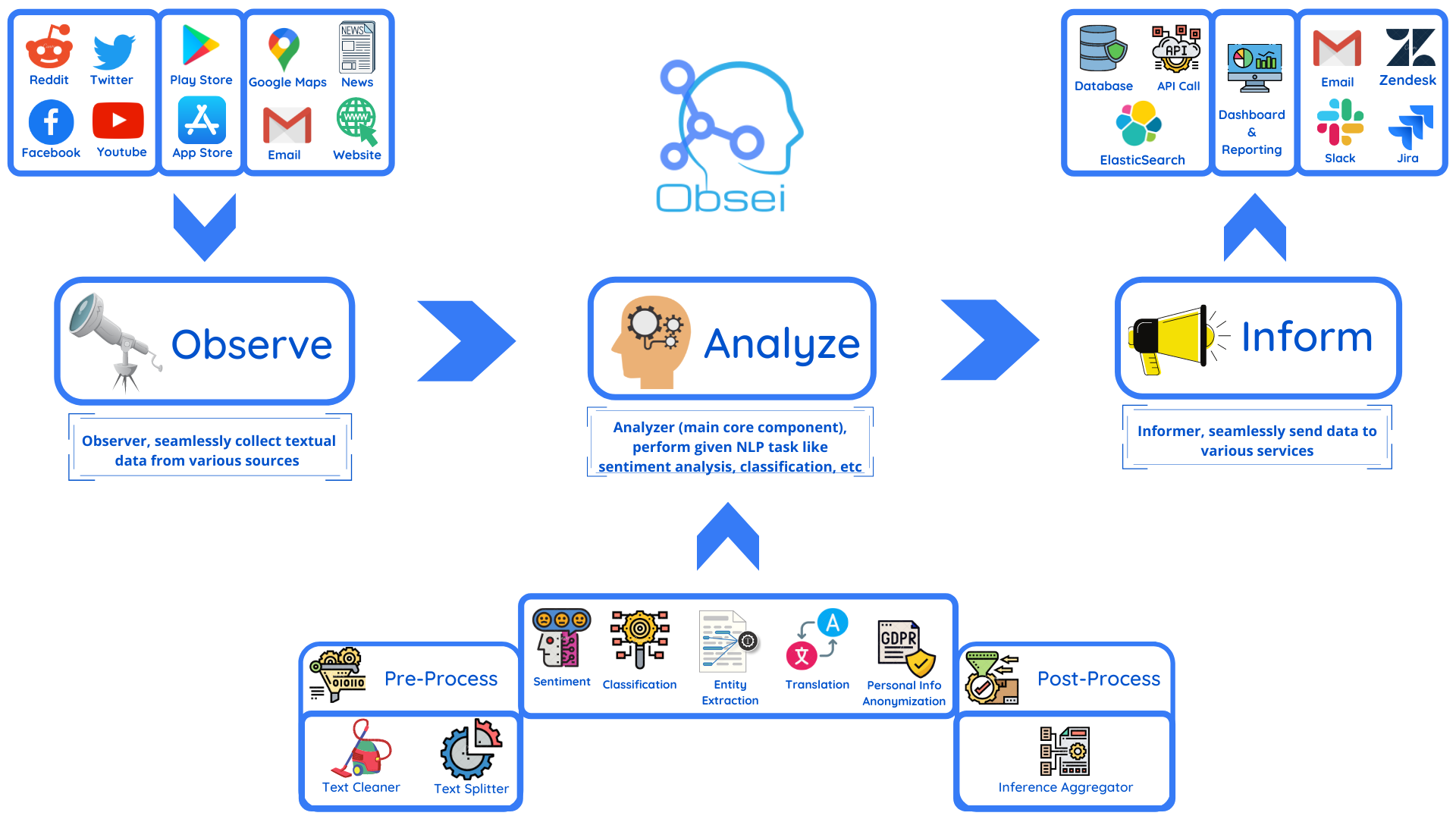
Future direction -
- Text, Image, Audio, Documents and Video oriented workflows
- Collect data from every possible private and public channels
- Add every possible workflow to an AI downstream application to automate manual cognitive workflows
Use cases
Obsei use cases are following, but not limited to -
- Social listening: Listening about social media posts, comments, customer feedback, etc.
- Alerting/Notification: To get auto-alerts for events such as customer complaints, qualified sales leads, etc.
- Automatic customer issue creation based on customer complaints on Social Media, Email, etc.
- Automatic assignment of proper tags to tickets based content of customer complaint for example login issue, sign up issue, delivery issue, etc.
- Extraction of deeper insight from feedbacks on various platforms
- Market research
- Creation of dataset for various AI tasks
- Many more based on creativity 💡
Installation
Prerequisite
Install the following (if not present already) -
- Install Python 3.7+
- Install PIP
Install Obsei
You can install Obsei either via PIP or Conda based on your preference. To install latest released version -
shell
pip install obsei[all]
Install from master branch (if you want to try the latest features) -
shell
git clone https://github.com/obsei/obsei.git
cd obsei
pip install --editable .[all]
Note: all option will install all the dependencies which might not be needed for your workflow, alternatively
following options are available to install minimal dependencies as per need -
- pip install obsei[source]: To install dependencies related to all observers
- pip install obsei[sink]: To install dependencies related to all informers
- pip install obsei[analyzer]: To install dependencies related to all analyzers, it will install pytorch as well
- pip install obsei[twitter-api]: To install dependencies related to Twitter observer
- pip install obsei[google-play-scraper]: To install dependencies related to Play Store review scrapper observer
- pip install obsei[google-play-api]: To install dependencies related to Google official play store review API based observer
- pip install obsei[app-store-scraper]: To install dependencies related to Apple App Store review scrapper observer
- pip install obsei[reddit-scraper]: To install dependencies related to Reddit post and comment scrapper observer
- pip install obsei[reddit-api]: To install dependencies related to Reddit official api based observer
- pip install obsei[pandas]: To install dependencies related to TSV/CSV/Pandas based observer and informer
- pip install obsei[google-news-scraper]: To install dependencies related to Google news scrapper observer
- pip install obsei[facebook-api]: To install dependencies related to Facebook official page post and comments api based observer
- pip install obsei[atlassian-api]: To install dependencies related to Jira official api based informer
- pip install obsei[elasticsearch]: To install dependencies related to elasticsearch informer
- pip install obsei[slack-api]:To install dependencies related to Slack official api based informer
You can also mix multiple dependencies together in single installation command. For example to install dependencies
Twitter observer, all analyzer, and Slack informer use following command -
shell
pip install obsei[twitter-api, analyzer, slack-api]
How to use
Expand the following steps and create a workflow -
Step 1: Configure Source/Observer
|
|
|
|
|
|
|
|
|
|
|
|
 Twitter
 Youtube Scrapper
 Facebook
 Email
Email Google Maps Reviews Scrapper
 AppStore Reviews Scrapper
 Play Store Reviews Scrapper
 Reddit
 Google News
 Web Crawler
 Pandas DataFrame
Step 2: Configure Analyzer
Note: To run transformers in an offline mode, check [transformers offline mode](https://huggingface.co/transformers/installation.html#offline-mode).Some analyzer support GPU and to utilize pass device parameter. List of possible values of device parameter (default value auto):
- auto: GPU (cuda:0) will be used if available otherwise CPU will be used
- cpu: CPU will be used
- cuda:{id} - GPU will be used with provided CUDA device id
|
|
|
|
|
|
 Text Classification
 Sentiment Analyzer
 NER Analyzer
 Translator
 PII Anonymizer
 Dummy Analyzer
Step 3: Configure Sink/Informer
|
|
|
|
|
|
|
 Slack
Slack Zendesk
 Jira
Jira ElasticSearch
 Http
Http Logger
Step 4: Join and create workflow
`source` will fetch data from the selected source, then feed it to the `analyzer` for processing, whose output we feed into a `sink` to get notified at that sink. ```python # Uncomment if you want logger # import logging # import sys # logger = logging.getLogger(__name__) # logging.basicConfig(stream=sys.stdout, level=logging.INFO) # This will fetch information from configured source ie twitter, app store etc source_response_list = source.lookup(source_config) # Uncomment if you want to log source response # for idx, source_response in enumerate(source_response_list): # logger.info(f"source_response#'{idx}'='{source_response.__dict__}'") # This will execute analyzer (Sentiment, classification etc) on source data with provided analyzer_config analyzer_response_list = text_analyzer.analyze_input( source_response_list=source_response_list, analyzer_config=analyzer_config ) # Uncomment if you want to log analyzer response # for idx, an_response in enumerate(analyzer_response_list): # logger.info(f"analyzer_response#'{idx}'='{an_response.__dict__}'") # Analyzer output added to segmented_data # Uncomment to log it # for idx, an_response in enumerate(analyzer_response_list): # logger.info(f"analyzed_data#'{idx}'='{an_response.segmented_data.__dict__}'") # This will send analyzed output to configure sink ie Slack, Zendesk etc sink_response_list = sink.send_data(analyzer_response_list, sink_config) # Uncomment if you want to log sink response # for sink_response in sink_response_list: # if sink_response is not None: # logger.info(f"sink_response='{sink_response}'") ```Step 5: Execute workflow
Copy the code snippets from Steps 1 to 4 into a python file, for exampleexample.py and execute the following command -
```shell
python example.py
```
Demo
We have a minimal streamlit based UI that you can use to test Obsei.
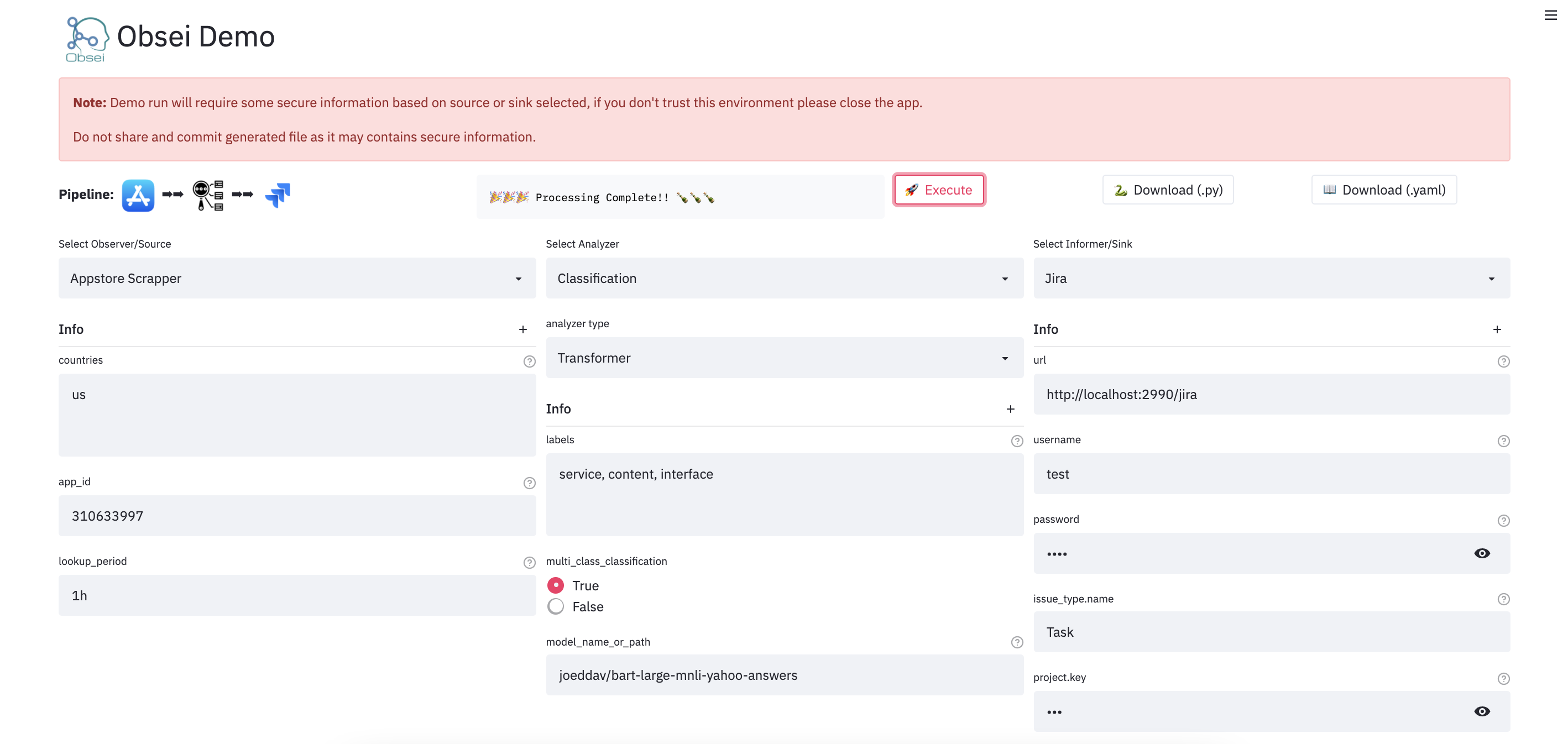
Watch UI demo video
Check demo at
(Note: Sometimes the Streamlit demo might not work due to rate limiting, use the docker image (locally) in such cases.)
To test locally, just run
``` docker run -d --name obesi-ui -p 8501:8501 obsei/obsei-ui-demo
You can find the UI at http://localhost:8501
```
To run Obsei workflow easily using GitHub Actions (no sign ups and cloud hosting required), refer to this repo.
Companies/Projects using Obsei
Here are some companies/projects (alphabetical order) using Obsei. To add your company/project to the list, please raise a PR or contact us via email.
- Oraika: Contextually understand customer feedback
- 1Page: Giving a better context in meetings and calls
- Spacepulse: The operating system for spaces
- Superblog: A blazing fast alternative to WordPress and Medium
- Zolve: Creating a financial world beyond borders
- Utilize: No-code app builder for businesses with a deskless workforce
Articles
| Sr. No. | Title | Author |
|---|---|---|
| 1 | AI based Comparative Customer Feedback Analysis Using Obsei | Reena Bapna |
| 2 | LinkedIn App - User Feedback Analysis | Himanshu Sharma |
Tutorials
| Sr. No. | Workflow | Colab | Binder |
|---|---|---|---|
| 1 | Observe app reviews from Google play store, Analyze them by performing text classification and then Inform them on console via logger | ||
| PlayStore Reviews → Classification → Logger |

|

|
|
| 2 | Observe app reviews from Google play store, PreProcess text via various text cleaning functions, Analyze them by performing text classification, Inform them to Pandas DataFrame and store resultant CSV to Google Drive | ||
| PlayStore Reviews → PreProcessing → Classification → Pandas DataFrame → CSV in Google Drive |
|
|
|
| 3 | Observe app reviews from Apple app store, PreProcess text via various text cleaning function, Analyze them by performing text classification, Inform them to Pandas DataFrame and store resultant CSV to Google Drive | ||
| AppStore Reviews → PreProcessing → Classification → Pandas DataFrame → CSV in Google Drive |
|
|
|
| 4 | Observe news article from Google news, PreProcess text via various text cleaning function, Analyze them via performing text classification while splitting text in small chunks and later computing final inference using given formula | ||
| Google News → Text Cleaner → Text Splitter → Classification → Inference Aggregator |
|
|
|
💡Tips: Handle large text classification via Obsei
Documentation
For detailed installation instructions, usages and examples, refer to our documentation.
Support and Release Matrix
| Linux | Mac | Windows | Remark | |
|---|---|---|---|---|
| Tests | ✅ | ✅ | ✅ | Low Coverage as difficult to test 3rd party libs |
| PIP | ✅ | ✅ | ✅ | Fully Supported |
| Conda | ❌ | ❌ | ❌ | Not Supported |
Discussion forum
Discussion about Obsei can be done at community forum
Changelogs
Refer releases for changelogs
Security Issue
For any security issue please contact us via email
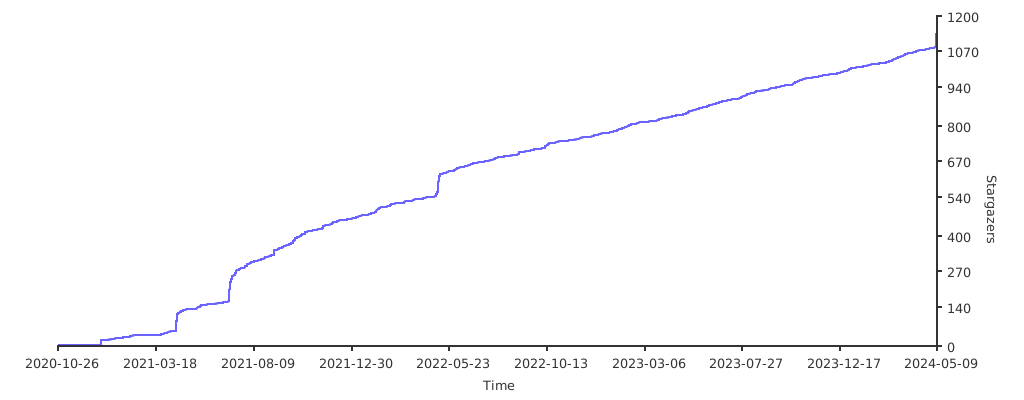
Stargazers over time
Maintainers
This project is being maintained by Oraika Technologies. Lalit Pagaria and Girish Patel are maintainers of this project.
License
- Copyright holder: Oraika Technologies
- Overall Apache 2.0 and you can read License file.
- Multiple other secondary permissive or weak copyleft licenses (LGPL, MIT, BSD etc.) for third-party components refer Attribution.
- To make project more commercial friendly, we void third party components which have strong copyleft licenses (GPL, AGPL etc.) into the project.
Attribution
This could not have been possible without these open source softwares.
Contribution
First off, thank you for even considering contributing to this package, every contribution big or small is greatly appreciated. Please refer our Contribution Guideline and Code of Conduct.
Thanks so much to all our contributors
Owner
- Name: oraika-oss
- Login: obsei
- Kind: organization
- Email: contact@oraika.com
- Location: India
- Website: https://oraika.com
- Twitter: OraikaTech
- Repositories: 3
- Profile: https://github.com/obsei
Home of open source projects undertaken by Oraika Technologies Private Limited
Citation (CITATION.cff)
# YAML 1.2
---
authors:
  -
    family-names: Pagaria
    given-names: Lalit

cff-version: "1.1.0"
license: "Apache-2.0"
message: "If you use this software, please cite it using this metadata."
repository-code: "https://github.com/obsei/obsei"
title: "Obsei - a low code AI powered automation tool"
version: "0.0.10"
...
GitHub Events
Total
- Issues event: 1
- Watch event: 111
- Delete event: 2
- Issue comment event: 4
- Push event: 2
- Pull request event: 10
- Fork event: 16
- Create event: 4
Last Year
- Issues event: 1
- Watch event: 111
- Delete event: 2
- Issue comment event: 4
- Push event: 2
- Pull request event: 10
- Fork event: 16
- Create event: 4
Committers
Last synced: over 3 years ago
All Time
- Total Commits: 402
- Total Committers: 15
- Avg Commits per committer: 26.8
- Development Distribution Score (DDS): 0.095
Top Committers
| Name | Commits | |
|---|---|---|
| lalitpagaria | p****t@g****m | 364 |
| dependabot[bot] | 4****]@u****m | 11 |
| Girish Patel | g****s@g****m | 8 |
| Akarsh Gajbhiye | a****e@g****m | 4 |
| Shahrukh Khan | s****1@g****m | 3 |
| Salil Mishra | m****3@g****m | 2 |
| pyup.io bot | g****t@p****o | 2 |
| Udit Dashore | t****3@g****m | 1 |
| Kumar Utsav | k****v@g****m | 1 |
| Chenxi Liu | 9****m@u****m | 1 |
| namanjuneja771 | 7****1@u****m | 1 |
| reenabapna | 8****a@u****m | 1 |
| cnarte | 5****e@u****m | 1 |
| sanjaybharkatiya | 6****a@u****m | 1 |
| Jatin Arora | j****n@u****p | 1 |
Committer Domains (Top 20 + Academic)
Packages
- Total packages: 2
-
Total downloads:
- pypi 154 last-month
-
Total dependent packages: 0
(may contain duplicates) -
Total dependent repositories: 3
(may contain duplicates) - Total versions: 21
- Total maintainers: 1
proxy.golang.org: github.com/obsei/obsei
- Documentation: https://pkg.go.dev/github.com/obsei/obsei#section-documentation
- License: apache-2.0
-
Latest release: v0.0.15
published over 2 years ago
Rankings
pypi.org: obsei
Obsei is an automation tool for text analysis need
- Documentation: https://obsei.readthedocs.io/
- License: Apache Version 2.0
-
Latest release: 0.0.15
published over 2 years ago
Rankings
Maintainers (1)
Dependencies
- obsei master
- streamlit *
- trafilatura *
- actions/cache v3.2.4 composite
- actions/checkout v3.3.0 composite
- actions/setup-python v4 composite
- actions/checkout v3.3.0 composite
- actions/setup-python v4 composite
- release-drafter/release-drafter v5 composite
- actions/checkout v3.3.0 composite
- docker/build-push-action v4 composite
- docker/login-action v1 composite
- docker/metadata-action v4.3.0 composite
- docker/setup-buildx-action v1 composite
- docker/setup-qemu-action v1 composite
- actions/checkout v3.3.0 composite
- docker/build-push-action v4 composite
- docker/login-action v1 composite
- docker/metadata-action v4.3.0 composite
- docker/setup-buildx-action v1 composite
- docker/setup-qemu-action v1 composite
- python 3.10-slim-bullseye build
- python 3.10-slim-bullseye build
- trafilatura *
- SQLAlchemy >= 1.4.44
- beautifulsoup4 >= 4.9.3
- dateparser >= 1.1.3
- mmh3 >= 3.0.0
- pydantic >= 1.10.2
- python-dateutil >= 2.8.2
- pytz >= 2022.6
- requests >= 2.26.0