anylabeling-far
A fork of AnyLabeling with support for annotating bounding boxes with fixed aspect ratios (FAR)
Science Score: 44.0%
This score indicates how likely this project is to be science-related based on various indicators:
-
✓CITATION.cff file
Found CITATION.cff file -
✓codemeta.json file
Found codemeta.json file -
✓.zenodo.json file
Found .zenodo.json file -
○DOI references
-
○Academic publication links
-
○Academic email domains
-
○Institutional organization owner
-
○JOSS paper metadata
-
○Scientific vocabulary similarity
Low similarity (12.6%) to scientific vocabulary
Repository
A fork of AnyLabeling with support for annotating bounding boxes with fixed aspect ratios (FAR)
Basic Info
- Host: GitHub
- Owner: RafeLoya
- License: gpl-3.0
- Language: Python
- Default Branch: main
- Size: 14.4 MB
Statistics
- Stars: 0
- Watchers: 1
- Forks: 0
- Open Issues: 0
- Releases: 0
Metadata Files
README.md
AnyLabeling-FAR
This is a fork of AnyLabeling, slightly modified with new shapes to allow
for the creation of bounding boxes at fixed aspect ratios (which I refer to with the acronym FAR) in a
user-friendly way. Currently, it supports human-made annotations, auto-labeling support may come sometime in the future.
The original README.md is included below this small section.
Installation
The regular installation instructions, if followed, will NOT install this version of AnyLabeling. To install this version, I recommend a modified version of the third method, which has been copied below.
**NOTE:* for the git URL, use HTTPS URL from this repository, not the original AnyLabeling repository.*
```bash
after navigating to a directory of your choosing...
git clone https://github.com/RafeLoya/anylabeling-FAR.git cd anylabeling-FAR pip install . ```
To start the program, simply do the following while in the .../anylabeling-FAR directory:
bash
anylabeling
Original README.md
🌟 AnyLabeling 🌟
Effortless data labeling with AI support from YOLO and Segment Anything!
AnyLabeling = LabelImg + Labelme + Improved UI + Auto-labeling






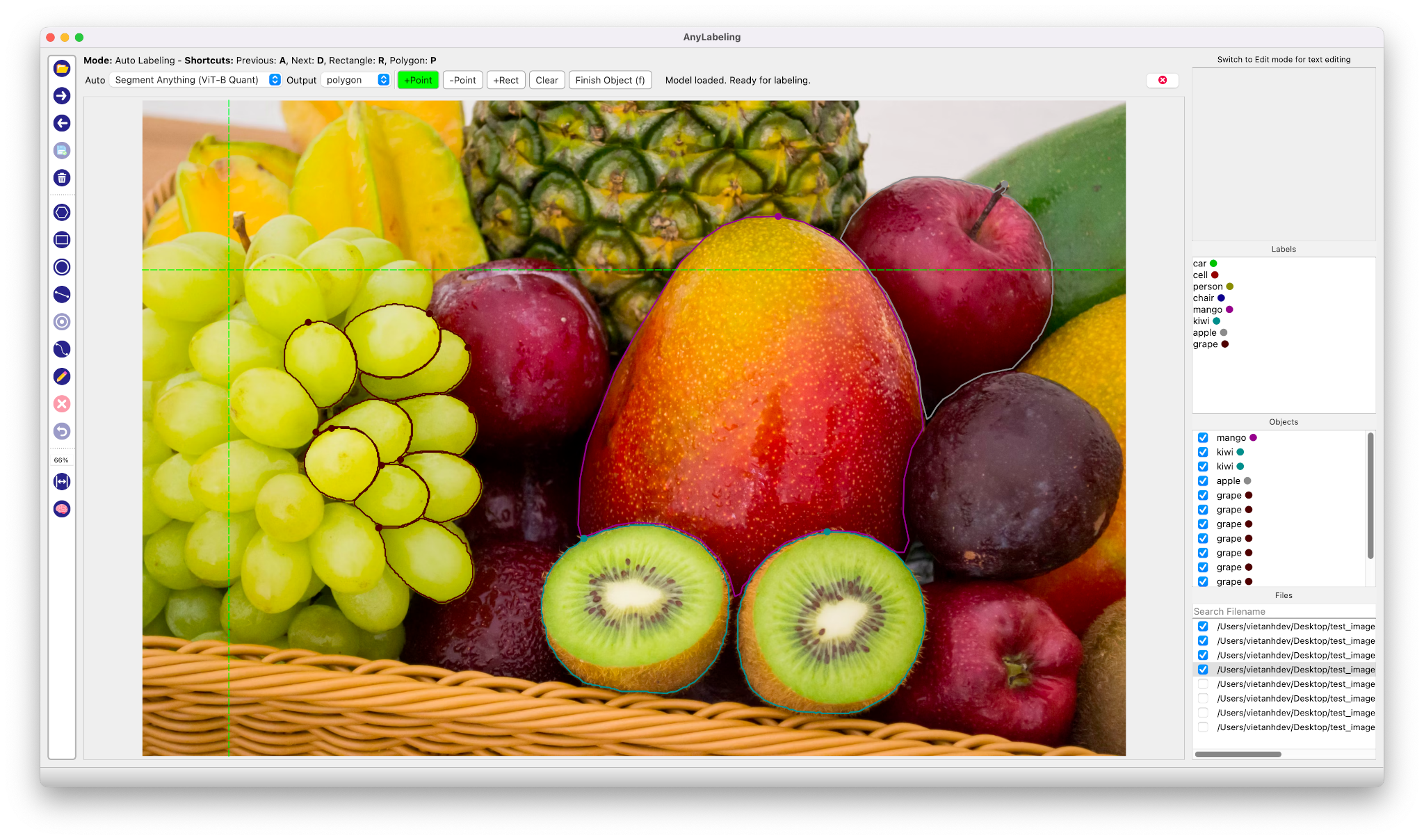
Auto Labeling with Segment Anything

- Youtube Demo: https://www.youtube.com/watch?v=5qVJiYNX5Kk
- Documentation: https://anylabeling.nrl.ai
Features:
- [x] Image annotation for polygon, rectangle, circle, line and point.
- [x] Auto-labeling YOLOv8, Segment Anything (SAM, SAM2).
- [x] Text detection, recognition and KIE (Key Information Extraction) labeling.
- [x] Multiple languages availables: English, Vietnamese, Chinese.
Install and Run
1. Download and run executable
- Download and run newest version from Releases.
- For MacOS:
- After installing, go to Applications folder
- Right click on the app and select Open
- From the second time, you can open the app normally using Launchpad
Install from Pypi
- Requirements: Python 3.10+. Recommended: Python 3.12.
Recommended: Miniconda/Anaconda.
Create environment:
bash
conda create -n anylabeling python=3.12
conda activate anylabeling
- (For macOS only) Install PyQt5 using Conda:
bash
conda install -c conda-forge pyqt==5.15.9
- Install anylabeling:
bash
pip install anylabeling # or pip install anylabeling-gpu for GPU support
- Start labeling:
bash
anylabeling
Documentation
Website: https://anylabeling.nrl.ai/
Applications
| Object Detection | Recognition | Facial Landmark Detection | 2D Pose Estimation |
| :---: | :---: | :---: | :---: |
|  |
|  |
|  |
|  |
| 2D Lane Detection | OCR | Medical Imaging | Instance Segmentation |
|
|
| 2D Lane Detection | OCR | Medical Imaging | Instance Segmentation |
|  |
|  |
|  |
|  |
| Image Tagging | Rotation | And more! |
|
|
| Image Tagging | Rotation | And more! |
|  |
|  | Your applications here! |
Development
- Install packages:
```bash pip install -r requirements-dev.txt
or pip install -r requirements-macos-dev.txt for MacOS
```
- Generate resources:
bash
pyrcc5 -o anylabeling/resources/resources.py anylabeling/resources/resources.qrc
- Run app:
bash
python anylabeling/app.py
Build executable
- Install PyInstaller:
bash
pip install -r requirements-dev.txt
- Build:
bash
bash build_executable.sh
- Check the outputs in:
dist/.
Contribution
If you want to contribute to AnyLabeling, please read Contribution Guidelines.
Star history
References
- Labeling UI built with ideas and components from LabelImg, LabelMe.
- Auto-labeling with Segment Anything Models, MobileSAM.
- Auto-labeling with YOLOv8.
Owner
- Name: Rafe Loya
- Login: RafeLoya
- Kind: user
- Repositories: 1
- Profile: https://github.com/RafeLoya
A Computer Science candidate at Baylor University. Proficiency in C, C++, Java
Citation (CITATION.cff)
cff-version: 1.2.0
message: "If you use this software, please cite it as below."
authors:
- family-names: "Nguyen"
  given-names: "Viet Anh"
  orcid: https://orcid.org/0009-0002-0457-7811
title: "AnyLabeling - Effortless data labeling with AI support"
url: "https://github.com/vietanhdev/anylabeling"
license: GPL-3
GitHub Events
Total
- Push event: 2
- Create event: 2
Last Year
- Push event: 2
- Create event: 2
Dependencies
- actions/checkout v3 composite
- actions/setup-python v4 composite
- pypa/gh-action-pypi-publish v1.8.5 composite
- actions/checkout v2 composite
- conda-incubator/setup-miniconda v2 composite
- mikepenz/release-changelog-builder-action v3 composite
- softprops/action-gh-release v2 composite
- black * development
- build * development
- twine * development
- build * development
- twine * development
- PyQt5 ==5.15.7
- PyYAML ==6.0.1
- darkdetect ==0.8.0
- imgviz ==1.5.0
- natsort ==8.1.0
- onnx ==1.16.1
- onnxruntime-gpu ==1.18.1
- opencv-contrib-python-headless ==4.7.0.72
- qimage2ndarray ==1.10.0
- termcolor ==1.1.0
- build * development
- twine * development
- PyYAML ==6.0.1
- darkdetect ==0.8.0
- imgviz ==1.5.0
- natsort ==8.1.0
- onnx ==1.16.1
- onnxruntime ==1.18.1
- opencv-contrib-python-headless ==4.7.0.72
- qimage2ndarray ==1.10.0
- termcolor ==1.1.0
- PyQt5 ==5.15.7
- PyYAML ==6.0.1
- darkdetect ==0.8.0
- imgviz ==1.5.0
- natsort ==8.1.0
- onnx ==1.16.1
- onnxruntime ==1.18.1
- opencv-contrib-python-headless ==4.7.0.72
- qimage2ndarray ==1.10.0
- termcolor ==1.1.0
- Pillow >=2.8
- PyQt5 >=5.15.7
- PyYAML ==6.0.1
- darkdetect ==0.8.0
- imgviz >=0.11
- natsort >=7.1.0
- numpy ==1.26.4
- onnx ==1.16.1
- opencv-python-headless ==4.7.0.72
- qimage2ndarray ==1.10.0
- termcolor ==1.1.0