Science Score: 23.0%
This score indicates how likely this project is to be science-related based on various indicators:
-
○CITATION.cff file
-
○codemeta.json file
-
○.zenodo.json file
-
✓DOI references
Found 3 DOI reference(s) in README -
✓Academic publication links
Links to: zenodo.org -
○Academic email domains
-
○Institutional organization owner
-
○JOSS paper metadata
-
○Scientific vocabulary similarity
Low similarity (11.6%) to scientific vocabulary
Repository
Basic Info
- Host: GitHub
- Owner: piyush1prasad
- License: mit
- Language: Python
- Default Branch: master
- Size: 133 MB
Statistics
- Stars: 0
- Watchers: 1
- Forks: 1
- Open Issues: 0
- Releases: 0
Metadata Files
README.md
cheapBuy











Introduction
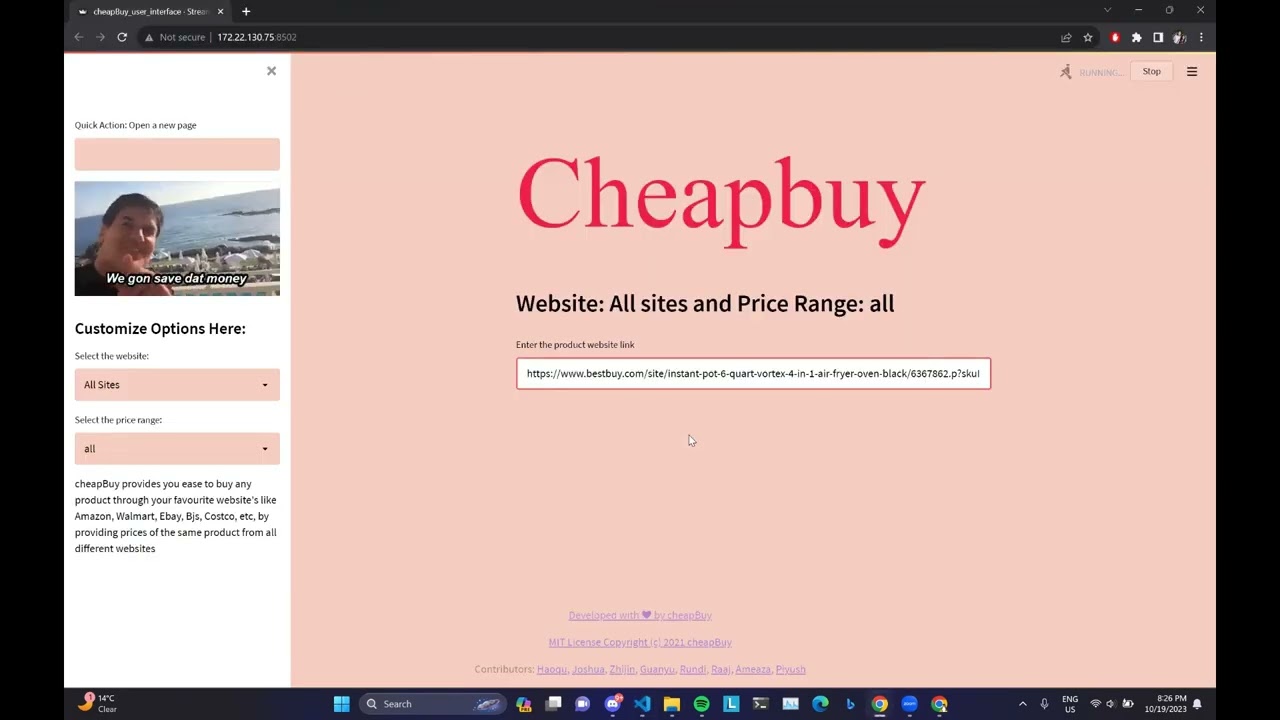
cheapBuy Extension You may easily purchase any item through your preferred websites, such as Amazon, Walmart, Ebay, Bjs, Costco, etc., using the cheapBuy Extension, which also provides price comparisons for the same item across many websites. It often takes a lot of time to compare prices across many websites. Instead, you can install our plugin cheapBuy, which will automatically gather prices for the same item from many websites so you can compare them side by side. Your time and money will both be saved by this extension. CheapBuy is a one-stop shop for finding the lowest products to purchase online.
Features
- Price Comparison
- Get alternative website for the product
- Highlight Cheapest product
Demo
The project is deployed on Streamlit cloud
:moneywithwings: Who should use this?
Anybody who wants to save money but does not want to spend too much time trying to search across multiple websites
Quick Start
- Clone the github repository at the preferable location in your local machine. You will need git to be preinstalled in the system. Once the repository is cloned in your system, with the help of cd command ,
git clone https://github.com/piyush1prasad/proj2 cd cheapBuy - This project uses Python 3, so make sure that Python and Pip are preinstalled. All requirements of the project are listed in the
requirements.txtfile. Use pip to install all of the requirements.pip install -r requirements.txt - Check out the demo video to know about the use of the website in the media files.
- To locally run the streamlit website, we would recommend setting up an Anaconda Environment and running the command
streamlit run cheapBuy_user_interface.py Copy and Paste the product URL in the search bar. Press enter
Review the results
Visit the website offering the cheapest deal!!
License
This project is licensed under the terms of the MIT license. Please check License for more details.
Team Members
 Piyush Prasad |
 Ameaza Rodrigues |
 Raaj Chitnis |
- :raising_hand: Piyush Prasad
- :raisinghandman: Raaj Chitnis
- :sassy_woman: Ameaza Rodrigues
Chat with us
Join our Discord
Or email us at: cheapbuy925@gmail.com
Score Cards
Here are the scorecards
Acknowledgements
We would like to thank Professor Dr Timothy Menzies for helping us understand the process of building a good Software Engineering project. We would also like to thank the teaching assistants Xiao Ling, Andre Lustosa, Kewen Peng, Weichen Shi for their support throughout the project.
We would also like to extend our gratitude to previous group : (https://github.com/anshulp2912/cheapBuy)
- https://streamlit.io/
- https://shields.io/
- https://www.powtoon.com/
Owner
- Name: Piyush Prasad
- Login: piyush1prasad
- Kind: user
- Repositories: 1
- Profile: https://github.com/piyush1prasad