df3d
Motion capture (markerless 3D pose estimation) pipeline and helper GUI for tethered Drosophila.
Science Score: 57.0%
This score indicates how likely this project is to be science-related based on various indicators:
-
○CITATION.cff file
-
✓codemeta.json file
Found codemeta.json file -
✓.zenodo.json file
Found .zenodo.json file -
✓DOI references
Found 1 DOI reference(s) in README -
○Academic publication links
-
✓Committers with academic emails
7 of 15 committers (46.7%) from academic institutions -
✓Institutional organization owner
Organization nely-epfl has institutional domain (ramdya-lab.epfl.ch) -
○JOSS paper metadata
-
○Scientific vocabulary similarity
Low similarity (14.1%) to scientific vocabulary
Keywords
Keywords from Contributors
Repository
Motion capture (markerless 3D pose estimation) pipeline and helper GUI for tethered Drosophila.
Basic Info
Statistics
- Stars: 92
- Watchers: 6
- Forks: 17
- Open Issues: 4
- Releases: 2
Topics
Metadata Files
README.md
Markerless Multi-view Motion Capture for Tethered Drosophila


DeepFly3D is a PyTorch and PyQT5 implementation of 2D-3D tethered Drosophila pose estimation. It aims to provide an interface for pose estimation and to permit further correction of 2D pose estimates, which are automatically converted to 3D pose.
DeepFly3D does not require a calibration pattern, it enforces geometric constraints using pictorial structures, which corrects most of the errors, and the remaining errors are automatically detected can be dealt manually with GUI.
We previously published our DeepFly3D work on eLife journal. You can read the publication here.
Table of Contents
- Markerless Multi-view Motion Capture for Tethered Drosophila
- Table of Contents
- Installing
- Data Structure
- Basic Usage
- Advanced Usage
- Python Interface
- Videos
- Output
- Running GUI
- Development
- Releasing a new version
- References
- Version History
Installing
Installing with pip
Create a new anaconda environment, and pip install nely-df3d package.
bash
conda create -n df3d python=3.12
conda activate df3d
pip install nely-df3d
Odd CUDA Drivers
Only in case your cuda driver is not up-to-date, or is not supported by mainstream pytorch, additionally you might need to explicitly install cudatoolkit before pip installing nely-df3d:
bash
conda install pytorch torchvision torchaudio cudatoolkit="YOUR_CUDA_VERSION" -c pytorch
For example with with RTX 3080 Ti GPU, you will need to do:
bash
conda create -n df3d python=3.12
conda activate df3d
conda install pytorch torchvision cudatoolkit=11 -c pytorch-nightly
pip install nely-df3d
Installing from the source
DeepFly3D requires Python3, Anaconda environment and CUDA drivers for installation. It is only tested on Ubuntu and MacOS. First, clone the repository:
git clone https://github.com/NeLy-EPFL/DeepFly3D
cd DeepFly3D
Then, run create a conda environment with
conda create -n df3d python=3.12
which will create a new python environment. Then, activate the environment.
conda activate df3d
Once this is done you can install the df3d package with the following command,
pip install -e .
which uses the setup.py function to create the package.
Make sure you also have installed the CUDA drivers compatible with your GPU, otherwise it is not possible to make 2D predictions. You can check how to install CUDA drivers here: https://developer.nvidia.com/cuda-downloads
Installing from the source for development
To run DeepFly3D you also need 2 other packages, nely-df2d and nely-pyba. If you want to do development it's best to install all 3 from source so you can easily make changes to different parts of the code. You can do that as follows.
```bash
in a particular folder, clone all 3 repos
git clone https://github.com/NeLy-EPFL/DeepFly3D.git git clone https://github.com/NeLy-EPFL/DeepFly2D.git git clone https://github.com/NeLy-EPFL/PyBundleAdjustment.git cd DeepFly3D conda env create -n df3d python=3.12 conda activate df3d
this will install all 3 packages as editable
pip install -e ../DeepFly2D -e ../PyBundleAdjustment -e . ```
Data Structure
The inteded usage of DeepFly3D is through command-line-intarface (CLI). df3d-cli assumes there are videos or images in this format under the folder. if your path /your/image/path has images or videos, df3d-cli will run 2D pose estimation, calibration and triangulation and will save 2d pose, 3d pose and calibration parameters under the folder /your/image/path/df3d.
Idealy you would have images or videos under images/ folder, with the specific naming convention:
.
+-- images/
|   +-- camera_0_img_0.jpg
|   +-- camera_1_img_0.jpg
|   +-- camera_2_img_0.jpg
|   +-- camera_3_img_0.jpg
|   +-- camera_4_img_0.jpg
|   +-- camera_5_img_0.jpg
|   +-- camera_6_img_0.jpg
...
or
.
+-- images
|   +-- camera_0.mp4
|   +-- camera_1.mp4
|   +-- camera_2.mp4
|   +-- camera_3.mp4
|   +-- camera_4.mp4
|   +-- camera_5.mp4
|   +-- camera_6.mp4
In case of mp4 files, df3d will first expand them into images using ffmpeg. Please check the sample data for a real example: https://github.com/NeLy-EPFL/DeepFly3D/tree/master/sample/test
Basic Usage
The basic usage is like this.
bash
df3d-cli /your/image/path
This command assumes your cameras are numbered in the default order:

in which case your data will look like this if cameras 0, 1, 2 are shown left-to-right in the top row and cameras 4, 5, 6 are show left-to-right in the bottom row:
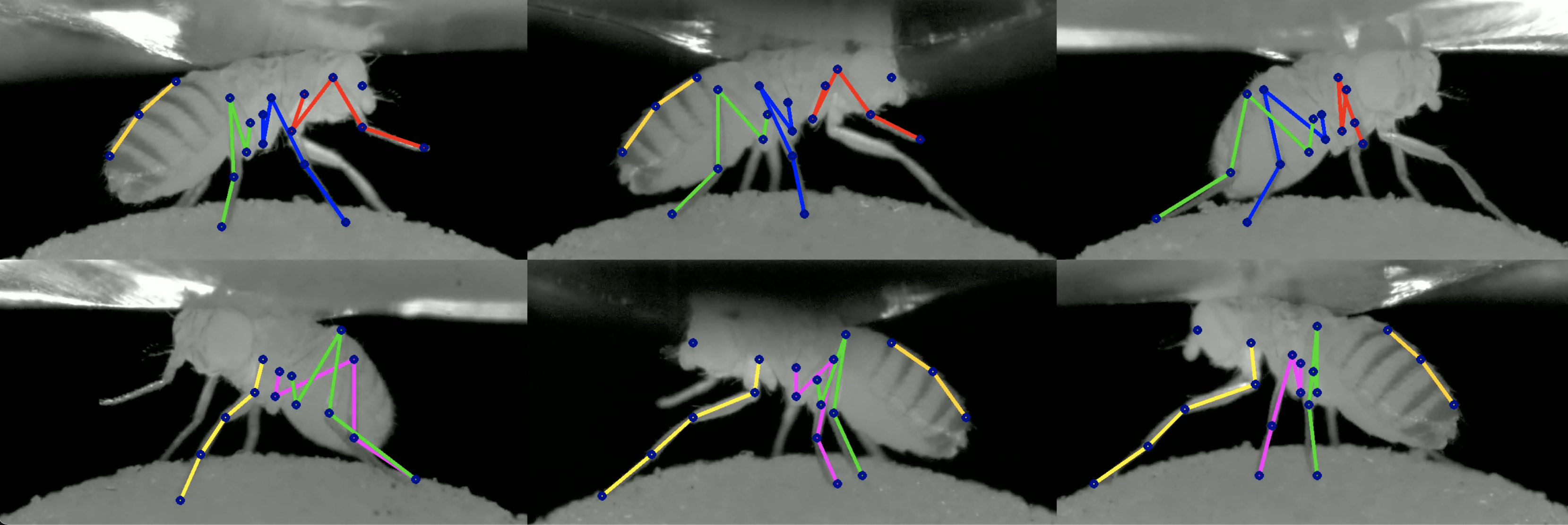
If instead your camera order is reversed for instance:
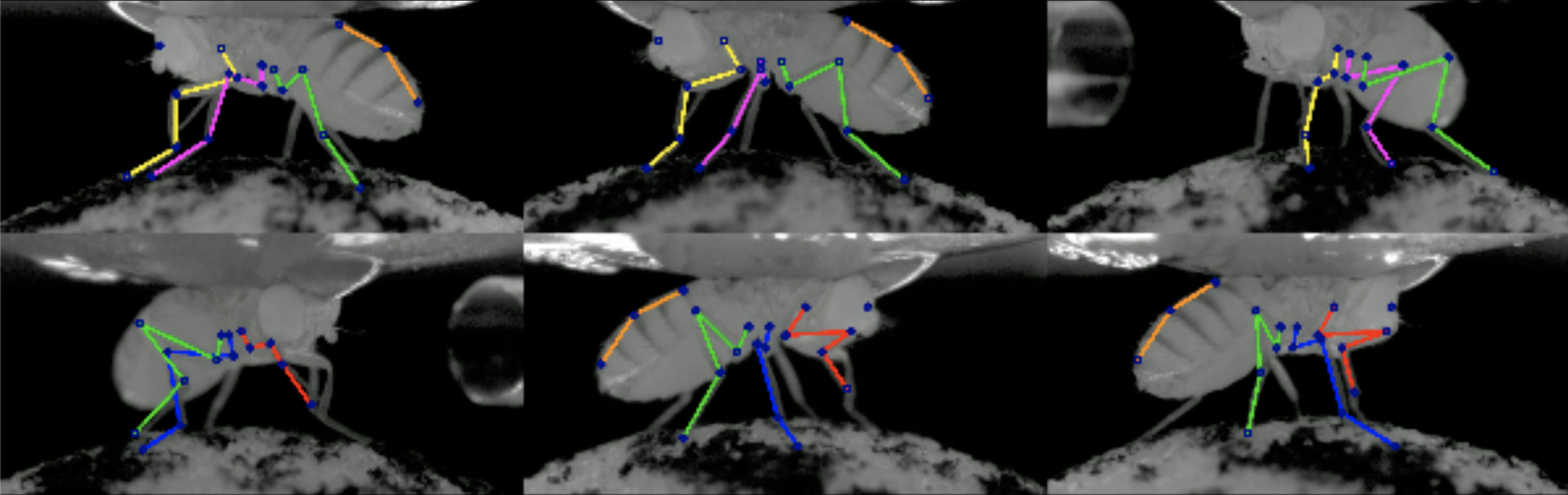
then your order is 6 5 4 3 2 1 0, so you'd need to run df3d-cli /your/image/path --order 6 5 4 3 2 1 0 to get DeepFly3D to work properly.
Advanced Usage
``` usage: df3d-cli [-h] [-v] [-vv] [-d] [--output-folder OUTPUTFOLDER] [-r] [-f] [-o] [-n NUMIMAGESMAX] [--order [CAMERAIDS [CAMERA_IDS ...]]] [--skip-pose-estimation] [--video-2d] [--video-3d] [--output-fps OUTPUT_FPS] [--batch-size BATCH_SIZE] [--pin-memory-disabled] INPUT
DeepFly3D pose estimation
positional arguments: INPUT Without additional arguments, a folder containing unlabeled images.
optional arguments:
-h, --help show this help message and exit
-v, --verbose Enable info output (such as progress bars)
-vv, --verbose2 Enable debug output
-d, --debug Displays the argument list for debugging purposes
--output-folder OUTPUTFOLDER
The name of subfolder where to write results
-r, --recursive INPUT is a folder. Successively use its subfolders
named 'images/'
-f, --from-file INPUT is a text-file, where each line names a folder.
Successively use the listed folders.
-o, --overwrite Rerun pose estimation and overwrite existing pose
results
-n NUMIMAGESMAX, --num-images-max NUMIMAGESMAX
Maximal number of images to process.
--order [CAMERAIDS [CAMERAIDS ...]]
Ordering of the cameras provided as an ordered list of
ids. Example: 0 1 4 3 2 5 6.
--skip-pose-estimation
Skip 2D and 3D pose estimation. Use in combination with --video-2d
or --video-3d to generate videos without rerunning pose estimation.
--video-2d Generate pose2d videos
--video-3d Generate pose3d videos
--output-fps OUTPUTFPS
FPS for output videos. If not specified, uses the FPS from
the input videos.
--batch-size BATCHSIZE
Batch size for inference - how many images are processed
through the model at once
--pin-memory-disabled
Whether to disable `pinmemoryin the dataloader.
Keeping pin memory enabled usually speeds up processing,
but sometimes leads to memory leaks.
``
Therefore, you can create advanced queries in df3d-cli, for example:
bash
df3d-cli -f /path/to/text.txt    \  # process each line from the text file
         -r                      \  # recursively search for images folder under each line of the text line
         --order 0 1 2 3 4 5 6   \  # set the camera order
         -n 100                  \  # process only the first 100 images
         --output-folder results \  # save output into results/ instead of /your/image/path/df3d/
         --vv                    \  # will print agressivelly, for debugging purposes
         --skip-pose-estimation  \  # will not run 2d pose estimation, instead will do calibration, triangulation and will save results
         --video-2d              \  # will make 2d video for each folder
         --video-3d              \  # will make 3d video for each folder
         --output-fps 15.0       \  # set output video FPS to 15 (instead of using the input video FPS)
To test df3d-cli, you run it on a folder for only 100 images, make videos, and print agressivelly for debugging:
bash
df3d-cli /path/to/images/ -n 100 -vv
Python Interface
Optionally, you can also use df3d on directly python.
```python from df3d.core import Core from df3d import video
core = Core(inputfolder='../sample/test/', numimagesmax=100, outputsubfolder='df3dpy', cameraordering=[0,1,2,3,4,5,6]) core.pose2destimation() core.calibratecalc(minimgid=0, maximgid=100)
save df3dresult file under '../sample/test/df3dpy'
core.save()
make videos
video.makepose2dvideo(
core.plot2d, core.numimages, core.inputfolder, core.outputfolder
)
video.makepose3dvideo(
core.getpoints3d(),
core.plot2d,
core.numimages,
core.inputfolder,
core.outputfolder,
)
In general following functions are available for Core module:
python
class Core:
def _init_(self, inputfolder, numimagesmax): # 9 lines
def setup_cameras(self): # 38 lines
# attribute access
@property def input_folder(self):  # 2 lines
@property def output_folder(self):  # 2 lines
@property def image_shape(self):  # 2 lines
@property def number_of_joints(self):  # 3 lines
def has_pose(self):  # 1 lines
def has_heatmap(self):  # 1 lines
def has_calibration(self):  # 4 lines

# interactions with pose-estimation
def update_camera_ordering(self, cidread2cid):  # 12 lines
def pose2d_estimation(self):  # 14 lines
def next_error(self, img_id):  # 1 lines
def prev_error(self, img_id):  # 1 lines
def calibrate_calc(self, min_img_id, max_img_id):  # 35 lines
def nearest_joint(self, cam_id, img_id, x, y):  # 10 lines
def move_joint(self, cam_id, img_id, joint_id, x, y):  # 10 lines

def save_calibration(self):  # 3 lines
def save_pose(self):  # 63 lines
def save_corrections(self):  # 1 line

# visualizations
def plot_2d(self, cam_id, img_id, with_corrections=False, joints=[]):  # 33 lines
def plot_heatmap(self, cam_id, img_id, joints=[]):  # 5 lines
def get_image(self, cam_id, img_id):  # 4 lines

# private helper methods
def next_error_in_range(self, range_of_ids):  # 6 lines
def get_joint_reprojection_error(self, img_id, joint_id, camNet):  # 11 lines
def joint_has_error(self, img_id, joint_id):  # 4 lines
def solve_bp_for_camnet(self, img_id, camNet):  # 29 lines
```
Videos
Using the flag --video-2d with df3d-cli will create the following video:

Using the flag --video-3d with df3d-cli will create the following video:

When generating videos with --video-2d or --video-3d, you can control the output video frame rate using the --output-fps flag. If not specified, the output video framerate will be set to equal the input videos' framerate.
Output
df3d-cli saves results under df3dresult.pk file. You can read it using,
```python
resultpath = '../sample/test/df3d/df3dresult*.pkl'
d = pickle.load(open(glob.glob(prpath)[0], 'rb'))
This will read a dictionary with the following keys:
python
d.keys()
dictkeys([0, 1, 2, 3, 4, 5, 6, 'points3d', 'points2d', 'points3dwoprocrustes', 'cameraordering', 'heatmap_confidence']) ```
Points2D
Detected 2D keypoints are hold under d['points2d'], which is a 4 dimensional tensor. ```python d['points2d'].shape
(7, 15, 38, 2) # [CAMERAS, TIMES, JOINTS, 2D] ```
You can read the corresponding 2D points from a particular camera from a particular time using,
python
row, column = d['points2d'][CAMERA, TIME, JOINT]
The points are in the (row, column) format.
You can also visualize which keypoints in results belongs to which keypoints on the animal: ```python import matplotlib.pyplot as plt
imagepath = '../sample/test/camera{camid}img{imgid}.jpg' prpath = '../sample/test/df3d/df3dresult*.pkl'
cam_id, time = 0, 0
plt.imshow(plt.imread(imagepath.format(camid=0,imgid=0))) plt.axis('off') for jointid in range(19): x, y = d['points2d'][camid, time][jointid, 1] * 960, d['points2d'][camid, time][jointid, 0] * 480 plt.scatter(x, y, c='blue', s=5) plt.text(x, y, f'{i}', c='red') ```


Points3D
You can recalculate the 3D points, given the 2D points and the caibraiton parameters:
```python from pyba.CameraNetwork import CameraNetwork import pickle import glob
imagepath = './sample/test/camera{camid}img{imgid}.jpg' prpath = './sample/test/df3d/df3dresult*.pkl'
d = pickle.load(open(glob.glob(pr_path)[0], 'rb')) points2d = d['points2d']
df3d points2d are saved in normalized into [0,1], rescale them into image shape
camNet = CameraNetwork(points2d=points2d*[480, 960], calib=d, imagepath=imagepath)
points3d = camNet.triangulate() ```
Camera 0 corresponds to origin. It's camera center (not the translation vector) corresponds to 0 point.

Camera Ordering
The same camera ordering as given input using --order flag in cli. ```python d["camera_ordering"]
array([0, 1, 2, 3, 4, 5, 6]) ```
Heatmap Confidence
Stacked Hourglass confidence values for each joint predicted. Given an unnormalized posterior distribution heatmap H over the pixels, we take the argmax_{h, w} H for the final prediction and H[h, w] for the confidence level.

Calibration
df3d_result files also have the calculated calibration parameters for each camera. Each calibration section includes 1. rotation matrix R 2. translation vector tvec, 3. intrinsic matrix intr, 4. distortion parameters distort.
python
calib = {0: {'R': array([[ 0.90885957,  0.006461  , -0.41705219],
         [ 0.01010426,  0.99924554,  0.03750006],
         [ 0.41697983, -0.0382963 ,  0.90810859]]),
  'tvec': array([1.65191596e+00, 2.22582670e-02, 1.18353733e+02]),
  'intr': array([[1.60410e+04, 0.00000e+00, 2.40000e+02],
         [0.00000e+00, 1.59717e+04, 4.80000e+02],
         [0.00000e+00, 0.00000e+00, 1.00000e+00]]),
  'distort': array([0., 0., 0., 0., 0.])},
 1: {'R': array([[ 0.59137248,  0.02689833, -0.80594979],
         [-0.00894927,  0.9996009 ,  0.02679478],
         [ 0.80634887, -0.00863303,  0.59137718]]),
  'tvec': array([ 1.02706542e+00, -9.25820468e-02,  1.18251732e+02]),
  'intr': array([[1.60410e+04, 0.00000e+00, 2.40000e+02],
         [0.00000e+00, 1.59717e+04, 4.80000e+02],
         [0.00000e+00, 0.00000e+00, 1.00000e+00]]),
  'distort': array([0., 0., 0., 0., 0.])},
}
The coordinate system is compatible with OpenCV, where z-axis corresponds to axis going out of camera.
Running GUI
GUI is primarily used for correcting the false 2D pose estimation results in the 'Correction' mode. Your changes will be saved under df3d folder and will be used for the final df3d_result file.
Currently, you can only use GUI after running the df3d on the cli on the same folder.
After installing the dependencies we can initialize the GUI using the command line entry point:

df3d ./data/test/ 15
The second argument sets the image folder, while the third argument sets the upper bound for the images, in case you only want to process the subset of images.
This should start the GUI:

you can optionally remove /FULL/PATH_FOLDER and NUM_IMAGES, in which case pop-up apperas the select the folder.

After completing pose estimation in the cli, you can open the pose mode:

Development
DeepFly3D consists of 3 pip packages: - DeepFly3D: https://pypi.org/project/df3d/ - PyBundleAdjustment: https://pypi.org/project/pyba/ - DeepFly2D: https://pypi.org/project/df2d/
The master branch of the DeepFly3D package is kept up-to-date with the last version of the pip package. Development is done under dev branch. Before pushing changes to the master branch, make sure all test cases are passing. You can run the tests using python -m unittest discover. Unittests make sure several scenarios can be processed using cli without failing.
Releasing a new version
- Update the version in
setup.py(eg. 1.0.1) - Create a tag for the release that matches the new version (eg. v1.0.1)
- Push the latest commit and tag - this will trigger a github action to make a new release for DeepFly3D on pypi and github
- Edit the github release https://github.com/NeLy-EPFL/DeepFly3D/releases to add information about the latest changes
References
You can cite our paper in case you find it useful.
@inproceedings{Gunel19DeepFly3D,
  author    = {Semih G{\"u}nel and
               Helge Rhodin and
               Daniel Morales and
               Joo Compagnolo and
               Pavan Ramdya and
               Pascal Fua},
  title     = {DeepFly3D, a deep learning-based approach for 3D limb and appendage tracking in tethered, adult Drosophila},
  bookTitle = {eLife},
  doi       = {10.7554/eLife.48571},
  year      = {2019}
}
Version History
Changes in 0.5
- Major internal rewrite.
Changes in 0.4
- Using the CLI, the output folder can be changed using the
--output-folderflag - CLI and GUI now use the same pose estimation code, so changes will automatically propagate to both
- Minor tweaks in the GUI layout, functionality kept unchanged
Changes in 0.3
- Results are saved in df3d folder instead of the image folder.
- Much faster startup time.
- Cameras are automatically ordered using Regular Expressions.
- CLI improvements. Now it includes 3D pose.
Changes in 0.2
- Changing name from deepfly3d to df3d
- Adding cli interface with df3d-cli
- Removing specific dependencies for numpy and scipy
- Removing L/R buttons, so you can see all the data at once
- Removing the front camera
- Faster startup time, less time spent on searching for the image folder
- Better notebooks for plotting
- Adding procrustes support. Now all the output is registere to template skeleton.
- Bug fixes in CameraNetwork. Now calibration with arbitrary camera sequence is possible.
Extras:
- If you are interested in the online annotation tool instead: DeepFly3DAnnotation
- To see the dataset used in the paper: Dataverse
Owner
- Name: Neuroengineering Laboratory @EPFL - Ramdya Lab
- Login: NeLy-EPFL
- Kind: organization
- Website: https://ramdya-lab.epfl.ch/
- Repositories: 42
- Profile: https://github.com/NeLy-EPFL
GitHub Events
Total
- Create event: 10
- Commit comment event: 1
- Release event: 1
- Issues event: 10
- Watch event: 6
- Delete event: 5
- Issue comment event: 15
- Push event: 31
- Pull request review event: 7
- Pull request review comment event: 2
- Pull request event: 9
Last Year
- Create event: 10
- Commit comment event: 1
- Release event: 1
- Issues event: 10
- Watch event: 6
- Delete event: 5
- Issue comment event: 15
- Push event: 31
- Pull request review event: 7
- Pull request review comment event: 2
- Pull request event: 9
Committers
Last synced: over 2 years ago
Top Committers
| Name | Commits | |
|---|---|---|
| semihgunel | g****h@g****m | 224 |
| Julien Harbulot | j****t@e****h | 112 |
| Sibo Wang | s****g@e****h | 7 |
| faymanns | f****s@e****h | 6 |
| Gunel | g****l@t****h | 4 |
| Gunel | g****l@v****h | 1 |
| Jasper Phelps | j****s@g****m | 1 |
| ramdya | r****a@g****m | 1 |
| Sibo Wang | s****b@g****m | 1 |
| Gunel | g****l@t****h | 1 |
| semihgunel | 2****! | 1 |
| Mr Samuel Kelly | s****9@g****u | 1 |
| Jonas Braun | 3****n | 1 |
| dependabot[bot] | 4****] | 1 |
| Julien Harbulot | j****h | 1 |
Committer Domains (Top 20 + Academic)
Issues and Pull Requests
Last synced: 11 months ago
All Time
- Total issues: 29
- Total pull requests: 35
- Average time to close issues: 3 months
- Average time to close pull requests: 20 days
- Total issue authors: 12
- Total pull request authors: 8
- Average comments per issue: 1.31
- Average comments per pull request: 1.34
- Merged pull requests: 31
- Bot issues: 0
- Bot pull requests: 2
Past Year
- Issues: 8
- Pull requests: 8
- Average time to close issues: 13 days
- Average time to close pull requests: 8 days
- Issue authors: 4
- Pull request authors: 2
- Average comments per issue: 0.38
- Average comments per pull request: 1.25
- Merged pull requests: 6
- Bot issues: 0
- Bot pull requests: 0
Top Authors
Issue Authors
- faymanns (9)
- jasper-tms (5)
- Dominic-DallOsto (5)
- azmaite (2)
- Sam-Kelly (2)
- hanhanhan-kim (1)
- mosamdabhi (1)
- lambdaloop (1)
- lengyuner (1)
- jonasfbraun (1)
- SHU-Yangqi (1)
- Xonxt (1)
Pull Request Authors
- semihgunel (11)
- Dominic-DallOsto (7)
- jasper-tms (6)
- faymanns (6)
- julien-h (5)
- dependabot[bot] (3)
- sibocw (1)
- Sam-Kelly (1)
Top Labels
Issue Labels
Pull Request Labels
Packages
- Total packages: 2
-
Total downloads:
- pypi 272 last-month
-
Total dependent packages: 0
(may contain duplicates) -
Total dependent repositories: 2
(may contain duplicates) - Total versions: 15
- Total maintainers: 3
pypi.org: df3d
GUI and 3D pose estimation pipeline for tethered Drosophila.
- Homepage: https://github.com/NeLy-EPFL/DeepFly3D
- Documentation: https://df3d.readthedocs.io/
- License: lgpl-3.0
-
Latest release: 0.57
published over 4 years ago
Rankings
Maintainers (1)
pypi.org: nely-df3d
GUI and 3D pose estimation pipeline for tethered Drosophila.
- Homepage: https://github.com/NeLy-EPFL/DeepFly3D
- Documentation: https://nely-df3d.readthedocs.io/
- License: lgpl-3.0
-
Latest release: 1.0.1
published about 1 year ago
Rankings
Maintainers (2)
Dependencies
- actions/checkout v4 composite
- actions/setup-python v5 composite
- PyQt5 *
- colorama *
- matplotlib *
- nely-df2d >=0.14
- nely-pyba >=0.13
- numpy *
- opencv-python-headless >=4.8.1.78
- scikit-learn *
- tqdm *