scikit-plots
An intuitive library that seamlessly adds plotting capabilities and functionality to any model objects or outputs, compatible with tools like scikit-learn, XGBoost, TensorFlow, and more.
Science Score: 67.0%
This score indicates how likely this project is to be science-related based on various indicators:
-
✓CITATION.cff file
Found CITATION.cff file -
✓codemeta.json file
Found codemeta.json file -
✓.zenodo.json file
Found .zenodo.json file -
✓DOI references
Found 15 DOI reference(s) in README -
✓Academic publication links
Links to: zenodo.org -
○Academic email domains
-
○Institutional organization owner
-
○JOSS paper metadata
-
○Scientific vocabulary similarity
Low similarity (11.0%) to scientific vocabulary
Keywords
Repository
An intuitive library that seamlessly adds plotting capabilities and functionality to any model objects or outputs, compatible with tools like scikit-learn, XGBoost, TensorFlow, and more.
Basic Info
- Host: GitHub
- Owner: scikit-plots
- License: bsd-3-clause
- Language: Jupyter Notebook
- Default Branch: main
- Homepage: https://scikit-plots.github.io/dev
- Size: 62.5 MB
Statistics
- Stars: 0
- Watchers: 0
- Forks: 1
- Open Issues: 1
- Releases: 6
Topics
Metadata Files
README.md
Welcome to Scikit-plots 101







Single line functions for detailed visualizations
The quickest and easiest way to go from analysis...
⚠️ Partially support Python 3.8 3.9 without some packages in cexternals, externals due to externals lib dep (e.g., astropy.stats, arrat-api-compat, arrat-api-extra)
📘 Documentation, Examples and Try|Install Scikit-plots:
Explore the full features of Scikit-plots: https://scikit-plots.github.io/dev/devel/index.html
🐋 Scikit-plots Runtime Docker Images:
🔎 Run the latest scikit-plots container — with full or partial preinstallation — interactively:
```bash
docker run -it --rm scikitplot/scikit-plots:latest
docker run -it --rm scikitplot/scikit-plots:latest -i -c "scikitplot -V"
bash
docker run -it scikitplot/scikit-plots:latest
docker run -it -v "$(pwd):/work/notebooks:delegated" -p 8891:8891 scikitplot/scikit-plots:latest ```
📥 User Installation:
🧠 Gotchas:
- ⚠️ (Recommended): Use a Virtual Environmentt (like
venvpipenv) to Avoid Conflicts. - 🚫 Don't use conda
base— it's prone to conflicts. - ✅ This avoids dependency issues and keeps your system stable.
Conda:
See Also: conda-environment-guidelines
```sh
(conda, mamba or micromamba) Create New Env and install scikit-plots
Create a new environment and install Python 3.11 with IPython kernel support
conda create -n py311 python=3.11 ipykernel -y
micromamba create -n py311 python=3.11 ipykernel -y ```
```sh
(conda, mamba or micromamba) Activate the environment
conda activate py311
micromamba activate py311 ```
```sh
(conda, mamba or micromamba) Install scikit-plots (Upcoming)
conda install --yes -c conda-forge scikit-plots
micromamba install --yes -c conda-forge scikit-plots ```
(Optionally) Pipenv install all dependencies:
See Also: pipenv-environment-guidelines
```sh
(Optionally) Pipenv dep
wget https://raw.githubusercontent.com/scikit-plots/scikit-plots/main/docker/env_pipenv/Pipfile
curl -O https://raw.githubusercontent.com/scikit-plots/scikit-plots/main/docker/envpipenv/Pipfile curl -O https://raw.githubusercontent.com/scikit-plots/scikit-plots/main/docker/envpipenv/Pipfile.lock pip install pipenv && pipenv install ```
```sh
(Optionally) Pipenv Activate the environment
pipenv shell ```
📦 From
PIP
Installation by
pypi
,
pypi.anaconda.org
or
GITHUB
The easiest way to set up scikit-plots is to install it using pip with the following command:
- By
pypi:
```sh
Now Install scikit-plots (via pip, conda, or local source)
pip install scikit-plots ```
- By
pypi.anaconda.org
(with
required runtime dependencies
):
```sh
(Optionally) Install the lost packages "Runtime dependencies" or use pipenv
https://github.com/celik-muhammed/scikit-plots/tree/main/requirements
wget https://raw.githubusercontent.com/scikit-plots/scikit-plots/main/requirements/default.txt
curl -O https://raw.githubusercontent.com/scikit-plots/scikit-plots/main/requirements/default.txt pip install -r default.txt ```
```sh
Try After Ensure all "Runtime dependencies" installed
pip install -U -i https://pypi.anaconda.org/scikit-plots-wheels-staging-nightly/simple scikit-plots ```
- By
GITHUB:
@<branch>
,
@<tag>
or
Source Code Archive URLs
to specify a version
- by
GITHUB
Branches:
@<branch>
```bash
pip install git+https://github.com/scikit-plots/scikit-plots.git@
Latest in Development
pip install git+https://github.com/scikit-plots/scikit-plots.git@main
(Added C, Cpp, Fortran Support) Works with standard Python (CPython)
pip install git+https://github.com/scikit-plots/scikit-plots.git@maintenance/0.4.x
(Works with PyPy interpreter) Works with standard Python (CPython)
pip install git+https://github.com/scikit-plots/scikit-plots.git@maintenance/0.3.x pip install git+https://github.com/scikit-plots/scikit-plots.git@maintenance/0.3.7 ```
- by
GITHUB
Tags:
@<tag>
```bash
pip install git+https://github.com/scikit-plots/scikit-plots.git@
pip install git+https://github.com/scikit-plots/scikit-plots.git@v0.4.0rc5 pip install git+https://github.com/scikit-plots/scikit-plots.git@v0.3.9rc3 pip install git+https://github.com/scikit-plots/scikit-plots.git@v0.3.7 ```
📁 From Source
Installation by
Archive
or
GIT Clone
🐍 Pitfalls:
- 💡 You can download
GitHub Source Code Archives(.zipor.tar.gz) by specifying abranch,tag, or a specificcommit ID. - 🛠️ After unzipping the
GitHub Source Code Archive(similar to cloning), remember require to rungit submodule updateto initialize submodules. - 🔄 Alternatively, you can install
scikit-plotsdirectly from theGitHub Source Code Repositoryto access the latest updates. - ↔️ Alternatively,
Source Distribution (
.tar.gz) are also available for direct installation viaPyPI (sdist), if applicable.
- By
Source Distribution (.tar.gz)
(with/without
required build dependencies
)
```sh
pip install package Installs wheel (.whl) if available, else source
pip install --no-binary=package package # Forces source installation only the specified package
pip install --no-binary=scikit-plots scikit-plots ```
```sh
pip install --no-binary=:all: package # Forces source installation for Package + all dependencies
This forces scikit-plots and all its dependencies to be installed from source (from .tar.gz).
pip install --no-binary=:all: scikit-plots ```
- By
GITHUB Source Code:
(with
required build dependencies
)
- by
GITHUB Source Code Archive URLs:
( .zip or .tar.gz )
(with
required build dependencies
)
Source code archives are available at specific URLs for each repository.
For example, consider the repository
scikit-plots/scikit-plots
.
- by
GitHub Source Code Repository Cloned:
(with
required build dependencies
)
```sh
Forked repo: https://github.com/scikit-plots/scikit-plots.git
git clone https://github.com/YOUR-USER-NAME/scikit-plots.git cd scikit-plots ```
```sh
(if Necessary) Add safe directories for git
bash docker/script/safe_dirs.sh
git config --global --add safe.directory '*' ```
```sh
(Optionally) download submodules, Not Needed Every Time.
git submodule update --init --recursive ```
```sh
Ensure venv (e.g. conda, venv, pipenv)
pip install -r ./requirements/all.txt
pip install -r ./requirements/build.txt ```
```sh
Install scikit-plots
pip install --no-cache-dir . -v ```
🧊🔧 It is also possible to include optional dependencies:
```sh
(Optionally) Install development version
python -m pip install --no-cache-dir -e .[build,dev,test,doc] -v
sh
https://github.com/celik-muhammed/scikit-plots/tree/main/requirements
(Optionally) Try Development [build,dev,test,doc]
For More in Doc: https://scikit-plots.github.io/
python -m pip install --no-cache-dir --no-build-isolation -e .[build,dev,test,doc] -v ```
```sh
https://github.com/celik-muhammed/scikit-plots/tree/main/requirements
[cpu] refer tensorflow-cpu, transformers, tf-keras
[gpu] refer Cupy tensorflow lib require NVIDIA CUDA support
pip install "scikit-plots[cpu]" ```
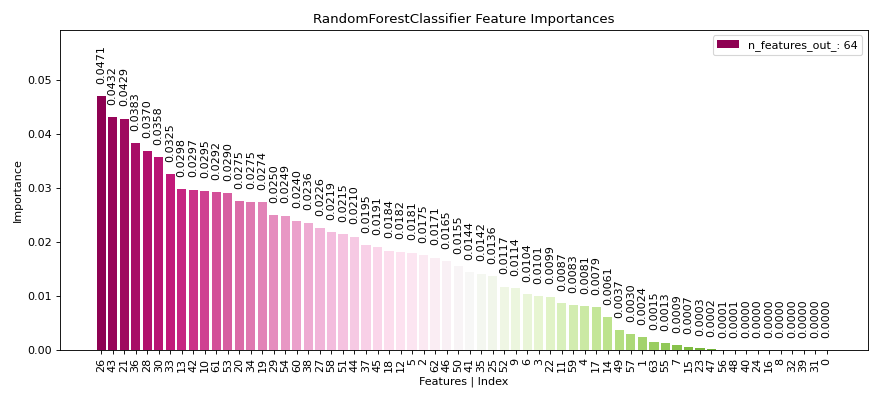
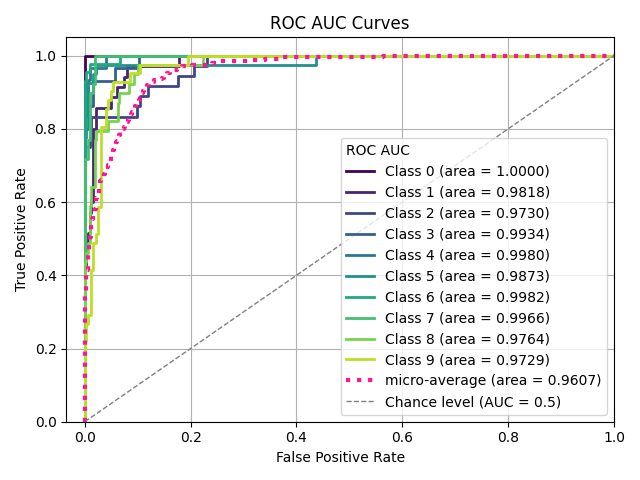
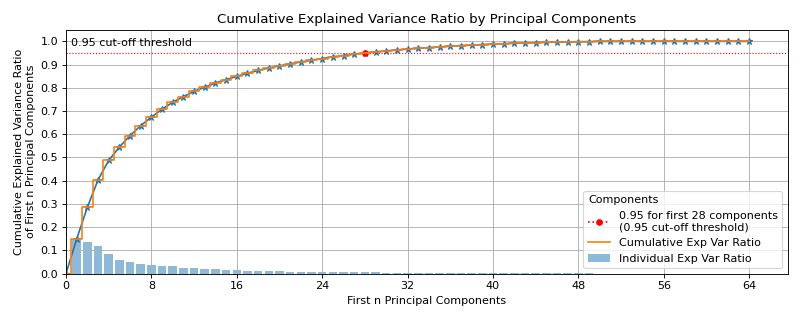
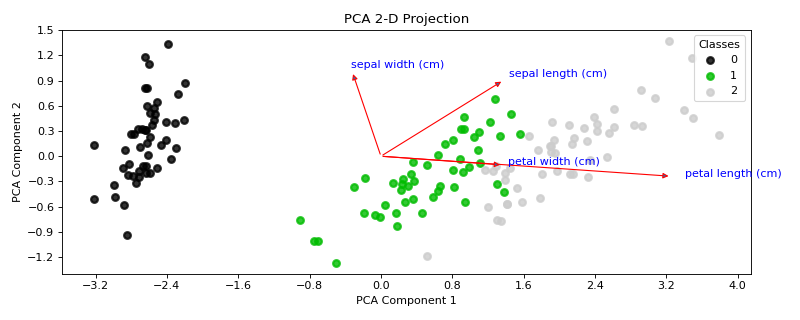
Sample Plots
|


|
|

|
|
|
|
|

|
|

|
|
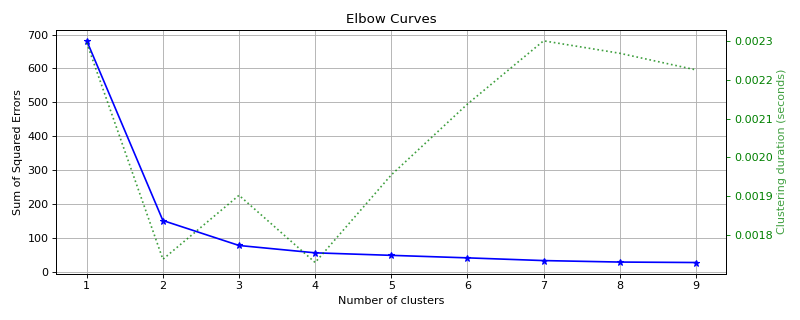
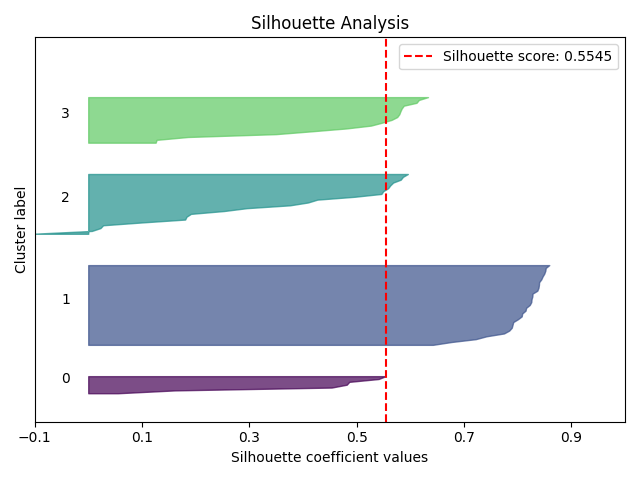
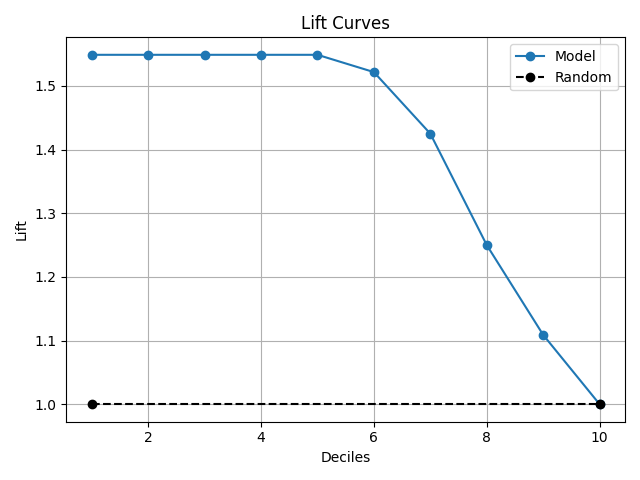
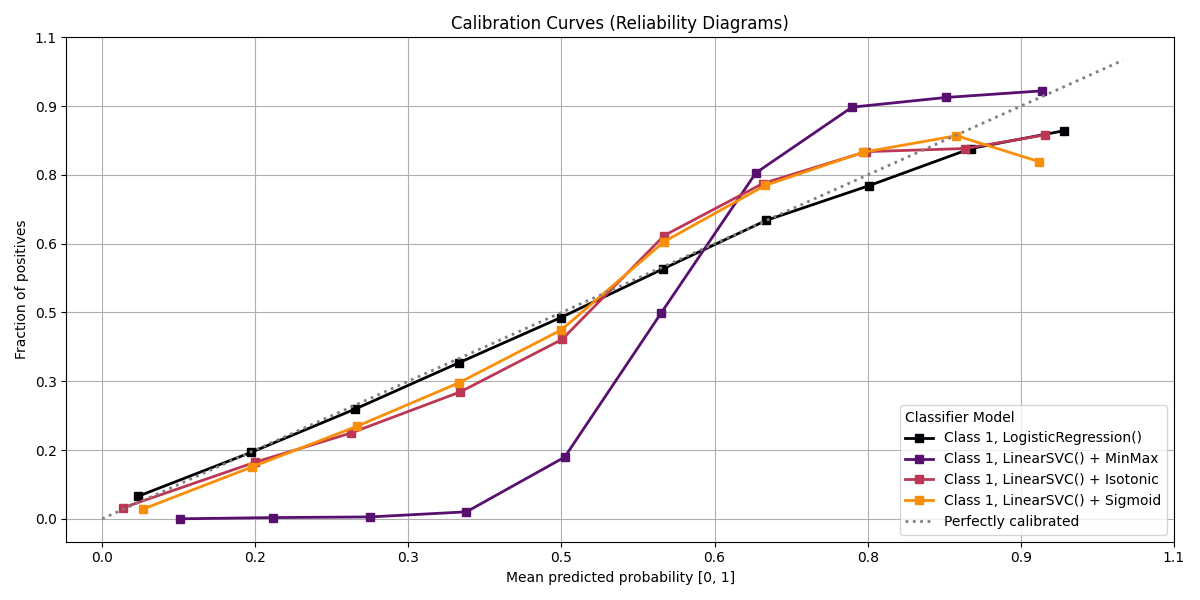
Scikit-plots is the result of an unartistic data scientist's dreadful realization that visualization is one of the most crucial components in the data science process, not just a mere afterthought.
Gaining insights is simply a lot easier when you're looking at a colored heatmap of a confusion matrix complete with class labels rather than a single-line dump of numbers enclosed in brackets. Besides, if you ever need to present your results to someone (virtually any time anybody hires you to do data science), you show them visualizations, not a bunch of numbers in Excel.
That said, there are a number of visualizations that frequently pop up in machine learning. Scikit-plots is a humble attempt to provide aesthetically-challenged programmers (such as myself) the opportunity to generate quick and beautiful graphs and plots with as little boilerplate as possible.
Okay then, prove it. Show us an example.
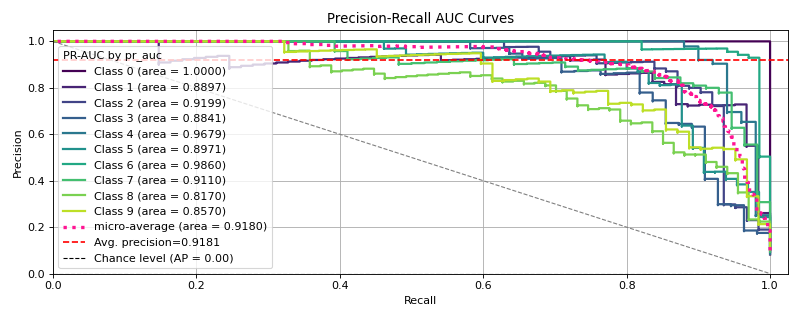
Say we use Keras Classifier in multi-class classification and decide we want to visualize the results of a common classification metric, such as sklearn's classification report with a confusion matrix.
Let’s start with a basic example where we use a Keras classifier to evaluate the digits dataset provided by Scikit-learn.
```python
Before tf {'0':'All', '1':'Warnings+', '2':'Errors+', '3':'Fatal Only'} if any
import os; os.environ['TFCPPMINLOGLEVEL'] = '3'
Disable GPU and force TensorFlow to use CPU
import os; os.environ['CUDAVISIBLEDEVICES'] = '' import tensorflow as tf
Set TensorFlow's logging level to Fatal
import logging; tf.getlogger().setLevel(logging.CRITICAL) import numpy as np from sklearn.datasets import loaddigits from sklearn.modelselection import traintest_split
Loading the dataset
X, y = loaddigits( returnX_y=True, )
Split the dataset into training and validation sets
Xtrain, Xval, ytrain, yval = traintestsplit( X, y, testsize=0.33, randomstate=0 )
Convert labels to one-hot encoding
Ytrain = tf.keras.utils.tocategorical(ytrain) Yval = tf.keras.utils.tocategorical(yval)
Define a simple TensorFlow model
tf.keras.backend.clearsession() model = tf.keras.Sequential([ # tf.keras.layers.Input(shape=(Xtrain.shape[1],)), # Input (Functional API) tf.keras.layers.InputLayer(shape=(X_train.shape[1],)), tf.keras.layers.Dense(64, activation='relu'), tf.keras.layers.Dense(64, activation='relu'), tf.keras.layers.Dense(10, activation='softmax') ])
Compile the model
model.compile( optimizer='adam', loss='categorical_crossentropy', metrics=['accuracy'], )
Train the model
model.fit( Xtrain, Ytrain, batchsize=32, epochs=2, validationdata=(Xval, Yval), verbose=0 )
Predict probabilities on the validation set
yprobas = model.predict(Xval)
Plot the data
import matplotlib.pyplot as plt import scikitplot as sp
sp.getlogger().setLevel(sp.splogging.WARNING)
sp.logger.setLevel(sp.logger.INFO) # default WARNING
Plot precision-recall curves
sp.metrics.plotprecisionrecall( yval, yprobas, ) ```
Pretty.
Maximum flexibility. Compatibility with non-scikit-learn objects.
Although Scikit-plot is loosely based around the scikit-learn interface, you don't actually need scikit-learn objects to use the available functions. As long as you provide the functions what they're asking for, they'll happily draw the plots for you.
The possibilities are endless.
Release Notes
See the changelog for a history of notable changes to scikit-plots.
Contributing to Scikit-plots
Reporting a bug? Suggesting a feature? Want to add your own plot to the library? Visit our.
The Scikit-plots Project is made both by and for its users, so we welcome and encourage contributions of many kinds. Our goal is to keep this a positive, inclusive, successful, and growing community that abides by the Scikit-plots Community Code of Conduct.
For guidance on contributing to or submitting feedback for the Scikit-plots Project,
see the contributions page.
For contributing code specifically, the developer docs have a
guide with a quickstart.
There's also a summary of contribution guidelines.
Developing with Codespaces
GitHub Codespaces is a cloud development environment using Visual Studio Code in your browser. This is a convenient way to start developing Scikit-plots, using our dev container configured with the required packages. For help, see the GitHub Codespaces docs.

Acknowledging (Governance) and Citing Scikit-plots
See the Acknowledgement, Citation Guide and the CITATION.bib, CITATION.cff file.
scikit-plots, “scikit-plots: vlatest”. Zenodo, Aug. 23, 2024. DOI: 10.5281/zenodo.13367000.
scikit-plots, “scikit-plots: v0.3.8dev0”. Zenodo, Aug. 23, 2024. DOI: 10.5281/zenodo.13367001.
Supporting the Project (Upcoming)


NumFOCUS, a 501(c)(3) nonprofit in the United States.
License
Scikit-plots is licensed under a 3-clause BSD style license - see the LICENSE file, and LICENSES files.
Owner
- Name: scikit-plots
- Login: scikit-plots
- Kind: organization
- Repositories: 1
- Profile: https://github.com/scikit-plots
Citation (CITATION.bib)
% --------------------------------------------------------------------
% CITATION.bib file for
% This file provides citation information for users
% who want to cite the library, related papers, and books.
% --------------------------------------------------------------------

@software{scikit-plots:vlatest,
  author  = { The scikit-plots developers },
  license = { BSD-3-Clause },
  doi     = { 10.5281/zenodo.13367000 },
  month   = { 11 },
  title   = {{ scikit-plots: Machine Learning Visualization in Python }},
  url     = { https://github.com/scikit-plots/scikit-plots },
  version = { latest },
  year    = { 2024 },
  note    = { Documentation available at \url{ https://scikit-plots.github.io/dev } },
  message = { Scikit-plot is the result of an unartistic data scientist's dreadful realization that visualization is one of the most crucial components in the data science process, not just a mere afterthought. },
}
GitHub Events
Total
- Create event: 95
- Issues event: 27
- Release event: 15
- Delete event: 75
- Issue comment event: 239
- Push event: 571
- Pull request review event: 2
- Pull request event: 465
- Fork event: 3
Last Year
- Create event: 95
- Issues event: 27
- Release event: 15
- Delete event: 75
- Issue comment event: 239
- Push event: 571
- Pull request review event: 2
- Pull request event: 465
- Fork event: 3
Issues and Pull Requests
Last synced: 11 months ago
All Time
- Total issues: 18
- Total pull requests: 222
- Average time to close issues: about 21 hours
- Average time to close pull requests: about 11 hours
- Total issue authors: 2
- Total pull request authors: 2
- Average comments per issue: 0.22
- Average comments per pull request: 0.68
- Merged pull requests: 160
- Bot issues: 1
- Bot pull requests: 29
Past Year
- Issues: 18
- Pull requests: 222
- Average time to close issues: about 21 hours
- Average time to close pull requests: about 11 hours
- Issue authors: 2
- Pull request authors: 2
- Average comments per issue: 0.22
- Average comments per pull request: 0.68
- Merged pull requests: 160
- Bot issues: 1
- Bot pull requests: 29
Top Authors
Issue Authors
- celik-muhammed (16)
- dependabot[bot] (2)
Pull Request Authors
- celik-muhammed (195)
- dependabot[bot] (43)
Top Labels
Issue Labels
Pull Request Labels
Dependencies
- joblib >=0.10
- matplotlib >=1.4.0
- pandas *
- scikit-learn >=0.21
- scipy >=0.9
- actions/checkout 11bd71901bbe5b1630ceea73d27597364c9af683 composite
- actions/setup-python 0b93645e9fea7318ecaed2b359559ac225c90a2b composite
- actions/upload-artifact b4b15b8c7c6ac21ea08fcf65892d2ee8f75cf882 composite
- bus1/cabuild/action/msdevshell e22aba57d6e74891d059d66501b6b5aed8123c4d composite
- conda-incubator/setup-miniconda d2e6a045a86077fb6cad6f5adf368e9076ddaa8d composite
- pypa/cibuildwheel ee63bf16da6cddfb925f542f2c7b59ad50e93969 composite
- scipy-openblas32 ==0.3.28.0.2
- spin ==0.13
- scipy-openblas64 ==0.3.28.0.2
- actions/checkout v4 composite
- github/codeql-action/analyze v3 composite
- github/codeql-action/autobuild v3 composite
- github/codeql-action/init v3 composite
- ${BASE_IMAGE} latest build
- jupyter/tensorflow-notebook latest
- nvidia/cuda 12.6.3-cudnn-runtime-ubuntu24.04
- Pillow *
- matplotlib *
- pandas *
- polars *
- scikit-image *
- scikit-learn *
- seaborn *
- sphinx-gallery *
- Cython >=3.0.8
- build *
- meson >=1.5.0
- meson-python >=0.16.0
- ninja >=1.11.0
- ninja *
- pybind11 >=2.13.2
- pythran >=0.14.0
- twine *
- Pillow >=9.1
- aggdraw *
- catboost *
- joblib >=1.2.0
- matplotlib >=3.5
- numpy >=1.23.5
- pandas >=1.5
- plotly >=5.10
- polars >=0.20.30
- pooch >=1.6.0
- pyarrow >=12.0.0
- scikit-image >=0.17.2
- scikit-learn >=1.1
- scipy >=1.6.0
- seaborn >=0.11
- threadpoolctl >=3.1.0
- xgboost *
- tensorflow-cpu *
- tf-keras *
- transformers *
- aggdraw *
- joblib >=1.2.0
- matplotlib >=3.5
- numpy >=1.23.5
- pandas >=1.5
- scikit-learn >=1.1
- scipy >=1.6.0
- threadpoolctl >=3.1.0
- black >=24.3.0 development
- cython-lint >=0.12.2 development
- doit >=0.36.0 development
- mypy >=1.9.0 development
- pre-commit * development
- pycodestyle * development
- pydevtool * development
- rich-click * development
- ruff >=0.5.1 development
- types-psutil * development
- typing_extensions * development
- cupy-cuda12x *
- conda-lock ==2.5.7
- hypothesis >=6.30 test
- pyamg >=4.0.0 test
- pytest >=7.1.2 test
- pytest-cov >=2.9.0 test
- pytest-fail-slow * test
- pytest-mpl * test
- pytest-run-parallel * test
- pytest-timeout * test
- pytest-xdist * test
- tensorflow *
- tf-keras *
- transformers *
- scientific-python/action-towncrier-changelog 1d7332022f76e36fe8ce2d716b851f3f98063c62 composite
- actions/checkout 11bd71901bbe5b1630ceea73d27597364c9af683 composite
- citation-file-format/cffconvert-github-action 4cf11baa70a673bfdf9dad0acc7ee33b3f4b6084 composite
- scientific-python/circleci-artifacts-redirector-action 4e13a10d89177f4bfc8007a7064bdbeda848d8d1 composite
- actions/checkout 11bd71901bbe5b1630ceea73d27597364c9af683 composite
- github/issue-labeler c1b0f9f52a63158c4adc09425e858e87b32e9685 composite
- actions/checkout 11bd71901bbe5b1630ceea73d27597364c9af683 composite
- actions/github-script 60a0d83039c74a4aee543508d2ffcb1c3799cdea composite
- actions/labeler 8558fd74291d67161a8a78ce36a881fa63b766a9 composite
- gerrymanoim/pr-prefix-labeler c8062327f6de59a9ae1c19f7f07cacd0b976b6fa composite
- github/issue-labeler c1b0f9f52a63158c4adc09425e858e87b32e9685 composite
- actions/checkout 11bd71901bbe5b1630ceea73d27597364c9af683 composite
- actions/setup-python 8d9ed9ac5c53483de85588cdf95a591a75ab9f55 composite
- pypa/gh-action-pypi-publish 76f52bc884231f62b9a034ebfe128415bbaabdfc composite
- actions/first-interaction 34f15e814fe48ac9312ccf29db4e74fa767cbab7 composite
- actions/github-script 60a0d83039c74a4aee543508d2ffcb1c3799cdea composite
- actions/checkout v4 composite
- docker/login-action 74a5d142397b4f367a81961eba4e8cd7edddf772 composite
- docker/metadata-action 902fa8ec7d6ecbf8d84d538b9b233a880e428804 composite
- docker/setup-buildx-action b5ca514318bd6ebac0fb2aedd5d36ec1b5c232a2 composite
- sigstore/cosign-installer d7d6bc7722e3daa8354c50bcb52f4837da5e9b6a composite
- actions/checkout 11bd71901bbe5b1630ceea73d27597364c9af683 composite
- actions/setup-python 8d9ed9ac5c53483de85588cdf95a591a75ab9f55 composite
- peaceiris/actions-gh-pages 4f9cc6602d3f66b9c108549d475ec49e8ef4d45e composite
- ./.github/actions * composite
- ./.github/meson_actions * composite
- actions/checkout 11bd71901bbe5b1630ceea73d27597364c9af683 composite
- actions/setup-python 8d9ed9ac5c53483de85588cdf95a591a75ab9f55 composite
- ./.github/actions * composite
- actions/checkout 11bd71901bbe5b1630ceea73d27597364c9af683 composite
- actions/setup-python 8d9ed9ac5c53483de85588cdf95a591a75ab9f55 composite
- actions/checkout 11bd71901bbe5b1630ceea73d27597364c9af683 composite
- peter-evans/create-pull-request v7 composite
- jupyter/tensorflow-notebook latest
- nvidia/cuda 12.6.3-cudnn-runtime-ubuntu24.04
- catboost *
- colorspacious *
- intersphinx_registry *
- jinja2 *
- jupyter-sphinx *
- jupyterlite-pyodide-kernel *
- jupyterlite-sphinx *
- jupytext *
- myst-nb *
- myst-parser *
- numpydoc *
- packaging *
- pooch *
- pydata-sphinx-theme *
- sphinx >=5.0.0,<100.0.0
- sphinx-copybutton *
- sphinx-design *
- sphinx-gallery *
- sphinx-prompt *
- sphinx-remove-toctrees *
- sphinx-rtd-theme *
- sphinx-tabs *
- sphinx-tags *
- sphinxcontrib-inlinesyntaxhighlight *
- sphinxcontrib-sass *
- sphinxcontrib-svg2pdfconverter *
- sphinxext-opengraph *
- towncrier *
- xgboost *
- catboost *
- plotly *
- polars *
- pyarrow *
- scikit-image *
- statsmodels >=0.12
- xgboost *
- Dockerfile * docker
- array-api-strict <2.1.1
- asv >=0.6
- click
- codecov
- compilers
- conda-build
- cython >=3.0.8
- cython-lint
- doit >=0.36.0
- gmpy2
- hypothesis
- intersphinx-registry
- ipython
- jupyterlite-pyodide-kernel
- jupyterlite-sphinx >=0.17.1
- jupytext
- libblas *
- matplotlib
- meson
- meson-python
- mpmath
- mypy
- myst-nb
- ninja
- numpy
- numpydoc
- openblas
- pkg-config
- pooch
- pybind11
- pydata-sphinx-theme >=0.15.2
- pydevtool
- pytest
- pytest-cov
- pytest-timeout
- pytest-xdist
- python 3.11.*
- pythran
- rich-click
- ruff >=0.0.292
- setuptools <67.3
- sphinx <8.0.0
- sphinx-copybutton
- sphinx-design
- threadpoolctl
- types-psutil
- typing_extensions
- ubuntu 22.04 build
- cython *
- joblib *
- meson-python *
- ninja *
- pytest *
- pytest-cov *
- threadpoolctl *
- cython ==3.0.10
- joblib ==1.2.0
- meson-python *
- ninja *
- pytest *
- pytest-xdist *
- threadpoolctl ==3.1.0