piglot
piglot: an Open-source Package for Derivative-free Optimisation of Numerical Responses - Published in JOSS (2024)
Science Score: 100.0%
This score indicates how likely this project is to be science-related based on various indicators:
-
✓CITATION.cff file
Found CITATION.cff file -
✓codemeta.json file
Found codemeta.json file -
✓.zenodo.json file
Found .zenodo.json file -
✓DOI references
Found 4 DOI reference(s) in README and JOSS metadata -
✓Academic publication links
Links to: joss.theoj.org -
✓Committers with academic emails
2 of 5 committers (40.0%) from academic institutions -
○Institutional organization owner
-
✓JOSS paper metadata
Published in Journal of Open Source Software
Keywords
Keywords from Contributors
Scientific Fields
Repository
A package for the optimisation of numerical responses
Basic Info
- Host: GitHub
- Owner: CM2S
- License: mit
- Language: Python
- Default Branch: main
- Homepage: https://piglot.readthedocs.io
- Size: 2.88 MB
Statistics
- Stars: 19
- Watchers: 3
- Forks: 4
- Open Issues: 2
- Releases: 9
Topics
Metadata Files
README.md







A package for the optimisation of numerical responses.
Introduction
Welcome to piglot, a Python tool taylored for the automated optimisation of responses from numerical solvers.
We aim to provide a simple and user-friendly interface that is also easily extendable, allowing integration with other solvers within the community.
Whether you're working on structural analysis, material modelling, fluid dynamics, control systems or astrophysics (to name a few) using, for instance, finite element analysis, spectral methods or Monte Carlo methods, piglot provides a versatile solution for solving inverse problems.
The primary emphasis is on derivative-free optimisation, ensuring compatibility with black-box solvers in scenarios where gradient information is not available, and cases where the function evaluations may be noisy. We highlight:
* Integration with solvers: We provide an extensible interface for coupling with physics solvers. As long as your solver can return a time-response for the fields you are interested, you can optimise it with piglot.
* Optimisation algorithms: Off the shelf, there are several optimisers included in the package. Among them, we highlight our fully-fledged Bayesian optimisation (based on BoTorch) that supports optimising stochastic and composite objectives and is highly customisable. Additional methods can also be easily implemented within piglot.
* Visualisation tools: You can use the built-in tool piglot-plot to visualise the results of the optimisation. There are native plotting utilities for the optimised responses, the parameter history, objective history and, for supported solvers, live plotting of the currently running case. Also, an animation of the optimisation process can be exported.
Feel free to explore, contribute, and optimise with piglot!
We recommend starting by reading the Getting started section, and then checking the latest documentation for additional details.
You can use our discussions page for help and our issue tracker for reporting problems and suggestions.
If you use this tool in your work, we encourage to open a PR to add it to our list of papers.
Getting started
We provide some examples to get you started with piglot.
There are two modes of operation available: running using the given piglot and piglot-plot tools and configuration files, or building the optimisation problem in a Python script.
Using configuration files
We use YAML configuration files to specify the optimisation problem to solve.
This is the simplest form of using piglot and is the recommended approach unless you have a strong motive to use Python scripts (described here).
A simple analytical curve fitting problem is included to showcase how to use configuration files.
To keep things simple, in this case, we fit a quadratic expression of the type $f(x) = a x^2$.
Note that this curve is generally obtained from a physics-based solver when solving an inverse problem.
As a reference, a numerically generated reference from the expression $f(x) = 2 x^2$ is used (provided in the examples/sample_curve_fitting/reference_curve.txt file).
We want to find the value for $a$ that better fits our reference (it should be 2).
The configuration file for this example is:
```yaml
iters: 10
optimiser: botorch
parameters: a: [1, 0, 4]
objective:
name: fitting
solver:
name: curve
cases:
'case1':
expression: * x ** 2
parametric: x
bounds: [-5, 5]
points: 100
references:
'referencecurve.txt':
prediction: ['case1']
``
You can find this file inexamples/samplecurvefitting/config.yaml
We run 10 iterations using thebotorchoptimiser (our interface for Bayesian optimisation), and set the parameterafor optimisation with bounds[0,4]and initial value 1.
Our optimisation objective is the fitting of an analytical curve, with the expression * x ** 2.
The notationindicates that this parameter should be optimised.
We also define a parameterisation using the variable $x$, where we sample the function between[-5,5]with 100 points.
Finally, we compare this generated response (with the labelcase1) with our reference, given from the filereference_curve.txt`
To run this example, open a terminal inside the piglot repository, enter the examples/sample_curve_fitting directory and run piglot with the given configuration file
bash
cd examples/sample_curve_fitting
piglot config.yaml
You should see an output similar to
BoTorch: 100%|██████████████████████████████████████████████████████| 10/10 [00:00<00:00, 17.66it/s, Loss: 8.8505e-08]
Completed 10 iterations in 0.56614s
Best loss:  8.85050592e-08
Best parameters
- a:     1.999508
As you can see, piglot correctly identifies the a parameter close to the expected value of 2, and the error of the fitting is in the order of $10^{-8}$.
In addition to these outputs, piglot creates an output directory, with the same name as the configuration file (minus the extension), where it stores the optimisation data.
Visualising results with piglot-plot
When using configuration files, the optimisation results can be quickly visualised with our piglot-plot utility.
With this tool, you can plot results for:
- response for a given case;
- response for best-observed objective;
- currently running response (for supported solvers and objectives);
- objective history;
- parameter history;
- cumulative regret;
- animation with the evaluated responses;
- Gaussian process regression for 1D optimisation problems.
Here we provide a brief overview over some of its features, but you can check out a more detailed description in our post-processing example.
In the same directory, run
bash
piglot-plot best config.yaml
Which will display the best-observed value for the optimisation problem.
You should see the following output in the terminal
Best run:
Start Time /s    0.587397
Run Time /s      0.004439
a                1.999508
Name: 18, dtype: object
Hash: 2313718f75bc0445aa71df7d6d4e50ba82ad593d65f3762efdcbed01af338e30
Objective:  8.85050592e-08
The script will also plot the best observed response, and its comparison with the reference response:
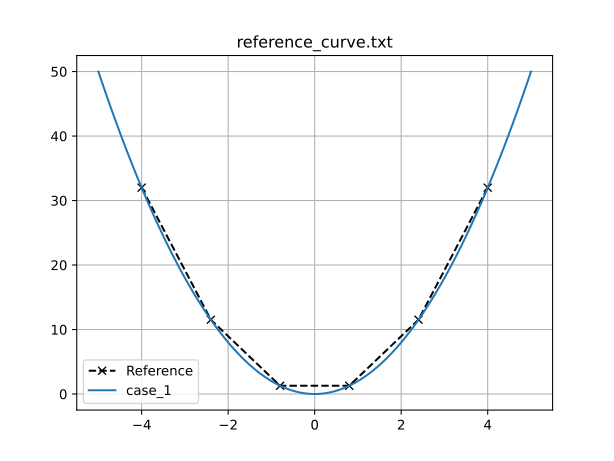
If you wish to directly save the figure without showing the GUI, you can also run
bash
piglot-plot best config.yaml --save_fig fitting.png
which will save the image to the fitting.png file.
If you wish to see the objective convergence history, you can also use
bash
piglot-plot history config.yaml --best --log
where the optional arguments --best and --log indicate to plot the best-observed objective in a logarithmic scale, which gives the following output:
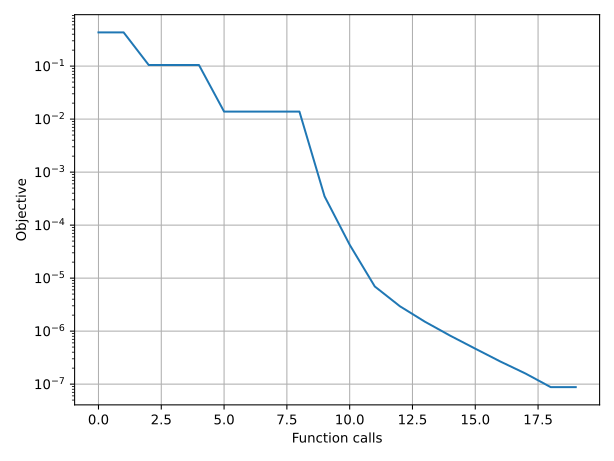
Now, try running (this may take some time)
bash
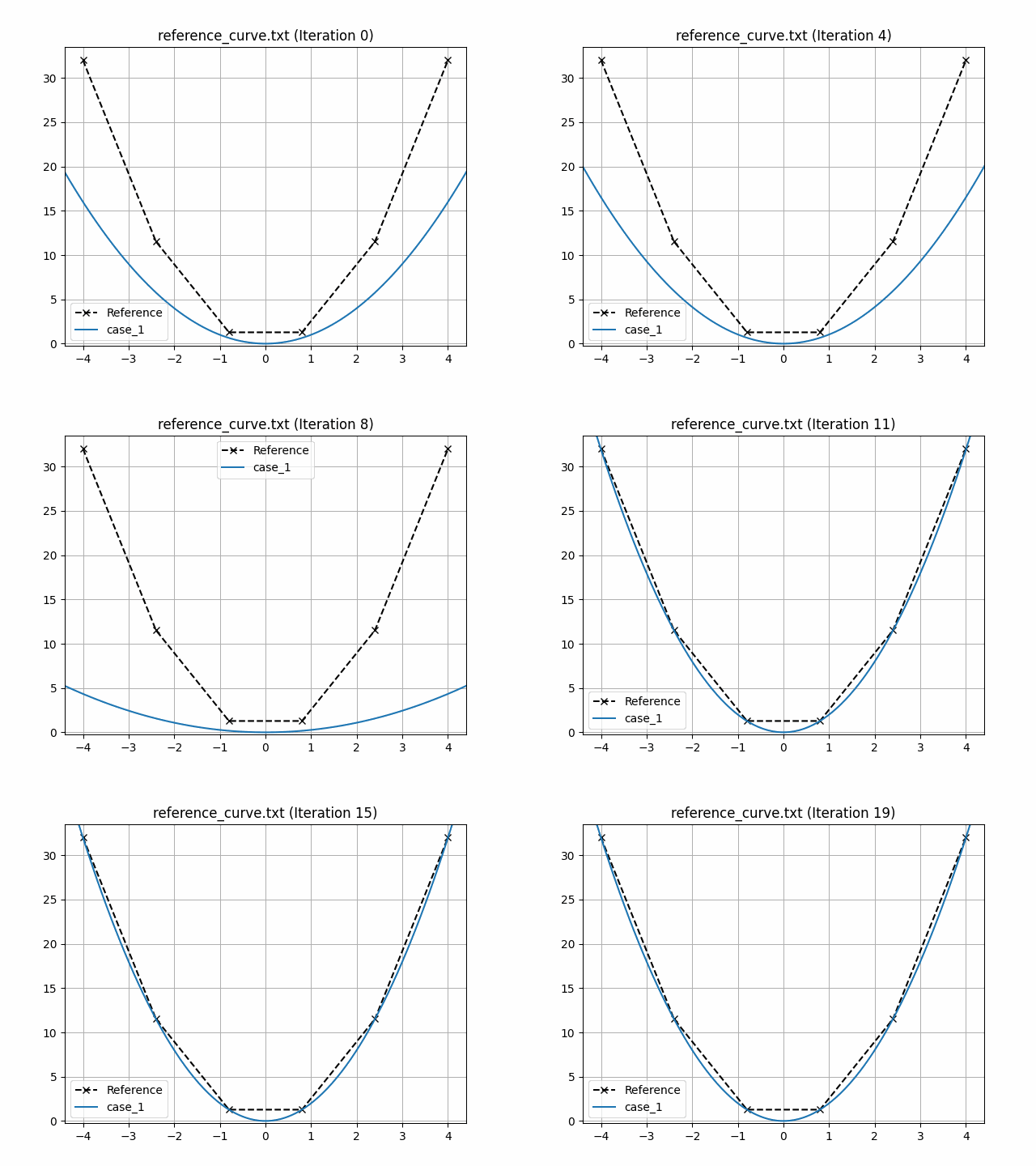
piglot-plot animation config.yaml
This generates an animation for all the function evaluations that have been made throughout the optimisation procedure.
You can find the .gif file(s) inside the output directory, which should give something like:
Using Python scripts
Another way of using piglot is via its package and Python modules.
This approach may offer increased flexibility in the setup of the optimisation problem, at the cost of increased complexity and verbosity.
A sample script equivalent to the configuration file for the problem described in the previous section is provided in examples/sample_curve_fitting/config.py, given by:
```python
import os
import shutil
from piglot.parameter import ParameterSet
from piglot.solver.solver import Case
from piglot.solver.curve.solver import CurveSolver
from piglot.solver.curve.fields import CurveInputData, Curve
from piglot.objectives.fitting import Reference, MSE
from piglot.objectives.fitting import FittingObjective, FittingSolver
from piglot.optimisers.botorch.bayes import BayesianBoTorch
Set up output and temporary directories
outputdir = 'config' tmpdir = os.path.join(outputdir, 'tmp') if os.path.isdir(outputdir): shutil.rmtree(outputdir) os.makedirs(outputdir, exist_ok=True)
Set up optimisation parameters
parameters = ParameterSet() parameters.add('a', 1.0, 0.0, 4.0)
Set up the reference
reference = Reference('referencecurve.txt', ['case1'], output_dir)
Set up the solver to use
inputdata = CurveInputData('case1', ' * x ** 2', 'x', (-5.0, 5.0), 100) case1 = Case(inputdata, {'case1': Curve()}) solver = CurveSolver([case1], parameters, outputdir, tmpdir=tmp_dir)
Set up the fitting objective
references = {reference: ['case1']} fittingsolver = FittingSolver(solver, references) objective = FittingObjective(parameters, fittingsolver, outputdir, MSE())
Set up the optimiser and run optimisation
optimiser = BayesianBoTorch(objective)
value, params = optimiser.optimise(10, parameters, output_dir)
print(f"Optimal value: {value}")
print(f"Optimal parameters: {params}")
Run with
bash
python config.py
Example output
BoTorch: 100%|██████████████████████████████████████████████████████| 10/10 [00:00<00:00, 16.75it/s, Loss: 8.9167e-08]
Completed 10 iterations in 0.59692s
Best loss: 8.91673999e-08
Best parameters
- a: 1.999506
Optimal value: 8.916739991036405e-08
Optimal parameters: [1.99950592]
```
Installation
You can install piglot by only installing the main scripts or as a standard Python package.
If you only intend to use the piglot and piglot-plot binaries, we strongly recommend the first option, as it avoids having to manage the dependencies in your Python environment.
However, if you wish to use the tools in the piglot package, you may have to resort to the second option.
Currently, we require Python 3.9 onwards.
Option 1: Install binaries
This option is recommended for end-users that only need to interact with the provided piglot and piglot-plot scripts.
We use pipx to install the package in an isolated environment with the required dependencies (we recommend reading the pipx documentation to check the advantages of using this approach).
1. Install pipx in your system using the instructions here;
2. In your favourite terminal, run: pipx install piglot;
3. Confirm the package is correctly installed by calling the piglot and piglot-plot executables.
Option 2: Install package
We recommend this option for users aiming to use the piglot package directly.
Note that this option also provides the piglot and piglot-plot scripts, but requires manual handling of the installation environment.
1. In your favourite terminal, run: pip install piglot;
2. Confirm the package is correctly installed by calling the piglot and piglot-plot executables.
Installing additional optimisers
We also support some optional external optimisers, which are not automatically installed along with piglot to reduce the number of dependencies and the installation cost.
You can either install them along with piglot, or manually using your package manager.
Their detection is done at runtime and, if not installed, an error will be raised.
Currently, the following optional optimisers are supported:
- lipo - LIPO optimiser
- geneticalgorithm - Genetic algorithm
- pyswarms - Particle swarm optimiser
These can be installed directly from PyPI (with the package names above).
If you wish to install piglot with one of these optimisers (which may be required when using a pipx install), you can run the following commands:
- pip install piglot[lipo] for the LIPO optimiser
- pip install piglot[genetic] for the Genetic algorithm
- pip install piglot[pso] for the Particle swarm optimiser optimiser
To simultaneously install more than one optimiser, for instance, the LIPO and the Particle swarm optimisers, run pip install piglot[lipo,pso].
If you wish to install all optimisers at once, you can run pip install piglot[full].
Owner
- Name: CM2S
- Login: CM2S
- Kind: organization
- Location: Porto, Portugal
- Repositories: 1
- Profile: https://github.com/CM2S
Computational Multi-Scale Modelling of Solids and Structures Research Group
JOSS Publication
piglot: an Open-source Package for Derivative-free Optimisation of Numerical Responses
Authors

Faculty of Engineering, University of Porto, Porto, Portugal, Institute of Science and Innovation in Mechanical and Industrial Engineering, Porto, Portugal
Faculty of Engineering, University of Porto, Porto, Portugal, Institute of Science and Innovation in Mechanical and Industrial Engineering, Porto, Portugal
Faculty of Engineering, University of Porto, Porto, Portugal
Faculty of Engineering, University of Porto, Porto, Portugal, Institute of Science and Innovation in Mechanical and Industrial Engineering, Porto, Portugal
Editor
Hugo Ledoux
Tags
computational mechanics inverse problems derivative-free optimisation Bayesian optimisation parameter identificationCitation (CITATION.cff)
cff-version: "1.2.0"
authors:
- family-names: Coelho
  given-names: R. P. Cardoso
  orcid: "https://orcid.org/0000-0001-9989-964X"
- family-names: Alves
  given-names: A. Francisca Carvalho
  orcid: "https://orcid.org/0000-0003-1214-5453"
- family-names: Pires
  given-names: T. M. Nogueira
  orcid: "https://orcid.org/0009-0000-1518-2845"
- family-names: Pires
  given-names: F. M. Andrade
  orcid: "https://orcid.org/0000-0002-4802-6360"
contact:
- family-names: Coelho
  given-names: R. P. Cardoso
  orcid: "https://orcid.org/0000-0001-9989-964X"
doi: 10.5281/zenodo.12796554
message: If you use this software, please cite our article in the
  Journal of Open Source Software.
preferred-citation:
  authors:
  - family-names: Coelho
    given-names: R. P. Cardoso
    orcid: "https://orcid.org/0000-0001-9989-964X"
  - family-names: Alves
    given-names: A. Francisca Carvalho
    orcid: "https://orcid.org/0000-0003-1214-5453"
  - family-names: Pires
    given-names: T. M. Nogueira
    orcid: "https://orcid.org/0009-0000-1518-2845"
  - family-names: Pires
    given-names: F. M. Andrade
    orcid: "https://orcid.org/0000-0002-4802-6360"
  date-published: 2024-07-23
  doi: 10.21105/joss.06652
  issn: 2475-9066
  issue: 99
  journal: Journal of Open Source Software
  publisher:
    name: Open Journals
  start: 6652
  title: "piglot: an Open-source Package for Derivative-free
    Optimisation of Numerical Responses"
  type: article
  url: "https://joss.theoj.org/papers/10.21105/joss.06652"
  volume: 9
title: "piglot: an Open-source Package for Derivative-free Optimisation
  of Numerical Responses"
GitHub Events
Total
- Release event: 2
- Watch event: 6
- Delete event: 16
- Issue comment event: 9
- Push event: 52
- Pull request review event: 4
- Pull request review comment event: 1
- Pull request event: 17
- Fork event: 1
- Create event: 13
Last Year
- Release event: 2
- Watch event: 6
- Delete event: 16
- Issue comment event: 9
- Push event: 52
- Pull request review event: 4
- Pull request review comment event: 1
- Pull request event: 17
- Fork event: 1
- Create event: 13
Committers
Last synced: 11 months ago
Top Committers
| Name | Commits | |
|---|---|---|
| Rui Coelho | 3****o | 43 |
| Tiago Pires | 1****9 | 6 |
| FranciscaAlves | a****s@g****m | 4 |
| Hugo Ledoux | h****x@t****l | 1 |
| Daniel S. Katz | d****z@i****g | 1 |
Committer Domains (Top 20 + Academic)
Issues and Pull Requests
Last synced: 10 months ago
All Time
- Total issues: 3
- Total pull requests: 52
- Average time to close issues: 20 days
- Average time to close pull requests: 3 days
- Total issue authors: 2
- Total pull request authors: 5
- Average comments per issue: 2.0
- Average comments per pull request: 0.69
- Merged pull requests: 44
- Bot issues: 0
- Bot pull requests: 0
Past Year
- Issues: 0
- Pull requests: 21
- Average time to close issues: N/A
- Average time to close pull requests: 3 days
- Issue authors: 0
- Pull request authors: 1
- Average comments per issue: 0
- Average comments per pull request: 0.9
- Merged pull requests: 14
- Bot issues: 0
- Bot pull requests: 0
Top Authors
Issue Authors
- Extraweich (2)
- QamarQQ (1)
- Lyu721 (1)
Pull Request Authors
- ruicoelhopedro (60)
- tmnp19 (12)
- hugoledoux (4)
- FranciscaAlves (3)
- danielskatz (2)
Top Labels
Issue Labels
Pull Request Labels
Packages
- Total packages: 1
-
Total downloads:
- pypi 34 last-month
- Total dependent packages: 0
- Total dependent repositories: 0
- Total versions: 8
- Total maintainers: 2
pypi.org: piglot
A package for the optimisation of numerical responses
- Homepage: https://github.com/CM2S/piglot
- Documentation: https://piglot.readthedocs.io/en/latest/
- License: MIT License
-
Latest release: 0.5.2
published about 1 year ago
Rankings
Maintainers (2)
Dependencies
- actions/checkout v4 composite
- actions/upload-artifact v1 composite
- openjournals/openjournals-draft-action master composite
- actions/checkout v4 composite
- actions/download-artifact v4 composite
- actions/setup-python v4 composite
- actions/upload-artifact v4 composite
- pypa/gh-action-pypi-publish release/v1 composite
- actions/checkout v4 composite
- actions/setup-python v5 composite
- Pillow *
- PyQt5 *
- PyYAML *
- botorch *
- matplotlib >=3.7.2
- numpy *
- pandas *
- scipy >=1.7
- sympy *
- torch *
- tqdm *